2016 MITSUBISHI LANCER air condition
[x] Cancel search: air conditionPage 260 of 392

Automatic air conditioning with
Fahrenheit scale (if so equipped)
7-10 Comfort controls
7
Press the air selection switch for about 10 seconds or longer. When the setting has changed, the system will beep and the indicator light will flash.• When the setting has changed from enabled to disabled, the system will beep three times and the indicator will flashthree times. • When the setting has changed from dis- abled to enabled, the system will beeptwo times and the indicator light willflash three times.
N00737301379
Push the switch, and the air conditioningcompressor will turn
on. The air conditioning
indicator light (A) will come on. A sound will be made every time you push the switch.
Push the switch again and the air condition- ing compressor will stop and the indicator light (A) goes off.
N00759800032
You can change the following functions tomatch your preference. Enable automatic air conditioning control:
NOTE
The factory setting is “Enable automatic air control”. While the mode selection dial is set between “ ” and “ ” position, the air selection will automatically change to the outside air position, even if the sy
stem is set to “Disable
automatic air control”, in order to preventwindows from fogging up.
Air conditioning switch
CAUTION When using the air conditioning, the idling speed may slightly increase as the air condi-tioning compressor is switched on/off auto- matically. Especially for vehicles with a continuously variable transmission (CVT),while the vehicle is stationary, fully depress the brake pedal to prevent the vehicle from creeping.
NOTE
If a problem is detected in the air condition- ing compressor, the air conditioning indica- tor light (A) blinks. Press the air conditioning switch once to turn it off, then once more to turn it b
ack on. If the air condi-
tioning indicator light does not blink there is no problem. If it does blink, have it checked at an authorized Mitsubishi Motors dealer ora repair facility of your choice. Sometimes, for example after using a high- pressure car wash, the condenser can get wet, and the air conditioning indicator light (A) blinks temporarily. Wait for a while, pressthe air conditioning switch once to turn the system off, then once more to turn it back on. Once the water evaporates, the blinking willstop.
Personalizing the air conditioning switch (Changing the function set- ting)
BK0230300US.bo
ok 10 ページ 2015年7月30日 木曜日 午後8時38分
Page 261 of 392

Automatic air conditioning with
Fahrenheit scale (if so equipped)
Comfort controls 7-11
7
When the mode selection dial or blower speed selection dial has been set to the “AUTO” position or when the tempera- ture control dial has been set to the mini-mum temperature, the air conditioning switch is automatically controlled. Disable automatic air conditioning con- trol:The air conditioning switch is not auto- matically controlled, unless the air condi- tioning switch is used. Changing the settings: Press the air conditioning switch for about10 seconds or longer. When the setting has changed, the system will beep and the indicator light will flash.• When the setting has changed from enabled to disabled, the system will beep three times and theindicator will flash three times. • When the setting has changed from dis- abled to enabled,the system will beep two times and the indicator light will flash three times.
N00731701414
In normal conditions, use the system in the AUTO mode and follow these procedures: 1. Set the blower speed selection dial to the “AUTO” position.
2. Select the temperature control dial to the desired temperature. The temperature can be set within a range of around 61 to 89. The temperature will increase as the dialis turned to the right. 3. Set the mode selection dial to the “AUTO” position.
The vents, recirculation/outside air, blower speed, and ON/OFF of air conditioning will be controlled automatically.
N00731800072
Blower speed and vent mode may be con-trolled manually by setting the blower speed selection dial and the mode selection dial tothe desired positions. To return to automatic
NOTE
The factory setting is “Enable automatic air conditioning control”.
While the mode selection dial is set between “ ” and “ ” position, the air condition- ing will run automatically, even if the system is set to “Disable automatic air conditioningcontrol”, in order to prevent windows from fogging up.
Operating the air conditioning system (automatic mode)
NOTE
NOTE
Set the temperature at about 75 under normal conditions. While the engine coolant temperature is low, the temperature of the air from the heater will be cool/cold until the engine warms up, even if you have selected warm air with thedial. To prevent the windshield and windows from fogging up, the vent mode will be changed to “ ” or “ ” and the blower speed will be reduced.
Operating the air conditioning system (manual mode)
BK0230300US.bo
ok 11 ページ 2015年7月30日 木曜日 午後8時38分
Page 262 of 392

Automatic air conditioning with
Celsius scale (if so equipped)
7-12 Comfort controls
7
operation, set the dials to the “AUTO” posi- tion.
N00732400280
To remove frost or mist from the windshield and door windows, use
the mode selection
dial (“ ” or “ ”). Use this setting to keep the windshield and door windows clear of mist, and to keep the leg area heated (when driving in rain or snow).
1. Set the mode selection dial to the “ ”2. Select your desired
blower speed by turn-
ing the blower speed selection dial. 3. Select your desired temperature by turn-ing the temperature control dial.
For quick defrosting 1. Set the mode selection dial to the “ ” 2. Set your blower to the maximum speed. 3. Set the temperature to the highest posi-tion.
N00731500239
The air conditioning can only be used whilethe engine is running.
Defrosting or defogging (wind- shield, door windows)
CAUTION For safety, make sure you have a clear view through all the windows.
For ordinary defrosting
NOTE
While the mode selection dial is set between “ ” and “ ” position, the air condition- ing compressor will run automatically. The outside air position will also be selected automatically.
If the mode selection dial is set between “ ” and “ ” you cannot turn the air con- ditioning off or select the recirculation posi- tion. This prevents the windows fromfogging up. To defog quickly, direct
the air flow from the
side vents toward the door windows. When defrosting, do not set the temperature control dial to the maximum cool position. This will blow cool air on the window glass and fog it up.
Automatic air conditioning with Celsius scale
(if so
equipped)
NOTE
BK0230300US.bo
ok 12 ページ 2015年7月30日 木曜日 午後8時38分
Page 263 of 392

Automatic air conditioning with
Celsius scale (if so equipped)
Comfort controls 7-13
7
N00711801594
N00736900111
When the ignition switch is in the “ON” posi- tion, select the blower speed by turning the blower speed selection dial. Turning the dial clockwise will increase theblower speed; turning the dial counterclock- wise will decrease it. When the dial is set to the “OFF” position, all fan-driven airflowwill stop.
N00737001389
Use this dial to adjust the temperature in thepassenger compartment. Turn the temperaturecontrol dial clockwise to make the air warmer. Turn it counterclockwise to make the air cooler.
Control panel
1- Temperature control dial 2- Air selection switch 3- Blower speed selection dial4- Air conditioning switch 5- Mode selection dial 6- Electric rear window defogger switch
P. 5-138
NOTE
There is an interior
air temperature sensor
(A) in the illustrated position. Never place anything over the sensor, since doing so will prevent it from functioning properly.
Blower speed selection dial
Temperature control dial
BK0230300US.bo
ok 13 ページ 2015年7月30日 木曜日 午後8時38分
Page 264 of 392
Automatic air conditioning with
Celsius scale (if so equipped)
7-14 Comfort controls
7
The above indicates the factory settings. You can personalize the air selection switch and air conditioning switch to match your per-sonal preferences. Contact your Mitsubishi Motors dealer or a repair facility of your choice for assistance.Refer to “Personalizing the air conditioning switch (Changing the function setting)” on page 7-16.Refer to “Personalizing the air selection (Changing the function setting)” on page
7-15.
N00737100136
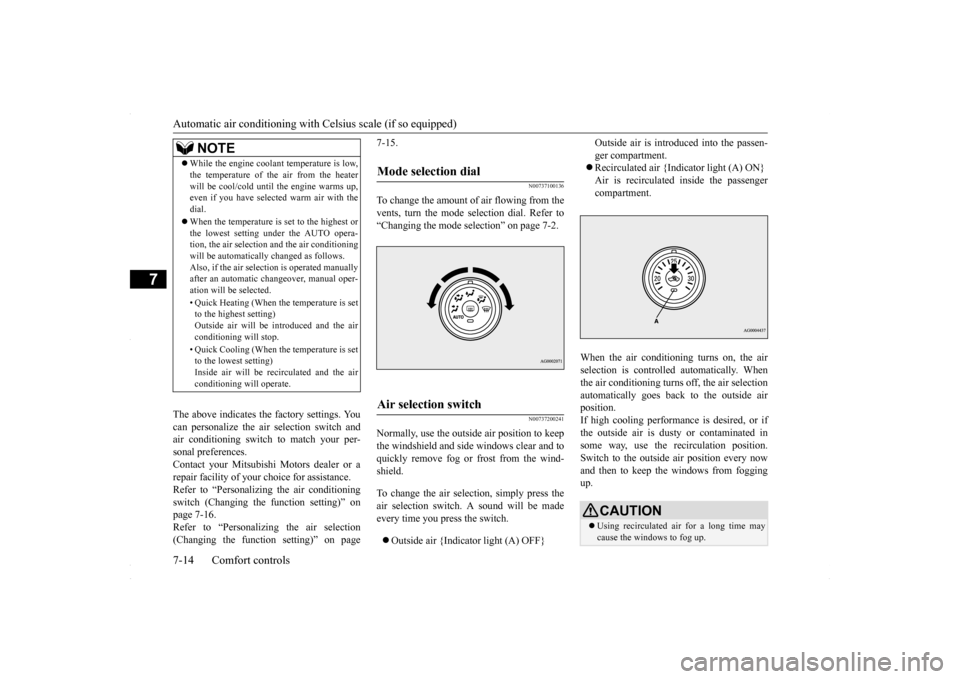
To change the amount of
air flowing from the
vents, turn the mode selection dial. Refer to“Changing the mode selection” on page 7-2.
N00737200241
Normally, use the outside air position to keepthe windshield and side windows clear and toquickly remove fog or frost from the wind- shield. To change the air selection, simply press the air selection switch. A sound will be madeevery time you press the switch. Outside air {Indicator light (A) OFF}
Outside air is introduced into the passen- ger compartment. Recirculated air {Indicator light (A) ON} Air is recirculated inside the passengercompartment.
When the air conditioning turns on, the air selection is controll
ed automatically. When
the air conditioning turns off, the air selectionautomatically goes back to the outside air position. If high cooling performance is desired, or ifthe outside air is dusty or contaminated in some way, use the recirculation position. Switch to the outside air position every nowand then to keep the windows from fogging up.
NOTE
While the engine coolant temperature is low, the temperature of the air from the heater will be cool/cold until the engine warms up, even if you have selected warm air with the dial. When the temperature is set to the highest or the lowest setting under the AUTO opera-tion, the air selection and the air conditioning will be automatically changed as follows. Also, if the air selection is operated manuallyafter an automatic changeover, manual oper- ation will be selected. • Quick Heating (When the temperature is set to the highest setting) Outside air will be introduced and the airconditioning will stop. • Quick Cooling (When the temperature is set to the lowest setting) Inside air will be recirculated and the air conditioning will operate.
Mode selection dial
Air selection switch
CAUTION Using recirculated air for a long time may cause the windows to fog up.
BK0230300US.bo
ok 14 ページ 2015年7月30日 木曜日 午後8時38分
Page 265 of 392

Automatic air conditioning with
Celsius scale (if so equipped)
Comfort controls 7-15
7
N00760001129
You can change the following functions to match your preference. Enable automatic air control: When the mode selection dial or theblower speed selection dial is set to the “AUTO” position, the air selection switch will also be automatically controlled. Disable automatic air control: Even when the mode selection dial or theblower speed selection dial is set to the “AUTO” position, the air selection switch will not be automatically controlled. Changing the settings: Press the air selection switch for about 10 seconds or longer. When the setting has changed, the systemwill beep and the indicator light will flash. • When the setting has changed from enabled to disabled,the system will beep three times and the indicator will flash three times. • When the setting has changed from dis-abled to enabled, the system will beep two times and the indicator light will flash three times.
N00737301382
Push the switch, and the air conditioning compressor will turn
on. The air conditioning
indicator light (A) will come on.A sound will be made every time you push the switch.
Push the switch again and the air condition- ing compressor will stop and the indicator light (A) goes off.
Personalizing the air selection (Changing the function setting)
NOTE
The factory setting is “Enable automatic air control”. While the mode selection dial is set to the “ ” position, the air selection will auto- matically change to the outside air position, even if the system is set to “Disable auto-matic air control”, in order to prevent win- dows from fogging up.
Air conditioning switch
CAUTION When using the air conditioning, the idling speed may slightly increase as the air condi- tioning compressor is switched on/off auto- matically. Especially for vehicles with acontinuously variable transmission (CVT), while the vehicle is stationary, fully depress the brake pedal to prevent the vehicle fromcreeping.NOTE
If a problem is detect
ed in the air condition-
ing compressor, the air conditioning indica-tor light (A) blinks. Press the air conditioning switch once to turn it off, then once more to turn it back on. If the air condi-tioning indicator light
does not blink there is
no problem. If it does blink, have it checked at an authorized Mitsubishi Motors dealer ora repair facility of your choice. Sometimes, for example after using a high- pressure car wash, the condenser can get wet, and the air conditioning indicator light (A)blinks temporarily. Wait for a while, press the air conditioning switch once to turn the system off, then once more to turn it back on.Once the water evaporates, the blinking will stop.
BK0230300US.bo
ok 15 ページ 2015年7月30日 木曜日 午後8時38分
Page 266 of 392

Automatic air conditioning with
Celsius scale (if so equipped)
7-16 Comfort controls
7
N00759800029
You can change the following functions to match your preference. Enable automatic air conditioning control: When the mode selection dial or blower speed selection dial has been set to the“AUTO” position or when the tempera-ture control dial has been set to the mini- mum temperature, the air conditioning switch is automatically controlled. Disable automatic air conditioning con- trol: The air conditioning switch is not auto- matically controlled, unless the air condi-tioning switch is used. Changing the settings Press the air conditioning switch for about 10 seconds or longer.When the setting has changed, the system will beep and the indicator light will flash. • When the setting has changed fromenabled to disabled, the system will beep three times and the indicator will flash three times.• When the setting has changed from dis- abled to enabled,
the system will beep two times and the indicator light will flash three times.
N00731701427
In normal conditions, use the system in the AUTO mode and follow these procedures:
1. Set the blower speed selection dial to the “AUTO” position. 2. Select the temperature control dial to the desired temperature. The temperature canbe set within a range of around 18 to 32. The temperature will increase as the dial is turned to the right.3. Set the mode selection dial to the “AUTO” position.
The vents, recirculation/outside air, blower speed, and ON/OFF of air conditioning willbe controlled automatically.
N00731800098
Blower speed and vent mode may be con-trolled manually by setting the blower speed
Personalizing the air conditioning switch (Changing the function set- ting)
NOTE
The factory setting is “Enable automatic air conditioning control”. While the mode selection dial is set to the “ ” position, the air conditioning will run automatically, even if the system is set to “Disable automatic air conditioning control”, in order to prevent windows from foggingup.
Operating the air conditioning system (automatic mode)
NOTE
Set the temperature at about 25 under normal conditions. While the engine coolant temperature is low, the temperature of the air from the heater will be cool/cold until the engine warms up,even if you have selected warm air with the dial. To prevent the windshield and windows from fogging up, the vent mode will be changed to “ ” or “ ” and the blower speed will be reduced.
Operating the air conditioning system (manual mode)
BK0230300US.bo
ok 16 ページ 2015年7月30日 木曜日 午後8時38分
Page 267 of 392
Automatic air conditioning with
Celsius scale (if so equipped)
Comfort controls 7-17
7
selection dial and the mode selection dial to the desired positions. To return to automatic operation, set the dials to the “AUTO” posi- tion.
N00732400440
To remove frost or mist from the windshieldand door windows, use
the mode selection
dial (“ ” or “ ”).
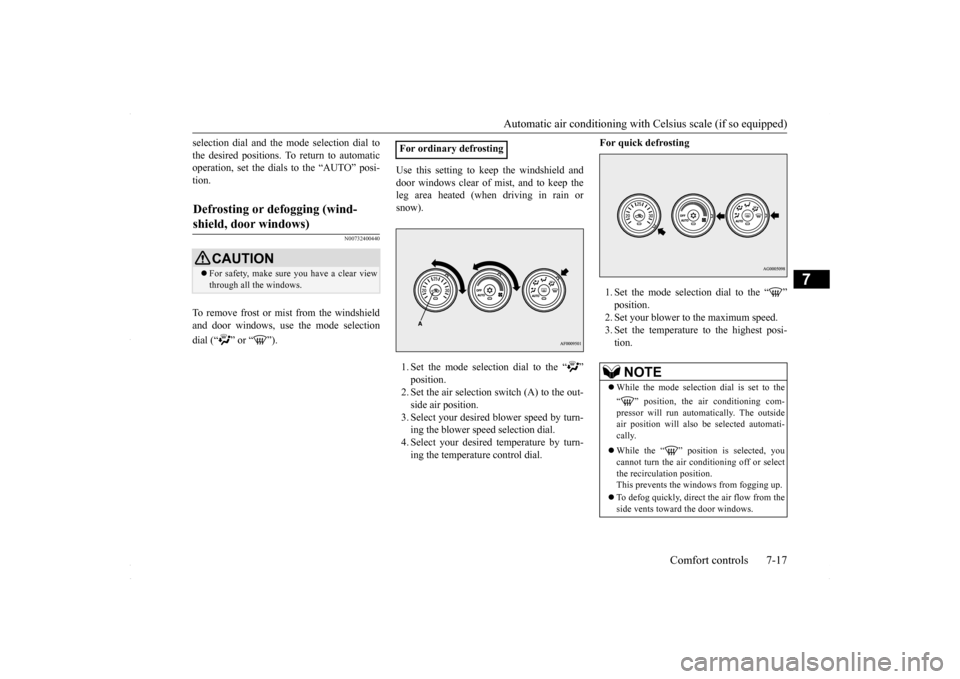
Use this setting to keep the windshield and door windows clear of mist, and to keep the leg area heated (when driving in rain or snow). 1. Set the mode selection dial to the “ ”2. Set the air selection switch (A) to the out- side air position. 3. Select your desired blower speed by turn-ing the blower speed selection dial. 4. Select your desired temperature by turn- ing the temperature control dial.
For quick defrosting 1. Set the mode selection dial to the “ ” 2. Set your blower to the maximum speed. 3. Set the temperature to the highest posi-tion.
Defrosting or defogging (wind- shield, door windows)
CAUTION For safety, make sure you have a clear view through all the windows.
For ordinary defrosting
NOTE
While the mode selection dial is set to the “ ” position, the air conditioning com- pressor will run automatically. The outside air position will also be selected automati-cally. While the “ ” position is selected, you cannot turn the air conditioning off or select the recirculation position.This prevents the windows from fogging up. To defog quickly, direct
the air flow from the
side vents toward the door windows.
BK0230300US.bo
ok 17 ページ 2015年7月30日 木曜日 午後8時38分