2016 MERCEDES-BENZ SPRINTER lock
[x] Cancel search: lockPage 174 of 290

Using the steering wheel buttons
XPress theVorU button repeatedly
until the Settingsmenu appears in the dis-
play.
XPress the 9button to switch to the sub-
menu selection.
XPress the WorX button to select the
Lightingsubmenu.
XPress the 9button to select the Daytimerunn. lampsfunction.
The selection marker is on the current setting.
XPress the WorX button to switch the
daytime running lamps OnorOff.
iIf you turn the light switch to TorL,
the corresponding lamp switches on. If you
turn the light switch to Ã, the daytime
running lamps remain switched on.
iFor safety reasons, it is not possible to reset
the Daytime runn. lampsfunction to the
factory setting while the vehicle is in motion.
You will see the following message in the dis-
play: Setting only possible at stand‐
still.
Switching surround lighting on or off
Using the steering wheel buttons
XPress the VorU button repeatedly
until the Settingsmenu appears in the dis-
play.
XPress the 9button to switch to the sub-
menu selection.
XPress the WorX button to select the
Lightingsubmenu.
XPress the 9button to select the Loc.lightingfunction.
The selection marker is on the current setting.
XPress the WorX button to switch the
surround lighting OnorOff.
If you switch the surround lighting to On
, the fol-
lowing lamps light up in the dark after you have
unlocked the vehicle using the key:
Rthe parking lamps
Rthe tail lamps
Rthe license plate lamps
Rthe fog lamps
The surround lighting automatically switches off
after 40 seconds or if you:
Ropen the driver's door
Rinsert the key into the ignition lock
Rlock the vehicle using the key
Setting the exterior lighting delayed
switch-off
In the Headlampssubmenu, you can set
whether and for how long you wish the exterior
lighting to remain on after closing the doors.
Using the steering wheel buttons
XPress the VorU button repeatedly
until the Settingsmenu appears in the dis-
play.
XPress the 9button to switch to the sub-
menu selection.
XPress the WorX button to select the
Lightingsubmenu.
XPress the 9button to select the Head‐lampsfunction.
The selection marker is on the current setting.
XPress the WorX button to select
whether and for how long you wish the exte-
rior lighting to remain on.
If you have set the delayed switch-off and switch
off the engine, the following remain lit:
Rthe parking lamps
Rthe tail lamps
Rthe license plate lamps
Rthe fog lamps
iYou can reactivate this function by opening
a door within 10 minutes.
If, after switching off the engine, you do not
open a door or you close an open door, the
exterior lighting switches off after
60 seconds.
172On-board computer (vehicles with steering wheel buttons)
On-board computer and displays
Page 176 of 290

This function pertains to theInst. cluster(instrument cluster) menu, the Lightingmenu
and the Vehiclemenu.
Using the steering wheel buttons
XPress the VorU button repeatedly
until the Settingsmenu appears in the dis-
play.
XPress the 9button to switch to the sub-
menu selection.
XPress the WorX button to select the
Conveniencesubmenu.
XPress the 9button to select the Keyfunc-
tion.
The selection marker is on the current setting.
XPress the WorX button to activate or
deactivate key dependency.
Trip computer menu
General notes
You can call up or reset statistical data for the
vehicle in the Trip computer menu.
iWhen you call up the trip computer again, it
displays the last function called up.
The units of the statistical information dis-
played are set permanently for each specific
country, and are therefore independent of the
units selected in the Settings
menu.
Trip computer "After start" or "After
reset"
Example: "After start" trip computer
:
Distance
;Time
=Average speed
?Average fuel consumption Using the steering wheel buttons
XPress the
VorU button to select
After start.
or
XPress the 9or: button to select
After reset.
The values in the After
startsubmenu refer to
the start of the journey. The values in the After
resetsubmenu refer to the last reset of the trip
computer.
The After start
trip computer function is
automatically reset if:
Rthe ignition has been switched off for more
than 4 hours.
R999 hours have been exceeded.
R9,999 miles have been exceeded.
The After
resettrip computer is automatically
reset if the value exceeds 9,999 hours or
99,999 miles.
iIf you turn the key to position 0in the igni-
tion lock or remove it, all the values are reset
after approximately four hours.
The values will not be reset if you turn the key
back to position 1or 2during this time.
Calling up the range
Using the steering wheel buttons
XPress the VorU button to select
After start.
XPress the 9or: button to select
Range.
The approximate distance which can be cov-
ered with the tank's current contents and
your current style of driving is shown.
iIf there is only a small amount of fuel left in
the fuel tank, the 7Please refuelmes-
sage is shown instead of the range.
Resetting the trip computer
Using the steering wheel buttons
XPress the VorU button to select
After start.
XPress the 9or: button to select the
function you would like to reset.
XPress and hold the 9reset button until the
values are reset to "0".
174On-board computer (vehicles with steering wheel buttons)
On-board computer and displays
Page 187 of 290

Lights
Display messagesPossible causes/consequences andMSolutions
b
Low beam left
The left-hand low beam is faulty3.
XHalogen headlamps:replace the bulb as soon as possible
(Ypage 87).
XBi-Xenon headlamps: consult a qualified specialist workshop as
soon as possible.
b
Low beam right
The right-hand low-beam headlamp is faulty3.
XHalogen headlamps: replace the bulb as soon as possible
(Ypage 87).
XBi-Xenon headlamps: consult a qualified specialist workshop as
soon as possible.
b
Cornering lt. left
The left-hand cornering light is faulty3.
XReplace the bulb as soon as possible (Ypage 87).
b
Cornering lt. right
The right-hand cornering light is faulty3.
XReplace the bulb as soon as possible (Ypage 87).
b
Lights on auto‐matic. Remove key
The automatic headlamp feature is active: the light switch is in the
à position and you have forgotten to remove the key.
XRemove the key from the ignition lock.
b
Turn signal left
The left-hand turn signal is faulty.
XChange the bulb as soon as possible in the front (Ypage 88) or rear
(Ypage 89) indicator lamp.
b
Turn signal right
The right-hand turn signal is faulty.
XChange the bulb as soon as possible in the front (Ypage 88) or rear
(Ypage 89) indicator lamp.
b
Brake lamp left
The left brake lamp is faulty3.
XReplace the bulb as soon as possible (Ypage 89).
b
Brake lamp right
The right brake lamp is faulty3.
XReplace the bulb as soon as possible (Ypage 89).
b
Third brake lamp
The high-mounted brake lamp is faulty3. This display message will only
appear if all LEDs have failed.
XConsult a qualified specialized workshop as soon as possible.
b
High beam left
The left high-beam headlamp is faulty3.
XReplace the bulb as soon as possible (Ypage 87).
3Depending on the equipment, the bulb-failure indicator may not befeatured for any lamps other than the turn
signals.
Display messages185
On-board computer and displays
Z
Page 197 of 290

ProblemPossible causes/consequences andMSolutions
h!:b
The yellow ESP®, ABS
and ASR/BAS indicator
lamps and the red brake
system indicator lamp
are lit while the engine is
running.
EBD is malfunctioning or deactivated due to undervoltage or malfunc-
tion.
The battery may not be being charged.
GWARNING
The rear wheels could lock sooner than expected when you apply the
brakes. The braking distance can increase in emergency braking sit-
uations.
There is an increased risk of skidding and accidents.
XVehicles with steering wheel buttons: also observe the messages in
the display (Ypage 176).
XStop the vehicle as soon as possible, paying attention to road and
traffic conditions.
XDo not drive on.
XConsult a qualified specialist workshop.
b The red brake sys-
tem indicator
lamp is lit while
the engine is run-
ning.There is insufficient brake fluid in the expansion tank.
GWARNING
Braking performance can be impaired.
There is a risk of an accident.
XVehicles with steering wheel buttons: also observe the messages in
the display (Ypage 176).
XStop the vehicle as soon as possible, paying attention to road and
traffic conditions.
XCheck the brake fluid level in the expansion tank (Ypage 223).
XIf the brake fluid is below the MIN mark: do not drive on!
XDo not add brake fluid. This does not solve the problem.
XConsult a qualified specialist workshop.
b When towing a
trailer: the red
brake system
indicator lamp is
lit while the
engine is running.
Additionally, a
warning tone
sounds.GWARNING
The brake force booster in the trailer is faulty.
The driving and braking characteristics of your vehicle could change.
There is a risk of the trailer overbraking and of you losing control over
the truck/trailer combination.
There is a risk of an accident.
XVehicles with steering wheel buttons: also observe the messages in
the display (Ypage 176).
XStop the vehicle as soon as possible, paying attention to road and
traffic conditions.
XDo not drive on.
XConsult a qualified specialist workshop.
Indicator and warning lamps in the instrument cluster195
On-board computer and displays
Z
Page 199 of 290

ProblemPossible causes/consequences andMSolutions
!
The yellow ABS
indicator lamp is
lit while the
engine is running.ABS is deactivated due to a malfunction or is temporarily unavailable.
ESP®, ASR and BAS, as well as cruise control, are also unavailable as
a result.
Self-diagnosis may not be complete, or the battery may not be charg-
ing.
GWARNING
The brake system continues to function normally, but without the
functions listed above. The wheels could therefore lock, e.g. if the
brakes are applied with maximum force.
This causes steerability and braking to be greatly impaired.
The braking distance can increase in emergency braking situations.
The driven wheels can spin when accelerating.
If ESP
®is not operational, ESP®will not stabilize the vehicle.
There is an increased risk of skidding and accidents.
XDrive a short distance at a speed above 13 mph (20 km/h).
The functions mentioned above are available again when the indi-
cator lamp goes out.
If the indicator lamp does not go out:
XDrive on with care.
XVisit a qualified specialist workshop immediately.
å The yellow DEF
indicator lamp is
lit while the
engine is running.The exhaust gas aftertreatment is malfunctioning or the current Diesel
Exhaust Fluid (DEF) supply is limiting the vehicle range.
XObserve the messages in the display.
h
The yellow ESP®
indicator lamp is
lit while the
engine is running.ESP®is deactivated due to undervoltage or a malfunction. As a result,
cruise control has also been deactivated.
Engine power output may be reduced.
The battery may not be being charged.
GWARNING
If ESP
®is not operational, ESP®will not stabilize the vehicle.
There is an increased risk of skidding and accidents.
XVehicles with steering wheel buttons: also observe the messages in the display (Ypage 176).
XDrive on with care.
XVisit a qualified specialist workshop immediately.
Indicator and warning lamps in the instrument cluster197
On-board computer and displays
Z
Page 203 of 290

ProblemPossible causes/consequences andMSolutions
;
The yellow Check
Engine indicator
lamp is lit while
the engine is run-
ning.The exhaust gas aftertreatment is malfunctioning or an emission rel-
evant malfunction has occurred. This malfunction or defect can dam-
age the exhaust gas aftertreatment.
After the first message and under normal operating conditions, you
can drive on for up to approximately 500 mi (800 km). Then a warning
tone sequence sounds and the engine can only be started another 16
times.
XObserve the messages in the display.
XHave the exhaust gas aftertreatment checked immediately at a
qualified specialist workshop.
In some states it is legally prescribed that after the check engine indi- cator lamp lights up you must contact a qualified specialist workshop
immediately. Observe the legal requirements.
% If you turn the key
to position 2in
the ignition lock,
the yellow pre-
glow indicator
lamp remains lit
for approximately
1 minute. Or the
yellow preglow
indicator lamp
lights up for
approximately
1 minute while
the engine is run-
ning.At extremely low temperatures, the engine may not start.
There is a malfunction in the preglow system.
XHave any malfunction rectified at a qualified specialist workshop.
\ The yellow diesel
particle filter indi-
cator lamp is lit
while the engine
is running.The automatic regeneration of the diesel particle filter is not sufficient
or has malfunctioned.
XDrive at an engine speed above 2000 rpm until the diesel particle
filter indicator lamp goes out.
XIf the diesel particle filter indicator lamp does not go out after
approximately 20 minutes: have the malfunction rectified immedi-
ately at a qualified specialist workshop.
ÈThe yellow air fil-
ter indicator lamp
is lit while the
engine is running.The service limit for the air filter has been reached. The air filter is dirty.
XHave the air filter element replaced as soon as possible at a quali-
fied specialist workshop.
Indicator and warning lamps in the instrument cluster201
On-board computer and displays
Z
Page 205 of 290
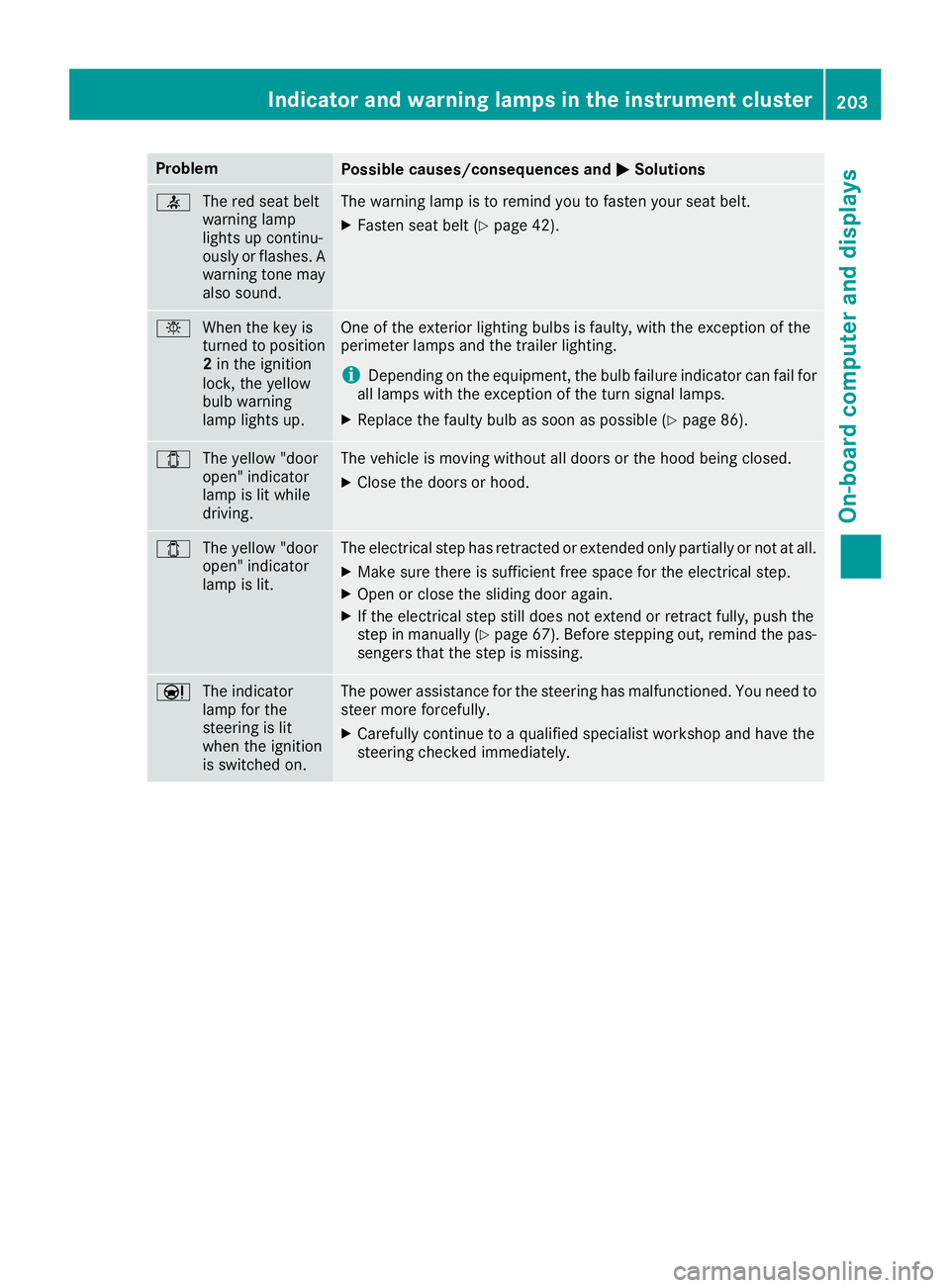
ProblemPossible causes/consequences andMSolutions
7
The red seat belt
warning lamp
lights up continu-
ously or flashes. A
warning tone may
also sound.The warning lamp is to remind you to fasten your seat belt.
XFasten seat belt (Ypage 42).
bWhen the key is
turned to position
2in the ignition
lock, the yellow
bulb warning
lamp lights up.One of the exterior lighting bulbs is faulty, with the exception of the
perimeter lamps and the trailer lighting.
iDepending on the equipment, the bulb failure indicator can fail for
all lamps with the exception of the turn signal lamps.
XReplace the faulty bulb as soon as possible (Ypage 86).
1 The yellow "door
open" indicator
lamp is lit while
driving.The vehicle is moving without all doors or the hood being closed.
XClose the doors or hood.
1The yellow "door
open" indicator
lamp is lit.The electrical step has retracted or extended only partially or not at all.
XMake sure there is sufficient free space for the electrical step.
XOpen or close the sliding door again.
XIf the electrical step still does not extend or retract fully, push the
step in manually (Ypage 67). Before stepping out, remind the pas-
sengers that the step is missing.
Ð The indicator
lamp for the
steering is lit
when the ignition
is switched on.The power assistance for the steering has malfunctioned. You need to
steer more forcefully.
XCarefully continue to a qualified specialist workshop and have the
steering checked immediately.
Indicator and warning lamps in the instrument cluster203
On-board computer and displays
Z
Page 206 of 290

Useful information
This Operator's Manual describes all models as
well as standard and optional equipment of your
vehicle that were available at the time of going
to print. Country-specific variations are possi-
ble. Note that your vehicle may not be equipped
with all of the described functions. This also
applies to systems and functions relevant to
safety.
Read the information on qualified specialist
workshops (
Ypage 26).
Stowage spaces and stowage com-
partments
Important safety notes
GWARNING
If you do not correctly store objects in the
vehicle interior, they can slip or be flung
around, thus striking vehicle occupants.
There is a risk of injury, especially when brak- ing or abruptly changing directions.
RAlways store objects so that they cannot be
flung around in these or in similar situa-
tions.
RAlways make sure that objects do not pro-
trude from stowage compartments, parcel
nets or stowage nets.
RClose lockable stowage compartments
while driving.
RStow and secure objects that are heavy,
hard, pointy, sharp-edged, fragile or too
large in the trunk.
In addition, observe the information in the
"Loading guidelines" section (
Ypage 212).
Glove box
Glove box (example: glove box with a lockable lid)
1
Unlocked
2Locked
=Glove box handle
You can lock and unlock the glove box using the mechanical or folding key.
XTo open: unlock the glove box lid if neces-
sary.
XPull glove box handle =in the direction of the
arrow.
?Card holder
APen holder
XTo close: fold the glove box up and press it
until it engages.
204Stowage spaces and stowage compartments
Stowing and features