2016 MERCEDES-BENZ S-Class SEDAN Stop
[x] Cancel search: StopPage 101 of 438
automatic operation by pressing or pulling
again.
If the sliding sunroof is raised at the rear, it low-
ers slightly automatically at higher speeds. The
noise level in the vehicle interior is reduced as a
result.
At low speeds it raises again automatically.
You can also temporarily deactivate automatic
lowering. To do so, press the3switch. The
sliding sunroof raises again automatically.
You can continue to operate the sliding sunroof
after switching off the engine or removing the
SmartKey from the ignition lock. This function
remains active for five minutes or until you open
a front door.
The sliding sunroof cannot be opened if a roof
carrier is installed. In order to allow ventilation
of the vehicle interior, you can raise the sliding
sunroof.
If contact is made with a roof carrier approved
by Mercedes-Benz, the sliding sunroof lowers
slightly but remains raised at the rear.
Before opening, raising or closing the sliding
sunroof, a check is carried out to see whether a valid SmartKey is in the vehicle, if:
Rthe 3 switch is pressed or pulled
and
Rthe Start/Stop button is used instead of the
SmartKey in the ignition lock
and
Rthe engine is not running
This is carried out by means of a brief radio con-
nection between the vehicle and the SmartKey.
Rain-closing feature
The raised sliding sunroof automatically lowers
at the rear when driving if it starts to rain. The
sliding sunroof is lowered depending on:
Rthe road speed and
Rthe intensity of the rain
You can manually cancel the automatic closing
procedure. Press or pull the 3switch in any
direction.
To raise the sliding sunroof again, press the
3 switch in direction :. The rain-closing
feature remains activated.
Operating the roller sunblinds for the
sliding sunroof
Important safety notes
GWARNING
Parts of the body could become trapped
between the roller sunblind and frame or slid-
ing sunroof during automatic opening or clos-
ing. There is a risk of injury.
When opening or closing, make sure that no
body parts are in the sweep of the roller sun-
blind.
If somebody becomes trapped:
Rrelease the switch immediately, or
Rduring automatic operation, push the
switch briefly in any direction
The opening or closing procedure will be stop- ped.
The roller sunblinds shield the vehicle interior
from sunlight. The front roller sunblind can only be opened and closed when the sliding sunroof
is closed.
Roller sunblind reversing feature
The roller sunblinds are equipped with an auto-
matic reversing feature. If a solid object blocks
or restricts a roller sunblind during the closing
process, the roller sunblind opens again auto-
matically. The automatic reversing feature is
only an aid and is not a substitute for your atten-
tion when closing the roller sunblinds.
GWARNING
The reversing feature does not react in par-
ticular to soft, light and thin objects, e.g. small
fingers. This means that the reversing feature
cannot prevent someone being trapped in
these situations. There is a risk of injury.
When closing the roller sunblind, make sure
that no body parts are in the sweep area.
If somebody becomes trapped:
Rrelease the switch immediately, or
Rpress the switch in any direction during the
automatic closing process
The closing process is stopped.
Panorama roof with power tilt/sliding panel99
Opening and closing
Z
Page 102 of 438
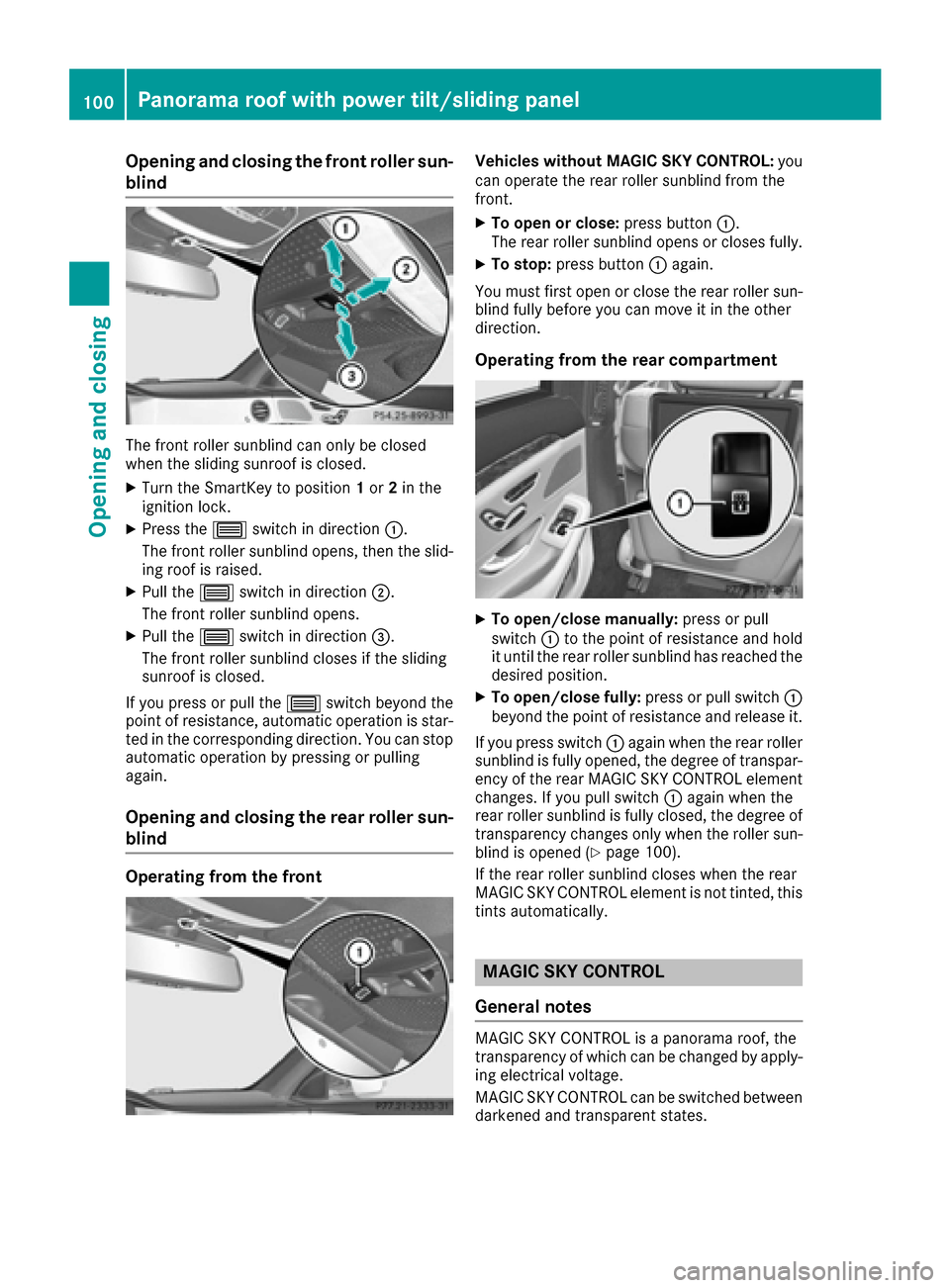
Opening and closing the front roller sun-
blind
The front roller sunblind can only be closed
when the sliding sunroof is closed.
XTurn the SmartKey to position1or 2in the
ignition lock.
XPress the 3switch in direction :.
The front roller sunblind opens, then the slid-
ing roof is raised.
XPull the 3switch in direction ;.
The front roller sunblind opens.
XPull the 3switch in direction =.
The front roller sunblind closes if the sliding
sunroof is closed.
If you press or pull the 3switch beyond the
point of resistance, automatic operation is star-
ted in the corresponding direction. You can stop
automatic operation by pressing or pulling
again.
Opening and closing the rear roller sun-
blind
Operating from the front
Vehicles without MAGIC SKY CONTROL: you
can operate the rear roller sunblind from the
front.
XTo open or close: press button:.
The rear roller sunblind opens or closes fully.
XTo stop: press button :again.
You must first open or close the rear roller sun-
blind fully before you can move it in the other
direction.
Operating from the rear compartment
XTo open/close manually: press or pull
switch :to the point of resistance and hold
it until the rear roller sunblind has reached the
desired position.
XTo open/close fully: press or pull switch:
beyond the point of resistance and release it.
If you press switch :again when the rear roller
sunblind is fully opened, the degree of transpar-
ency of the rear MAGIC SKY CONTROL element
changes. If you pull switch :again when the
rear roller sunblind is fully closed, the degree of transparency changes only when the roller sun-
blind is opened (
Ypage 100).
If the rear roller sunblind closes when the rear
MAGIC SKY CONTROL element is not tinted, this
tints automatically.
MAGIC SKY CONTROL
General notes
MAGIC SKY CONTROL is a panorama roof, the
transparency of which can be changed by apply- ing electrical voltage.
MAGIC SKY CONTROL can be switched between
darkened and transparent states.
100Panorama roof with power tilt/sliding panel
Opening and closing
Page 105 of 438
Problems with the sliding sunroof
GWARNING
If you close the sliding sunroof again immediately after it has been blocked or reset, the sliding
sunroof closes with increased or maximum force. The reversing feature is then not active. Parts
of the body could be trapped in the closing area in the process. This poses an increased risk of
injury or even fatal injury.
Make sure that no parts of the body are in the closing area.
If somebody becomes trapped:
Rrelease the switch immediately, or
Rpress the switch in any direction during the automatic closing process
The closing process is stopped.
!If the sliding sunroof still cannot be opened or closed as a result of a malfunction, contact a
qualified specialist workshop.
ProblemPossible causes/consequences and MSolutions
The sliding sunroof can-
not be closed and you
cannot see the cause.If the sliding sunroof is obstructed during closing and reopens again
slightly:
XImmediately after it blocks, pull the3switch down again to the
point of resistance until the sliding sunroof is closed.
The sliding sunroof is closed with increased force.
If the sliding sunroof is obstructed again during closing and then
reopens slightly:
XImmediately after it blocks, pull the 3switch down again to the
point of resistance until the sliding sunroof is closed.
The sliding sunroof is closed without the automatic reversing fea-
ture.
Panorama roof with power tilt/sliding panel103
Opening and closing
Z
Page 114 of 438
Positioning the front-passenger seat for
chauffeur mode
General notes
Pay attention to the important safety notes
(Ypage 111). Adjust the seat for chauffeur
mode before the journey (Ypage 112). Do not
remove the front-passenger seat head restraint
during the journey.
Adjusting from the rear compartment
You can use the override button to disable this
function (Ypage 67).
In order for the front-passenger seat to be posi-
tioned in chauffeur mode:
Rthe SmartKey must be in the ignition lock and in position 1or 2(Ypage 162)
Rthe front-passenger seat may not be occupied
Rthe front-passenger seat belt must not be
inserted into the buckle
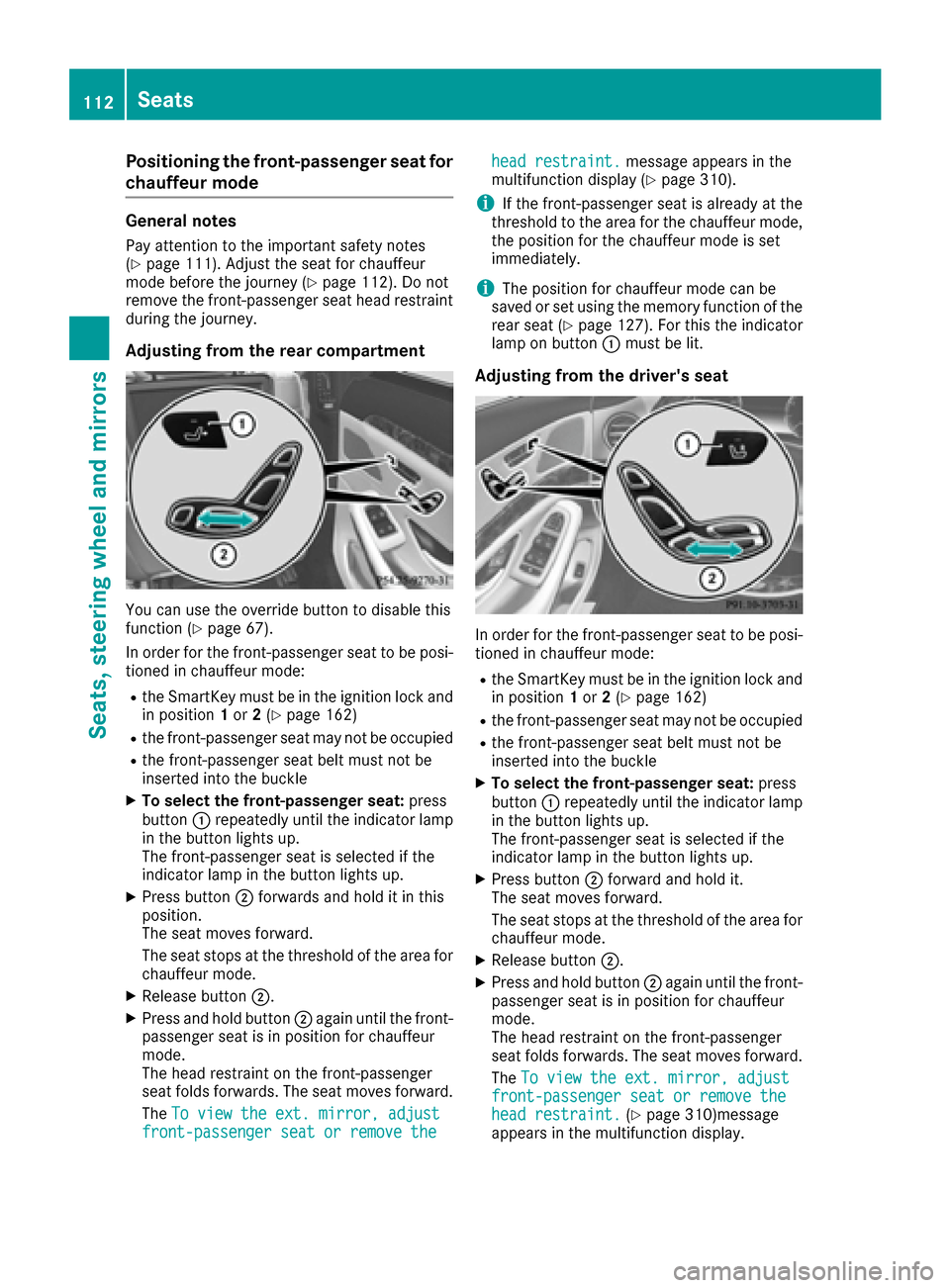
XTo select the front-passenger seat: press
button :repeatedly until the indicator lamp
in the button lights up.
The front-passenger seat is selected if the
indicator lamp in the button lights up.
XPress button ;forwards and hold it in this
position.
The seat moves forward.
The seat stops at the threshold of the area for
chauffeur mode.
XRelease button ;.
XPress and hold button ;again until the front-
passenger seat is in position for chauffeur
mode.
The head restraint on the front-passenger
seat folds forwards. The seat moves forward.
The To view the ext. mirror, adjust
front-passenger seat or remove the
head restraint.message appears in the
multifunction display (Ypage 310).
iIf the front-passenger seat is already at the
threshold to the area for the chauffeur mode,
the position for the chauffeur mode is set
immediately.
iThe position for chauffeur mode can be
saved or set using the memory function of the
rear seat (
Ypage 127). For this the indicator
lamp on button :must be lit.
Adjusting from the driver's seat
In order for the front-passenger seat to be posi-
tioned in chauffeur mode:
Rthe SmartKey must be in the ignition lock and
in position 1or 2(Ypage 162)
Rthe front-passenger seat may not be occupied
Rthe front-passenger seat belt must not be
inserted into the buckle
XTo select the front-passenger seat: press
button :repeatedly until the indicator lamp
in the button lights up.
The front-passenger seat is selected if the
indicator lamp in the button lights up.
XPress button ;forward and hold it.
The seat moves forward.
The seat stops at the threshold of the area for
chauffeur mode.
XRelease button ;.
XPress and hold button ;again until the front-
passenger seat is in position for chauffeur
mode.
The head restraint on the front-passenger
seat folds forwards. The seat moves forward.
The To view the ext. mirror, adjust
front-passenger seat or remove thehead restraint.(Ypage 310)message
appears in the multifunction display.
112Seats
Seats, steering wheel and mirrors
Page 124 of 438

Problems with the steering wheel heating
ProblemPossible causes/consequences andMSolutions
The steering wheel heat-
ing has switched off pre-
maturely or cannot be
switched on.The on-board voltage is too low because too many electrical consum-
ers are switched on.
XSwitch off electrical consumers that you do not need, such as the
rear window defroster or interior lighting.
EASY-ENTRY/EXIT feature
Important safety notes
GWARNING
When the EASY-ENTRY/EXIT feature adjusts
the steering wheel and the driver's seat, you
and other vehicle occupants – particularly
children – could become trapped. There is a
risk of injury.
While the EASY-ENTRY/EXIT feature is mak-
ing adjustments, make sure that no one has
any body parts in the sweep of the seat and
the steering wheel.
If there is a risk of becoming trapped by
Rthe steering wheel: move the steering
wheel adjustment lever.
Rthe seat: press the switch for seat adjust-
ment.
The adjustment process is stopped.
Press one of the memory function position
switches. The adjustment process is stopped.
This function is only available on vehicles with
memory function.
GWARNING
If children activate the EASY-ENTRY/EXIT fea-
ture, they can become trapped, particularly
when unattended. There is a risk of injury.
When leaving the vehicle, always take the
SmartKey with you and lock the vehicle. Never
leave children unsupervised in the vehicle.
GWARNING
If you drive off while the EASY-ENTRY/EXIT
feature is making adjustments, you could lose
control of the vehicle. There is a risk of an
accident.
Always wait until the adjustment process is
complete before driving off.
The EASY-ENTRY/EXIT feature makes getting in
and out of your vehicle easier.
You can activate and deactivate the EASY-
ENTRY/EXIT feature using the multimedia sys-
tem (see the separate operating instructions).
Position of the steering wheel and the
driver's seat when the EASY-ENTRY/
EXIT feature is active
The steering wheel tilts upwards and the driver's
seat moves backwards if you:
Rremove the SmartKey from the ignition lock
Rwith KEYLESS-GO: open the driver's door;
KEYLESS-GO must be in position 1
Rwith the SmartKey:open the driver's door;
the SmartKey must be in position 0or 1in the
ignition lock (
Ypage 162)
Ropen the driver's door when the ignition is
switched off
iThe steering wheel only tilts upwards and
the driver's seat only moves backwards if the
driving position is stored after seat or steering wheel adjustment.
The last position of the steering wheel or seat is
stored if:
Rthe ignition is switched off
Rthe setting is stored with the memory function
(Ypage 126).
iThe steering wheel only moves upwards if it
has not already reached the upper stop. The
driver's seat only moves backwards if it is not
already in the rearmost position.
122Steering wheel
Seats, steering wheel and mirrors
Page 125 of 438

Position of the steering wheel and the
driver's seat for driving
The steering wheel and the driver's seat are
moved to the previously set position if:
Rthe driver's door is closed and you insert the
SmartKey into the ignition lock
Ryou close the driver's door when the ignition
is switched on
Ryou press the Start/Stop button once on vehi-
cles with KEYLESS-GO
iThe steering wheel and the driver's seat only
return to the last set position when the driving
position is stored after seat or steering wheel
adjustment.
The last position of the steering wheel or seat is
stored if:
Rthe ignition is switched off
Rthe setting is stored with the memory function
(Ypage 126).
Crash-responsive EASY-EXIT feature
If the crash-responsive EASY-EXIT feature is trig-
gered in an accident, the steering column will
move upwards when the driver's door is opened
or the SmartKey is removed from the ignition
lock. This makes it easier to exit the vehicle and
rescue the occupants.
The crash-responsive EASY-EXIT feature is only
operational if the EASY-EXIT/ENTRY feature is
activated in the multimedia system (see the sep-
arate operating instructions).
Mirrors
Rear-view mirror
XAnti-glare mode: flick anti-glare lever :for-
wards or back.
Exterior mirrors
Important safety notes
GWARNING
You could lose control of your vehicle if you do the following while driving:
Radjust the driver's seat, head restraint,
steering wheel or mirrors
Rfasten the seat belt
There is a risk of an accident.
Adjust the driver's seat, head restraint, steer-
ing wheel and mirror and fasten your seat belt before starting the engine.
GWARNING
The exterior mirror on the front-passenger
side reduces the size of the image. Visible
objects are actually closer than they appear.
This means that you could misjudge the dis-
tance from road users traveling behind, e.g.
when changing lane. There is a risk of an acci-
dent.
For this reason, always make sure of the
actual distance from the road users traveling
behind by glancing over your shoulder.
Adjusting the exterior mirrors
Mirrors123
Seats, steering wheel and mirrors
Z
Page 128 of 438
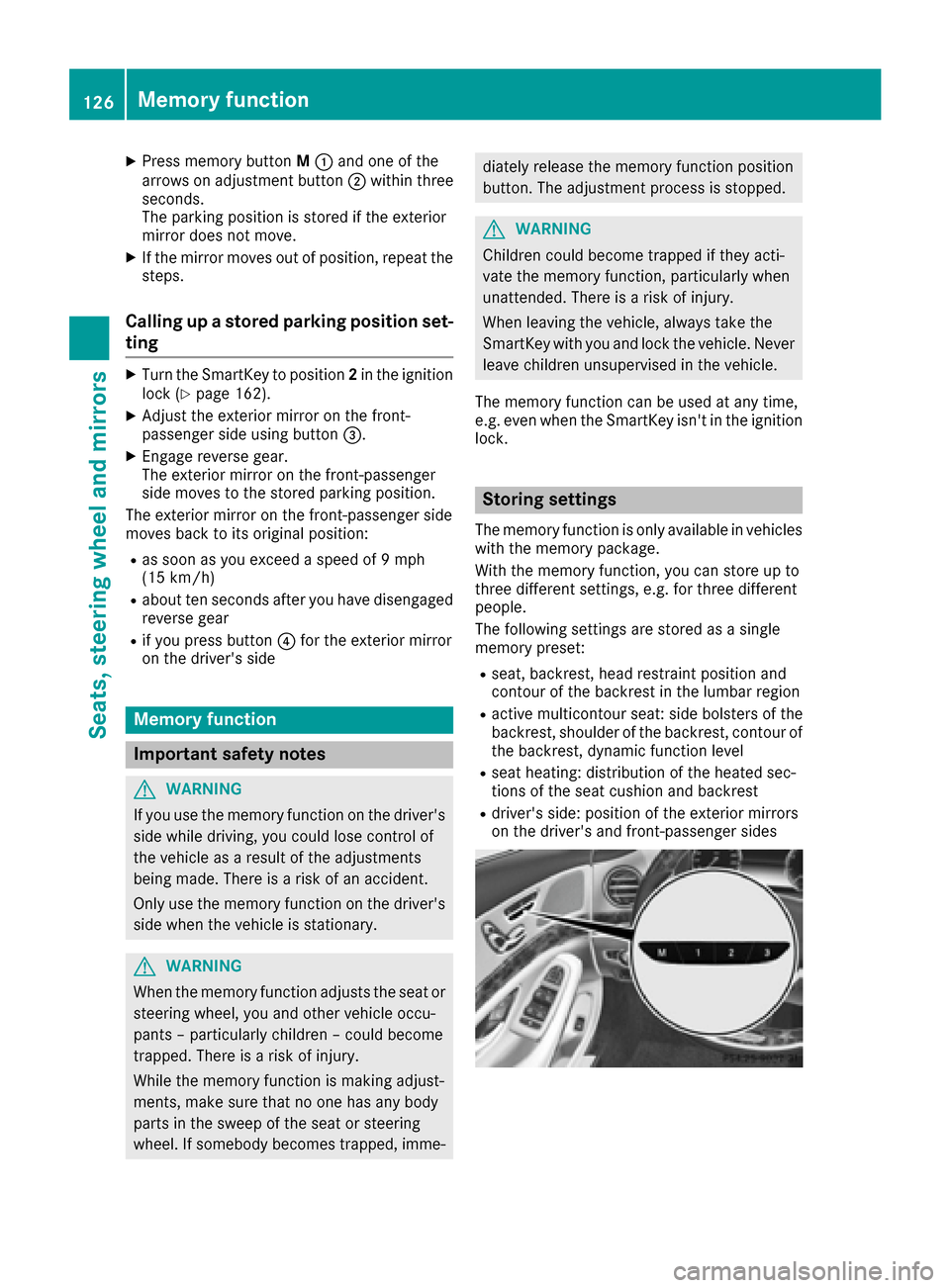
XPress memory buttonM: and one of the
arrows on adjustment button ;within three
seconds.
The parking position is stored if the exterior
mirror does not move.
XIf the mirror moves out of position, repeat the
steps.
Calling up a stored parking position set-
ting
XTurn the SmartKey to position 2in the ignition
lock (Ypage 162).
XAdjust the exterior mirror on the front-
passenger side using button =.
XEngage reverse gear.
The exterior mirror on the front-passenger
side moves to the stored parking position.
The exterior mirror on the front-passenger side
moves back to its original position:
Ras soon as you exceed a speed of 9 mph
(15 km/h)
Rabout ten seconds after you have disengaged
reverse gear
Rif you press button ?for the exterior mirror
on the driver's side
Memory function
Important safety notes
GWARNING
If you use the memory function on the driver's side while driving, you could lose control of
the vehicle as a result of the adjustments
being made. There is a risk of an accident.
Only use the memory function on the driver's
side when the vehicle is stationary.
GWARNING
When the memory function adjusts the seat or steering wheel, you and other vehicle occu-
pants – particularly children – could become
trapped. There is a risk of injury.
While the memory function is making adjust-
ments, make sure that no one has any body
parts in the sweep of the seat or steering
wheel. If somebody becomes trapped, imme-
diately release the memory function position
button. The adjustment process is stopped.
GWARNING
Children could become trapped if they acti-
vate the memory function, particularly when
unattended. There is a risk of injury.
When leaving the vehicle, always take the
SmartKey with you and lock the vehicle. Never
leave children unsupervised in the vehicle.
The memory function can be used at any time,
e.g. even when the SmartKey isn't in the ignition
lock.
Storing settings
The memory function is only available in vehicles
with the memory package.
With the memory function, you can store up to
three different settings, e.g. for three different
people.
The following settings are stored as a single
memory preset:
Rseat, backrest, head restraint position and
contour of the backrest in the lumbar region
Ractive multicontour seat: side bolsters of the
backrest, shoulder of the backrest, contour of
the backrest, dynamic function level
Rseat heating: distribution of the heated sec-
tions of the seat cushion and backrest
Rdriver's side: position of the exterior mirrors
on the driver's and front-passenger sides
126Memory function
Seats, steering wheel and mirrors
Page 129 of 438
XAdjust the seat accordingly (Ypage 106).
XOn the driver's side, adjust the steering wheel
(Ypage 120) and the exterior mirrors
(Ypage 123).
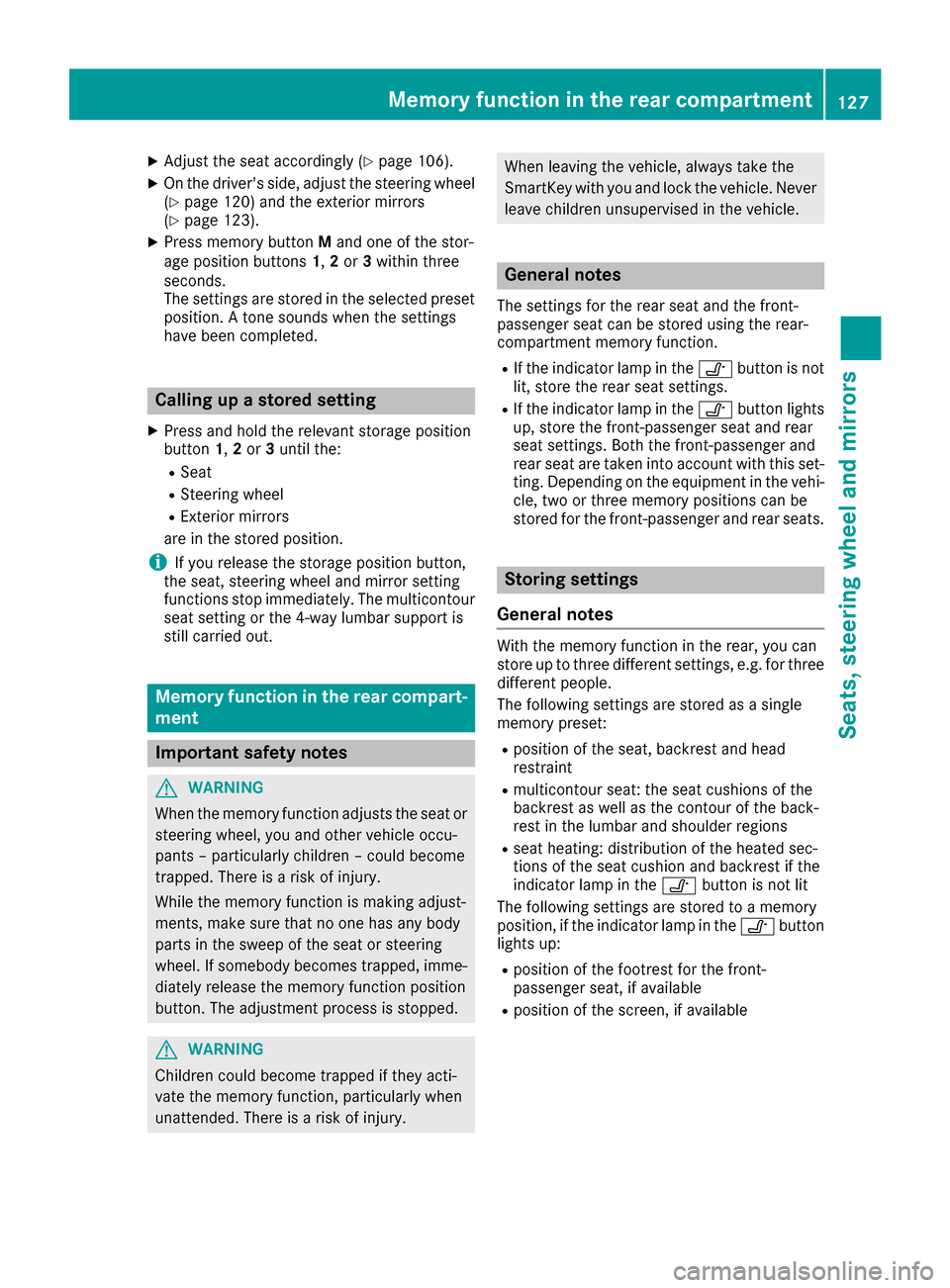
XPress memory button Mand one of the stor-
age position buttons 1,2 or 3within three
seconds.
The settings are stored in the selected preset
position. A tone sounds when the settings
have been completed.
Calling up a stored setting
XPress and hold the relevant storage position
button 1,2 or 3until the:
RSeat
RSteering wheel
RExterior mirrors
are in the stored position.
iIf you release the storage position button,
the seat, steering wheel and mirror setting
functions stop immediately. The multicontour
seat setting or the 4-way lumbar support is
still carried out.
Memory function in the rear compart-
ment
Important safety notes
GWARNING
When the memory function adjusts the seat or steering wheel, you and other vehicle occu-
pants – particularly children – could become
trapped. There is a risk of injury.
While the memory function is making adjust-
ments, make sure that no one has any body
parts in the sweep of the seat or steering
wheel. If somebody becomes trapped, imme-
diately release the memory function position
button. The adjustment process is stopped.
GWARNING
Children could become trapped if they acti-
vate the memory function, particularly when
unattended. There is a risk of injury.
When leaving the vehicle, always take the
SmartKey with you and lock the vehicle. Never
leave children unsupervised in the vehicle.
General notes
The settings for the rear seat and the front-
passenger seat can be stored using the rear-
compartment memory function.
RIf the indicator lamp in the vbutton is not
lit, store the rear seat settings.
RIf the indicator lamp in the vbutton lights
up, store the front-passenger seat and rear
seat settings. Both the front-passenger and
rear seat are taken into account with this set-
ting. Depending on the equipment in the vehi-
cle, two or three memory positions can be
stored for the front-passenger and rear seats.
Storing settings
General notes
With the memory function in the rear, you can
store up to three different settings, e.g. for three
different people.
The following settings are stored as a single
memory preset:
Rposition of the seat, backrest and head
restraint
Rmulticontour seat: the seat cushions of the
backrest as well as the contour of the back-
rest in the lumbar and shoulder regions
Rseat heating: distribution of the heated sec-
tions of the seat cushion and backrest if the
indicator lamp in the vbutton is not lit
The following settings are stored to a memory
position, if the indicator lamp in the vbutton
lights up:
Rposition of the footrest for the front-
passenger seat, if available
Rposition of the screen, if available
Memory function in the rear compartment127
Seats, steering wheel and mirrors
Z