2016 MERCEDES-BENZ S-Class SEDAN park assist
[x] Cancel search: park assistPage 16 of 438

Operation ......................................... 54
System self-test ...............................56
Occupant safety
Air bags ...........................................5 0
Automatic measures after an acci-
dent ................................................. 61
Children in the vehicle ..................... 61
Important safety notes .................... 45
Introduction to the restraint sys-
tem .................................................. 44
Occupant Classification System
(OCS) ............................................... 53
PASSENGER AIR BAG indicator
lamps ............................................... 46
Pets in the vehicle ........................... 67
PRE-SAFE
®(anticipatory occu-
pant protection) ............................... 59
PRE-SAFE
®PLUS (anticipatory
occupant protection PLUS) .............. 60
Restraint system warning lamp ........ 45
OCS
Conditions ....................................... 53
Faults ............................................... 57
Operation ......................................... 54
System self-test ............................... 56
Odometer ........................................... 261
Oil
see Engine oil
On-board computer
AMG menu ..................................... 275
Assistance graphic menu ............... 268
Assistance menu ........................... 269
Display messages .......................... 277
Displaying a service message ........ 358
DISTRONIC PLUS ........................... 204
Factory settings ............................. 275
Head-up display ............................. 259
HYBRID menu ................................ 272
Important safety notes .................. 256
Instrument cluster menu ............... 274
Lights menu ................................... 274
Media menu ................................... 265
Menu overview .............................. 261
Message memory .......................... 277
Navigation menu ............................ 263
Operation ....................................... 257
Radio menu ................................... 265 Service menu ................................. 269
Settings menu ............................... 269
Standard display ............................ 261
Telephone menu ............................ 267
Trip menu ...................................... 261
Video DVD operation ..................... 267
Online access to the vehicle
Data protection .............................. 188
Functions ....................................... 189
General informa tion ....................... 188
Inte
rnet .......................................... 189
Opening the fuel filler flap
(PLUG-IN HYBRID vehicles) ............ 179
Operating safety
Declaration of conformity ................ 28
Important safety notes .................... 27
Operating system
see On-board computer
Operator's Manual
Overview .......................................... 25
Vehicle equipment ........................... 25
Outside temperature display ........... 257
Overhead control panel ...................... 39
Override feature
Rear side windows ........................... 67
P
Paint code number ............................ 426
Paintwork (cleaning instructions) ... 361
Panic alarm .......................................... 44
Panorama roof with power tilt/
sliding panel
Important safety notes .................... 97
Opening/closing the roller sun-
blind ............................................... 100
Operating ......................................... 98
Operating the roller sunblinds for
the sliding sunroof ........................... 99
Problem (malfunction) ................... 103
Rain closing feature ......................... 99
Resetting ....................................... 102
Reversing feature ............................. 98
Parcel net hooks ............................... 329
Parking
Important safety notes .................. 189
Parking brake ................................ 190
14Index
Page 17 of 438

Position of exterior mirror, front-
passenger side ...............................125
Rear view camera .......................... 220
Switching off the engine ................ 190
see PARKTRONIC
Parking aid
see 360° camera
see Active Parking Assist
see Exterior mirrors
see PARKTRONIC
see Rear view camera
Parking assistance
see PARKTRONIC
Parking brake
Applying automatically ................... 191
Applying or releasing manually ...... 191
Display message ............................ 281
Electric parking brake .................... 190
Emergency braking ........................ 192
General notes ................................ 190
Releasing automatically ................. 191
Warning lamp ................................. 319
Parking lamps
Switching on/off ........................... 131
PARKTRONIC
Deactivating/activating ................. 215
Driving system ............................... 214
Function/notes .............................2 14
Important safety notes .................. 214
Problem (malfunction) ................... 216
Range of the sensors ..................... 214
Warning display ............................. 215
PASSENGER AIR BAG
Display message ............................ 289
Indicator lamps ................................ 46
Problem (malfunction) ................... 289
Perfume atomizer
Operating ....................................... 153
Problem (malfunction) ................... 155
Vial ................................................ 153
Pets in the vehicle ............................... 67
Plastic trim (cleaning instruc-
tions) .................................................. 364
PLUG-IN HYBRID operating
Electrical energy generated ........... 249
PLUG-IN HYBRID operation
Automatic engine start (ECO
start/stop function) ....................... 253 Automatic engine switch-off (ECO
start/stop function) ....................... 252
Charge level of the high-voltage
battery ........................................... 245
Charging the high-voltage battery .. 246
Displaying the total range and
electric range ................................. 248
Driving tip
s .................................... 251
EC
O start/stop function ................ 252
Electric motor (power display) ....... 242
Electrical energy generated
(COMAND) ..................................... 249
Energy flow display ........................ 245
Fuel consumption .......................... 249
Fuel consumption (COMAND) ........ 249
General notes ................................ 240
Haptic accelerator pedal ................ 251
High-voltage battery (condition of
charge) .......................................... 245
Hybrid drive system overview ........ 241
HYBRID menu ................................ 272
Important safety notes .................. 240
Instrument cluster (power dis-
play) ............................................... 242
Instrument cluster overview .......... 242
Manual drive program .................... 250
Noiseless start ............................... 249
Operating (on-board computer) ..... 245
Operating mode ............................. 243
Overrun mode ................................ 253
Parking .......................................... 253
Power display ................................ 244
Power display (electric motor) ....... 242
Problems ....................................... 254
Problems with SRS (supplemental
restraint system) ............................ 255
Problems with the combustion
engine ............................................ 254
Problems with the hybrid drive
system ........................................... 255
Problems with the Recuperative
Brake System ................................ 254
Program selector button ................ 250
Pulling away ................................... 250
READY display ............................... 249
Recuperative Brake System ........... 240
Resetting the values (COMAND) .... 249
Route-based operating strategy ..... 253
Index15
Page 34 of 438

Cockpit
FunctionPage
:Steering wheel paddle shift-
ers174
;Combination switch131
=Horn
?Instrument cluster33
ADIRECT SELECT lever170
BOverhead control panel39
CControl panel for:
ÜLowering the rear seat
head restraints116
u Extending/retracting
the rear roller sunblind334
PASSENGER AIR BAG indica-
tor lamp46
Adjusting the brightness of
the instrument lighting and
the multimedia system dis-
play
DIgnition lock162
Start/Stop button162
FunctionPage
EClimate control systems140
FAdjusts the steering wheel120
Steering wheel heating120
GCruise control lever197
HElectric parking brake190
IDiagnostics connection28
JOpening the hood352
KLight switch130
LControl panel for:
Activating Steering Assist
and Stop&Go Pilot207
Switching on Active Lane
Keeping Assist237
Deactivating PARKTRONIC214
Switching on the 360° cam-
era224
Activating Night View Assist230
Switching on the head-up
display259
32Cockpit
At a glance
Page 45 of 438
Deactivate the hybrid system manually if:
Rthe6 restraint system warning lamp in the
instrument cluster lights up after an accident
Rthe vehicle is badly damaged, e.g. after an
accident, and the restraint system compo-
nents were not activated
Rthe vehicle is badly damaged and has to be
towed or transported
XIf possible, move the vehicle out of the
danger zone: shift the automatic transmis-
sion into position N.
XRelease the electric parking brake.
XRoll the vehicle to a safe place and park it
safely.
Get assistance from others if necessary.
iThe vehicle is locked automatically when
the ignition is switched on and the wheels are
turning. There is therefore a risk of being
locked out if the vehicle is being pushed or
tested on a dynamometer.
XSwitch the ignition off.
XShift the automatic transmission to park posi-
tion P(Ypage 170).
Depress the electric parking brake
(
Ypage 190).
Secure the vehicle against rolling away
(
Ypage 406).
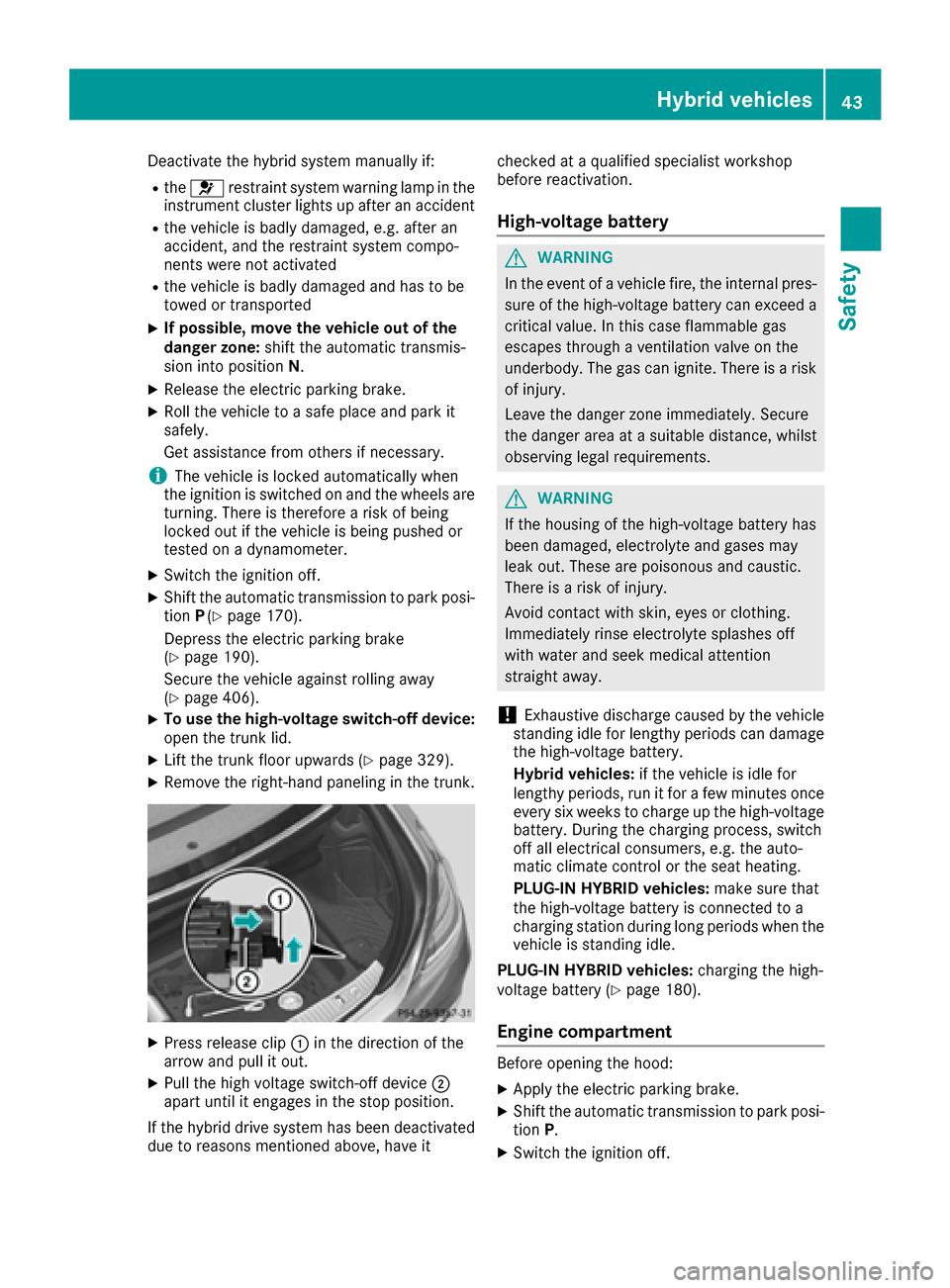
XTo use the high-voltage switch-off device:
open the trunk lid.
XLift the trunk floor upwards (Ypage 329).
XRemove the right-hand paneling in the trunk.
XPress release clip :in the direction of the
arrow and pull it out.
XPull the high voltage switch-off device ;
apart until it engages in the stop position.
If the hybrid drive system has been deactivated
due to reasons mentioned above, have it checked at a qualified specialist workshop
before reactivation.
High-voltage battery
GWARNING
In the event of a vehicle fire, the internal pres- sure of the high-voltage battery can exceed a
critical value. In this case flammable gas
escapes through a ventilation valve on the
underbody. The gas can ignite. There is a risk
of injury.
Leave the danger zone immediately. Secure
the danger area at a suitable distance, whilst
observing legal requirements.
GWARNING
If the housing of the high-voltage battery has
been damaged, electrolyte and gases may
leak out. These are poisonous and caustic.
There is a risk of injury.
Avoid contact with skin, eyes or clothing.
Immediately rinse electrolyte splashes off
with water and seek medical attention
straight away.
!Exhaustive discharge caused by the vehicle
standing idle for lengthy periods can damage
the high-voltage battery.
Hybrid vehicles: if the vehicle is idle for
lengthy periods, run it for a few minutes once every six weeks to charge up the high-voltage
battery. During the charging process, switch
off all electrical consumers, e.g. the auto-
matic climate control or the seat heating.
PLUG-IN HYBRID vehicles: make sure that
the high-voltage battery is connected to a
charging station during long periods when the
vehicle is standing idle.
PLUG-IN HYBRID vehicles: charging the high-
voltage battery (
Ypage 180).
Engine compartment
Before opening the hood:
XApply the electric parking brake.
XShift the automatic transmission to park posi-
tion P.
XSwitch the ignition off.
Hybrid vehicles43
Safety
Z
Page 62 of 438

style to suit the prevailing road and weather
conditions and maintain a safe distance from
the vehicle in front. Drive carefully.
Function
PRE-SAFE®intervenes:
Rin emergency braking situations, e.g. when
BAS is activated
Rin critical driving situations, e.g. when physi-
cal limits are exceeded and the vehicle under-
steers or oversteers severely
Rvehicles with the Driving Assistance package:
when a driver assistance system intervenes
powerfully or the radar sensor system detects
an imminent danger of collision in certain sit- uations
PRE-SAFE
®takes the following measures
depending on the hazardous situation detected:
Rthe front seat belts are pre-tensioned.
Rif the vehicle skids, the side windows and the panorama roof with power tilt/sliding panel
are closed.
Rthe front-passenger seat is adjusted if it is in
an unfavorable position.
Rfor vehicles with electrically adjustable rear
seats: the outer rear seats are adjusted if they
are in an unfavorable position.
Rvehicles with a multicontour seat: the air pres-
sure in the side bolsters of the seat backrest
is increased.
Rvehicles with seat belt extenders: the seat
belts of the outer rear seats are pre-ten-
sioned.
If the hazardous situation passes without result-
ing in an accident, PRE-SAFE
®slackens the belt
pre-tensioning. On vehicles with multicontour
seats, the air pressure in the side bolsters is
reduced again. All settings made by PRE-SAFE
®
can then be reversed.
If the seat belt pre-tensioning is not reduced:
XMove the seat backrest or seat back slightly
when the vehicle is stationary.
The seat belt pre-tensioning is reduced and
the locking mechanism is released.
The seat-belt adjustment is an integral part of
the PRE-SAFE
®convenience function. Informa-
tion about the convenience function can be
found under "Belt adjustment" (
Ypage 50).
PRE-SAFE®PLUS (anticipatory occu-
pant protection system PLUS)
Introduction
PRE-SAFE®PLUS is only available in vehicles
with the Driving Assistance package.
Using the radar sensor system, PRE-SAFE
®
PLUS is able to detect that a head-on or rear-end
collision is imminent. In certain hazardous sit-
uations, PRE-SAFE
®PLUS takes pre-emptive
measures to protect the vehicle occupants.
Important safety notes
The intervention of PRE-SAFE®PLUS cannot
prevent an imminent collision.
The driver is not warned when PRE-SAFE
®PLUS
intervenes.
PRE-SAFE
®PLUS does not intervene if the vehi-
cle is backing up.
When driving, or when parking or exiting a park-
ing space with assistance from Active Parking
Assist, PRE-SAFE
®PLUS will not apply the
brakes.
Function
PRE-SAFE®PLUS intervenes in certain situa-
tions if the radar sensor system detects an
imminent head-on or rear-end collision.
PRE-SAFE
®PLUS takes the following measures
depending on the hazardous situation detected:
Rif the radar sensor system detects that a
head-on collision is imminent, the seat belts
are pre-tensioned.
Rif the radar sensor system detects that a rear-
end collision is imminent:
-the brake pressure is increased if the driver
applies the brakes when the vehicle is sta- tionary.
-the seat belts are pre-tensioned.
The PRE-SAFE®PLUS braking application is can-
celed:
Rif the accelerator pedal is depressed when a
gear is engaged
Rif the risk of a collision passes or is no longer
detected
Rif DISTRONIC PLUS indicates an intention to
pull away
60Occupant safety
Safety
Page 72 of 438

GWARNING
BAS PLUS does not react:
Rto small people, e.g. children
Rto animals
Rto oncoming vehicles
Rwhen cornering
As a result, BAS PLUS may not intervene in all
critical situations. There is a risk of an acci-
dent.
Always pay careful attention to the traffic sit- uation and be ready to brake.
In the event of snowfall or heavy rain, the rec-
ognition can be impaired.
Recognition by the radar sensor system is also
impaired in the event of:
Rthere is dirt on the sensors or anything else
covering the sensors
Rthere is interference by other radar sources
Rthere are strong radar reflections, for exam-
ple in parking garages
Ra narrow vehicle traveling in front, e.g. a
motorbike
Ra vehicle traveling in front on a different line
Rvehicles quickly moving into the radar sensor
system detection range
Recognition by the camera system is also
impaired in the event of:
Rdirt on the camera or if the camera is covered
Rthere is glare on the camera system, e.g. from
the sun being low in the sky
Rdarkness
Rif:
-pedestrians move quickly, e.g. into the path
of the vehicle
-the camera system no longer recognizes a
pedestrian as a person due to special cloth- ing or other objects
-a pedestrian is concealed by other objects
-the typical outline of a person is not distin-
guishable from the background
Following damage to the front end of the vehicle,
have the configuration and operation of the
radar sensors checked at a qualified specialist
workshop. This also applies to collisions at slow
speeds where there is no visible damage to the
front of the vehicle. Following damage to the windshield, have the
configuration and operation of the camera sys-
tem checked at a qualified specialist workshop.
Function
To avoid a collision, BAS PLUS calculates the
brake force necessary if:
Ryou approach an obstacle, and
RBAS PLUS has detected a risk of collision
When driving at a speed under 20 mph
(30 km/h): if you depress the brake pedal, BAS
PLUS is activated. The increase in brake pres-
sure will be carried out at the last possible
moment.
When driving at a speed above 20 mph
(30 km/h): if you depress the brake pedal
sharply, BAS PLUS automatically raises the
brake pressure to a value adapted to the traffic
situation.
BAS PLUS provides braking assistance in haz-
ardous situations with vehicles in front within a
speed range between 4 mph (7 km/h) and
155 mph (250 km/h).
At speeds of up to approximately 44 mph
(70 km/h), BAS PLUS can react to:
Rstationary objects in the path of your vehicle,
e.g. stopped or parked vehicles
Rpedestrians in the path of your vehicle
Robstacles crossing your path, which move in
the detection range of the sensors and are
recognized by them
iIf BAS PLUS demands particularly high brak-
ing force, preventative passenger protection
measures (PRE-SAFE
®) are activated simulta-
neously (Ypage 59).
XKeep the brake pedal depressed until the
emergency braking situation is over.
ABS prevents the wheels from locking.
BAS PLUS is deactivated and the brakes func-
tion as usual again, if:
Ryou release the brake pedal.
Rthere is no longer a risk of collision.
Rno obstacle is detected in front of your vehi-
cle.
Ryou depress the accelerator pedal.
Ryou activate kickdown.
70Driving safety systems
Safety
Page 73 of 438

COLLISION PREVENTION ASSIST
PLUS
General information
COLLISION PREVENTION ASSIST PLUS consists
of a distance warning function with an autono-
mous braking function and adaptive Brake
Assist.
COLLISION PREVENTION ASSIST PLUS can help
you to minimize the risk of a front-end collision
with a vehicle ahead or reduce the effects of
such a collision.
If COLLISION PREVENTION ASSIST PLUS
detects that there is a risk of a collision, you will
be warned visually and acoustically. If you do not
react to the visual and audible collision warning,
autonomous braking can be initiated in critical
situations. If you apply the brake yourself in a
critical situation, the COLLISION PREVENTION
ASSIST PLUS adaptive Brake Assist assists you.
Important safety notes
In particular, the detection of obstacles can be
impaired if:
Rthere is dirt on the sensors or anything else
covering the sensors
Rthere is snow or heavy rain
Rthere is interference by other radar sources
Rthere are strong radar reflections, for exam-
ple in parking garages
Ra narrow vehicle traveling in front, e.g. a
motorbike
Ra vehicle traveling in front on a different line
Rnew vehicles or after a service on the COLLI-
SION PREVENTION ASSIST PLUS system
Observe the notes in the section on breaking-
in (
Ypage 161).
Following damage to the front end of the vehicle,
have the configuration and operation of the
radar sensor checked at a qualified specialist
workshop. This also applies to collisions at slow
speeds where there is no visible damage to the
front of the vehicle.
Switching on/off
The COLLISION PREVENTION ASSIST PLUS is
automatically active after switching on the igni-
tion. You can activate or deactivate COLLISION PRE-
VENTION ASSIST PLUS in the on-board com-
puter (
Ypage 270). When deactivated, the dis-
tance warning function and the autonomous
braking function are also deactivated.
If COLLISION PREVENTION ASSIST PLUS is
deactivated, the æsymbol appears in the
assistance graphics display.
Distance warning function
General information
iObserve the "Important safety notes" sec-
tion for driving safety systems (Ypage 68).
The distance warning function can help you to
minimize the risk of a front-end collision with a
vehicle ahead or reduce the effects of such a
collision.
With the help of the radar sensor system, the
distance warning function can detect obstacles
that are in the path of your vehicle for an exten-
ded period of time.
If the distance warning function detects that
there is a risk of a collision, you will be warned
visually and acoustically.
Starting at a speed of approximately 4 mph
(7 km/h), the distance warning function warns
you if you rapidly approach a vehicle in front. An
intermittent warning tone will then sound, and
the · distance warning lamp will light up in
the instrument cluster.
Up to a speed of approximately 44 mph
(70 km/h), the distance warning function can
also react to stationary obstacles, such as stop-
ped or parked vehicles.
Important safety notes
GWARNING
The distance warning function does not react:
Rto people or animals
Rto oncoming vehicles
Rto crossing traffic
Rwhen cornering
Thus, the distance warning function cannot
provide a warning in all critical situations.
There is a risk of an accident.
Always pay careful attention to the traffic sit-
uation and be ready to brake.
Driving safety systems71
Safety
Z
Page 78 of 438

For PRE-SAFE®Brake to assist you when driving,
the radar sensor system and the camera system
must be switched on and be operational.
With the help of the radar sensor system and the
camera system, PRE-SAFE
®Brake can detect
obstacles that are in front of your vehicle for an
extended period of time.
In addition, pedestrians in the path of your vehi-
cle can be detected.
PRE-SAFE
®Brake detects pedestrians using
typical characteristics such as the body con-
tours and posture of a person standing upright.
iObserve the restrictions described in the
"Important safety notes" sec-
tion“ (
Ypage 76).
Important safety notes
GWARNING
PRE-SAFE
®Brake will initially brake your vehi-
cle by a partial application of the brakes if a
danger of collision is detected. There may be
a collision unless you brake yourself. Even
after subsequent full application of the brakes
a collision cannot always be avoided, partic-
ularly when approaching at too high a speed.
There is a risk of an accident.
Always apply the brakes yourself and try to
take evasive action, provided it is safe to do
so.
In the event of a partial application of the brakes,
the vehicle is braked with up to 50% of the full
braking pressure.
GWARNING
PRE-SAFE
®Brake cannot always clearly iden-
tify objects and complex traffic conditions.
In these cases, PRE-SAFE
®Brake may:
Rgive an unnecessary warning and then
brake the vehicle
Rnot give a warning or intervene
There is a risk of an accident.
Always pay particular attention to the traffic
situation and be ready to brake, especially if
PRE-SAFE
®Brake warns you. Terminate the
intervention in a non-critical driving situation.
GWARNING
PRE-SAFE
®Brake cannot always clearly iden-
tify people, especially if they are moving. In
these cases, PRE-SAFE
®Brake cannot inter-
vene. There is a risk of an accident.
Always pay particular attention to the traffic
situation and be ready to brake, especially if
PRE-SAFE
®Brake warns you.
In order to maintain the appropriate distance to
the vehicle in front and thus prevent a collision,
you must apply the brakes yourself.
GWARNING
PRE-SAFE
®Brake does not react:
Rto small people, e.g. children
Rto animals
Rto oncoming vehicles
Rto crossing traffic
Rwhen cornering
As a result, PRE-SAFE
®Brake may neither
give warnings nor intervene in all critical sit-
uations. There is a risk of an accident.
Always pay careful attention to the traffic sit- uation and be ready to brake.
In the event of snowfall or heavy rain, the rec-
ognition can be impaired.
Recognition by the radar sensor system is also
impaired in the event of:
Rthere is dirt on the sensors or anything else
covering the sensors
Rthere is interference by other radar sources
Rthere are strong radar reflections, for exam-
ple in parking garages
Ra narrow vehicle traveling in front, e.g. a
motorbike
Ra vehicle traveling in front on a different line
relative to the center of your vehicle
Recognition by the camera system is also
impaired in the event of:
Rdirt on the camera or if the camera is covered
Rthere is glare on the camera system, e.g. from
the sun being low in the sky
76Driving safety systems
Safety