2016 MERCEDES-BENZ GLE-Class Theft
[x] Cancel search: TheftPage 5 of 450

1, 2, 3 ...
4ETS (Electronic Traction System)see ETS/4ETS (Electronic Trac-
tion System)
4MATIC (permanent four-wheel
drive) .................................................. 235
12 V socket
see Sockets
115 V socket ...................................... 343
360° camera
Cleaning ........................................ .366
Display in the multimedia system .. 222
Function/notes .............................2 21
A
ABS (Anti-lock Braking System)
Display message ............................ 281
Function/notes ................................ 66
Important safety notes .................... 66
Warning lamp ................................. 319
Accident
Automatic measures after an acci-
dent ................................................. 59
Activating/deactivating cooling
with air dehumidification ................. 132
Active Blind Spot Assist
Activating/deactivating (on-
board computer) ............................ 272
Display message ............................ 305
Function/information .................... 230
Trailer towing ................................. 233
Active Curve System
Display message ............................ 303
Function/notes ............................. 207
Active Driving Assistance package .. 230
Active Lane Keeping Assist
Activating/deactivating (on-
board computer) ............................ 272
Display message ............................ 305
Function/information .................... 233
Trailer towing ................................. 235
Active Parking Assist
Display message ............................ 306
Exiting a parking space .................. 216
Function/notes ............................. 213
Important safety notes .................. 213 Parking .......................................... 215
ADAPTIVE BRAKE ................................. 74
Adaptive Brake Assist
Function/notes ................................ 70
Adaptive Damping System
Function/notes ............................. 209
Adaptive damping system
see ADS (Adaptive Damping System)
Adaptive Highbeam Assist
Display message ............................ 295
Function/notes ............................. 117
Switching on/off ........................... 118
Additives (engine oil) ........................ 438
ADS (Adaptive Damping System)
Function/notes ............................. 206
Air bags
Deployment ..................................... 56
Display message ............................ 290
Front air bag (driver, front
passenger) ....................................... 50
Important safety notes .................... 49
Introduction ..................................... 49
Knee bag .......................................... 51
Occupant Classification System
(OCS) ............................................... 52
P
ASSENGER AIR BAG indicator
lamps ............................................... 45
Side impact air bag .......................... 51
Window curtain air bag .................... 51
Air filter (display message) .............. 298
AIR FLOW ........................................... 134
Air vents
Glove box ....................................... 142
Important safety notes .................. 141
Rear ............................................... 142
Setting ........................................... 141
Setting the center air vents ........... 142
Setting the side air vents ............... 142
Air-conditioning system
see Climate control
AIRMATIC package
ADS (Adaptive Damping System) ... 206
Function/notes ............................. 205
Alarm
ATA (Anti-Theft Alarm system) ......... 77
Switching off (ATA) .......................... 77
Switching the function on/off
(ATA) ................................................ 77
Index3
Page 6 of 450

Alarm systemsee ATA (Anti-Theft Alarm system)
AMG
Adaptive sport suspension sys-
tem ................................................ 209
AMG menu (on-board computer) .....2 77
Anti-lock braking system
see ABS (Anti-lock Braking System)
Anti-Theft Alarm system
see ATA (Anti-Theft Alarm system)
Approach/departure angle .............. 190
Ashtray ............................................... 341
Assistance display (on-board com-
puter) ..................................................2 71
Assistance menu (on-board com-
puter) ..................................................2 71
ASSYST PLUS
Displaying a service message ........3 60
Hiding a service message .............. 360
Resetting the service interval dis-
play ................................................ 360
Service message ............................ 360
Special service requirements ......... 361
ATA (Anti-Theft Alarm system)
Activating/deactivating ................... 77
Function ...........................................7 7
Switching off the alarm .................... 77
ATTENTION ASSIST
Activating/deactivating ................. 272
Display message ............................ 301
Function/notes ............................. 224
Audio menu (on-board computer) .... 269
Audio system
see separate operating instructions
Authorized Mercedes-Benz Center
see Qualified specialist workshop
Authorized workshop
see Qualified specialist workshop
AUTO lights
Display message ............................ 294
see Lights
Automatic car wash (care) ............... 361
Automatic engine start (ECO start/
stop function) .................................... 150
Automatic engine switch-off (ECO
start/stop function) .......................... 150
Automatic headlamp mode .............. 114Automatic transmission
Accelerato
r pedal position ............. 157
Changing gear ............................... 157
DIRECT SELECT lever ..................... 154
Display message ............................ 311
Drive program ................................ 158
Drive program display .................... 154
Driving tips .................................... 157
DYNAMIC SELECT controller ......... 152
Emergency running mode .............. 162
Engaging drive position .................. 156
Engaging neutral ............................ 155
Engaging park position automati-
cally ............................................... 155
Engaging reverse gear ................... 155
Engaging the park position ............ 155
Gliding mode ................................. 157
Kickdown ....................................... 157
Manual shifting .............................. 159
Oil temperature (on-board com-
puter, Mercedes-AMG vehicles) ..... 277
Overview ........................................ 154
Problem (malfunction) ................... 162
Pulling away ................................... 148
Starting the engine ........................ 147
Steering wheel paddle shifters ...... 159
Trailer towing ................................. 158
Transmission position display ........ 154
Transmission positions .................. 156
Automatic transmission emer-
gency mode ....................................... 162
Axle load, permissible (trailer tow-
ing) ...................................................... 445
B
Bag hook ............................................ 334
Ball coupling
Installing ........................................ 258
Removing ....................................... 262
BAS (Brake Assist System) ................. 67
BAS PLUS with Cross-Traffic Assist
(Brake Assist PLUS with Cross-
Traffic Assist)
Function/notes ................................ 67
Important safety notes .................... 67
Battery (high-voltage)
see High-voltage battery
4Index
Page 19 of 450

Warning lamp ................................. 327
PRE-SAFE®PLUS (anticipatory
occupant protection PLUS)
Display message ............................2 88
Operation ......................................... 59
Protection against theft
ATA (Anti-Theft Alarm system) ......... 77
Immobilizer ...................................... 76
Protection of the environment
General notes .................................. 25
Pulling away
General notes ................................ 148
Trailer ............................................ 149
Pulling away (automatic transmis-
sion) .................................................... 148
Q
QR code
Mercedes-Benz Guide App ................. 1
Rescue card ..................................... 30
Qualified specialist workshop ........... 29
R
RACETIMER (on-board computer) .... 277
Radiator cover ................................... 357
Radio
Selecting a station ......................... 269
see separate operating instructions
Radio-wave reception/transmis-
sion in the vehicle
Declaration of conformity ................ 29
RBS (Recuperative Brake System)
Warning lamp ................................. 318
Reading lamp ..................................... 118
Rear bench seat
Folding forwards/back .................. 333
Rear compartment
Setting the air vents ......................1 42
Setting the temperature ................ 134
Rear fog lamp
Display message ............................ 293
Switching on/off ........................... 115
Rear seats
Adjusting ....................................... 104
Rear view camera
Cleaning instructions ..................... 365 Display in the multimedia system .. 218
Function/notes .............................2
17
Switching on/off ........................... 218
Rear window defroster
Problem (malfunction) ................... 138
Switching on/off ........................... 137
Rear window wiper
Replacing the wiper blade .............. 124
Switching on/off ........................... 122
Rear-view mirror
Anti-glare (manual) ........................ 110
Dipping (automatic) ....................... 111
Recuperative Brake System
Driving safety systems ..................... 44
Important safety notes .................... 44
Refrigerant (air-conditioning sys-
tem)
Important safety notes .................. 440
Refueling
Fuel gauge ....................................... 34
Important safety notes .................. 162
Refueling process .......................... 163
Refueling process (PLUG-IN
HYBRID vehicles) ........................... 163
see Fuel
Remote control
Garage door opener ....................... 352
Programming (garage door
opener) .......................................... 353
Replacing bulbs
General notes ................................ 119
Important safety notes .................. 119
Overview of bulb types .................. 120
Removing/rep
lacing the cover
(front wheel arch) .......................... 120
Reporting safety defects .................... 30
Rescue card ......................................... 30
Reserve (fuel tank)
see Fuel
Reserve fuel
Display message ............................ 297
Warning lamp ................................. 325
Residual heat (climate control) ........ 138
Restraint system
Display message ............................ 288
Introduction ..................................... 44
Warning lamp ................................. 324
Warning lamp (function) ................... 45
Index17
Page 78 of 450

Function
XTo activate/deactivate:activateor deacti -
vat ePRE-SAF E®Brake in th eon-board com-
puter (Ypage 272).
If th ePRE-SAF E®Brake is no tactivated, th e
æ symbol appear sin th emultifunction dis-
play.
If you have activated DS R (
Ypage 236), PRE-
SAFE®Brake is deactivated.
Starting at aspee dof aroun d 4mph (7 km/h),
this function warn syou if you rapidly approac h a
vehicl ein front. An intermittent warning tone
will then soun dand th e· distanc ewarning
lamp will ligh tup in th einstrumen tcluster.
XBrake immediately to defuse th esituation .
or
XTak eevasive action provide dit is saf eto do
so.
PRE-SAF E
®Brake can also brak eth evehicl e
automatically under th efollowin gconditions:
Rth edriver and front-passenger have their seat
belt sfastene d
and
Rth evehicl espee dis between approximately
4 mph (7 km/h) and 12 4mph (20 0km/h)
At speeds of up to approximately 44 mph
(70 km/h) PRE-SAF E
®Brake can also detect :
Rstationary objectsin th epat hof your vehicle,
e.g. stoppe dor parked vehicles
Rpedestrian sin th epat hof your vehicl e
iIf there is an increased ris kof acollision ,
preventive passenger protection measures
(PRE-SAF E
®)are triggered (Ypage 58).
If th eris kof collision wit hth evehicl ein fron t
remain sand you do no tbrake, tak eevasive
action or accelerate significantly, th evehicl e
may perfor mautomatic emergenc ybraking ,up
to th epoin tof full brak eapplication .Automatic
emergenc ybraking is no tperformed until imme-
diately prio rto an imminent accident.
You can preven tth eintervention of th ePRE -
SAFE
®Brake at any time by:
Rdepressing th eaccelerato rpedal further.
Ractivating kickdown .
Rreleasingth ebrak epedal. The braking action of PRE-SAF
E
®Brake is ended
automatically if:
Ryou maneuve rto avoi dth eobstacle .
Rthere is no longer any danger of acollision .
Rthere is no longer an obstacle detected in
frontof your vehicle.
STEER CONTROL
General information
STEE RCONTROL help syou by transmitting a
noticeable steering force to th esteering whee l
in th edirection require dfor vehicl estabilization .
This steering assistanc eis provide din particular
if:
Rbot hright wheels or bot hlef twheels are on a
wet or slippery road surface when you brake.
Rth evehicl estart sto skid.
Important safety notes
iObserv eth e"Importan tsafet ynotes" sec -
tion (Ypage 66) .
No steering support is provide dfrom STEE R
CONTROL, if:
RES P®is deactivated
RESP®is malfunctioning .
Rthelighting is faulty.
If ES P®is malfunctioning ,you will be assisted
further by th eelectrical power steering .
Protection against theft
Immobilizer
XTo activate with theSmartKey :remove th e
SmartKey from th eignition lock.
XTo activate with KEYLESS-GO: switch the
ignition off and open th edriver' sdoor .
XTo deactivate: switch on theignition .
The immobilize rprevents your vehicl efrom
bein gstarted without th ecorrect SmartKey.
When leaving th evehicle, always tak eth e
SmartKey wit hyou and loc kth evehicle. Anyon e
can start th eengin eif avalid SmartKey has been
lef tinside th evehicle.
76Protection against theft
Safety
Page 79 of 450

iThe immobilizer is always deactivated when
you start the engine.
In the event that the engine cannot be started
(yet the vehicle's battery is charged), the sys-
tem is not operational. Contact an authorized
Mercedes-Benz Center or call
1-800-FOR-MERCedes (in the USA) or
1-800-387-0100 (in Canada).
ATA (anti-theft alarm system)
XTo arm: lock the vehicle with the SmartKey or
KEYLESS-GO.
Indicator lamp :flashes. The alarm system
is armed after approximately 15 seconds.
XTo deactivate using the SmartKey: unlock
the vehicle with the SmartKey.
or
XInsert the SmartKey into the ignition lock.
XTo deactivate using KEYLESS-GO: unlock
the vehicle with KEYLESS-GO.
or
XPress the Start/Stop button on the dash-
board. The SmartKey must be inside the vehi- cle.
A visual and audible alarm is triggered if the
alarm system is armed and you open:
Ra door
Rthe vehicle with the mechanical key
Rthe tailgate
Rthe hood
XTo switch the alarm off with the Smart-
Key: press the %or& button on the
SmartKey.
The alarm is switched off.
or
XInsert the SmartKey into the ignition lock.
The alarm is switched off.
XTo stop the alarm using KEYLESS-GO:
grasp the outside door handle. The SmartKey
must be outside the vehicle.
The alarm is switched off.
or
XPress the Start/Stop button on the dash-
board. The SmartKey must be inside the vehi- cle.
The alarm is switched off.
The alarm is not switched off, even if you close
the open door that triggered it, for example.
iIf the alarm continues for more than
30 seconds, the mbrace emergency call sys-
tem automatically notifies the Customer
Assistance Center. This is done either by text message or data connection. The emergency
call system sends the message or data provi-
ded that:
Ryou have subscribed to the mbrace service.
Rthe mbrace service has been activated
properly.
Rthe necessary mobile phone network is
available.
Protection against theft77
Safety
Z
Page 80 of 450

Useful information
i
This Operator's Manual describes all models
and all standard and optional equipment of
your vehicle available at the time of publica-
tion of the Operator's Manual. Country-spe-
cific differences are possible. Please note
that your vehicle may not be equipped with all
features described. This also applies to
safety-related systems and functions.
iRead the information on qualified specialist
workshops (Ypage 29).
SmartKey
Important safety notes
GWARNING
If children are left unsupervised in the vehicle,
they could:
Ropen the doors, thus endangering other
people or road users.
Rget out and disrupt traffic.
Roperate the vehicle's equipment.
Additionally, children could set the vehicle in
motion if, for example, they:
Rrelease the parking brake.
Rshifting the automatic transmission out of
park position P
RStart the engine.
There is a risk of an accident and injury.
When leaving the vehicle, always take the
SmartKey with you and lock the vehicle. Never
leave children or animals unattended in the
vehicle. Always keep the SmartKey out of
reach of children.
GWARNING
If you attach heavy or large objects to the
SmartKey, the SmartKey could be uninten-
tionally turned in the ignition lock. This could
cause the engine to be switched off. There is a risk of an accident.
Do not attach any heavy or large objects to theSmartKey. Remove any bulky key rings before
inserting the SmartKey into the ignition lock.
!Keep the SmartKey away from strong mag-
netic fields. Otherwise, the remote control
function could be affected.
Strong magnetic fields can occur in the vicin-
ity of powerful electrical installations.
Do not keep the SmartKey:
Rwith electronic devices, e.g. a mobile phone
or another SmartKey.
Rwith metallic objects, e.g. coins or metal foil.
Rinside metallic objects, e.g. a metal case.
This can affect the functionality of the Smart-
Key.
Do not keep the KEYLESS-GO or KEYLESS-GO
Start function key in the temperature-controlled
cup holder. Otherwise, the KEYLESS-GO or KEY-
LESS-GO Start function key will not be detected. Vehicles with KEYLESS-GO start function: do
not keep the SmartKey in the cargo compart-
ment. Otherwise, the SmartKey may not be
detected, e.g. when starting the engine using
the Start/Stop button.
SmartKey functions
:& To lock the vehicle
;FTo open/close the tailgate
=%To unlock the vehicle
XTo unlock centrally: press the%button.
If you do not open the vehicle within approx-
imately 40 seconds of unlocking:
Rthe vehicle is locked again.
Ranti-theft protection is reactivated.
XTo lock centrally: press the&button.
78SmartKey
Opening and closing
Page 82 of 450

XTo deactivate:press the&button on the
SmartKey twice in rapid succession.
The battery check lamp of the SmartKey
flashes twice briefly and lights up once, then
KEYLESS-GO is deactivated (
Ypage 81).
XTo activate: press any button on the Smart-
Key.
or
XInsert the SmartKey into the ignition lock.
KEYLESS-GO and all of its associated features
are available again.
KEYLESS-GO start function
General notes
Bear in mind that the engine can be started by
any of the vehicle occupants if there is a Smart-
Key in the vehicle (
Ypage 148).
Changing the settings of the locking
system
You can change the settings of the locking sys-
tem. This means that only the driver's door and
the fuel filler flap are unlocked when the vehicle
is unlocked. This is useful if you frequently travel
on your own.
XTo change the setting: press and hold down
the % and& buttons simultaneously
for about six seconds until the battery indica-
tor lamp flashes twice (
Ypage 81).
If the setting of the locking system is changed
within the signal range of the vehicle, pressing
the & or% button:
Rlocks or
Runlocks the vehicle
The SmartKey now functions as follows:
XTo unlock: press the%button once.
XTo unlock centrally: press the%button
twice.
XTo lock centrally: press the&button. The KEYLESS-GO function is changed as fol-
lows:
XTo unlock the driver's door:
touch the inner
surface of the door handle on the driver's
door.
XTo unlock centrally: touch the inner surface
of the door handle on the front-passenger
door or the rear door.
XTo lock centrally: touch the outer sensor
surface on one of the door handles
(
Ypage 79).
XTo restore the factory settings: press and
hold down the %and& buttons simul-
taneously for approximately si x se
conds until
the battery check lamp flashes twice
(
Ypage 81).
Mechanical key
General notes
If the vehicle can no longer be locked or
unlocked with the SmartKey or the KEYLESS-GO
key, use the mechanical key.
If you use the mechanical key to unlock and
open the driver's door, the anti-theft alarm sys-
tem will be triggered. Switch off the alarm
(
Ypage 77).
If you unlock the vehicle using the mechanical
key, the fuel filler flap will not be unlocked auto- matically.
XTo unlock the fuel filler flap: insert the
SmartKey into the ignition lock.
Removing the mechanical key
80SmartKey
Opening and closing
Page 87 of 450
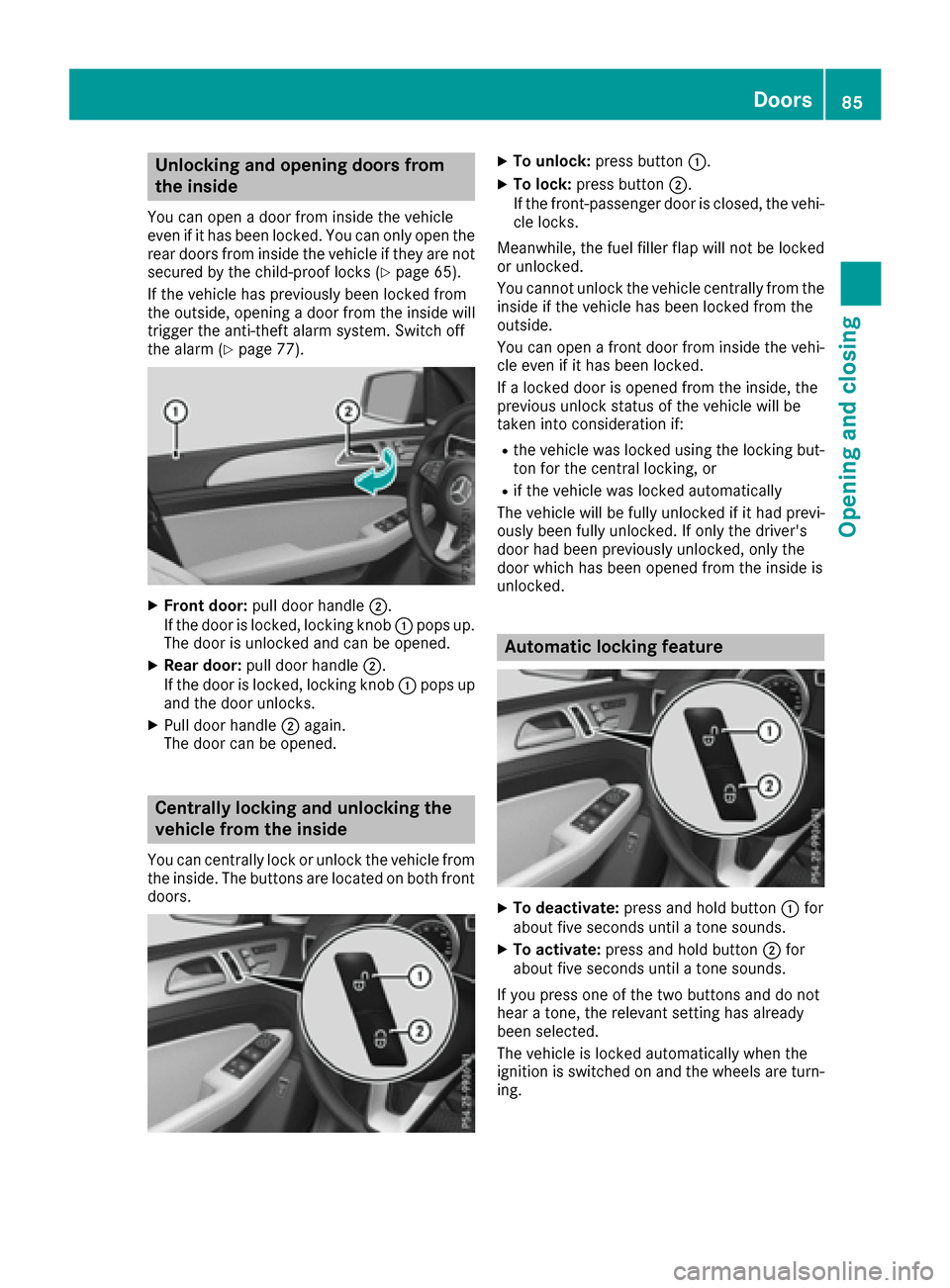
Unlocking and opening doors from
the inside
You can open a door from inside the vehicle
even if it has been locked. You can only open the
rear doors from inside the vehicle if they are notsecured by the child-proof locks (
Ypage 65).
If the vehicle has previously been locked from
the outside, opening a door from the inside will
trigger the anti-theft alarm system. Switch off
the alarm (
Ypage 77).
XFront door: pull door handle ;.
If the door is locked, locking knob :pops up.
The door is unlocked and can be opened.
XRear door: pull door handle ;.
If the door is locked, locking knob :pops up
and the door unlocks.
XPull door handle ;again.
The door can be opened.
Centrally locking and unlocking the
vehicle from the inside
You can centrally lock or unlock the vehicle from
the inside. The buttons are located on both front
doors.
XTo unlock: press button :.
XTo lock:press button ;.
If the front-passenger door is closed, the vehi-
cle locks.
Meanwhile, the fuel filler flap will not be locked
or unlocked.
You cannot unlock the vehicle centrally from the
inside if the vehicle has been locked from the
outside.
You can open a front door from inside the vehi-
cle even if it has been locked.
If a locked door is opened from the inside, the
previous unlock status of the vehicle will be
taken into consideration if:
Rthe vehicle was locked using the locking but-
ton for the central locking, or
Rif the vehicle was locked automatically
The vehicle will be fully unlocked if it had previ-
ously been fully unlocked. If only the driver's
door had been previously unlocked, only the
door which has been opened from the inside is
unlocked.
Automatic locking feature
XTo deactivate: press and hold button :for
about five seconds until a tone sounds.
XTo activate: press and hold button ;for
about five seconds until a tone sounds.
If you press one of the two buttons and do not
hear a tone, the relevant setting has already
been selected.
The vehicle is locked automatically when the
ignition is switched on and the wheels are turn-
ing.
Doors85
Opening and closing
Z