2016 MERCEDES-BENZ GLC COUPE bluetooth
[x] Cancel search: bluetoothPage 9 of 389
Gliding mod
e................................. 157
Kickdown ....................................... 157
Manual shifting .............................. 158
Oil temperature (on-board com-
puter, Mercedes-AMG vehicles) ..... 245
Overview ........................................ 153
Problem (fault) ............................... 161
Pulling away ................................... 146
Starting the engine ........................ 146
Steering wheel gearshift paddle s... 158
Trailer towing ................................. 157
Transmission position display
(DIRECT SELECT lever) ................... 155
Transmission positions .................. 156
Automatic transmission emer-
gency running mode ......................... 161
Auxiliary heating/ventilation
Display message ............................ 278
Important safety notes .................. 137
Problem (display message) ............ 141
Remote control .............................. 139
Setting the departure time ............. 140
Switching on/off (on the centre
console) ......................................... 138
Axle load, permissible (trailer tow-
ing) ...................................................... 381 B
Back button ....................................... 293
Bag hook ............................................ 311
Ball coupling
Swinging out .................................. 220
BAS (Brake Assist System) ................. 69
BAS PLUS with Cross-Traffic Assist (Brake Assist PLUS with Cross-
Traffic Assist)
Function/note s................................ 69
Important safety notes .................... 69
Battery (key)
Checking .......................................... 85
Important safety notes .................... 85
Replacing ......................................... 85
Battery (vehicle)
Charging ........................................ 347
Display message ............................ 264
Important safety notes .................. 345
Jump starting ................................. 348 Belt tensioner
Activation ......................................... 53
Blind Spot Assist
Activating/deactivating (on-
board computer) ............................ 241
Display message ............................ 268
Notes/function .............................. 210
see Active Blind Spot Assist
BlueTEC
see AdBlue ®
Bluetooth ®
Connecting a different mobile
phone ............................................ 300
Searching for a mobile phone ........ 299
See also Digital Owner's Manua l... 292
Telephony ...................................... 299
Bonnet
Active bonnet (pedestrian protec-tion) ............................................... 325
Closing ........................................... 326
Display message ............................ 277
Important safety notes .................. 325
Opening ......................................... 326
Boot load (maximum) ........................ 379
Brake
EBD .................................................. 77
Brake Assist
see BAS (Brake Assist System)
Brake fluid
Display message ............................ 254
Notes ............................................. 377
Brake force distribution
see EBD (electronic brake force
distribution)
Brake lamps
Adaptive ........................................... 73
Brakes
ABS .................................................. 68
Adaptive Brake Assist ...................... 72
BAS .................................................. 69
BAS PLUS with Cross-Traffic
Assist ............................................... 69
Brake fluid (notes) ......................... 377
Display message ............................ 250
Driving tips .................................... 171
Hill start assist ............................... 147
HOLD function ............................... 186 6
Index
Page 12 of 389

Cup holder
Centre console .............................. 316
Important safety notes .................. 315
Rear compartment ........................ .316
Cycle rack .......................................... 225 D
Data see Technical data
Data carrier
Selecting ........................................ 237
Data modem mode
Telephone with Bluetooth ®
(SAP
profile) .......................................... .302
Daytime driving lights
Display message ............................ 261
Function/notes ............................ .115
Dealership
see Qualified specialist workshop
Declarations of conformity ................. 28
Diagnostics connection ......................29
Diesel .................................................. 375
Digital Owner's Manual
Help ................................................ .25
Introduction .....................................25
Digital speedometer .........................233
Dipped-beam headlamps
Display message ............................ 261
Replacing bulbs ............................ .122
Setting for driving abroad (sym-
metrical) ........................................ 115
Setting for driving on the right/
left ................................................. 244
Switching on/off ........................... 116
DIRECT SELECT lever
Automatic transmission ................. 154
Display
see Display message
see Warning and indicator lamps
Display message
Driving systems ............................ .266
Display messages
ASSYST PLUS ................................ 330
Calling up (on-board computer) ..... 249
Engine ............................................ 263
General information ....................... 248
Hiding (on-board computer) ........... 248 Introduction ................................... 248
Key ................................................ 279
Lights ............................................. 261
Safety systems .............................. 250
Tyres .............................................. 273
Vehicle .......................................... .275
Distance warning function
Function/notes ................................ 72
Distance warning signal (warning
lamp) ................................................. .289
Distance warning system
see COLLISION PREVENTION
ASSIST PLUS
DISTRONIC PLUS
Activating ....................................... 179
Activation conditions ..................... 179
Cruise control lever ....................... 179
Deactivating ................................... 183
Display message ............................ 270
Displays in the instrument cluster .. 182
Driving tips ................................... .184
Driving with DISTRONIC PLUS ....... 180
Function/notes ............................ .178
Important safety notes .................. 178
Selecting ........................................ 179
Setting the specified minimum
distance ......................................... 182
Setting the spee d.......................... 182
Stopping ........................................ 181
with Steering Assist and Stop&Go Pilot ............................................... 184
Door
Automatic locking (switch) ............... 89
Central locking/unlocking (key) ...... 83
Control panel ................................... 40
Display message ............................ 277
Emergency locking ........................... 90
Emergency unlocking ....................... 90
Important safety notes .................... 88
Opening (from the inside) ................ 88
Drive programs
Automatic transmission ................. 157
Display (DIRECT SELECT lever) ...... 155
DYNAMIC SELECT switch .............. 152
Driver's door
see Door
Driving abroad
Mercedes-Benz Service ................. 331 Index
9
Page 19 of 389

Messages
see Display messages
see Warning and indicator lamps
Mirror turn signal
Cleaning ........................................ .335
Mirrors
see Exterior mirrors
see Rear-view mirror
see Vanity mirror (in sun visor)
Mobile phone
Connecting (Bluetooth ®
inter-
face) .............................................. 299
Connecting another mobile
phone ............................................ 300
Connecting the telephone module
with Bluetooth ®
(SAP profile) ......... 301
Frequencies ................................... 371
Installation ..................................... 371
Menu (on-board computer) ............ 238
Notes/placing in the bracket ......... 322
Transmission output (maximum) .... 371
Modifying the programming (key) ..... 84
MOExtended tyres .............................341
Motorway mode ................................ 118
MP3
Operating ....................................... 237
See also Digital Owner's Manual ... 292
Multifunction display
Function/notes ............................ .230
Multifunction steering wheel
Operating the on-board computer .. 229
Overview .......................................... 35
Multimedia system
Switching on and off ..................... .293
Music files
See also Digital Owner's Manual ... 292 N
Navigation Menu (on-board computer) ............ 234
See also Digital Owner's Manual ... 292
Notes on running in a new vehicle .. 143O
Occupant safety Airbags ............................................ 46 Automatic front-passenger front
airbag deactivatio
n .......................... 49
Automatic measures after an acci-
dent ................................................. 56
Children in the vehicle ..................... 56
Important safety notes .................... 41
PASSENGER AIRBAG indicator
lamp ................................................. 42
Pets in the vehicle ........................... 67
PRE-SAFE ®
(anticipatory occu-
pant protection) ............................... 55
PRE-SAFE ®
PLUS (anticipatory
occupant protection PLUS) .............. 55
Restraint system introduction .......... 41
Restraint system warning lamp ....... .42
Seat belts ........................................ 43
Odometer ........................................... 232
Oil
see Engine oil
On-board computer
AMG menu ..................................... 245
Assistance graphic menu ............... 239
Assistance menu ........................... 240
Display messages .......................... 248
Displaying a service message ........ 330
DISTRONIC PLUS ........................... 183
Factory settings ............................. 245
G-Meter ......................................... 246
Head-up display ............................. 231
Important safety notes .................. 228
Instrument cluster menu ............... 244
Light menu ..................................... 243
Media menu ................................... 236
Menu overview .............................. 232
Message memory .......................... 249
Navigation menu ............................ 234
Operating the TV ............................ 238
Operating video DVD ..................... 237
Operation ....................................... 229
RACETIMER ................................... 247
Radio menu ................................... 236
Service menu ................................. 240
Settings menu ............................... 240
Standard display ............................ 232
Telephone menu ............................ 238
Trip menu ...................................... 232
Vehicle menu ................................. 244 16
Index
Page 24 of 389
Stowage compartments
Armrest (under) ............................. 307
Centre console .............................. 306
Cup holder .....................................3 15
Door ............................................... 307
Glove compartment ....................... 306
Important safety information ......... 305
Rear ............................................... 307
Spectacles compartment .............. .306
see Stowage areas
Stowage net ....................................... 307
Stowage space
Stowage net ................................... 307
Summer tyres
In winter ........................................ 358
Sun blind
Rear side windows ......................... 317
Sun visor ............................................ 317
Suspension settings
AIR BODY CONTROL ..................... .188
Suspension tuning
AMG sports suspension based on
AIR BODY CONTROL ..................... .190
Switching
the interior motion sensor on/off .... 81
Switching on media mode
Via the device lis t.......................... 303
Switching the auxiliary heating/
ventilation
On/off ........................................... 138 T
Tail lamps Display message ............................ 261
Tailgate
Display message ............................ 276
Emergency unlocking ....................... 95
Important safety notes .................... 90
Limiting the opening angle ............... 94
Obstruction detectio n...................... 91
Opening dimensions ...................... 379
Opening/closing .............................. 90
Opening/closing (automatically
from inside) ...................................... 94
Opening/closing (automatically
from outside) ................................... 91 Technical data
Capacities ...................................... 373
Drawbar load (maximum) ............... 380
Information .................................... 371
Trailer load s................................... 380
Vehicle data ................................... 379
Telephone
Accepting a call (multifunction
steering wheel) .............................. 239
Authorising a mobile phone (con-
necting) ......................................... 299
Connecting a Mobile phone (gen-
eral information) ............................ 299
Display message ............................ 279
Introduction ................................... 238
Menu (on-board computer) ............ 238
Number from the phone book ........ 239
Redialling ....................................... 239
Rejecting/ending a call ................. 239
See also Digital Owner's Manua l... 292
Switching between mobile
phones ........................................... 300
Telephone compartment ................ 307
see Mobile phone
Telephone module with Bluetooth ®
(SAP profile) Activating and connecting the
module ........................................... 301
Charging a mobile phone ............... 303
Connecting the mobile phone ........ 301
Connecting the module via a USB
cable .............................................. 301
Data modem mode ........................ 302
Installing the module ..................... 300
Introduction ................................... 300
Saving/deleting the PIN for the
SIM card ........................................ 302
Setting s......................................... 302
SIM card mode .............................. 301
Text messages ............................... 302
Transferring the phone book .......... 302
Temperature
Coolant (display in the instrumentcluster) .......................................... 229
Engine oil (on-board computer,
Mercedes-AMG vehicles) ............... 245
Outside temperature ...................... 229
Setting (climate control )................ 131 Index
21
Page 240 of 389
X
Confirm by pressing aon the steering
wheel.
X To open the media sources list: pressa
briefly.
The list shows the following media sources,
for example:
R CD or DVD (DVD only in the COMAND
Online multimedia system)
R SD card
R Media Register (only in the COMAND
Online multimedia system)
R USB storage device
R Bluetooth ®
-capable audio device
Please observe further information on media
support and media operation in the multimedia
system (see Digital Owner's Manual).
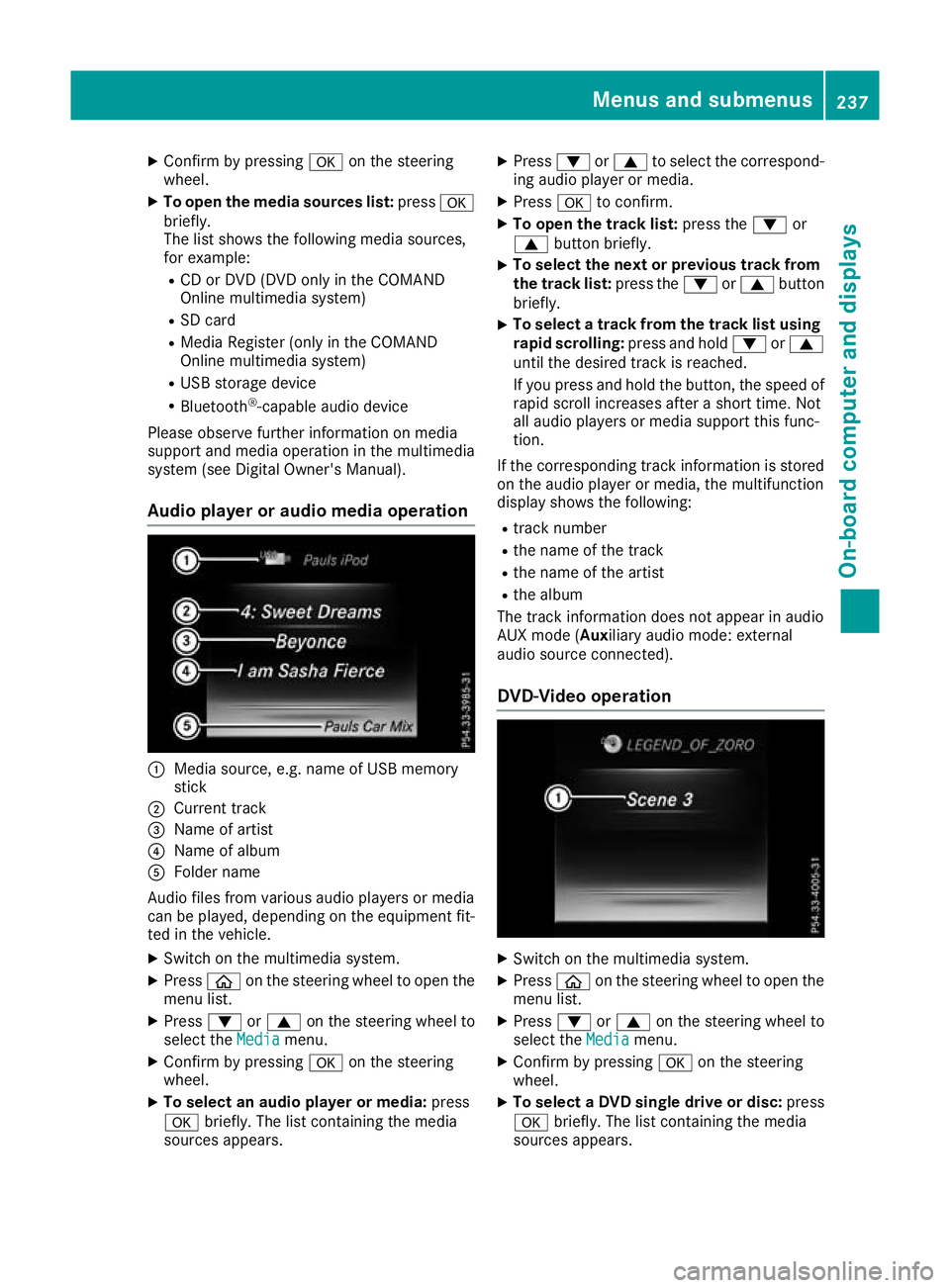
Audio player or audio media operation :
Media source, e.g. name of USB memory
stick
; Current track
= Name of artist
? Name of album
A Folder name
Audio files from various audio players or media
can be played, depending on the equipment fit- ted in the vehicle.
X Switch on the multimedia system.
X Press òon the steering wheel to open the
menu list.
X Press :or9 on the steering wheel to
select the Media
Media menu.
X Confirm by pressing aon the steering
wheel.
X To select an audio player or media: press
a briefly. The list containing the media
sources appears. X
Press :or9 to select the correspond-
ing audio player or media.
X Press ato confirm.
X To open the track list: press the:or
9 button briefly.
X To select the next or previous track from
the track list: press the:or9 button
briefly.
X To select a track from the track list using
rapid scrolling: press and hold:or9
until the desired track is reached.
If you press and hold the button, the speed of rapid scroll increases after a short time. Not
all audio players or media support this func-
tion.
If the corresponding track information is stored on the audio player or media, the multifunction
display shows the following:
R track number
R the name of the track
R the name of the artist
R the album
The track information does not appear in audio
AUX mode (Aux iliary audio mode: external
audio source connected).
DVD-Video operation X
Switch on the multimedia system.
X Press òon the steering wheel to open the
menu list.
X Press :or9 on the steering wheel to
select the Media Mediamenu.
X Confirm by pressing aon the steering
wheel.
X To select a DVD single drive or disc: press
a briefly. The list containing the media
sources appears. Menus and submenus
237On-board computer and displays Z
Page 241 of 389
X
Press :or9 to select the correspond-
ing DVD single drive or disc.
X Press ato confirm.
X To open the scene list: press the:or
9 button briefly.
X To select the next or previous scene in the
scene list: press the:or9 button
briefly.
X To select a scene from the scene list using
rapid scrolling: press and hold:or9
until desired scene :is reached.
X Press ato confirm your selection.
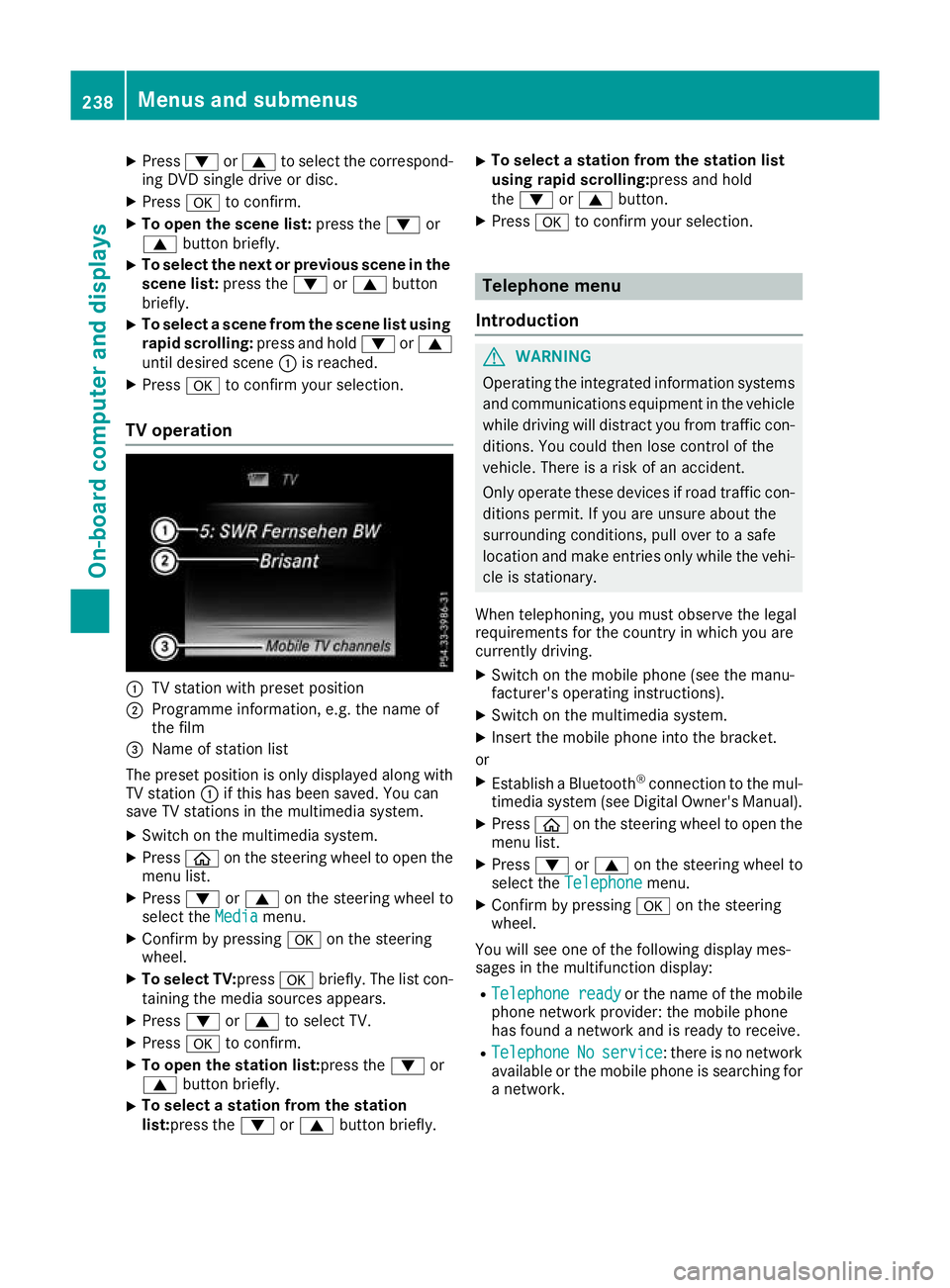
TV operation :
TV station with preset position
; Programme information, e.g. the name of
the film
= Name of station list
The preset position is only displayed along with TV station :if this has been saved. You can
save TV stations in the multimedia system.
X Switch on the multimedia system.
X Press òon the steering wheel to open the
menu list.
X Press :or9 on the steering wheel to
select the Media
Mediamenu.
X Confirm by pressing aon the steering
wheel.
X To select TV: pressabriefly. The list con-
taining the media sources appears.
X Press :or9 to select TV.
X Press ato confirm.
X To open the station list:press the :or
9 button briefly.
X To select a station from the station
list:press the
:or9 button briefly. X
To select a station from the station list
using rapid scrolling:press and hold
the
: or9 button.
X Press ato confirm your selection. Telephone menu
Introduction G
WARNING
Operating the integrated information systems and communications equipment in the vehicle
while driving will distract you from traffic con-
ditions. You could then lose control of the
vehicle. There is a risk of an accident.
Only operate these devices if road traffic con-
ditions permit. If you are unsure about the
surrounding conditions, pull over to a safe
location and make entries only while the vehi-
cle is stationary.
When telephoning, you must observe the legal
requirements for the country in which you are
currently driving. X Switch on the mobile phone (see the manu-
facturer's operating instructions).
X Switch on the multimedia system.
X Insert the mobile phone into the bracket.
or X Establish a Bluetooth ®
connection to the mul-
timedia system (see Digital Owner's Manual).
X Press òon the steering wheel to open the
menu list.
X Press :or9 on the steering wheel to
select the Telephone Telephone menu.
X Confirm by pressing aon the steering
wheel.
You will see one of the following display mes-
sages in the multifunction display:
R Telephone ready Telephone ready or the name of the mobile
phone network provider: the mobile phone
has found a network and is ready to receive.
R Telephone
Telephone No
Noservice
service: there is no network
available or the mobile phone is searching for
a network. 238
Menus and submenusOn-board computer and displays
Page 242 of 389
i
You can obtain further information about
suitable mobile phones and connecting
mobile phones via Bluetooth ®
:
R on the Internet at http://www.mercedes-
benz.com/connect
R at any Mercedes-Benz Service Centre
Accepting a call If someone calls you when you are in the
Tele‐ Tele‐
phone
phone menu, a display message appears in the
multifunction display.
You can accept a call at any time irrespective of
the selected menu.
X Press the 6button on the steering wheel
to accept the call.
Rejects or ends a call X
Press the ~button on the steering wheel
to reject or end the call.
Selecting an entry in the phone book X
Press òon the steering wheel to open the
menu list.
X Press :or9 on the steering wheel to
select the Telephone
Telephone menu.
X Confirm by pressing aon the steering
wheel.
X Press :, 9ora to switch to the
phone book.
X Press :or9 to select the names one
after the other.
or X To start rapid scrolling: press and hold:
or 9 for longer than one second.
The names are displayed quickly one after the
other in the phone book.
If you press and hold the :or9 button
for longer than five seconds, the name with
the next or previous initial letter in the alpha-
bet appears.
Rapid scrolling stops when you release the
button or reach the end of the list.
X If only one telephone number is stored for
a name: press the 6ora button to
start dialling.
or X
If there is more than one number for a
name: press the 6ora button to dis-
play the numbers.
X Press :or9 to select the number you
want to dial.
X Press the 6ora button to start dial-
ling.
or
X To exit the telephone book: press the~
or % button briefly.
Redialling The on-board computer saves the last names or
numbers dialled in the redial memory.
X Press òon the steering wheel to open the
menu list.
X Press :or9 on the steering wheel to
select the Telephone Telephone menu.
X Confirm by pressing aon the steering
wheel.
X Press the 6button to switch to the redial
memory.
X Press :or9 to select the desired
name or number.
X Press the 6ora button to start dial-
ling.
or X To exit the redial memory: press the~
or % button briefly. Assistance graphic menu
X
Press òon the steering wheel to open the
menu list.
X Press :or9 on the steering wheel to
select the Assistance graphic Assistance graphic menu. Menus and submenus
239On-board computer and displays Z
Page 302 of 389
Calculating the route
Prerequisite: the address has been entered and
is in the menu.
X Select Start
Start orContinue
Continue.
The route is calculated with the selected route
type and the selected route options.
If route guidance has already been activated,
a prompt will appear asking whether you wish to end the current route guidance.
X Select Yes
Yes orSet as intermediate des‐
Set as intermediate des‐
tination
tination.
Yes
Yes cancels the current route guidance and
starts route calculation to the new destina-
tion.
Set as intermediate destination
Set as intermediate destination adds
the new destination in addition to the existing
destination and opens the intermediate des-
tinations list. Connecting the mobile phone
Requirements For telephony via the Bluetooth
®
interface, you
require a Bluetooth ®
-capable mobile phone. The
mobile phone must support Hands-Free Profile
1.0 or above.
Multimedia system:
X Select Vehicle
VehicleQSystem set‐ System set‐
tings tingsQ Activate Bluetooth
Activate Bluetooth .
X Activate Bluetooth ®
O.
Mobile phone:
X Activate Bluetooth ®
and, if necessary, Blue-
tooth ®
visibility for other devices (see the
manufacturer's operating instructions).
The Bluetooth ®
device names for all of one man-
ufacturer's products might be identical. To
make it possible to clearly identify your mobile
phone, change the device name (see the man-
ufacturer's operating instructions).
If the mobile phone supports the PBAP (Phone
Book Access Profile) and MAP (Message
Access Profile) Bluetooth ®
profiles, the follow-
ing information will be transmitted after you
connect:
R Phone book
R Call lists
R Messages i
Further information on suitable mobile
phones can be obtained on the Internet at:
http://www.mercedes-benz.com/
connect
Searching for and authorising a mobile
phone Before using your mobile phone with the multi-
media system for the first time, you will need to
search for the phone and then authorise (con-
nect) it. Depending on the mobile phone, author- isation takes place by means of Secure Simple
Pairing or by entering a passkey. The multimedia
system automatically makes the procedure that is relevant for your mobile phone available. The
mobile phone is always connected automati-
cally after authorisation. Further information on
using a mobile phone with the multimedia sys-
tem (see the Digital Owner's Manual).
If the multimedia system does not detect your
mobile phone, this may be due to particular
security settings on your mobile phone (see the manufacturer's operating instructions).
Only one mobile phone can be connected to the
multimedia system at any one time.
Searching for a mobile phone
Audio 20:
X Select Tel/
Tel/®Q Connect Connect
device
device QSearch for phonesSearch for phones QStartStart
search
search .
The available mobile phones are displayed.
COMAND Online:
X Select Telephone
Telephone QConnectConnect
device
device QSearch for phonesSearch for phones QStartStart
search
search .
The available mobile phones are displayed.
Symbols in the device list Sym-
bol Explanation
Ï
New mobile phone found, not yet
authorised.
Ñ
Mobile phone is authorised, but is
not connected.
#
Mobile phone is authorised and
connected.
Connecting the mobile phone Operating system
299Multimedia system Z