2016 MERCEDES-BENZ GLC-Class engine
[x] Cancel search: enginePage 113 of 418
=Seat cushion length
?Seat cushion angle
ASeat fore-and-aft adjustment
Adjusting the head restraints
Important safety notes
GWARNING
You could lose control of your vehicle if you do the following while driving:
Radjust the driver's seat, head restraint,
steering wheel or mirrors
Rfasten the seat belt
There is a risk of an accident.
Adjust the driver's seat, head restraint, steer-
ing wheel and mirror and fasten your seat belt before starting the engine.
GWARNING
If the head restraints are not installed or not
adjusted correctly, they cannot provide pro-
tection as intended. There is an increased risk
of injury in the head and neck area, e.g. in the event of an accident or when braking.
Always drive with the head restraints instal-
led. Before driving off, make sure for every
vehicle occupant that the center of the head
restraint supports the back of the head at
about eye level.
General notes
Pay attention to the important safety notes
(
Ypage 109).
Do not rotate the head restraints of the front
and rear seats. Otherwise, you cannot adjust
the height and angle of the head restraints to
the correct position.
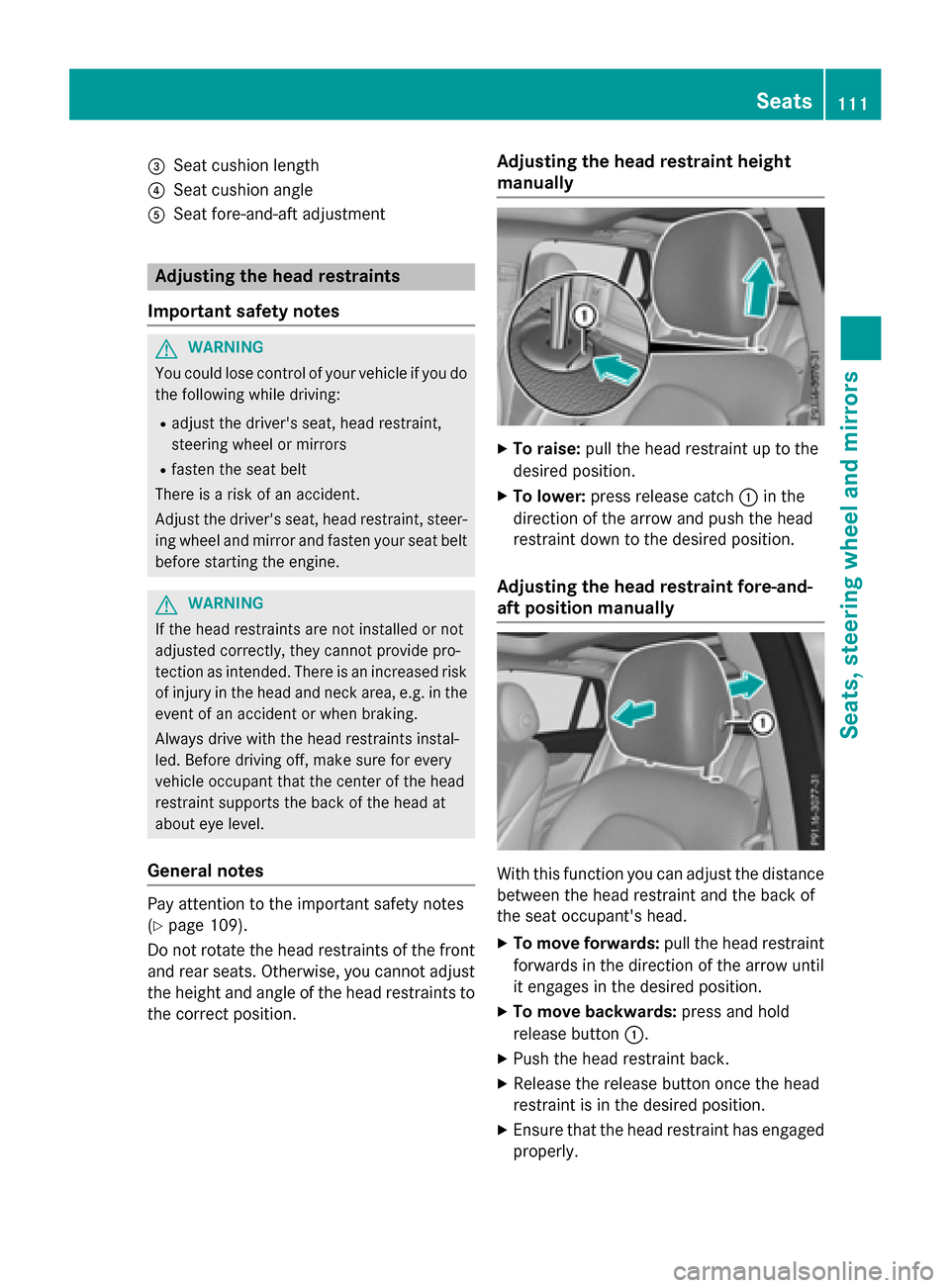
Adjusting the head restraint height
manually
XTo raise: pull the head restraint up to the
desired position.
XTo lower: press release catch :in the
direction of the arrow and push the head
restraint down to the desired position.
Adjusting the head restraint fore-and-
aft position manually
With this function you can adjust the distance
between the head restraint and the back of
the seat occupant's head.
XTo move forwards: pull the head restraint
forwards in the direction of the arrow until
it engages in the desired position.
XTo move backwards: press and hold
release button :.
XPush the head restraint back.
XRelease the release button once the head
restraint is in the desired position.
XEnsure that the head restraint has engaged
properly.
Seats111
Seats, steering wheel and mirrors
Z
Page 117 of 418

Problems with the seat ventilation
ProblemPossible causes/consequences andMSolutions
The seat ventilation has
switched off prema-
turely or cannot be
switched on.The on-board voltage is too low because too many electrical con-
sumers are switched on.
XSwitch off electrical consumers that you do not need, such as
the rear window defroster or interior lighting.
Once the battery is sufficiently charged, the seat ventilation can
be switched back on.
Steering wheel
Important safety notes
GWARNING
You could lose control of your vehicle if you do the following while driving:
Radjust the driver's seat, head restraint,
steering wheel or mirrors
Rfasten the seat belt
There is a risk of an accident.
Adjust the driver's seat, head restraint, steer-
ing wheel and mirror and fasten your seat belt before starting the engine.
GWARNING
Children could injure themselves if they
adjust the steering wheel. There is a risk of
injury.
When leaving the vehicle, always take the
SmartKey with you and lock the vehicle. Never
leave children unsupervised in the vehicle.
The electrically adjustable steering wheel can
still be adjusted when there is no key in the
ignition lock.
Adjusting the steering wheel man-
ually
:Release lever
;To adjust the steering wheel height
=To adjust the steering wheel position
(fore-and-aft adjustment)
XPush release lever :down completely.
The steering column is unlocked.
XAdjust the steering wheel to the desired
position.
XPush release lever :up completely.
The steering column is locked.
XCheck if the steering column is locked.
When doing so, try to push the steering
wheel up or down or try to move it in the
fore-and-aft direction.
Steering wheel115
Seats, steering wheel and mirrors
Z
Page 120 of 418

Position of the steering wheel for driv-
ing
The steering wheel is moved to the last selec-
ted position when:
Rthe driver's door is closed and you insert
the SmartKey into the ignition lock
Ryou close the driver's door when the igni-
tion is switched on
Ryou press the Start/Stop button once on
vehicles with KEYLESS-GO
iThe steering wheel only returns to the last
set position if the driving position is stored
after the seat or steering column has been adjusted (
Ypage 122).
The most recent driving position of the steer-
ing wheel is stored if:
Rthe ignition is switched off
Rthe setting is stored with the memory func-
tion (
Ypage 122).
Crash-responsive EASY-EXIT feature
If the crash-responsive EASY-EXIT feature is
triggered in an accident, the steering column
will move upwards when the driver's door is
opened or the SmartKey is removed from the ignition lock. This makes it easier to exit the
vehicle and rescue the occupants.
The crash-responsive EASY-EXIT feature is
only operational if the EASY-EXIT/ENTRY fea-
ture is activated in Audio 20/COMAND; see
the separate Audio 20/COMAND operating
instructions.
Mirrors
Rear-view mirror
XAnti-glare mode: flick anti-glare lever :
forwards or back.
Exterior mirrors
Important safety notes
GWARNING
You could lose control of your vehicle if you do the following while driving:
Radjust the driver's seat, head restraint,
steering wheel or mirrors
Rfasten the seat belt
There is a risk of an accident.
Adjust the driver's seat, head restraint, steer-
ing wheel and mirror and fasten your seat belt before starting the engine.
GWARNING
The exterior mirror on the front-passenger
side reduces the size of the image. Visible
objects are actually closer than they appear.
This means that you could misjudge the dis-
tance from road users traveling behind, e.g.
when changing lane. There is a risk of an acci-
dent.
For this reason, always make sure of the
actual distance from the road users traveling
behind by glancing over your shoulder.
118Mirrors
Seats, steering wheel and mirrors
Page 126 of 418

Useful information
i
This Operator's Manual describes all
models and all standard and optional equip-
ment of your vehicle available at the time of
publication of the Operator's Manual.
Country-specific differences are possible.
Please note that your vehicle may not be
equipped with all features described. This
also applies to safety-related systems and
functions.
iRead the information on qualified special-
ist workshops (
Ypage 27).
Exterior lighting
General notes
If you wish to drive during the daytime without lights, switch off the daytime running lamps
function in the on-board computer
(
Ypage 255).
Setting the exterior lighting
Setting options
Exterior lighting can be set using the:
Rlight switch
Rcombination switch (Ypage 126)
Ron-board computer (Ypage 255)
Light switch
Operation
1 WLeft-hand standing lamps
2XRight-hand standing lamps
3TParking lamp, license plate and
instrument cluster lighting
4ÃAutomatic headlamp mode, control-
led by the light sensor
5LLow-beam/high-beam headlamps
BRRear fog lamp
If you hear a warning tone when you leave the
vehicle, the lights may still be switched on.
XTurn the light switch to the Ãposition.
The exterior lighting (except the parking/
standing lamps) switches off automatically if
you:
Rremove the SmartKey from the ignition lock
Ropen the driver's door with the SmartKey in
position 0in the ignition lock.
Automatic headlamp mode
à is the favored light switch setting. The
light setting is automatically selected accord-
ing to the brightness of the ambient light
(exception: poor visibility due to weather con-
ditions such as fog, snow or spray):
RSmartKey in position 1in the ignition lock:
the parking lamps are switched on or off
automatically depending on the brightness
of the ambient light.
RWith the engine running (USA only): if you
have activated the daytime running lamps
function via the on-board computer, the
124Exterior lighting
Lights and windshield wipers
Page 127 of 418

daytime running lamps or the parking
lamps and the low-beam headlamps are
switched on or off automatically depending
on the brightness of the ambient light.
RWith the engine running (Canada only):
depending on the ambient light, the day-
time running lamps or the parking lamps
and the low-beam headlamps are switched
on or off automatically.
XTo switch on the automatic headlamps:
turn the light switch to the Ãposition.
GWARNING
When the light switch is set to Ã, the low-
beam headlamps may not be switched on
automatically if there is fog, snow or other
causes of poor visibility due to the weather
conditions such as spray. There is a risk of an
accident.
In such situations, turn the light switch to
L.
The automatic headlamp feature is only an
aid. The driver is responsible for the vehicle's
lighting at all times.
Canada only:
The daytime running lamps improve the visi-
bility of your vehicle during the day. The day-
time running lamps function is required by law
in Canada. It cannot therefore be deactivated.
When the engine is running and the vehicle is
stationary: if you move the selector lever from
a drive position to P, the daytime running
lamps/low-beam headlamps go out after
three minutes.
When the engine is running, the vehicle is
stationary and in bright ambient light: if you
turn the light switch to T, the daytime
running lamps and parking lamps switch on.
If the engine is running and you turn the light
switch to the Lposition, the manual set-
tings take precedence over the daytime run-
ning lamps.
USA only:
The daytime running lamps improve the visi-
bility of your vehicle during the day. To do this, the daytime running lamps function must be
switched on using the on-board computer
(
Ypage 255).
If the engine is running and you turn the light
switch to the TorL position, the man-
ual settings take precedence over the day-
time running lamps.
Low-beam headlamps
Even if the light sensor does not detect that it
is dark, the parking lamps and low-beam
headlamps switch on when the ignition is
switched on and the light switch is set to the
L position. This is a particularly useful
function in the event of rain and fog.
XTo switch on the low-beam headlamps:
turn the SmartKey in the ign
ition lock to
position 2or start the engine.
XTurn the light switch to the Lposition.
The green Lindicator lamp in the instru-
ment cluster lights up.
Rear fog lamp
The rear fog lamp improves visibility of your
vehicle for the traffic behind in the event of
thick fog. Please take note of the country-
specific regulations for the use of rear fog
lamps.
XTo switch on the rear fog lamp: turn the
SmartKey in the ignition lock to position 2
or start the engine.
XTurn the light switch to the LorÃ
position.
XPress the Rbutton.
The yellow Rindicator lamp in the
instrument cluster lights up.
XTo switch off the rear fog lamp: press the
R button.
The yellow Rindicator lamp in the
instrument cluster goes out.
Parking lamps
!If the battery has been excessively dis-
charged, the parking lamps or standing
lamps are automatically switched off to
enable the next engine start. Always park
Exterior lighting125
Lights and windshield wipers
Z
Page 128 of 418

your vehiclesafely and sufficientl ylit
accordin gto legal standards .Avoid th e
continuous use of th eT parkin glamp s
fo rsevera lhours. If possible, switch on th e
X right or th eW leftstandin glamp .
XTo switch on: turnth eligh tswitch to th e
T position .
The green Tindicator lamp in th einstru-
men tcluster lights up.
Standing lamps
Switchin gon th estandin glamp sensures th e
correspondin gside of th evehicl eis illumina-
ted.
XTo switch on th estanding lamps :th e
SmartKey should no tbe in th eignition loc k
or it should be in position 0.
XTurnth eligh tswitch to th eW (left-han d
side of th evehicle) or X(right-hand side
of th evehicle) position .
Combination switch
Turn signal
:High-beam headlamp s
;Turnsignal ,right
=High-beam flasher
?Tur nsignal ,lef t
XTo indicat ebriefly: press thecombination
switch briefl yto th epressur epoin tin th e
direction of arrow ;or?.
The correspondin gtur nsignal flashes three
times .
XTo indicate: press thecombination switch
beyond th epressur epoin tin th edirection
of arrow ;or?.
High-bea mheadlamps
XTo switch on manually: turnth eSmartke y
to position 2in th eignition loc kor start th e
engine.
XVehicles without Adaptive Highbeam
Assist: tur nth eligh tswitch to Lor
Ã.
XVehicles wit hAdaptive Highbeam Assist:
tur nth eligh tswitch to L.
XPress thecombination switch beyond th e
pressur epoin tin th edirection of arrow :.
In th eà position ,th ehigh-beam head -
lamp sare only switched on when it is dark
and th eengin eis running .
The blue Kindicator lamp in th einstru-
men tcluster lights up when th ehigh-beam
headlamp sare switched on .
XTo deactivate:mov eth ecombination
switch bac kto it snormal position .
The blue Kindicator lamp in th einstru-
men tcluster goe sout .
Vehicles wit hAdaptive Highbeam Assist:
when Adaptive Highbeam Assis tis active ,it
automatically controls activation of th ehigh-
beam headlamp s (
Ypage 127).
High-beamflashe r
XTo switch on: turnth eSmartKey in th e
ignition loc kto position 1or 2,or start th e
engine.
XPull th ecombination switch in th edirection
of arrow =.
126Exterior lighting
Lights and windshield wiper s
Page 137 of 418

Switching the rear window wiper on/
off
Combination switch
:
èSwitch
2/5bWipes with washer fluid
3ISwitches on intermittent wiping
40 Switches off intermittent wiping
XTurn the SmartKey to position 1or 2in the
ignition lock (
Ypage 153).
XTurn switch :on the combination switch
to the corresponding position.
When the rear window wiper is switched on,
the icon appears in the instrument cluster.
Replacing the wiper blades
Important safety notes
GWARNING
If the windshield wipers begin to move while
you are changing the wiper blades, you could be trapped by the wiper arm. There is a risk of
injury.
Always switch off the windshield wipers and
ignition before changing the wiper blades.
!Never open the hood/tailgate if a wiper
arm has been folded away from the wind-
shield/rear window.
Never fold a windshield wiper arm without a
wiper blade back onto the windshield/rear
window.
Hold the windshield wiper arm firmly when
you change the wiper blade. If you release the wiper arm without a wiper blade and it
falls onto the windshield/rear window, the
windshield/rear window may be damaged
by the force of the impact.
Mercedes-Benz recommends that you have
the wiper blades changed at a qualified
specialist workshop.
!To avoid damaging the wiper blades,
make sure that you touch only the wiper
arm of the wiper.
Changing the windshield wiper blades
Adjusting the wiper blades so that they
are vertical
On vehicles without KEYLESS-GO:
XTurn the SmartKey to position 1or 2in the
ignition lock (
Ypage 153).
XSet the windshield wiper to position °.
XWhen the wiper arms have reached the ver-
tical position, turn the SmartKey to position
0 and remove it from the ignition lock.
XFold the wiper arm away from the wind-
shield.
On vehicles with KEYLESS-GO:
XSwitch off the engine.
XRemove your foot from the brake pedal.
XSet the windshield wiper to the °posi-
tion.
XPress the Start/Stop button repeatedly
until the windshield wiper starts.
XWhen the wiper arms have reached the ver- tical position, press the Start/Stop button.
XFold the wiper arm away from the wind-
shield.
Windshield wipers135
Lights and windshield wipers
Z
Page 140 of 418

Problems with the windshield wipers
ProblemPossible causes/consequences andMSolutions
The windshield wipers
are jammed.Leaves or snow, for example, may be obstructing the windshield
wiper movement. The wiper motor has been deactivated.
XFor safety reasons, you should remove the SmartKey from the
ignition lock.
or
XSwitch off the engine using the Start/Stop button and open the driver's door.
XRemove the cause of the obstruction.
XSwitch the windshield wipers back on.
The windshield wipers
fail completely.The windshield wiper drive is malfunctioning.
XSelect another wiper speed on the combination switch.
XHave the windshield wipers checked at a qualified specialist
workshop.
The windshield washer
fluid from the spray
nozzles no longer hits
the center of the wind-
shield.The spray nozzles are misaligned.
XHave the spray nozzles adjusted at a qualified specialist work-
shop.
138Windshield wipers
Lights and windshield wipers