2016 MERCEDES-BENZ GLC-Class tow
[x] Cancel search: towPage 196 of 418

If Steering Assist and Stop&Go Pilot are acti-
vated but is not ready for a steering interven-
tion, steering wheel symbol:appears in
gray. If the system provides you with support
by means of steering interventions, sym-
bol :is shown in green.
Deactivating Steering Assist and Stop&Go
Pilot
XPress button ;.
Indicator lamp :goes out. The DTR+:
SteeringAssist.Offmessage appears
in the multifunction display. Steering Assist
and Stop&Go Pilot are deactivated.
When DISTRONIC PLUS is deactivated or not
available, Steering Assist and Stop&Go Pilot
are deactivated automatically.
HOLD function
General notes
The HOLD function can assist the driver in the
following situations:
Rwhen pulling away, especially on steep
slopes
Rwhen maneuvering on steep slopes
Rwhen waiting in traffic
The vehicle is kept stationary without the
driver having to depress the brake pedal.
The braking effect is canceled and the HOLD
function deactivated when you depress the
accelerator pedal to pull away.
Important safety notes
GWARNING
When leaving the vehicle, it can still roll away despite being braked by the HOLD function if:
Rthere is a malfunction in the system or in
the voltage supply.
Rthe HOLD function has been deactivated by
pressing the accelerator pedal or the brake
pedal, e.g. by a vehicle occupant.
Rthe electrical system in the engine com-
partment, the battery or the fuses have
been tampered with.
Rthe battery is disconnected
There is a risk of an accident.
If you wish to exit the vehicle, always turn off
the HOLD function and secure the vehicle
against rolling away.
!If DISTRONIC PLUS or the HOLD function
is activated, the vehicle brakes automati-
cally in certain situations.
To prevent damage to the vehicle, deacti-
vate DISTRONIC PLUS and the HOLD func-
tion in the following or other similar situa-
tions:
Rwhen towing the vehicle
Rin the car wash
Deactivating the HOLD function
(
Ypage 195).
Activation conditions
You can activate the HOLD function if all of
the following conditions are fulfilled:
Rthe vehicle is stationary.
Rthe engine is running or if it has been auto-
matically switched off by the ECO start/
stop function.
Rthe driver's door is closed or your seat belt
is fastened.
Rthe electric parking brake is released.
Rthe transmission is in position D,R or N.
RDISTRONIC PLUS is deactivated.
194Driving systems
Driving and parking
Page 199 of 418
XSelect theEor Cdrive program with the
DYNAMIC SELECT switch (
Ypage 161).
The vehicle is raised to the normal level.
When driving at speeds above 80 mph
(125 km/h), the vehicle is automatically low-
ered by 0.6 in (15 mm) in the Eand Cdrive
programs. When driving at speeds below
50 mph (80 km/h), the vehicle is raised again.
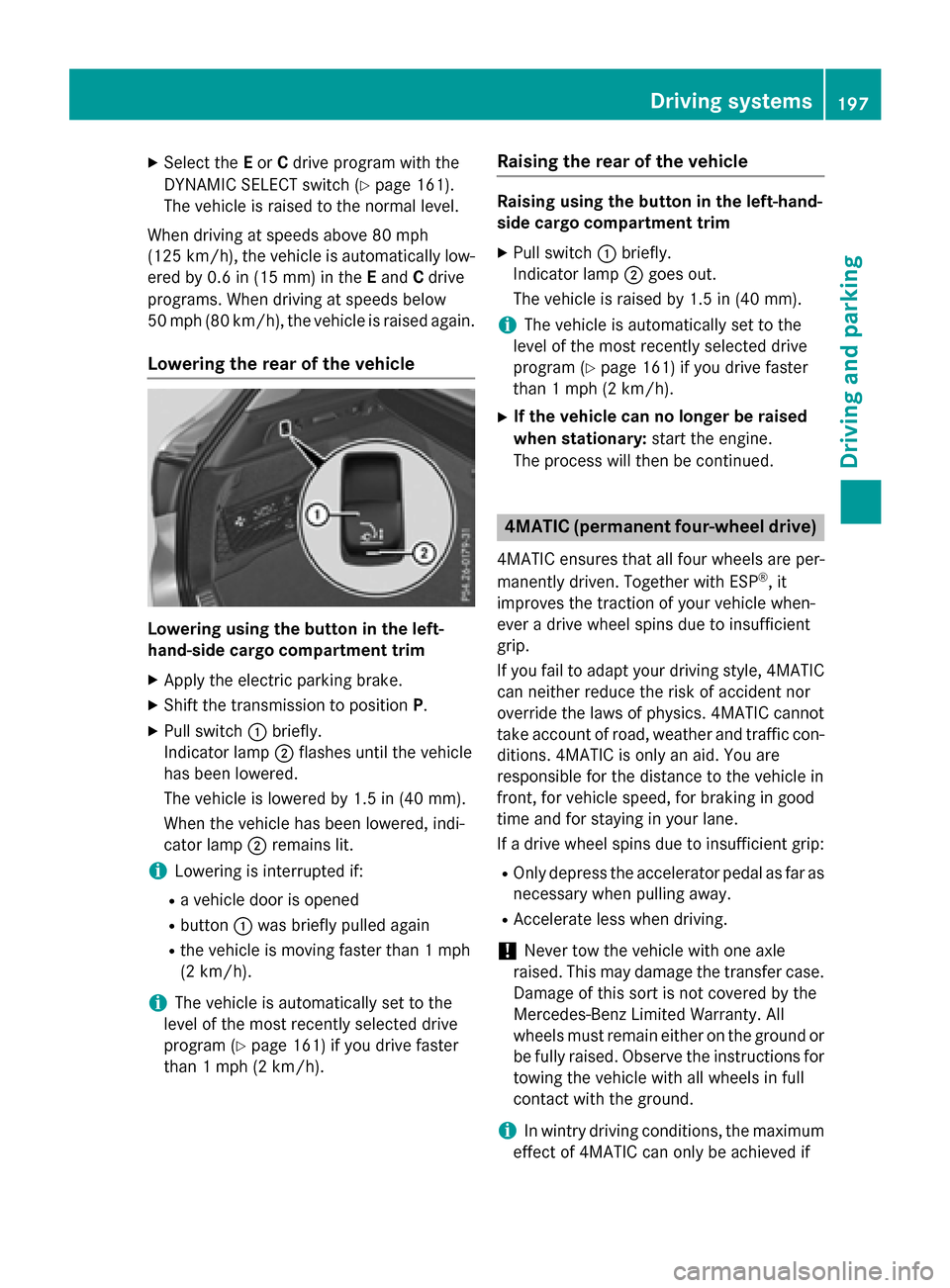
Lowering the rear of the vehicle
Lowering using the button in the left-
hand-side cargo compartment trim
XApply the electric parking brake.
XShift the transmission to position P.
XPull switch:briefly.
Indicator lamp ;flashes until the vehicle
has been lowered.
The vehicle is lowered by 1.5 in (40 mm).
When the vehicle has been lowered, indi-
cator lamp ;remains lit.
iLowering is interrupted if:
Ra vehicle door is opened
Rbutton :was briefly pulled again
Rthe vehicle is moving faster than 1 mph
(2 km/h).
iThe vehicle is automatically set to the
level of the most recently selected drive
program (
Ypage 161) if you drive faster
than 1 mph (2 km/h).
Raising the rear of the vehicle
Raising using the button in the left-hand-
side cargo compartment trim
XPull switch :briefly.
Indicator lamp ;goes out.
The vehicle is raised by 1.5 in (40 mm).
iThe vehicle is automatically set to the
level of the most recently selected drive
program (
Ypage 161) if you drive faster
than 1 mph (2 km/h).
XIf the vehicle can no longer be raised
when stationary: start the engine.
The process will then be continued.
4MATIC (permanent four-wheel drive)
4MATIC ensures that all four wheels are per-
manently driven. Together with ESP®, it
improves the traction of your vehicle when-
ever a drive wheel spins due to insufficient
grip.
If you fail to adapt your driving style, 4MATIC can neither reduce the risk of accident nor
override the laws of physics. 4MATIC cannot
take account of road, weather and traffic con-
ditions. 4MATIC is only an aid. You are
responsible for the distance to the vehicle in
front, for vehicle speed, for braking in good
time and for staying in your lane.
If a drive wheel spins due to insufficient grip:
ROnly depress the accelerator pedal as far as
necessary when pulling away.
RAccelerate less when driving.
!Never tow the vehicle with one axle
raised. This may damage the transfer case. Damage of this sort is not covered by the
Mercedes-Benz Limited Warranty. All
wheels must remain either on the ground or
be fully raised. Observe the instructions fortowing the vehicle with all wheels in full
contact with the ground.
iIn wintry driving conditions, the maximum
effect of 4MATIC can only be achieved if
Driving systems197
Driving and parking
Z
Page 205 of 418

:Detected parking space on the left
;Parking symbol
=Detected parking space on the right
Active Parking Assist is switched on automat-
ically when driving forwards. The system is
operational at speeds of up to approximately
22 mph (35 km/h). While in operation, the
system independently locates and measures
parking spaces on both sides of the vehicle.
Active Parking Assist will only detect parking
spaces:
Rparallel or at right angles to the direction of
travel
Rthat are parallel to the direction of travel
and at least 59 in (1.5 m) wide
Rthat are parallel to the direction of travel
and at least 39.5 in (1.0 m) longer than your
vehicle
Rthat are at right angles to the direction of
travel and at least 39.5 in (1.0 m) wider
than your vehicle
iNote that Active Parking Assist cannot
measure the size of a parking space if it is at
right angles to the direction of travel. You
will need to judge whether your vehicle will
fit into the parking space.
When driving at speeds below 19 mph
(30 km/h), you will see the parking symbol as
a status indicator in the instrument cluster.
When a parking space h
as been detected, an
arrow towards the right or the left also
appears. By default, Active Parking Assist
only displays parking spaces on the front-
passenger side. Parking spaces on the driv- er's side are displayed as soon as the turn
signal on the driver's side is activated. When
parking on the driver's side, this must remain
switched on until you acknowledge the use of
Active Parking Assist by pressing the
a
button on the multifunction steering wheel.
The system automatically determines
whether the parking space is parallel or at
right angles to the direction of travel.
A parking space is displayed while you are
driving past it, and until you are approx-
imately 50 ft (15 m) awayfrom it .
Parking
GWARNING
If you leave the vehicle when it is only being
braked by Active Parking Assist it could roll
away if:
Rthere is a malfunction in the system or in
the voltage supply.
Rthe electrical system in the engine com-
partment, the battery or the fuses have
been tampered with.
Rthe battery is disconnected.
Rthe accelerator pedal has been depressed,
e.g. by a vehicle occupant.
There is a risk of an accident.
Before leaving the vehicle, always secure it
against rolling away.
iWhen PARKTRONIC detects obstacles,
Active Parking Assist brakes automatically
during the parking process. You are respon-
sible for braking in good time.
XStop the vehicle when the parking space
symbol shows the desired parking space in
the instrument cluster.
XShift the transmission to position R.
The Start Park Assist?Yes: OKNo:
% message appears in the multifunction
display.
Driving system s203
Driving an d parking
Z
Page 224 of 418

DrivingAssistance PLUS package
General notes
The Driving Assistanc ePLU Spackage con-
sists of DISTRONIC PLU S (
Ypage 183), Active
Blin dSpot Assis t (
Ypage 222) and Active
Lan eKeepin gAssis t (
Ypage 225).
Active Blind Spot Assist
General notes
Active Blin dSpot Assis tuses aradar sensor
system, pointe dtoward th erea rof th evehi-
cle, to monito rth eare ato th esides of th e
vehicle whic hth edriver is unable to see . A
warnin gdisplay in th eexterio rmirrors draws
your attention to vehicles detecte din th e
monitored area. If you then switch on th ecor-
respondin gturn signal to chang elane, you
will also receiv ean optical and audible warn -
ing. If aris kof latera lcollision is detected,
corrective braking may hel pyou avoid acol-
lision .Before acourse-correcting brake appli -
cation ,Active Blin dSpot Assis tevaluates th e
spac ein th edirection of trave land at th e
sides of th evehicle. Fo rthis, Active Blin dSpot
Assis tuses th eforward-facin gradar sensors.
Active Blin dSpot Assis tsupports you from a
speed of approximately 20 mph (30 km/h).
Important safet ynotes
Active Blin dSpot Assis tis only an aid and is
no t a substitute fo rattentive driving.
GWARNING
Active Blin dSpot Assis tdoe sno treact to :
Rvehicles overtaken to oclosely on th eside,
placin gthem in th eblin dspo tare a
Rvehicles whic happroac hwit h a larg espeed
differential and overtak eyour vehicle
As aresult ,Active Blin dSpot Assis tmay nei-
ther giv ewarnings no rinterven ein suc hsit -
uations. There is aris kof an accident.
Always observ eth etraffic condition scare-
fully, and maintain asaf elatera ldistance.
iUS Aonly: Thi sdevic ehas been approved
by th eFCC as a"Vehicular Radar System".
The radar sensor is intended fo ruse in an
automotive radar system only. Removal,
tampering, or altering of th edevic ewill void
any warranties ,and is no tpermitte dby th e
FCC. Do no ttampe rwith, alter, or use in
any non-approved way.
An yunauthorized modification to this
devic ecould void th euser's authorit yto
operat eth eequipment.
iCanada only: Thi sdevic ecomplies wit h
RSS-210 of Industry Canada. Operation is
subjec tto th efollowing tw oconditions:
1. Thi sdevic emay no tcaus eharmful inter-
ference ,and
2. Thi sdevic emus taccept any interfere
nce
re
ceived, includin ginterferenc ethat may
caus eundesired operation of th edevice.
Removal, tampering, or altering of th e
devic ewill void any warranties ,and is no t
permitted. Do no ttampe rwith, alter, or use
in any non-approved way.
An yunauthorized modification to this
devic ecould void th euser's authorit yto
operat eth eequipment.
Rada rsensor s
The Active Blin dSpot Assis tradar sensor sare
integrated into th efron tand rea rbumper s
and behin d acover in th eradiator trim. Mak e
sur ethat th ebumper sand th ecover in th e
radiator grill are free of dirt, ic eor slush. The
rea rsensor smus tno tbe covered, e.g. by
bicycl eracks or overhangin gloads. Following
a severe impact or in th eevent of damage to
th ebumpers, hav eth efunction of th eradar
sensor schecke dat aqualified specialist
workshop .Active Blin dSpot Assis tmay oth-
erwise no longer wor kproperly.
Monitoring area
GWARNING
Active Blind Spot Assis tdoe sno tdetec tall
traffic situation sand road users. There is a
ris kof an accident.
222Driving systems
Driving an d parking
Page 229 of 418

A lane-correcting brake application is inter-
rupted automatically if:
Ra driving safety system intervenes, e.g.
ESP®, PRE-SAFE®Brake or Active Blind
Spot Assist.
Rlane markings can no longer be recognized.
Activating/deactivating Active Lane
Keeping Assist
XTo activate: press button ;.
Indicator lamp :lights up. The Lane
Keeping Assist Onmessage appears in
the multifunction display. If all conditions
have been satisfied, a warning or steering
intervention may be made.
If you drive at speeds above 40 mph
(60 km/h) and lane markings are detected, the lines in the assistance graphics display
(
Ypage 251) are shown in green. Active
Lane Keeping Assist is ready for use.
XTo deactivate: press button;.
Indicator lamp :goes out. The Active
Lane Keeping Assist is deactivated. The
Lane Keeping Assist Off
message
appears in the multifunction display.
Selecting Standard or Adaptive setting
XIn the DriveAssistmenu on the on-board
computer, select the Active Lane Keep‐
ing Assistfunction (Ypage 253).
XSelectStandardorAdaptive.
When Standard
is selected, no warning
vibration occurs if:
Ryou switch on the turn signals. In this
event, the warnings are suppressed for a
certain period of time.
Ra driving safety system intervenes, such
as ABS, BAS or ESP®.
When Adaptive
is selected, no warning
vibration occurs if:
Ryou switch on the turn signals. In this
event, the warnings are suppressed for a
certain period of time.
Ra driving safety system intervenes, e.g.
ABS, BAS or ESP®.
Ryou accelerate hard, e.g. kickdown.
Ryou brake hard.
Ryou steer actively, e.g. swerve to avoid an
obstacle or change lanes quickly.
Ryou cut the corner on a sharp bend.
In order that you are warned only when nec-
essary and in good time if you cross the lane
marking, the system recognizes certain con-
ditions and warns you accordingly.
The warning vibration occurs earlier if:
Ryou approach the outer lane marking on a
bend.
Rthe road has very wide lanes, e.g. a high-
way.
Rthe system recognizes solid lane markings.
The warning vibration occurs later if:
Rthe road has narrow lanes.
Ryou cut the corner on a bend.
Towing a trailer
Important safety notes
GWARNING
Installing an unsuitable ball coupling may
result in overloading of the trailer tow hitch
and the rear axle. This applies especially if the ball coupling in question is longer or angled
differently. This could seriously impair the
driving characteristics and the trailer can
come loose. There is a risk of an accident.
Towing a trailer227
Driving an d parking
Z
Page 230 of 418

You should only ever install a ball coupling
that has the permissible dimensions and thatis designed to meet your trailer-towing
requirements. Do not modify the ball coupling
or the trailer tow hitch.
You will find the values approved by the man-ufacturer on the vehicle identification plates
and those for the towing vehicle under "Tech-
nical data" (
Ypage 416).
GWARNING
If the ball coupling is not installed correctly or not secured with the bolt provided and the
corresponding spring cotter, the trailer may
come loose. There is a risk of an accident.
Always install and secure the ball coupling as
described. Before every journey, ensure that
the ball coupling is secured with the bolt and
the corresponding spring cotter.
GWARNING
When the vehicle/trailer combination begins
to lurch, you could lose control of it. The vehi- cle/trailer combination could even rollover.
There is a risk of an accident.
On no account should you attempt to
straighten up the vehicle/trailer combination
by increasing the speed. Reduce vehicle
speed and do not countersteer. Apply the
brake as necessary.
Please observe the manufacturer's operating
instructions for the trailer coupling if a
detachable trailer coupling is used.
Couple and uncouple the trailer carefully. If
you do not couple the trailer to the towing
vehicle correctly, the trailer could become
detached.
Make sure that the following values are not
exceeded:
Rthe permissible trailer drawbar noseweight
Rthe permissible trailer load
Rthe permissible rear axle load of the towing
vehicle
Rthe maximum permissible gross vehicle
weight of both the towing vehicle and the
trailer
The applicable permissible values, which
must not be exceeded, can be found:
Rin the vehicle documents
Ron the identification plates for the trailer
tow hitch and the trailer
Ron the vehicle identification plate
If the values differ, the lowest value applies.
When towing a trailer, your vehicle's handling
characteristics will be different in comparison
with when driving without a trailer.
The vehicle/trailer combination:
Ris heavier
Ris restricted in its acceleration and gradi-
ent-climbing capability
Rhas an increased braking distance
Ris affected more by strong crosswinds
Rdemands more sensitive steering
Rhas a larger turning radius
This could impair the handling characteris-
tics.
When towing a trailer, always adjust your
speed to the current road and weather con-
ditions. Do not exceed the max
imum permis-
sible speed for your vehicle/trailer combina-
tion.
Notes on towing a trailer
Important safety notes
GWARNING
When the vehicle/trailer combination begins
to lurch, you could lose control of it. The vehi- cle/trailer combination could even rollover.
There is a risk of an accident.
On no account should you attempt to
straighten up the vehicle/trailer combination
by increasing the speed. Reduce vehicle
228Towing a trailer
Driving and parking
Page 231 of 418

speed and do not countersteer. Apply the
brake as necessary.
Please observe the manufacturer's operating
instructions for the trailer coupling if a
detachable trailer coupling is used.
Couple and uncouple the trailer carefully. If
you do not couple the trailer to the towing
vehicle correctly, the trailer could become
detached.
Make sure that the following values are not
exceeded:
Rthe permissible trailer drawbar noseweight
Rthe permissible trailer load
Rthe permissible rear axle load of the towing
vehicle
Rthe maximum permissible gross vehicle
weight of both the towing vehicle and the
trailer
The applicable permissible values, which
must not be exceeded, can be found:
Rin the vehicle documents
Ron the identification plates of the trailer tow hitch, the trailer and the vehicle
If the values differ, the lowest value applies.
You will find the values approved by the man-
ufacturer on the vehicle identification plates
and those for the towing vehicle under "Tech-
nical data" (
Ypage 416).
When towing a trailer, your vehicle's handling
characteristics will be different in comparison
with when driving without a trailer.
The vehicle/trailer combination:
Ris heavier
Ris restricted in its acceleration and gradi-
ent-climbing capability
Rhas an increased braking distance
Ris affected more by strong crosswinds
Rdemands more sensitive steering
Rhas a larger turning radius
This could impair the handling characteris-
tics. When towing a trailer, always adjust your
speed to the current road and weather con-
ditions. Do not exceed the maximum permis-
sible speed for your vehicle/trailer combina-
tion.
General notes
RDo not exceed the legally prescribed max-
imum speed for vehicle/trailer combina-
tions in the relevant country.
This lowers the risk of an accident.
ROnly install an approved trailer coupling on
your vehicle.
Further information on availability and on
installation is available from any authorized Mercedes-Benz Center.
RThe bumpers of your vehicle are not suita-
ble for installing detachable trailer cou-
plings.
RDo not install hired trailer couplings or
other detachable trailer couplings on the
bumpers of your vehicle.
RTo reduce the risk of damage to the ball
coupling, remove it from the ball coupling
recess when not in use.
iWhen towing a trailer, set the tire pres-
sure on the rear axle of the towing vehicle
for a maximum load; see the tire pressure
table in the fuel filler flap (
Ypage 393).
Please note that when towing a trailer,
PARKTRONIC (
Ypage 198) is only available
with limitations or not at all.
iOn vehicles without level control, the
height of the ball coupling will alter accord-
ing to the load placed on the vehicle. If nec-
essary, use a trailer with a height-adjusta-
ble drawbar.
You will find installing dimensions and loads
under "Technical data" (
Ypage 415).
Driving tips
iObserve the notes on ESP®trailer stabi-
lization (
Ypage 75).
Towing a trailer229
Driving and parking
Z
Page 232 of 418

The maximum permissible speed for vehicle/
trailer combinations depends on the type of
trailer. Before beginning the journey, check
the trailer's documents to see what the max-
imum permissible speed is. Observe the
legally prescribed maximum speed in the rel-
evant country.
For certain Mercedes-Benz vehicles, the max-
imum permissible rear axle load is increased
when towing a trailer. Refer to the "Technical
data" section to find out whether this applies
to your vehicle.
If you utilize any of the added maximum rear
axle load when towing a trailer, the vehicle/
trailer combination may not exceed a maxi-
mum speed of 60 mph (100 km/h) for rea-
sons concerning the operating permit. This
also applies in countries in which the permis-
sible maximum speed for vehicle/trailer com-
binations is above 60 mph (100 km/h).
When towing a trailer, your vehicle's handling
characteristics will be different in comparison
with when driving without a trailer.
Use the left-hand steering wheel paddle
shifter to shift into a lower gear in good time
on long and steep downhill gradients.
iThis also applies if you have activated
cruise control.
This will use the braking effect of the engine,
so that less braking will be required to main-
tain the speed. This relieves the load on the
brake system and prevents the brakes from
overheating and wearing too quickly. If you
need additional braking, depress the brake
pedal repeatedly rather than continuously.
Driving tips
RMaintain a greater distance from the vehi-
cle in front than when driving without a
trailer.
RAvoid braking abruptly. If possible, brake
gently at first to allow the trailer to run on.
Then, increase the braking force rapidly.
RThe values given for gradient-climbing
capabilities from a standstill refer to sea level. When driving in mountainous areas,
note that the power output of the engine
and, consequently, the vehicle's gradient-
climbing capability, decreases with
increasing altitude.
If the trailer swings from side to side:
XDo not accelerate.
XDo not counter-steer.
XBrake if necessary.
Installing the ball coupling
GWARNING
If the ball coupling is not correctly installed
and secured, it can come loose during the
journey and endanger other road users. There is a risk of an accident and injury.
Always install and secure the ball coupling as
described. Before every journey, ensure that
the ball coupling is secured with the bolt and
the corresponding spring cotter.
GWARNING
If the ball coupling is not installed correctly or not secured with the bolt provided and the
corresponding spring cotter, the trailer may
come loose. There is a risk of an accident.
Always install and secure the ball coupling as
described. Before every journey, ensure that
the ball coupling is secured with the bolt and
the corresponding spring cotter.
GWARNING
If the ball coupling is not installed and secured
correctly the trailer may come loose. There is
a risk of an accident.
Install and secure the ball coupling as descri-
bed in the ball coupling installation instruc-
tions. Make sure that the ball coupling is
installed and secured correctly before every
journey.
230Towing a trailer
Driving and parking