2016 MERCEDES-BENZ GLC-Class trailer
[x] Cancel search: trailerPage 77 of 418

ESP®trailer stabilization
General information
If your vehicle/trailer combination begins to
swerve, ESP
®assists you in this situation.
ESP®slows the vehicle down by braking and
limiting the engine output until the vehicle/
trailer combination has stabilized.
Important safety notes
GWARNING
If road and weather conditions are poor,
trailer stabilization will not be able to prevent
the vehicle/trailer combination from swerv-
ing. Trailers with a high center of gravity can
tip over before ESP
®can detect this. There is
a risk of an accident.
Always adapt your driving style to the prevail-
ing road and weather conditions.
If your vehicle with trailer (vehicle/trailer
combination) begins to lurch, you can only
stabilize the vehicle/trailer combination by
depressing the brake firmly.
ESP
®trailer stabilization is active above
speeds of about 65 km/h.
ESP
®trailer stabilization does not work if
ESP®is deactivated or disabled because of a
malfunction.
Crosswind Assist
General information
Strong crosswinds can cause your vehicle to
deviate from a straight course. The crosswind driving assistance function integrated in
ESP
®noticeably reduces these impairments.
ESP
®intervenes automatically according to
the direction and intensity of the crosswinds
affecting your vehicle.
ESP intervenes with stabilizing braking to
assist you in keeping the vehicle in the lane.
Crosswind Assist is active at vehicle speeds
above 50 mph (80 km/h) when driving
straight ahead or cornering gently. Important safety notes
Crosswind Assist does not work if ESP
®is
deactivated or disabled because of a mal-
function.
EBD (electronic brake force distribu-
tion)
General information
EBD monitors and controls the brake pres-
sure on the rear wheels to improve driving
stability while braking.
Important safety notes
iObserve the "Important safety notes" sec-
tion (
Ypage 67).
GWARNING
If EBD is malfunctioning, the rear wheels can
lock, e.g. under full braking. This increases the
risk of skidding and an accident.
You should therefore adapt your driving style
to the different handling characteristics. Have
the brake system checked at a qualified spe-
cialist workshop.
Observe information regarding indicator and
warning lamps (
Ypage 294) as well as dis-
play messages (
Ypage 261).
ADAPTIVE BRAKE
ADAPTIVE BRAKE enhances braking safety
and offers increased braking comfort. In addi- tion to the braking function, ADAPTIVE BRAKE
also has the HOLD function (
Ypage 194) and
hill start assist (
Ypage 157).
PRE-SAFE®Brake
General information
PRE-SAFE®Brake can help you to minimize
the risk of a collision with a vehicle ahead or a
pedestrian, and reduce the effects of such a
Driving safety systems75
Safety
Z
Page 97 of 418

this, make a kicking movement under the
bumper with your foot.
Observe the following points:
RCarry your KEYLESS-GO key about your
person. The KEYLESS-GO key must be in
the rear detection range of the vehicle.
RWhen making the kicking movement, make
sure that you are standing firmly on the
ground and that there is sufficient clear-
ance to the rear of the vehicle. You could
otherwise lose your balance, e.g. on ice.
RAlways ensure that you only make the kick-ing movement within the detection range of
sensors :.
RStand at least 12 in (30 cm) away from the
rear area while doing so.
RDo not come into contact with the bumper
while making the kicking movement. Oth-
erwise, the sensors may not function cor-
rectly.
RHANDS-FREE ACCESS does not function
when the engine is started.
RIf a KEYLESS-GO key is within the rear
detection range of KEYLESS-GO, HANDS-
FREE ACCESS could be triggered. The tail- gate could thus be opened or closed unin-
tentionally, for example, if you:
-install or remove the ball coupling.
-couple or uncouple a trailer.
-install or remove a rear-mounted bicycle
rack.
-load/unload bicycles on/from a rear-
mounted bicycle rack.
-sit on the edge of the cargo compart-
ment.
-set something down or lift something up
behind the vehicle.
-polish the rear of the vehicle.
Do not carry the KEYLESS-GO key about
your person in these situations or in situa-
tions similar to these. This will prevent the
unintentional opening/closing of the tail-
gate.
RDirt caused by road salt around sensors :
may restrict functionality.
RUsing the HANDS-FREE AC CESS with a
prosthetic leg may restrict functionality.
Operation
XTo open/close: kick into sensor detection
range :under the bumper with your foot.
Two warning tones sound while the tailgate
is opening or closing.
XIf the tailgate does not open/close after
several attempts: wait at least ten sec-
onds, using your foot kick under the
bumper again.
Cargo compartment95
Opening and closing
Z
Page 135 of 418

XIn recess?on the inside of the closing
handle, pry off and remove the upper sec-
tion of handle =with a flat and smooth
object, e.g. a screwdriver.
XPull the lower section of handle :using a
sharp, sudden movement to remove it from
the paneling and then place it to one side.
XReach under the right-hand side of paneling
B and apply a gentle jolting force along the
entire length of the paneling in order to
unclip it.
XRelease and pull out locator lighting con-
nector Cat the latch.
XVehicles with EASY-PACK tailgate: pull out
the plug connector for the switch of the
EASY-PACK tailgate in the top right of the
paneling.
XVehicles with electric fold-out trailer tow
hitch: unlock and pull out the plug connec-
tor for the electric fold-out trailer tow hitch
in the top left of the paneling.
XPlace paneling Bto one side.
XOn the side where the bulb is to be
changed, unclip the remaining part of pan- eling
Dfrom the assembly using a sudden,
sharp movements, until bulb holder Eis
accessible.
XTurn the bulb counter-clockwise and pull it out of bulb holder E.
XInsert the new bulb into bulb holder Eand
turn it clockwise.
XPosition paneling Dand engage it in place
by tapping it with your hand.
XBefore beginning the installation, check
that all the metal clips are inserted in the
parts placed to one side: 2 clips ;in the
upper part of handle =and 4 clips Ain
paneling B.
XIf not, remove the missing metal clips from
the metal openings in the tailgate and
insert them in the appropriate places.
XTake paneling Band connect plug con-
nector Cto the surround lighting.
iThe surround lighting only illuminates
when the tailgate has been shut and reop-
ened.
XVehicles with EASY-PACK tailgate: push in
the plug connector for the switch of the
EASY-PACK tailgate in the top right of the
paneling.
XVehicles with electric fold-out trailer tow
hitch: push in the plug connector for the
electric fold-out trailer tow hitch in the top
left of the paneling.
XPosition paneling Band engage it in place
by tapping it with your hand, starting from
the outside.
Replacing bulbs133
Lights and windshield wipers
Z
Page 153 of 418
Useful information............................152
Notes on breaking-in a new vehi-
cle ....................................................... 152
Driving ............................................... 152
DYNAMIC SELECT switch .................161
Automatic transmission ...................161
Refueling ............................................ 169
Parking ............................................... 172
Driving tips ........................................ 176
Driving systems ................................ 181
Towing a trailer ................................. 227
151
Driving and parking
Page 159 of 418
Make sure that the engine cannot be started
via your smartphone before carrying out
maintenance or repairs. You can prevent an
engine start via your smartphone, for exam-
ple, if you:
Rswitch on the hazard warning lamps
Rdo not lock the doors
Ropen the hood
Pulling away
General notes
GWARNING
If the engine speed is above the idling speed
and you engage transmission position Dor R,
the vehicle could pull away suddenly. There is
a risk of an accident.
When engaging transmission position Dor R,
always firmly depress the brake pedal and do not simultaneously accelerate.
Depress the accelerator carefully when pull-
ing away.
The vehicle locks centrally once you have
pulled away. The locking knobs in the doors
drop down.
You can open the doors from the inside at any
time.
You can also deactivate the automatic locking
feature, see the Digital Operator's Manual.
It is only possible to shift the transmission
from position Pto the desired position if you
depress the brake pedal. Only then is the
parking lock released. If you do not depress
the brake pedal, the DIRECT SELECT lever can
still be moved but the parking lock remains
engaged.
iUpshifts take place at higher engine
speeds after a cold start. This helps the
catalytic converter to reach its operating
temperature more quickly.
Information on the automatic release of the
electric parking brake (
Ypage 174).
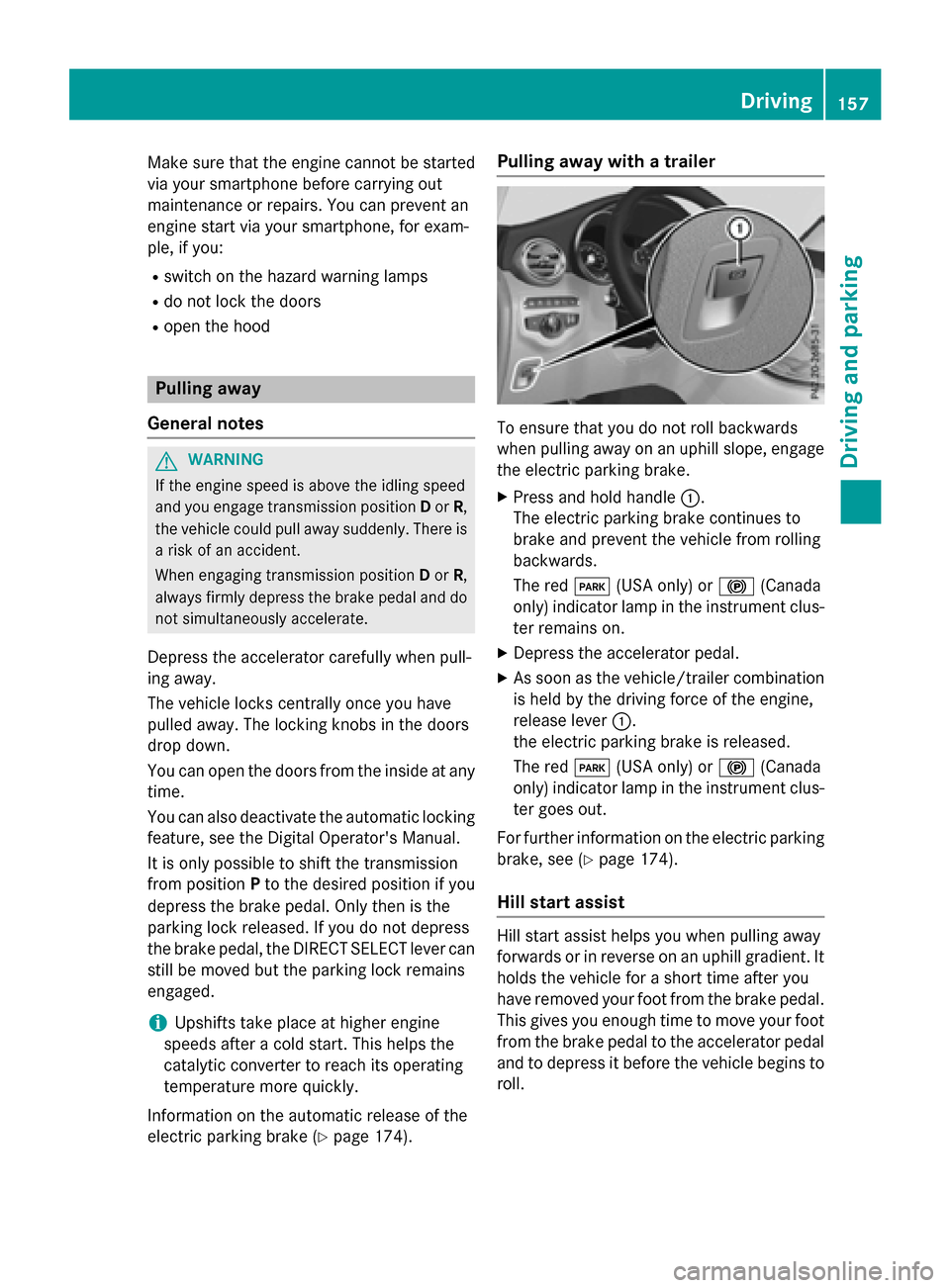
Pulling away with a trailer
To ensure that you do not roll backwards
when pulling away on an uphill slope, engage
the electric parking brake.
XPress and hold handle :.
The electric parking brake continues to
brake and prevent the vehicle from rolling
backwards.
The red F(USA only) or !(Canada
only) indicator lamp in the instrument clus-
ter remains on.
XDepress the accelerator pedal.
XAs soon as the vehicle/trailer combination
is held by the driving force of the engine,
release lever :.
the electric parking brake is released.
The red F(USA only) or !(Canada
only) indicator lamp in the instrument clus-
ter goes out.
For further information on the electric parking
brake, see (
Ypage 174).
Hill start assist
Hill start assist helps you when pulling away
forwards or in reverse on an uphill gradient. It
holds the vehicle for a short time after you
have removed your foot from the brake pedal.
This gives you enough time to move your foot
from the brake pedal to the accelerator pedal
and to depress it before the vehicle begins to
roll.
Driving157
Driving and parking
Z
Page 167 of 418

ANeutral
Do not shift the transmission toN
while driving. Otherwise, the auto-
matic transmission could be dam-
aged.
No power is transmitted from the
engine to the drive wheels.
Releasing the brake pedal will allow
you to move the vehicle freely, e.g. to push it or tow it.
If ESP
®is deactivated or faulty:
shift the transmission to position N
if the vehicle is in danger of skid-
ding, e.g. on icy roads.
If you switch the engine off with the
transmission in position Ror D, the
automatic transmission shifts to N
automatically.
!Rolling in neutral Ncan damage
the drive train.
7Drive
The automatic transmission
changes gear automatically. All
forward gears are available.
Driving tips
Changing gear
The automatic transmission shifts to the indi-
vidual gears automatically when it is in trans-
mission position D. This automatic gear shift-
ing behavior is determined by:
Rthe selected drive program
Rthe position of the accelerator pedal
Rthe road speed
Accelerator pedal position
Your style of driving influences how the auto- matic transmission shifts gear:
Rlittle throttle: early upshifts
Rmore throttle: late upshifts
Double-clutch function
When shifting down, the double-clutch func-
tion is active regardless of the currently selec-
ted drive program. The double-clutch function
reduces load change reactions and is condu-
cive to a sporty driving style. The sound gen-
erated by the double-clutch function depends
on the drive program selected.
Kickdown
Use kickdown for maximum acceleration.
XDepress the accelerator pedal beyond the
pressure point.
The automatic transmission shifts to a
lower gear depending on the engine speed.
XEase off the accelerator pedal once the
desired speed is reached.
The automatic transmission shifts back up.
Rocking the vehicle free
Rocking the vehicle free by shifting back and
forth between transmission positions Dand R
can help to free a vehicle that has become
stuck in mud or snow.
The vehicle's engine management restricts
switching between transmission positions D
and Rto speeds up to a maximum of 5 mph
(9 km/h).
To shift back and forth between transmission
positions Dand R, move the DIRECT SELECT
lever up and down past the point of resist-
ance.
Towing a trailer
XDrive in the middle of the engine speed
range on uphill gradients.
XManual shifting: depending on the uphill
or downhill gradient, shift into a gear
(
Ypage 167), in which the engine will run
the middle of the engine speed range.
This also applies if cruise control or
DISTRONIC PLUS is activated.
Automatic transmission165
Driving an d parking
Z
Page 200 of 418

you use wintertires (M+S tire s), with snow
chains if necessary.
PARKTRONIC
Important safety notes
PARKTRONIC is an electronic parking aid with ultrasonic sensors. It monitors the area
around your vehicle using six sensors in the
front bumper and six sensors in the rear
bumper. PARKTRONIC indicates visually and
audibly the distance between your vehicle
and an object.
PARKTRONIC is only an aid. It is not a replace-
ment for your attention to your immediate
surroundings. You are always responsible for
safe maneuvering, parking and exiting a park-
ing space. When maneuvering, parking or
pulling out of a parking space, make sure that
there are no persons, animals or objects in
the area in which you are maneuvering.
!When parking, pay particular attention to
objects above or below the sensors, such
as flower pots or trailer drawbars.
PARKTRONIC does not detect such objects
when they are in the immediate vicinity of
the vehicle. You could damage the vehicle
or the objects.
The sensors may not detect snow and other
objects that absorb ultrasonic waves.
Ultrasonic sources such as an automatic
car wash, the compressed-air brakes on a
truck or a pneumatic drill could cause
PARKTRONIC to malfunction.
PARKTRONIC may not function correctly on
uneven terrain.
PARKTRONIC is activated automatically when
you:
Rswitch on the ignition
Rshift the transmission to position D,Ror N
PARKTRONIC is deactivated at speeds above
11 mph (18 km/ h). It is reactivated at lower
speeds.
Range of the sensors
General notes
PARKTRONIC does not take objects into con-
sideration that are:
Rbelow the detection range, e.g. people, ani-
mals or objects.
Rabove the detection range, e.g. overhang-
ing loads, truck overhangs or loading
ramps.
:Sensors in the front bumper, left-hand
side (example)
The sensors must be free from dirt, ice or
slush. They can otherwise not function cor-
198Driving systems
Driving and parking
Page 204 of 418
Parking tips:
ROn narrow roads, drive as close to the park-
ing space as possible.
RParking spaces that are littered or over-
grown might be identified or measured
incorrectly.
RParking spaces that are partially occupied
by trailer drawbars might not be identified
as such or be measured incorrectly.
RSnowfall or heavy rain may lead to a parking
space being measured inaccurately.
RPay attention to the PARKTRONIC
(
Ypage 199) warning messages during the
parking procedure.
RYou can intervene in the steering procedure
to correct it at any time. Active Parking
Assist will then be canceled.
RWhen transporting a load which protrudes
from your vehicle, you should not use
Active Parking Assist.
RNever use Active Parking Assist when snow
chains are installed.
RMake sure that the tire pressures are
always correct. This has a direct influence
on the parking characteristics of the vehi-
cle.
Use Active Parking Assist for parking spaces:
Rparallel or at right angles to the direction of
travel
Rthat are on straight roads, not bends
Rthat are on the same level as the road, e.g.
not on the pavement
Detecting parking spaces
Objects located above the height range of
Active Parking Assist will not be detected
when the parking space is measured. These
are not taken into account when the parking
procedure is calculated, e.g. overhanging
loads, tail sections or loading ramps of goods vehicles.
GWARNING
If there are objects above the detection range:
RActive Park Assist may steer too early
Rthe vehicle may not stop in front of these
objects
You may cause a collision as a result. There is
a risk of an accident.
If objects are located above the detection
range, stop and deactivate Active Parking
Assist.
For further information on the detection
range (
Ypage 198).
Active Parking Assist does not assist you
parking in spaces at right angles to the direc-
tion of travel if:
Rtwo parking spaces are located directly
next to one another
Rthe parking space is directly next to a low
obstacle such as a low curb
Ryou park forwards
Active Parking Assist does not assist you
parking in spaces that are parallel or at right
angles to the direction of travel if:
Rthe parking space is on a curb
Rthe system reads the parking space as
being blocked, for example by foliage or
grass paving blocks
Rthe area is too small for the vehicle to
maneuver into
Rthe parking space is bordered by an obsta- cle, e.g. a tree, a post or a trailer
202Driving systems
Driving and parking