2016 MERCEDES-BENZ GL-Class Nav
[x] Cancel search: NavPage 17 of 246

Declarations of conformity
Vehicl ecomponent swhich receive
and/o rtransmit radi owaves
USA only :The wireles sdevices of this vehicle
compl ywit hPar t15 of th eFCC Rules .Oper-
ation is subjec tto th efollowing tw ocondi-
tions:
1) These devices may no tcaus einterference,
and
2) These devices mus taccept any interfer-
ence ,includin ginterferenc ethat may caus e
undesired operation of th edevice.
Changes or modification sno texpressl y
approved by th eparty responsible fo rcom-
pliance could void th euser's authorit yto
operat eth eequipment.
Canad aonly :The wireles sdevices of this
vehicle compl ywit hIndustry Canada license-
exemp tRSS standard(s) .Operation is subjec t
to th efollowing tw oconditions:
1) These devices may no tcaus einterference,
and
2) These devices mus taccept any interfer-
ence ,includin ginterferenc ethat may caus e
undesired operation of th edevice.
Correct us e
GWARNING
Modification sto electronic components, their
software as well as wirin gcan impair their
function and/o rth efunction of other net-
worke dcomponents. In particular, systems
relevant to safet ycould also be affected. As a
result ,these may no longer function as inten-
ded and/o rjeopardiz eth eoperatin gsafet yof
th evehicle. There is an increase dris kof an
acciden tand injury.
Never tampe rwit hth ewirin gas well as elec -
tronic component sor their software .You
should hav eall wor kto electrical and elec -
tronic equipmen tcarrie dout at aqualified
specialis tworkshop .
Observeth efollowing information when usin g
COMAND:
Rth esafet ynote sin this manual
Rtraffic rule sand regulation s
Rlaws and safet ystandard spertainin gto
moto rvehicles
Roof antenna functionalit y(telephone, satel-
lit eradio, GPS )can be affecte dby th euse of
roof carrie rsystems .
Attachin gmetalized retrofit fil mto th ewind-
shield may affec tradio reception and hav e a
negative impact on all other antennas (e.g.
emergency antenna) in th evehicle interior.
Protection against theft :this devic eis
equipped wit htechnica
l provision sto protect
it against theft. Further information on pro -
tection against thef tcan be obtained from an
authorized Mercedes-Ben zCenter.
Qualified specialist workshop
Read th einformation on qualified specialist
workshop sin th evehicle Operator's Manual.
Function restrictions
Fo rsafet yreasons, som efunction sare
restricte dor unavailable whil eth evehicle is in
motion .You will notice this, fo rexample,
because either you will no tbe able to selec t
certain men uitems or amessage will appear
to this effect .
Datastored in th evehicle
Dat arecording
Thi svehicle is capable of recordin gdiagnostic
information relatin gto vehicle operation ,mal-
functions, and user settings. Thi smay include
information about th eperformanc eor status
of various systems ,includin gbut no tlimited
to ,engine, throttle, steerin gor brake sys-
tems ,that is stored and can be rea dout wit h
suitable devices, particularly when th evehi-
Introduction15
Z
Page 21 of 246

Overview.............................................. 20
Touchpad ............................................. 25
Basic functions .................................... 31
Character entry (telephony) ...............33
Character entry (navigation) ..............34
Favorites .............................................. 35
19
Overview and operation
Page 23 of 246

RNavigation system
-Navigation via the hard drive
-Destination entry, for example using key-
word search
-Realistic 3D map with textured city mod-
els
-Personal POIs and routes using SD mem-
ory card
-Navigation functions, e.g. compass dis-
play
-Dynamic route guidance with traffic
reports via SIRIUS satellite radio
RCommunication
-Messaging functions (text messages, e-
mail)
-Address book
-Internet browser
-Mercedes-Benz Apps with Google™
Local Search, destination and route
download, Facebook, Google Street
View™, stock prices, news and much
more
-Mercedes-Benz Mobile Website
-WiFi interface for the connection of a
smartphone to COMAND
-WiFi hotspot functionality to connect a
tablet PC or laptop in order to enable
access to the Internet using the custom- er's mobile phone
RSIRIUS Weather
-Weather data as an information chart
(current forecast, 5-day preview,
detailed information)
-Weather data on the weather map, e.g.
rain radar data, storm characteristics
and the track of tropical cyclones (hurri-
canes, tornadoes)
RVehicle functions
-Vehicle settings, e.g. fuel consumption
-360° camera
-Rear view camera
-Ionization
-Seat functions, for example adjustment
of driving dynamics
-Driving dynamic display in COMAND dis-
play for vehicles with the Off-Road Engi-
neering package (see the vehicle Opera-
tor's Manual)
RFavorites button
Fast access to favorites functions using the
favorites button on the controller
Display
General notes
!Do not use the space in front of the dis-
play for storage. Objects placed here could
damage the display or impair its function.
Avoid any direct contact with the display
surface. Pressure on the display surface
may result in impairments to the display,
which could be irreversible.
Wearing polarized sunglasses may impair
your ability to read the display.
The display has an automatic temperature-
controlled switch-off feature. The brightness
is automatically reduced if the temperature is
too high. The display may then temporarily
switch off completely.
Overview
Overview21
Overview and operation
Page 26 of 246
FunctionPage
GAccepts a call119
Makes a call119
Redial119
Accepts a new call when a
call is being made (call wait-
ing)
122
HRejects a call119
Ends an active call123
ISwitches the mute function
on/off
31
Switches off navigation
announcements
31
FunctionPage
JSwitches to navigation
mode
65
Calls up the navigation sys-
tem menu
107
KCalls up the telephone
menu
113
LCalls up vehicle settings54
Buttons and controller
Overview
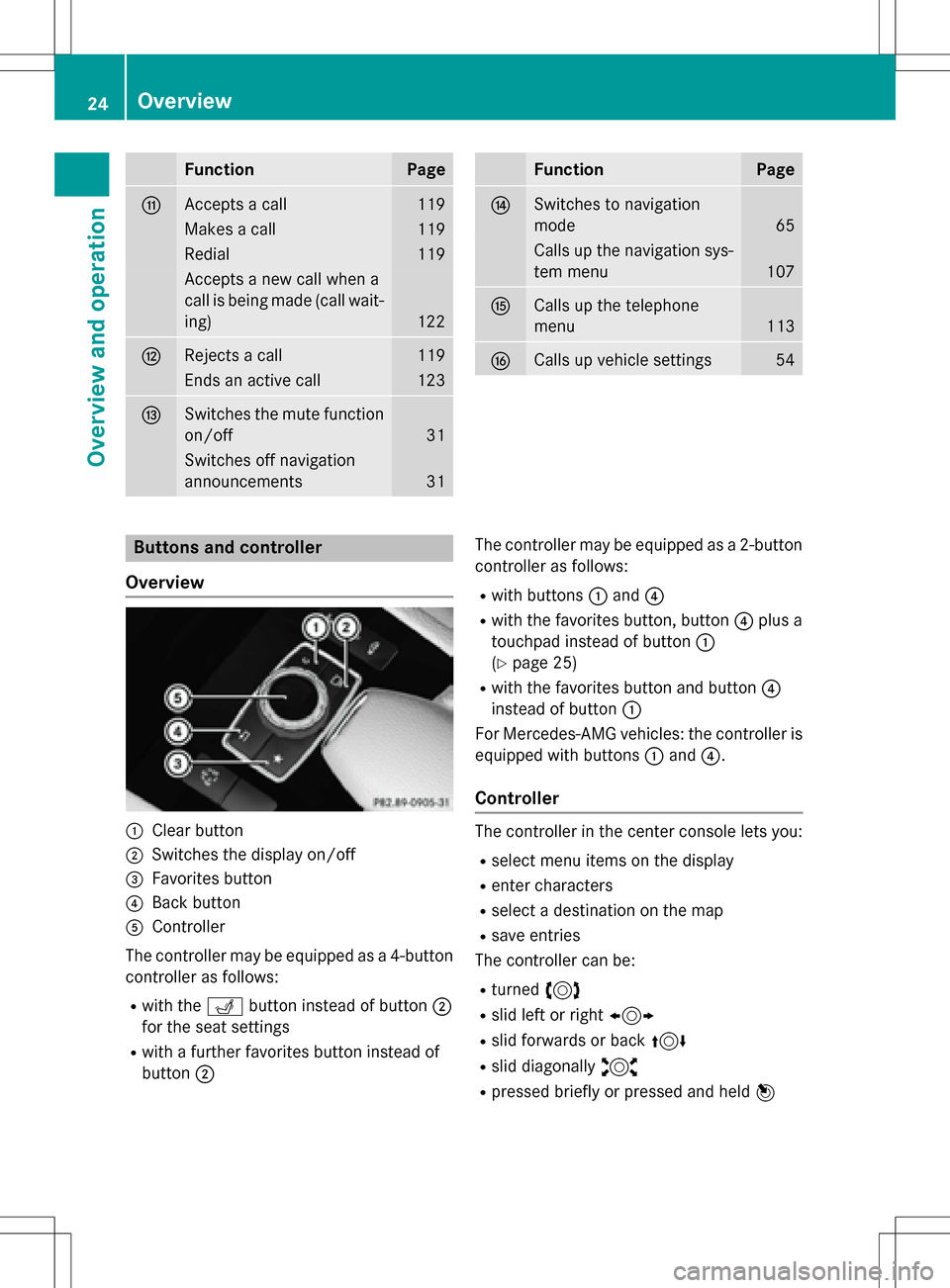
:Clear button
;Switches the display on/off
=Favorites button
?Back button
AController
The controller may be equipped as a 4-button
controller as follows:
Rwith the Tbutton instead of button ;
for the seat settings
Rwith a further favorites button instead of
button ; The controller may be equipped as a 2-button
controller as follows:
Rwith buttons
:and ?
Rwith the favorites button, button ?plus a
touchpad instead of button :
(
Ypage 25)
Rwith the favorites button and button ?
instead of button :
For Mercedes-AMG vehicles: the controller is
equipped with buttons :and ?.
Controller
The controller in the center console lets you:
Rselect menu items on the display
Renter characters
Rselect a destination on the map
Rsave entries
The controller can be:
Rturned 3
Rslid left or right 1
Rslid forwards or back 4
Rslid diagonally2
Rpressed briefly or pressed and held 7
24Overview
Overview and operation
Page 27 of 246
Back button
You can use the%button to exit a menu or
to call up the basic display of the current
operating mode.
XTo exit the menu: briefly press the%
button.
COMAND changes to the next higher menu
level in the current operating mode.
XTo call up the basic display: press the
% button for longer than two seconds.
COMAND changes to the basic display of
the current operating mode.
Clear button
The delete button is on the COMAND control
panel and on the controller.
XTo delete individual characters: briefly
press the $button on the control panel.
or
XBriefly press the jclear button on the
controller.
XTo delete an entire entry: press and hold
the $ button on the control panel.
or
XPress and hold the jclear button on the
controller.
Favorites button
You can assign predefined functions using
the g favorites button and call them up by
pressing the button (
Ypage 49).
Display off button
You can switch the display off/on using the
_ button (
Ypage 41).
Seat button
If the controller is equipped with the T
button, you can call up the menu for the seat
settings (
Ypage 56).
Touchpad
Touchpad overview
!
Do not use any sharp objects on the
touchpad. This could damage the touch-
pad.
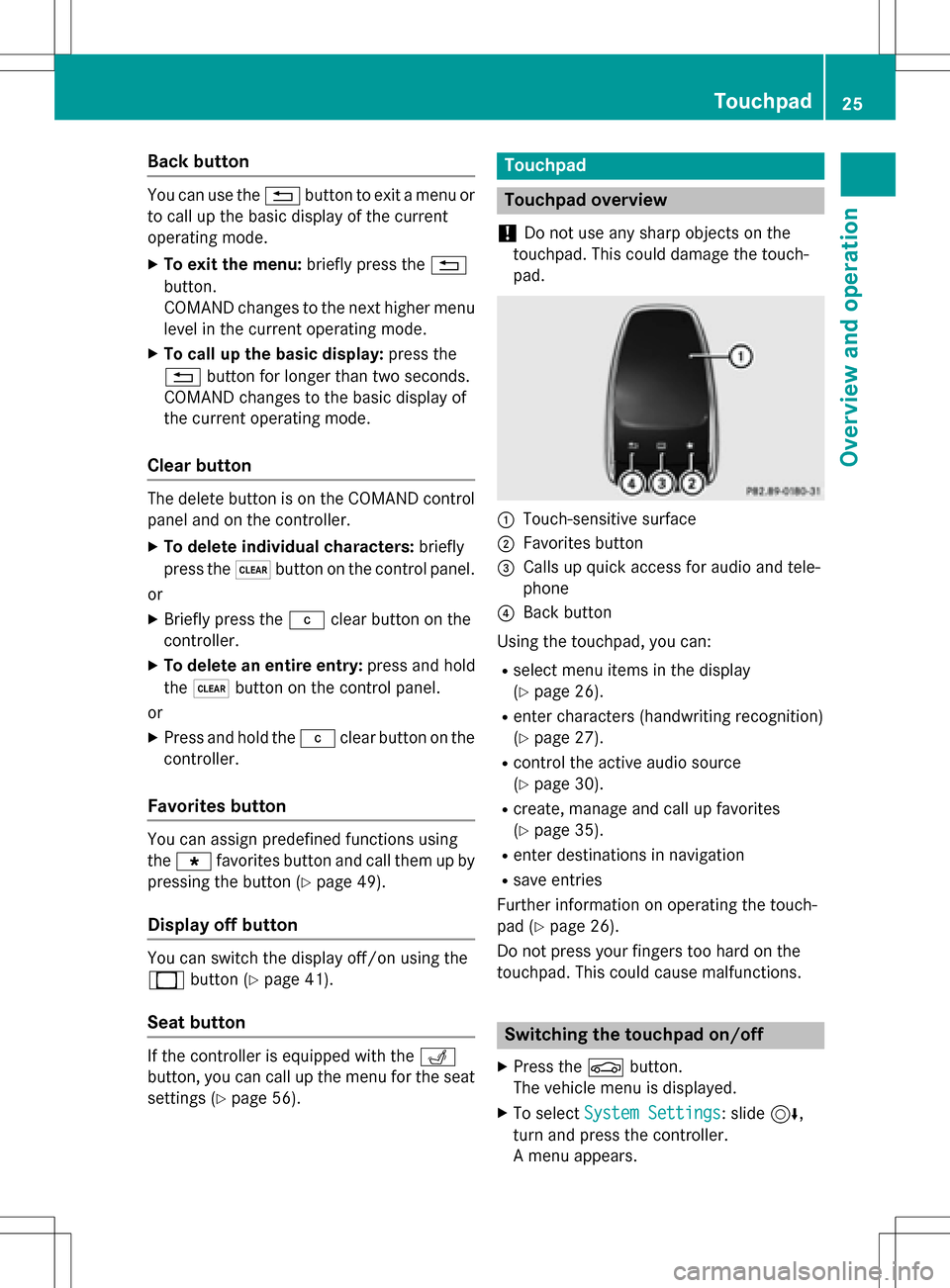
:Touch-sensitive surface
;Favorites button
=Calls up quick access for audio and tele-
phone
?Back button
Using the touchpad, you can:
Rselect menu items in the display
(
Ypage 26).
Renter characters (handwriting recognition)
(
Ypage 27).
Rcontrol the active audio source
(
Ypage 30).
Rcreate, manage and call up favorites
(
Ypage 35).
Renter destinations in navigation
Rsave entries
Further information on operating the touch-
pad (
Ypage 26).
Do not press your fingers too hard on the
touchpad. This could cause malfunctions.
Switching the touchpad on/off
XPress the Øbutton.
The vehicle menu is displayed.
XTo select System Settings: slide6,
turn and press the controller.
A menu appears.
Touchpad25
Overview and operation
Page 28 of 246
XSelectTouchpadif the touchpad is equip-
ped with handwriting recognition.
XSelect Activate Touchpad.
The touchpad is switched on Oor off ª.
Operating the touchpad
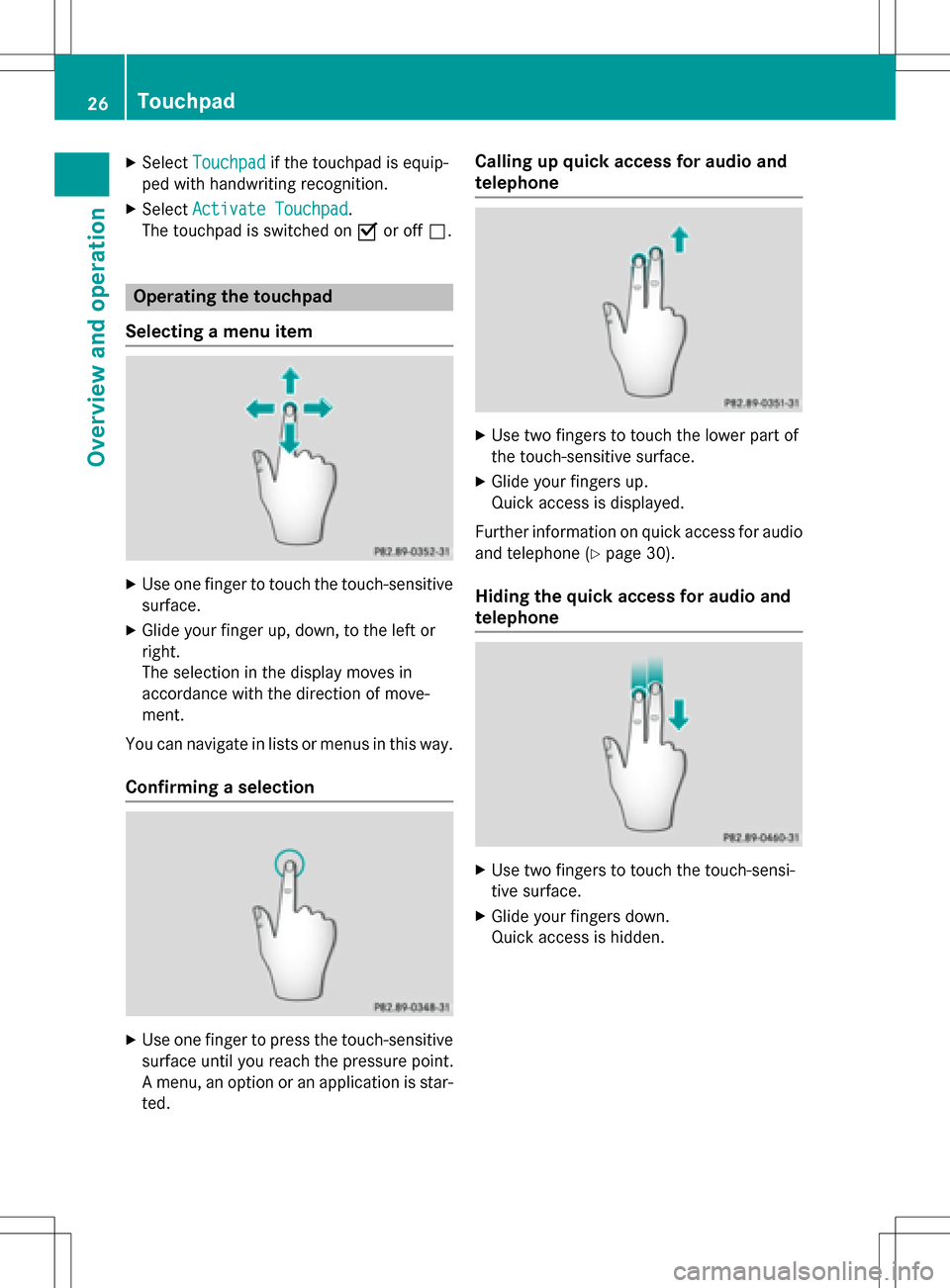
Selecting a menu item
XUse one finger to touch the touch-sensitive
surface.
XGlide your finger up, down, to the left or
right.
The selection in the display moves in
accordance with the direction of move-
ment.
You can navigate in lists or menus in this way.
Confirming a selection
XUse one finger to press the touch-sensitive surface until you reach the pressure point.
A menu, an option or an application is star-
ted.
Calling up quick access for audio and
telephone
XUse two fingers to touch the lower part of
the touch-sensitive surface.
XGlide your fingers up.
Quick access is displayed.
Further information on quick access for audio
and telephone (
Ypage 30).
Hiding the quick access for audio and
telephone
XUse two fingers to touch the touch-sensi-
tive surface.
XGlide your fingers down.
Quick access is hidden.
26Touchpad
Overview and operation
Page 33 of 246
XCallupquic k access during a call
(
Ypage 26).
XTo select cha racters: glide your finger to
the left or right and press.
Every character selected will betransmit-
ted immediately.
Basic functions
Switching COMAND on/off
XPress the qcontrol knob.
When you switch on COMAND, a warning
message willappear. COMAND calls up the
previously selected menu.
If you switch off COMAND, playback of the
current media source will also be switched
off.
Adjusting the volume
Adjusting the volume for media sources
XTurn the qcontrol knob.
or
XPress the WorX button on the mul-
tifunction steering wheel.
The volume of the med iasource currently
selected changes.
Adjusting the volume for traffic
announcements and navigation
announcements
During traff icor navigation announcements:
XTurn the qcontrol knob.
or
XPress the WorX button on the mul-
tifunction steering wheel.
iYou can set the volume for navigation
announcements to bedifferent from the
volume of the respective med iasource.
Adjusting the volume for phone calls
You can adjust the volume for hands-free
mode during a telephone call.
XTurn the qcontrol knob.
or
XPress the WorX button on the mul-
tifunction steering wheel.
iSe tting the volume for the Voice Control
System voice output, see the separate
operating instructions.
Switching the sound on or off
Media source sound
XPress the 8button on the COMAND
controller or the multifunction steering
wheel.
The sound isswitched off. Ifthe audio out-
put isswitched off, the status line willshow
the 8 symbol. Ifyou switch the med ia
source or change the volume, the sound is
automatical lyswitched on.
iEven ifthe sound isswitched off, you will
still hear navigation system announce-
ments.
Switching navigation announcements
off and on again
XTo switch navigation announcemen ts
off: press the 8button during an
announcement.
The Spoken
drivingrecommendations
have been deactivated.message
appears.
XTo switch navigation announcemen ts
back on: switch COMAND off and then on
again (
Ypage 31 ).
or
XSt art a new route calculation (Ypage 71 ).
Basic functions31
Overview and operation
Page 34 of 246
or
XSelect+: while route guidance is active,
show the menu and press the controller
(
Ypage 90).
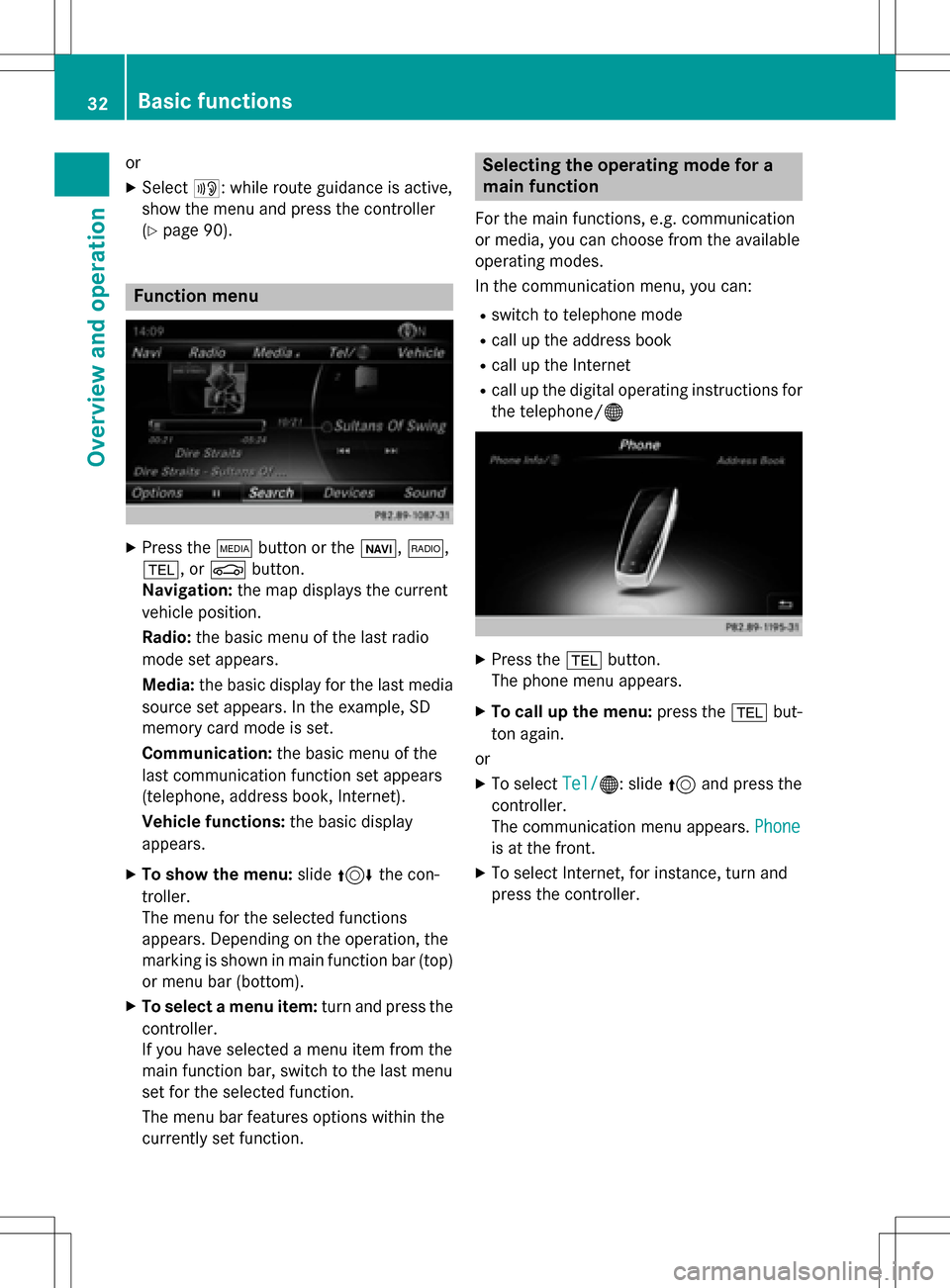
Function menu
XPress the Õbutton or the ß,$,
%, or Øbutton.
Navigation: the map displays the current
vehicle position.
Radio: the basic menu of the last radio
mode set appears.
Media: the basic display for the last media
source set appears. In the example, SD
memory card mode is set.
Communication: the basic menu of the
last communication function set appears
(telephone, address book, Internet).
Vehicle functions: the basic display
appears.
XTo show the menu: slide4 the con-
troller.
The menu for the selected functions
appears. Depending on the operation, the
marking is shown in main function bar (top) or menu bar (bottom).
XTo select a menu item: turn and press the
controller.
If you have selected a menu item from the
main function bar, switch to the last menu
set for the selected function.
The menu bar features options within the
currently set function.
Selecting the operating mode for a
main function
For the main functions, e.g. communication
or media, you can choose from the available
operating modes.
In the communication menu, you can:
Rswitch to telephone mode
Rcall up the address book
Rcall up the Internet
Rcall up the digital operating instructions for
the telephone/®
XPress the %button.
The phone menu appears.
XTo call up the menu: press the%but-
ton again.
or
XTo select Tel/®: slide5and press the
controller.
The communication menu appears. Phone
is at the front.
XTo select Internet, for instance, turn and
press the controller.
32Basic functions
Overview and operation