2016 MERCEDES-BENZ G-Class brake fluid
[x] Cancel search: brake fluidPage 6 of 302

Transmission position display ........ 119
Automatic transmission emer-
gency mode ....................................... 127
Axle load, permissible (trailer tow-
ing) ...................................................... 298
B
BabySmart™
Air bag deactivation system .............5 0
Backup lamp
Changing bulbs ................................ 96
BAS (Brake Assist System) ................. 56
Battery
Checking (SmartKey) ....................... 62
Important safety guidelines
(SmartKey) ....................................... 61
Replacing (SmartKey) ...................... 62
Battery (vehicle)
Charging ........................................ 252
Display message ............................ 193
Important safety notes .................. 250
Jump starting ................................. 254
Overview ........................................ 250
Blind Spot Assist
Activating/deactivating ................. 178
Activating/deactivating (on-
board computer) ............................ 178
Display message ............................ 196
Notes/function .............................. 155
Brake fluid
Display message ............................ 187
Notes ............................................. 293
Warning lamp ................................. 205
Brake fluid level ................................ 240
Brake lamps
Adaptive ........................................... 56
Display message ............................ 190
Brakes
ABS .................................................. 55
BAS .................................................. 56
Brake fluid (notes) ......................... 293
Display message ............................ 185
High-performance brake system .... 135
Important safety notes .................. 133
Maintenance .................................. 134
Parking brake ................................ 131
Riding tips ...................................... 133 Warning lamp ................................. 205
Breakdown
see Flat tire
see Towing away
Brightness control (instrument
cluster lighting) ................................... 27
Brush guard ....................................... 231
Bulbs
Backup lamp .................................... 96
Brake lamp ...................................... 95
Rear fog lamp .................................. 96
Tail lamp .......................................... 95
see Replacing bulbs
C
CaliforniaImportant notice for retail cus-
tomers and lessees .......................... 20
Calling up a malfunction
see Display messages
Care
Car wash ........................................ 241
Carpets .......................................... 247
Chrome parts ................................. 244
Display ........................................... 245
Gear or selector lever .................... 246
Headlamps ..................................... 244
Interior ........................................... 245
Matte finish ................................... 243
Notes ............................................. 241
Paint .............................................. 243
Plastic trim .................................... 245
Power washer ................................ 242
Rear view camera .......................... 244
Roof lining ...................................... 247
Seat belt ........................................ 246
Seat covers .................................... 246
Sensors ......................................... 244
Steering wheel ............................... 246
Tail pipes ....................................... 244
Trailer coupling .............................. 245
Trim strips ..................................... 246
Washing by hand ........................... 242
Wheels ........................................... 242
Windows ........................................ 243
Wiper blades .................................. 244
Wooden trim .................................. 246
4Index
Page 16 of 302

Service menu (on-board com-
puter).................................................. 178
Service products
Brake fluid .....................................2 93
Coolant (engine) ............................ 294
Engine oil ....................................... 292
Fuel ................................................ 289
Important safety notes .................. 289
Notes ............................................. 289
Refrigerant (air-conditioning sys-
tem) ............................................... 293
Washer fluid ................................... 295
Setting a speed limit
see SPEEDTRONIC
Setting the air distribution ...............105
Settings
Calling up a stored setting ...............8 3
Factory (on-board computer) ......... 181
On-board computer ....................... 178
SETUP (on-board computer) ............. 182
Shift ranges ....................................... 123
Side impact air bag ............................. 42
Side marker lamp (display mes-
sage) ................................................... 191
Side marker lamps (changing
bulbs) .................................................... 94
Side windows
Convenience closing feature ............ 69
Convenience opening feature .......... 68
Important safety information ........... 68
Opening/closing .............................. 68
Overview .......................................... 68
Troubleshooting ............................... 69
Ski rack .............................................. 220
Sliding sunroof
Important safety notes .................... 69
Opening/closing .............................. 70
Operating manually .......................... 70
Problem (malfunction) ..................... 71
SmartKey
Changing the battery ....................... 62
Changing the programming ............. 61
Checking the battery ....................... 62
Convenience closing feature ............ 69
Convenience opening feature .......... 68
Display message ............................ 202
Door central locking/unlocking ....... 60 Important safety notes .................... 60
Loss ................................................. 63
Malfunction ...................................... 63
Mechanical key ................................ 61
Ove
rview .......................................... 60
P
roblem (malfunction) ..................... 63
Starting the engine ........................ 113
Snow chains ...................................... 264
Sockets
Front-passenger footwell ............... 223
Luggage compartment ................... 223
Rear compartment ......................... 223
SOS
see mbrace
Spare fuses ........................................ 259
Spare wheel
Mounting ....................................... 281
Notes/data .................................... 286
Spare wheel bracket at the rear .... 249
Stainless-steel spare hub cap ........ 249
Special seat belt retractor .................. 47
Specialist workshop ............................ 23
Speed, controlling
see Cruise control
Speedometer
Digital ............................................ 174
In the Instrument cluster ............... 171
Segments ...................................... 171
Selecting the unit of measure-
ment .............................................. 179
see Instrument cluster
SPEEDTRONIC
Display message ............................ 197
Selecting ........................................ 145
Variable ......................................... 145
Standing lamps
Display message ............................ 191
Switching on/off .............................. 87
Starting the engine
Important safety notes .................. 113
Steering (display message) .............. 202
Steering wheel
Adjusting (electrically) ..................... 78
Buttons (on-board computer) ......... 172
Cleaning ......................................... 246
Important safety notes .................... 78
Paddle shifters ............................... 123
14Index
Page 20 of 302

VentilationSetting the airflow ......................... 105
Video
Operating the DVD ......................... 176
VIN ...................................................... 288
W
Warning and indicator lamps
ABS ................................................ 206
Brakes ........................................... 205
Check Engine ................................. 210
Coolant .......................................... 210
Cruise control ................................ 142
Distance warning ........................... 212
DISTRONIC PLUS ........................... 212
ESP
®.............................................. 207
ESP®OFF ....................................... 208
Fuel tank ........................................ 210
LIM (DISTRONIC PLUS) .................. 149
LIM (variable SPEEDTRONIC) ......... 145
Overview .................................. 28, 202
Parking brake ................................ 209
PASSENGER AIR BAG OFF ............... 35
Reserve fuel ................................... 210
Restraint system ............................ 209
Seat belt ........................................ 204
Tire pressure monitor .................... 213
Warning triangle ................................ 248
Warranty .............................................. 20
Washer fluid
Display message ............................ 202
Wheel bolt tightening torque ........... 284
Wheels
Changing a wheel .......................... 281
Checking ........................................ 262
Cleaning ......................................... 242
Important safety notes .................. 262
Interchanging/changing ................ 281
Mounting a new wheel ................... 284
Mounting a wheel .......................... 282
Overview ........................................ 262
Removing a wheel .......................... 283
Storing ........................................... 282
Technical data ............................... 284
Tightening torque ........................... 284
Wheel size/tire size ....................... 284 Window curtain air bag
Display message ............................ 188
Operation ......................................... 43
Windows
see Side windows
Windows (cleaning instructions) ..... 243
Windshield
Defrosting ...................................... 105
Windshield heating ........................... 106
Windshield washer fluid
see Windshield washer system
Windshield washer system
Adding washer fluid ....................... 239
Notes ............................................. 295
Windshield wipers
Problem (malfunction) ..................... 98
Rear window wiper .......................... 97
Replacing the wiper blades .............. 97
Switching on/off .............................. 96
Winter
Driving in winter ............................. 136
Winter o
peration ............................ 264
Winter driving
Snow chains .................................. 264
Winter operation
Overview ........................................ 264
Winter tires
M+S tires ....................................... 264
Wiper blades
Cleaning ......................................... 244
Important safety notes .................... 97
Replacing ......................................... 97
18Index
Page 26 of 302

between you, your dealer, or Mercedes-Benz
USA, LLC.
To contact NHTSA, you may call the Vehicle
Safety Hotline toll-free at
1-888-327-4236(TTY: 1-800-424-9153); go to
http://www.safercar.gov; or write to: Admin-
istrator, NHTSA Headquarters,
1200 New Jersey Avenue, SE, West Building,
Washington, DC 20590.
You can obtain additional information about
vehicle safety from:
http://www.safercar.gov
Limited Warranty
!
Follow the instructions in this manual about
the proper operation of your vehicle as well as
about possible vehicle damage. Damage to
your vehicle that arises from culpable contra-
ventions against these instructions is not cov-
ered either by the Mercedes-Benz Limited
Warranty or by the New or Used-Vehicle War-
ranty.
QR codes for rescue cards
The QR codes are secured in the fuel filler flap
and on the opposite side on the B-pillar. In the
event of an accident, rescue services can use
the QR codes to quickly find the appropriate
rescue cards for your vehicle. The current res-
cue card contains the most important informa-
tion about your vehicle in a compact form, e.g.
the routing of the electric cables.
You can find more information under http://
portal.aftersales.i.daimler.com/public/
content/asportal/en/communication/
informationen_fuer/QRCode.htm l.
Data stored in the vehicle
Data recording
A wide range of electronic components in your
vehicle contain data memories.
These data memories temporarily or perma-
nently store technical information about:
RVehicle's operating state
RIncidents
RMalfunctions In general, this technical information docu-
ments the state of a component, a module, a
system or the surroundings.
These include, for example:
Roperating conditions of system components,
e.g. fluid levels
Rthe vehicle's status messages and those of its
individual components, e.g. number of wheel
revolutions/speed, deceleration in move-
ment, lateral acceleration, accelerator pedal
position
Rmalfunctions and defects in important system
components, e.g. lights, brakes
Rvehicle reactions and operating conditions in
special driving situations, e.g. air bag deploy-
ment, intervention of stability control sys-
tems
Rambient conditions, e.g. outside temperature
This data is of an exclusively technical nature
and can be used to:
Rassist in recognizing and rectifying malfunc-
tions and defects
Ranalyze vehicle functions, e.g. after an acci-
dent
Roptimize vehicle function
The data cannot be used to trace the vehicle's
movements.
When your vehicle is servic ed, te
chnical infor-
mation can be read from the event data memory
and malfunction data memory.
Services include, for example:
Rrepair services
Rservice processes
Rwarranties
Rquality assurance
It is read by employees of the service network
(including manufacturers) using special diag-
nostic devices. More detailed information is
obtained from it, if required.
After a malfunction has been rectified, the infor-
mation is deleted from the malfunction memory
or is continually overwritten.
When operating the vehicle, situations are con-
ceivable in which this technical data, in connec-
tion with other information (if necessary, under
consultation with an authorized expert), could
be traced to a person.
24Introduction
Page 98 of 302

XSwitch off the lights.
XUnscrew screws:.
XRemove lens;.
=Turn signal
?Brake/tail lamp
ATail lamps/standing lamps
XTurn the corresponding bulb counter-clock-
wise, applying slight pressure, and remove it
from the bulb holder.
XInsert the new bulb into the bulb holder and,
applying slight pressure, turn it clockwise
until it engages.
XInstall lens;.
XReplace and tighten screws :.
XAMG vehicles:secure the protection grille
(Ypage 95).
Backup lamp/rear fog lamp
!Do not fasten the screws too tightly. You
could otherwise damage the lens.
Example: rear fog lamp
XSwitch off the lights.
XUnscrew screws ;.
XRemove lens:.
XTurn bulb=counter-clockwise, applying
slight pressure, and remove it from the bulb
holder.
XInsert the new bulb into the bulb holder and,
applying slight pressure, turn it clockwise
until it engages.
XInstall lens :.
XReplace and tighten screws ;.
Windshield wipers
Switching the windshield wipers
on/off
!
Do not operate the windshield wipers when
the windshield is dry, as this could damage
the wiper blades. Moreover, dust that has col-
lected on the windshield/rear window can
scratch the glass if wiping takes place when
the windshield/rear window is dry.
If it is necessary to switch on the windshield
wipers in dry weather conditions, always use
washer fluid when operating the windshield
wipers.
!If the windshield wipers leave smears on the
windshield/rear window after the vehicle has
been washed in an automatic car wash, this
may be due to wax or other residue. Clean the
windshield/rear window with washer fluid
after an automatic car wash.
!Intermittent wiping with rain sensor: due to
optical influences and the windshield becom-
ing dirty in dry weather conditions, the wind-
shield wipers may be activated inadvertently.
This could then damage the windshield wiper
blades or scratch the windshield.
For this reason, you should always switch off
the windshield wipers in dry weather.
96Windshield wipers
Lights and windshield wipers
Page 136 of 302

Never use the brake pedal as a footrest. Never
depress the brake pedal and the accelerator
pedal at the same time.
!Depressing the brake pedal constantly
results in excessive and premature wear to
the brake pads.
If the brakes have been subjected to a heavy
load, do not stop the vehicle immediately, but
drive on for a short while. This allows the airflow
to cool the brakes more quickly.
Wet roads
If driving in heavy rain for a prolonged period of time without braking, there may be a delayed
reaction from the brakes when braking for the
first time. This may also occur after the vehicle
has been washed.
You have to depress the brake pedal more
firmly. Maintain a greater distance from the
vehicle in front.
After driving on a wet road or having the vehicle washed, brake firmly while paying attention to
the traffic conditions. This will warm up the
brake discs, thereby drying them more quickly
and protecting them against corrosion.
Limited braking performance on salt-
treated roads
If you drive on salted roads, a layer of salt resi-
due may form on the brake discs and brake
pads. This can result in a significantly longer
braking distance.
RBrake occasionally to remove any possible
salt residue. Make sure that you do not
endanger other road users when doing so.
RCarefully depress the brake pedal and the
beginning and end of a journey.
RMaintain a greater distance to the vehicle
ahead.
Servicing the brakes
!If the brake warning lamp lights up in the
instrument cluster and you hear a warning
tone even though the parking brake has been released, the brake fluid level may be too low.
Observe additional warning messages in the
multifunction display.
The brake fluid level may be too low due to
brake pad wear or leaking brake lines. Have the brake system checked immediately.
This work should be carried out at a qualified
specialist workshop.
!A function or performance test should only
be carried out on a 2-axle dynamometer. If
you are planning to have the vehicle tested on
such a dynamometer, contact an authorized
Mercedes-Benz Center to obtain further infor-
mation first. Otherwise, you could damage
the drive train or the brake system.
!As the ESP®system operates automatically,
the engine and the ignition must be switched
off (the SmartKey must be in position 0or 1in
the ignition lock) if the parking brake is tested
on a brake dynamometer (for a maximum of
ten seconds).
Braking applications triggered automatically
by ESP
®may otherwise seriously damage the
brake system.
Mercedes-Benz recommends that you only have
brake pads/linings installed on your vehicle
which have been approved for Mercedes-Benz
vehicles or which correspond to an equivalent
quality standard. Brake pads/linings which have
not been approved for Mercedes-Benz vehicles
or which are not of an equivalent quality could
affect your vehicle's operating safety.
Mercedes-Benz recommends that you only use
brake fluid that has been specially approved for
your vehicle by Mercedes-Benz, or which corre-
sponds to an equivalent quality standard. Brake
fluid which has not been approved for
Mercedes-Benz vehicles or which is not of an
equivalent quality could affect your vehicle's
operating safety.
All checks and maintenance work on the brake
system must be carried out at a qualified spe-
cialist workshop.
Have brake pads installed and brake fluid
replaced at a qualified specialist workshop.
If your brake system is subject only to moderate
loads, you should test the functionality of your
brakes at regul ar interva
ls by pressing firmly on
the brake pedal at high speeds. This improves
the grip of the brake pads.
You can find a description of Brake Assist (BAS)
on (
Ypage 56).
134Driving tips
Driving and parking
Page 189 of 302
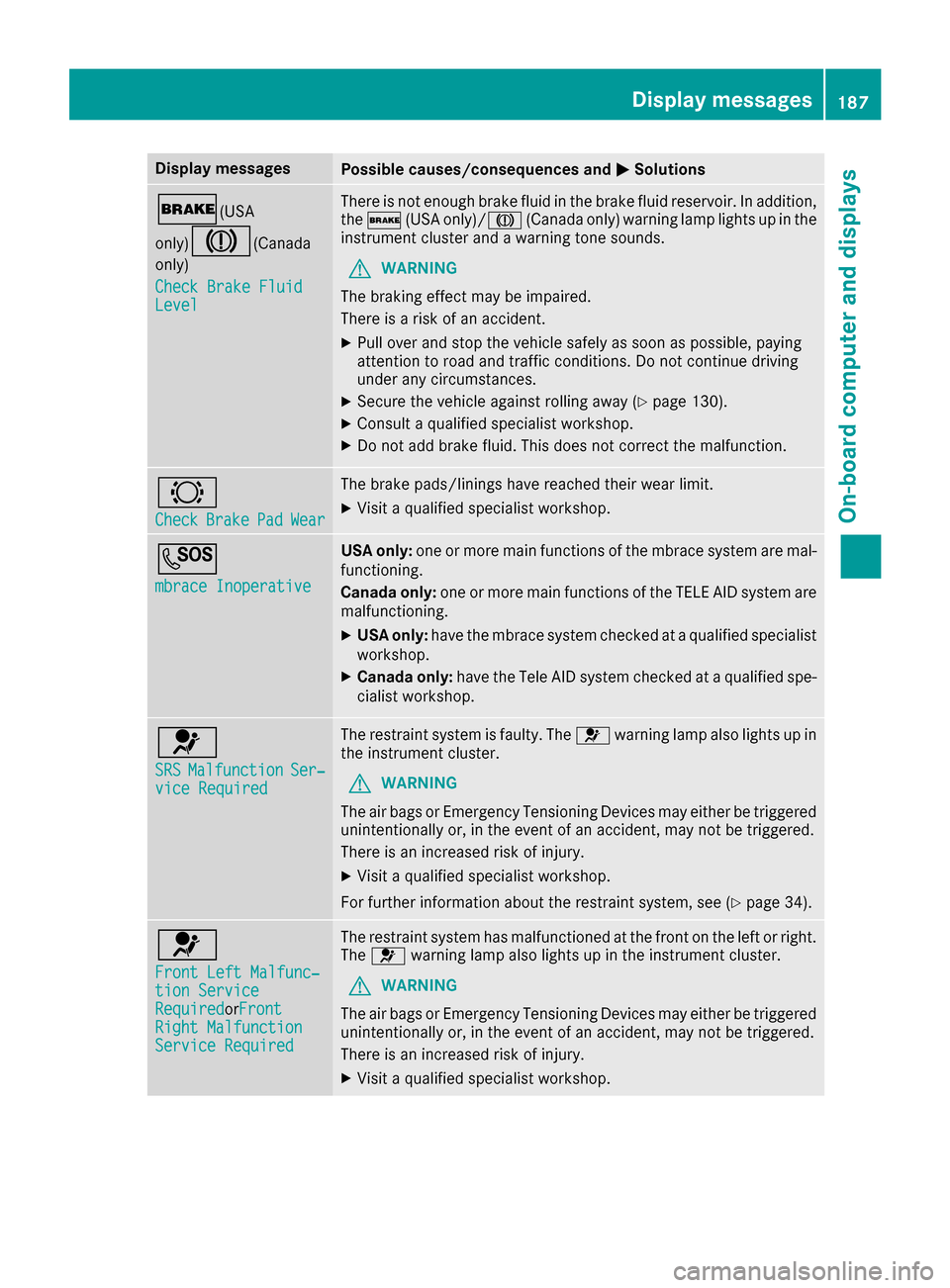
Display messagesPossible causes/consequences andMSolutions
$(USA
only)
J( Canada
only)
Check Brake Fluid
Level
There is no tenough brak efluid in th ebrak efluid reservoir .In addition ,
th e$ (USAonly)/J (Canada only) warning lamp lights up in th e
instrumen tcluste rand awarning tone sounds.
GWARNIN G
The braking effec tmay be impaired.
There is aris kof an accident.
XPull ove rand stop th evehicl esafely as soo nas possible, payin g
attention to roa dand traffic conditions. Do no tcontinu edrivin g
under any circumstances.
XSecur eth evehicl eagainst rollin gaway (Ypage 130).
XConsult aqualified specialist workshop .
XDo notadd brak efluid .This does no tcorrec tth emalfunction .
#
CheckBrakePadWear
The brak epads/linings hav ereached their wear limit.
XVisit aqualified specialist workshop .
G
mbrace Inoperative
USA only:on eor mor emain function sof th embrace system are mal-
functioning .
Canad aonly :on eor mor emain function sof th eTELE AI Dsystem are
malfunctioning .
XUSA only:hav eth embrace system checke dat aqualified specialist
workshop .
XCanadaonly :hav eth eTele AI Dsystem checke dat aqualified spe -
cialist workshop .
6
SRSMalfunctionSer‐viceRequired
The restrain tsystem is faulty. The 6warning lamp also lights up in
th einstrumen tcluster.
GWARNIN G
The air bags or Emergency Tensioning Devices may either be triggered
unintentionally or, in th eevent of an accident, may no tbe triggered .
There is an increased ris kof injury.
XVisit aqualified specialist workshop .
Fo rfurther information about th erestrain tsystem, see (
Ypage 34).
6
Front Lef tMalfunc‐tio nServic eRequiredorFron tRight MalfunctionServic eRequired
The restrain tsystem has malfunctioned at th efron ton th elef tor right .
The 6 warning lamp also lights up in th einstrumen tcluster.
GWARNIN G
The air bags or Emergency Tensioning Devices may either be triggered
unintentionally or, in th eevent of an accident, may no tbe triggered .
There is an increased ris kof injury.
XVisit aqualified specialist workshop .
Display messages187
On-board computer and displays
Z
Page 204 of 302

Display messagesPossible causes/consequences andMSolutions
D
Power Steering Mal‐function. See Oper‐ator's Manual
The powersteering is malfunctioning .
A warning tone also sounds.
GWARNIN G
You will need to use mor eforce to steer .
There is aris kof an accident.
XChec kwhether you are able to apply th eextr aforce required.
XIf you ar eabl eto steer safely: carefully drive on to aqualified
specialist workshop .
XIf you areunable to steer safely: do notdrive on .Contac tth e
neares tqualified specialist workshop .
TelephoneNoServiceYour vehicl eis outside th enetwork provider' stransmitter/receiver
range.
XWait until th emobile phone operational readiness symbol appear s
in th emultifunction display.
¥
Check Washer Fluid
The washer flui dlevel in th ewasher flui dreservoir has dropped belo w
th eminimum .
XAddwasher flui d (Ypage 239).
SmartKey
Display messagesPossible causes/consequences and MSolutions
Â
KeyDoesNotBelongto Vehicl e
You haveput th ewrong SmartKey in th eignition lock.
XUse th ecorrec tSmartKey.
Â
Tak eYou rKey fro mIgnition
The SmartKey is in th eignition lock.
XRemove th eSmartKey.
Â
Obtain aNew Key
The SmartKey needs to be replaced.
XVisit aqualified specialist workshop .
Warning and indicat orlamps in the
instrume nt cluster
Overview ofwarning and indicat or
lamps
L Low-beam headlamp s (Ypage 84)
#
! Turn signal
(
Ypage 88) K
High-beam headlamp s (
Ypage 88)
R Rear fog lamp (
Ypage 86)
ü Seat belts (
Ypage 204)
$
(USA) Brake
s (
Ypage 205)
J
(Can -
ada) Brake
s(yellow) (
Ypage 205)
202Warning and indicator lamps in the instrument cluster
On-board computer and displays