2016 MERCEDES-BENZ E-CLASS SALOON air condition
[x] Cancel search: air conditionPage 144 of 557
Overview of climate control sy
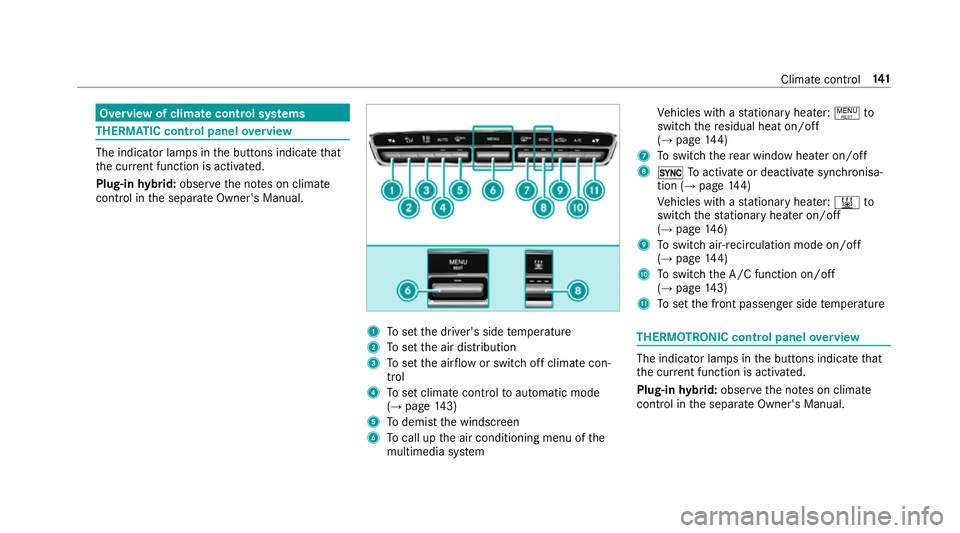
stems THERM
ATIC cont rol panel overview The indicator lamps in
the buttons indicate that
th e cur rent function is acti vated.
Plug-in hybrid: obser vethe no tes on climate
contro l inthe separate Owner's Manual. 1
Toset the driver's side temp erature
2 Toset the air distribution
3 Toset the air flow or switch off climate con‐
trol
4 Toset climate contro lto automatic mode
(→ page 143)
5 Todemist the windscreen
6 Tocall up the air conditioning menu of the
multimedia sy stem Ve
hicles with a stationary heater: !to
switch there sidual heat on/off
(→ page 144)
7 Toswitch there ar wind owheater on/off
8 0 Toactivate or deactivate syn chronisa‐
tion (→ page 144)
Ve hicles with a stationary heater: &to
switch thest ationary heater on/off
(→ page 146)
9 Toswitch air-recirculation mode on/off
(→ page 144)
A Toswitch the A/C function on/off
(→ page 143)
B Toset the front passenger side temp erature THERMOTRONIC control panel
overview The indicator lamps in
the buttons indicate that
th e cur rent function is acti vated.
Plug-in hybrid: obser vethe no tes on climate
contro l inthe separate Owner's Manual. Climate control
141
Page 145 of 557

1
Toset the driver's side temp erature
2 Toset the driver's side air distribution
3 Toset the air flow or switch off climate con‐
trol
4 Toset climate contro lto automatic mode
(→ page 143)
5 Todemist the windscreen
6 Tocall up the air conditioning menu of the
multimedia sy stem To
switch there sidual heat on/off
(→ page 144)
7 Toswitch there ar wind owheater on/off
8 ¿ Toswitch the A/C function on/off
(→ page 143)
Ve hicles with a stationary heater: &to
switch thest ationary heater on/off
(→ page 146)
9 Toswitch air-recirculation mode on/off
(→ page 144)
A Toset the front passenger side air distribu‐
tion
B Toset the front passenger side temp erature Re
ar operating unit 1
Toset thete mp erature
2 Display
3 Toset the air flow Operating
the clima tecont rol sy stem Switching clima
tecont rol on/off #
Toswitch on: setthe air flow toleve l 1 or
higher using theH button. #
Toswitch off: setthe air flow toleve l 0 using
th eH button. 14 2
Climate cont rol
Page 183 of 557

associated damage, which may not be visible,
to
th e bumpers or radiator grille, ha vethe function
of thera dar sensors checked at a qualified spe‐
cialist workshop. The driver assis tance sy stem
may no longer workproperly. Overview of driving sy
stems and driving
saf ety sy stems In
this section, you will find information about
th efo llowing driving sy stems and driving saf ety
sy stems:
R 360° Camera (→ page214)
R ABS ( Anti-lo ckBra king System)
(→ page 180)
R Distance Pilot DISTRONIC (→ page 193)
R Adaptive brake lights (→ page190)
R AIR BODY CONTROL (→ page 205)
R Active Brake Assi st (→page 185)
R Active Lane Keeping Assist (→ page 234)
R ATTENTION ASSIST (→ page 228)
R BAS (Bra keAssist System) (→ page181)
R DYNA MIC BODY CONT ROL (→ page 205) R
EBD ( Electronic Brakeforc eDistribution)
(→ page 184)
R ESP ®
(Electronic Stability Program)
(→ page 181)
R DRIVE PIL OT (→page 200)
R HOLD function (→ page 203)
R Steering Pilot (→ page 200)
R Limiter (→ page190)
R Parking Pilot (→ page217)
R Parking Assist PARKTRONIC (→ page 208)
R Reversing camera (→ page211)
R Cruise control (→ page190)
R Blind Spot Assi stand Active Blind Spot Assi st
( → page 232)
R Traf fic Sign Assi st (→page 229) Fu
nctions of ABS (anti-lock braking sy stem) ABS
regulates the brake pressure in critical driv‐
ing situations:
R During braking, the wheels are pr evented
from blocking, e.g. due tomaximum full-s top
braking or insuf ficient traction of the tyres.
R Vehicle steerability while braking is ensured.
R ABS is active from speeds of appr ox.
8 km/h.
If ABS inter venes when braking, you will feel a
pulsing in the brake pedal. The pulsating brake
pedal can be an indication of hazardous road
conditions and can ser veas a reminder totake
ex tra care while driving.
Sy stem limits
ABS may be impaired or may not function if a
malfunction has occur red and theye llow !
ABS warning lamp lights up continuously in the
instrument clus ter af terth e engine is star ted. 18 0
Driving and pa rking
Page 187 of 557

Ac
tivating/deactivating ESP ®
(Electronic Sta‐
bility Prog ram) Multimedia sy
stem:
, Vehicle .
k Assistance .
ESP #
Activate Oor deacti vate ª the function.
ESP ®
is deactivated if the ESP ®
OFF å warn‐
ing lamp lights up continuously in the instrument
clus ter.
Obser vethe information on warning lamps and
display messages which may be shown in the
instrument clus ter. Fu
nctions of ESP ®
Crosswind Assist ESP
®
Crosswind Assist de tects sudden gu sts of
side wind and helps the driver tokeep theve hi‐
cle in the lane:
R ESP ®
Crosswind Assist is active at vehicle
speeds between 80 km/h and 200 km/h
when driving stra ight ahead or cornering
slight ly. R
The vehicle is stabilised bymeans of individ‐
ual brake application on one side. Fu
nctions of ESP ®
trailer stabilisation &
WARNING Risk of accident in poor road
and weather conditions
In poor road and weather conditions, the
trailer stabilisation cannot pr event lu rching of
th eve hicle/trailer combination. Trailers with
a high centre of grav ity may tip over before
ESP ®
de tects this. #
Alw ays adapt your driving style to suit
th e cur rent road and weather condi‐
tions. When driving with a trailer, ESP
®
can stabilise
yo ur vehicle if the trailer begins tosw ay from
side toside:
R ESP ®
trailer stabilisation is active abo ve
speeds of 65 km/h. R
Slight sw aying is reduced bymeans of a tar‐
ge ted, individual brake application on one
side.
R Intheeve nt of intense sw aying, the engine
output is also reduced and all wheels are
braked.
ESP ®
trailer stabilisation may be impaired or
may not function if:
R The trailer is not connec ted cor rectly or is
not de tected prope rly by theve hicle. Fu
nction of EBD (Electronic Brake forc e Dis‐
tribution) EBD is
characterised bythefo llowing:
R Monitoring and regulating the brake pressure
on there ar wheels.
R Impr oved driving stability when braking,
especially on bends. 184
Driving and pa rking
Page 191 of 557

Cancelling a brake application of
Active
Brake Assi st
Yo u can cancel a brake application of Active
Brake Assi stat any time by:
R Dep ressing the accelera tor pedal fully.
R Releasing the brake pedal.
Ac tive Brake Assi stcancels the inter vention
when at least one of thefo llowing conditions is
fulfilled:
R You manoeuv retoavoid the obs tacle.
R The reis no longer a risk of collision.
R An obs tacle is no longer de tected in front of
yo ur vehicle.
Evasive Steering Assist
Evasive Steering Assist has thefo llowing charac‐
te rist ics:
R Can de tect stationary or crossing pedes‐
trians.
R Can assist the driver with additional steering
assis tance if it de tects a swerving manoeu‐
vre. R
Can be acti vatedby an abrupt steering mo ve‐
ment during a swerving manoeuvre.
R Can assi stduring swerving and stra ightening
of theve hicle.
R Can react from a speed of appr oximately
20 km/h up toa speed of appr oximately
70 km/h.
R You can pr eventthe assis tance at any time
by active steering. &
WARNING Risk of an accident despi te
Evasive Steering Assist
Evasive Steering Assist cann otalw ays clear ly
identify objects and complex traf fic situa‐
tions.
In addition, thesteering support of Evasive
St eering Assist is generally not su fficient to
av oid a collision.
In such cases Evasive Steering Assist can:
R give an unnecessary warning or pr ovide
assis tance
R not gi veawa rning or not pr ovide assis‐
ta nce #
Alw ays pay careful attention tothe traf‐
fi c situation; do not rely on Ev asive
St eering Assist alone. #
Beready tobrake and take evasive
action, if necessar y. #
Preve ntthe assis tance byactively steer‐
ing in non-critical driving situations. #
Drive at an appropriate speed if pedes‐
trians are close tothe path of your vehi‐
cle. Also obser
vethe sy stem limits of Evasive Steer‐
ing Assist.
Sy stem limits
Ac tive Brake Assi stmay be impaire d or may not
function in thefo llowing situations:
R In sno w,rain, fog, heavy spr ay, if there is
gl are, in direct sunlight or in great lyvarying
light conditions.
R Ifth e sensors are dirty, mis ted up, damaged
or co vered. 18 8
Driving and pa rking
Page 198 of 557

Pulling
the cruise control le ver will set the dis‐
pla yed speed limit as the speed, pr ovided that:
R The Speed Limit Pilot has been activated in
the multimedia sy stem and
R Distance Pilot DISTRONIC has been acti va‐
te d.
If no speed limit is displa yed when the le ver is
operated, the speed set bythe driver is adop ted.
Drive prog ram
The DYNA MIC SELECT switch allo wsyouto
ch ange the driving style of Dis tance Pilot
DISTRONIC. Depending on which drive program
is selected, the driving characteristics can be
ge ared towa rds fuel econom y,comfort or
dynamic per form ance (→ page160).
Sy stem limits
Dis tance Pilot DISTRONIC is acti veinthe
0 km/h to200 km/h speed range.
Ve hicles with the Driving Assistance Pack‐
age: Distance Pilot DISTRONIC is acti veinthe
0 km/h to210 km/h speed range. The sy
stem may be impaired or may not function
in thefo llowing situations:
R In sno w,rain, fog, heavy spr ay, if there is
gl are, in direct sunlight or in great lyvarying
light conditions.
R Ifth e windscreen in the area of the camera is
dirty, mis ted up, damaged or co vered.
R Ifth era dar sensors are dirty or co vered.
Do not use Dis tance Pilot DISTRONIC in thefo l‐
lowing situations:
R Inroad and traf fic conditions whi chdo not
allow youto maintain a cons tant speed, e.g.
in heavy traf fic or on winding roads.
R On slippe ryroads. Braking or accelerating
can cause the drive wheels tolose traction
and theve hicle could then skid.
R When there is poor visibility, e.g. due tofog,
heavy rain or sno w.
R In multi-s torey car par ksor at tollst ations.
R Onroads with steep uphill or downhill gradi‐
ents. Ti
ps
Pa y particular attention in thefo llowing traf fic
situations. In such situations, brake if necessar y.
Dis tance Pilot DISTRONIC is then deactivated:
R When cornering, entering and exiting a bend.
R When not driving in the cent reofthe lane.
R When other vehicles are changing lane.
R Ifth ere are nar row vehicles.
R Ifth ere are obs tacles and stationary vehi‐
cles.
R Ifth ere are crossing vehicles, pedestrians,
mo torcyc lists or cyclists. Driving and parking
19 5
Page 199 of 557

Display of Distance Pilot DISTRONIC in
the
assi stance graphic and in the speedome ter 1
Vehicle ahead
2 Distance indica tor
3 Set specified di stance
4 Own vehicle 1
Speed of vehicle ahead
2 Stored speed
Displa ysinthe multifunction display
When activating Dis tance Pilot DISTRONIC or
when changing thestored speed, the new stored
speed is shown for around five seconds in the
ç multifunction display 70 km/h.
When Dis tance Pilot DISTRONIC is acti ve,th e set
st ored speed is displa yed next totheç sym‐
bol. When dis tance control is acti ve,th e symbol
is shown in green.
Ve hicles with the Driving Assistance Pack‐
age: On mo torw ays or high-speed major roads th
eç symbol is displa yed cyclically when the
ve hicle is ready topull away.
Ve hicles with Speed Limit Pilo t:If a speed
limit is automatical lyadop ted, this is shown as
th estored speed with theê symbol.
Operating Distance Pilot DISTRONIC &
WARNING Risk of accident if de tection
function of Dis tance Pilot DISTRONIC is
impaired
The Dis tance Pilot DISTRONIC does not
re act:
R topeople or animals
R tostationary obs tacles on thero ad, e.g.
st opped or par kedve hicles (vehicles with‐
out the Driving Assis tance Package)
R tostationary obs tacles on thero ad, e.g.
st opped or par kedve hicles, if conditions
are not suf ficient toenable de tection
(vehicles wi th the Driving Assis tance
Pa ckage)
R tooncoming vehicles and crossing traf fic19 6
Driving and pa rking
Page 204 of 557
R
When the sy stem is actively steering, the
è symbol is shown in green in the multi‐
function displa y.
St eering Pilot sy stem limits
St eering Pilot has a limited steering torque for
lateral guidance. In some cases, thesteering
inter vention is not su fficient tokeep theve hicle
in the lane.
If de tection of lane markings and vehicles ahead
is impaired, Steering Pilot switches topassive
mode. The sy stem pr ovides no support in this
case. During the transition from the active to
passive status theè symbol is shown as
enlar ged and flashes yello w. Once the sy stem is
passive theè symbol is gr eyed out in the
multifunction displa y.
The sy stem may be impaired or may not function
in thefo llowing situations:
R Ifth ere is poor visibility, e.g. due toinsuf fi‐
cient illumination of thero ad, or due tosno w,
ra in, fog or spr ay.
R Ifth ere is glare, e.g. from oncoming traf fic,
di re ct sunlight or reflection from other vehi‐
cles (e.g. if thero ad sur face is wet). R
Ifth e windscreen is dirty, mis ted up, dam‐
aged or co vered, for ins tance byast icke r,in
th e vicinity of the camera.
R If no, or se veral, unclear lane markings are
present for one lane, e.g. in a construction
area.
R Ifth e lane markings are wornaw ay, dark or
co vered up, e.g. bydirt or sno w.
R Ifth e dis tance totheve hicle in front is too
small and the lane markings thus cannot be
de tected.
R Ifth e lane markings change quickl y,e.g.
lanes branch off, cross one ano ther or
mer ge.
R Ifth ero ad is nar rowand winding.
R Ifth ere are highly variable shade conditions
on thero ad.
R Ifth ere are obs tacles su chas traf fic guid‐
ance posts on the lane or projecting out into
th e lane.
The sy stem does not pr ovide assis tance in the
fo llowing conditions:
R Onvery sharp bends. R
When towing a trailer.
R Ifyo u actively change lane without swit ching
on the turn signal indicator.
R Ifyo u swit chon the turn signal indicator and
th e conditions for activating Active Lane
Change Assi stare not fulfilled.
Note s onSteering Pilot
St eering Pilot is only an aid. You are responsible
fo rth e dis tance totheve hicle in front, forve hi‐
cle speed, for braking in good time and forst ay‐
ing in lane. Before changing lanes, make sure
th at the neighbouring lane is free (shoulder
view).
Ac tive Lane Change Assi st
% The availability of thefo llowing function is
countr y-dependent.
St eering Pilot remains active even if the turn sig‐
nal indicator is switched on. Steering Pilot then
assists the driver when changing lanes byapply‐
ing steering torques toinitiate the lane change. Driving and parking
201