2016 MERCEDES-BENZ E-CLASS ESTATE sensor
[x] Cancel search: sensorPage 223 of 565
Sy
stem limitations
The sy stem limitations forPa rking Assist
PA RKTRONIC apply for passive side impact pro‐
te ction.
Objects placed next totheve hicle, or pedes‐
trians who approach the side of theve hicle will
not be de tected.
Deacti vating/acti vating PARKTRONIC
* NO
TERisk of an accident from objects
at close range Pa
rking Assist PARKTRONIC may not de tect
cer tain objects at close range. #
When pa rking theve hicle, pay particular
attention toany objects which are
abo veor below the sensors, e.g. flowe r‐
pots or dr awbars. The vehicle or other
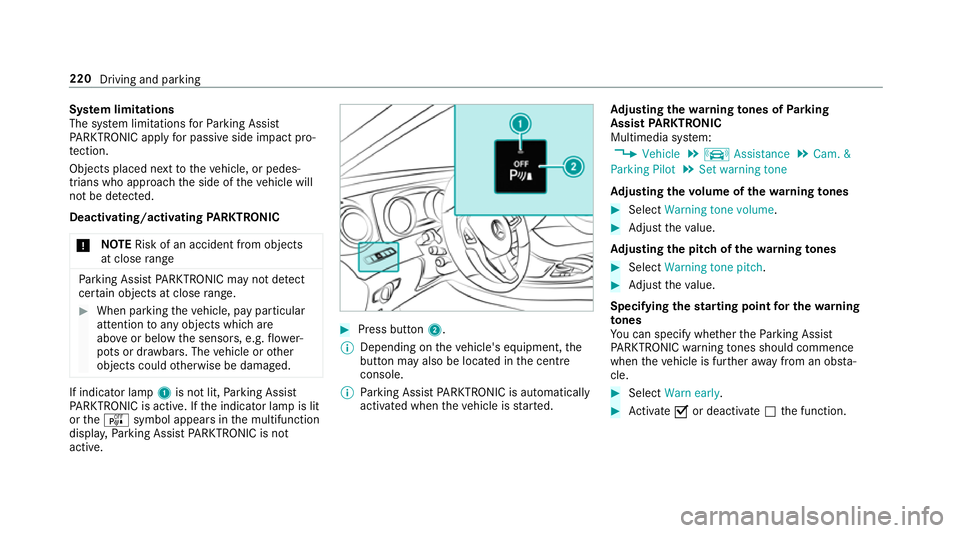
objects could otherwise be damaged. If indicator lamp
1is not lit, Parking Assist
PA RKTRONIC is active. If the indicator lamp is lit
or theé symbol appears in the multifunction
displa y,Pa rking Assist PARKTRONIC is not
active. #
Press but ton2.
% Depending on theve hicle's equipment, the
button may also be located in the cent re
console.
% Parking Assist PARKTRONIC is automatical ly
activated when theve hicle is star ted. Ad
justing the warning tones of Parking
Assist PARKTRONIC
Multimedia sy stem:
, Vehicle .
k Assistance .
Cam. &
Parking Pilot .
Set warning tone
Ad justing the volume of thewa rning tones #
Select Warning tone volume. #
Adjust theva lue.
Ad justing the pitch of the warning tones #
Select Warning tone pitch. #
Adjust theva lue.
Specifying thest arting point for the warning
to nes
Yo u can specify whe ther thePa rking Assist
PA RKTRONIC warning tones should commence
when theve hicle is fur ther aw ay from an obs ta‐
cle. #
Select Warn early. #
Activate Oor deacti vate ª the function. 220
Driving and parking
Page 240 of 565
&
WARNING Risk of accident caused by
limited de tection per form ance of Drive
Aw ayAssi st
Drive AwayAssi stcannot al ways clearly iden‐
tify objects and traf fic situations.
In su chcases, Drive AwayAssi stmight:
R Warnyou without reason and limit the
ve hicle speed.
R Not warnyou or not limit theve hicle
speed. #
Alw ays pay careful attention tothe traf‐
fi c situation; do not rely on Drive Away
Assi stalone. #
Be prepared tobrake or swer veif nec‐
essar y. Drive
AwayAssi stis only an aid. It is not a sub‐
st itute foryo ur attention tothe sur roundings.
The responsibility for safe manoeuvring and
parking remains with you. Make sure that no
persons, animals or objects etc. are in the
manoeuvring range. A
risk of a collision may arise in thefo llowing sit‐
uations, forex ample:
R Ifth e driver mixes up the accelera tor and
brake pedals.
R Ifth e wrong gear is selec ted.
The Drive AwayAssi stfunction is active under
th efo llowing conditions:
R IfPa rking Assist PARKTRONIC is activated.
R Every time thege ar is changed tok orh
when theve hicle is at a standstill.
R Ifth e de tected obs tacle is less than appr ox.
1. 0 m away.
R Ifth e manoeuvring assis tance function is
acti vated in the multimedia sy stem.
Drive AwayAssi stis una vailable on inclines and
when driving with a trailer.
Cross Traf fic Alert
% Also read the instructions on Blind Spot
Assist (→ page242).
Ve hicles with Blind Spot Assis t:Dr ivers can
also be warned of any crossing traf fic when re
ve rsing out of a parking space. If a critical sit‐
uation is de tected, a warning symbol appears on
th e camera image of the multimedia sy stem. If
th e driver does not respond tothewa rning, the
ve hicle's brakes can be applied automaticall y.To
do this, the function uses thera dar sensors in
th e bumper. The area adjacent totheve hicle is
continually monitored.
If th era dar sensors are obstructed byvehicles
or other objects, de tection is not possible.
The Cross Traf fic Alert function is acti veunder
th efo llowing conditions:
R If Blind Spot Assist is activated.
R Ifth eve hicle is reve rsing at walking pace.
R Ifth e manoeuvring assis tance function is
acti vated in the multimedia sy stem.
Cross Traf fic Alert is una vailable on inclines and
when driving with a trailer. Driving and parking
237
Page 245 of 565
Blind Spot Assi
stand Active Blind Spot
Assi st Fu
nction of Blind Spot Assist and Active
Blind Spot Assi st
Blind Spot Assi stuses two lateral, rear-facing
ra dar sensors tomonitor the area up to40 m
behind your vehicle and 3 m directly next to your
ve hicle.
If a vehicle is de tected at speeds ab ove appr ox‐
imately 12km/h and this vehicle subsequently
enters the monitoring range di rectly next to your
ve hicle, thewa rning lamp in the outside mir ror
lights up red.
If a vehicle is de tected close to yourvehicle in
th e lateral monitoring range and you swit chon
th e turn signal indicator in the cor responding
direction, a warning tone sounds once. The red
wa rning lamp in the outside mir rorflashes. If the
turn signal indica torre mains on, all other de tec‐
te dve hicles are indicated only bytheflashing of
th ere dwa rning lamp.
If yo uove rtake a vehicle quickl y,no warning is
given. &
WARNING Risk of accident despi teBlind
Spot Assi st
Blind Spot Assi stdoes not react tovehicles
approaching and overtaking you at a greatly
di fferent speed.
As a result, Blind Spot Assist cannot warn
drivers in this situation. #
Alw ays pay careful attention tothe traf‐
fi c situation and maintain a safe dis‐
ta nce at the side of theve hicle. Blind Spot Assist and
Active Blind Spot Assi st
are on lyaids. They may failto detect some vehi‐
cles and are no substitute for attentive driving.
Alw ays ensure that there is suf ficient di stance to
th e side forot her road users and obs tacles.
Sy stem limitations
The de tection capability of Blind Spot Assi stcan
be restricted in thefo llowing situations:
R Ifth e sensors are dirty or co vered.
R When there is poor visibility, e.g. due tofog,
heavy rain, snow or spr ay. R
If nar rowvehicles are within the monitoring
ra nge, e.g. bicycles.
Wa rnings may be issued in er ror when driving
close tocrash ba rriers or similar solid lane bor‐
ders. Warnings may be inter rupte d when driving
alongside long vehicles, forex ample lor ries, for a
prolonged time.
Blind Spot Assist is not operational when reve rse
ge ar is engaged.
Brake application of Active Blind Spot Assi st
If Ac tive Blind Spot Assi stdetects a risk of a side
impact in the monitoring range, a cou rse-cor‐
re cting brake application is car ried out. This is
designed tohelp youavo id a collision.
The course-cor recting brake application is availa‐
ble in the speed range between appr oximately
30 km/h and 200 km/h. &
WARNING Risk of accident despi te
brake application of Active Blind Spot
Assi st
A cou rse-co rrecting brake application cann ot
alw ays pr event a collision. 242
Driving and pa rking
Page 249 of 565
R
The lane markings are worn, dark or co vered.
R The dis tance totheve hicle in front is too
small and the lane markings thus cannot be
de tected.
R The lane markings change quickl y,e.g. lanes
branch off, cross one ano ther or mer ge.
R The road is very nar row and winding.
Ve hicles with Driving Assistance pac kage or
Driving Assistance Plus pa ckage: Active Lane
Ke eping Assist uses radar sensors tomonitor
se veral areas around theve hicle. If thera dar
sensors in there ar bumper are dirty or co vered
with sn ow,th e sy stem may be impaired or may
not function. If an obs tacle in the lane in which
yo u are driving has been de tected, no lane-cor‐
re cting brake application occu rs.
Ac tivating Active Lane Keeping Assist &
WARNING Risk of accident despi te
Ac tive Lane Keeping Assist warning
A lane-cor recting brake application cannot
al wa ys bring theve hicle back into the origi‐
nal lane. #
Alw aysst eer, brake or accelera teyour‐
self, especially if Active Lane Keeping
Assist warnsyo u or makes a lane-cor‐
re cting brake application. &
WARNING Risk of accident despi teinter‐
ve ntion of Active Lane Keeping Assist
Ac tive Lane Keeping Assist does not de tect
traf fic conditions or road users. In very rare
cases, the sy stem may make an inappropri‐
ate brake application, e.g. af ter intentional ly
driving over a solid lane marking.
The brake application can be inter rupte d at
any time if yousteer slightly in the opposite
direction. #
Alw ays make sure that there is suf fi‐
cient di stance tothe side forot her traf‐
fi c or obs tacles. &
WARNING Risk of accident despi teLane
Ke eping Assist
Lane Keeping Assist cann otalw ays clearly
de tect lane markings. In su
chcases, Lane Keeping Assist can:
R give an unnecessary warning
R not give a warning #
Alw ays pay particular attention tothe
traf fic situation and keep within the
lane, especially if Active Lane Keeping
Assist alerts you. Re
quirement:
The driving speed is at least 60 km/h. 246
Driving and pa rking
Page 311 of 565
#
Todispl aydestination information: select
¥ Details. Ro
ute guidance with cur rent traf fic re ports Tr
af fic information overview
% The services are not available in everycoun‐
tr y.
Tr af fic re ports can be recei ved with thefo llowing
services:
R Live Traf fic Information
R FM RDS-TMC
It is not possible touse bo thservices simul‐
ta neously.
Live Traf fic Information or FM RDS-TMC is
displ ayed with a symbol.
% Hazard alerts can be recei ved using the Car-
to -X service.
% Theremay be dif fere nces between the traf fic
re ports recei ved and the actual road and
traf fic conditions. Impor
tant information on Live Traf fic Informa‐
tion:
R Current tra ffic reports are recei ved via the
Internet connection or via data roaming (for
selec ted European count ries).
R The tra ffic situation is updated at short, regu‐
lar inter vals.
R In selec ted European count ries, the subscrip‐
tion service is available free of charge for a
period of thre eye ars from the manufacturing
date.
The status of the subscription can be dis‐
pla yed (→ page 309).
Re gis tering Live Traf fic Information
R The service is initially acti vatedfo rth ree
months upon vehicle hando ver.
R The service must be regis tered
( → page 309):
- upon vehicle hando ver
- within thre e months
R This ensures the full, free usage period. R
Registration is car ried out at a Mercedes-
Benz Service Centre on the Mercedes me
we bsite.
R Ifre gistration is not comple ted within this
time period, Live Traf fic Information will be
deactivated. If Live Traf fic Information contin‐
ues tobe used af terth is period, e.g. af ter six
months, there maining time for free usage is
2 and a half years.
In fo rm ation on theve hicle's position is regularly
sent toDaimler AG. The da tais immediately ren‐
de red anonymous byDaimler AGand forw arded
to the traf fic da taprov ider. Using this data, traf‐
fi c re ports releva nt totheve hicle's position are
sent totheve hicle. The vehicle acts as a sensor
fo rth eflow of traf fic and helps toimpr ovethe
qu ality of the tra ffic reports.
If yo u do not wish totransmit your vehicle posi‐
tion, you can ha vethis service deactivated at a
Mercedes-Benz Service Cent re.
Useful information on FM RDS-TMC:
R A FM RDS-TMC radio station broadcasts traf‐
fi c re ports alongside thera dio prog ramme.
R FM RDS-TMC is not available in all countries. 308
Multimedia sy stem
Page 380 of 565
R
The bonnet was pr eviously opened.
The engine must be restar ted and the engine oil
le ve l will be de term ined again during driving.
On-board computer: , Service .
Engine oil level:
Yo u will see one of thefo llowing display
messa ges in the multifunction displa y:#
Engine oil level Measuring now: measu re‐
ment of the oil le vel is not yet possible.
Re peat there qu est af ter a maximum of 30
minutes' driving. #
Engine oil level OK andthe bar display for
indicating the oil le vel in the multifunction
display is green and is between "min" and
"max": the oil le vel is cor rect. #
Engine oil level Add 1.0 l andthe bar display
fo r indicating the oil le vel in the multifunction
display is orange and is below "min": top up
with 1 l of engine oil. #
Reduce engine oil level andthe bar display
fo r indicating the oil le vel in the multifunction
display is orange and is abo ve"max": drain off
theexc ess engine oil. Consult a qualified
specialist workshop. #
For engine oil level turn on ignition: switch on
th e ignition tocheck the engine oil le vel. #
Engine oil level System inoperative : sensor
fa ulty or not connected. Consult a qualified
specialist workshop. #
Engine oil level System currently unavail. :
close the engine bonn et.
To pping up engine oil &
WARNING Danger of bu rns from hot
component parts in the engine compart‐
ment
Cer tain component parts in the engine com‐
partment may be very hot, e.g. the engine,
th era diator and parts of theex haust sy stem. #
Let the engine cool down and only
to uch the component parts described
below: &
WARNING Risk offire and injury from
engine oil
If engine oil comes into con tact wi thhot
component parts in the engine compart‐
ment, it may ignite. #
Make sure that no engine oil is spilled
next tothefiller opening. #
Allow the engine tocool off and thor‐
oughly clean the engine oil from compo‐
nent parts before starting theve hicle. *
NO
TEEngine dama gecaused byan
incor rect oil filter, incor rect oil or addi‐
tives #
Do not use engine oils or oil filters
which do not cor respond tothe specifi‐
cations explicitly prescribed forthe
service inter vals. #
Do not alter the engine oil or oil filter in
order toachie velonger change inter vals
th an presc ribed. #
Do not use additives. Maintenance and care
377
Page 387 of 565
Information on cleaning and car
eAvoiding vehicle damage
Wi per blades
Fold out the wiper blades and clean them using a damp clo th.D o not clean the wiper blades too of ten.
Ex terior lighting
Cleanthe lens with a wet sponge and mild de terg ent, e.g. car
shampoo. Only use cleaning agents or cleaning clo
thsth at are suitable
fo r plast ic lenses.
AIRPANEL Ifth eve hicle is very dusty or there are salt deposits in the
AIR PANEL mechanics, the adjustment range of the shutters in
th era diator trim may be restricted.
R Switch on the ignition, and the shutters open automati‐
cally af ter appro ximately 12 0 seconds.
R Clean the bearing points of the shutters with a high-pres‐
sure water jet. When using a high-p
ressure water jet, maintain a minimum
dis tance of 30 cm.
Sensors Cleanthe sensors in the front and rear bumpers and in the
ra diator grille with a soft clo thand car shampoo. When using a high-pressure
water jet, maintain a minimum
dis tance of 30 cm.
Re versing camera
and 360° Camera R
Open the camera co ver with the multimedia sys‐
te m(→ page 227) .
R Use clear water and a soft clo thtoclean the camera lens. Do not use a high-pressure
water jet. 384
Maintenance and care
Page 415 of 565
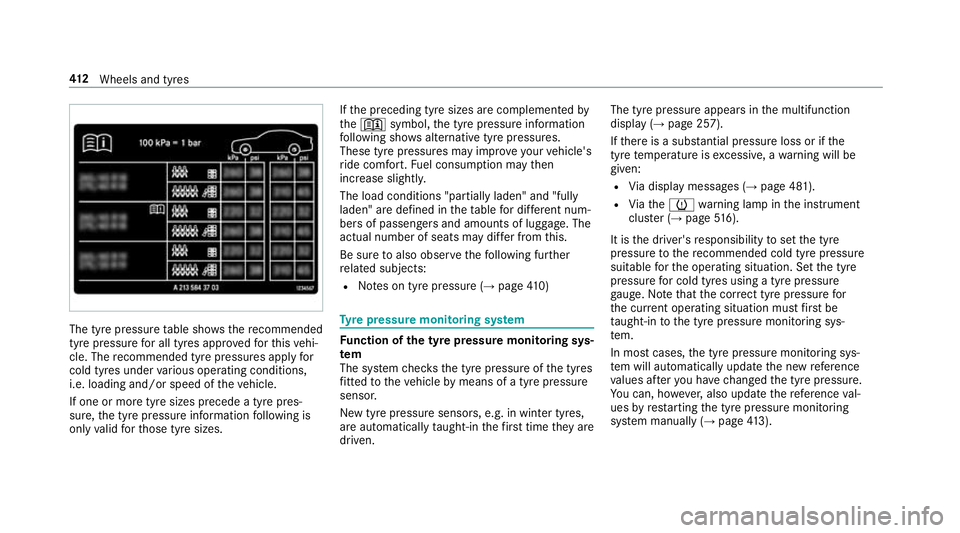
The tyre pressure
table sho ws there commended
tyre pressure for all tyres appro vedfo rth is vehi‐
cle. The recommended tyre pressures apply for
cold tyres under various operating conditions,
i.e. loading and/or speed of theve hicle.
If one or more tyre sizes precede a tyre pres‐
sure, the tyre pressure information following is
only valid forth ose tyre sizes. If
th e preceding tyre sizes are complemented by
th e+ symbol, the tyre pressure information
fo llowing sho wsalternative tyre pressures.
These tyre pressures may impr oveyour vehicle's
ri de comfort. Fuel consum ption may then
increase slightl y.
The load conditions "partially laden" and "fully
laden" are defined in theta ble for dif fere nt num‐
be rs of passengers and amounts of luggage. The
actual number of seats may dif fer from this.
Be sure toalso obse rveth efo llowing fur ther
re lated subjects:
R Notes on tyre pressure (→ page410) Ty
re pressure moni toring sy stem Fu
nction of the ty repressure moni toring sys‐
tem
The sy stem checks the tyre pressure of the tyres
fi tted totheve hicle bymeans of a tyre pressu re
sensor.
New tyre pressure sensors, e.g. in winter tyres,
are automatically taught-in thefirs t time they are
driven. The tyre pressure appears in
the multifunction
display (→ page 257).
If th ere is a subs tantial pressure loss or if the
tyre temp erature is excessive, a warning will be
given:
R Via display messages (→ page 481).
R Viath eh warning lamp in the instrument
clus ter (→ page 516).
It is the driver's responsibility toset the tyre
pressure tothere commended cold tyre pressure
suitable forth e operating situation. Set the tyre
pressure for cold tyres using a tyre pressu re
ga uge. Notethat the cor rect tyre pressure for
th e cur rent operating situation mu stfirs t be
ta ught-in tothe tyre pressure monitoring sys‐
te m.
In most cases, the tyre pressure monitoring sys‐
te m will auto matically update the new refere nce
va lues af teryo u ha vechanged the tyre pressure.
Yo u can, ho wever,also update there fere nce val‐
ues byrestarting the tyre pressure monitoring
sy stem manually (→ page413). 412
Wheels and tyres