2016 MERCEDES-BENZ E-CLASS ESTATE Wheel change
[x] Cancel search: Wheel changePage 270 of 565
Operating saf
ety &
WARNING Risk of di stra ction from infor‐
mation sy stems and communications
equipment
If yo u operate information and communica‐
tions equipment integ rated in theve hicle
when driving, you will be distracted from the
traf fic situation. This could also cause youto
lose control of theve hicle. #
Only operate this equipment when the
traf fic situation permits. #
Ifyo u cannot be sure of this, stop the
ve hicle whilst paying attention toroad
and traf fic conditions and ope rate the
equipment with theve hicle stationar y. &
WARNING Risk of di stra ction from oper‐
ating mobile communication equipment
while theve hicle is in motion
If yo u operate mobile communication equip‐
ment when driving, you will be distracted from
the tra ffic situation. This could also
cause youto lose control of theve hicle.
Only operate this equipment when theve hi‐
cle is stationar y. Fo
ryo ur ow n sa fety, al ways obser vethefo llow‐
ing points when operating mobile communica‐
tions equipment and especially your voice con‐
trol sy stem:
R Obser vethe legal requ irements forth e coun‐
try in which you are driving.
R While driving, on ly operate mobile communi‐
cations equipment and your voice control
sy stem when the tra ffic conditions permit it.
Yo u may otherwise be distracted from the
traf fic conditions and cause an accident,
inju ring yourself and others.
R Do not use thevo ice control sy stem in an
emer gency as your voice can change and
yo ur telephone call can be unnecessarily
dela yed.
R Familiarise yourself with thevo ice control
sy stem functions before starting the journe y. Operation
Operating
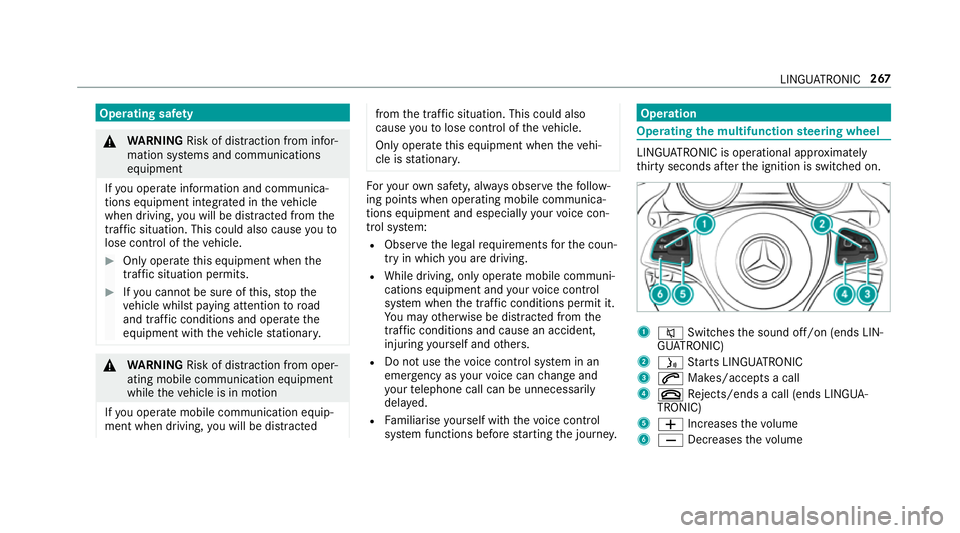
the multifunction steering wheel LINGU
ATRO NIC is operational appr oximately
th irty seconds af terth e ignition is switched on. 1
8 Switches the sound off/on (ends LIN‐
GU ATRO NIC)
2 ó Starts LINGU ATRO NIC
3 6 Makes/accepts a call
4 ~ Rejects/ends a call (ends LINGUA‐
TRONIC)
5 W Increases thevo lume
6 X Decreases thevo lume LINGU
ATRO NIC 267
Page 272 of 565
R
Telephone numbers can be entered as single
digits. Changing
the language setting Yo
u can change the language of LINGU ATRO NIC
via the sy stem language settings. If the set sys‐
te m language is not suppor tedby LINGUA‐
TRONIC, English will be selected.
LINGU ATRO NIC is available in thefo llowing lan‐
guages:
R German
R English
R French
R Italian
R Dutch
R Spanish Using LINGU
ATRO NIC ef fectively Au
dible help functions Yo
ure cei veinformation and help for:
R optimal operation: saytheHelp LINGUA-
TRONIC command
R cur rent application: presstheó button
on the multifunction steering wheel and say
th eHelp command
R continued dialogue: saytheHelp command
during a voice dialogue
R specific sy stem: call up the help command
fo rth e desired sy stem, e.g. Help telephone Speech
quality impr ovement If LI
NGUATRONIC does not unde rstand you:
R only operate LINGU ATRO NIC from the driv‐
er's seat.
R say the commands coherently and clearly,
but do not exaggerate thewo rds. R
preve nt loud noises, e.g. the blo wer,from
inter fering while you make an entr y.
R say thevo ice tag with the same intonation
when creating voice tags.
If an addre ss book entry voice tag is not rec‐
ognised:
R only crea tesensible address book entries in
th e sy stem/mobile phone, e.g. surname and
fi rs t name in the cor rect field.
R do not use any abbr eviations, unnecessary
spaces or special characters.
If a station list entry is not recognised:
R say theRead out station list command. Essential commands
Switch commands
Switch commands can be used
toopen cer tain
applications. The command selection can be
used rega rdless of the application that is cur‐
re ntly acti ve. LINGU
ATRO NIC 269
Page 308 of 565
In
this lane, you will be able tocompl ete bo th
th e next change of direction and the one
af te rth at.
R Possible lane (gr eyarro w)
In this lane, you will on ly beabletocompl ete
th e next change of direction.
R App roaching new lane 3
During thech ange of direction, new lanes
may be added.
% Lane recommendations can also be dis‐
pl ay ed in the instrument display and in the
head-up displa y.
Destination reached
Once the destination is reached, you will see the
ch equered flag Í. Route guidance is finished.
When an intermedia tedestination has been
re ached, you will see the intermediate destina‐
tion flag with the number of your intermediate
destination Î. Afterth is, route guidance is
continued. Swit
ching navigation announcements on/off
Re quirements:
R aro ute has already been created
R route guidance is active #
Toswitch off: during a navigation announce‐
ment, press the8 button on the multi‐
function steering wheel.
or #
Press the controller on theright beside the
to uchpad.
The Spoken driving recommendations have
been deactivated. message appears. #
Toswitch on: displaythe navigation menu
(→ page 295). #
Select Driving recommendation .
In thefo llowing situations, navigation announce‐
ments are switched on automatically:
R thero ute is recalculated.
R the multimedia sy stem is switched off and
th en on again.
R theve hicle is restar ted. %
You can access and add this function as a
fa vo urite under Spoken driving recommenda-
tions on/off.
Swit ching navigation announcements on/off
during a phone call #
Select System. #
Select õAudio. #
Swit chDriving recommendations during
phone call onO or off ª.
Ad justing the volume of navigation
announcements
Re quirements:
R aro ute has already been created
R route guidance is active #
Press theW orX button on the multi‐
function steering wheel during a navigation
announcement.
or #
Turn the controller on theright beside the
to uchpad. Multimedia sy
stem 305
Page 375 of 565
ASS
YST PLUS se rvice inter val display Fu
nction of the ASS YST PLUS se rvice inter val
displ ay The ASS
YST PLUS service inter val display in the
instrument display pr ovides information on the
re maining time or dis tance be fore the next
service due date.
Yo u can hide this service message using the
back button on the left-hand side of thesteering
wheel.
Yo u can obtain fur ther information concerning
th e servicing of your vehicle from a qualified
specialist workshop, e.g. a Mercedes-Benz
Service Centre. Displaying
the service due da teOn-board computer:
, Service .
ASSYST PLUS
The next service due date is displa yed. #
Toexitth e displa y:press the back button
on the left-hand side of thesteering wheel. Make sure
toobser vethefo llowing fur ther rela‐
te d subjec t:
R Operating the on-board computer
(→ page 256). Car
rying out service workatregular inter‐
va ls *
NO
TEPremature wearthro ugh failure to
obser veservice due dates Service
workwhich is not car ried out at the
ri ght time or incomple tely can lead to
inc reased wear and damage totheve hicle. #
Alw ays obser vethe prescribed service
inter vals. #
Alw ays ha vethe prescribed service
wo rkcar ried out at a qualified specialist
wo rkshop. Special service
requ irements The prescribed service inter
val is based on nor‐
mal operation of theve hicle. Service workwill need
tobe per form ed more of ten if theve hicle
is operated under arduous conditions or
increased loads, forex ample:
R regular city driving with frequent intermedi‐
ate stops.
R ifth eve hicle is primarily used totrave l short
dis tances.
R for frequent operation in mountainous terrain
or on poor road sur faces.
R ifth e engine is of ten le ftidling for long peri‐
ods.
R in particula rly dusty conditions and/or if air-
re circulation mode is frequently used.
In these or similar operating conditions, ha ve,for
ex ample, the interior air filter, engine air filter,
engine oil and oil filter changed more frequent ly.
The tyres must be checked more frequently if
th eve hicle is operated under increased loads.
Fu rther information can be obtained at a quali‐
fi ed specialist workshop. 372
Maintenance and care
Page 393 of 565
Flat ty
re Note
s onflat tyres &
WARNING Risk of accident due toaflat
tyre
A flat tyre se verely affects the driving charac‐
te rist ics as well as thesteering and braking
of theve hicle.
Ty res without run-flat characteristics: #
Do not drive on with a flat tyre. #
Chan getheflat tyre immediately with
th e emer gency spa rewheel or spare
wheel. Alternativel y,consult a qualified
specialist workshop.
Ty res with run-flat characteristics: #
Obse rveth e information and warning
no tes on MOExtended tyres (run-flat
tyres). In
theeve nt of a flat tyre, thefo llowing options
are available depending on your vehicle's equip‐
ment:
R Vehicles with MOExtended tyres: it is pos‐
sible tocontinue the journey for a short
period of time. Make sure you obse rvethe
no tes on MOExtended tyres (run-flat tyres)
(→ page 390).
R Vehicles with a TIREFIT kit: you can repair
th e tyre so that it is possible tocontinue the
jou rney for a short period of time. Todo this,
use the TIREFIT kit (→ page 392).
R Vehicles with a Mercedes-Benz emer‐
ge ncy call sy stem: intheeve nt of a flat
tyre, consult the Mercedes-Benz emer gency
call sy stem Cus tomer Assis tance Centre.
R Change the wheel (→ page 422).
% The emer gency spa rewheel is only available
in cer tain countries. MOExtended tyres (run-
flat tyres) Wi
th MOExtended tyres (run-flat tyres), you can
continue todrive your vehicle even if there is a tot
al loss of pressure in one or more tyres. How‐
eve r,th e tyre af fected must not show any clearly
visible damage.
Yo u can recognise MOExtended tyres bythe
MOExtended marking which appears onthe side
wa ll of the tyre.
Ve hicles with tyre pressure loss warning sys‐
te m: MOExtended tyres may only be used in
conjunction wi than activated tyre pressure loss
wa rning sy stem.
Ve hicles with tyre pressure monitoring sys‐
te m: MOExtended tyres may only be used in
conjunction wi than activated tyre pressure mon‐
itoring sy stem.
If a pressure loss warning message appears in
th e multifunction display:
R Check the tyres for dama ge
R If driving on, obser vethefo llowing no tes &
WARNING Risk of accident when driving
in run-flat mode
When driving in run-flat mode, the handling
ch aracteristics are impaired. e.g. when cor‐ 390
Breakdown assistance
Page 395 of 565
The tyre inflation compressor is mainte‐
nance-free. If
there is a malfunction, please
conta ct aqualified specialist workshop. Using
the TIREFIT kit Ha
ve thefo llowing readily available:
R tyre sealant bottle
R enclosed TIREFIT sticker
R tyre inflation compressor
Yo u can use TIREFIT tyre sealant toseal punctu‐
re s of up to4 mm, particularly those in the tyre
conta ct surface. You can use TIREFIT in outside
te mp eratures down to-20 °C. &
WARNING Risk of accident when using
tyre sealant
In thefo llowing situations, the tyre sealant is
unable toprov ide suf ficient breakdown assis‐
ta nce, as it is unable toseal the tyre prop‐
erly: R
there are cuts or punctures in the tyre
larger than those pr eviously mentioned.
R the wheel rim is dama ged.
R you ha vedriven at very low tyre pres‐
sures or on a flat tyre. #
Do not drive on. #
Consult a qualified specialist workshop. &
WARNING Risk of inju ryand poisoning
from tyre sealant
Ty re sealant is hazardous tohealth and cau‐
ses ir rita tion. Do not allow it tocome into
contact wi thyour skin, eyes or clo thing, and
do not swallow it. Do not inhale any vapours.
Ke ep the tyre sealant away from children.
Obser vethefo llowing if you come into con‐
ta ct wi th the tyre sealant: #
Rinse off the tyre sealant from your skin
using water immediatel y. #
If tyre sealant gets into your eyes, thor‐
oughly rinse them using clean water
immediatel y. #
If tyre sealant has been swallowe d,
th oroughly rinse out your mouth imme‐
diately and drink plenty of water.Do not
induce vomiting and seek medical
attention immediately. #
Change out of clo thing which has come
into con tact wi thtyre sealant immedi‐
ately. #
If an alle rgic reaction occurs, seek med‐
ical attention immediatel y. *
NO
TEOverheating due tothe tyre infla‐
tion compressor running too long #
Do not runth e tyre inflation compres‐
sor for longer than ten minu tes without
inter ruption. Comply with
the manufacturer's saf ety no tes on
th est icke r on the tyre inflation compressor. 392
Breakdown assis tance
Page 413 of 565
This could cause damage
totheve hicle or
th e tyres. #
Neverfit snow chains on the front
wheels. #
Only fit snow chains on there ar wheels
in pairs. *
NO
TEDama getothe wheel trim from fit‐
te d snow chains If sn
ow ch ains are fitted tosteel wheels, the
wheel trims can be damaged. #
Remo vethe wheel trims of steel wheels
before fitting snow chains. R
Snow chains are on ly permissible for cer tain
wheel/tyre combinations. You can obtain
information about this from a Mercedes-Benz
Service Cent re.
R For saf etyre asons, on lyuse sn owchains that
ha ve been specifically appr ovedfo ryo ur
ve hicle byMercedes-Benz, or snow chains
with the same quality standard. R
If sn owchains are fitted, the maximum per‐
missible speed is 50 km/h.
R Vehicles with Parking Pilo t:Do not use
Pa rking Assist PARKTRONIC if sn ow chains
are fitted.
R Vehicles with AIR BODY CONT ROL:On ly
drive at raised vehicle le vel if snow chains
are fitted.
% You can permanently limit the maximum
ve hicle speed for driving with winter tyres
(→ page 202).
% You can deactivate ESP ®
to pull away
( → page 193). This all owsth e wheels tospin,
achieving an increased driving forc e. Ty
re pressure Note
s on tyre pressure &
WARNING Risk of accident due toinsuf‐
fi cient or excessive tyre pressure
Underinfla ted or overinfla ted tyres pose the
fo llowing risks:
R The tyres may bur st, especially as the
load and vehicle speed increase.
R The tyres may wearexc essively and/or
une venly, which may greatlyimpair tyre
traction.
R The driving characteristics, as well as
st eering and braking, may be greatly
impaired. #
Comply with there commended tyre
pressure and check the tyre pressure of
all tyres including the spare wheel regu‐
larly:
R at least once a month
R when the load changes 41 0
Wheels and tyres
Page 414 of 565
R
before embarking on a longer journey
R if operating conditions change, e.g. off-
ro ad driving #
Adjust the tyre pressure as necessar y.Driving wi
thtyre pressu rethat is too high or too
low can:
R Sho rten the service life of the tyres.
R Cause increased tyre damage.
R Adversely af fect handling characteristics and
th us driving saf ety, e.g. due toaquaplaning. &
WARNING Risk of accident from repea‐
te d tyre pressure drop
If th e tyre pressure drops repeatedl y,the
wheel, valve or tyre may be damaged.
Insuf ficient tyre pressure can cause the tyres
to bur st. #
Inspect the tyre for signs of fore ign
objects. #
Check whe ther the wheel or valve has a
leak. #
Ifyo u are unable torectify the damage,
conta ct aqualified specialist workshop. Information on
there commended tyre pressure
fo rth eve hicle's factor y-fitted tyres can be found
on the tyre pressure table on the inside of the
fuel filler flap (→ page411).
Use a sui table pressure gauge tocheck the tyre
pressure. The outer appearance of a tyre does
not permit any reliable conclusion about the tyre
pressure.
Ve hicles with a tyre pressure monitoring sys‐
te m: You can also check the tyre pressure using
th e on-board computer.
Only cor rect tyre pressures when the tyres are
cold. Conditions for cold tyres:
R The vehicle has been par ked with the tyres
out of direct sunlight for at least thre e hours.
R The vehicle has tr avelled less than 1.6 km.
A rise in the tyre temp erature of 10°C increases
th e tyre pressure byappr ox.10 kPa (0.1 ba r,1.
5 psi). Take this into account when checking
th e tyre pressure of warm tyres.
Note s on trailer operation
Alw ays inflate there ar axle tyres tothere com‐
mended tyre pressures on the tyre pressure
ta ble for increased load. Ty
re pressure table The tyre pressure
table is on the inside of the
fuel filler flap. Wheels and tyres
411