2016 MAZDA MODEL 3 4-DOOR lock
[x] Cancel search: lockPage 109 of 598

3–33
Before Driving
Mirrors
Rearview Mirror
WARNING
Do not stack cargo or objects higher
than the seatbacks: Cargo stacked higher than the
seatbacks is dangerous. It can block
your view in the rearview mirror, which
might cause you to hit another car
when changing lanes.
Rearview mirror adjustment
Before driving, adjust the rearview mirror
to center on the scene through the rear
window.
NOTE
For the manual day/night mirror, perform
the adjustment with the day/night lever in
the day position.
Reducing glare from headlights
Manual day/night mirror
Push the day/night lever forward for day
driving. Pull it back to reduce glare of
headlights from vehicles at the rear.
Night
Day Day/Night le
ver
Auto-dimming mirror
The auto-dimming mirror automatically
reduces glare of headlights from vehicles
at the rear when the ignition is switched
ON.
(With Homelink wireless control
system)
Press the OFF button (
) to cancel the
automatic dimming function. The indicator
light will turn off.
To reactivate the automatic dimming
function, press the ON button (
). The
indicator light will illuminate.
Indicator lightOFF button
ON button
Mazda3_8FA4-EA-15G_Edition1.indb 332015/05/11 14:00:26
Page 111 of 598
3–35
Before Driving
Windows
Power Windows
The ignition must be switched ON for the
power windows to operate.
WARNING
Make sure the opening is clear before
closing a window:Closing a power window is dangerous.
A person's hands, head, or even neck
could be caught by the window and
result in serious injury or even death.
This warning applies especially to
children.
Never allow children to play with power
window switches: Power window switches that are not
locked with the power window lock
switch would allow children to operate
power windows unintentionally, which
could result in serious injury if a child's
hands, head or neck becomes caught
by the window.
CAUTION
To prevent burning out the fuse and
damaging the power window system,
do not open or close more than three
windows at once.
NOTE
A power window may no longer open/close
if you continue to press the switch after
fully opening/closing the power window.
If the power window does not open/close,
wait a moment and then operate the switch
again.
Operating the Driver's Power
Window
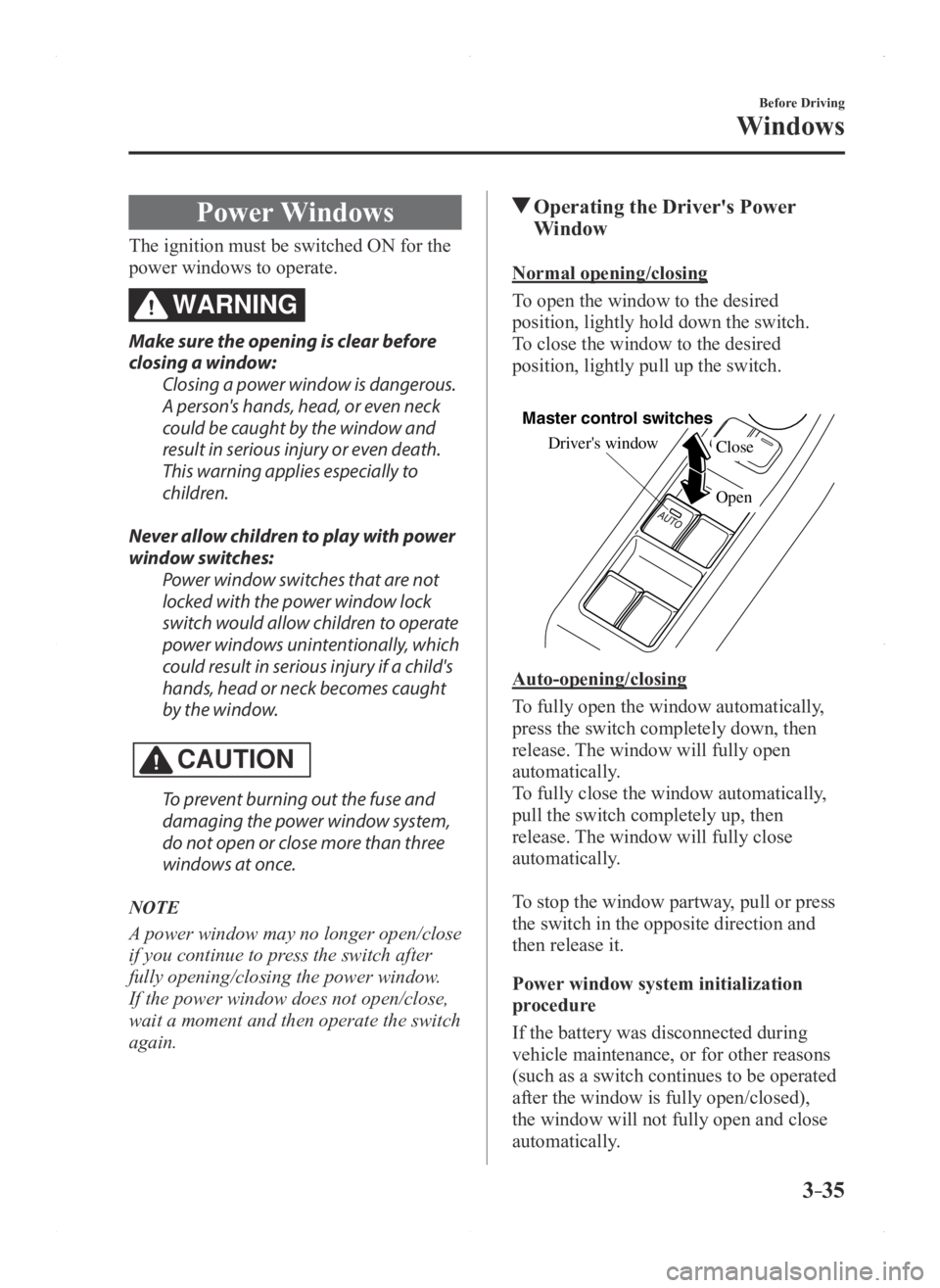
Normal opening/closing
To open the window to the desired
position, lightly hold down the switch.
To close the window to the desired
position, lightly pull up the switch.
Driver's window
Open Close
Master control switches
Auto-opening/closing
To fully open the window automatically,
press the switch completely down, then
release. The window will fully open
automatically.
To fully close the window automatically,
pull the switch completely up, then
release. The window will fully close
automatically.
To stop the window partway, pull or press
the switch in the opposite direction and
then release it.
Power window system initialization
procedure
If the battery was disconnected during
vehicle maintenance, or for other reasons
(such as a switch continues to be operated
after the window is fully open/closed),
the window will not fully open and close
automatically.
Mazda3_8FA4-EA-15G_Edition1.indb 352015/05/11 14:00:28
Page 112 of 598

3–36
Before Driving
Windows
The power window auto function will only
resume on a power window that has been
reset.
1. Switch the ignition ON.
2. Make sure that the power window lock
switch located on the driver's door is
not depressed.
3. Press the switch and fully open the
window.
4. Pull up the switch to fully close the
window and continue holding the
switch for about 2 seconds after the
window fully closed.
Jam-safe window
If a person's hands, head or an object
blocks the window during the auto-closing
operation, the window will stop and open
halfway.
WARNING
Make sure nothing blocks the window
just before it reaches the fully closed
position or while holding up the power
window switch: Blocking the power window just before
it reaches the fully closed position or
while holding up the power window
switch is dangerous.
In this case, the jam-safe function
cannot prevent the window from
closing all the way. If fingers are
caught, serious injuries could occur.
NOTE
Depending on driving conditions, a
closing power window could stop and
start opening when the window feels
a shock that is similar to something
blocking it.
In the event the jam-safe function
activates and the power window cannot
be closed automatically, pull and hold
the switch and the window will close.
The jam-safe window function does not
operate until the system has been reset.
Engine-off power window operation
The power window can be operated for
about 40 seconds after the ignition is
switched from ON to off with all doors
closed. If any door is opened, the power
window will stop operating.
NOTE
For engine-off operation of the power
window, the switch must be held up firmly
throughout window closure because the
auto-closing function will be inoperable.
Mazda3_8FA4-EA-15G_Edition1.indb 362015/05/11 14:00:28
Page 113 of 598

3–37
Before Driving
Windows
Operating the Passenger Power
Windows
To open the window to the desired
position, hold down the switch.
To close the window to the desired
position, pull up the switch.
Close
Open
NOTE
The power windows may be operated
when the power window lock switch
on the driver's door is in the unlocked
position.
The passenger windows may be opened
or closed using the master control
switches on the driver's door.
Left rear window
Right rear windowFront
passenger's
window
Driver's window
Master control switches
Power Window Lock Switch
This feature prevents all power windows
from operating, except the driver's power
window. Keep this switch in the locked
position while children are in the vehicle.
Locked position (button depressed):
Only the driver's power window can be
operated.
Unlocked position (button not
depressed):
All power windows on each door can be
operated.
Locked position
Unlocked position
Mazda3_8FA4-EA-15G_Edition1.indb 372015/05/11 14:00:29
Page 118 of 598

3–42
Before Driving
Security System
*Some models.
Theft-Deterrent System*
If the theft deterrent system detects an
inappropriate entry into the vehicle,
which could result in the vehicle or its
contents being stolen, the alarm alerts the
surrounding area of an abnormality by
sounding the horn and flashing the hazard
warning lights.
The system will not function unless it's
properly armed. So when you leave the
vehicle, follow the arming procedure
correctly.
Operation
System triggering conditions
The horn sounds intermittently and the
hazard warning lights flash for about 30
seconds when the system is triggered by
any one of the following:
Unlocking a door with the key, door
lock switch, or an inside door-lock knob. Forcing open a door, the hood or the
liftgate/trunk lid. Opening the hood by operating the hood
release handle. Switching the ignition ON without using
the push button start.
If the system is triggered again, the lights
and horn will activate until the driver's
door is unlocked with the transmitter.
(With advanced key)
The lights and horn can also be
deactivated by pressing the request switch
on a door.
NOTE
If the battery goes dead while the theft-
deterrent system is armed, the horn will
activate and the hazard warning lights
will flash when the battery is charged or
replaced.
How to Arm the System
1. Close the windows and the moonroof*
securely.
2. Switch the ignition OFF .
3. Make sure the hood, the doors, and the
liftgate/trunk lid are closed.
4. Press the lock button on the transmitter
or lock the driver's door from the
outside with the auxiliary key.
The hazard warning lights will flash
once.
The following method will also arm the
theft-deterrent system:
Press the door-lock switch “” while
any door is open and then close all of
the doors.
(With the advanced keyless function)
Press a request switch.
The security indicator light in the
instrument panel flashes twice per
second for 20 seconds.
5. After 20 seconds, the system is fully
armed.
Mazda3_8FA4-EA-15G_Edition1.indb 422015/05/11 14:00:30
Page 119 of 598

3–43
Before Driving
Security System
NOTE
The theft deterrent system can also be
armed by activating the auto relock
function with all the doors, the liftgate/
trunk lid and the hood closed.
Refer to Transmitter on page 3-4. The system will disarm if one of the
following operations takes place within
20 seconds after pressing the lock
button:
Unlocking any door . Opening any door or the liftgate/
trunk lid. Opening the hood. Switching the ignition ON. (With the advanced keyless
function)
Pressing the electric liftgate/trunk lid
opener while the key is being carried.
To rearm the system, do the arming
procedure again. When the doors are locked by pressing
the lock button on the transmitter
or using the auxiliary key while the
theft-deterrent system is armed, the
hazard warning lights will flash once to
indicate that the system is armed.
To Turn Off an Armed System
An armed system can be turned off using
any one of the following methods:
Pressing the unlock button on the
transmitter. Switching the ignition ON. (With the advanced keyless function)
Pressing a request switch on the doors.
The hazard warning lights will flash twice.
NOTE
When the doors are unlocked by pressing
the unlock button on the transmitter while
the theft-deterrent system is turned off, the
hazard warning lights will flash twice to
indicate that the system is turned off.
To Stop the Alarm
A triggered alarm can be turned off using
any one of the following methods:
Pressing the unlock button on the
transmitter. Starting the engine with the push button
start. (With the advanced keyless function)
Pressing a request switch on the doors. Pressing the electric liftgate/trunk lid
opener while the key is being carried.
The hazard warning lights will flash twice.
Theft-Deterrent Labels
A label indicating that your vehicle is
equipped with a Theft-Deterrent System is
in the glove compartment.
Mazda recommends that you affix it to the
lower rear corner of a front door window.
Mazda3_8FA4-EA-15G_Edition1.indb 432015/05/11 14:00:31
Page 121 of 598

3–45
Before Driving
Driving Tips
Hazardous Driving
WARNING
Be extremely careful if it is necessary to
downshift on slippery surfaces:Downshifting into lower gear
while driving on slippery surfaces is
dangerous. The sudden change in tire
speed could cause the tires to skid. This
could lead to loss of vehicle control
and an accident.
When driving on ice or in water, snow,
mud, sand, or similar hazards:
Be cautious and allow extra distance for
braking. Avoid sudden braking and sudden
maneuvering. Do not pump the brakes. Continue to
press down on the brake pedal.
Refer to Antilock Brake System (ABS)
on page 4-62. If you get stuck, select a lower gear and
accelerate slowly. Do not spin the front
wheels.
For more traction in starting on slippery
surfaces such as ice or packed snow,
use sand, rock salt, chains, carpeting, or
other nonslip material under the front
wheels.
NOTE
Use snow chains only on the front wheels.
Floor Mat
WARNING
Make sure the floor mats are hooked on
the retention pins to prevent them from
bunching up under the foot pedals: Using a floor mat that is not secured is
dangerous as it will interfere with the
accelerator and brake pedal operation,
which could result in an accident.
Do not install two floor mats, one on top
of the other, on the driver's side: Installing two floor mats, one on top
of the other, on the driver's side is
dangerous as the retention pins can
only keep one floor mat from sliding
forward.
If using a heavy duty floor mat for
winter use always remove the original
floor mat.
Loose floor mat(s) will interfere with
the foot pedal and could result in an
accident.
When setting a floor mat, position the floor
mat so that its grommets are inserted over
the pointed end of the retention posts.
Mazda3_8FA4-EA-15G_Edition1.indb 452015/05/11 14:00:31
Page 122 of 598
3–46
Before Driving
Driving Tips
Rocking the Vehicle
WARNING
Do not spin the wheels at more than
56 km/h (35 mph), and do not allow
anyone to stand behind a wheel when
pushing the vehicle:When the vehicle is stuck, spinning the
wheels at high speed is dangerous.
The spinning tire could overheat and
explode. This could cause serious
injuries.
CAUTION
Too much rocking may cause engine
overheating, transaxle failure, and tire
damage.
If you must rock the vehicle to free it from
snow, sand or mud, depress the accelerator
slightly and slowly move the shift lever
from 1 (D) to R.
Winter Driving
Carry emergency gear, including tire
chains, window scraper, flares, a small
shovel, jumper cables, and a small bag of
sand or salt.
Ask an Authorized Mazda Dealer to check
the following:
Have the proper ratio of antifreeze in the
radiator.
Refer to Engine Coolant on page
6-30.
Inspect the battery and its cables. Cold
reduces battery capacity. Use an engine oil appropriate for the
lowest ambient temperatures that the
vehicle will be driven in (page 6-27).
Inspect the ignition system for damage
and loose connections. Use washer fluid made with antifreeze—
but do not use engine coolant antifreeze
for washer fluid (page 6-32).
NOTE
Do not use the parking brake in fr eezing
weather as it may freeze. Instead, shift
to P with an automatic transaxle and to
1 or R with a manual transaxle. Block
the rear wheels.
Remove snow before driving. Snow left
on the windshield is dangerous as it
could obstruct vision.
Do not apply excessive for ce to a
window scraper when removing ice or
frozen snow on the mirror glass and
windshield.
Mazda3_8FA4-EA-15G_Edition1.indb 462015/05/11 14:00:31