2016 LINCOLN MKZ HYBRID remote control
[x] Cancel search: remote controlPage 155 of 543

This feature automatically recalls the position
of the driver seat, power mirrors and power
steering column. The memory control is
located on the driver door.
Saving a PreSet Position
1. Switch the ignition on.
2. Adjust the seat, exterior mirrors and
power steering column to your desired
position.
3. Press and hold the desired preset button
until you hear a single tone.
You can save up to three preset memory
positions. You can save a memory preset at
any time. Recalling a PreSet Position
Press and release the preset button
associated with your desired driving position.
The seat, mirrors and steering column will
move to the position stored for that preset.
Note:
A pre-set memory position can only
be recalled when the ignition is off, or when
the transmission is in park (P) or neutral (N)
if the ignition is on.
You can also recall a preset memory position
by:
• Pressing the unlock button on your
intelligent access key fob if it is linked to
a preset position.
• Unlocking the intelligent driver door
handle if a linked key fob is present.
• Entering a personal entry code on the
Securicode keypad. See Locks (page
67).
Note: Using a linked key fob to recall your
memory position when the ignition is off
moves the seat to the Easy Entry position. Note:
Pressing any active memory feature
control - power seat, mirror (or steering
column switch) (or any memory button)
during a memory recall cancels the
operation.
Linking a PreSet Position to your
Remote Control or Intelligent Access
Key Fob
Your vehicle can save the preset memory
positions for up to three remote controls or
intelligent access (IA) keys.
1. With the ignition on, move the memory positions to the desired positions.
2. Press and hold the desired preset button
for about five seconds. A tone will sound
after about two seconds. Continue
holding until a second tone is heard.
3. Within three seconds, press the lock button on the remote control you are
linking.
To unlink a remote control, follow the same
procedure – except in step 3, press the
unlock button on the remote control.
152
MKZ Hybrid (CC9) Hybrid Electric Vehicle (HEV), Canada/United States of America, enUSA, First Printing SeatsE142554
Page 156 of 543

Note:
If more than one linked remote control
or IA key is in range, the memory function
moves to the settings of the first key to
initiate a memory recall.
Easy Entry and Exit Feature
If you enable the easy entry and exit feature,
it automatically moves the driver seat
position rearward up to two inches (five
centimeters) when you switch the ignition
off.
The driver seat will return to the previous
position when you switch the ignition on.
You can enable or disable this feature in the
information display. See Information
Displays (page 110).
REAR SEATS
Note: Your vehicle may have split seatbacks
that you must fold individually.
Note: Make sure the center safety belt is
unbuckled before folding the seatback.
To lower the seat back(s) from inside the
vehicle, do the following: 1. Pull the handle to release the seatback.
2. Push the seatback forward. 3. Stow the safety belt in the stowage clip.
This will prevent the safety belt from
getting caught in the seat latch.
When raising the seat back(s), make sure you
hear the seat latch into place.
153
MKZ Hybrid (CC9) Hybrid Electric Vehicle (HEV), Canada/United States of America, enUSA, First Printing SeatsE144634 E164098
Page 161 of 543
HomeLink Wireless Control System (If
Equipped) WARNING
Do not use the system with any garage
door opener that does not have the
safety stop and reverse feature as required
by U.S. Federal Safety Standards (this
includes any garage door opener
manufactured before April 1, 1982). A garage
door opener which cannot detect an object,
signaling the door to stop and reverse, does
not meet current federal safety standards.
Using a garage door opener without these
features increases the risk of serious injury
or death. Note:
Make sure that the garage door and
security device are free from obstruction
when you are programming. Do not program
the system with the vehicle in the garage.
Note: Make sure you keep the original
remote control transmitter for use in other
vehicles as well as for future system
programming. Note:
We recommend that upon the sale or
lease termination of your vehicle, you erase
the programmed function buttons for security
reasons. See Erasing the function button
codes later in this section.
Note: You can program a maximum of three
devices. To change or replace any of the
three devices after it has been initially
programmed, you must first erase the current
settings. See Erasing the function button
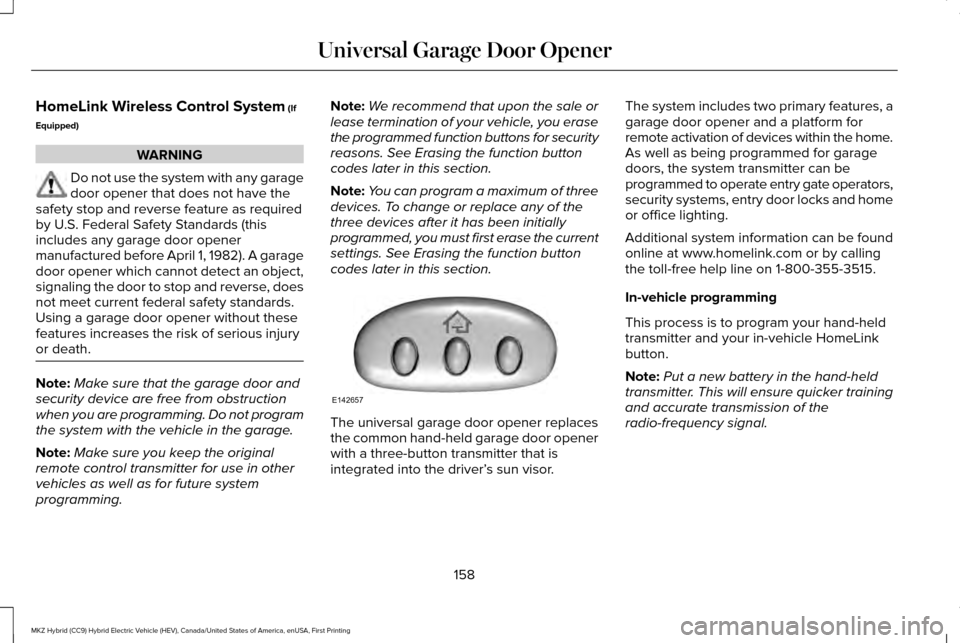
codes later in this section. The universal garage door opener replaces
the common hand-held garage door opener
with a three-button transmitter that is
integrated into the driver’
s sun visor.The system includes two primary features, a
garage door opener and a platform for
remote activation of devices within the home.
As well as being programmed for garage
doors, the system transmitter can be
programmed to operate entry gate operators,
security systems, entry door locks and home
or office lighting.
Additional system information can be found
online at www.homelink.com or by calling
the toll-free help line on 1-800-355-3515.
In-vehicle programming
This process is to program your hand-held
transmitter and your in-vehicle HomeLink
button.
Note:
Put a new battery in the hand-held
transmitter. This will ensure quicker training
and accurate transmission of the
radio-frequency signal.
158
MKZ Hybrid (CC9) Hybrid Electric Vehicle (HEV), Canada/United States of America, enUSA, First Printing Universal Garage Door OpenerE142657
Page 224 of 543

System Not Available
Conditions that can cause the system to
deactivate or prevent the system from
activating when requested include:
•
A blocked sensor.
• High brake temperature.
• A failure in the system or a related
system. Blocked Sensor A message displays if something obstructs
the radar signals from the sensor. The sensor
is located behind a fascia cover near the
driver side of the lower grille. The system
cannot detect a vehicle ahead and will not
function when something obstructs the radar
signals. The following table lists possible
causes and actions for this message
displaying.
Action
Cause
Clean the grille surface in front of the radar or remove the object
causing the obstruction.
The surface of the radar in the grille is dirty or obstructed in some
way.
Wait a short time. It may take several minutes for the radar to detect
that it is free from obstruction.
The surface of the radar in the grille is clean but the message remains
in the display.
Do not use the system in these conditions because it may not detect
any vehicles ahead.
Heavy rain or snow is interfering with the radar signals.
Do not use the system in these conditions because it may not detect
any vehicles ahead.
Swirling water, or snow or ice on the surface of the road may interfere
with the radar signals.
Wait a short time or switch to normal cruise control.
You are in a desert or remote area with no other vehicles and no
roadside objects.
221
MKZ Hybrid (CC9) Hybrid Electric Vehicle (HEV), Canada/United States of America, enUSA, First Printing Cruise ControlE145632
Page 264 of 543
Fires
As with any vehicle, call 911 immediately if
you see sparks, smoke or flames coming
from the vehicle.
•
Exit the vehicle immediately.
• Advise 911 that an electric or
hybrid-electric vehicle is involved.
• As with any vehicle fire, do not inhale
smoke, vapors or gas from the vehicle,
as they may be hazardous.
• Remain a safe distance from the vehicle
and try to stay clear of the smoke.
• Stay out of the roadway and stay out of
the way of any oncoming traffic while
awaiting the arrival of emergency
responders.
Post-Incident
• Do not store a severely damaged vehicle
with a lithium-ion battery inside a
structure or within 50 feet (15 meters) of
any structure or vehicle.
• Make sure that passenger and cargo
compartments remain ventilated (i.e.
open window, door or trunk). •
For vehicles in the United States, notify
Ford Motor Company 1-800-392-3673
(then follow the prompts on the voice
response menu), an authorized Ford
dealer or service center as soon as
possible as there may be other steps to
secure and discharge the high-voltage
battery.
• For vehicles in Canada, notify Ford Motor
Company 1-800-565-3673 (then follow
the prompts on the voice response
menu), an authorized Ford dealer or
service center as soon as possible as
there may be other steps to secure and
discharge the high-voltage battery.
• Call 911 if you observe leaking fluids,
sparks, smoke or flames, or hear gurgling
or bubbling from the high-voltage battery.
POST-CRASH ALERT SYSTEM
The system flashes the direction indicators
and sounds the horn (intermittently) in the
event of a serious impact that deploys an
airbag (front, side, side curtain or Safety
Canopy) or the safety belt pretensioners. The horn and indicators will turn off when:
•
You press the hazard control button.
• You press the panic button on the remote
entry transmitter (if equipped).
• Your vehicle runs out of power.
Spinout Detection
If a spinout is detected, the vehicle comes
to a stop and the hazard warning flashers
come on. A message that states the spinout
hazards are activated will appear on the
instrument cluster. The message may not
appear if your vehicle runs out of power.
Once the hazard warning flashers have been
activated, you can turn them off by:
• Pressing the hazard warning flasher
button.
• Pressing the remote control unlock
button.
• Pressing the remote control panic button.
• Cycling the ignition on and off twice.
261
MKZ Hybrid (CC9) Hybrid Electric Vehicle (HEV), Canada/United States of America, enUSA, First Printing Roadside Emergencies
Page 276 of 543

Protected components
Fuse amp rating
Fuse or relay number
Run/start anti-lock brake system.
10A 2
25
Run/start powertrain control module.
10A 2
26
Fuel door solenoid.
10A 1
27
Not used.
–
28
Hybrid content vehicle power 5.
15A 1
29
Not used.
–
30
Not used.
–
31
HEV/PHEV pulse width modulated fan relay.
–
32
Not used.
–
33
Not used.
–
34
Charger fan.
15A 2
35
HEV battery electronic control module fan.
15A 2
36
Remote CD.
5A 1
37
273
MKZ Hybrid (CC9) Hybrid Electric Vehicle (HEV), Canada/United States of America, enUSA, First Printing Fuses
Page 537 of 543

Information Messages..................................121
Active Park............................................................122
Adaptive Cruise Control....................................122
Adaptive Headlamps..........................................123
AdvanceTrac ™.......................................................123
Airbag.....................................................................124
Alarm......................................................................124
Automatic Engine Shutdown............................124
Battery and Charging System (12 volt)...........125
Battery and Charging System (High Voltage).............................................................125
Blind Spot Information and Cross Traffic Alert System...............................................................126
Doors and Locks..................................................126
Driver Alert............................................................127
Fuel........................................................................\
..127
Hill Start Assist.....................................................128
Keys and Intelligent Access.............................128
Lane Keeping System........................................129
Maintenance.........................................................130
MyKey......................................................................131
Park Aid..................................................................132
Park Brake.............................................................133
Power Steering.....................................................134
Pre-Collision Assist.............................................135
Remote Start.........................................................135
Seats.......................................................................136
Starting System ...................................................136 Tire Pressure Monitoring System................137
Traction Control....................................................137
Transmission.........................................................138
Installing Child Seats......................................18 Child Seats...............................................................18
Using Lap and Shoulder Belts............................18
Using Lower Anchors and Tethers for
CHildren (LATCH).............................................24
Using Tether Straps..............................................25
Instrument Cluster
........................................102
Instrument Lighting Dimmer........................88
Interior Lamps
..................................................93
Front Interior Lamp...............................................93
Rear Interior Lamp................................................94
Rear Interior Lamp (If Equipped).......................94
Interior Luggage Compartment Release
...........................................................75
Interior Mirror...................................................98
Auto-Dimming Mirror...........................................99
Introduction
.........................................................7
J
Jump Starting the Vehicle
..........................256
Connecting the Jumper Cables......................257
Jump Starting......................................................259
Preparing Your Vehicle.....................................256
Removing the Jumper Cables........................
259 K
Keyless Entry
....................................................72
SECURICODE™ KEYLESS ENTRY
KEYPAD...............................................................72
Keyless Starting
.............................................166
Ignition Modes.....................................................166
Keys and Remote Controls
...........................54
L
Lane Keeping System
.................................224
Switching the System On and Off..................225
Lighting Control
...............................................87
Headlamp Flasher.................................................87
High Beams............................................................87
Lighting
..............................................................87
Lincoln Automotive Financial Services......12
Load Carrying
................................................240
Load Limit.......................................................240 Vehicle Loading - with and without a
Trailer................................................................240
534
MKZ Hybrid (CC9) Hybrid Electric Vehicle (HEV), Canada/United States of America, enUSA, First Printing Index
Page 538 of 543

Locking and Unlocking..................................67
Activating Intelligent Access.............................68
Autolock .................................................................69
Auto Relock............................................................69
Battery Saver..........................................................70
Illuminated Entry...................................................70
Illuminated Exit......................................................70
Luggage Compartment.......................................70
Power Decklid.........................................................71
Power Door Locks................................................67
Remote Control.....................................................67
Smart Unlocks for Intelligent Access
Keys.....................................................................69
Locks..................................................................67
M
Maintenance..................................................287 General Information...........................................287
Media Hub.......................................................361
Memory Function...........................................151
Easy Entry and Exit Feature..............................153
Linking a PreSet Position to your Remote
Control or Intelligent Access Key Fob.......
152
Saving a PreSet Position...................................152
Message Center See: Information Displays..................................110 Mirrors
See: Heated Windows and Mirrors.................144
See: Windows and Mirrors.................................95
Mobile Communications Equipment...........13
Moonroof.........................................................100 Bounce-Back.........................................................101
Opening and Closing the Moonroof..............100
Motorcraft Parts
............................................350
MyKey Troubleshooting................................65
MyKey™..............................................................60 Principle of Operation.........................................60
MyLincoln Touch ™
.........................................362
General Information...........................................362
MyLincoln Touch ™ Troubleshooting
.........465
N
Navigation......................................................452 cityseekr...............................................................455
Destination Mode...............................................452
Map Mode.............................................................461
Navigation Map Updates..................................464
Navigation Voice Commands..........................
464
Point of Interest (POI) Categories..................455
Quick-touch Buttons..........................................463
Setting Your Navigation Preferences............456
Normal Scheduled Maintenance..............484 O
Oil Change Indicator Reset........................291
Oil Check
See: Engine Oil Check......................................290
Opening and Closing the Hood...............287
Ordering Additional Owner's Literature......................................................267
Obtaining a French Owner’ s Manual............267
Overhead Console
.......................................165
P
Parking Aids..................................................204 Principle of Operation.......................................204
Passive Anti-Theft System............................77 SecuriLock...............................................................77
PATS See: Passive Anti-Theft System.........................77
Perchlorate........................................................12
Personal Safety System ™
..............................43
How Does the Personal Safety System
Work?...................................................................43
535
MKZ Hybrid (CC9) Hybrid Electric Vehicle (HEV), Canada/United States of America, enUSA, First Printing Index