2016 LINCOLN MKZ HYBRID remote control
[x] Cancel search: remote controlPage 80 of 543

PASSIVE ANTI-THEFT SYSTEM
Note:
The system is not compatible with
non-Ford aftermarket remote start systems.
Use of these systems may result in vehicle
starting problems and a loss of security
protection.
Note: Metallic objects, electronic devices or
a second coded key on the same key chain
may cause vehicle starting problems if they
are too close to the key when starting your
vehicle. Prevent these objects from touching
the coded key while starting your vehicle.
Switch the ignition off, move all objects on
the key chain away from the coded key and
restart your vehicle if a problem occurs.
Note: Do not leave a duplicate coded key
in your vehicle. Always take your keys and
lock all doors when leaving your vehicle. SecuriLock
The system helps prevent your vehicle from
starting unless you use a coded key
programmed to your vehicle. Using the
wrong key may prevent your vehicle from
starting. A message may appear in the
information display.
If you are unable to start your vehicle with a
correctly coded key, it is not operating
properly. A message may appear in the
information display.
Automatic Arming
Your vehicle arms immediately after
switching the ignition off.
Automatic Disarming
Switching the ignition on with a coded key
disarms your vehicle.
Replacement Keys
Note:
Your vehicle comes equipped with two
intelligent access keys. The intelligent access key functions as a
programmed key that operates the driver
door lock and activates the intelligent access
with push button start system, as well as a
remote control.
If your programmed transmitters are lost or
stolen and you do not have an extra coded
key, have your vehicle towed to an
authorized dealer. You need to erase the
key codes from your vehicle and program
new coded keys.
Store an extra programmed key away from
your vehicle in a safe place to help prevent
any inconveniences. See your authorized
dealer to purchase additional spare or
replacement keys.
Programming a Spare Intelligent Access
Key
Note:
You can program a maximum of four
intelligent access keys to your vehicle.
77
MKZ Hybrid (CC9) Hybrid Electric Vehicle (HEV), Canada/United States of America, enUSA, First Printing Security
Page 81 of 543

You must have two previously programmed
intelligent access keys inside your vehicle
and the new unprogrammed intelligent
access keys readily accessible. See an
authorized dealer to have the spare key
programmed if two previously programmed
keys are not available.
Make sure that your vehicle is off before
beginning this procedure. Make sure that
you close all the doors before beginning and
that they remain closed throughout the
procedure. Perform all steps within 30
seconds of starting the sequence. Stop and
wait for at least one minute before starting
again if you perform any steps out of
sequence.
Read and understand the entire procedure
before you begin.
1.
Remove the rubber covering (A) from the
cupholder. Place the first programmed
key in the backup slot (B) at the bottom
of the cupholder, then press the push
button ignition switch.
2. Wait five seconds and then press the push button ignition switch again.
3. Remove the intelligent access key.
4. Within 10 seconds, place a second programmed intelligent access key in the
backup slot. Press the push button
ignition switch.
5. Wait five seconds and then press the push button ignition switch again.
6. Remove the intelligent access key. 7. Place the unprogrammed intelligent
access key in the backup slot and press
the push button ignition switch.
Programming is now complete. Verify the
remote control functions operate and your
vehicle starts with the new intelligent access
key.
If programming was not successful, wait 10
seconds and repeat Steps 1 through 7. If you
are still unsuccessful, take your vehicle to
your authorized dealer.
ANTI-THEFT ALARM
The system will warn you of an unauthorized
entry to your vehicle. It will be triggered if
any door, the luggage compartment or the
hood is opened without using the key,
remote control or keyless entry keypad.
The direction indicators will flash and the
horn will sound if unauthorized entry is
attempted while the alarm is armed.
Take all remote controls to an authorized
dealer if there is any potential alarm problem
with your vehicle.
78
MKZ Hybrid (CC9) Hybrid Electric Vehicle (HEV), Canada/United States of America, enUSA, First Printing SecurityE155835
Page 82 of 543

Arming the Alarm
The alarm is ready to arm when there is not
a key in your vehicle. Electronically lock your
vehicle to arm the alarm.
Disarming the Alarm
Disarm the alarm by any of the following
actions:
•
Unlock the doors or luggage
compartment with the remote control or
keyless entry keypad.
• Switch your vehicle on or start your
vehicle.
• Use a key in the driver door to unlock
your vehicle, then switch your vehicle on
within 12 seconds.
Note: Pressing the panic button on the
remote control will stop the horn and signal
indicators, but will not disarm the system.
79
MKZ Hybrid (CC9) Hybrid Electric Vehicle (HEV), Canada/United States of America, enUSA, First Printing Security
Page 96 of 543
WELCOME LIGHTING
The Lincoln welcome mat projection lights
are on the bottom of the exterior mirror
housings. They will project an image onto
the ground a short distance from your vehicle
when welcome lighting or lighted entry turns
on.
Note:
Moisture, frost and ice build-up or
other types of contamination on the surface
of the light lens can cause non-permanent
distortion or reduced brightness of the
image. Do not use abrasive materials to
clean the lens.
INTERIOR LAMPS
The lamps switch on when:
• You open any door.
• You press a remote control button.
• You press the all lamps on switch on the
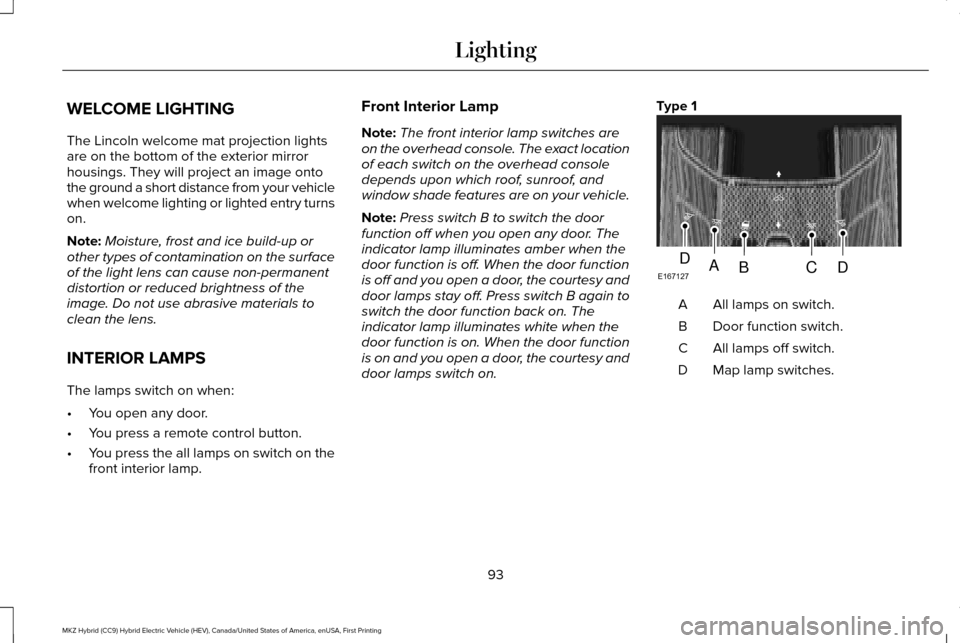
front interior lamp. Front Interior Lamp
Note:
The front interior lamp switches are
on the overhead console. The exact location
of each switch on the overhead console
depends upon which roof, sunroof, and
window shade features are on your vehicle.
Note: Press switch B to switch the door
function off when you open any door. The
indicator lamp illuminates amber when the
door function is off. When the door function
is off and you open a door, the courtesy and
door lamps stay off. Press switch B again to
switch the door function back on. The
indicator lamp illuminates white when the
door function is on. When the door function
is on and you open a door, the courtesy and
door lamps switch on. Type 1 All lamps on switch.
A
Door function switch.
B
All lamps off switch.
C
Map lamp switches.
D
93
MKZ Hybrid (CC9) Hybrid Electric Vehicle (HEV), Canada/United States of America, enUSA, First Printing LightingE167127ABCDD
Page 99 of 543

Window Lock
Press the control to lock or unlock the rear
window controls. It will illuminate when you
lock the rear window controls.
Accessory Delay
You can use the window switches for several
minutes after you switch the ignition off or
until you open either front door.
GLOBAL OPENING AND CLOSING
You can use the remote control to operate
the windows with the ignition off. Note:
You can enable or disable this feature
in the information display or see an
authorized dealer. See (page 110).
Note: To operate this feature, accessory
delay must not be active.
Opening the Windows
You can only open the windows for a short
time after you unlock your vehicle with the
remote control. After you unlock your vehicle,
press and hold the remote control unlock
button to open the windows and vent the
moonroof. Release the button once
movement starts. Press the lock or unlock
button to stop movement.
Closing the Windows WARNING
When closing the windows and
moonroof, you should verify they are
free of obstructions and make sure that
children and pets are not in the proximity of
the window openings. To close the windows and moonroof, press
and hold the remote control lock button.
Release the button once movement starts.
Press the lock or unlock button to stop
movement.
EXTERIOR MIRRORS
Power Exterior Mirrors
WARNING
Do not adjust the mirrors when your
vehicle is moving.
96
MKZ Hybrid (CC9) Hybrid Electric Vehicle (HEV), Canada/United States of America, enUSA, First Printing Windows and MirrorsE144072
Page 119 of 543

Settings
—
On or Off
Easy Entry / Exit
Right or Left Hand Traffic
Traffic Set Up
Adaptive Hdlamps
Lighting
On or Off
Auto Highbeam
On or Off
Daytime Lights
Select time interval
Autolamp Delay
On or Off
Autolock
Locks
On or Off
Autounlock
On or Off
Mislock
All doors or Driver door
Remote Unlocking
Hold OK to Initialize
Neutral Tow
Set to XXX % - Hold
OK to Reset
Oil Life Reset
Enable or Disable Switch
Power Decklid
Auto or Last Settings
Heater – A/C
Climate Control
Remote Start
Auto Heated or Off
Steering Wheel
Auto or Off
Front Defrost
Auto or Off
Rear Defrost
116
MKZ Hybrid (CC9) Hybrid Electric Vehicle (HEV), Canada/United States of America, enUSA, First Printing Information Displays
Page 147 of 543

2. Adjust the temperature control to the
desired setting. Use 72°F (22°C) as a
starting point, then adjust the setting as
necessary.
HEATED WINDOWS AND MIRRORS
Heated Rear Window
Note: Make sure the engine is running
before operating the heated windows. Press the button to clear the
heated rear window of thin ice and
fog. The heated rear window will
automatically turn off after a short period of
time. Start the engine before you switch the
heated rear window on.
Note: Do not use razor blades or other sharp
objects to clean or remove decals from the
inside of the heated rear window. The
vehicle warranty does not cover damage
caused to the heated rear window grid lines. Heated Exterior Mirror
When you switch the heated rear window
on, the heated exterior mirrors will
automatically turn on.
Note:
Do not remove ice from the mirrors
with a scraper or adjust the mirror glass
when it is frozen in place.
Note: Do not clean the mirror housing or
glass with harsh abrasives, fuel or other
petroleum-based cleaning products.
CABIN AIR FILTER
Your vehicle is equipped with a cabin air
filter, which gives you and your passengers
the following benefits:
• It improves your driving comfort by
reducing particle concentration.
• It improves the interior compartment
cleanliness.
• It protects the climate control
components from particle deposits.
You can locate the cabin air filter behind the
glove box. Note:
Make sure you have a cabin air filter
installed at all times. This prevents foreign
objects from entering the system. Running
the system without a filter in place could
result in degradation or damage to the
system.
Replace the filter at regular intervals. See
Scheduled Maintenance (page 479).
For additional cabin air filter information, or
to replace the filter, see an authorized dealer.
REMOTE START
The remote start feature allows you to
pre-condition the interior of your vehicle. The
climate control system works to achieve
comfort according to your pre-selected
settings.
Note: You cannot adjust the system during
remote start operation. You cannot switch
on the displays or indicators during remote
start.
144
MKZ Hybrid (CC9) Hybrid Electric Vehicle (HEV), Canada/United States of America, enUSA, First Printing Climate ControlE184884
Page 148 of 543

Switch the ignition on to return the system
to its pre-selected settings. You can now
make adjustments normally, but you need to
switch certain vehicle-dependent features
back on, such as:
•
Heated seats.
• Cooled seats.
• Heated steering wheel.
• Heated mirrors.
• Heated rear window.
You can adjust the default remote start
settings using the information display
controls. See Information Displays (page
110).
Automatic Settings
In hot weather, the system is set to 72°F
(22°C). The cooled seats are set to high (if
available, and selected to AUTO in the
information display).
In moderate weather, the system either heats
or cools (based on pre-selected settings).
The rear defroster, heated mirrors and
heated seats do not automatically switch on. In cold weather, the system is set to 72°F
(22°C). The heated seats are set to high (if
available, and selected to AUTO in the
information display). The rear defroster and
heated mirrors automatically switch on.
145
MKZ Hybrid (CC9) Hybrid Electric Vehicle (HEV), Canada/United States of America, enUSA, First Printing Climate Control