2016 LINCOLN MKZ HYBRID engine
[x] Cancel search: enginePage 68 of 543

USING MYKEY WITH REMOTE
START SYSTEMS
MyKey is not compatible with non
Ford-approved, aftermarket remote start
systems. If you choose to install a remote
start system, see an authorized dealer for a
Ford-approved remote start system.
MYKEY TROUBLESHOOTING Potential Causes
Condition
I cannot create a MyKey. •The key or transmitter used to start the vehicle does not have admin privileg\
es.
• The key or transmitter used to start the vehicle is the only admin key (there always has to be at
least one admin key).
• Vehicles with keyless start: The keyless start transmitter is not placed in the backup position.
See Starting a Gasoline Engine (page 167).
• SecuriLock passive anti-theft system is disabled or in unlimited mode.
• The key or transmitter used to start your vehicle does not have admin privile\
ges.
• No MyKeys are created.
See Creating a MyKey (page 61).
I cannot program the configurable
settings.
•The key or transmitter used to start your vehicle does not have admin privile\
ges.
• No MyKeys are created.
See Creating a MyKey (page 61).
I cannot clear the MyKeys.
Purchase a new key from an authorized dealer.
I lost the only admin key.
65
MKZ Hybrid (CC9) Hybrid Electric Vehicle (HEV), Canada/United States of America, enUSA, First Printing MyKey™
Page 98 of 543

POWER WINDOWS
WARNINGS
Do not leave children unattended in
your vehicle and do not let them play
with the power windows. They may seriously
injure themselves. When closing the power windows, you
should verify they are free of
obstructions and make sure that children and
pets are not in the proximity of the window
openings. Note:
Window operation may stop or delay
during low battery conditions and engine
re-cranking. It will resume after the engine
starts. Note:
You may hear a pulsing noise when
just one of the windows are open. Lower the
opposite window slightly to reduce this
noise.
Press the switch to open the window.
Lift the switch to close the window.
One-Touch Down
Press the switch fully and release it. Press
again or lift it to stop the window.
One-Touch Up
Lift the switch fully and release it. Press or
lift it again to stop the window. Bounce-Back
The window will stop automatically while
closing. It will reverse some distance if there
is an obstacle in the way.
Overriding the Bounce-Back Feature
WARNING
When you override the bounce-back
feature, the window will not reverse if
it detects an obstacle. Take care when
closing the windows to avoid personal injury
or damage to your vehicle. Pull up the window switch and hold within
two seconds of the window reaching the
bounce-back position. The window will travel
up with no bounce-back protection. The
window will stop if you release the switch
before the window closes fully.
95
MKZ Hybrid (CC9) Hybrid Electric Vehicle (HEV), Canada/United States of America, enUSA, First Printing Windows and MirrorsE146043
Page 100 of 543
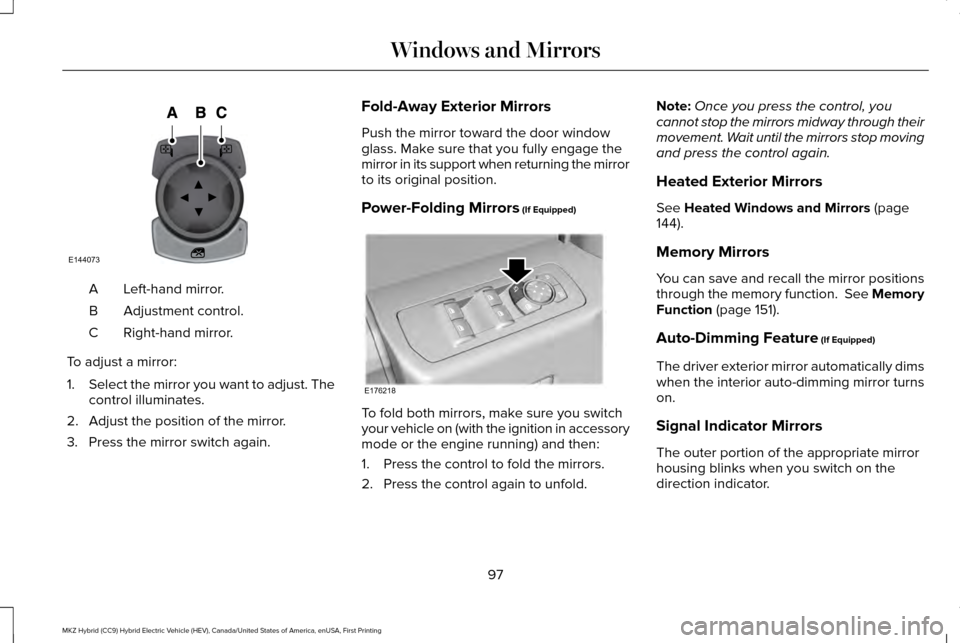
Left-hand mirror.
A
Adjustment control.
B
Right-hand mirror.
C
To adjust a mirror:
1. Select the mirror you want to adjust. The
control illuminates.
2. Adjust the position of the mirror.
3. Press the mirror switch again. Fold-Away Exterior Mirrors
Push the mirror toward the door window
glass. Make sure that you fully engage the
mirror in its support when returning the mirror
to its original position.
Power-Folding Mirrors (If Equipped)
To fold both mirrors, make sure you switch
your vehicle on (with the ignition in accessory
mode or the engine running) and then:
1. Press the control to fold the mirrors.
2. Press the control again to unfold.Note:
Once you press the control, you
cannot stop the mirrors midway through their
movement. Wait until the mirrors stop moving
and press the control again.
Heated Exterior Mirrors
See Heated Windows and Mirrors (page
144).
Memory Mirrors
You can save and recall the mirror positions
through the memory function. See Memory
Function
(page 151).
Auto-Dimming Feature
(If Equipped)
The driver exterior mirror automatically dims
when the interior auto-dimming mirror turns
on.
Signal Indicator Mirrors
The outer portion of the appropriate mirror
housing blinks when you switch on the
direction indicator.
97
MKZ Hybrid (CC9) Hybrid Electric Vehicle (HEV), Canada/United States of America, enUSA, First Printing Windows and MirrorsE144073 E176218
Page 109 of 543

Blind Spot Monitor (If Equipped)
Lights when you switch this feature
off or with a blind spot message.
See
Blind Spot Information
System (page 229). See General Information
(page
110).
Brake System Lights when you engage the
parking brake with the ignition on.
If it lights when you are driving,
check that the parking brake is not on. If the
parking brake is not on, this Brake System
lamp indicates low brake fluid level or a
brake system malfunction. Have an
authorized dealer check the system
immediately. WARNING
Driving your vehicle with the warning
lamp on is dangerous. A significant
decrease in braking performance may occur.
It will take you longer to stop your vehicle.
Have an authorized dealer check the system
immediately. Driving extended distances with
the parking brake engaged can cause brake
failure and the risk of personal injury. Cruise Control
(If Equipped)
Lights when you switch on cruise
control.
Direction Indicator Lights when the left or right turn
signal or the hazard warning
flasher is switched on. If the
indicators stay on or flash faster, check for a
burned-out bulb.
See Changing a Bulb
(page 301). Door Ajar Lights when the ignition is on and
any door is not completely closed.
EcoSelect Lights when you switch on this feature. See
Hybrid Electric Vehicle
(page 171).
Electric Park Brake Lights or flashes when the electric
parking brake malfunctions.
Engine or Motor Coolant Temperature Lights when the engine or motor
cooling system is overheating.
Stop your vehicle in a safe place
and have an authorized dealer check the
system.
106
MKZ Hybrid (CC9) Hybrid Electric Vehicle (HEV), Canada/United States of America, enUSA, First Printing Instrument ClusterE151262 E144522 E71340 E194390 E146190
Page 110 of 543
Engine Oil
If it lights with the engine running
or when you are driving, this
indicates a malfunction. Stop your
vehicle as soon as it is safe to do so and
switch the engine off. Check the engine oil
level. See Engine Oil Check (page 290).
Note: Do not resume your trip if it lights, even
if the oil level is correct. Have an authorized
dealer check the system immediately.
Fasten Safety Belt Lights and a chime sounds to
remind you to fasten your safety
belt. See Safety Belt Minder (page
39
).
Front Airbag Lights when you start your vehicle.
If it continues to flash or remains
on, it indicates a malfunction. Have
an authorized dealer check the system. Grade Assist
(If Equipped) Lights when you switch on the
grade assist function.
Heads Up Display
(If Equipped) A red beam of lights appears on
the windshield in certain instances
when using adaptive cruise control
and/or the collision warning system. To make
sure the display works, it will also appear
momentarily when you start your vehicle.
High Beam Lights when you switch on the
high-beam headlamps. Flashes
when you use the headlamp
flasher.
Hood Ajar Lights when the ignition is on and
the hood is not completely closed.Lane Keeping Aid
(If Equipped) Lights when you activate the lane
keeping system.
Low Fuel Level Lights when the fuel level is low or
the fuel tank is nearly empty.
Refuel as soon as possible.
Low Tire Pressure Warning Lights when your tire pressure is
low. If the lamp remains on with
the engine running or when
driving, check your tire pressure as soon as
possible.
To confirm the lamp is working, it will also
light momentarily when you switch on the
ignition. If it does not light when you switch
the ignition on, or it begins to flash at any
time, have an authorized dealer check the
system.
107
MKZ Hybrid (CC9) Hybrid Electric Vehicle (HEV), Canada/United States of America, enUSA, First Printing Instrument Cluster E144523 E156133 E159324 E144813
Page 111 of 543

Low Washer Fluid
Lights when the windshield washer
fluid is low.
Parking Lamps Lights when you switch on the
parking lamps.
Powertrain Fault Lights when your vehicle detects
a powertrain fault. Contact an
authorized dealer as soon as
possible.
Note: If your vehicle detects certain faults,
it will not allow you to operate the
accelerator pedal. If this happens, press the
brake pedal and release it. This will activate
limp home vehicle operation. In limp home
vehicle operation, your vehicle will
accelerate in a controlled manner up to a
maximum speed of 35 mph (56 km/h) on a
flat surface. If you apply the brake pedal or
move the transmission to neutral (N) you can
override your vehicle ’s acceleration. Ready to Drive Lights when you switch on your
vehicle and it is ready to drive. A
corresponding message may
display stating ready to drive.
Service Engine Soon If the service engine soon indicator
light stays illuminated after the
engine is started, it indicates that
the On Board Diagnostics system (OBD) has
detected a malfunction of the vehicle
emissions control system. Refer to On board
diagnostics (OBD) in the Fuel and Refueling
chapter for more information about servicing
your vehicle. See Emission Control System
(page 184).
If the light is blinking, the engine is misfiring.
This could damage your catalytic converter.
Drive in a moderate fashion (avoid heavy
acceleration and deceleration) and have your
vehicle serviced immediately. Note:
If your engine is misfiring, excessive
exhaust temperatures could damage the
catalytic converter or other vehicle
components.
The service engine soon indicator lights
when the you first switch on your vehicle,
prior to engine start, to check the bulb and
to indicate whether the vehicle is ready for
inspection maintenance testing.
Normally, the service engine soon light will
stay on until the engine cranks, then turn
itself off if no malfunctions are present.
However, if after 15 seconds the service
engine soon light blinks eight times, it means
that the vehicle is not ready for inspection
maintenance testing. See Emission Control
System (page 184).
Stability Control Flashes when the system is active.
If it stays lit or does not light when
you switch on the ignition, this
indicates a malfunction. During a malfunction
the system will switch off. Have an authorized
dealer check the system immediately.
See
Using Stability Control (page 203).
108
MKZ Hybrid (CC9) Hybrid Electric Vehicle (HEV), Canada/United States of America, enUSA, First Printing Instrument ClusterE178202 E144692 E138639
Page 114 of 543

Note:
The cluster will remember the menu
level 2 state when the individual key state
is changed from the RUN position to the OFF
position. Display/Trip
Menu level 5
Menu level 4
Menu level 3
Menu level 2
—
—
Help
Engage
Split Power + Avg Fuel Economy +
Instantaneous Fuel Gauge + Battery Gauge + Fuel Gauge)
—
—
Help
Empower
(Power with engine on/off threshold
+ Avg Fuel Economy + Instantaneous Fuel Gauge + Battery Gauge + Fuel Gauge)
Avg Fuel
Avg Fuel
Change MyView
MyView
(MyView + Battery Gauge + Fuel Gauge) Inst. Fuel
Power
Coolant Temp
Split Power
Accessory Power
Power + Threshold
Trip 1
Tach rpm x 1000 + Avg Fuel
Trip 2
Accessory Power
111
MKZ Hybrid (CC9) Hybrid Electric Vehicle (HEV), Canada/United States of America, enUSA, First Printing Information Displays
Page 115 of 543

Display/Trip
Fuel History
Trip 1
Coach
Trip 2
Average Speed
Fuel History
Blank
Coach
—
Blank
—
—
Help
—
—
Help
Trip 1 & 2: Trip Data + Battery Gauge
+ Fuel Gauge
Engage
Engage provides separate gauges for engine
power and high voltage battery power in
kilowatts (kW). The engine power gauge fill
is white and the high voltage battery power
gauge fill is blue. You can also see an
instantaneous fuel economy gauge. When
your vehicle is operating on battery power
only, you will see EV displayed and the
gauges will appear in blue. Note:
Hold OK to reset average fuel
economy.
Empower
Empower provides a power demand gauge
in kilowatts (kW) which includes an engine
on or off threshold. •
When your vehicle is operating with
battery power only (below the threshold),
you will see EV displayed and the gauge
fill is blue.
• When your vehicle is operating with both
the engine and the high voltage battery
providing power the gauge fill is white.
112
MKZ Hybrid (CC9) Hybrid Electric Vehicle (HEV), Canada/United States of America, enUSA, First Printing Information Displays