2016 LINCOLN MKS ESP
[x] Cancel search: ESPPage 77 of 382

AUTOMATIC HIGH BEAM
CONTROL (If Equipped)
The system will automatically turn on your
high beams if it is dark enough and no other
traffic is present. When it detects the
headlights of an approaching vehicle, the tail
lamps of the preceding vehicle or street
lighting, the system will turn off the high
beams before they distract other drivers. The
low beams remain on.
Note: If it appears that automatic control of
the high beams is not functioning properly,
check the windshield in front of the camera
for a blockage. A clear view of the road is
required for proper system operation. Have
any windshield damage in the area of the
camera ’s field-of-view repaired.
Note: If the system detects a blockage such
as bird droppings, bug splatter, snow or ice,
and you do not observe changes, the system
will go into low beam mode until you clear the
blockage. A message may also appear in the
instrument cluster display noting the front
camera is blocked. Note:
Typical road dust, dirt and water spots
will not affect the performance of the
automatic high beam system. However, in cold
or inclement weather conditions, you will
notice a decrease in the availability of the high
beam system, especially at start up. If you
want to change the beam state independently
of the automatic control, you may switch the
high beams on or off using the lever. Automatic
control will resume when conditions are
correct.
Note: Modification of the vehicle ride height
such as using much larger tires, may degrade
feature performance.
A camera sensor, centrally mounted behind
the windshield of your vehicle, continuously
monitors conditions to decide when to turn
the high beams off and on.
Once the system is active, the high beams
will turn on if:
• The ambient light level is low enough.
• There is no traffic in front of the vehicle.
• The vehicle speed is greater than 32 mph
(52 km/h). T
he high beams will turn off if:
• The system detects the headlamps of an
approaching vehicle or the tail lamps of
a preceding vehicle.
• Vehicle speed falls below 27 mph
(44 km/h)
.
• The ambient light level is high enough
that high beams are not required.
• The system detects severe rain, snow or
fog.
• The camera is blocked.
Activating the System
Switch on the system using the information
display and autolamps. See Information
Displays (page 89
). Switch the lighting control to the autolamps
position.
74
MKS (CLE) Canada/United States of America, enUSA, First Printing Lighting
Page 88 of 382
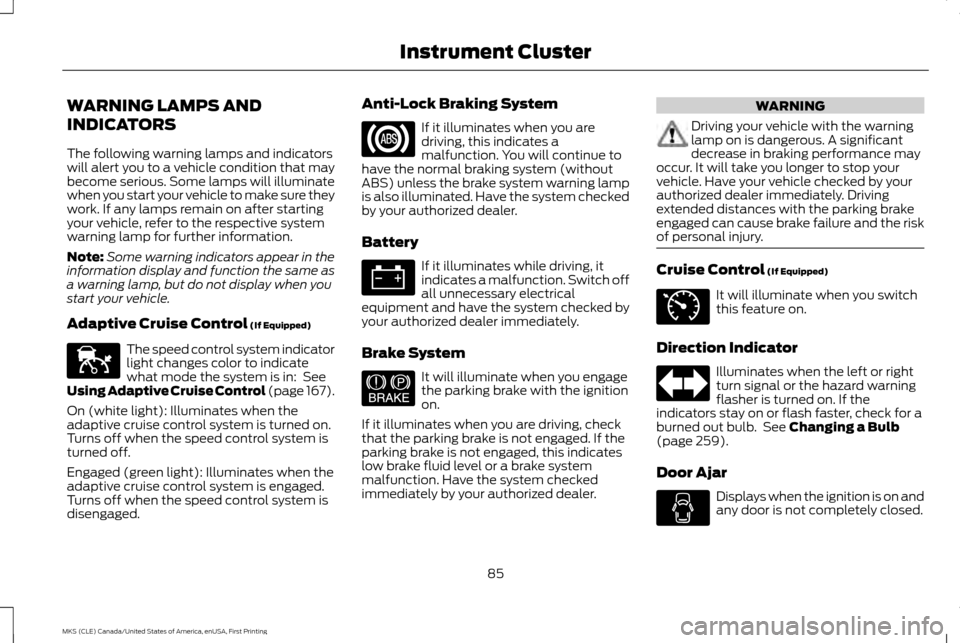
WARNING LAMPS AND
INDICATORS
The following warning lamps and indicators
will alert you to a vehicle condition that may
become serious. Some lamps will illuminate
when you start your vehicle to make sure they
work. If any lamps remain on after starting
your vehicle, refer to the respective system
warning lamp for further information.
Note:
Some warning indicators appear in the
information display and function the same as
a warning lamp, but do not display when you
start your vehicle.
Adaptive Cruise Control (If Equipped) The speed control system indicator
light changes color to indicate
what mode the system is in:
See
Using Adaptive Cruise Control (page 167).
On (white light): Illuminates when the
adaptive cruise control system is turned on.
Turns off when the speed control system is
turned off.
Engaged (green light): Illuminates when the
adaptive cruise control system is engaged.
Turns off when the speed control system is
disengaged. Anti-Lock Braking System If it illuminates when you are
driving, this indicates a
malfunction. You will continue to
have the normal braking system (without
ABS) unless the brake system warning lamp
is also illuminated. Have the system checked
by your authorized dealer.
Battery If it illuminates while driving, it
indicates a malfunction. Switch off
all unnecessary electrical
equipment and have the system checked by
your authorized dealer immediately.
Brake System It will illuminate when you engage
the parking brake with the ignition
on.
If it illuminates when you are driving, check
that the parking brake is not engaged. If the
parking brake is not engaged, this indicates
low brake fluid level or a brake system
malfunction. Have the system checked
immediately by your authorized dealer. WARNING
Driving your vehicle with the warning
lamp on is dangerous. A significant
decrease in braking performance may
occur. It will take you longer to stop your
vehicle. Have your vehicle checked by your
authorized dealer immediately. Driving
extended distances with the parking brake
engaged can cause brake failure and the risk
of personal injury. Cruise Control
(If Equipped)
It will illuminate when you switch
this feature on.
Direction Indicator Illuminates when the left or right
turn signal or the hazard warning
flasher is turned on. If the
indicators stay on or flash faster, check for a
burned out bulb. See
Changing a Bulb
(page 259).
Door Ajar Displays when the ignition is on and
any door is not completely closed.
85
MKS (CLE) Canada/United States of America, enUSA, First Printing Instrument ClusterE144524 E144522 E71340
Page 89 of 382

Engine Coolant Temperature
Illuminates when the engine
coolant temperature is high. Stop
the vehicle as soon as possible,
switch off the engine and let cool. See
Engine Coolant Check (page 247).
Engine Oil If it illuminates with the engine
running or when you are driving, this
indicates a malfunction. Stop your
vehicle as soon as it is safe to do so and
switch the engine off. Check the engine oil
level. See
Engine Oil Check (page 245).
Note: Do not resume your journey if it
illuminates despite the level being correct.
Have the system checked by your authorized
dealer immediately.
Fasten Safety Belt It will illuminate and a chime will
sound to remind you to fasten your
safety belt. See
Seatbelt
Reminder (page 33). Front Airbag If it fails to illuminate when you
start your vehicle, continues to
flash or remains on, it indicates a
malfunction. Have the system checked by
your authorized dealer.
Front Fog Lamps
(If Equipped) Lights when you switch the front
fog lamps on.
Grade Assist
(If Equipped) It will illuminate when the grade
assist function has been turned on.
Heads Up Display
(If Equipped) A red beam of lights will illuminate
on the windshield in certain
instances when using adaptive
cruise control and/or the collision warning
system. It will also illuminate momentarily
when you start your vehicle to make sure the
display works. High Beam It will illuminate when you switch
the high beam headlamps on. It will
flash when you use the headlamp
flasher.
Low Fuel Level It will illuminate when the fuel level
is low or the fuel tank is nearly
empty. Refuel as soon as possible.
Low Tire Pressure Warning It will illuminate when your tire
pressure is low. If the lamp remains
on with the engine running or when
driving, check your tire pressure as soon as
possible.
It will also illuminate momentarily when you
switch the ignition on to confirm the lamp is
functional. If it does not illuminate when you
switch the ignition on, or begins to flash at
any time, have the system checked by your
authorized dealer.
Low Washer Fluid It will illuminate when the
windshield washer fluid is low.
86
MKS (CLE) Canada/United States of America, enUSA, First Printing Instrument Cluster E144523 E156133 E132353
Page 92 of 382

GENERAL INFORMATION
WARNING
Driving while distracted can result in
loss of vehicle control, crash and injury.
We strongly recommend that you use
extreme caution when using any device that
may take your focus off the road. Your
primary responsibility is the safe operation
of your vehicle. We recommend against the
use of any hand-held device while driving and
encourage the use of voice-operated systems
when possible. Make sure you are aware of
all applicable local laws that may affect the
use of electronic devices while driving. Various systems on your vehicle can be
controlled using the information display
controls on the steering wheel.
Corresponding information is displayed in the
information display. Information Display Controls
•
Press the up and down arrow buttons to
scroll through and highlight the options
within a menu.
• Press the right arrow button to enter a
sub-menu.
• Press the left arrow button to exit a menu.
• Press and hold the left arrow button at
any time to return to the main menu
display (escape button).
• Press the OK button to choose and
confirm settings or messages. This icon gives you the ability to
switch a feature on or off. A check
in the box indicates the feature is
enabled, and unchecked indicates the feature
is disabled.
Main menu
From the main menu bar on the left side of
the information display, you can choose from
the following categories:
Scroll up or down to highlight one of the
categories and then press the right arrow key
or OK to enter into that category. Press the
left arrow key as needed to exit back to the
main menu.
• Display Mode
• Trip 1 & 2
• Fuel Economy
• Driver Assist
• Settings
Display Mode
Use the up or down arrow buttons to choose
between the following display options.
89
MKS (CLE) Canada/United States of America, enUSA, First Printing Information DisplaysE173228 E204495
Page 118 of 382

Linking a Preset Position to Your
Remote Control or Intelligent Access
Key
You can save the preset memory positions
for up to three remote controls or intelligent
access (IA) keys.
1. With the ignition on, move the memory
positions to the desired positions.
2. Press and hold the desired preset button
for five seconds. A tone sounds after
about two seconds. Continue holding
until you hear a second tone.
3. Within three seconds, press the lock button on the remote control you are
linking.
To unlink a remote control, follow the same
procedure – except in Step 3, press the
unlock button on the remote control.
Easy Entry and Exit Feature
If you enable the easy entry and exit feature,
it automatically moves the driver seat
position rearward up to two inches (five
centimeters) and the steering column up and
forward when you switch the ignition off.
When you switch the ignition on, the driver
seat and steering column return to the
previous position. You can enable or disable this feature in the
information display. See Information
Displays (page 89).
CLIMATE CONTROLLED SEATS
(If Equipped)
Heated Seats WARNING
Persons who are unable to feel pain to
the skin because of advanced age,
chronic illness, diabetes, spinal cord
injury, medication, alcohol use, exhaustion,
or other physical conditions, must exercise
care when using the seat heater. The seat
heater may cause burns even at low
temperatures, especially if used for long
periods of time. Do not place anything on the
seat that insulates against heat, such as a
blanket or cushion, because this may cause
the seat heater to overheat. Do not puncture
the seat with pins, needles, or other pointed
objects because this may damage the
heating element which may cause the seat
heater to overheat. An overheated seat may
cause serious personal injury. Note:
Do not do the following: •
Place heavy objects on the seat.
• Operate the seat heater if water or any
other liquid spills on the seat. Allow the
seat to dry thoroughly.
The heated seats will only function when the
engine is running. Press the heated seat symbol located on the
touchscreen to cycle through the various heat
settings and off. Warmer settings are
indicated by more indicator lights.
If the engine falls below 350 RPM while the
heated seats are on, the feature will turn
itself off. You will need to reactivate it.
After 60 minutes of operation, the heated
seats automatically turn off. Press the
symbol to switch the heated seats on.
115
MKS (CLE) Canada/United States of America, enUSA, First Printing SeatsE146322
Page 120 of 382

Rear Heated Seats
WARNING
Persons who are unable to feel pain to
the skin because of advanced age,
chronic illness, diabetes, spinal cord
injury, medication, alcohol use, exhaustion,
or other physical conditions, must exercise
care when using the seat heater. The seat
heater may cause burns even at low
temperatures, especially if used for long
periods of time. Do not place anything on the
seat that insulates against heat, such as a
blanket or cushion, because this may cause
the seat heater to overheat. Do not puncture
the seat with pins, needles, or other pointed
objects because this may damage the
heating element which may cause the seat
heater to overheat. An overheated seat may
cause serious personal injury. Note:
Do not do the following:
• Place heavy objects on the seat.
• Operate the seat heater if water or any
other liquid spills on the seat. Allow the
seat to dry thoroughly.
The rear seat heat controls are located on
the rear of the center console. The heated seats only operate when the
ignition is on.
•
Press the indicated side of the control for
minimum heat.
• Press again to turn off. •
Press the indicated side of the control for
maximum heat.
• Press again to turn off.
The indicator light will illuminate when you
switch on the heated seats. After 60 minutes of operation, the heated
seats automatically turn off. Press the
symbol to switch the heated seats on.
REAR SEAT ARMREST
Fold the armrest down to use the armrest
and cupholder. To open the storage lid, pull
up on the latch located between the
cupholders.
Armrest pass-through
Note:
Do not exceed 80 pounds (36
kilograms) of weight on the pass-through door.
117
MKS (CLE) Canada/United States of America, enUSA, First Printing SeatsE166817 E146322 E144635
Page 126 of 382

Changes or modifications to your device not
expressly approved by the party responsible
for compliance can void the user
’s authority
to operate the equipment.
123
MKS (CLE) Canada/United States of America, enUSA, First Printing Universal Garage Door Opener
Page 133 of 382

Stopping the Engine When Your
Vehicle is Moving
WARNING
Switching off the engine when the
vehicle is still moving will result in a loss
of brake and steering assistance. The
steering will not lock, but higher effort will be
required. When the ignition is switched off,
some electrical circuits, including air bags,
warning lamps and indicators may also be
off. If the ignition was turned off accidentally,
you can shift into neutral (N) and re-start the
engine. 1.
Press and hold the button for one second,
or press it three times within two seconds.
2. Move the transmission selector lever to neutral (N) and use the brakes to bring
your vehicle to a safe stop. When your
vehicle has stopped, move the
transmission selector lever to park (P)
and switch the ignition off.
3. Apply the parking brake. Guarding Against Exhaust Fumes WARNING
If you smell exhaust fumes inside your
vehicle, have your vehicle checked by
your authorized dealer immediately. Do
not drive your vehicle if you smell exhaust
fumes. Carbon monoxide is present in
exhaust fumes. Take precautions to avoid its
dangerous effects. Important Ventilating Information
If you stop your vehicle and then leave the
engine idling for long periods, we recommend
that you do one of the following:
•
Open the windows at least 1 inch (2.5
centimeters).
• Set your climate control to outside air.
ENGINE BLOCK HEATER (If Equipped) WARNINGS
Failure to follow engine block heater
instructions could result in property
damage or serious personal injury. WARNINGS
Do not use your heater with
ungrounded electrical systems or
two-pronged adapters. There is a risk
of electrical shock. Do not fully close the hood, or allow it
to drop under its own weight when
using the engine block heater. This
could damage the power cable and may
cause an electrical short resulting in fire, injury
and property damage. Note:
The heater is most effective when
outdoor temperatures are below 0°F (-18°C).
The heater acts as a starting aid by warming
the engine coolant. This allows the climate
control system to respond quickly. The
equipment includes a heater element
(installed in the engine block) and a wire
harness. You can connect the system to a
grounded 120-volt AC electrical source.
130
MKS (CLE) Canada/United States of America, enUSA, First Printing Starting and Stopping the Engine