Page 557 of 660
5577-2. Steps to take in an emergency
7
When trouble arises
RX450h_U_OM0E013U
Remove any dirt or foreign matter
from the wheel contact surface.
If foreign matter is on the wheel contact
surface, the wheel nuts may loosen
while the vehicle is in motion, causing
the tire to come off.
Install the spare tire and loosely
tighten each wheel nut by hand by
approximately the same amount.
Tighten the wheel nuts until the tapered
portion comes into loose contact with
the disc wheel seat.
Lower the vehicle.
Firmly tighten each wheel nut two or
three times in the order shown in the
illustration.
For vehicles with wheel lock nuts,
tighten the wheel lock nut last
Tightening torque:
76 ft•lbf (103 N•m, 10.5 kgf•m)
Stow the flat tire, tire jack and all tools.
Installing the spare tire
1
Disc wheel
seat
Tapered portion2
3
4
5
Page 558 of 660

5587-2. Steps to take in an emergency
RX450h_U_OM0E013U
■The compact spare tire
●The compact spare tire is identified by the label “TEMPORARY USE ONLY” on the
tire sidewall.
Use the compact spare tire temporarily, and only in an emergency.
●Make sure to check the tire inflation pressure of the compact spare tire. (P. 589)
■When using the compact spare tire
As the compact spare tire is not equipped wi th a tire pressure warning valve and trans-
mitter, low inflation pressure of the spare tire will not be indicated by the tire pressure
warning system. Also, if you replace the compact spare tire after the tire pressure warn-
ing light comes on, the light remains on.
■When the compact spare tire is equipped
When driving with the compact spare tire inst alled, the vehicle height will be different
than when driving with standard tires.
■If you have a flat front tire on a road covered with snow or ice
Install the compact spare tire on one of the rear wheels of the vehicle. Perform the follow-
ing steps and fit tire chains to the front tires: Replace a rear tire with the compact spare tire.
Replace the flat front tire with the tire removed from the rear of the vehicle.
Fit tire chains to the front tires.
1
2
3
Page 559 of 660

5597-2. Steps to take in an emergency
7
When trouble arises
RX450h_U_OM0E013U
WARNING
■When using the compact spare tire
●Remember that the compact spare tire provided is specifically designed for use with
your vehicle. Do not use your compact spare tire on another vehicle.
●Do not use more than one compact spare tire simultaneously.
●Replace the compact spare tire with a standard tire as soon as possible.
●Avoid sudden acceleration, abrupt steering, sudden braking and shifting operations
that cause sudden engine braking.
■When the compact spare tire is attached
The vehicle speed may not be correctly detected, and the following systems may not
operate correctly:
Also, not only can the following system not be utilized fully, but it may even negatively
affect the drive-train components:
• E-Four (AWD models)
■Speed limit when using the compact spare tire
Do not drive at speeds in excess of 50 mph (80 km/h) when a compact spare tire is
installed on the vehicle.
The compact spare tire is not designed for driving at high speeds. Failure to observe
this precaution may lead to an accident causing death or serious injury.
■After using the tools and jack
Before driving, make sure all the tools and jack are securely in place in their storage
location to reduce the possibility of personal injury during a collision or sudden brak-
ing.
• ABS & Brake assist
• VSC
• TRAC
• EPS
• Trailer Sway Control
• VDIM
• Adaptive Variable Suspension System (if equipped)
• Cruise control (if equipped)
• Dynamic radar cruise control (if equipped)
• Dynamic radar cruise control with full- speed range (if equipped)
• PCS (Pre-Collision System) (if equipped)
• LDA (Lane Departure Alert with
steering control) (if equippedF
• LKA (Lane-Keeping Assist) (if
equipped)
• Automatic High Beam (if equipped)
• AFS (Adaptive Front-lighting System) (if equipped)
• Tire pressure warning system
• Intuitive parking assist
• Lexus parking assist monitor (if equipped)
• Panoramic view monitor (if equipped)
• BSM (Blind Spot Monitor)
• Navigation system
Page 560 of 660
5607-2. Steps to take in an emergency
RX450h_U_OM0E013U
NOTICE
■Be careful when driving over bumps with the compact spare tire installed on the vehi-
cle
When driving with the compact spare tire installed, the vehicle height will be different
than when driving with standard tires. Be careful when driving over uneven road sur-
faces, etc.
■Driving with tire chains and the compact spare tire
Do not fit tire chains to the compact spare tire.
Tire chains may damage the vehicle body and adversely affect driving performance.
■When replacing the tires
When removing or fitting the wheels, tires or the tire pressure warning valve and trans-
mitter, contact your Lexus dealer as the tire pressure warning valve and transmitter
may be damaged if not handled correctly.
Page 561 of 660

5617-2. Steps to take in an emergency
7
When trouble arises
RX450h_U_OM0E013U
One of the following may be the cause of the problem:
●The electronic key may not be functioning properly. ( P. 564)
●There may not be sufficient fuel in the vehicle’s tank.
Refuel the vehicle.
●There may be a malfunction in the immobilizer system. ( P. 85)
●There may be a malfunction in the steering lock system.
●The hybrid system may be malfunctioni ng due to an electrical problem such
as electronic key battery depletion or a blown fuse. However, depending on
the type of malfunction, an interim meas ure is available to start the hybrid sys-
tem. ( P. 562)
One of the following may be the cause of the problem:
●The 12-volt battery may be discharged. ( P. 568)
●The 12-volt battery terminal connections may be loose or corroded.
( P. 483)
If the hybrid system will not start
Reasons for the hybrid system not star ting vary depending on the situation.
Check the following and perform the appropriate procedure:
The hybrid system will not start even though the correct starting proce-
dure is being followed. ( P. 232)
The interior lights and headlights are d im, or the horn does not sound or
sounds at a low volume.
Page 562 of 660

5627-2. Steps to take in an emergency
RX450h_U_OM0E013U
One of the following may be the cause of the problem:
●The 12-volt battery may be discharged. (P. 568)
●One or both of the 12-volt battery terminals may be disconnected. ( P. 483)
Contact your Lexus dealer if the problem cannot be repaired, or if repair procedures
are unknown.
When the hybrid system does not start, the following steps can be used as an
interim measure to start the hybrid system if the power switch is functioning nor-
mally.
Do not use this starting procedur e except in cases of emergency.
Turn the power switch to ON mode an d check that the parking brake is set.
( P. 233, 245)
Shift the shift lever to P.
Turn the power switch to ACCESSORY mode.
Press and hold the power switch for ab out 15 seconds while depressing the
brake pedal firmly.
Even if the hybrid system can be starte d using the above steps, the system may
be malfunctioning. Have the vehicle inspected by your Lexus dealer.
The interior lights and headlights do not turn on, or the horn does not
sound.
Emergency start function
1
2
3
4
Page 563 of 660
5637-2. Steps to take in an emergency
7
When trouble arises
RX450h_U_OM0E013U
Turn the power switch to ON mode and check that the parking brake is set.
( P. 233, 245)
Turn the power switch to ACCESSORY mode.
Depress the brake pedal.
Pry the cover up with a flathead
screwdriver or equivalent tool.
To prevent damage to the cover, cover
the tip of the scre wdriver with a rag.
Press the shift lock override button.
The shift lever can be shifted while the
button is pressed
If the shift lever cannot be shifted from P
If the shift lever cannot be shifted with your foot on the brake pedal, there may
be a problem with the shift lock system (a system to prevent accidental opera-
tion of the shift le ver). Have the vehicle inspecte d by your Lexus dealer imme-
diately.
The following steps may be used as an emergency measure to ensure that the
shift lever can be shifted:
1
2
3
4
5
Page 564 of 660
5647-2. Steps to take in an emergency
RX450h_U_OM0E013U
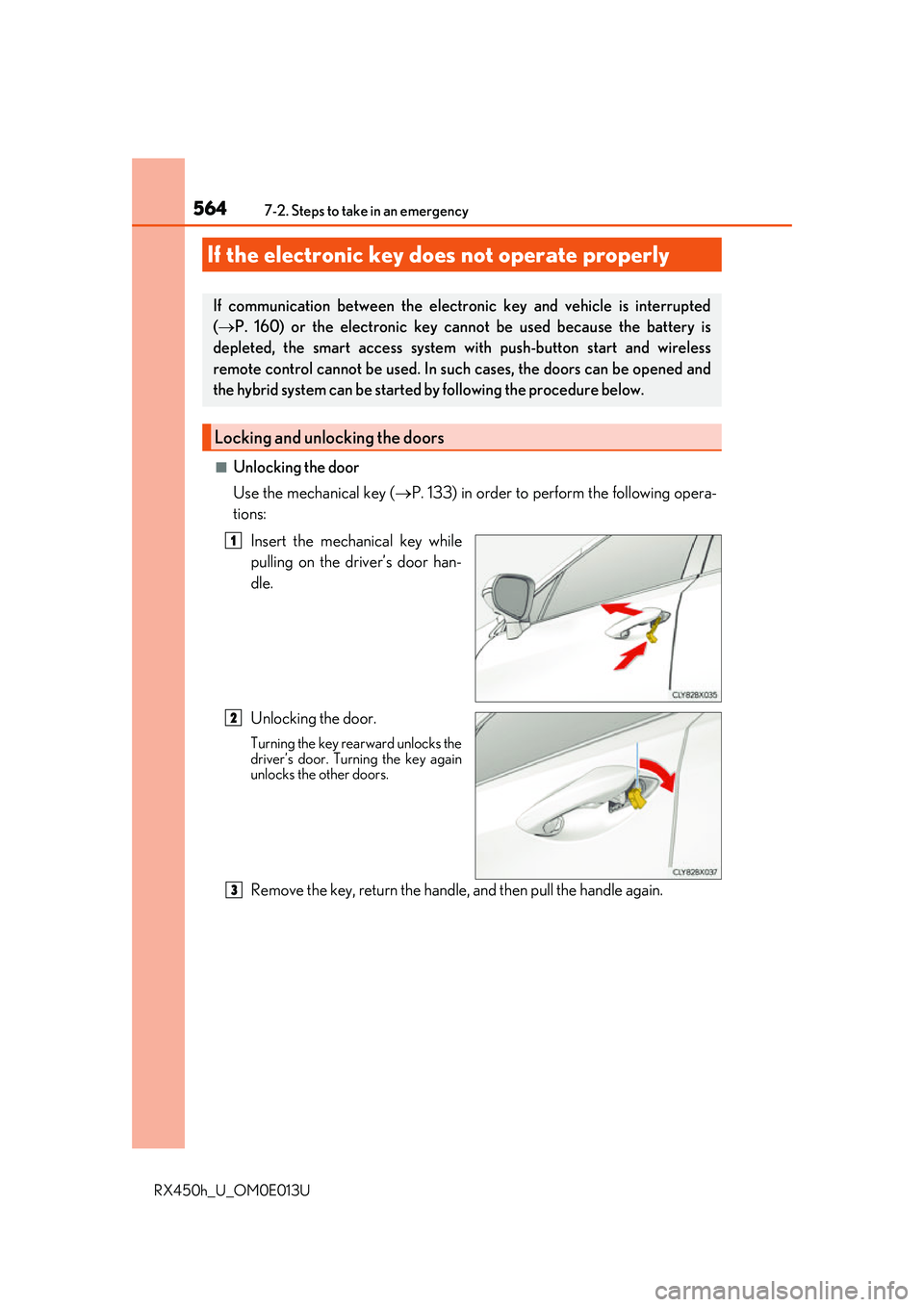
■Unlocking the door
Use the mechanical key (P. 133) in order to perform the following opera-
tions:
Insert the mechanical key while
pulling on the driver’s door han-
dle.
Unlocking the door.
Turning the key rearward unlocks the
driver’s door. Turning the key again
unlocks the other doors.
Remove the key, return the handle, and then pull the handle again.
If the electronic key does not operate properly
If communication between the electronic key and vehicle is interrupted
( P. 160) or the electronic key ca nnot be used because the battery is
depleted, the smart access system wi th push-button start and wireless
remote control cannot be used. In such cases, the doors can be opened and
the hybrid system can be started by following the procedure below.
Locking and unlocking the doors
1
2
3