2016 LEXUS RX450H fog
[x] Cancel search: fogPage 413 of 660
4135-2. Using the air conditioning system and defogger
5
Interior features
RX450h_U_OM0E013U
WARNING
■To prevent the windshield from fogging up
●Do not use during cool air operation in extremely humid weather. The differ-
ence between the temperature of the outside air and that of the windshield can cause
the outer surface of the windshield to fog up, blocking your vision.
■To prevent burns
●Do not touch the rear view mirror surfaces when the outside rear view mirror defog-
gers are on.
●Do not touch the glass at lower part of the windshield or to the side of the front pillars
when the windshield wiper de-icer is on. (if equipped)
NOTICE
■Humidity sensor
■To prevent 12-volt battery discharge
Do not leave the air conditioning system on longer than necessary when the hybrid sys-
tem is off.
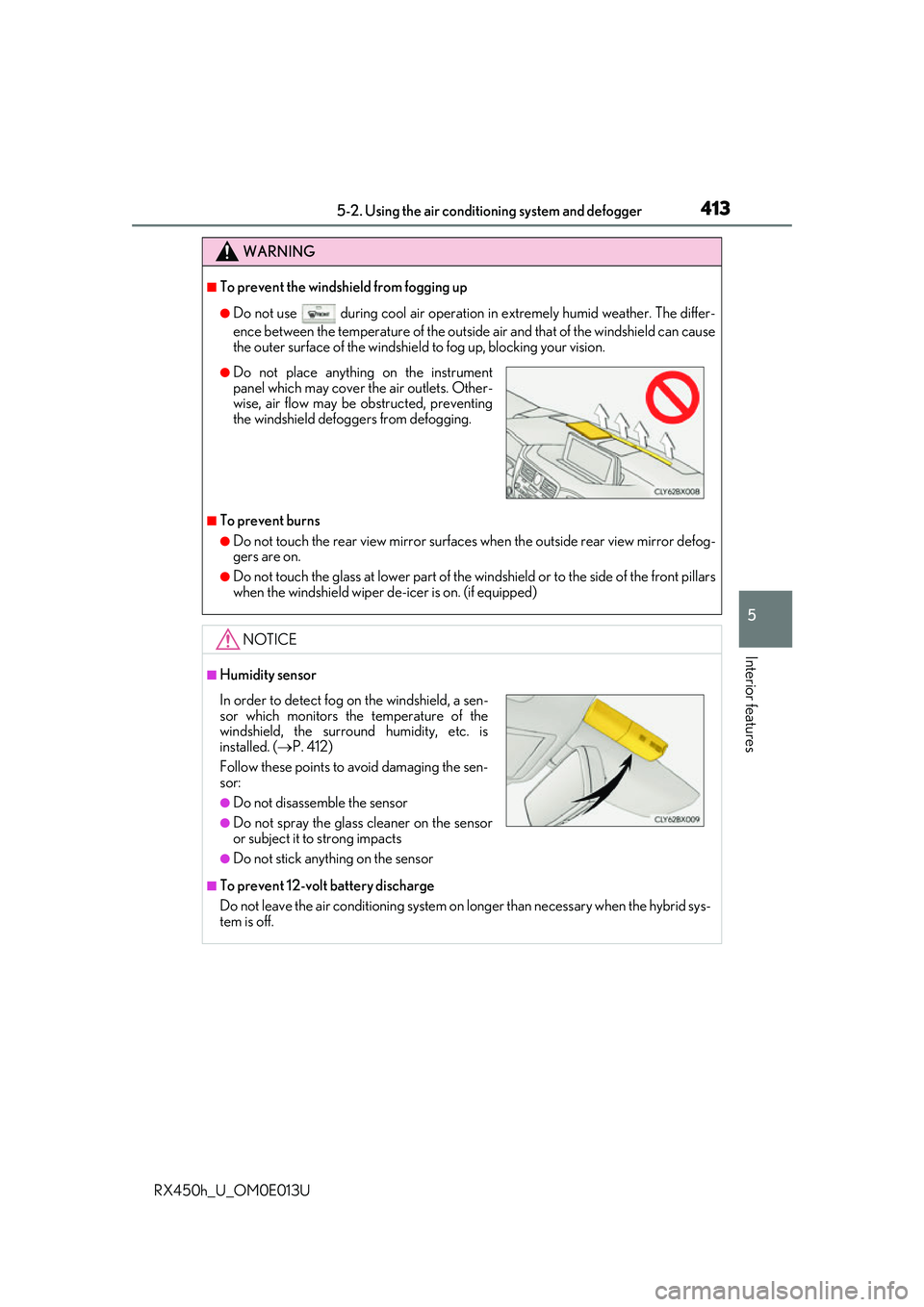
●Do not place anything on the instrument
panel which may cover the air outlets. Other-
wise, air flow may be obstructed, preventing
the windshield defoggers from defogging.
In order to detect fog on the windshield, a sen-
sor which monitors the temperature of the
windshield, the surround humidity, etc. is
installed. ( P. 412)
Follow these points to avoid damaging the sen-
sor:
●Do not disassemble the sensor
●Do not spray the glass cleaner on the sensor
or subject it to strong impacts
●Do not stick anything on the sensor
Page 414 of 660
4145-2. Using the air conditioning system and defogger
RX450h_U_OM0E013U
Heated steering wheel/seat heaters/seat ventila-
tors
: If equipped
Heated steering wheel and seat heaters heat the side grips of the steering
wheel and seats, respectively. Seat ventilators maintain good airflow by blow-
ing air from the seats.
WARNING
●Care should be taken to prevent injury if anyone in the following categories comes in
contact with the steering wheel and seats when the heater is on:
• Babies, small children, the elderly, the sick and the physically challenged
• Persons with sensitive skin
• Persons who are fatigued
• Persons who have taken alcohol or drugs that induce sleep (sleeping drugs, cold
remedies, etc.)
●Observe the following precautions to prevent minor burns or overheating:
• Do not cover the seat with a blanket or cushion when using the seat heater.
• Do not use seat heater more than necessary.
NOTICE
●Do not put heavy objects that have an unev en surface on the seat and do not stick
sharp objects (needles, nails, etc.) into the seat.
●To prevent 12-volt battery discharge, do not use the functions when the hybrid system
is off.
Page 415 of 660

4155-2. Using the air conditioning system and defogger
5
Interior features
RX450h_U_OM0E013U
Turns the heated steering wheel on/off
The indicator light comes on when the
heated steering wheel is operating.
■Operation condition
The heated steering wheel can be used when the power switch is in ON mode.
■Timer
The heated steering wheel will automati cally turn off after about 30 minutes.
When any switch is pressed, the system is set to automatic mode and the
“AUTO” indicator (green) lights up.
Each time the switch is pressed, the
operation condition changes as follows.
Hi (3 segments lit) Mid (2 segments
lit) Lo (1 segment lit) Off
The level indicator (amber) lights up
during operation.
■Operation condition
The front seat heaters can be used when the power switch is in ON mode.
■Customization
Some functions can be customized. ( P. 607)
Heated steering wheel
Front seat heaters
Level
indicator
“AUTO”
indicator
Page 416 of 660

4165-2. Using the air conditioning system and defogger
RX450h_U_OM0E013U
Each time the switch is pressed, the
operation condition changes as follows.
Hi (3 segments lit) Mid (2 segments
lit) Lo (1 segment lit) Off
The level indicator (amber) lights up
during operation.
■Operation condition
The rear seat heaters can be used wh en the power switch is in ON mode.
When any switch is pressed, the system
is set to automatic mode and the
“AUTO” indicator (green) lights up.
Each time the switch is pressed, the
operation condition changes as follows.
Hi (3 segments lit) Mid (2 segments
lit) Lo (1 segment lit) Off
The level indicator (green) lights up
during operation.
■Operation condition
The seat ventilators can be used when the power switch is in ON mode.
■Customization
Some functions can be customized. (P. 607)
Rear seat heaters (if equipped)
Level indicator
Seat ventilators
Level
indicator
“AUTO”
indicator
Page 464 of 660
4646-1. Maintenance and care
RX450h_U_OM0E013U
NOTICE
■Cleaning detergents
●Do not use the following types of detergent, as they may discolor the vehicle interior
or cause streaks or damage to painted surfaces:
• Non-seat portions: Organic substances su ch as benzene or gasoline, alkaline or
acidic solutions, dye, and bleach
• Seats: Alkaline or ac idic solutions, such as thinner, benzene, and alcohol
●Do not use polish wax or polis h cleaner. The instrument pane l’s or other interior part’s
painted surface may be damaged.
■Preventing damage to leather surfaces
Observe the following precautions to avoid damage to and deterioration of leather
surfaces:
●Remove any dust or dirt from leather surfaces immediately.
●Do not expose the vehicle to direct sunlight for extended periods of time. Park the
vehicle in the shade, especially during summer.
●Do not place items made of vinyl, plastic, or containing wax on the upholstery, as they
may stick to the leather surface if the vehicle interior heats up significantly.
■Water on the floor
Do not wash the vehicle floor with water.
Vehicle systems such as the audio system may be damaged if wate r comes into contact
with electrical components such as the au dio system above or under the floor of the
vehicle. Water may also cause the body to rust.
■When cleaning the inside of the windshield (vehicles with Lexus Safety System+)
Do not allow glass cleaner to contact the lens. Also, do not touch the lens.
( P. 292, 302)
■Cleaning the inside of the rear window
●Do not use glass cleaner to clean the rear window, as this may cause damage to the
rear window defogger heater wires or antenna. Use a cloth dampened with luke-
warm water to gently wipe the window clean. Wipe th e window in strokes running
parallel to the heater wires or antenna.
●Be careful not to scratch or damage the heater wires or antenna.
Page 524 of 660

5246-3. Do-it-yourself maintenance
RX450h_U_OM0E013U
Install the cover.
Align the tabs of the cover with the
grooves and install the cover.
■Replacing the following bulbs
If any of the lights listed below has burnt out, have it replaced by your Lexus
dealer.
●Headlight low beams
●Headlight high beams
●Front turn signal lights (vehic les with triple-beam headlights)
●Parking lights and daytime running lights
●Front fog lights
●Cornering lights (if equipped)
●Front side marker lights (vehicles with triple-beam headlights)
●Side turn signal lights
●Stop/tail lights
●Rear turn signal light (vehicles with triple-beam headlights)
●Rear side marker lights
●High mounted stoplight
●License plate lights
●Outer foot lights
5
Page 525 of 660

5256-3. Do-it-yourself maintenance
6
Maintenance and care
RX450h_U_OM0E013U
■LED lights
The headlight low beams, headlight high beams, front turn signal lights (vehicles with tri-
ple-beam headlights), parking lights and daytime running lights, front fog lights, corner-
ing lights (if equipped), front side marker lights (vehicles with tr iple-beam headlights),
side turn signal lights, stop/t ail lights, rear turn signal light (vehicles with triple-beam
headlights), rear side marker lights, high moun ted stoplight, license plate lights, and outer
foot lights consist of a number of LEDs. If any of the LEDs has burned out, take your vehi-
cle to your Lexus dealer to have the light replaced.
■Condensation build-up on the inside of a lens
Temporary condensation build-up on the inside of the headlight lens does not indicate a
malfunction. Contact your Lexus dealer for more information in the following situations:
●Large drops of water have built up on the inside of a lens.
●Water has built up inside a headlight.
■When replacing light bulbs
P. 510
WARNING
■To prevent injury
Before performing any light bulb replacement procedure, be sure to turn the power
switch off. Failure to do so may result in burns from hot components or a part of your
body may get caught on an operating component, possibly causing serious injury.
■Replacing light bulbs
●Turn off the lights. Do not attempt to replac e the bulb immediately after turning off the
lights.
The bulbs become very hot and may cause burns.
●Do not touch the glass portion of the light bulb with bare hands. When it is unavoid-
able to hold the glass portion, use and hold with a clean dry cloth to avoid getting
moisture and oils on the bulb.
Also, if the bulb is scratched or dropped, it may blow out or crack.
●Fully install light bulbs and any parts used to secure them. Failure to do so may result
in heat damage, fire, or water entering th e headlight unit. This may damage the head-
lights or cause condensation to build up on the lens.
●Do not attempt to repair or disassemble th e light bulbs, connectors, electric circuits
or component parts.
Doing so may result in death or se rious injury due to electric shock.
■To prevent damage or fire
●Make sure bulbs are fully seated and locked.
●Check the wattage of the bulb before installing to prevent heat damage.
Page 538 of 660
5387-2. Steps to take in an emergency
RX450h_U_OM0E013U
(If equipped)
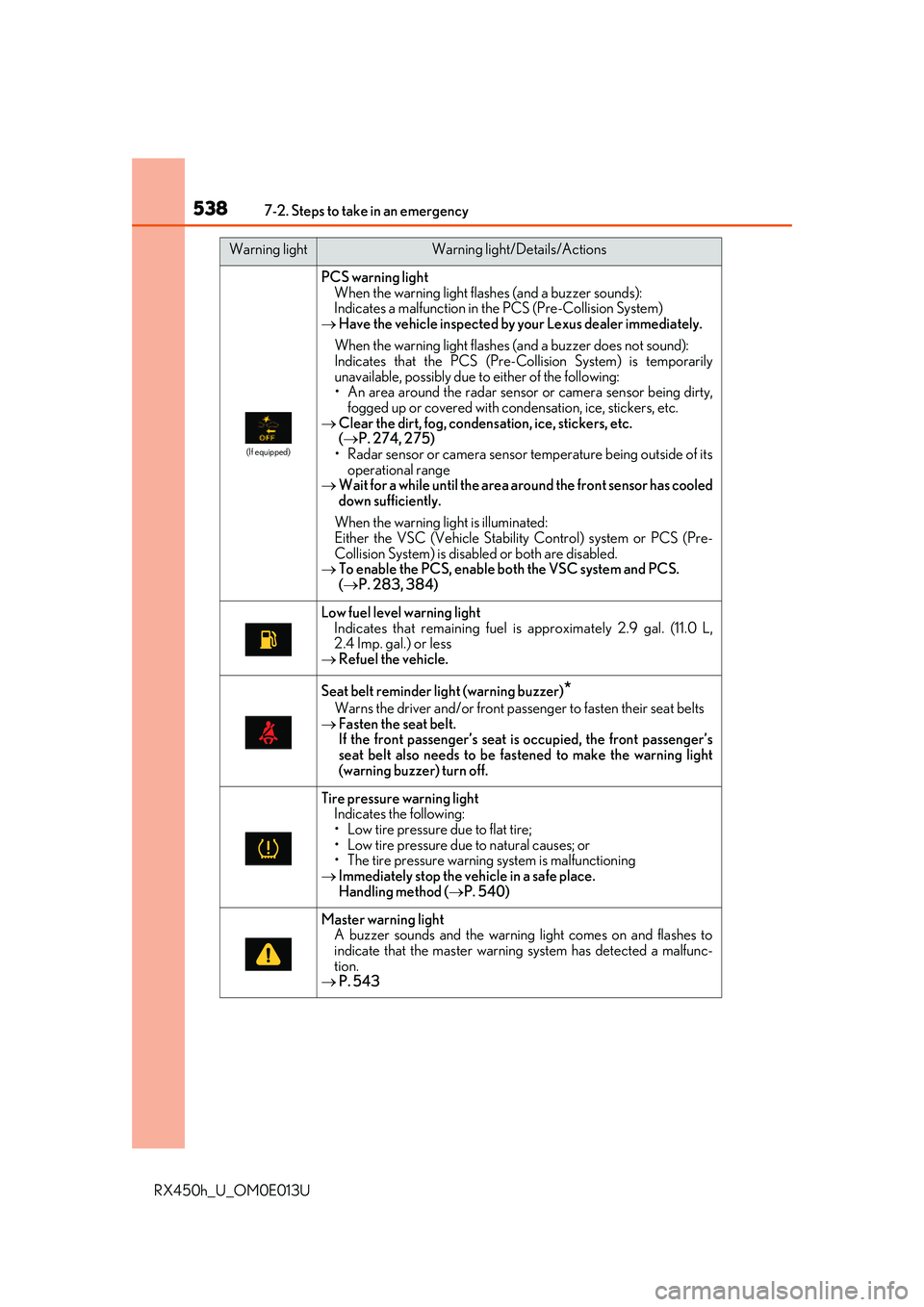
PCS warning lightWhen the warning light flashes (and a buzzer sounds):
Indicates a malfunction in the PCS (Pre-Collision System)
Have the vehicle inspected by your Lexus dealer immediately.
When the warning light flashes (and a buzzer does not sound):
Indicates that the PCS (Pre-Collision System) is temporarily
unavailable, possibly due to either of the following:
• An area around the radar sensor or camera sensor being dirty,
fogged up or covered with condensation, ice, stickers, etc.
Clear the dirt, fog, condensation, ice, stickers, etc.
( P. 274, 275)
• Radar sensor or camera sensor temperature being outside of its
operational range
Wait for a while until the area around the front sensor has cooled
down sufficiently.
When the warning lig ht is illuminated:
Either the VSC (Vehicle Stability Control) system or PCS (Pre-
Collision System) is disabled or both are disabled.
To enable the PCS, enable bo th the VSC system and PCS.
( P. 283, 384)
Low fuel level warning light
Indicates that remaining fuel is approximately 2.9 gal. (11.0 L,
2.4 Imp. gal.) or less
Refuel the vehicle.
Seat belt reminder light (warning buzzer)*
Warns the driver and/or front passenger to fasten their seat belts
Fasten the seat belt.
If the front passenger’s seat is occupied, the front passenger’s
seat belt also needs to be fastened to make the warning light
(warning buzzer) turn off.
Tire pressure warning light
Indicates the following:
• Low tire pressure due to flat tire;
• Low tire pressure due to natural causes; or
• The tire pressure warnin g system is malfunctioning
Immediately stop the vehicle in a safe place.
Handling method ( P. 540)
Master warning light
A buzzer sounds and the warning light comes on and flashes to
indicate that the master warnin g system has detected a malfunc-
tion.
P. 543
Warning lightWarning light/Details/Actions