2016 LEXUS RX450H fog
[x] Cancel search: fogPage 295 of 660

2954-5. Using the driving support systems
4
Driving
RX450h_U_OM0E013U
WARNING
■Before using LKA system
Do not rely solely upon the LKA system. LKA is not a system which automatically
drives the vehicle or reduces the amount of attention that must be paid to the area in
front of the vehicle. The driver must always assume full responsibility for driving safely
by always paying careful attention to the surrounding conditions and operate the steer-
ing wheel to correct the path of the vehicle. Also, make sure to take adequate breaks
when fatigued, such as from driving for a long period of time.
Failure to perform appropriate driving operat ions and pay careful attention may lead to
an accident, resulting in death or serious injury.
■To avoid operating LKA by mistake
When not using the LKA system, use the LKA switch to turn the system off.
■Situations unsuitable for LKA
Do not use the LKA system in the following situations.
The system may not operate properly and lead to an accident, resulting in death or
serious injury.
●A spare tire, tire chains, etc., are equipped.
●When the tires have been excessively worn, or when the tire inflation pressure is low.
●Tires which differ by structure, manufacturer, brand or tread pattern are used.
●Objects or patterns that could be mistaken for white (yellow) lines are present on the
side of the road (guardrails, curbs, reflective poles, etc.).
●Vehicle is driven on a snow-covered road.
●White (yellow) lines are difficult to see due to rain, snow, fog, dust, etc.
●Asphalt repair marks, white (y ellow) line marks, etc., are present due to road repair.
●Vehicle is driven in a temporary lane or restricted lane due to construction work.
●Vehicle is driven on a road surface which is slippery due to rainy weather, fallen snow,
freezing, etc.
●Vehicle is driven in traffic lanes other than on highways and freeways.
●Vehicle is driven in a construction zone.
●When your vehicle is towing a trailer or during emergency towing
■Preventing LKA system malfunctions and operations performed by mistake
●Do not modify the headlights or place stickers, etc., on the surface of the lights.
●Do not modify the suspension etc. If the suspension etc. needs to be replaced, con-
tact your Lexus dealer.
●Do not install or place anything on the hood or grille. Also, do not install a grille guard
(bull bars, kangaroo bar, etc.).
●If your windshield needs repair s, contact your Lexus dealer.
Page 304 of 660

3044-5. Using the driving support systems
RX450h_U_OM0E013U
WARNING
■Before using LDA system
Do not rely solely upon the LDA system. LDA is not a system which automatically
drives the vehicle or reduces the amount of attention that must be paid to the area in
front of the vehicle. The driver must always assume full responsibility for driving safely
by always paying careful attention to the surrounding conditions and operate the steer-
ing wheel to correct the path of the vehicle. Also, make sure to take adequate breaks
when fatigued, such as from driving for a long period of time.
Failure to perform appropriate driving operat ions and pay careful attention may lead to
an accident, resulting in death or serious injury.
■To avoid operating LDA by mistake
When not using the LDA system, use the LDA switch to turn the system off.
■Situations unsuitable for LDA
Do not use the LDA system in the following situations.
The system may not operate properly and lead to an accident, resulting in death or
serious injury.
●A spare tire, tire chains, etc., are equipped.
●When the tires have been excessively worn, or when the tire inflation pressure is low.
●Tires which differ by structure, manufacturer, brand or tread pattern are used.
●Objects or patterns that could be mistaken for white (yellow) lines are present on the
side of the road (guardrails, curbs, reflective poles, etc.).
●Vehicle is driven on a snow-covered road.
●White (yellow) lines are difficult to see due to rain, snow, fog, dust, etc.
●Asphalt repair marks, white (y ellow) line marks, etc., are present due to road repair.
●Vehicle is driven in a temporary lane or restricted lane due to construction work.
●Vehicle is driven on a road surface which is slippery due to rainy weather, fallen snow,
freezing, etc.
●Vehicle is driven in traffic lanes other than on highways and freeways.
●Vehicle is driven in a construction zone.
●When your vehicle is towing a trailer or during emergency towing
■Preventing LDA system malfunctions and operations performed by mistake
●Do not modify the headlights or place stickers, etc., on the surface of the lights.
●Do not modify the suspension etc. If the suspension etc. needs to be replaced, con-
tact your Lexus dealer.
●Do not install or place anything on the hood or grille. Also, do not install a grille guard
(bull bars, kangaroo bar, etc.).
●If your windshield needs repair s, contact your Lexus dealer.
Page 313 of 660
3134-5. Using the driving support systems
4
Driving
RX450h_U_OM0E013U
WARNING
■Situations unsuitable for dynamic radar cruise control with full-speed range
Do not use dynamic radar cruise control with full-speed range in any of the following
situations.
Doing so may result in inappropriate speed control and could cause an accident result-
ing in death or serious injury.
●Roads where there are pedestrians, cyclers, etc.
●In heavy traffic
●On roads with sharp bends
●On winding roads
●On slippery roads, such as those covered with rain, ice or snow
●On steep downhills, or where there are sudden changes between sharp up and down
gradients
Vehicle speed may exceed the set speed when driving down a steep hill.
●At entrances to freeways and highways
●When weather conditions are bad enough that they may prevent the sensors from
detecting correctly (fog, snow, sandstorm, heavy rain, etc.)
●When there is rain, snow, etc. on the fron t surface of the radar sensor or camera sen-
sor
●In traffic conditions that require frequent repeated acceleration and deceleration
●When your vehicle is towing a trailer or during emergency towing
●When an approach warning buzzer is heard often
Page 325 of 660
3254-5. Using the driving support systems
4
Driving
RX450h_U_OM0E013U
WARNING
■Situations unsuitable for dynamic radar cruise control
Do not use dynamic radar cruise control in any of the following situations.
Doing so may result in inappropriate speed control and could cause an accident result-
ing in death or serious injury.
●Roads where there are pedestrians, cyclers, etc.
●In heavy traffic
●On roads with sharp bends
●On winding roads
●On slippery roads, such as those covered with rain, ice or snow
●On steep downhills, or where there are sudden changes between sharp up and down
gradients
Vehicle speed may exceed the set speed when driving down a steep hill.
●At entrances to freeways and highways
●When weather conditions are bad enough that they may prevent the sensors from
detecting correctly (fog, snow, sandstorm, heavy rain, etc.)
●When there is rain, snow, etc. on the fron t surface of the radar sensor or camera sen-
sor
●In traffic conditions that require frequent repeated acceleration and deceleration
●When your vehicle is towing a trailer or during emergency towing
●When an approach warning buzzer is heard often
Page 370 of 660

3704-5. Using the driving support systems
RX450h_U_OM0E013U
■Conditions under which the BSM function may not function correctly
●The BSM function may not detect vehicles correctly in the following situations:
• When the sensor is misaligned due to a stro ng impact to the sensor or its surround-
ing area
• When mud, snow, ice, a sticke r, etc. is covering the sensor or surrounding area on
the rear bumper
• When driving on a road surf ace that is wet with standing water during bad weather,
such as heavy rain, snow, or fog
• When multiple vehicles are approaching wi th only a small gap between each vehicle
• When the distance between your vehicle and a following vehicle is short
• When there is a significant difference in speed between your vehicle and the vehicle that enters the detection area
• When the difference in speed between your vehicle and another vehicle is changing
• When a vehicle enters a detection area traveling at about the same speed as your vehicle
• As your vehicle starts from a stop, a vehicle remains in the detection area
• When driving up and down cons ecutive steep inclines, such as hills, dips in the road,
etc.
• When driving on roads with sharp bends, consecutive curves, or uneven surfaces
• When vehicle lanes are wide, or when driving on the edge of a lane, and the vehicle in an adjacent lane is far away from your vehicle
• When towing a trailer (vehicles with towing package)
• When items such as a bicycle carrier are installed on the rear of the vehicle
• When there is a significant difference in height between your vehicle and the vehicle that enters the detection area
• Immediately after the BSM function is turned on
●Instances of the BSM function unnecessarily detecting a vehicle and/or object may
increase in the following situations:
• When the sensor is misaligned due to a stro ng impact to the sensor or its surround-
ing area
• When the distance between your vehicle and a guardrail, wall, etc. that enters the detection area is short
• When driving up and down cons ecutive steep inclines, such as hills, dips in the road,
etc.
• When vehicle lanes are narrow, or when driv ing on the edge of a lane, and a vehicle
traveling in a lane other than the ad jacent lanes enters the detection area
• When driving on roads with sharp bends, consecutive curves, or uneven surfaces
• When the tires are slipping or spinning
• When the distance between your vehicle and a following vehicle is short
• When a bicycle carrier or other accessory is installed to the rear of the vehicle
• When towing a trailer (vehicles with towing package)
Page 374 of 660
3744-5. Using the driving support systems
RX450h_U_OM0E013U
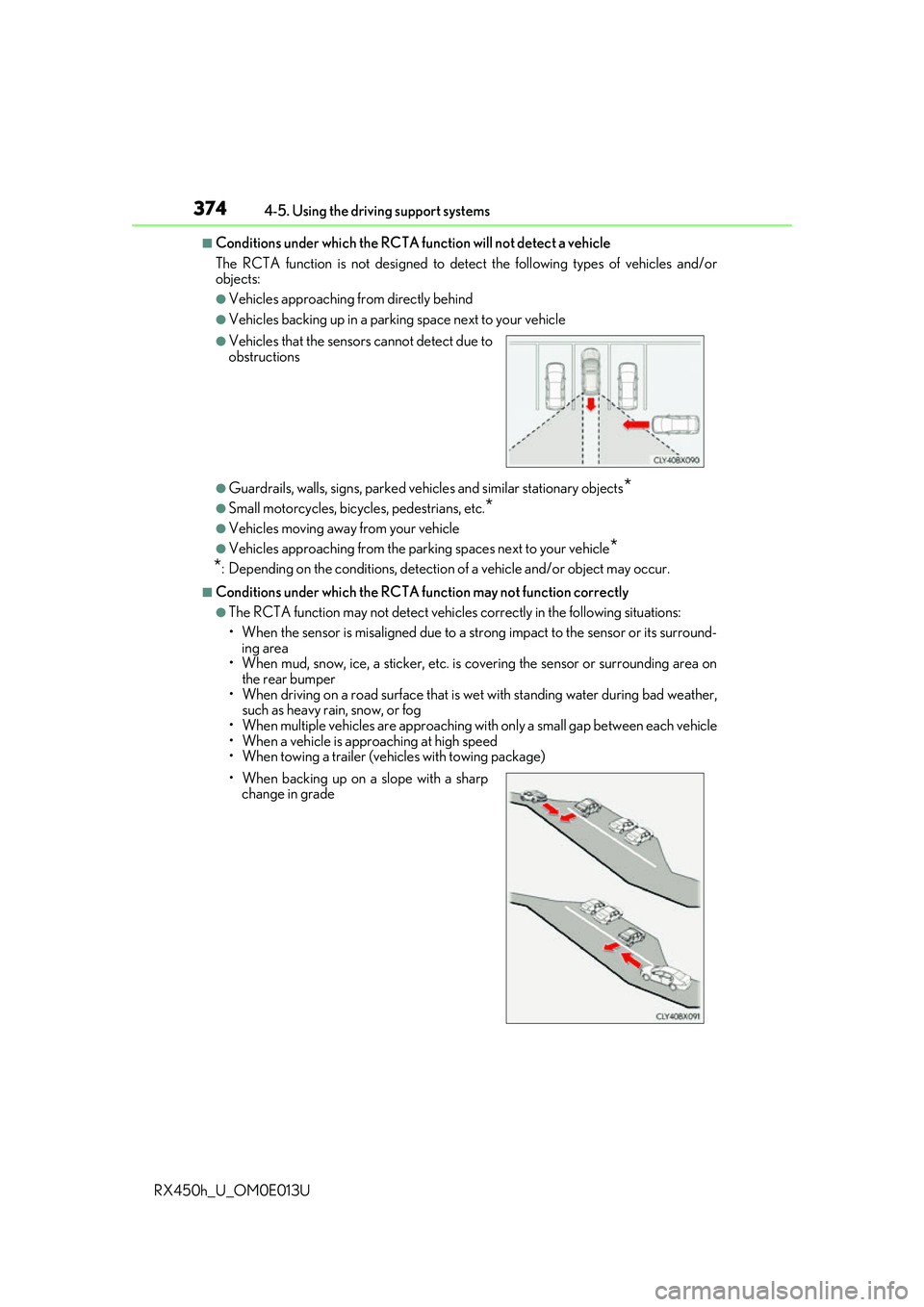
■Conditions under which the RCTA fu nction will not detect a vehicle
The RCTA function is not designed to detect the following types of vehicles and/or
objects:
●Vehicles approaching from directly behind
●Vehicles backing up in a parkin g space next to your vehicle
●Guardrails, walls, signs, parked vehi cles and similar stationary objects*
●Small motorcycles, bicycles, pedestrians, etc.*
●Vehicles moving away from your vehicle
●Vehicles approaching from the parking spaces next to your vehicle*
*
: Depending on the conditions, detection of a vehicle and/or object may occur.
■Conditions under which the RCTA function may not function correctly
●The RCTA function may not detect vehicles correctly in the following situations:
• When the sensor is misaligned due to a stro ng impact to the sensor or its surround-
ing area
• When mud, snow, ice, a sticke r, etc. is covering the sensor or surrounding area on
the rear bumper
• When driving on a road surf ace that is wet with standing water during bad weather,
such as heavy rain, snow, or fog
• When multiple vehicles are approaching wi th only a small gap between each vehicle
• When a vehicle is approaching at high speed
• When towing a trailer (vehicles with towing package)
●Vehicles that the sensors cannot detect due to
obstructions
• When backing up on a slope with a sharp change in grade
Page 397 of 660

397
5Interior features
RX450h_U_OM0E013U
5-1. Basic operation of the Remote Touch screen
Remote Touch ............................ 398
12.3-inch displa y.........................402
5-2. Using the air conditioning system and defogger
Lexus Climate Concierge ..... 404
Automatic air conditioning system ......................................... 405
Heated steering wheel/ seat heaters/
seat ventilators .......................... 414
5-3. Using the interior lights Interior lights list........................... 417
• Interior lights ........................... 418
• Personal lights ........................ 419
5-4. Using the storage features List of storage features.............. 421
• Glove box ............................... 422
• Console box ........................... 422
• Cup holders............................423
• Door pockets ......................... 424
• Bottle holders ........................425
• Coin box ..................................425
• Auxiliary boxes......................426
Luggage compartment features........................................ 427 5-5. Using the other interior
features
Other interior features ............ 432
• Sun visors ................................ 432
• Vanity mirrors ....................... 432
• Clock ........................................ 433
• Wireless charger ................. 433
• Power outlets (12 VDC) ................................. 440
• Power outlet (120 VAC)................................441
• Front passenger footwell hooks......................................... 442
• Rear door sunshades ......... 443
• Armrest .................................... 443
• Assist grips.............................. 444
• Coat hooks ............................. 444
Garage door opener ............... 445
LEXUS Enform Safety Connect ...................................... 452
Page 404 of 660

404
RX450h_U_OM0E013U5-2. Using the air conditio
ning system and defogger
Automatic air conditioning system ( P. 408)
Set the air conditioning system to automatic mode.
The temperature for the driver’s seat and front passenger’s seat can be adjusted indi-
vidually.
Seat heaters and ventilators ( P. 415, 416)
Select “AUTO” mode on each seat.
Seat heater or ventilation is automatically selected according to the set temperature
of the air conditioning system, outside temperature, etc.
Lexus Climate Concierge
The climate control seats are automatica lly controlled according to the set
temperature of the air conditioning sy stem, outside temperature, cabin tem-
perature, etc. Lexus Climate Concierge allows a comfortable condition to be
maintained without adjusting each system.
1
2