2016 LEXUS RX450H fog
[x] Cancel search: fogPage 202 of 660

202
RX450h_U_OM0E013U
4-1. Before drivingDriving the vehicle..................... 204
Cargo and luggage.....................212
Vehicle load limits........................216
Trailer towing (vehicles with towing package)........................ 217
Trailer towing (vehicles without towing
package).....................................230
Dinghy towing .............................. 231
4-2. Driving procedures Power (ignition) switch ............ 232
EV drive mode ............................ 237
Hybrid transmi ssion .................. 239
Turn signal lever ......................... 244
Parking brake .............................. 245
Brake Hold ................................... 249
4-3. Operating the lights and wipers
Headlight switch.......................... 251
Automatic High Beam ............. 255
Fog light switch ........................... 259
Windshield wipers and washer ......................................... 260
Rear window wiper and washer ......................................... 265
4-4. Refueling Opening the fuel tank cap................................................. 267
4Driving
Page 205 of 660

2054-1. Before driving
4
Driving
RX450h_U_OM0E013U
With the brake pedal depressed, shift the shift lever to D. (P. 239)
Pull the parking brake switch and parking brake is set manually. ( P. 246)
Release the brake pedal and gently de press the accelerator pedal to acceler-
ate the vehicle.
Press the parking brake switch and pa rking brake is released manually.
( P. 246)
■When starting off on a uphill
The hill-start assist control will activate. ( P. 381)
■For fuel-efficient driving
Keep in mind that hybrid vehicles are simila r to conventional vehicles, and it is necessary
to refrain from activities su ch as sudden acceleration. ( P. 387)
■Driving in the rain
●Drive carefully when it is ra ining, because visibility will be reduced, the windows may
become fogged-up, and the road will be slippery.
●Drive carefully when it starts to rain, beca use the road surface will be especially slip-
pery.
●Refrain from high speeds when driving on an expressway in the rain, because there may
be a layer of water between the tires and th e road surface, preventing the steering and
brakes from operating properly.
■Restraining the hybrid system output (Brake Override System)
●When the accelerator and brake pedals are depressed at the same time, the hybrid sys-
tem output may be restrained.
●A warning message is displayed on the mult i-information display while the system is
operating. If a warning message is shown on the multi-in formation display, read the
message and follow the instructions.
■Restraining sudden start (Drive-Start Control)
●When the following unusual operation is pe rformed, the hybrid system output may be
restrained.
• When the shift lever is shifted from R to D, D to R, N to R, P to D, or P to R (D includes S) with the acce lerator pedal depressed, a warning message appears on
the multi-information display. If a warning message is shown on the multi-informa-
tion display, read the message and follo w the instructions.
• When the accelerator pedal is depresse d too while the vehicle is in reverse.
●While Drive-Start Control is being activated, your vehicle may have trouble escaping
from the mud or fresh snow. In such case, deactivate TRAC (P. 383) to cancel Drive-
Start Control so that the vehicle may beco me able to escape from the mud or fresh
snow.
Starting off on a uphill
1
2
3
4
Page 237 of 660

2374-2. Driving procedures
4
Driving
RX450h_U_OM0E013U
Turns EV drive mode on/off
When EV drive mode is turned on, the
EV drive mode indicator will come on.
Pressing the switch when in EV drive
mode will return the vehicle to normal
driving (using the gasoline engine and
electric motor [traction motor]).
■Situations in which EV drive mode cannot be turned on
It may not be possible to turn EV drive mode on in the following situations. If it cannot be
turned on, a buzzer will sound and a message will be shown on the multi-information dis-
play.
●The temperature of the hybrid system is high.
The vehicle has been left in the sun, driv en on a hill, driven at high speeds, etc.
●The temperature of the hybrid system is low.
The vehicle has been left in temperatures lower than about 32 F (0 C) for a long
period of time, etc.
●The gasoline engine is warming up.
●The hybrid battery (tra ction battery) is low.
The remaining battery level indicated in the “Energy Monitor” display is low. (P. 125)
●Vehicle speed is high.
●The accelerator pedal is depressed firmly or the vehicle is on a hill, etc.
●The windshield defogger is in use.
EV drive mode
In EV drive mode, electric power is su pplied by the hybrid battery (traction
battery), and only the electric motor (traction motor) is used to drive the vehi-
cle.
This mode allows you to drive in reside ntial areas early in the morning and late
at night, or in indoor parking lots, etc., without concern for noises and gas
emissions.
However, when the vehicle proximity noti fication system is active, the vehicle
may produce sound.
Page 257 of 660

2574-3. Operating the lights and wipers
4
Driving
RX450h_U_OM0E013U
■Conditions to turn the high beams on/off automatically
●When all of the following conditions are met, the high beams will be turned on automat-
ically (after approximately 1 second):
• The vehicle speed is approximately 21 mph (34 km/h) or more.
• The area ahead of the vehicle is dark.
• There are no vehicles ahead with headlights or tail lights turned on.
• There are few streetlights on the road ahead.
●If any of the following condit ions is met, the high beams will turn off automatically:
• The vehicle speed is below ap proximately 17 mph (27 km/h).
• The area ahead of the vehicle is not dark.
• Vehicles ahead have th eir headlights or tail lights turned on.
• There are many streetlights on the road ahead.
■Camera sensor detection information
●The high beams may not be automatically turned off in the following situations:
• When a vehicle suddenly appears from around a curve
• When the vehicle is cut in front of by another vehicle
• When vehicles ahead cannot be detected du e to repeated curves, road dividers or
roadside trees
• When vehicles ahead appear in a faraway lane on a wide road
• When the lights of vehicles ahead are not on
●The high beams may be turned off if a vehicl e ahead that is using fog lights without its
headlights turned on is detected.
●House lights, street lights, traffic signals, and illuminated billboards or signs and other
reflective objects may cause the high beams to change to the low beams, or the low
beams to remain on.
●The following factors may affect the amount of time taken for the high beams to turn on
or off:
• The brightness of the headlights, fog lights, and tail lights of vehicles ahead
• The movement and direction of vehicles ahead
• When a vehicle ahead only has operational lights on one side
• When a vehicle ahead is a two-wheeled vehicle
• The condition of the road (gradient, cu rve, condition of the road surface, etc.)
• The number of passengers and amount of luggage in the vehicle
●The high beams may turn on or off unexpectedly.
●Bicycles or similar vehicles may not be detected.
Page 258 of 660

2584-3. Operating the lights and wipers
RX450h_U_OM0E013U
●In the following situations the system may not be able to correctly detect the surround-
ing brightness level. This may cause the lo w beams to remain on or the high beams to
flash or dazzle pedestrians or vehicles ahead. In such a case, it is necessary to manually
switch between the high and low beams.
• When driving in inclement weather (heavy rain, snow, fog, sandstorms, etc.)
• When the windshield is obscured by fog, mist, ice, dirt, etc.
• When the windshield is cracked or damaged
• When the camera sensor is deformed or dirty
• When the temperature of the camera sensor is extremely high
• When the surrounding brightness level is equal to that of headlights, tail lights or fog
lights
• When headlights or tail lights of vehicles ahead are turned off, dirty, changing color,
or not aimed properly
• When the vehicle is hit by water, snow, dust, etc. from a preceding vehicle
• When driving through an area of intermittently changing brightness and darkness
• When frequently and repeated ly driving ascending/descending roads, or roads with
rough, bumpy or uneven surfaces (such as stone-paved roads, gravel roads, etc.)
• When frequently and repeatedly taking curves or driving on a winding road
• When there is a highly reflective object ahea d of the vehicle, such as a sign or mirror
• When the back of a preceding vehicle is highly reflective, such as a container on a truck
• When the vehicle’s headlights are damaged or dirty, or are not aimed properly
• When the vehicle is listing or titling due to a flat tire, a trailer being towed, etc.
• When the headlights are changed between the high beams and low beams repeat-
edly in an abnormal manner
• When the driver believes that the high beams may be flashing or dazzling pedestri- ans or other drivers
■Temporarily lowering sensor sensitivity
The sensitivity of the sensor can be temporarily lowered.
Turn the power switch off while the following conditions are met.
• The headlight switch is in or .
• The headlight switch lever is in high beam position.
• Automatic High Beam switch is on.
Turn the power switch to ON mode.
Within 30 seconds after , repeat pulling th e headlight switch lever to the original
position then pushing it to the high beam position quickly 10 times, then leave the lever
in high beam position.
If the sensitivity is changed, the Automatic High Beam indicator is turn on and off 3
times.
Automatic High Beam (head lights) may turn on even the vehicle is stopped.
1
2
32
4
Page 259 of 660
2594-3. Operating the lights and wipers
4
Driving
RX450h_U_OM0E013U
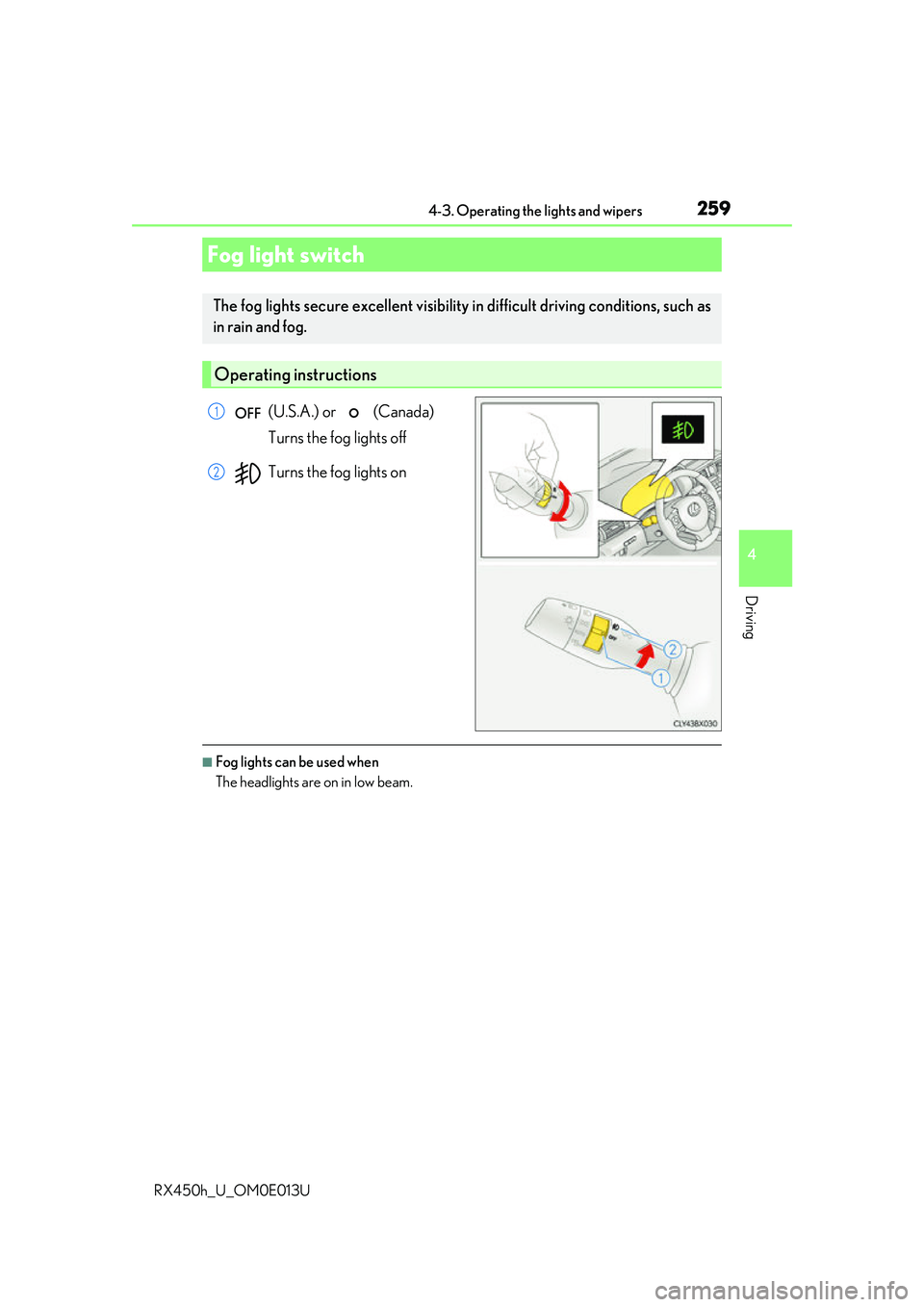
(U.S.A.) or (Canada)
Turns the fog lights off
Turns the fog lights on
■Fog lights can be used when
The headlights are on in low beam.
Fog light switch
The fog lights secure excellent visibility in difficult driving conditions, such as
in rain and fog.
Operating instructions
1
2
Page 275 of 660
2754-5. Using the driving support systems
4
Driving
RX450h_U_OM0E013U
WARNING
■To avoid malfunction of the camera sensor
Observe the following precautions.
Otherwise, the camera sensor may not operate properly, possibly leading to an acci-
dent resulting in death or serious injury.
●Keep the windshield clean at all times.
• If the windshield is dirty or covered with an oily film, water droplets, snow, etc.,
clear the windshield.
• If a glass coating agent is applied to the wi ndshield, it will still be necessary to use
the windshield wipers to re move water droplets from th e area of the windshield in
front of the camera sensor.
• If the inner side of the windshield where th e camera sensor is installed is dirty, con-
tact your Lexus dealer.
●If the part of the windshield in front of the camera sensor is fogged up or covered with
condensation or ice, use the windshield de fogger to remove the fog, condensation or
ice. ( P. 409)
●If water droplets cannot be properly removed from the area of the windshield in front
of the camera sensor by the windshield wipers, replace the wiper insert or wiper blade.
• To replace the wiper insert: P. 504
• If the wiper blades need to be re placed, contact your Lexus dealer.
●Do not attach window tinting to the windshield.
●Replace the windshield if it is damaged or cracked.
If the windshield needs to be re placed, contact your Lexus dealer.
●Do not get the camera sensor wet.
●Do not allow bright lights to shine into the camera sensor.
●Do not dirty or damage the camera sensor.
When cleaning the inside of the windshield , do not allow glass cleaner to contact the
lens. Also, do not touch the lens.
If the lens is dirty or damaged, contact your Lexus dealer.
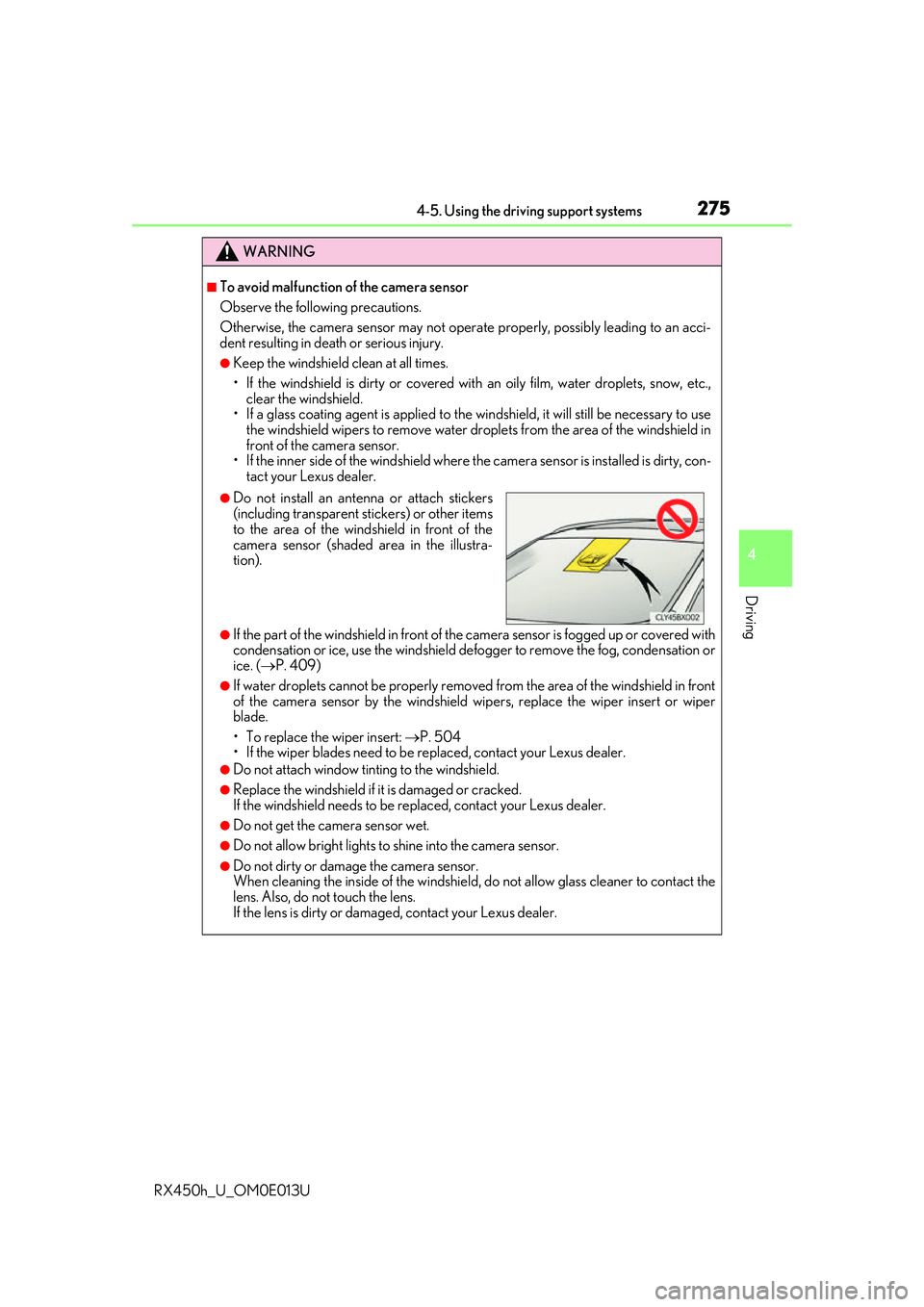
●Do not install an ante nna or attach stickers
(including transparent st ickers) or other items
to the area of the wind shield in front of the
camera sensor (shaded area in the illustra-
tion).
Page 289 of 660
2894-5. Using the driving support systems
4
Driving
RX450h_U_OM0E013U
■Situations in which the system may not operate properly
●In some situations such as the following, a vehicle may not be detected by the radar
sensor and camera sensor, preventing the system from operating properly:
• If an oncoming vehicle is approaching your vehicle
• If a vehicle ahead is a motorcycle or bicycle
• When approaching the side of a vehicle
• If a preceding vehicle has a small rear end, such as an unloaded truck
• If a vehicle ahead is carrying a load which protrudes past its rear bumper
• If a vehicle ahead is irregularly shap ed, such as a tractor or side car
• If the sun or other light is shin ing directly on a vehicle ahead
• If a vehicle cuts in front of your ve hicle or emerges from beside a vehicle
• If a vehicle ahead makes an abrupt maneuver (such as sudden swerving, accelera-
tion or deceleration)
• When suddenly cutting behind a preceding vehicle
• When driving in inclement we ather such as heavy rain, fog, snow or a sandstorm
• When the vehicle is hit by water, sn ow, dust, etc. from a vehicle ahead
• When driving through steam or smoke
• When driving in a place where the surrounding brightness changes suddenly, such as at the entrance or exit of a tunnel
• When a very bright light, such as the sun or the headlights of on coming traffic, shines
directly into the camera sensor
• When the surrounding area is dim, such as at dawn or dusk, or while at night or in a tunnel
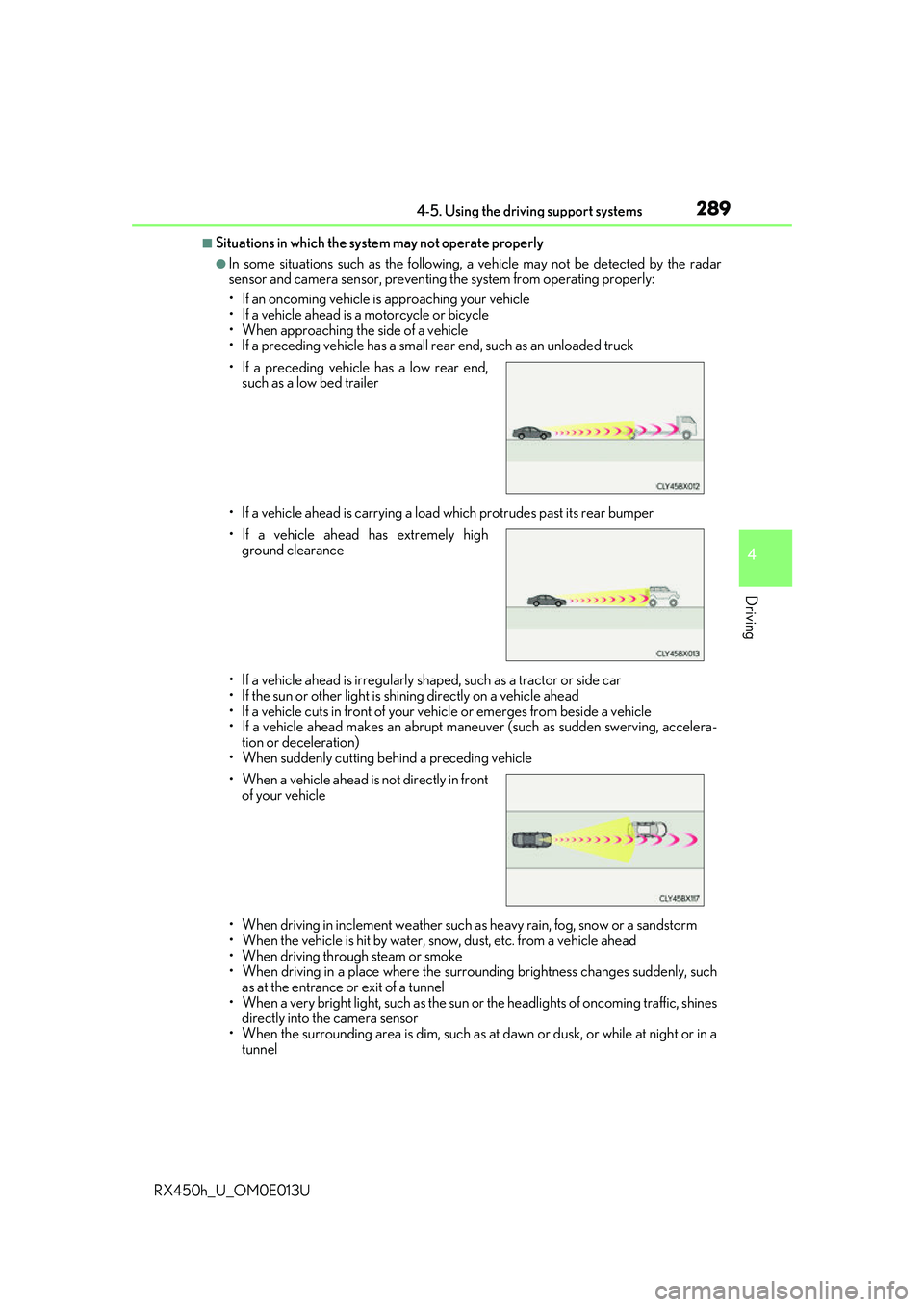
• If a preceding vehicle has a low rear end,
such as a low bed trailer
• If a vehicle ahead has extremely high ground clearance
• When a vehicle ahead is not directly in front of your vehicle