Page 295 of 748

2954-5. Using the driving support systems
4
Driving
RX350_U_OM48E90U WA R N I N G ■
Before using LDA system
Do not rely solely upon the LDA system. LDA is not a system which automatically
drives the vehicle or reduces the amount of attention that must be paid to the area in
front of the vehicle. The driver must always assume full responsibility for driving safely
by always paying careful attention to the surrounding conditions and operate the steer-
ing wheel to correct the path of the vehicle. Also, make sure to take adequate breaks
when fatigued, such as from driv ing for a long period of time.
Failure to perform appropriate driving operat ions and pay careful attention may lead to
an accident, resulting in death or serious injury. ■
To avoid operating LDA by mistake
When not using the LDA system, use the LDA switch to turn the system off. ■
Situations unsuitable for LDA
Do not use the LDA system in the following situations.
The system may not operate properly and le ad to an accident, resulting in death or
serious injury. ●
A spare tire, tire chains, etc., are equipped. ●
When the tires have been excessively worn, or when the tire inflation pressure is low. ●
Tires which differ by structure, manufa cturer, brand or tread pattern are used.●
Objects or patterns that could be mistaken for white (yellow) lines are present on the
side of the road (guardrails, curbs, reflective poles, etc.).●
Vehicle is driven on a snow-covered road. ●
White (yellow) lines are difficult to see due to rain, snow, fog, dust, etc. ●
Asphalt repair marks, white (y ellow) line marks, etc., are present due to road repair.●
Vehicle is driven in a temporary lane or restricted lane due to construction work. ●
Vehicle is driven on a road surface which is slippery due to rainy weather, fallen snow,
freezing, etc. ●
Vehicle is driven in traffic lanes other than on highways and freeways. ●
Vehicle is driven in a construction zone. ●
When your vehicle is towing a trailer or during emergency towing ■
Preventing LDA system malfunctions and operations performed by mistake●
Do not modify the headlights or place stickers, etc., on the surface of the lights. ●
Do not modify the suspension etc. If the suspension etc. needs to be replaced, con-
tact your Lexus dealer. ●
Do not install or place anything on the hood or grille. Also, do not install a grille guard
(bull bars, kangaroo bar, etc.). ●
If your windshield needs repair s, contact your Lexus dealer.
Page 297 of 748

2974-5. Using the driving support systems
4
Driving
RX350_U_OM48E90U LDA indicator
The illumination condition of the
indicator informs the driver of the
system operation status. Illuminated in white:
LDA system is operating.
Illuminated in green:
Steering wheel assistance of the steer-
ing assist function is operating.
Flashing in amber:
Lane departure alert function is operat-
ing.
Operation display of steering wheel
operation support
Indicates that steering wheel assistance of the steering assist function is oper-
ating.
Lane departure alert function display
Displayed when the multi-information disp lay is switched to the driving assist
system information screen.Indications on multi-information display 1
2
3
Inside of displayed white lines is
white
Inside of displayed white lines is
black
Indicates that the system is recognizing
white (yellow) lines. When the vehicle
departs from its lane, the white line dis-
played on the side the vehicle departs
from flashes amber. Indicates that the system is not able to
recognize white (yellow) lines or is
temporarily canceled.
Page 298 of 748

298 4-5. Using the driving support systems
RX350_U_OM48E90U ■
Operation conditions of each function ●
Lane departure alert function
This function operates when all of the following conditions are met.
• LDA is turned on.
• Vehicle speed is approximately 32 mph (50 km/h) or more.
• System recognizes white (yellow) lines.
• Width of traffic lane is approximately 9.8 ft. (3 m) or more.
• Turn signal lever is not operated.
• Vehicle is driven on a straight road or around a gentle curve with a radius of more
than approximately 492 ft. (150 m).
• No system malfunctions are detected. ( P. 6 3 4 )●
Steering assist function
This function operates when all of the foll owing conditions are met in addition to the
operation conditions for the lane departure alert function.
• Setting for “Steering Assist” in of the multi-information display is set to “On”.
( P. 9 6 )
• Vehicle is not accelerated or decelerated by a fixed amount or more.
• Steering wheel is not operated with a st eering force level suitable for changing
lanes.
• ABS, VSC, TRAC and PCS are not operating.
• TRAC or VSC is not turned off. ●
Ve h i c l e s w a y w a r n i n g
This function operates when all of the following conditions are met.
• Setting for “Sway Warning” in of the multi-information display is set to “On”.
( P. 9 6 )
• Vehicle speed is approximately 32 mph (50 km/h) or more.
• Width of traffic lane is approximately 9.8 ft. (3 m) or more.
• No system malfunctions are detected. ( P. 6 3 4 )
Page 299 of 748

2994-5. Using the driving support systems
4
Driving
RX350_U_OM48E90U ■
Temporary cancellation of functions
When operation conditions are no longer me t, a function may be temporarily canceled.
However, when the operation conditions are met again, operation of the function is auto-
matically restored. ( P. 2 9 8 )■
Steering assist function
Depending on the vehicle speed, lane depart ure situation, road conditions, etc., the
operation of the functions may not be reco gnized or the functions may not operate.■
Lane departure alert function
The warning buzzer may be difficult to hear due to external noise, audio playback, etc.
Also, it may be difficult to feel steering wheel vibrations due to the road conditions, etc. ■
Hands off steering wheel alert
When the system determines that the driver has removed their hands from the steering
wheel while the steering assist function is operating, a warning message is displayed on
the multi-information displa y and the buzzer sounds.■
White (yellow) lines are on ly on one side of road
The LDA system will not operate for the side on which white (yellow) lines could not be
recognized.
Page 313 of 748
3134-5. Using the driving support systems
4
Driving
RX350_U_OM48E90U ●
Motorcycles traveling in the same lane ●
When water or snow thrown up by the surrounding vehicles hinders the detecting of
the sensor
■
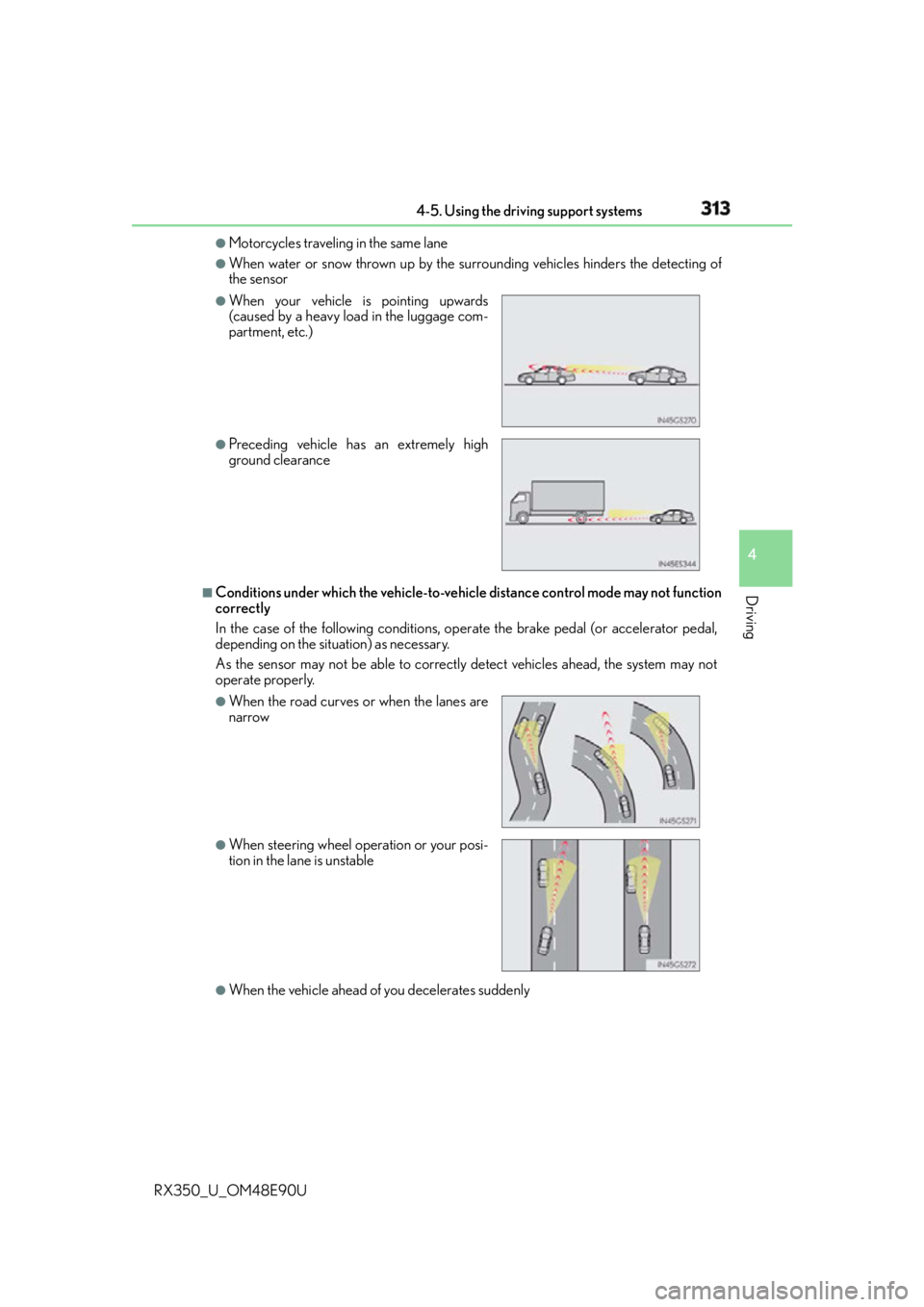
Conditions under which the ve hicle-to-vehicle distance co ntrol mode may not function
correctly
In the case of the following conditions, op erate the brake pedal (or accelerator pedal,
depending on the situ ation) as necessary.
As the sensor may not be able to correctly detect vehicles ahead, the system may not
operate properly.
●
When the vehicle ahead of you decelerates suddenly ●
When your vehicle is pointing upwards
(caused by a heavy load in the luggage com-
partment, etc.) ●
Preceding vehicle has an extremely high
ground clearance
●
When the road curves or when the lanes are
narrow
●
When steering wheel operation or your posi-
tion in the lane is unstable
Page 325 of 748
3254-5. Using the driving support systems
4
Driving
RX350_U_OM48E90U ■
Conditions under which the ve hicle-to-vehicle distance co ntrol mode may not function
correctly
In the case of the following conditions, op erate the brake pedal (or accelerator pedal,
depending on the situ ation) as necessary.
As the sensor may not be able to correctly detect vehicles ahead, the system may not
operate properly.
●
When the vehicle ahead of you decelerates suddenly ●
When the road curves or when the lanes are
narrow ●
When steering wheel operation or your posi-
tion in the lane is unstable
Page 340 of 748
340 4-5. Using the driving support systems
RX350_U_OM48E90U ■
Screen display
The parking assist monitor screen will be displayed if the shift position is
shifted to R while the engine switch is in IGNITION ON mode.
Intuitive parking assist (if
equipped)
Rear Cross Traffic Alert (if
equipped)
A simplified image is displayed on
the upper part of the screen when
an obstacle is detected.■
Using the system
Use any of the following modes.
●
Estimated course line display mode ( P. 3 4 2 )
Estimated course lines are dis-
played which move in accor-
dance with the operation of the
steering wheel.Using the Lexus parking assist monitor 1
2
Page 341 of 748
3414-5. Using the driving support systems
4
Driving
RX350_U_OM48E90U ●
Parking assist guide line display mode ( P. 344)
The steering wheel return points
(parking assist guide lines) are
displayed. ●
Distance guide line display mode
Distance guide lines only are dis-
played.
When the shift lever is in any position other than R, the display mode can be
changed in the following procedure.
Press the “MENU” button on the Le xus Display Audio controller/Remote
touch, and then select on the screen.
Select “Vehicle”, and then select “B ackup Camera Guide Line Settings” on
the screen.
Select the desired display mode.
Estimated course line display
mode ( P. 3 4 2 )
Parking assist guide line display
mode ( P. 3 4 4 )
Distance guide line display mode
Distance guide lines only are dis-
played.Switching the display mode 1
2
3
1
2
3