Page 382 of 660
3825-9. Bluetooth® Phone
NX200t_OM_USA_OM78081U
Using a Bluetooth® Phone
Before making a phone call, check the connection status, battery charge, call
area and signal strength. (
P. 383)
If a Bluetooth
® device cannot be connected, chec k the connection status. If the
device is not connected, either register or reconnect it. (
P. 3 74 , 3 7 7 )
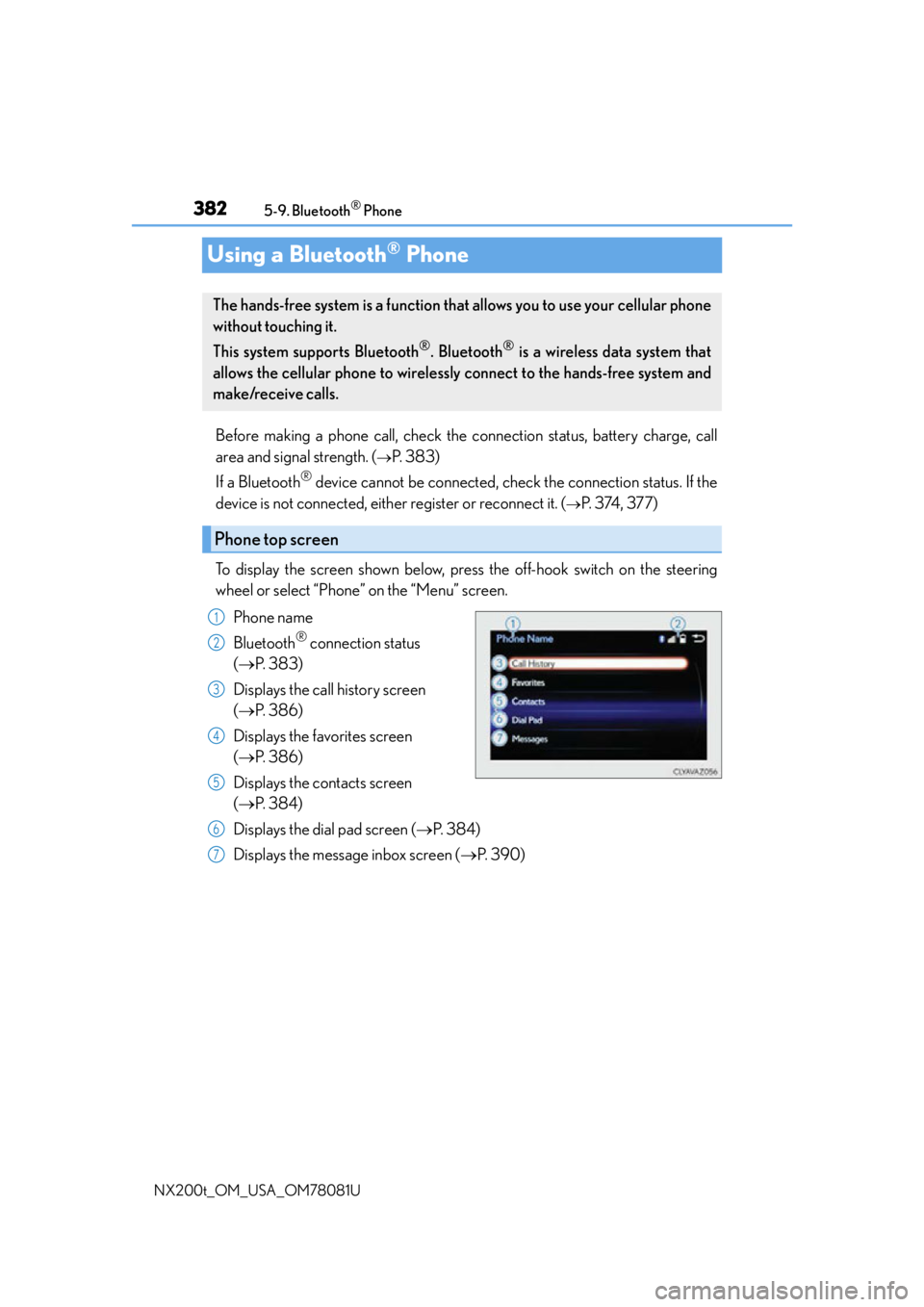
To display the screen shown below, press the off-hook switch on the steering
wheel or select “Phone” on the “Menu” screen. Phone name
Bluetooth
® connection status
( P. 3 8 3 )
Displays the call history screen
( P. 3 8 6 )
Displays the favorites screen
( P. 3 8 6 )
Displays the contacts screen
( P. 3 8 4 )
Displays the dial pad screen ( P. 3 8 4 )
Displays the message inbox screen ( P. 3 9 0 )
The hands-free system is a function that allows you to use your cellular phone
without touching it.
This system supports Bluetooth
®. Bluetooth® is a wireless data system that
allows the cellular phone to wirelessly connect to the hands-free system and
make/receive calls.
Phone top screen
1
2
3
4
5
6
7
Page 384 of 660
3845-9. Bluetooth® Phone
NX200t_OM_USA_OM78081U
Making a call
Go to “Dial Pad”: “MENU” button “Phone” “Dial Pad”
Input a phone number. ( P. 3 3 0 )
Press the off-hook switch on the steering wheel or select .
You can dial a number from the phoneb ook data imported from your cellular
phone. The system has one phonebook for each registered telephone. Up to
2500 contacts may be stored in each phonebook. ( P. 3 8 5 )
Go to “Contacts”: “MENU” button “Phone” “Contacts”
Choose the desired contact to call from the list.
Choose the number and then press the off-hook switch on the steering wheel
or press the controller.
Once a Bluetooth® phone is registered, you can make a call using the follow-
ing procedure:
Dialing
Dialing from the phonebook
1
2
3
1
2
3
Page 385 of 660
3855-9. Bluetooth® Phone
5
Lexus Display Audio system
NX200t_OM_USA_OM78081U
You can transfer the phone numbers in a Bluetooth® phone to the system.
Operation methods differ between PBAP (Phone Book Access Profile) compat-
ible and PBAP inco mpatible Bluetooth
® phones. If the cellular phone does not
support either PBAP or OPP (Object Push Profile) service, you cannot transfer
contacts.
Press the off-hook switch on the steering wheel.
If the phonebook is empty, a message will be displayed.
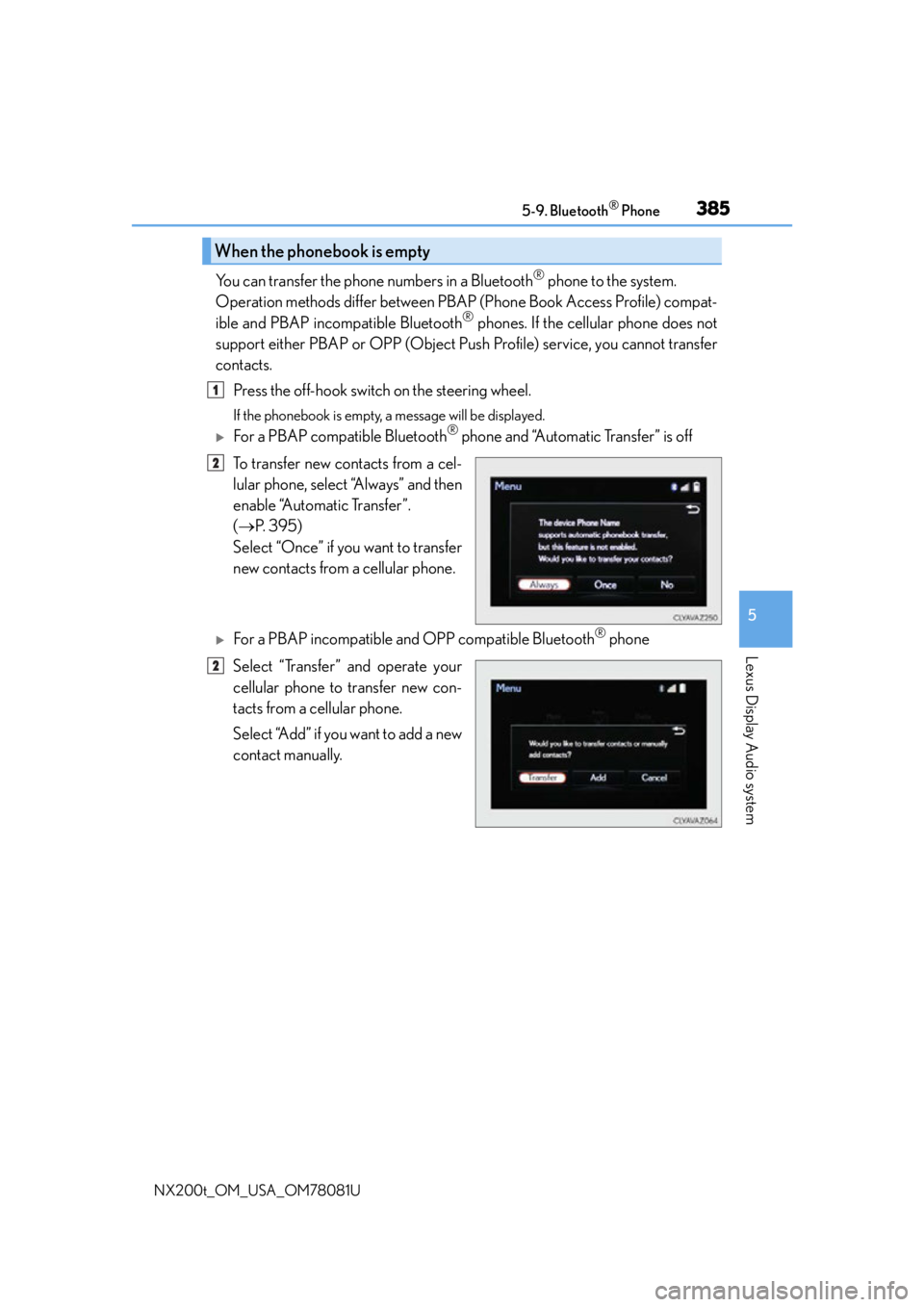
For a PBAP compatible Bluetooth® phone and “Automatic Transfer” is off
To transfer new contacts from a cel-
lular phone, select “Always” and then
enable “Automatic Transfer”.
( P. 3 9 5 )
Select “Once” if you want to transfer
new contacts from a cellular phone.
For a PBAP incompatible and OPP compatible Bluetooth® phone
Select “Transfer” and operate your
cellular phone to transfer new con-
tacts from a cellular phone.
Select “Add” if you want to add a new
contact manually.
When the phonebook is empty
1
2
2
Page 386 of 660
3865-9. Bluetooth® Phone
NX200t_OM_USA_OM78081U
You can make a call using numbers registered in the favorites. Go to “Favorites”: “MENU” button “Phone” “Favorites”
Choose the desired contact to call from the list.
Choose the number and then press the off-hook switch on the steering wheel
or press the controller.
You can make a call using the call history. Go to “Call History”: “MENU” button “Phone” “Call History”
Select the desired entry from the list.
Press the off-hook switch on the steering wheel or select .
■Call history list
●If you make a call to or receive a call from a number registered in the phonebook, the
name is displayed in the call history.
●If you make multiple calls to the same number , only the last call made is displayed in the
call history.
■International calls
Depending on the mobile phone in use, you ma y not be able to make international calls.
■Calling by using the latest call history entry
Press the
off-hook switch on the steering wheel to display the phone top screen.
Press the
switch again switch on the steering wheel to display the “Call History”
screen.
Press the
switch again switch on the steering wheel to select the latest call history
entry.
Dialing from favorites
Dialing from history
1
2
3
1
2
3
1
2
3
Page 387 of 660
3875-9. Bluetooth® Phone
5
Lexus Display Audio system
NX200t_OM_USA_OM78081U
Receiving a call
Press the off-hook switch on the steer-
ing wheel or select .
Press the on-hook switch on the steering wheel or select .
■International calls
Depending on the cellular phone in use, received international calls may not be dis-
played correctly.
When a call is received, the following screen is displayed together with a
sound.
To answer the phone
To refuse a call
Page 389 of 660
3895-9. Bluetooth® Phone
5
Lexus Display Audio system
NX200t_OM_USA_OM78081U
Phone number containing a “w” symbol
When the “w” symbol is dialed in an outgoing call, you need to go to the
“Release Tones” screen to dial the following digits. Move the controller to the
left and then select “Release Tones”.
Select “Handset Mode” to change from a hands-free call to a cellular phone call
or vice versa.
Press the on-hook switch on the steering wheel or select .
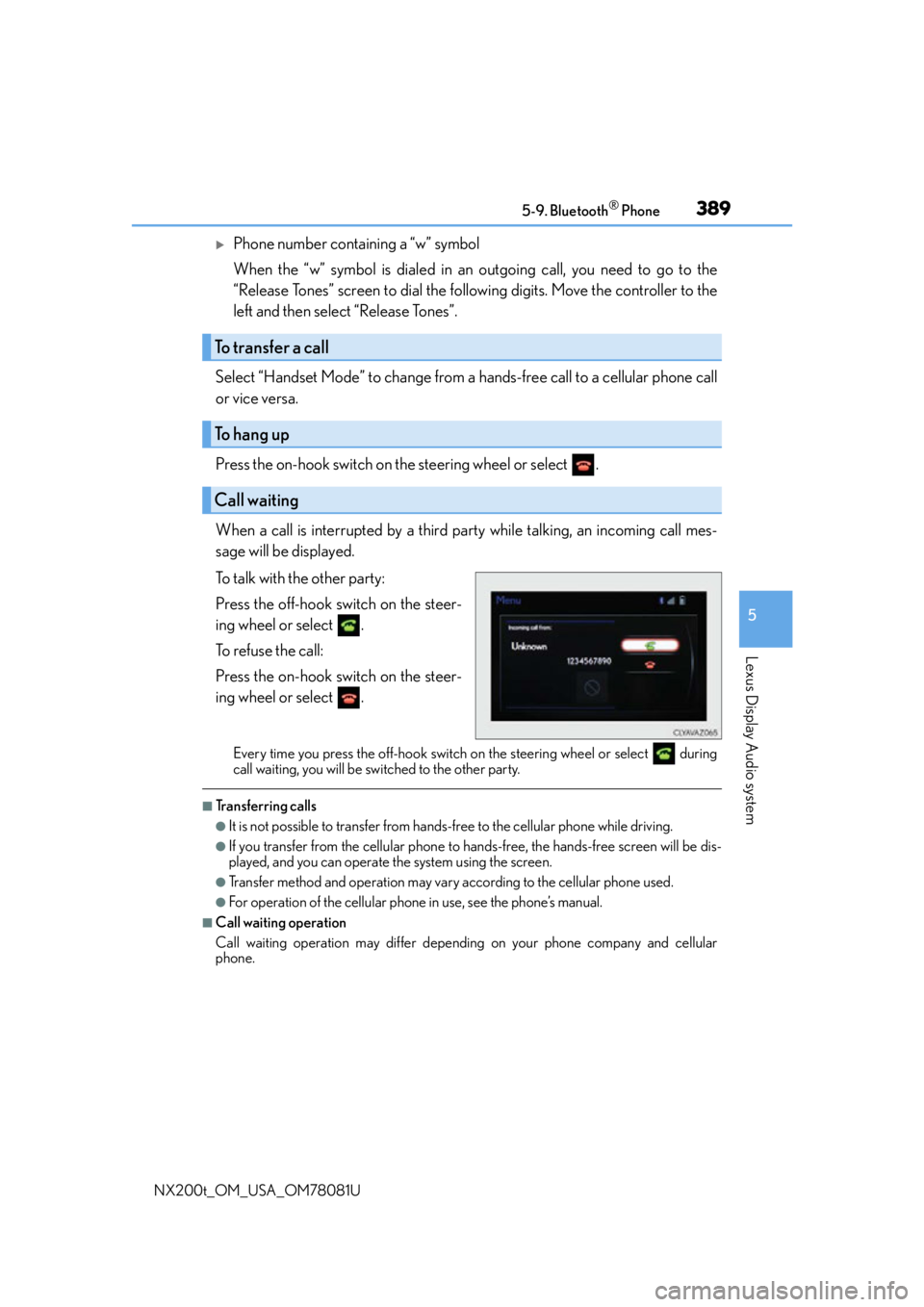
When a call is interrupted by a third party while talking, an incoming call mes-
sage will be displayed.
To talk with the other party:
Press the off-hook switch on the steer-
ing wheel or select .
To refuse the call:
Press the on-hook switch on the steer-
ing wheel or select .
Every time you press the off-hook switch on the steering wheel or select during
call waiting, you will be switched to the other party.
■Transferring calls
●It is not possible to transfer from hand s-free to the cellular phone while driving.
●If you transfer from the cellular phone to ha nds-free, the hands-free screen will be dis-
played, and you can operate the system using the screen.
●Transfer method and operation may vary according to the cellular phone used.
●For operation of the cellular phone in use, see the phone’s manual.
■Call waiting operation
Call waiting operation may differ depend ing on your phone company and cellular
phone.
To transfer a call
To hang up
Call waiting
Page 392 of 660
3925-9. Bluetooth® Phone
NX200t_OM_USA_OM78081U
Using the steering wheel switches
Volume switch
During an incoming call: Adjusts the
ring tone volume
During speaking on the phone:
Adjusts in call volume
The voice guidance volume cannot be
adjusted using this button.
Off-hook switch • Start call
• Receiving
• Phone top screen display
On-hook switch • End call
• Refuse call
Talk switch
Press: Turns the voice command system on
Press and hold: Turns the voice command system off
The steering wheel switches can be used to operate a connected cellular
phone.
Operating a telephone usin g the steering wheel switches
1
2
3
4
Page 419 of 660

419
6Interior features
NX200t_OM_USA_OM78081U
6-1. Using the air conditioning system and defogger
Automatic air conditioning system ..........................................420
Heated steering wheel/ seat heaters/
seat ventilators......................... 430
6-2. Using the interior lights Interior lights list..........................433• Front interior light ................434
• Personal lights........................434
• Rear interior light .................435 6-3. Using the storage features
List of storage features ............ 436• Glove box ............................... 437
• Console box........................... 437
•Cup holders/ bottle holders.........................438
• Sunglass holder .................... 439
Luggage compartment features........................................440
6-4. Other interior features Other interior features ............ 445
• Sun visors ................................ 445
• Vanity mirrors ........................ 445
• Clock ........................................ 446
• Power outlet (12 VDC)...... 446
• Power outlet (120 VAC) ... 447
• Wireless charger.................. 448
• Armrest .................................... 454
• Assist grips.............................. 455
• Coat hooks ............................. 455
Garage door opener................ 456
Compass ....................................... 462
Safety Connect ........................... 466


