2016 LEXUS LS460L park assist
[x] Cancel search: park assistPage 245 of 708

245
4Driving
LS460/LS460L_GE (OM50G06E)
4-1. Before driving
Driving the vehicle..................... 246
Cargo and luggage ................... 257
Trailer towing .............................. 258
4-2. Driving procedures
Engine (ignition) switch ...........259
Automatic transmission
(vehicles without paddle
shift switches)............................ 264
Automatic transmission
(vehicles with paddle
shift switches)............................ 269
Turn signal lever ......................... 278
Parking brake .............................. 279
Brake Hold....................................282
Horn.................................................284
4-3. Operating the lights and
wipers
Headlight switch ........................ 285
AHS (Adaptive High-beam
System)......................................... 291
Fog light switch ...........................298
Windshield wipers and
washer ........................................ 300
Headlight cleaner switch ....... 304
4-4. Refueling
Opening the fuel tank cap..... 305
4-5. Using the driving support
systems
Cruise control .............................309
Dynamic radar
cruise control............................. 313
Dynamic radar cruise
control with
full-speed range ......................328
LKA
(Lane-Keeping Assist).......... 344
Driving mode select
switch ........................................... 354
Electronically modulated
air suspension ...........................358
Driving assist systems ..............360
PCS (Pre-Crash
Safety system) ..........................368
BSM
(Blind Spot Monitor) .............. 381
•The Blind Spot Monitor
function .................................... 387
• The RCTA function .............390
Lexus night view ......................... 393
4-6. Driving tips
Winter driving tips ..................... 399
Eco-friendly driving tips ..........403
Page 247 of 708

2474-1. Before driving
4
Driving
LS460/LS460L_GE (OM50G06E)
Make sure that the parking brake is set and shift the shift lever to D.
Gently depress the accelerator pedal.
Release the parking brake.
■When starting off on a uphill
Hill-start assist control will operate. ( P. 360)
■Driving in the rain
●Drive carefully when it is raining, because visibility will be reduced, the windows
may become fogged-up, and the road will be slippery.
●Drive carefully when it starts to rain, because the road surface will be especially
slippery.
●Refrain from high speeds when driving on an expressway in the rain, because there
may be a layer of water between the tires and the road surface, preventing the
steering and brakes from operating properly.
■Engine speed while driving
In the following conditions, the engine spee d may become high while driving. This is
due to automatic up-shifting control or down-shifting implementation to meet driv-
ing conditions. It does not indicate sudden acceleration.
●The vehicle is judged to be driving uphill or downhill
●When the accelerator pedal is released
●When the brake pedal is depressed while sport mode is selected
Starting off on a steep uphill
1
2
3
Page 337 of 708

3374-5. Using the driving support systems
4
Driving
LS460/LS460L_GE (OM50G06E)
■Dynamic radar cruise control with full-speed range can be set when
●The shift lever is in the D or range 4 or higher of S has been selected.
(vehicles without paddle shift switches)
●The shift lever is in D.
(vehicles with paddle shift switches)
●Range 4 or higher of D has been selected by using the paddle shift.
(vehicles with paddle shift switches)
●Vehicle speed is above approximately 50 km/h (30 mph).
■Accelerating after setting the vehicle speed
The vehicle can accelerate normally. After acceleration, the set speed resumes.
However, during vehicle-to-vehicle distance control mode, the vehicle speed may
decrease below the set speed in order to maintain the distance to the vehicle ahead.
■Automatic cancelation of vehicle -to-vehicle distance control
Vehicle-to-vehicle distance control driving is automatically canceled in the following
situations:
●Actual vehicle speed falls below approximately 40 km/h (25 mph) when there are
no vehicle ahead.
●The preceding vehicle leaves the lane when your vehicle is following at a speed
below 40 km/h (25 mph).
●VSC is activated.
●TRC is activated for a period of time.
●When the VSC or TRC system is turned off by pressing the VSC OFF switch.
●The sensor cannot operate correctly because it is covered in some way.
●The windshield wipers are operating at high speed (when the wiper switch is set to
the “AUTO” mode or the high speed wiper operation position).
●When snow mode is set.
●The parking brake is operated.
●The vehicle is stopped by system control on a steep incline.
●Pre-crash brake assist is activated.
●The following are detected when the vehicle has been stopped by system control:
• The driver is not wearing a seat belt.
• The driver’s door is opened.
• The trunk or hood is opened.
• The vehicle has been stopped for about 3 minutes.
If vehicle-to-vehicle distance control driving is automatically canceled for any other
reason, there may be a malfunction in the system. Contact your Lexus dealer.
Page 350 of 708

3504-5. Using the driving support systems
LS460/LS460L_GE (OM50G06E)
■After the vehicle has been parked in the sun
The LKA system functions may not be available and a warning message ( P. 614)
will be displayed for a while after driving has started. In such cases, turn the LKA sys-
tem off and turn it on again after normal temperature returns. When the temperature
in the cabin decreases and the temperature around the camera sensor ( P. 344)
becomes suitable for its operation, the functions will begin to operate.
■If there are lane markers on only one side of the vehicle
The lane keeping assist function will not operate. Also, the lane departure warning
will not operate for the side on which lane markers could not be recognized.
■Conditions in which the function may not operate correctly
In the following conditions, the LKA system functions may not operate, or it may not
be possible to ensure adequate performance. Also, the camera sensor may be
unable to recognize lane lines causing the lane departure warning function to oper-
ate incorrectly, or the lane keeping assist function may not operate properly. How-
ever, this does not indicate a malfunction.
●When driving through an area with no lane markers, such as a tollbooth, a crossing
or before a ticket checkpoint
●When driving on a sharp curve
●When lanes are extremely narrow or extremely wide
●When the vehicle leans to one side an unusual amount due to a heavy load or
improper tire inflation pressure
●When the following distance between your vehicle and the vehicle ahead is
extremely short
●When the lane markers are yellow (These may be more difficult for the system to
recognize compared to white markers.)
●When the lane markers are broken, “Raised pavement marker” or stones
●When lane markers are obscured or partially obscured by sand, dirt, etc.
●When there are shadows on the road running parallel with lane markers, or if a
shadow covers the lane markers
●When driving on a particularly bright road surface, such as concrete
●When driving on a road surface that is bright due to reflected light
●When driving in a location where the li ght level changes rapidly, such as the
entrance to or exit from a tunnel
●When sunlight or the headlights of oncoming vehicles are shining directly into the
camera lens
●When driving on roads that are branching or merging
Page 395 of 708

3954-5. Using the driving support systems
4
Driving
LS460/LS460L_GE (OM50G06E)
■When displaying on the side display
When another screen is displayed on
the main display while the Lexus night
view is being shown on the main dis-
play, the Lexus night view screen will
be displayed on the side display.
Lexus night view screen
Main display switching button
Switches the Lexus night view from
the side display to the main display.
■Imaging range
The image is shown ranging from the tip of the low beam to the high beam.
■If the vehicle speed is less than approximately 15 km/h (9 mph) when the Lexus
night view is operating
An image will be displayed on the Lexus night view screen, but both the range and
the distance of the projection will be limited as near-infrared rays are not being radi-
ated outward.
■When the Lexus night view switch is pressed while the Lexus night view cannot be
operated
Advice information will be displayed on the Lexus night view screen. Follow the dis-
played advice.
■If the Lexus night view switch is pressed at a time when the Lexus night view opera-
tion is not possible
Follow the advice displayed on the Remote Touch screen.
■When the shift lever is shifted to R wh ile the Lexus night view is operating
The Lexus night view screen switches as follows.
Main display: Switches to the Lexus parking assist monitor screen.
Side display: The display blacks out and no image is displayed.
1
2
Page 416 of 708

4165-1. Remote Touch screen
LS460/LS460L_GE (OM50G06E)
Interruption screens
Each of the following screens is displayed automatically in accordance
with conditions.
• Lexus parking assist-sensor
•Phone*1
• Driving mode
• Lexus night view (if equipped) ( P. 395)
*1: For details, refer to “Navigation and Multimedia System Owner’s Manual” or
“Navigation System Owner’s Manual”.
*2: Except for Hong Kong and Macau
Page 516 of 708

5166-1. Maintenance and care
LS460/LS460L_GE (OM50G06E)
NOTICE
■Cleaning detergents
●Do not use the following types of detergent, as they may discolor the vehicle inte-
rior or cause streaks or damage to painted surfaces:
• Non-seat portions: Organic substances such as benzene or gasoline, alkaline
or acidic solutions, dye, and bleach
• Seats: Alkaline or acidic solutions, such as thinner, benzene, and alcohol
●Do not use polish wax or polish cleaner. The instrument panel’s or other interior
part’s painted surface may be damaged.
■Preventing damage to leather surfaces
Observe the following precautions to avoid damage to and deterioration of
leather surfaces:
●Remove any dust or dirt from leather surfaces immediately.
●Do not expose the vehicle to direct sun light for extended periods of time. Park
the vehicle in the shade, especially during summer.
●Do not place items made of vinyl, plastic, or containing wax on the upholstery, as
they may stick to the leather surface if the vehicle interior heats up significantly.
■Water on the floor
Do not wash the vehicle floor with water.
Vehicle systems such as the audio system may be damaged if water comes into
contact with electrical components such as the audio system above or under the
floor of the vehicle. Water may also cause the body to rust.
■When cleaning the inside of the windshield (vehicles with LKA [Lane-Keeping
Assist])
Be careful not to touch the camera sensor ( P. 344).
If the camera is accidentally scratched or hit, LKA may not operate properly or
may cause a malfunction.
■Cleaning the inside of the rear window
●Do not use glass cleaner to clean the rear window, as this may cause damage to
the rear window defogger heater wires or antenna. Use a cloth dampened with
lukewarm water to gently wipe the window clean. Wipe the window in strokes
running parallel to the heater wires or antenna.
●Be careful not to scratch or damage the heater wires or antenna.
Page 607 of 708
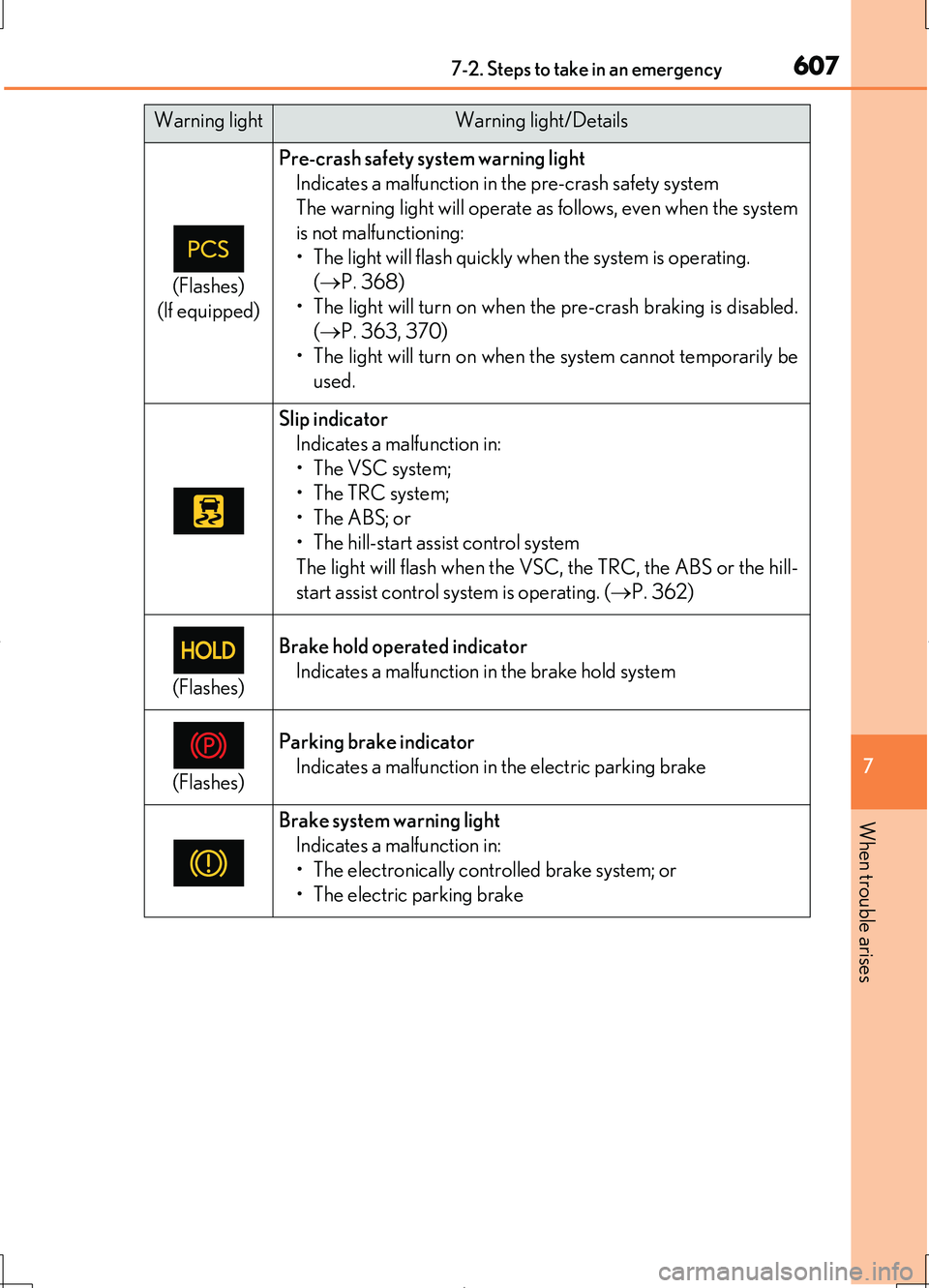
6077-2. Steps to take in an emergency
7
When trouble arises
LS460/LS460L_GE (OM50G06E)
(Flashes)
(If equipped)
Pre-crash safety system warning light
Indicates a malfunction in the pre-crash safety system
The warning light will operate as follows, even when the system
is not malfunctioning:
• The light will flash quickly when the system is operating.
( P. 368)
• The light will turn on when the pre-crash braking is disabled.
( P. 363, 370)
• The light will turn on when the system cannot temporarily be
used.
Slip indicator
Indicates a malfunction in:
•The VSC system;
•The TRC system;
•The ABS; or
• The hill-start assist control system
The light will flash when the VS C, the TRC, the ABS or the hill-
start assist control system is operating. ( P. 362)
(Flashes)
Brake hold operated indicator
Indicates a malfunction in the brake hold system
(Flashes)
Parking brake indicator
Indicates a malfunction in the electric parking brake
Brake system warning light
Indicates a malfunction in:
• The electronically controlled brake system; or
• The electric parking brake
Warning lightWarning light/Details