2016 Lexus GS450h brake light
[x] Cancel search: brake lightPage 171 of 544

GS450h_OM_OM30E99U_(U)
1714-1. Before driving
4
Driving
WA R N I N G
Observe the following precautions.
Failure to do so may result in death or serious injury.
■When the vehicle is stopped
●Do not depress the accelerator pedal unnecessarily.
If the shift lever is any position other than P or N, the vehicle may accelerate suddenly
and unexpectedly, causing an accident.
●In order to prevent accidents due to the vehicle rolling away, always keep depressing
the brake pedal while stopped with the “READY” indicator is illuminated, and apply
the parking brake as necessary.
●If the vehicle is stopped on an incline, in order to prevent accidents caused by the
vehicle rolling forward or backward, always depress the brake pedal and securely
apply the parking brake as needed.
●Avoid revving or racing the engine.
Running the engine at high speed while the vehicle is stopped may cause the exhaust
system to overheat, which could result in a fire if combustible material is nearby.
■When the vehicle is parked
●Do not leave glasses, cigarette lighters, sp ray cans, or soft drink cans in the vehicle
when it is in the sun.
Doing so may result in the following:
• Gas may leak from a cigarette lighter or spray can, and may lead to a fire.
• The temperature inside the vehicle may cause the plastic lenses and plastic mate- rial of glasses to deform or crack.
• Soft drink cans may fracture, causing the contents to spray over the interior of the
vehicle, and may also cause a short circuit in the vehicle’s electrical components.
●Do not leave cigarette lighters in the vehicle. If a cigarette lighter is in a place such as
the glove box or on the floor, it may be lit accidentally when luggage is loaded or the
seat is adjusted, causing a fire.
●Do not attach adhesive discs to the windsh ield or windows. Do not place containers
such as air fresheners on the instrument panel or dashboard. Adhesive discs or con-
tainers may act as lenses, causing a fire in the vehicle.
●Do not leave a door or window open if the curved glass is coated with a metallized
film such as a silver-colored one. Reflected sunlight may cause the glass to act as a
lens, causing a fire.
●Always apply the parking brake, shift the shift lever to P, stop the hybrid system and
lock the vehicle.
Do not leave the vehicle unattended wh ile the “READY” indicator is illuminated.
●Do not touch the exhaust pipes while the “READY” indicator is illuminated or imme-
diately after turning the hybrid system off.
Doing so may cause burns.
Page 193 of 544
193
GS450h_OM_OM30E99U_(U)4-2. Driving procedures
4
Driving
Parking brake
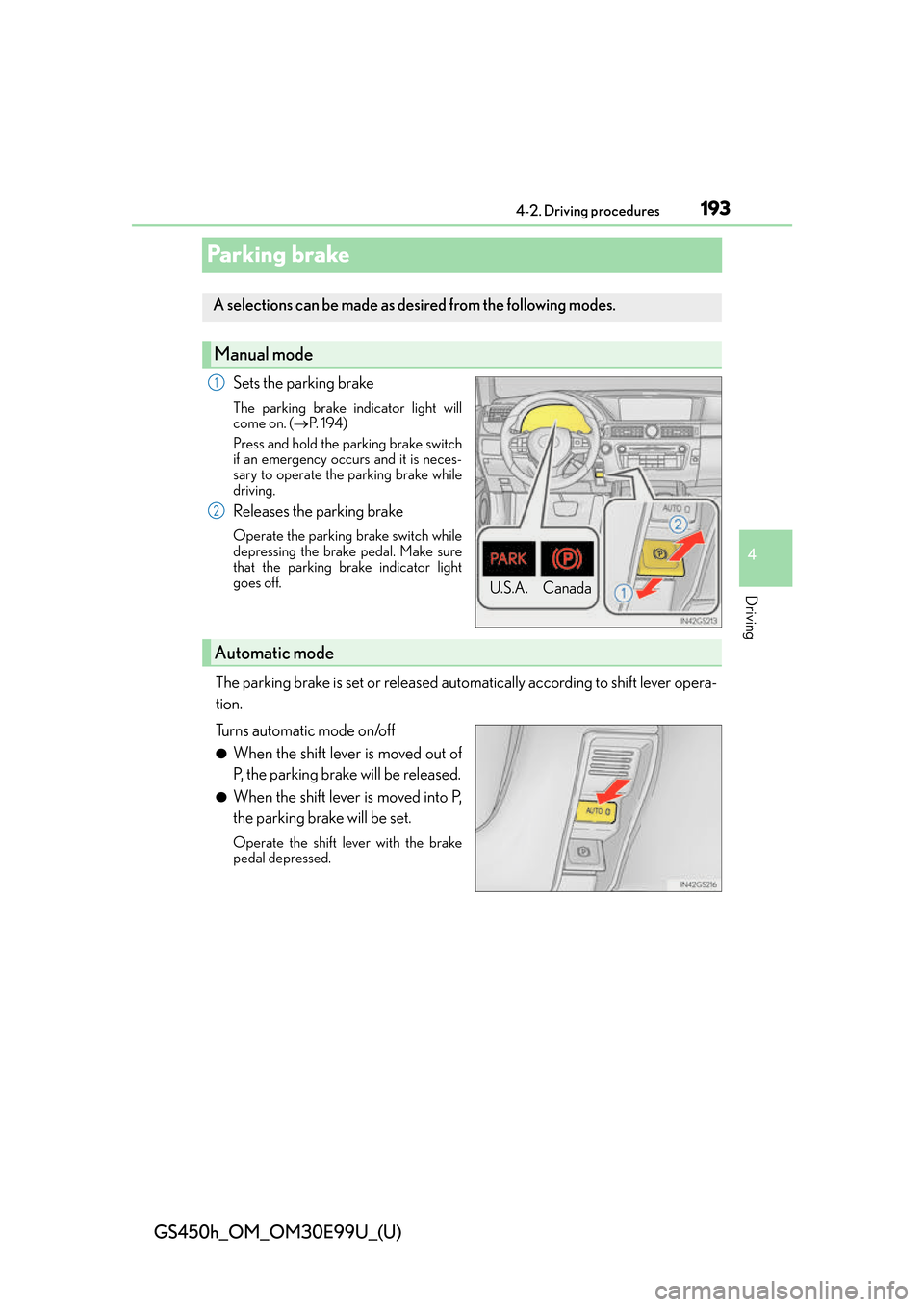
Sets the parking brake
The parking brake indicator light will
come on. ( P. 1 9 4 )
Press and hold the parking brake switch
if an emergency occurs and it is neces-
sary to operate the parking brake while
driving.
Releases the parking brake
Operate the parking brake switch while
depressing the brake pedal. Make sure
that the parking brake indicator light
goes off.
The parking brake is set or released automatically according to shift lever opera-
tion.
Turns automatic mode on/off
●When the shift lever is moved out of
P, the parking brake will be released.
●When the shift lever is moved into P,
the parking brake will be set.
Operate the shift lever with the brake
pedal depressed.
A selections can be made as de sired from the following modes.
Manual mode
U.S.A. Canada
1
2
Automatic mode
Page 194 of 544
194
GS450h_OM_OM30E99U_(U)
4-2. Driving procedures
■Parking brake operation
●When the power switch is not in ON mode, the parking brake cannot be released using
the parking brake switch.
●When the power switch is not in ON mode, automatic mode (automatic brake setting
and releasing) is not available.
●If the parking brake is operated repeatedly over a short period of time, the system may
restrict operation to prevent overheating. If this happens, refrain from operating the
parking brake. Normal operation will return after about 1 minute.
●In situations such as when parking on a steep slope*, the maximum amount of braking
force can be used by pressing the parking brake switch with the parking brake already
set.
*: Use wheel chocks when parking on a steep slope.
■Parking brake operation sound
When the parking brake operates, a motor sound (whirring sound) may be heard. This
does not indicate a malfunction.
■Parking brake indicator light
●Depending on the power switch mode, the parking brake indicato r light will come on
and stay on as described below:
ON mode: Comes on until the parking brake is released.
Not in ON mode: Stays on for approximately 15 seconds.
●When the power switch is turned off with th e parking brake set, the parking brake indi-
cator light will stay on for about 15 seco nds. This does not indicate a malfunction.
■When there is a malfunction in the system
Warning lights and/or warning message will turn on or flash. ( P. 4 0 2 , 4 0 6 )
Depending on the condition, the par king brake indicator light may flash.
■Parking brake engaged warning buzzer
P. 4 1 2
■Usage in winter time
P. 2 7 5
NOTICE
■When parking the vehicle
Before you leave the vehicle, set the parking brake, shift the shift lever to P and make
sure that the vehicle does not move.
■When the system malfunctions
Stop the vehicle in a safe place and check the warning messages.
■When the parking brake cannot be released due to a malfunction
Use the parking brake release tool to manually release the parking brake. (P. 4 4 9 )
Driving the vehicle with the parking brake set will lead to brake components overheat-
ing, which may affect braking perf ormance and increase brake wear.
Page 195 of 544
195
GS450h_OM_OM30E99U_(U)4-2. Driving procedures
4
Driving
Brake Hold
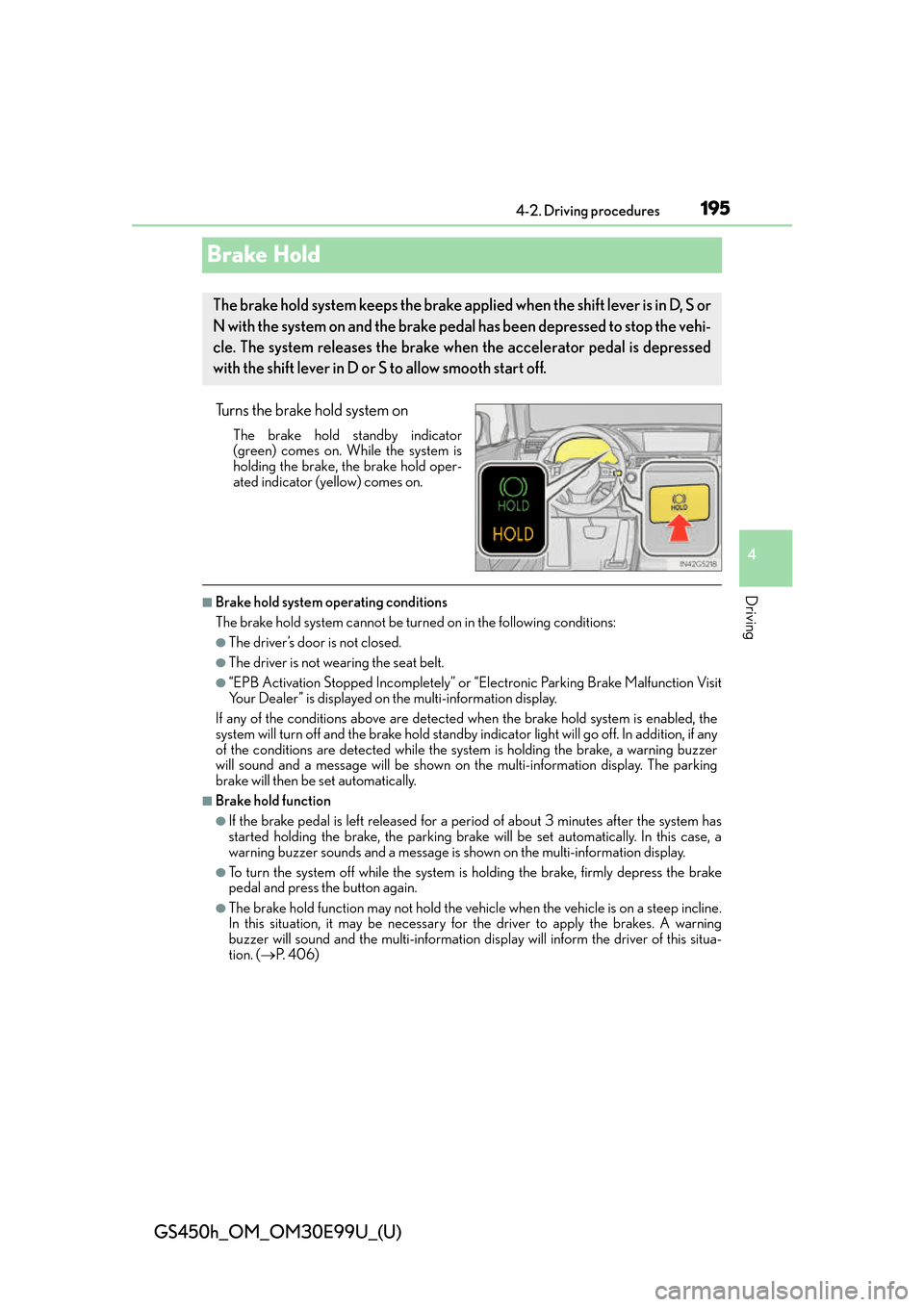
Turns the brake hold system on
The brake hold standby indicator
(green) comes on. Wh ile the system is
holding the brake, the brake hold oper-
ated indicator (yellow) comes on.
■Brake hold system operating conditions
The brake hold system cannot be turn ed on in the following conditions:
●The driver’s door is not closed.
●The driver is not wearing the seat belt.
●“EPB Activation Stopped Incompletely” or “Electronic Parking Brake Malfunction Visit
Your Dealer” is displayed on the multi-information display.
If any of the conditions above are detected when the brake hold system is enabled, the
system will turn off and the brake hold standby indicator light will go of f. In addition, if any
of the conditions are detected while the sy stem is holding the brake, a warning buzzer
will sound and a message will be shown on th e multi-information display. The parking
brake will then be set automatically.
■Brake hold function
●If the brake pedal is left released for a period of about 3 minutes after the system has
started holding the brake, the parking brake w ill be set automatically. In this case, a
warning buzzer sounds and a message is shown on the multi-information display.
●To turn the system off while the system is holding the brake, firmly depress the brake
pedal and press the button again.
●The brake hold function may not hold the vehicle when the vehicle is on a steep incline.
In this situation, it may be necessary for the driver to apply the brakes. A warning
buzzer will sound and the multi-information di splay will inform the driver of this situa-
tion. ( P. 4 0 6 )
The brake hold system keeps the brake applied when the shift lever is in D, S or
N with the system on and the brake pedal has been depressed to stop the vehi-
cle. The system releases the brake when the accelerator pedal is depressed
with the shift lever in D or S to allow smooth start off.
Page 196 of 544
196
GS450h_OM_OM30E99U_(U)
4-2. Driving procedures
■When the parking brake is set automatically while the system is holding the brakes
The parking brake will not be released auto matically. Perform one of the following proce-
dures to release the parking brake and conf irm that the parking brake indicator light
turns off. ( P. 1 9 3 )
●With the brake pedal depressed, operate the parking brake switch.
●Fasten your seat belt, check that the shift leve r is in either D or R and slowly depress the
accelerator pedal.
■Warning message and buzzers
Warning messages and buzzers are used to indicate a system malfunction or to inform
the driver of the need for caution. ( P. 4 0 6 )
WA R N I N G
■When the vehicle is on a steep incline
When using the brake hold system on a stee p incline exercise caution. The brake hold
function may not hold the vehicle in such a situation.
■When stopped on a slippery road
The system cannot stop the vehicle when the gripping ability of the tires has been
exceeded. Do not use the system when stopped on a slippery road.
NOTICE
■When parking the vehicle
The brake hold system is not designed for use when parking the vehicle for a long
period of time. Turning the power switch off while the system is holding the brake may
release the brake, which would cause the vehicle to move. When operating the power
switch, depress the brake pedal, set the parking brake and shift the shift lever to P.
Page 198 of 544

198
GS450h_OM_OM30E99U_(U)
4-3. Operating the lights and wipers
AFS (Adaptive Front-lighting System) secures excellent visibility at intersections
and on curves by automatically adjusting the direction of the light axis of the
headlights according to vehicle speed and the degree of the tire’s angle as con-
trolled by steering input.
AFS operates at speeds of 6 mph (10 km/h) or higher.
■Deactivating AFS
Settings can be changed from on the multi-information display
( P. 9 3 ) .
Press or on the meter control switch and select “AFS”.
Press on the meter control
switch and select “Off”.
The indicator turns on when the AFS
is deactivated.
■Daytime running light system
●To make your vehicle more visible to other drivers during daytime driving, the daytime
running lights turn on automatically whenever the hybrid system is started and the park-
ing brake is released with the headlight sw itch in the or “AUTO” position. (Illumi-
nate brighter than the parking lights.) Dayt ime running lights are not designed for use at
night.
For the U.S.A.: Daytime running lights can be turned off by operating the switch.
●Compared to turning on the headlights, the daytime running light system offers greater
durability and consumes less electricity, so it can help improve fuel economy.
■Headlight control sensor
AFS (Adaptive Front-lighting System) (if equipped)
1
2
The sensor may not function properly if an
object is placed on the sensor, or anything that
blocks the sensor is affixed to the windshield.
Doing so interferes with the sensor detecting
the level of ambient light and may cause the
automatic headlight system to malfunction.
Page 224 of 544
224
GS450h_OM_OM30E99U_(U)
4-5. Using the driving support systems
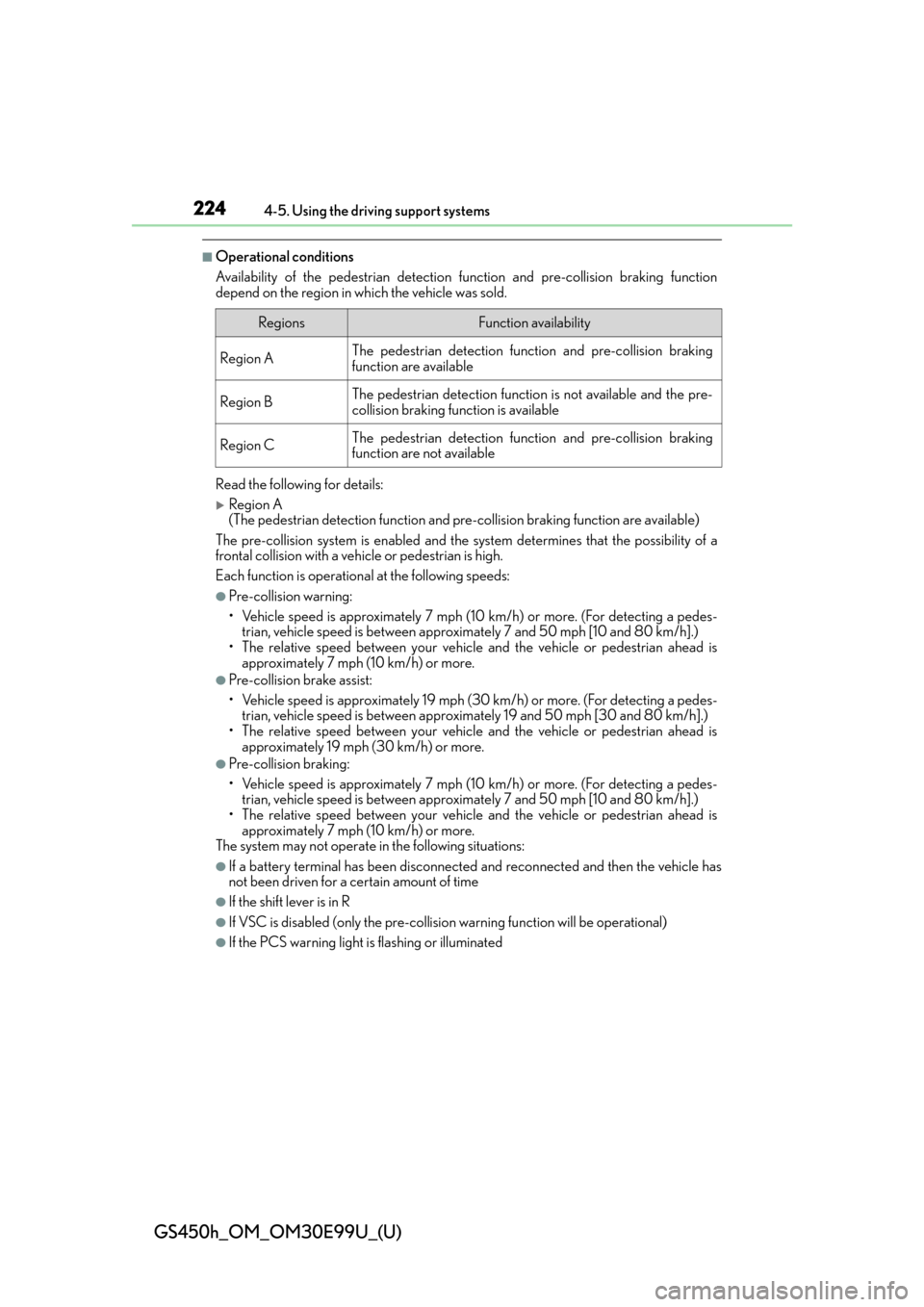
■Operational conditions
Availability of the pedestrian detection function and pre-collision braking function
depend on the region in which the vehicle was sold.
Read the following for details:
Region A
(The pedestrian detection fu nction and pre-collision braking function are available)
The pre-collision system is enabled and the sy stem determines that the possibility of a
frontal collision with a vehicle or pedestrian is high.
Each function is operationa l at the following speeds:
●Pre-collision warning:
• Vehicle speed is approximately 7 mph (1 0 km/h) or more. (For detecting a pedes-
trian, vehicle speed is between approxim ately 7 and 50 mph [10 and 80 km/h].)
• The relative speed between your vehicl e and the vehicle or pedestrian ahead is
approximately 7 mph (10 km/h) or more.
●Pre-collision brake assist:
• Vehicle speed is approximately 19 mph (3 0 km/h) or more. (For detecting a pedes-
trian, vehicle speed is between approxim ately 19 and 50 mph [30 and 80 km/h].)
• The relative speed between your vehicl e and the vehicle or pedestrian ahead is
approximately 19 mph (30 km/h) or more.
●Pre-collision braking:
• Vehicle speed is approximately 7 mph (1 0 km/h) or more. (For detecting a pedes-
trian, vehicle speed is between approxim ately 7 and 50 mph [10 and 80 km/h].)
• The relative speed between your vehicl e and the vehicle or pedestrian ahead is
approximately 7 mph (10 km/h) or more.
The system may not operate in the following situations:
●If a battery terminal has be en disconnected and reconnected and then the vehicle has
not been driven for a certain amount of time
●If the shift lever is in R
●If VSC is disabled (only the pre-collision warning function will be operational)
●If the PCS warning light is flashing or illuminated
RegionsFunction availability
Region AThe pedestrian detection function and pre-collision braking
function are available
Region BThe pedestrian detection function is not available and the pre-
collision braking function is available
Region CThe pedestrian detection function and pre-collision braking
function are not available
Page 225 of 544
GS450h_OM_OM30E99U_(U)
2254-5. Using the driving support systems
4
Driving
Region B
(The pedestrian detection function is not available and the pre-collision braking func-
tion is available)
The pre-collision system is enabled and the sy stem determines that the possibility of a
frontal collision with a vehicle is high.
Each function is operationa l at the following speeds:
●Pre-collision warning:
• Vehicle speed is approximately 10 mph (15 km/h) or more.
• The relative speed between your vehicl e and the vehicle or pedestrian ahead is
approximately 7 mph (10 km/h) or more.
●Pre-collision brake assist:
• Vehicle speed is approximately 19 mph (30 km/h) or more.
• The relative speed between your vehicl e and the vehicle or pedestrian ahead is
approximately 19 mph (30 km/h) or more.
●Pre-collision braking:
• Vehicle speed is approximately 10 mph (15 km/h) or more.
• The relative speed between your vehicl e and the vehicle or pedestrian ahead is
approximately 7 mph (10 km/h) or more.
The system may not operate in the following situations:
●If a battery terminal has be en disconnected and reconnected and then the vehicle has
not been driven for a certain amount of time
●If the shift lever is in R
●If VSC is disabled (only the pre-collision warning function will be operational)
●If the PCS warning light is flashing or illuminated
Region C
(The pedestrian detection function and pr e-collision braking function are not avail-
able)
The pre-collision system is enabled and the sy stem determines that the possibility of a
frontal collision with a vehicle is high.
Each function is operationa l at the following speeds:
●Pre-collision warning:
• Vehicle speed is approximately 10 mph (15 km/h) or more.
• The relative speed between your vehicl e and the vehicle or pedestrian ahead is
approximately 7 mph (10 km/h) or more.
●Pre-collision brake assist:
• Vehicle speed is approximately 19 mph (30 km/h) or more.
• The relative speed between your vehicl e and the vehicle or pedestrian ahead is
approximately 19 mph (30 km/h) or more.
The system may not operate in the following situations:
●If a battery terminal has be en disconnected and reconnected and then the vehicle has
not been driven for a certain amount of time
●If the shift lever is in R
●If VSC is disabled (only the pre-collision warning function will be operational)
●If the PCS warning light is flashing or illuminated