Page 350 of 565

539
Driving your vehicle
Anti-lock brake system (ABS)
ABS (or ESC) will not prevent acci-
dents due to improper or dangerous
driving maneuvers. Even though
vehicle control is improved during
emergency braking, always maintain
a safe distance between you and
objects ahead. Vehicle speeds
should always be reduced during
extreme road conditions. The vehicle
should be driven at reduced speeds
in the following circumstances:
When driving on rough, gravel orsnow-covered roads.
When driving on roads where the road surface is pitted or has differ-
ent surface heights.
Driving in these conditions increase
the stopping distance for your vehi-
cle. The ABS continuously senses the
speed of the wheels. If the wheels
are going to lock, the ABS system
repeatedly modulates the hydraulic
brake pressure to the wheels.
When you apply your brakes under
conditions which may lock the
wheels, you may hear a “tik-tik’’
sound from the brakes, or feel a cor-
responding sensation in the brake
pedal. This is normal and it means
your ABS is active.
In order to obtain the maximum ben-
efit from your ABS in an emergency
situation, do not attempt to modulate
your brake pressure and do not try to
pump your brakes. Press your brake
pedal as hard as possible or as hard
as the situation allows the ABS to
control the force being delivered to
the brakes.
✽ ✽
NOTICE
A click sound may be heard in the
engine compartment when the vehi-
cle begins to move after the engine is
started. These conditions are normal
and indicate that the anti-lock brake
system is functioning properly.
UM CAN (ENG) 5.QXP 12/1/2014 1:03 PM Page 39
Page 356 of 565

545
Driving your vehicle
Vehicle stability management
(VSM) (if equipped)
This system provides further
enhancements to vehicle stability
and steering responses when a vehi-
cle is driving on a slippery road or a
vehicle detects changes in coeffi-
cient of friction between right wheels
and left wheels when braking.
VSM operation
When the VSM is in operation, ESC
indicator light ( ) blinks.
When the vehicle stability manage-
ment is operating properly, you can
feel a slight pulsation in the vehicle
and/or abnormal steering responses
(EPS). This is only the effect of brake
and EPS control and indicates noth-
ing unusual.
The VSM does not operate when:
Driving on bank road such as gra-dient or incline
Driving in reverse
ESC OFF indicator light ( ) remains on the instrument cluster
EPS indicator light remains on the instrument cluster
VSM operation off
If you press the ESC OFF button to
turn off the ESC, the VSM will also
cancel and the ESC OFF indicator
light ( ) illuminates.
To turn on the VSM, press the button
again. The ESC OFF indicator light
goes out.
WARNING- Tire/
Wheel size
When replacing tires and
wheels, make sure they are the
same size as the original tires
and wheels installed. Driving
with varying tire or wheel sizes
may diminish any supplemental
safety benefits of the VSM sys-
tem.
UM CAN (ENG) 5.QXP 12/1/2014 1:03 PM Page 45
Page 372 of 565
561
Driving your vehicle
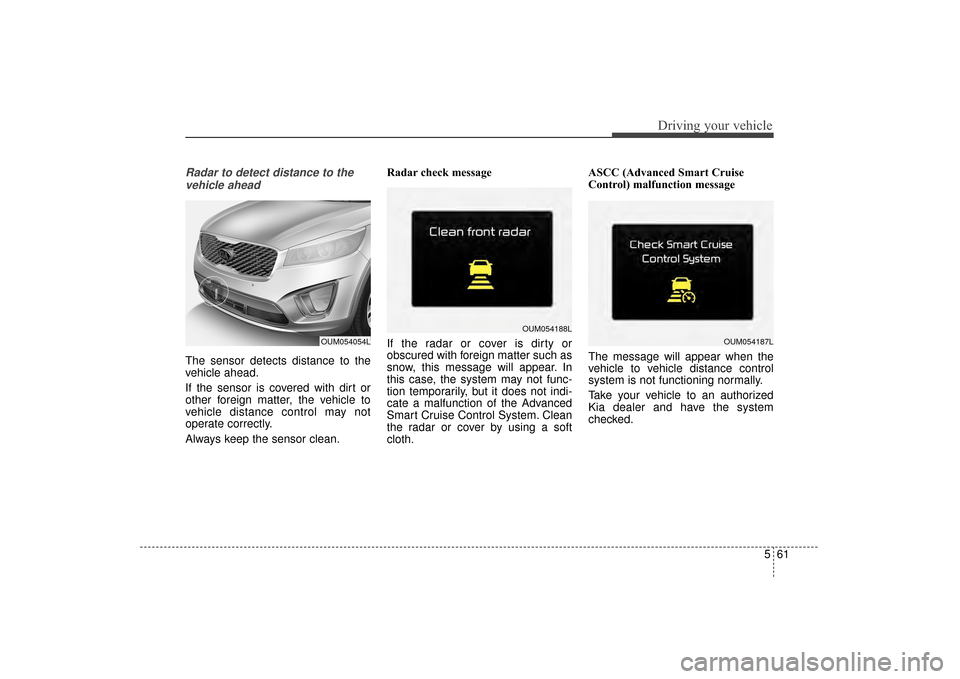
Radar to detect distance to thevehicle ahead
The sensor detects distance to the
vehicle ahead.
If the sensor is covered with dirt or
other foreign matter, the vehicle to
vehicle distance control may not
operate correctly.
Always keep the sensor clean. Radar check message
If the radar or cover is dirty or
obscured with foreign matter such as
snow, this message will appear. In
this case, the system may not func-
tion temporarily, but it does not indi-
cate a malfunction of the Advanced
Smart Cruise Control System. Clean
the radar or cover by using a soft
cloth.ASCC (Advanced Smart Cruise
Control) malfunction message
The message will appear when the
vehicle to vehicle distance control
system is not functioning normally.
Take your vehicle to an authorized
Kia dealer and have the system
checked.
OUM054054L
OUM054188L
OUM054187L
UM CAN (ENG) 5.QXP 12/1/2014 1:05 PM Page 61
Page 379 of 565

Driving your vehicle
68
5
- After an engine start, please stop
for several seconds. If system ini-
tialization is not completed, the
ASCC does not normally operate.
- After an engine start, if any objects are not detected or the sensor
cover is obscured with foreign sub-
stances, there is a possibility that
the ASCC system may not work.
- Below conditions may cause mal- function: over baggage loading in a
trunk, suspension remodeling, tire
replacement with unauthorized
tires or tires with different worn-out
and pressure levels. This device complies with
Industry Canada licence-exempt
RSS standard(s).
Operation is subject to the following
two conditions:
(1) This device may not cause inter-
ference, and
(2) This device must accept any
interference, including interfer-
ence that may cause undesired
operation of the device.
(3) Changes or modifications not
expressly approved by the party
responsible for compliance could
void the user’s authority to oper-
ate the device.
WARNING - Inclines &
Towing
Do not use ASCC on steep
inclines or when towing another
vehicle or trailer since such
extreme loading can interfere
with your vehicle's ability to
maintain the selected speed.
UM CAN (ENG) 5.QXP 12/1/2014 1:05 PM Page 68
Page 383 of 565
Driving your vehicle
72
5
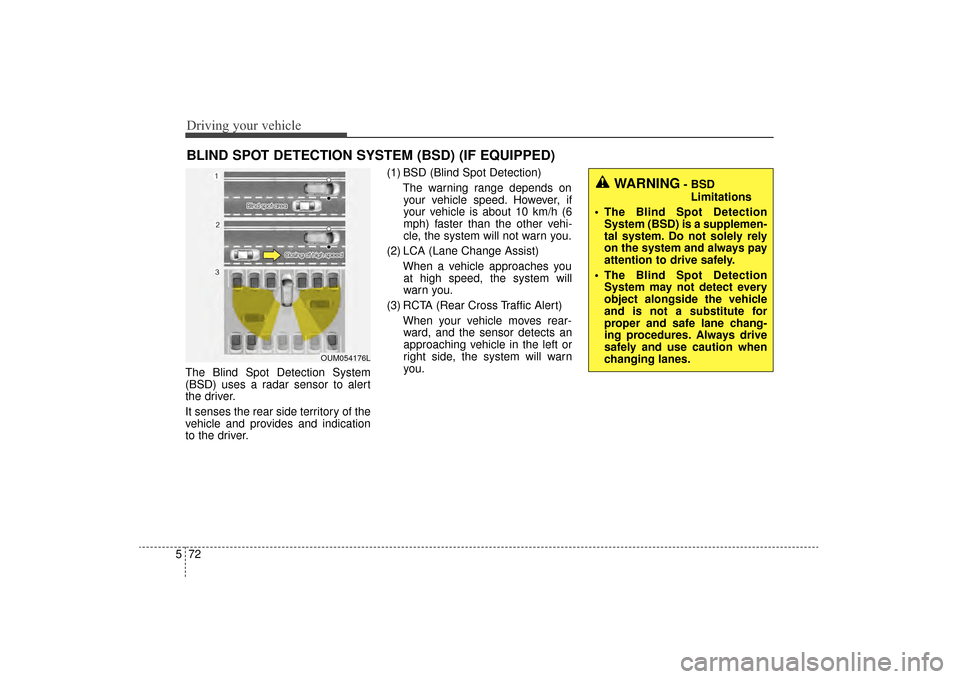
The Blind Spot Detection System
(BSD) uses a radar sensor to alert
the driver.
It senses the rear side territory of the
vehicle and provides and indication
to the driver. (1) BSD (Blind Spot Detection)
The warning range depends onyour vehicle speed. However, if
your vehicle is about 10 km/h (6
mph) faster than the other vehi-
cle, the system will not warn you.
(2) LCA (Lane Change Assist) When a vehicle approaches youat high speed, the system will
warn you.
(3) RCTA (Rear Cross Traffic Alert) When your vehicle moves rear-ward, and the sensor detects an
approaching vehicle in the left or
right side, the system will warn
you.
BLIND SPOT DETECTION SYSTEM (BSD) (IF EQUIPPED)
WARNING- BSD
Limitations
The Blind Spot Detection System (BSD) is a supplemen-
tal system. Do not solely rely
on the system and always pay
attention to drive safely.
The Blind Spot Detection System may not detect every
object alongside the vehicle
and is not a substitute for
proper and safe lane chang-
ing procedures. Always drive
safely and use caution when
changing lanes.
OUM054176L
UM CAN (ENG) 5.QXP 12/1/2014 1:06 PM Page 72
Page 387 of 565
Driving your vehicle
76
5
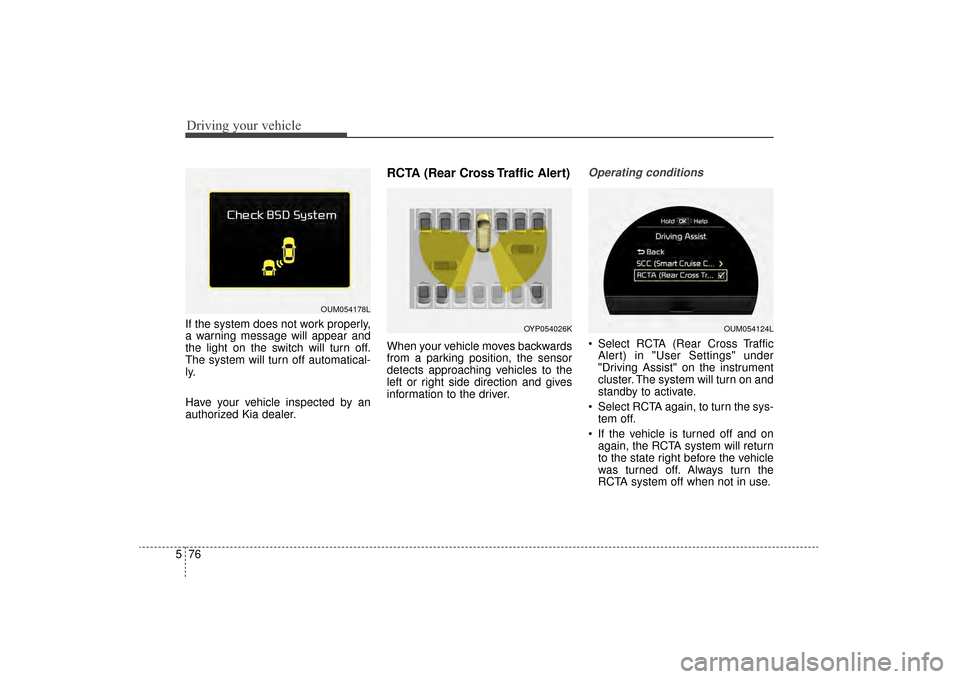
If the system does not work properly,
a warning message will appear and
the light on the switch will turn off.
The system will turn off automatical-
ly.
Have your vehicle inspected by an
authorized Kia dealer.
RCTA (Rear Cross Traffic Alert)
When your vehicle moves backwards
from a parking position, the sensor
detects approaching vehicles to the
left or right side direction and gives
information to the driver.
Operating conditions
Select RCTA (Rear Cross Traffic
Alert) in "User Settings" under
"Driving Assist" on the instrument
cluster. The system will turn on and
standby to activate.
Select RCTA again, to turn the sys- tem off.
If the vehicle is turned off and on again, the RCTA system will return
to the state right before the vehicle
was turned off. Always turn the
RCTA system off when not in use.
OUM054178L
OYP054026KOUM054124L
UM CAN (ENG) 5.QXP 12/1/2014 1:06 PM Page 76
Page 389 of 565

Driving your vehicle
78
5
✽
✽
NOTICE
• The system may not work proper-
ly if the bumper has been replaced
or if a repair work has been done
near the sensor.
• The detection area differs accord- ing to the roads width. If the road
is narrow the system may detect
other vehicles in the next lane.
• On the contrary, if the road is very wide the system may not detect
other vehicles.
• The system may turn off due to strong electromagnetic waves.
Non-operating condition
Driver's Attention
The driver must be cautious in the
below situations for the system may
not assist the driver and may not
work properly.
- Curved roads, tollgates, etc.
- The surrounding of the sensor is
polluted with rain, snow, mud, etc
- The rear bumper near the sensor is covered or hidden with a foreign
matter such as a sticker, bumper
guard, bicycle stand etc.
- The rear bumper is damaged or the sensor is out of place.
- The height of the vehicle has signif- icantly changed such as when the
trunk is loaded with heavy objects,
abnormal tire pressure etc.
- Due to bad weather such as heavy rain or snow. - A fixed object is near such as a
guardrail, etc.
- A substantial amount of metallic objects such as a construction
area.
- A large vehicle is nearby such as a bus or truck.
- A motorcycle or bicycle is near.
- A flat trailer is near.
- If the vehicle starts at the same time as the vehicle next to it and
has accelerated.
- When the other vehicle passes by at a high rate of speed.
- When changing lanes.
- When going down or up a steep road where the height of the lane is
different.
- When the other vehicle drives at the rear very nearby or drives very
close.
- When a trailer or carrier is installed.
UM CAN (ENG) 5.QXP 12/1/2014 1:06 PM Page 78
Page 390 of 565

579
Driving your vehicle
- When the temperature of rearbumper is high.
- When parking structure covers the sensor.
- When reversing from a parking space with pillars or metal struc-
tures.
- When you are reversing and if the detected vehicle is simultaneously
reversing.
- If there are small objects like shop- ping carts and baby carriages.
- If there is a vehicle with decreased ride height (lowered).
- When the vehicle is close to anoth- er vehicle.Outside rearview mirror may not
alert the driver when:
- The outside rearview mirror hous- ing is severely polluted.
- The window is severely polluted.
- The windows are severely tinted.
- When driving through a narrow road with many trees or bushes. This device complies with
Industry Canada licence-exempt
RSS standard(s).
Operation is subject to the following
two conditions:
(1) This device may not cause inter-
ference, and
(2) This device must accept any
interference, including interfer-
ence that may cause undesired
operation of the device.
UM CAN (ENG) 5.QXP 12/1/2014 1:06 PM Page 79