2016 KIA Sedona ESP
[x] Cancel search: ESPPage 435 of 644
523
Driving your vehicle
The ABS continuously senses the
speed of the wheels. If the wheels
are going to lock, the ABS system
repeatedly modulates the hydraulic
brake pressure to the wheels.
When you apply your brakes under
conditions which may lock the
wheels, you may hear a “tik-tik’’
sound from the brakes, or feel a cor-
responding sensation in the brake
pedal. This is normal and it means
your ABS is active.
In order to obtain the maximum ben-
efit from your ABS in an emergency
situation, do not attempt to modulate
your brake pressure and do not try to
pump your brakes. Press your brake
pedal as hard as possible or as hard
as the situation allows the ABS to
control the force being delivered to
the brakes.✽ ✽NOTICE
A click sound may be heard in the
engine compartment when the vehi-
cle begins to move after the engine is
started. These conditions are normal
and indicate that the anti-lock brake
system is functioning properly.
Even with the anti-lock brake sys-
tem, your vehicle still requires suf-
ficient stopping distance. Always
maintain a safe distance from the
vehicle in front of you.
Always slow down when cornering. The anti-lock brake system cannot
prevent accidents resulting from
excessive speeds.
On loose or uneven road surfaces, operation of the anti-lock brake
system may result in a longer stop-
ping distance than for vehicles
equipped with a conventional
brake system.
Page 437 of 644

525
Driving your vehicle
Electronic stability control
(ESC)
The Electronic Stability control
(ESC) system is designed to stabi-
lize the vehicle during cornering
maneuvers. ESC checks where you
are steering and where the vehicle is
actually going. ESC applies the
brakes on individual wheels and
intervenes with the engine manage-
ment system to stabilize the vehicle.Electronic stability control (ESC) will
not prevent accidents. Excessive
speed in turns, abrupt maneuvers
and hydroplaning on wet surfaces
can still result in serious accidents.
Only a safe and attentive driver can
prevent accidents by avoiding
maneuvers that cause the vehicle to
lose traction. Even with ESC
installed, always follow all the normal
precautions for driving - including
driving at safe speeds for the condi-
tions.
The Electronic Stability Control (ESC)
system is an electronic system
designed to help the driver maintain
vehicle control under adverse condi-
tions. It is not a substitute for safe driv-
ing practices. Factors including speed,
road conditions and driver steering
input can all affect whether ESC will be
effective in preventing a loss of control.
It is still your responsibility to drive and
corner at reasonable speeds and to
leave a sufficient margin of safety.
When you apply your brakes under
conditions which may lock the wheels,
you may hear a “tik-tik’’ sound from the
brakes, or feel a corresponding sensa-
tion in the brake pedal. This is normal
and it means your ESC is active.
✽ ✽
NOTICE
A click sound may be heard in the
engine compartment when the vehi-
cle begins to move after the engine is
started. These conditions are normal
and indicate that the Electronic
Stability Control System is function-
ing properly.
OYP054011K
Page 441 of 644

529
Driving your vehicle
Vehicle stability management
(VSM) (if equipped)
This system provides further
enhancements to vehicle stability
and steering responses when a vehi-
cle is driving on a slippery road or a
vehicle detects changes in coeffi-
cient of friction between right wheels
and left wheels when braking.
VSM operation
When the VSM is in operation, ESC
indicator light ( ) blinks.
When the vehicle stability manage-
ment is operating properly, you can
feel a slight pulsation in the vehicle
and/or abnormal steering responses
(EPS). This is only the effect of brake
and EPS control and indicates noth-
ing unusual.The VSM does not operate when:
Driving on bank road such as gra-
dient or incline
Driving in reverse
ESC OFF indicator light ( ) remains on the instrument cluster
EPS indicator light remains on the instrument cluster
VSM operation off
If you press the ESC OFF button to
turn off the ESC, the VSM will also
cancel and the ESC OFF indicator
light ( ) illuminates.
To turn on the VSM, press the button
again. The ESC OFF indicator light
goes out.
Malfunction indicator
The VSM can be deactivated even if
you don’t cancel the VSM operation
by pressing the ESC OFF button. It
indicates that a malfunction has
been detected somewhere in the
Electric Power Steering system or
VSM system. If the ESC indicator
light ( ) or EPS warning light
remains on, take your vehicle to an
authorized Kia dealer and have the
system checked.
✽ ✽ NOTICE
• The VSM is designed to function
above approximately 22 km/h
(13 mph) on curves.
• The VSM is designed to function above approximately 10 km/h
(6 mph) when a vehicle is braking
on a split-mu road. The split-mu
road is made of surfaces which
have different friction forces.
Page 442 of 644
Driving your vehicle
30
5
The Vehicle Stability Management
system is not a substitute for safe
driving practices but a supplemen-
tary function only. It is the respon-
sibility of the driver to always check
the speed and the distance to the
vehicle ahead. Always hold the
steering wheel firmly while driving.
Your vehicle is designed to activate according to the driver’s intention,
even with installed VSM. Always
follow all the normal precautions
for driving at safe speeds for the
conditions – including driving in
clement weather and on a slippery
road.Hill-start assist control (HAC)
A vehicle has the tendency to roll
back on a steep hill when it starts to
go after stopping. The Hill-start
Assist Control (HAC) prevents the
vehicle from rolling back by applying
the brakes automatically for about 2
seconds. The brakes are released
when the accelerator pedal is
depressed or after about 2 seconds.
The HAC is activated only for about 2
seconds, so when the vehicle is
starting off always depress the accel-
erator pedal.WARNING- Maintaining
Brake Pressure on Incline
HAC does not replace the need
to apply brakes while stopped
on an incline. While stopped,
make sure you maintain brake
pressure sufficient to prevent
your vehicle from rolling back-
ward and causing an accident.
Don’t release the brake pedal
until you are ready to accelerate
forward.
Page 449 of 644
537
Driving your vehicle
SMART CRUISE CONTROL SYSTEM (SCC) (IF EQUIPPED)
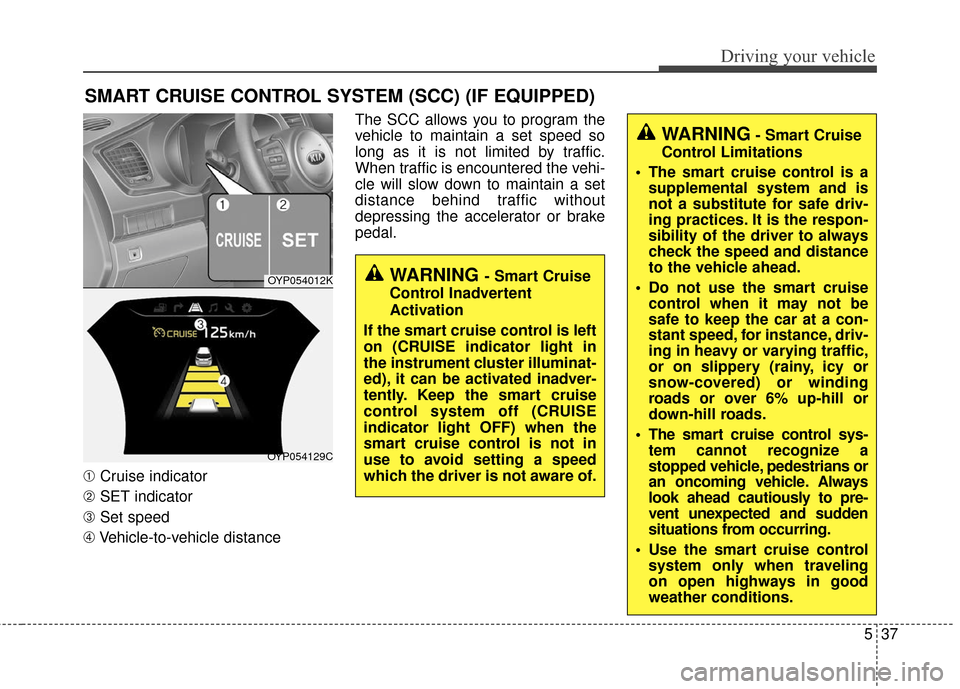
➀Cruise indicator
➁ SET indicator
➂ Set speed
\b Vehicle-to-vehicle distance The SCC allows you to program the
vehicle to maintain a set speed so
long as it is not limited by traffic.
When traffic is encountered the vehi-
cle will slow down to maintain a set
distance behind traffic without
depressing the accelerator or brake
pedal.
OYP054012K
OYP054129C
WARNING - Smart Cruise
Control Inadvertent
Activation
If the smart cruise control is left
on (CRUISE indicator light in
the instrument cluster illuminat-
ed), it can be activated inadver-
tently. Keep the smart cruise
control system off (CRUISE
indicator light OFF) when the
smart cruise control is not in
use to avoid setting a speed
which the driver is not aware of.
WARNING- Smart Cruise
Control Limitations
The smart cruise control is a supplemental system and is
not a substitute for safe driv-
ing practices. It is the respon-
sibility of the driver to always
check the speed and distance
to the vehicle ahead.
Do not use the smart cruise control when it may not be
safe to keep the car at a con-
stant speed, for instance, driv-
ing in heavy or varying traffic,
or on slippery (rainy, icy or
snow-covered) or winding
roads or over 6% up-hill or
down-hill roads.
The smart cruise control sys- tem cannot recognize a
stopped vehicle, pedestrians or
an oncoming vehicle. Always
look ahead cautiously to pre-
vent unexpected and sudden
situations from occurring.
Use the smart cruise control system only when traveling
on open highways in good
weather conditions.
Page 450 of 644
Driving your vehicle
38
5
Speed setting (SCC)
To set cruise control speed:
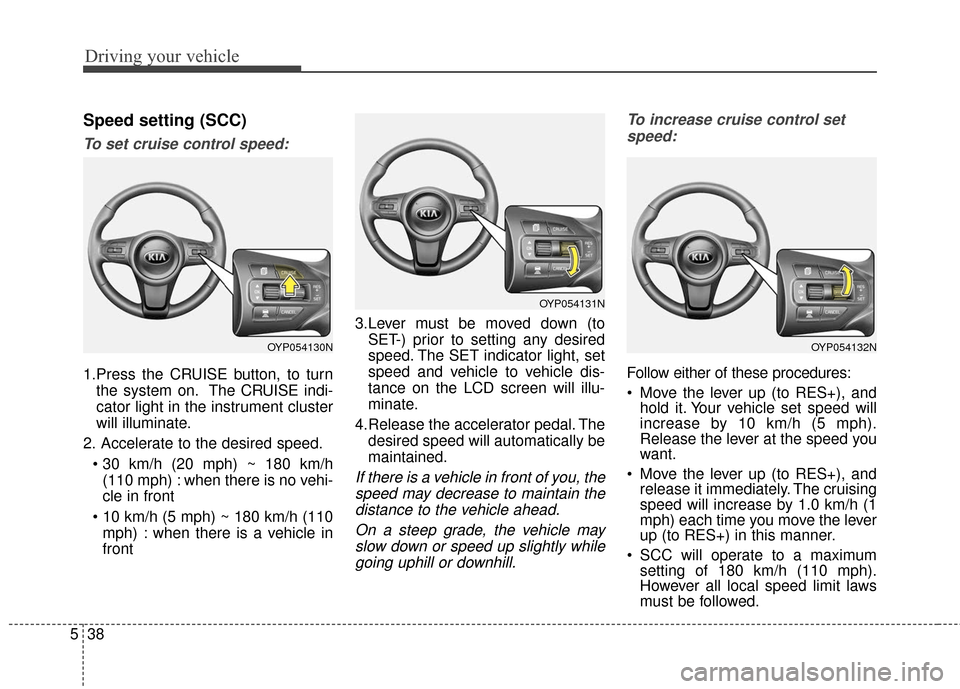
1.Press the CRUISE button, to turn
the system on. The CRUISE indi-
cator light in the instrument cluster
will illuminate.
2. Accelerate to the desired speed. (110 mph) : when there is no vehi-
cle in front
mph) : when there is a vehicle in
front 3.Lever must be moved down (to
SET-) prior to setting any desired
speed. The SET indicator light, set
speed and vehicle to vehicle dis-
tance on the LCD screen will illu-
minate.
4.Release the accelerator pedal. The desired speed will automatically be
maintained.
If there is a vehicle in front of you, thespeed may decrease to maintain thedistance to the vehicle ahead.
On a steep grade, the vehicle mayslow down or speed up slightly whilegoing uphill or downhill. To increase cruise control set
speed:
Follow either of these procedures:
Move the lever up (to RES+), and hold it. Your vehicle set speed will
increase by 10 km/h (5 mph).
Release the lever at the speed you
want.
Move the lever up (to RES+), and release it immediately. The cruising
speed will increase by 1.0 km/h (1
mph) each time you move the lever
up (to RES+) in this manner.
SCC will operate to a maximum setting of 180 km/h (110 mph).
However all local speed limit laws
must be followed.
OYP054130N
OYP054131N
OYP054132N
Page 464 of 644
Driving your vehicle
52
5
- After an engine start, please stop
for several seconds. If system ini-
tialization is not completed, the
SCC does not normally operate.
- After an engine start, if any objects are not detected or the sensor
cover is obscured with foreign sub-
stances, there is a possibility that
the SCC system may not work.
- Below conditions are not allowed: over baggage loading in a trunk,
suspension remodeling, tire
replacement with unauthorized
tires or tires with different worn-out
and pressure levels. This device complies with
Industry Canada licence-exempt
RSS standard(s).
Operation is subject to the following
conditions:
(1) This device may not cause inter-
ference, and
(2) This device must accept any
interference, including interfer-
ence that may cause undesired
operation of the device.
(3) Changes or modifications not
expressly approved by the party
responsible for compliance could
void the user's authority to oper-
ate the device.
CAUTION
The SCC may not operate tem-
porarily due to electrical inter-ference.
Page 476 of 644
Driving your vehicle
64
5
LANE DEPARTURE WARNING SYSTEM (LDWS) (IF EQUIPPED)
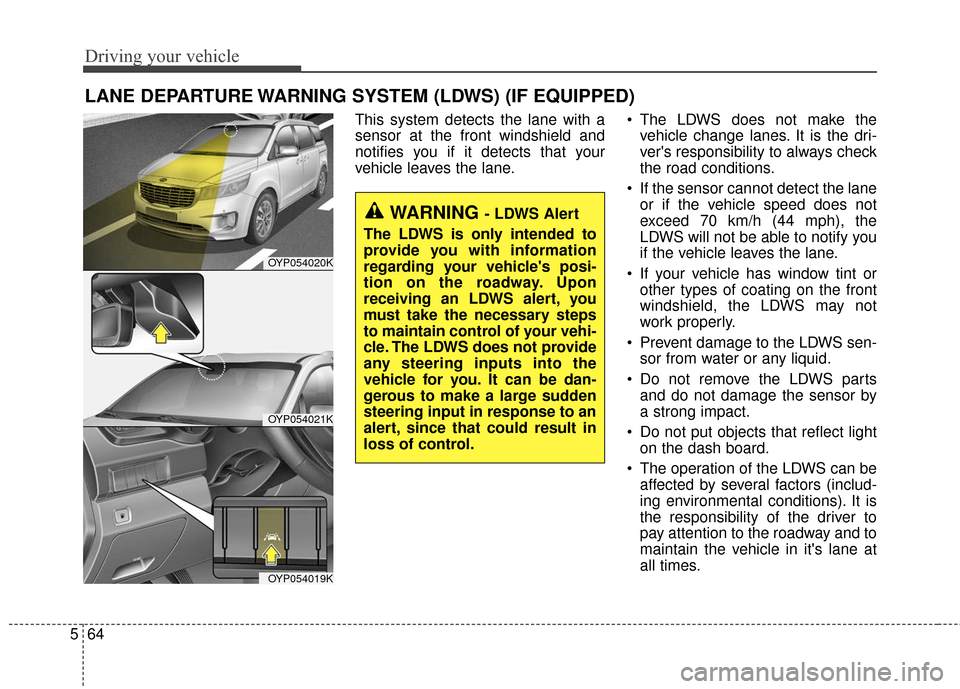
This system detects the lane with a
sensor at the front windshield and
notifies you if it detects that your
vehicle leaves the lane. The LDWS does not make the
vehicle change lanes. It is the dri-
ver's responsibility to always check
the road conditions.
If the sensor cannot detect the lane or if the vehicle speed does not
exceed 70 km/h (44 mph), the
LDWS will not be able to notify you
if the vehicle leaves the lane.
If your vehicle has window tint or other types of coating on the front
windshield, the LDWS may not
work properly.
Prevent damage to the LDWS sen- sor from water or any liquid.
Do not remove the LDWS parts and do not damage the sensor by
a strong impact.
Do not put objects that reflect light on the dash board.
The operation of the LDWS can be affected by several factors (includ-
ing environmental conditions). It is
the responsibility of the driver to
pay attention to the roadway and to
maintain the vehicle in it's lane at
all times.
OYP054020K
OYP054021K
OYP054019K
WARNING - LDWS Alert
The LDWS is only intended to
provide you with information
regarding your vehicle's posi-
tion on the roadway. Upon
receiving an LDWS alert, you
must take the necessary steps
to maintain control of your vehi-
cle. The LDWS does not provide
any steering inputs into the
vehicle for you. It can be dan-
gerous to make a large sudden
steering input in response to an
alert, since that could result in
loss of control.