2016 KIA Sedona remote control
[x] Cancel search: remote controlPage 357 of 644
4255
Features of your vehicle
Skipping Prompt Messages
While prompt message is being stat-
ed Shortly press the key on the
steering remote controller
The prompt message is immediately
ended and the beep tone will sound.
After the “beep”, say the voice com-
mand.
Re-starting Voice Recognition
While system waits for a command
Shortly press the key on the
steering remote controller
The command wait state is immedi-
ately ended and the beep ton will
sound. After the “beep”, say the voice
command.
ENDING VOICE
RECOGNITION
While Voice Recognition is operatingPress and hold the key on the
steering remote controller
ing any steering wheel control or a
different key will end voice com-
mand.
voice command, say “cancel” or
“end” to end voice command.
voice command, press and hold the key on the steering wheel to
end voice command.
Voice Recognition and Phone
Contact Tips:
The Kia Voice Recognition System
may have difficulty understanding
some accents or uncommon
names. When using Voice
Recognition to place a call, speak in
a moderate tone, with clear pronun-
ciation
To maximize the use of Voice
Recognition, consider these guide-
lines when storing contacts:
Use full names vs. short or single syllab
le names (“John Smith” vs.
“Dad”, “Smith Residence” vs.
“Home”)
Avoid using special characters or hyphens (@, &, #, /, -, *, +, etc.)
Emergency” vs. “ICE”)
Spell words completely, no abbre- viations (“Doctor Goodman” vs.
“Dr. Goodman”)
Page 387 of 644
4285
Features of your vehicle
Bluetooth®Wireless Technology
AUDIO (for Type A-1)
What is Bluetooth®Wireless
Technology
?
Bluetooth®Wireless Technology
allows devices to be connected in a
short distance, including hands-free
devices, stereo headsets, wireless
remote controllers, etc. For more
information, visit
the Bluetooth®
Wireless Technologywebsite at
www.Bluetooth.com
Before using Bluetooth®Wireless
Technology audio features
Bluetooth®Wireless Technology
audio may not be supported
depending on the compatibility of
your
Bluetooth®Wireless Technology
mobile phone.
Bluetooth®Wireless
Technology audio, you must first
pair and connect the
Bluetooth®
Wireless Technology mobile phone. The
Bluetooth®word mark and
logos are registered trademarks
owned by Bluetooth SIG, Inc. and
any use of such marks by Kia is
under license. Other trademarks
and trade names are those of their
respective owners. A Bluetooth
®
enabled cell phone is required to
use
Bluetooth®Wireless Technology.
Bluetooth®Wireless Technology
audio can be used only when the
[Audio Streaming] of Phone is
turned .
❈ Setting Bluetooth®Wireless TechnologyAudio Streaming : Press the
key Select [Phone] Select [Audio
Streaming] through the TUNE
knob Set
/OffOn
SETUP
On
WARNING - Distracted
driving
Driving while distracted can
result in a loss of vehicle control
that may lead to an accident,
severe personal injury, and
death. The driver's primary
responsibility is in the safe and
legal operation of a vehicle, and
use of any handheld devices,
other equipment, or vehicle sys-
tems which take the driver's
eyes, attention and focus away
from the safe operation of a vehi-
cle or which are not permissible
by law should never be used dur-
ing operation of the vehicle.
Page 389 of 644
4287
Features of your vehicle
PHONE (for Type A-1)
Before using the Bluetooth® Wireless
Technology phone features
Bluetooth®Wireless
Technology phone, you must first
pair and connect the
Bluetooth®
Wireless Technology mobile phone.
connected, it is not possible to
enter Phone mode. Once a phone
is paired or connected, the guid-
ance screen will be displayed.
tion (IGN/ACC ON), the
Bluetooth®
Wireless Technology phone will be
automatically connected. Even if
you are outside, the
Bluetooth®
Wireless Technology phone will be
automatically connected once you
are in the vicinity of the vehicle. If
you do not want automatic
Bluetooth®Wireless Technology
phone connection, set the
Bluetooth®Wireless Technology
power to OFF
Making a call using the
Steering-wheel mount controls
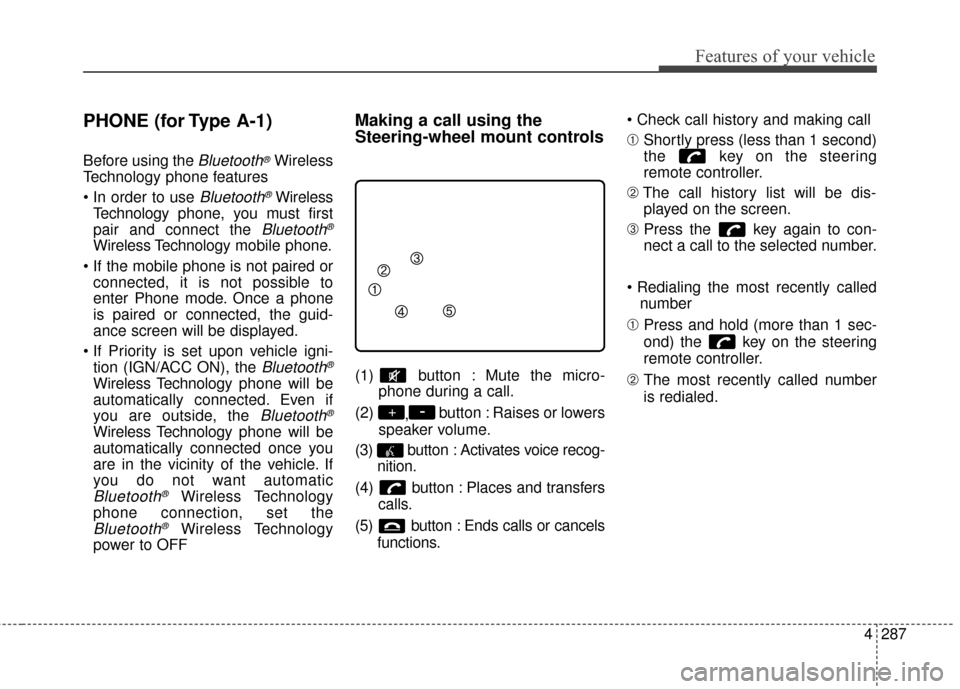
(1) button : Mute the micro- phone during a call.
(2) ,button : Raises or lowers
speaker volume.
(3) button : Activates voice recog- nition.
(4) button : Places and transfers calls.
(5) button : Ends calls or cancels functions.
➀
Shortly press (less than 1 second)
the key on the steering
remote controller.
➁ The call history list will be dis-
played on the screen.
\b Press the key again to con-
nect a call to the selected number.
number
➀ Press and hold (more than 1 sec-
ond) the key on the steering
remote controller.
➁ The most recently called number
is redialed.
-+
Page 391 of 644
4289
Features of your vehicle
Pairing Key / Key on
the Steering Remote Controller
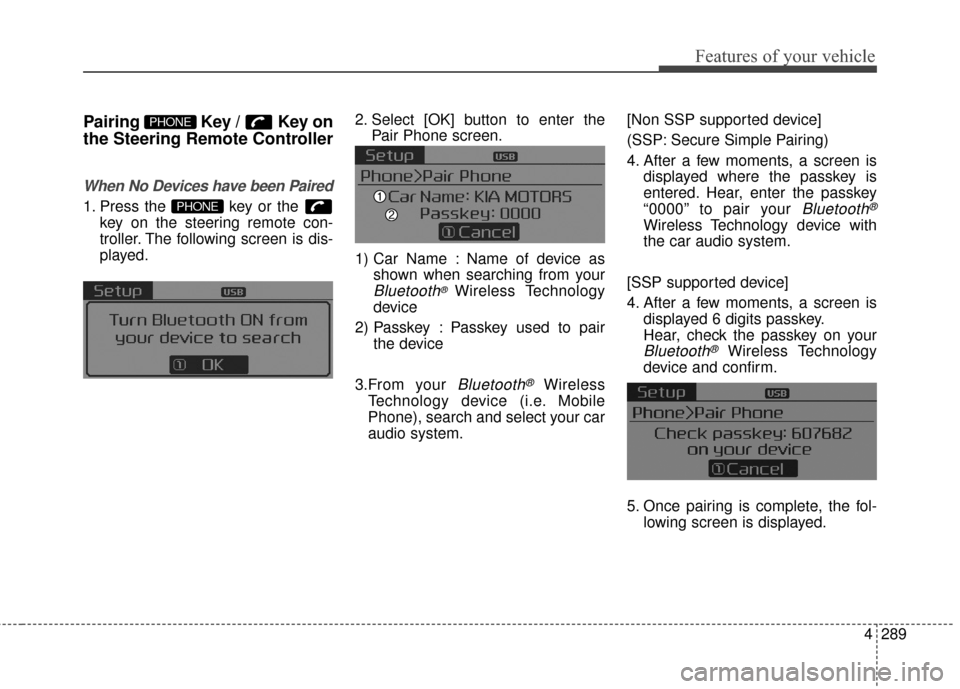
When No Devices have been Paired
1. Press the key or the key on the steering remote con-
troller. The following screen is dis-
played. 2. Select [OK] button to enter the
Pair Phone screen.
1) Car Name : Name of device as shown when searching from your
Bluetooth®Wireless Technology
device
2) Passkey : Passkey used to pair the device
3.From your
Bluetooth®Wireless
Technology device (i.e. Mobile
Phone), search and select your car
audio system. [Non SSP supported device]
(SSP: Secure Simple Pairing)
4. After a few moments, a screen is
displayed where the passkey is
entered. Hear, enter the passkey
“0000” to pair your
Bluetooth®
Wireless Technology device with
the car audio system.
[SSP supported device]
4. After a few moments, a screen is displayed 6 digits passkey.
Hear, check the passkey on your
Bluetooth®Wireless Technology
device and confirm.
5. Once pairing is complete, the fol- lowing screen is displayed.
PHONE
PHONE
Page 404 of 644
Features of your vehicle
302
4
Skipping Prompt Messages
While prompt message is being stat-
ed Shortly press the key on the
steering remote controller
The prompt message is immediately
ended and the beep tone will sound.
After the “beep”, say the voice com-
mand.
Re-starting Voice Recognition
While system waits for a command
Shortly press the key on the
steering remote controller
The command wait state is immedi-
ately ended and the beep ton will
sound. After the “beep”, say the voice
command.
ENDING VOICE
RECOGNITION
While Voice Recognition is operating
Press and hold the key on the
steering remote controller
ing any steering wheel control or a
different key will end voice com-
mand.
voice command, say “cancel” or
“end” to end voice command.
voice command, press and hold the key on the steering wheel to
end voice command.
Voice Recognition and Phone
Contact Tips:
The Kia Voice Recognition System
may have difficulty understanding
some accents or uncommon
names. When using Voice
Recognition to place a call, speak in
a moderate tone, with clear pronun-
ciation
To maximize the use of Voice
Recognition, consider these guide-
lines when storing contacts:
Use full names vs. short or single syllab
le names (“John Smith” vs.
“Dad”, “Smith Residence” vs.
“Home”)
Avoid using special characters or hyphens (@, &, #, /, -, *, +, etc.)
Emergency” vs. “ICE”)
Spell words completely, no abbre- viations (“Doctor Goodman” vs.
“Dr. Goodman”)
Page 636 of 644

Index
2I
Active ECO system. . . . . . . . . . . . . . . . . . . . . . . . . . . . 5-53Active ECO operation . . . . . . . . . . . . . . . . . . . . . . . 5-53
Limitation of Active ECO operation . . . . . . . . . . . . 5-53
When Active ECO is activated . . . . . . . . . . . . . . . . . 5-53
Air bag - advanced supplemental restraint system . . . . . 3-5 Air bag warning label. . . . . . . . . . . . . . . . . . . . . . . . 3-86
Air bag warning light . . . . . . . . . . . . . . . . . . . . . . . . 3-62
Curtain air bag . . . . . . . . . . . . . . . . . . . . . . . . . . . . . 3-78
Do not install a child restraint on the front passenger’s seat . . . . . . . . . . . . . . . . . . . . . . . 3-62
Driver's and passenger's front air bag . . . . . . . . . . . 3-73
How does the air bag system operate. . . . . . . . . . . . 3-60
Occupant Detection System (ODS) . . . . . . . . . . . . . 3-66
Side air bag. . . . . . . . . . . . . . . . . . . . . . . . . . . . . . . . 3-76
SRS Care . . . . . . . . . . . . . . . . . . . . . . . . . . . . . . . . . 3-85
SRS components and functions . . . . . . . . . . . . . . . . 3-63
Air cleaner . . . . . . . . . . . . . . . . . . . . . . . . . . . . . . . . . . 7-38\
Filter replacement. . . . . . . . . . . . . . . . . . . . . . . . . . . 7-38
Air conditioning system . . . . . . . . . . . . . . . . . . . . . . . . . 8-5
Appearance care . . . . . . . . . . . . . . . . . . . . . . . . . . . . . . 7-85 Exterior care . . . . . . . . . . . . . . . . . . . . . . . . . . . . . . . 7-85
Interior care . . . . . . . . . . . . . . . . . . . . . . . . . . . . . . . 7-91 Audio system . . . . . . . . . . . . . . . . . . . . . . . . . . . . . . . 4-201
Antenna . . . . . . . . . . . . . . . . . . . . . . . . . . . . . . . . . 4-201
Aux, USB port . . . . . . . . . . . . . . . . . . . . . . . . . . . . 4-203
CD player . . . . . . . . . . . . . . . . . . . . . . . . . . . . 4-215, 264
How vehicle audio works . . . . . . . . . . . . . . . . . . . . 4-204
Steering wheel remote controller . . . . . . . . . . . . . . 4-201
Automatic climate control system . . . . . . . . . . . . . . . 4-162 Automatic heating and air conditioning. . . . . . . . . 4-163
Checking the amount of air conditioner refrigerant and compressor lubricant . . . . . . . . . . . . . . . . . . . . . . 4-179
Climate control air filter. . . . . . . . . . . . . . . . . . . . . 4-178
From the front seat . . . . . . . . . . . . . . . . . . . . . . . . . 4-173
From the rear seat. . . . . . . . . . . . . . . . . . . . . . . . . . 4-173
Manual heating and air conditioning . . . . . . . . . . . 4-164
Outside thermometer . . . . . . . . . . . . . . . . . . . . . . . 4-168
Rear climate control . . . . . . . . . . . . . . . . . . . . . . . . 4-173
System operation . . . . . . . . . . . . . . . . . . . . . . . . . . 4-176
Automatic transaxle . . . . . . . . . . . . . . . . . . . . . . . . . . . 5-13 Automatic transaxle operation . . . . . . . . . . . . . . . . . 5-13
Good driving practices . . . . . . . . . . . . . . . . . . . . . . . 5-18
A