Page 79 of 513
Safety features of your vehicle
62
3
WARNING
In order for side and curtain air bags to provide the best
protection, front seat occu-
pants and outboard rear occu-pants should sit in an uprightposition with the seat belts
properly fastened. Importantly,
children should sit in a proper
child restraint system in therear seat.
When children are seated in the rear outboard seats, they
must be seated in the proper
child restraint system. Make
sure to position the child
restraint system as far away
from the door side as possi-
ble, and secure the child
restraint system in a lockedposition.
(Continued)(Continued)
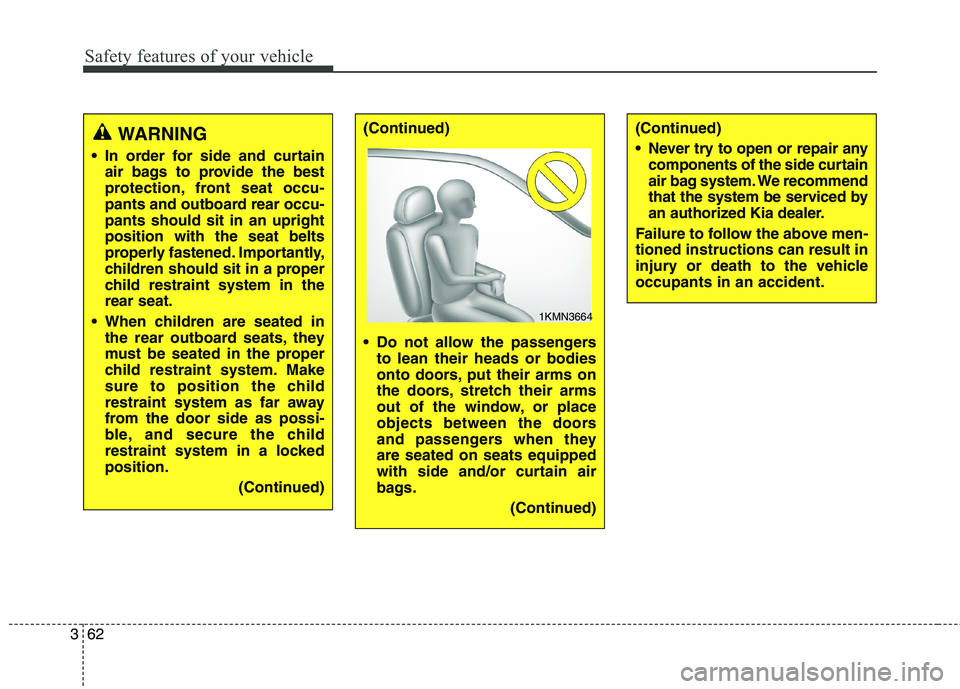
Do not allow the passengersto lean their heads or bodies
onto doors, put their arms on
the doors, stretch their arms
out of the window, or place
objects between the doors
and passengers when theyare seated on seats equipped
with side and/or curtain air
bags.
(Continued)(Continued)
Never try to open or repair anycomponents of the side curtain
air bag system. We recommend
that the system be serviced by
an authorized Kia dealer.
Failure to follow the above men-tioned instructions can result in
injury or death to the vehicleoccupants in an accident.
1KMN3664
Page 89 of 513
LCD display . . . . . . . . . . . . . . . . . . . . . . . . . . . . . . 4-61
. . . . . . . . . . . . . . . . . . . . . . . . . . 4-62
. . . . . . . . . . . . . . . . . . . . . 4-63
. . . . . . . . . . . . . . . . . . . . . . . . . . . . . . . . . 4-63
. . . . . . . . . . . . . . . . . . . . . . . . . . . . . . . . . . . 4-63
. . . . . . . . . . . . . . . . . . . . . . . . . . . . 4-64
. . . . . . . . . . . . . . . . . . . . . . . . . . . . 4-74
Trip computer . . . . . . . . . . . . . . . . . . . . . . . . . . . . . 4-85
. . . . . . . . . . . . . . . . . . . . . . . . . . . . . . . . 4-85
. . . . . . . . . . . . . . . . . . . . . . . . . . . . . . . . . . . . 4-87
Warning and indicator lights . . . . . . . . . . . . . . . . 4-89 . . . . . . . . . . . . . . . . . . . . . . . . . . . . . . . 4-89
Head up display (HUD) . . . . . . . . . . . . . . . . . . . . 4-103 . . . . . . . . . . . . . . . . . . . . . . . . . . . . . . . . . 4-103
. . . . . . . . . . . . . . . . . . . . . . . 4-104
. . . . . . . . . . . . . . . . . . 4-104
Parking assist system . . . . . . . . . . . . . . . . . . . . . . 4-106 . . . . . . . . . . 4-106
. 4-108
. . . . . . . . . . . . . . . . . . . . . . . . . . . . . . . 4-110 Rearview camera . . . . . . . . . . . . . . . . . . . . . . . . . 4-111
Parking guide system . . . . . . . . . . . . . . . . . . . . . . 4-112
. . . . . . . . . . . . . 4-112
. . . . . . . . . . . . . . . . . . . . . . . . . . . . . 4-113
Front blind spot monitoring system . . . . . . . . . . 4-115
Surroud view monitoring system . . . . . . . . . . . . 4-117
Lighting . . . . . . . . . . . . . . . . . . . . . . . . . . . . . . . . 4-117 . . . . . . . . . . . . . . . . . . . . . . 4-117
. . . . . . . . . . . . . . . . . . . . . 4-117
. . . . . . . . . . . . . . . . . . . . . . . . 4-117
. . . . . . . . . . . . . . . . . . . 4-118
. . . . . . . . . . . . . . . . . . . . . . . . . . . . . 4-118
. . . . . . . . . . . . . . . . . . . . . . . . 4-121
. . . . . . . . . . . 4-122
. . . . . . . . . . . . . . . . . . . . . . . . . . . . . 4-123
. . . . . . . . . . . . . . . . . . . . . . . . . . . . . . . 4-123
. . . . . . . . . . . . . . . . . . . . . 4-124
. . . . . . . . . . . . . . . . . . . . . . . . . . . . 4-124
Wipers and washers . . . . . . . . . . . . . . . . . . . . . . . 4-125
Interior light . . . . . . . . . . . . . . . . . . . . . . . . . . . . . 4-128 . . . . . . . . . . . . . . . . . . . . . . . . . . . 4-128
. . . . . . . . . . . . . . . . . . . . . . . . . . . . 4-129
. . . . . . . . . . . . . . . . . . . . . . . . . . . 4-130
. . . . . . . . . . . . . . . . . . . . . . . . . . 4-130
. . . . . . . . . . . . . . . . . . . . . . . . . . . . . 4-131
. . . . . . . . . . . . . . . . . . . . . . . . . . 4-131
4
Page 91 of 513
Features of your vehicle
4
4
Record your key number
The key code number is stamped on the
key code tag
attached to the key
set. Should you lose
your keys, we recommend that you
contact an authorized Kia dealer.
Remove the key code tag and store it
in a safe place. Also, record the key
code number and keep it in a safe
place (not in the vehicle). Smart key function
1. Door lock
2. Door unlock
3. Trunk unlock and/or openWith the smart key, you can lock or
unlock a door and trunk and even
start the engine.
• To remove the mechanical key, press
and hold the release button (4) and
remove the mechanical key (5).
To reinstall the mechanical key, put the key into the hole and push it
until a click sound is heard.
SMART KEY
OKH045004L
OKH042008L
Page 97 of 513

Features of your vehicle
10
4
✽✽
NOTICE
When starting the engine, do not use
the key with other immobilizer keys
around. Otherwise the engine may
not start or may stop soon after it
starts. Keep each key separate in
order to avoid a starting malfun-
tioin. ✽✽
NOTICE
If you need additional keys or lose
your keys, we recommend that you
consult an authorized Kia dealer.
CAUTION
The transponder in your smart key is an important part of the immobilizer system. It isdesigned to give years of trou-ble-free service, however you should avoid exposure to mois-ture, static electricity and roughhandling. Immobilizer systemmalfunction could occur.
CAUTION
Do not change, alter or adjust the immobilizer system because itcould cause the immobilizer sys-tem to malfunction. We recom- mend that the system be serv-iced by an authorized Kia dealer.
Malfunctions caused by improp-er alterations, adjustments ormodifications to the immobilizer system are not covered by yourvehicle manufacturer warranty.
CAUTION
Do not put metal accessoriesnear the smart key.
The engine may not start for themetal accessories may interruptthe transponder signal from normally transmitting.
Page 112 of 513

425
Features of your vehicle
Automatic reversal
If, during power opening or closing, the
trunk is blocked by an object or part of
the body, the power trunk will detect
the resistance, and it will stop move-
ment or move to the full open position
to allow the object to be cleared.
However, if the resistance is weak such as from an object that is thin or
soft, or the trunk is near the latchedposition, the automatic stop and
reversal may not detect the resist-
ance and the closing operation will
continue. Also, if the power trunk is
forced by a strong impact, the auto-
matic stop and reversal may operate.If the automatic stop and reversal
feature operates continuously more
than twice during opening or closing
operation, the power trunk may stop
at that position. At this time, close the
trunk manually and operate the trunkautomatically again.
How to reset the power trunk
If the battery has been discharged or disconnected, or if the related fusehas been replaced or disconnected,
for the power trunk to operate nor-
mally, reset the power trunk as follow:
1. Put the shift lever in P (Park).
2. Close the trunk manually.
If the power trunk doesn't work prop-
erly after above procedure, we rec-
ommend that the system be checked
by an authorized Kia dealer.
OKH045021K
WARNING
Never intentionally place any object or part of your body in
the path of the power trunk tomake sure the automatic stopoperates.
Make sure all faces, arms, hands, body parts and any
other obstructions are safely
out of the way before operat-
ing the power trunk.
Never place any object or part of your body in the path of the
power trunk. This could result
in serious injury or cause
damage to the vehicle.
Make sure there are no people or objects around the trunk
before operating the powertrunk.
Page 148 of 513
461
Features of your vehicle
LCD ModesLCD DISPLAY
Modes SymbolExplanation
Trip Computer This mode displays driving information like the tripmeter, fuel economy,
and so on. For more details, refer to “Trip Computer” in this chapter.
Tu r n B y Tu r n
(if equipped)This mode displays the state of the navigation.
ASCC
(if equipped)This mode displays the state of the Advanced Smart Cruise Control system (ASCC).
For more details, refer to "Advanced Smart Cruise Control system (ASCC)" in chapter 5.
A/VThis mode displays the state of the A/V system.
Information
This mode informs of the tire pressure information, service interval (mileage or days) and
warning messages related to the advanced smart cruise control system, pre-safe seat belt,and so on.
User SettingsOn this mode, you can change settings of the doors, lamps and so on.
❈ For controlling the LCD modes, refer to "LCD Display Control" in this chapter.
or
Page 149 of 513
Features of your vehicle
62
4
Cannot edit settings while driving
This warning message illuminates if
you try to select the other User
Settings item except Head-up dis-
play item when driving.
For safety, change the User Settings
after parking the vehicle and moving
the shift lever to P (Park) position.
Quick guide (Help)
If you press and hold the OK button
in the User Settings Mode, explana-tion about the selected item is dis-
played in the cluster. Trip Computer Mode
This mode displays driving informa-
tion like the tripmeter, fuel economy,and so on. ❈
For more details, refer to “Trip
Computer” in this chapter.
OKH045408L
■Type A■Type B
OKH045560L
■Type A■Type B
OKH045527L
■ Type A■Type B
Page 152 of 513
465
Features of your vehicle
Service required
If you do not have your vehicle serv- iced according to the already inputted
service interval, "Service required"
message is displayed for several sec-
onds each time you set the Engine
Start/Stop Button to the ON position.
To reset the service interval to the
mileage and days you inputted before:
- Press the OK button for more than1 second. Service interval OFF
If the service interval is not set,
"Service interval OFF" message is
displayed on the LCD display.
✽✽
NOTICE
If any of the following conditions
occurs, the mileage and days may be
incorrect.
- The battery cable is disconnected.
- The fuse switch is turned off.
- The battery is discharged.
OKH043413LOKH043405L
■ Type A■Type B■Type A■Type B


