Page 445 of 643

Driving your vehicle
72
5
Warning message
The message will appear when camera’s
field of view is covered by some objects.
The system stops until the field of view is
normal.
Check the windshield around the camera
view area.
If the system does not work normally
even though camera’s field of view is
cleared, we recommend that the system
be checked by an authorized Kia dealer. When SLIF is not working properly, the
warning message will come on for a few
second. After the message disappears,
the master warning light will illuminate.
We recommend that the system be
checked by an authorized Kia dealer.The system may not fully operate and
provide correct information in the follow-
ing situations.
Traffic signs are positioned on sharp
curve.
Poorly positioned traffic sign. (eg. Rotated, shaded by any object, dam- aged…)
Concealed traffic signs by other vehicle.
Broken LED traffic signs.
Poor weather like snow, rain, fog
There is glare around traffic signs by low sun in the sky.
There is insufficient illumination of the traffic signs in the night.
There is bright lights around traffic signs.
There is dirt, ice or frost on the wind- shield in the area of the camera.
When camera field of view is covered by objects such as a sticker, paper, leaf fall.
When driving very close to the vehicle in front of you.
When navigation system has malfunc- tion.
When bus or trucks attached with a speed sticker are passing you.
When you are in area or countries where navigation system is not covered.
When a navigation system not updated latest map version.
OJD055155L
OUM054154L
OJD055174L
JD PE eng 5.QXP 9/30/2015 5:27 PM Page 72
Page 447 of 643

Driving your vehicle
74
5
The BSD (Blind spot detection) system
uses a radar sensor to alert the driver
while driving.
It senses the rear side territory of the
vehicle and provides information to the
driver. ➀
BSD(Blind spot detection)
Warning range is dependent on your
vehicle speed. However, if the speed of
your vehicle is faster by 10km/h or more
than other nearby vehicles, the warning is
not operated. ➁ LCA(Lane change assist)
When vehicles are approaching to your
vehicle at high speed, the warning is
operated. ➂ RCTA(Rear cross traffic alert)
When your vehicle moves backward, the
sensor detects approaching vehicles to
the left or right side direction and warning
is operated. BSD (Blind Spot Detection) /
LCA (Lane Change Assist)
Operating conditions
The indicator on the switch will illuminate when the BSD (Blind spot detection) sys-
tem switch is pressed with the ignition
switch ON. If the vehicle speed exceeds 30
km/h (18.6 mph), the system will activate.
If you press the switch again, the switch
indicator and system will be turned off.
If the ignition switch is turned OFF and
ON the system returns to the previous
state.
BLIND SPOT DETECTION SYSTEM (BSD) (IF EQUIPPED)OUM054176L
WARNING
Always check the road condition while driving for unexpected situa-
tions even though the BSD (Blindspot detection) system is operating.
BSD (Blind spot detection) system is a system made for convenience.
Do not solely rely on the system but
always pay attention to drive safely.
OJD055061
JD PE eng 5.QXP 9/30/2015 5:27 PM Page 74
Page 448 of 643
575
Driving your vehicle
When the system is not used turn the
system off by pressing the switch.
When the system is turned on the warn-
ing light will illuminate for 3 seconds on
the outside rearview mirror.Warning type
The system will activate when:
1. The system is on
2. Vehicle speed is above 30 km/h (18.6mph)
3. Other vehicles are detected in the rear side
If a vehicle is detected within the bound-
ary of the system, a warning light will illu-
minate on the outside rearview mirror.
If the detected vehicle is not in detection
range, the warning will be turned off.
OJD055059
1st stage
JD PE eng 5.QXP 9/30/2015 5:27 PM Page 75
Page 449 of 643
Driving your vehicle
76
5
The second stage alarm will activate when:
1. The first stage alert is on
2. The turn signal is on to change a lane
When the second stage alert is activated,
a warning light will be blinking on the out-
side rearview mirror and an alarm willsound.
If you move the turn signal switch to ori-
gin position, the second stage alert will
be deactivated. - The second stage alarm can be deac-
tivated.
To activate the alarm: Go to the User Settings Mode
Sound and select "BSD" on the LCD
display.
To deactivate the alarm: Go to the User Settings Mode
Sound and deselect "BSD" on the LCD
display.Detecting sensor
The sensors are located inside of the
rear bumper.
Always keep the rear bumper clean for
the system to work properly.
OJD055060
2st stage
CAUTION
The alarm function helps alert the
driver. Deactivate this function only
when it is necessary
OJD055058
JD PE eng 5.QXP 9/30/2015 5:27 PM Page 76
Page 450 of 643
577
Driving your vehicle
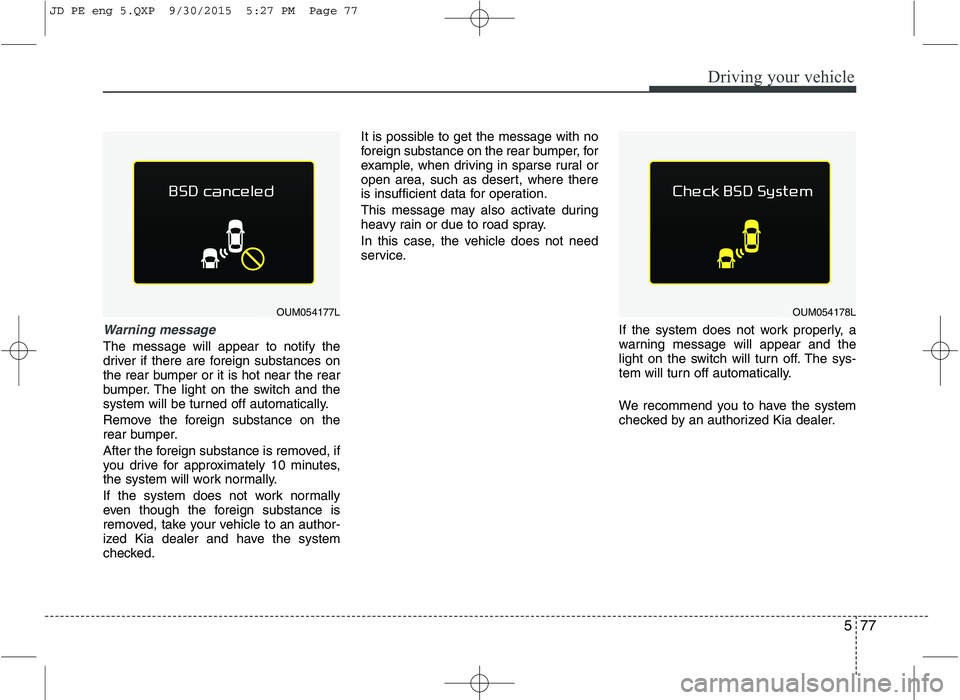
Warning message
The message will appear to notify the
driver if there are foreign substances on
the rear bumper or it is hot near the rear
bumper. The light on the switch and the
system will be turned off automatically.
Remove the foreign substance on the
rear bumper.
After the foreign substance is removed, if
you drive for approximately 10 minutes,
the system will work normally.
If the system does not work normally
even though the foreign substance is
removed, take your vehicle to an author-
ized Kia dealer and have the system
checked.It is possible to get the message with no
foreign substance on the rear bumper, for
example, when driving in sparse rural or
open area, such as desert, where there
is insufficient data for operation.
This message may also activate during
heavy rain or due to road spray.
In this case, the vehicle does not need
service.
If the system does not work properly, a
warning message will appear and the
light on the switch will turn off. The sys-
tem will turn off automatically.
We recommend you to have the system
checked by an authorized Kia dealer.
OUM054177LOUM054178L
JD PE eng 5.QXP 9/30/2015 5:27 PM Page 77
Page 451 of 643

Driving your vehicle
78
5
RCTA (Rear cross traffic alert)
When your vehicle moves backwards
from a parking position, the sensor
detects approaching vehicles to the left
or right side direction and gives informa-
tion to the driver.Operating conditions
Select RCTA (Rear Cross Traffic Alert)
in "User Settings" under "Driving Assist"
on the instrument cluster. The system
will turn on and stand by to be activated.
Select RCTA again, to turn the system off.
If the vehicle is turned off and on again, the RCTA system will return to
the state right before the vehicle was
turned off. Turn the RCTA system off
when not in use.
The system is operated when the vehi- cle speed is below 10km/h with the
shift lever in R (Reverse). The RCTA (Rear Cross Traffic Alert)
detection range is 0.5m~20m based on
side direction. If an approaching vehi-cle speed is 7 km/h~36 km/h in detec-
tion range, The warning is on.
However, the system sensing range is
different based on conditions. Always
pay attention to surrounding.
OJD055124LOYP054026K
JD PE eng 5.QXP 9/30/2015 5:27 PM Page 78
Page 452 of 643

579
Driving your vehicle
Warning type
If an approaching vehicle detected bysensors, the warning is chime and the
warning light will blink on the outside
rearview mirror.
If the detected vehicle is out of detec- tion range, moving away in the oppo-
site direction or moving slow, the warn-ing is cancelled.
The system may not be operating properly due to other factors or circum-
stances, so always pay attention to
your surrounding.
❈ If the bumper on either side is blocked
by a barrier or vehicles, the system
sensing ability may be deteriorated.
WARNING
The warning light on the outside rearview mirror will illuminate
whenever a vehicle is detected at
the rear side by the system.
To avoid accidents, do not focus
only on the warning light and neg-
lect to see the surrounding of the
vehicle.
Drive safely even though the vehi- cle is equipped with a BSD (Blind
spot detection) system. Do not
solely rely on the system but check
for yourself before changing lanes.
The system may not alert the driver
in some conditions so always check
the surroundings while driving.CAUTION
The system may not work proper-
ly if the bumper has been replacedor if a repair work has been donenear the sensor.
The detection area differs accord- ing to the roads width. If the roadis narrow the system may detectother vehicles in the second next lane.
On the contrary, if the road is very wide the system may not detectother vehicles in the next lane.
The system might be turned off due to strong electromagneticwaves.
OYP054027K
JD PE eng 5.QXP 9/30/2015 5:27 PM Page 79
Page 455 of 643

Driving your vehicle
82
5
Remember, your vehicle does not
require extended warm-up. After the
engine has started, allow the engine to
run for 10 to 20 seconds prior to plac-
ing the vehicle in gear. In very cold
weather, however, give your engine a
slightly longer warm-up period.
Do not "lug" or "over-rev" the engine. Lugging is driving too slowly in too
high a gear resulting engine bucking. If
this happens, shift to a lower gear.
Over-revving is racing the engine
beyond its safe limit. This can be avoid-
ed by shifting at the recommended
speeds.
Use your air conditioning sparingly. The air conditioning system is operat-
ed by engine power so your fuel econ-
omy is reduced when you use it.
Open windows at high speeds can reduce fuel economy.
Fuel economy is less in crosswinds and headwinds. To help offset some of
this loss, slow down when driving in
these conditions. Keeping a vehicle in good operating con-
dition is important both for economy and
safety. We recommend in general that the
vehicle be serviced by an authorized Kia
dealer.
WARNING
- Engine off dur-
ing motion
Never turn the engine off to coast
down hills or anytime the vehicle is
in motion. The power steering and
power brakes will not function
properly without the engine run-
ning. Instead, keep the engine on
and downshift to an appropriate
gear for engine braking effect. In
addition, turning off the ignition
while driving could engage the
steering wheel lock (if equipped)
resulting in loss of vehicle steering
which could cause serious injuryor death.
JD PE eng 5.QXP 9/30/2015 5:27 PM Page 82

