Page 101 of 688

Front Fog Lights — If Equipped
The front fog light switch is built into the headlight
switch.
To activate the front fog lights, turn on the parking
lights or the low beam headlights and push the
fog light button on the headlight switch. To turn off the
front fog lights, push the fog light button on the headlight
switch a second time or turn off the headlight switch.
An indicator light in the instrument cluster illuminates
when the fog lights are turned on.
NOTE:The fog lights will operate with the low beam
headlights or parking lights on. Selecting the high beam
headlights will turn off the fog lights.
Parking Lights
Rotate the headlight switch to the parking position to
turn on the parking lights. The parking light indicator in
the cluster will illuminate.
Headlight Delay
This feature provides the safety of headlight illumination
for up to 90 seconds when leaving your vehicle in an
unlit area.
The time delay of the headlights is programmable be-
tween 0, 30, 60 and 90 seconds. Refer to “Uconnect
Settings” in “Multimedia” for further information.4
GETTING TO KNOW YOUR VEHICLE 99
Page 105 of 688
To operate the courtesy lights, push either the drivers or
passenger light switch.
NOTE:
•Before exiting the vehicle, make sure that the interior
lights are turned off. This will prevent the battery from
discharging once the doors are closed.
•If a light is left on it will automatically be turned off
after approximately 15 minutes after the ignition is in
the STOP/OFF position.Rear Lights
Push the button on the rear dome light once to turn the
light On, the light will remain On at all times. Push the
button a second time to turn the light Off, the lights will
remain Off at all times.
Rear Dome Light
4
GETTING TO KNOW YOUR VEHICLE 103
Page 107 of 688

Dome Light Timing
The Dome Light will automatically illuminate when the
doors are unlocked, the doors are opened or after the
doors are closed.
Timing Entering The Vehicle
The dome lights illuminate in the following ways:
•When the doors are unlocked, the dome light will
illuminate for approximately 27 seconds.
•When one of the doors is opened, the dome light will
illuminate for approximately three minutes.
•When the doors are closed, the dome light will auto-
matically shut off after approximately 10 seconds.
The timing stops once the ignition is placed in the
MAR/RUN or AVV/START position.The dome light will turn off under any of the following
conditions:
•The dome light is disabled when the ignition is placed
in the MAR/RUN or AVV/START position.
•The dome lights will turn off automatically when the
doors are locked.
•The dome lights will automatically turn off after
approximately fifteen minutes of inactivity to preserve
the battery.
Timing Exiting The Vehicle
The dome light will illuminate under the following
conditions when the ignition is turned to the STOP/OFF
position and the key is removed:
•The dome light will illuminate for 27 seconds after the
key is removed from the ignition.
4
GETTING TO KNOW YOUR VEHICLE 105
Page 108 of 688
•The opening of one of the doors (approximately three
minutes).
•After closing a door (approximately 27 seconds).
The dome light timing is disabled when the doors are
locked.
Cargo Area Lights
Two interior lights are located in the cargo area on the
side trim panels.
These lights automatically turn on/off when the liftgate
is opened and closed, regardless of the position of the
ignition.
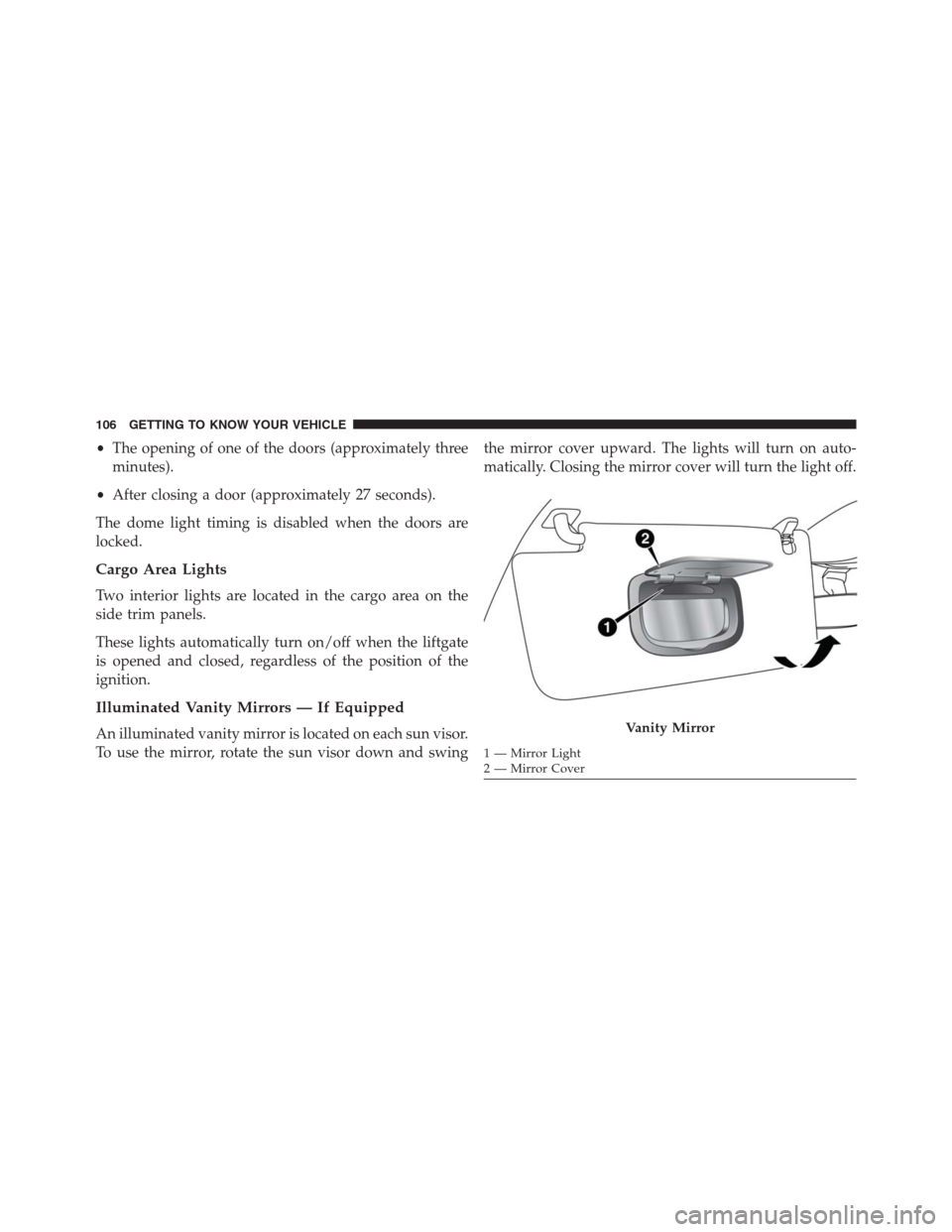
Illuminated Vanity Mirrors — If Equipped
An illuminated vanity mirror is located on each sun visor.
To use the mirror, rotate the sun visor down and swingthe mirror cover upward. The lights will turn on auto-
matically. Closing the mirror cover will turn the light off.Vanity Mirror
1 — Mirror Light
2 — Mirror Cover 106 GETTING TO KNOW YOUR VEHICLE
Page 113 of 688

•The vehicle speed exceeds 3 mph (5 km/h) and the
rain sensor detects the presence of rain.
NOTE:
•The Rain Sensing feature will not operate when the
wiper switch is in the low or high-speed position.
•The Rain Sensing feature may not function properly
when ice, or dried salt water is present on the wind-
shield.
•Use of Rain-X or products containing wax or silicone
may reduce Rain Sensing performance.
•The Rain Sensing feature can be turned on and off
using the Uconnect System, refer to “Uconnect Set-
tings” in “Multimedia” for further information.Rear Wiper Operation
The rear wiper/washer controls are located on the lever
on the right side of the steering column. The rear
wiper/washer is operated by rotating a switch, located at
the middle of the lever.
Rotate the center portion of the lever upward to
the first detent for intermittent operation and to
the second detent for continuous rear wiper operation.
To use the washer, push the lever forward and
hold while spray is desired. If the lever is
pushed while in the intermittent setting, the
wiper will turn on and operate for several wipe
cycles after the end of the lever is released, and then
resume the intermittent interval previously selected.
If the lever is pushed while the wiper is in the off
position, the wiper will operate for several wipe cycles,
then turn off.
4
GETTING TO KNOW YOUR VEHICLE 111
Page 114 of 688

NOTE:As a protective measure, the pump will stop if
the switch is held for more than 30 seconds. Once the
lever is released, the pump will resume normal opera-
tion.
If the rear wiper is operating when the ignition is turned
to the STOP/OFF position, the wiper will automatically
return to the “park” position.
Rear Window Defroster
The rear window defroster button is located with
the Climate Controls on the instrument panel.
Push this button to turn on the rear window defroster. An
indicator in the button will illuminate when the rear
window defroster is on. The rear window defroster
automatically turns off after approximately 20 minutes.
To manually shut the defroster off, push the button a
second time.CAUTION!
Failure to follow these cautions can cause damage to
the heating elements:
•Use care when washing the inside of the rear
window. Do not use abrasive window cleaners on
the interior surface of the window. Use a soft cloth
and a mild washing solution, wiping parallel to the
heating elements. Labels can be peeled off after
soaking with warm water.
•Do not use scrapers, sharp instruments, or abrasive
window cleaners on the interior surface of the
window.
•Keep all objects a safe distance from the window.
112 GETTING TO KNOW YOUR VEHICLE
Page 115 of 688

Windshield Wiper De-Icer — If Equipped
Your vehicle may be equipped with a Windshield Wiper
De-Icer feature that may be activated under the following
conditions:
•Activation By Front Defrost— The Windshield Wiper
De-Icer will be activated automatically in the case of a
cold weather manual start with full front defrost, and
the ambient temperature is below 40° F (4.4° C).
•Activation By Rear Defrost— The Windshield Wiper
De-Icer will be activated automatically when the rear
defrost is turned on and the ambient temperature is
below 40° F (4.4° C).
•Activation By Remote Start Operation— When Re-
mote Start is active and the outside ambient tempera-
ture is less than 40° F (4.4° C), the Windshield Wiper
De-Icer will be enabled. Upon exiting remote start
mode the Windshield Wiper De-Icer will remain on.Auto-On Rear Window Defroster/Windshield Wiper
De-Icer— If Equipped
Turning On the car, the Rear Window Defroster and
Windshield Wiper De-Icer will automatically turn ON
when the outside ambient temperature is less than 40° F
(4.4° C).
The Rear Window Defroster and Windshield Wiper De-
Icer automatically turn off after approximately 20 min-
utes. To manually shut the defroster/windshield off,
push the button a second time.
4
GETTING TO KNOW YOUR VEHICLE 113
Page 117 of 688

The window controls will operate only when the ignition
is in the MAR/RUN or AVV/START position.
NOTE:For vehicles equipped with Uconnect, the power
window switches will remain active for up to three
minutes after the ignition is cycled to the STOP/OFF
position. Opening either front door will cancel this
feature. Refer to “Uconnect Settings” in “Multimedia” for
further information.
WARNING!
Never leave children unattended in a vehicle, and do
not let children play with power windows. Do not
leave the Key Fob in or near the vehicle, or in a
location accessible to children, and do not leave the
ignition of a vehicle equipped with Keyless Enter-
N-Go in the MAR/RUN mode. Occupants, particu-
larly unattended children, can become entrapped by
(Continued)
WARNING!(Continued)
the windows while operating the power window
switches. Such entrapment may result in serious
injury or death.
Controls
AUTO-Down Feature — If Equipped
The driver and passenger power window switches have
an AUTO-down feature. Push the switch for half a
second and release it, the window will go down auto-
matically.
To partially open the window, push the window switch
and release it when you want the window to stop.
To stop the window from going all the way down during
the AUTO-down operation, pull up on the switch briefly
when the when the window has reached the desired
position.
4
GETTING TO KNOW YOUR VEHICLE 115