Page 50 of 688

To Exit Remote Start Mode Without Driving The
Vehicle
Push and release the REMOTE START button one time or
allow the engine to run for the entire 15-minute cycle.
NOTE:To avoid unintentional shutdowns, the system
will disable the one time push of the REMOTE START
button for two seconds after receiving a valid Remote
Start request.
To Exit Remote Start Mode And Drive The Vehicle
Before the end of 15-minute cycle, push and release the
UNLOCK button on the RKE transmitter to unlock the
doors and disarm the Vehicle Security Alarm (if
equipped). Then, prior to the end of the 15-minute cycle,
for vehicles equipped with the Keyless Enter-N-Go fea-
ture push and release the START/STOP button; for
vehicles not equipped with Keyless Enter-N-Go feature
put the key in RUN position.NOTE:For vehicles equipped with the Keyless Enter-
N-Go feature, the message “Remote Start Active — Push
Start Button” will display in the Electronic Vehicle Infor-
mation Center (EVIC) or the Driver Information Dispay
(DID) until you push the START button.
NOTE:For vehicles not equipped with the Keyless
Enter-N-Go feature, the message “Remote Start Active —
Key to RUN” will display in the Electronic Vehicle
Information Center (EVIC) until you put the key in RUN
position.Remote Start Comfort Systems — If Equipped
When Remote Start is activated, the heated steering
wheel and driver heated seat features will automatically
turn on in cold weather. These features will stay on
through the duration of Remote Start or until the ignition
switch is cycled to the MAR/RUN position.
48 GETTING TO KNOW YOUR VEHICLE
Page 52 of 688

SENTRY KEY
The Sentry Key Immobilizer system prevents unauthor-
ized vehicle operation by disabling the engine. The
system does not need to be armed or activated. Operation
is automatic, regardless of whether the vehicle is locked
or unlocked.
The system uses a Key Fob with a factory-mated Remote
Keyless Entry (RKE) transmitter, a Keyless Push Button
Ignition, and a RF receiver to prevent unauthorized
vehicle operation. Therefore, only Key Fobs that are
programmed to the vehicle can be used to start and
operate the vehicle. The system will not allow the engine
to crank if an invalid Key Fob tries to start the engine.
After placing the ignition to the ON/RUN position, if
there is a problem with the system, the Vehicle Security
Light will turn on. This condition will result in the engine
being shut off after two seconds.Should this occur, have the vehicle serviced as soon as
possible by an authorized dealer.
CAUTION!
•Do not make modifications or alterations to the
immobilizer system. Modifications or alterations to
the immobilization system may result in a loss of
security protection.
•The Sentry Key Immobilizer system is not compat-
ible with some aftermarket remote starting sys-
tems. Use of these systems may result in vehicle
starting problems and loss of security protection.
50 GETTING TO KNOW YOUR VEHICLE
Page 55 of 688

same exterior zone (for further information, refer to
�Keyless Enter-N-Go�in�Getting To Know Your
Vehicle”).
•Push the LOCK button on the Remote Keyless Entry
(RKE) transmitter.
3. If any doors are open, close them.
NOTE:
•If a second chime is heard after approximately four
seconds from arming the alarm, disarm the alarm by
pressing the UNLOCK button. Check for the correct
closure of doors and liftgate, then reactivate the
system by following steps 1 and 2.
•If a second chime is heard after approximately four
seconds from arming the alarm, even with the doors
and liftgate properly closed, a fault may have oc-
curred during the arming operation. If this occurs,
contact your authorized dealer.To Disarm The System
The Vehicle Security Alarm can be disarmed using any of
the following methods:
•Push the UNLOCK button on the Remote Keyless
Entry (RKE) transmitter.
•Grasp the Passive Entry Unlock Door Handle with a
valid Key Fob available in the same exterior zone (if
equipped). Refer to�Keyless Enter-N-Go�in�Getting
To Know Your Vehicle�for further information.
•Cycle the vehicle ignition system out of the STOP/OFF
position.
– For vehicles equipped with Keyless Enter-N-Go,
push the Keyless Enter-N-Go START/STOP button
(requires at least one valid Key Fob in the vehicle).
– For vehicles not equipped with Keyless Enter-N-Go,
insert a valid key into the ignition switch and turn
the key to the MAR/RUN position.
4
GETTING TO KNOW YOUR VEHICLE 53
Page 56 of 688
NOTE:
•The driver’s door key cylinder cannot arm or disarm
the Vehicle Security Alarm.
•When the Vehicle Security Alarm is armed, the interior
power door lock switches will not unlock the doors.
The Vehicle Security Alarm is designed to protect your
vehicle. However, you can create conditions where the
system will give you a false alarm. If one of the previ-
ously described arming sequences has occurred, the
Vehicle Security Alarm will arm regardless of whether
you are in the vehicle or not. If you remain in the vehicle
and open a door, the alarm will sound. If this occurs,
disarm the Vehicle Security Alarm.
If the Vehicle Security Alarm is armed and the battery
becomes disconnected, the Vehicle Security Alarm will
remain armed when the battery is reconnected.Disabling
To completely disable the alarm (e.g. in the case of long
inactivity of the car), lock the doors by turning the vehicle
key in the exterior door lock cylinder.
NOTE:If the batteries in the RKE transmitter discharge
in the event of a failure to the system, or to switch off the
alarm, place the ignition in the MAR/RUN position.
DOORS
Manual Door Locks
To lock each door, rotate the door lock button on each
door trim panel forward. To unlock the doors, pull the
inside door handle to the first detent or rotate the door
lock button until the lock symbol is no longer visible.
If the lock symbol is visible when the door is shut, the
door will lock. Therefore, make sure the Key Fob is not
inside the vehicle before closing the door.
54 GETTING TO KNOW YOUR VEHICLE
Page 60 of 688
Keyless Enter-N-Go
The Passive Entry system is an enhancement to the
vehicle’s Remote Keyless Entry (RKE) system and a
feature of Keyless Enter-N-Go. This feature allows you to
lock and unlock the vehicle’s door(s) without having to
push the RKE transmitter LOCK or UNLOCK buttons.
NOTE:
•Passive Entry can be enabled or disabled. Refer to
“Uconnect SETTINGS” in “Multimedia” for further
information.
•If wearing gloves on your hands, or if it has been
raining on the Passive Entry door handle, the unlock
sensitivity can be affected, resulting in a slower re-
sponse time.•If the vehicle is unlocked by the Passive Entry Door
Handle, and no door is opened within 60 seconds, the
vehicle will re-lock and if equipped, the security alarm
will arm.
To Unlock From The Driver’s Side
With a valid Passive Entry RKE transmitter within 5 ft
(1.5 m) of the driver’s door handle, grab the front driver
door handle to unlock the driver’s door automatically.
58 GETTING TO KNOW YOUR VEHICLE
Page 73 of 688

Heated Seats — If Equipped
The heated seat switches are located on the instrument
panel.
You can choose between two heating levels:
•Push the heated seat button
once to turn the HI
setting ON.
•Push the heated seat buttona second time to turn
the LO setting ON.
•Push the heated seat buttona third time to turn
the heating elements OFF.
If the HI-level setting is selected, the system will auto-
matically switch to LO-level after approximately 145
minutes of continuous operation. At that time, the dis-
play will change from HI to LO, indicating the change.
The LO-level setting will turn OFF automatically after
approximately 60 minutes.NOTE:The engine must be running for the heated seats
to operate.
Vehicles Equipped With Remote Start
Vehicles equipped with Remote Start, the heated seats
can be programed to come on during a Remote Start.
This feature can be programmed through the Uconnect
system. Refer to “Uconnect Settings” in “Multimedia” for
further information.
Auto Comfort Systems — If Equipped
Vehicles equipped with Auto on Comfort, turning on the
car the driver ’s heated seat will automatically turn ON
when temperatures are below 40° F (4.4° C).
4
GETTING TO KNOW YOUR VEHICLE 71
Page 93 of 688
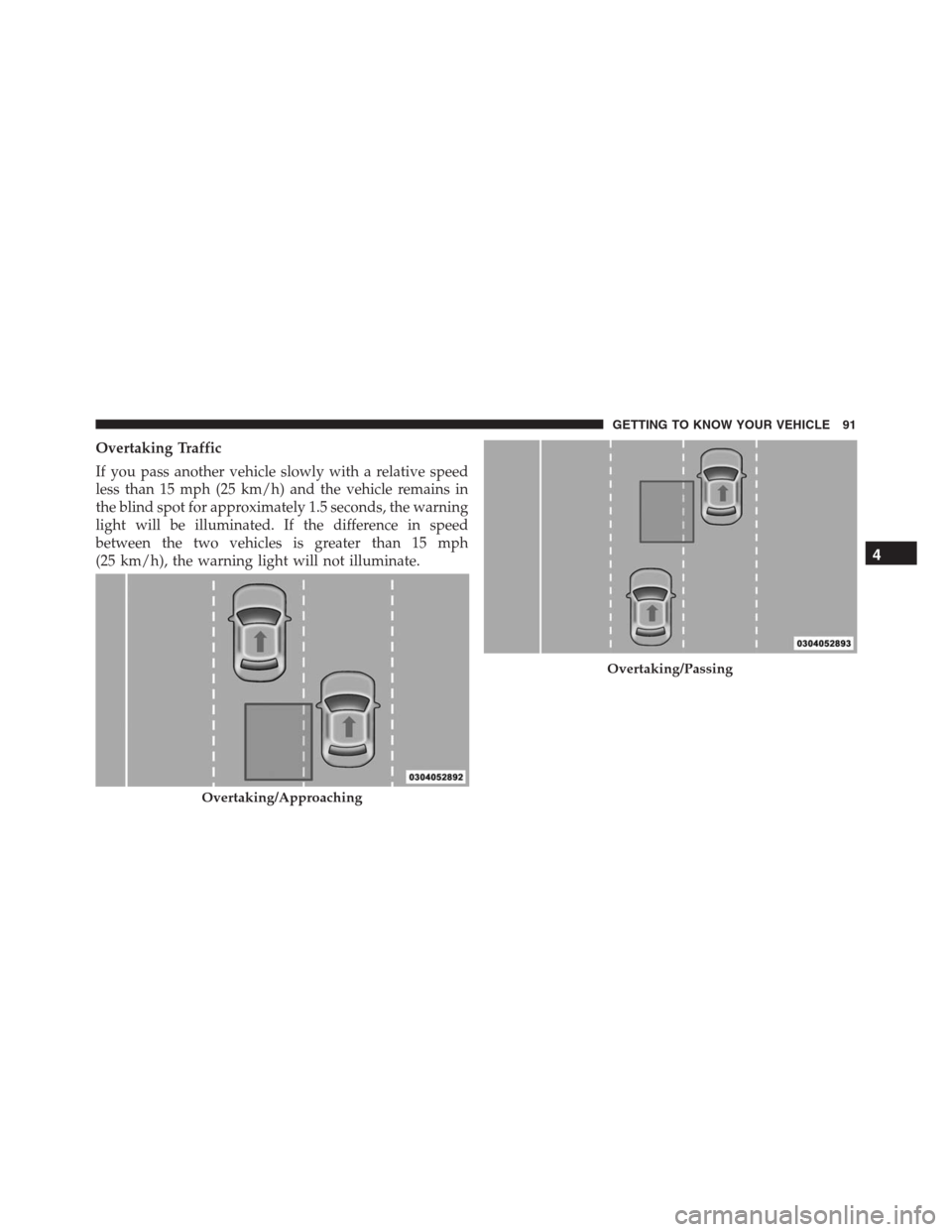
Overtaking Traffic
If you pass another vehicle slowly with a relative speed
less than 15 mph (25 km/h) and the vehicle remains in
the blind spot for approximately 1.5 seconds, the warning
light will be illuminated. If the difference in speed
between the two vehicles is greater than 15 mph
(25 km/h), the warning light will not illuminate.
Overtaking/Approaching
Overtaking/Passing
4
GETTING TO KNOW YOUR VEHICLE 91
Page 100 of 688

Automatic Lighting — If Equipped
Light Sensor
The light sensor is equipped with an infrared LED,
located on the windshield. It detects changes in light
intensity outside the vehicle, based on the sensitivity of
light set by using the Menu on the display or on the
Uconnect system.
The higher the sensitivity, the lesser the amount of
external light required for controlling the lighting.
Automatic Headlights
Turn the headlight switch to the AUTO position.
When the automatic headlights are enabled, the head-
light time delay is active. After the ignition switch is
placed in the STOP/OFF position, the headlights will
automatically turn off after the time is set by Uconnect
Settings.The timing of the headlights is adjustable between 0, 30,
60 and 90 seconds. Refer to “Uconnect Settings” in
“Multimedia” for further information.
NOTE:The engine must be running before the headlights
will come on in the automatic mode.
Daytime Running Lights (DRL) — If Equipped
The Daytime Running Lights (DRLs) will turn on when
the engine is started and remain on unless the headlights
are turned on or the engine is shut off.
The DRLs will be disabled during turn signal operation
and resume operation when the turn signal operation has
ended.
98 GETTING TO KNOW YOUR VEHICLE