Page 93 of 550
Features of your vehicle84Transmitter precautions✽
✽NOTICEThe transmitter will not work if any of
following occur:
• The ignition key is in ignition switch.
• You exceed the operating distance
limit (about 30 feet [10 m]).
• The battery in the transmitter is weak.
• Other vehicles or objects may be blocking the signal.
• The weather is extremely cold.
• The transmitter is close to a radio transmitter such as a radio station or
an airport which can interfere with
normal operation of the transmitter.
When the transmitter does not work
correctly, open and close the door with
the ignition key. If you have a problem
with the transmitter, we recommend
that you contact a HYUNDAI autho-
rised repairer. (Continued)(Continued)
• If the transmitter is in close proximity
to your cell phone or smart phone, the
signal from the transmitter could be
blocked by normal operation of your
cell phone or smart phone. This is
especially important when the phone
is active such as making call, receiving
calls, text messaging, and/or sending/
receiving emails. Avoid placing the
transmitter and your cell phone or
smart phone in the same pants or
jacket pocket and maintain adequate
distance between the two devices.
CAUTION
Changes or modifications not
expressly approved by the party responsible for compliance couldvoid the user’s authority to operatethe equipment. If the keyless entry system is inoperative due tochanges or modifications not expressly approved by the partyresponsible for compliance, it will not be covered by your manufactur-er’s vehicle warranty.
CAUTION
Keep the transmitter away from water or any liquid and fire. If theinside of the transmitter gets damp(due to drinks or moisture), or is heated, internal circuit may mal-function, excluding the car from the warranty.
CAUTION
Keep the transmitter away fromelectromagnetic materials that blocks electromagnetic waves tothe key surface.
EL(FL) UK 4A.QXP 2/9/2015 9:02 PM Page 8
Page 94 of 550
49
Features of your vehicle
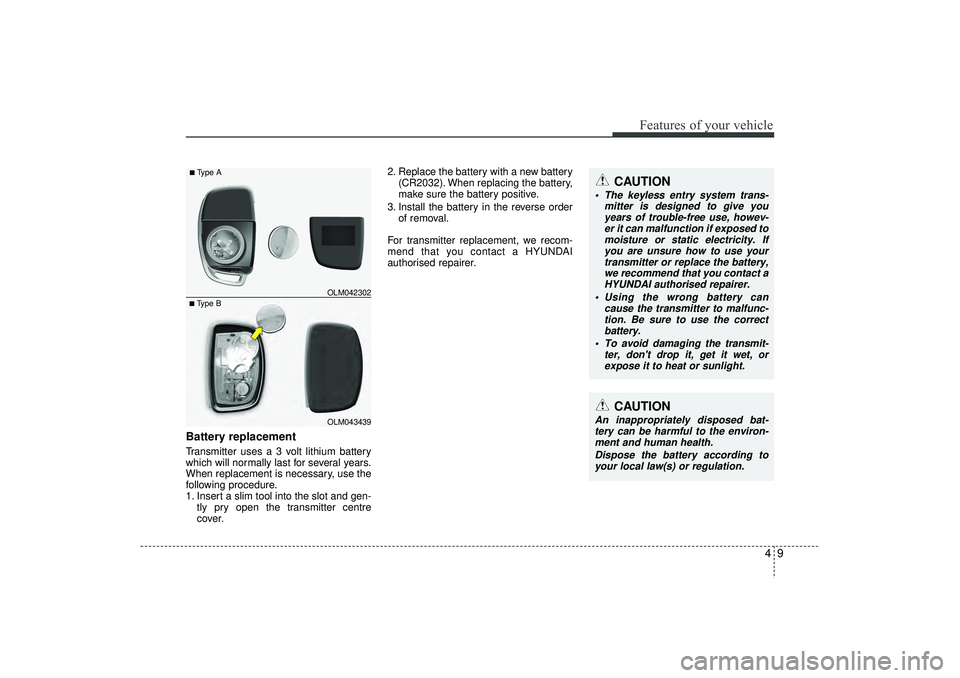
Battery replacementTransmitter uses a 3 volt lithium battery
which will normally last for several years.
When replacement is necessary, use the
following procedure.
1. Insert a slim tool into the slot and gen-tly pry open the transmitter centre
cover. 2. Replace the battery with a new battery
(CR2032). When replacing the battery,
make sure the battery positive.
3. Install the battery in the reverse order of removal.
For transmitter replacement, we recom-
mend that you contact a HYUNDAI
authorised repairer.
CAUTION
The keyless entry system trans- mitter is designed to give youyears of trouble-free use, howev-er it can malfunction if exposed tomoisture or static electricity. If you are unsure how to use yourtransmitter or replace the battery, we recommend that you contact aHYUNDAI authorised repairer.
Using the wrong battery can cause the transmitter to malfunc-tion. Be sure to use the correct battery.
To avoid damaging the transmit- ter, don't drop it, get it wet, orexpose it to heat or sunlight.
CAUTION
An inappropriately disposed bat-tery can be harmful to the environ-ment and human health.
Dispose the battery according toyour local law(s) or regulation.
■Type B OLM042302■Type A
OLM043439
EL(FL) UK 4A.QXP 2/9/2015 9:02 PM Page 9
Page 118 of 550
433
Features of your vehicle
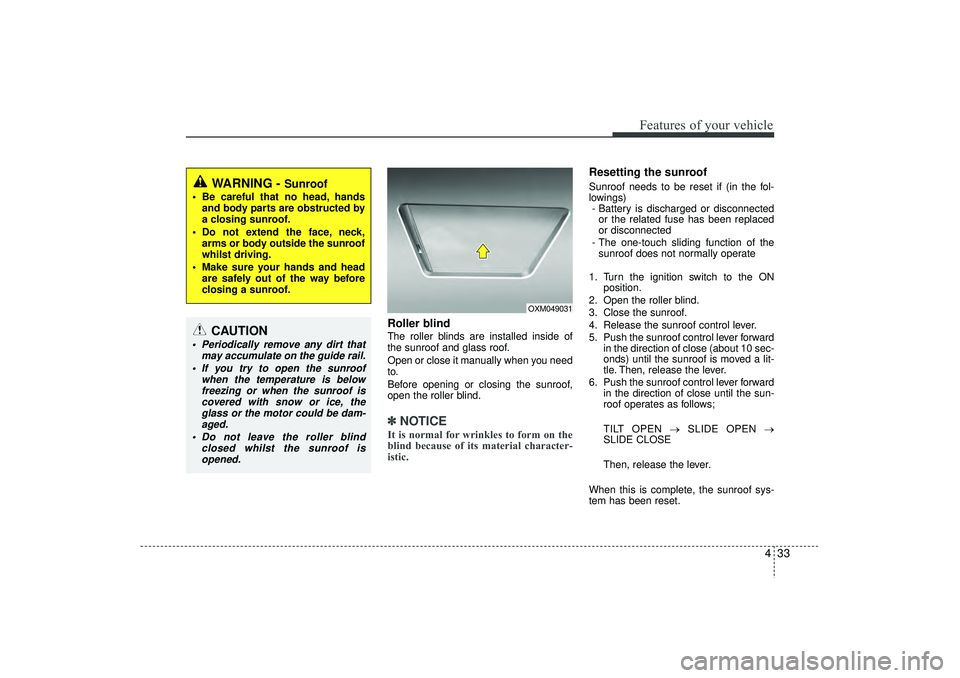
Roller blind The roller blinds are installed inside of
the sunroof and glass roof.
Open or close it manually when you need
to.
Before opening or closing the sunroof,
open the roller blind.✽ ✽NOTICEIt is normal for wrinkles to form on the
blind because of its material character-
istic.
Resetting the sunroofSunroof needs to be reset if (in the fol-
lowings)
- Battery is discharged or disconnected or the related fuse has been replaced
or disconnected
- The one-touch sliding function of the sunroof does not normally operate
1. Turn the ignition switch to the ON position.
2. Open the roller blind.
3. Close the sunroof.
4. Release the sunroof control lever.
5. Push the sunroof control lever forward in the direction of close (about 10 sec-
onds) until the sunroof is moved a lit-
tle. Then, release the lever.
6. Push the sunroof control lever forward in the direction of close until the sun-
roof operates as follows;
TILT OPEN → SLIDE OPEN →
SLIDE CLOSE
Then, release the lever.
When this is complete, the sunroof sys-
tem has been reset.
OXM049031
WARNING -
Sunroof
Be careful that no head, hands and body parts are obstructed by
a closing sunroof.
Do not extend the face, neck, arms or body outside the sunroof
whilst driving.
Make sure your hands and head are safely out of the way before
closing a sunroof.
CAUTION
Periodically remove any dirt that may accumulate on the guide rail.
If you try to open the sunroof when the temperature is belowfreezing or when the sunroof iscovered with snow or ice, the glass or the motor could be dam-aged.
Do not leave the roller blind closed whilst the sunroof isopened.
EL(FL) UK 4A.QXP 2/9/2015 9:04 PM Page 33
Page 130 of 550
445
Features of your vehicle
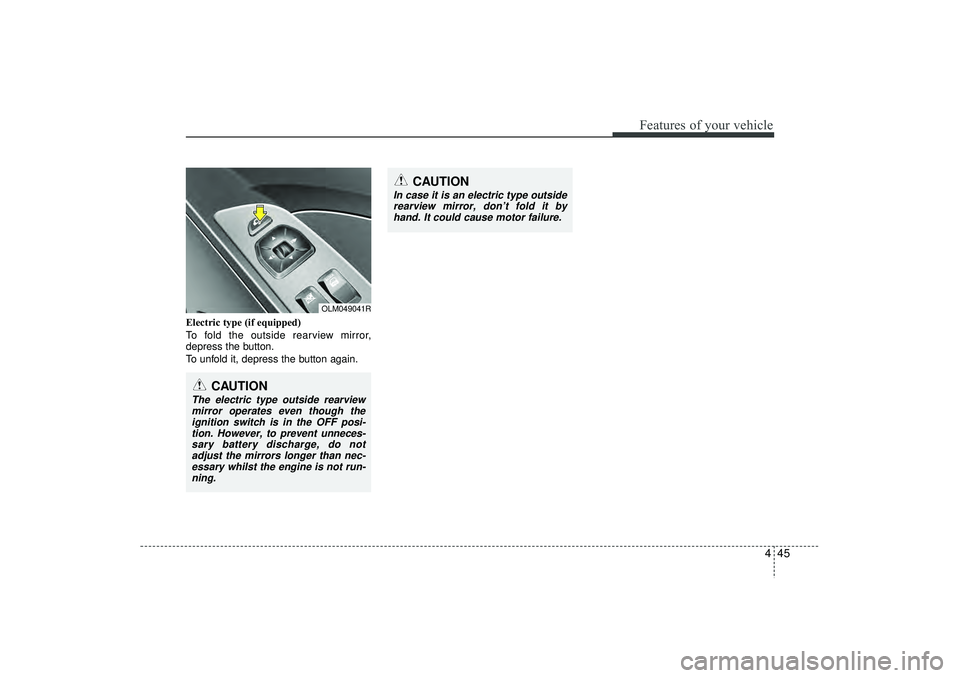
Electric type (if equipped)
To fold the outside rearview mirror,
depress the button.
To unfold it, depress the button again.
OLM049041R
CAUTION
In case it is an electric type outsiderearview mirror, don’t fold it byhand. It could cause motor failure.
CAUTION
The electric type outside rearviewmirror operates even though the ignition switch is in the OFF posi-tion. However, to prevent unneces-sary battery discharge, do not adjust the mirrors longer than nec-essary whilst the engine is not run-ning.
EL(FL) UK 4A.QXP 2/9/2015 9:04 PM Page 45
Page 140 of 550
455
Features of your vehicle
Information ModeService IntervalService in
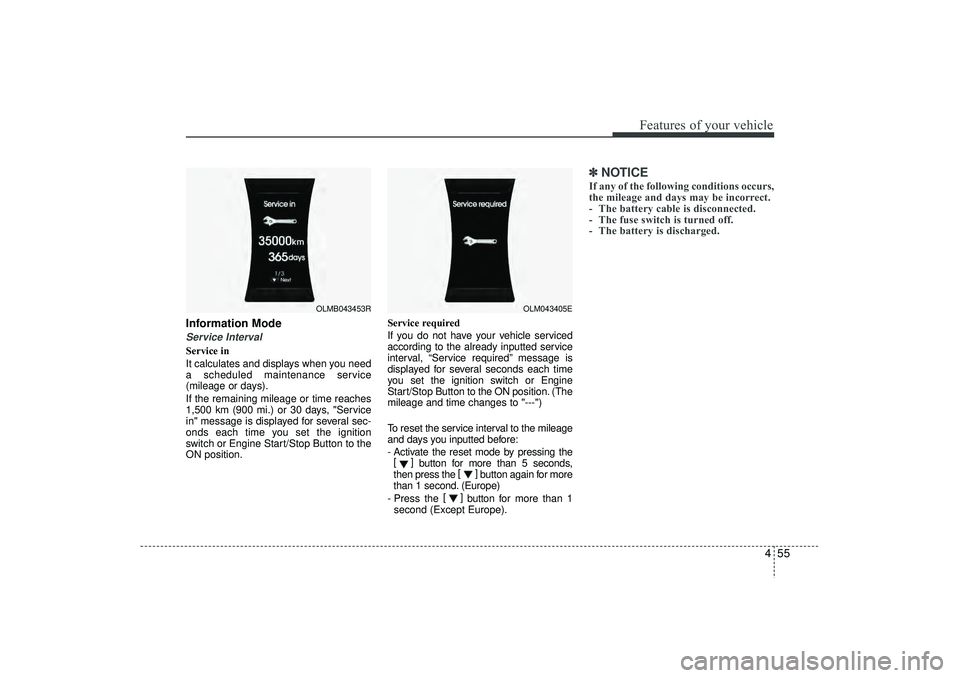
It calculates and displays when you need
a scheduled maintenance service
(mileage or days).
If the remaining mileage or time reaches
1,500 km (900 mi.) or 30 days, "Service
in" message is displayed for several sec-
onds each time you set the ignition
switch or Engine Start/Stop Button to the
ON position.Service required
If you do not have your vehicle serviced
according to the already inputted service
interval, “Service required” message is
displayed for several seconds each time
you set the ignition switch or Engine
Start/Stop Button to the ON position. (The
mileage and time changes to "---")
To reset the service interval to the mileage
and days you inputted before:
- Activate the reset mode by pressing the
[] button for more than 5 seconds,
then press the []
button again for more
than 1 second. (Europe)
- Press the []
button for more than 1
second (Except Europe).
✽ ✽ NOTICEIf any of the following conditions occurs,
the mileage and days may be incorrect.
- The battery cable is disconnected.
- The fuse switch is turned off.
- The battery is discharged.
OLM043405E
OLMB043453R
EL(FL) UK 4A.QXP 2/9/2015 9:04 PM Page 55
Page 143 of 550
Features of your vehicle58
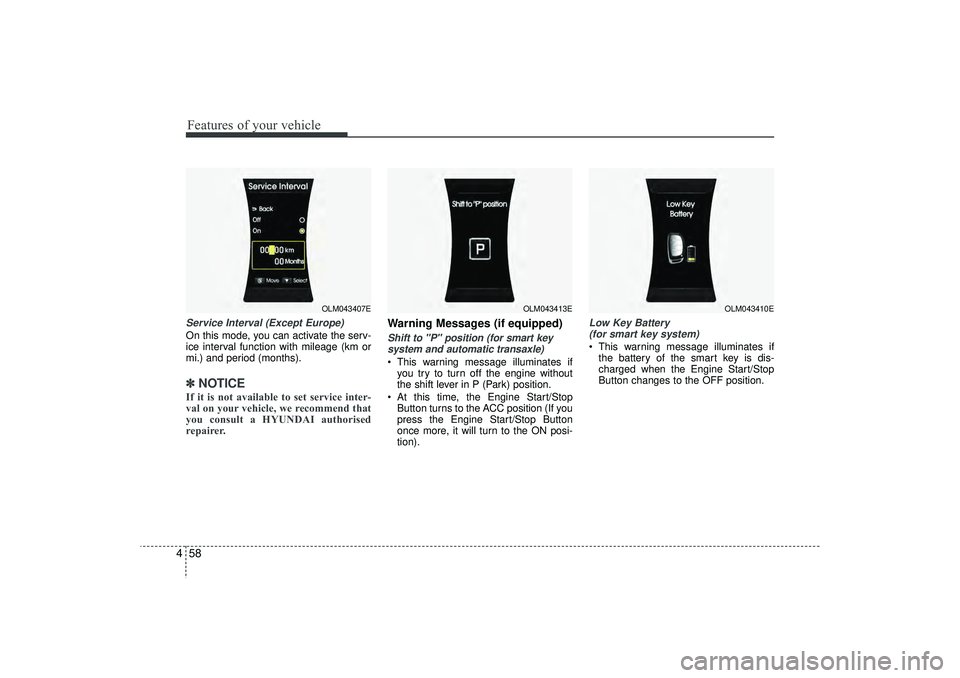
4Service Interval (Except Europe)On this mode, you can activate the serv-
ice interval function with mileage (km or
mi.) and period (months).✽ ✽
NOTICEIf it is not available to set service inter-
val on your vehicle, we recommend that
you consult a HYUNDAI authorised
repairer.
Warning Messages (if equipped)Shift to "P" position (for smart key
system and automatic transaxle) This warning message illuminates if you try to turn off the engine without
the shift lever in P (Park) position.
At this time, the Engine Start/Stop Button turns to the ACC position (If you
press the Engine Start/Stop Button
once more, it will turn to the ON posi-
tion).
Low Key Battery (for smart key system) This warning message illuminates if the battery of the smart key is dis-
charged when the Engine Start/Stop
Button changes to the OFF position.
OLM043407E
OLM043413E
OLM043410E
EL(FL) UK 4A.QXP 2/9/2015 9:04 PM Page 58
Page 149 of 550
Features of your vehicle64
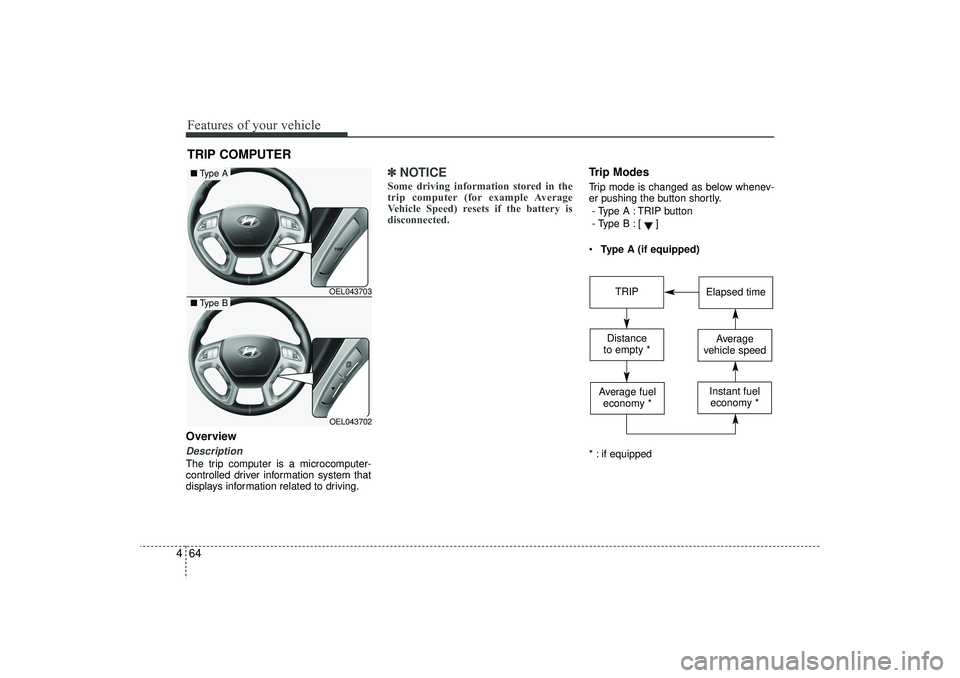
4OverviewDescriptionThe trip computer is a microcomputer-
controlled driver information system that
displays information related to driving.
✽ ✽
NOTICESome driving information stored in the
trip computer (for example Average
Vehicle Speed) resets if the battery is
disconnected.
Trip ModesTrip mode is changed as below whenev-
er pushing the button shortly.
- Type A : TRIP button
- Type B :
[]
Type A (if equipped)
* : if equipped
TRIP COMPUTER
OEL043703OEL043702
■ Type A■Type B
TRIP
Elapsed time
Distance
to empty *
Average
vehicle speed
Average fuel economy *
Instant fueleconomy *
EL(FL) UK 4A.QXP 2/9/2015 9:05 PM Page 64
Page 151 of 550
Features of your vehicle66
4✽
✽
NOTICE• The average vehicle speed is not dis-
played if the driving distance is less
than 300 meters (0.186 miles) or the
driving time is less than 10 seconds
since the ignition switch or Engine
Start/Stop button is turned to ON.
• Even if the vehicle is not in motion, the average vehicle speed keeps going
whilst the engine is running.Elapsed Time (3) The elapsed time is the total driving
time since the last elapsed time reset.
- Time range (hh:mm): 00:00 ~ 99:59
To reset the elapsed time, press the trip button (Type A : TRIP, Type B : )
for more than 1 second when the
elapsed time is displayed.✽ ✽ NOTICEEven if the vehicle is not in motion, the
elapsed time keeps going whilst the
engine is running.
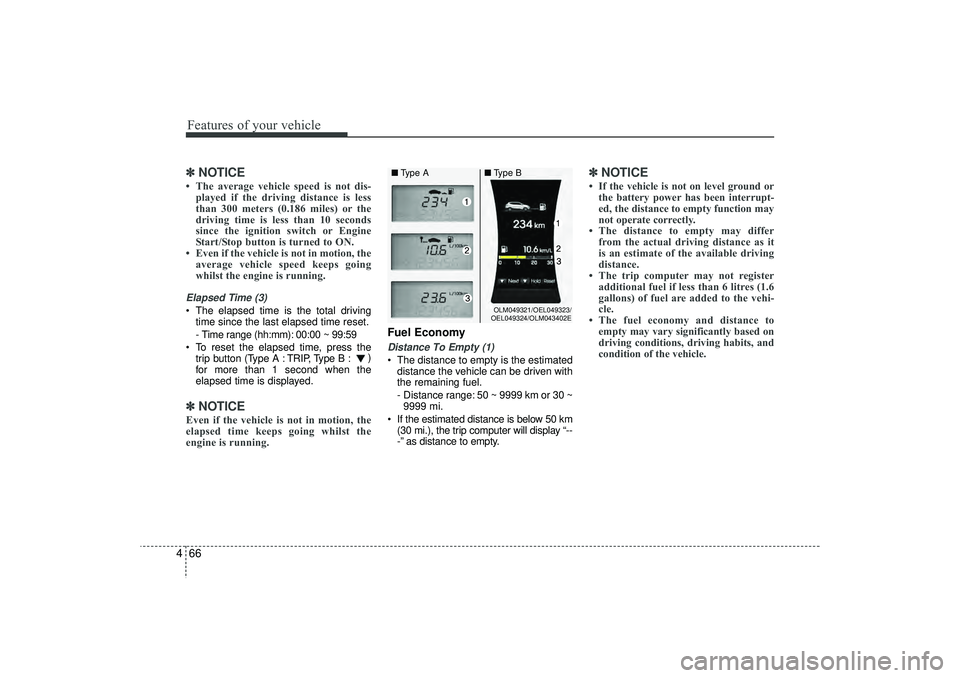
Fuel EconomyDistance To Empty (1) The distance to empty is the estimated
distance the vehicle can be driven with
the remaining fuel.
- Distance range: 50 ~ 9999 km or 30 ~9999 mi.
If the estimated distance is below 50 km (30 mi.), the trip computer will display “--
-” as distance to empty.
✽ ✽ NOTICE• If the vehicle is not on level ground or
the battery power has been interrupt-
ed, the distance to empty function may
not operate correctly.
• The distance to empty may differ from the actual driving distance as it
is an estimate of the available driving
distance.
• The trip computer may not register additional fuel if less than 6 litres (1.6
gallons) of fuel are added to the vehi-
cle.
• The fuel economy and distance to empty may vary significantly based on
driving conditions, driving habits, and
condition of the vehicle.
OLM049321/OEL049323/
OEL049324/OLM043402E
■ Type A ■Type B
EL(FL) UK 4A.QXP 2/9/2015 9:05 PM Page 66