Page 125 of 473
3-63
Convenient features of your vehicle
3
Elapsed Time (3)
The elapsed time is the total driv-ing time since the last elapsed time reset.
- Time range (hh:mm): 00:00 ~ 99:59
To reset the elapsed time, press the SET button for more than 1second when the elapsed time is
displayed.
Even if the vehicle is not in
motion, the elapsed time keepsgoing while the engine is running.
Fuel Economy
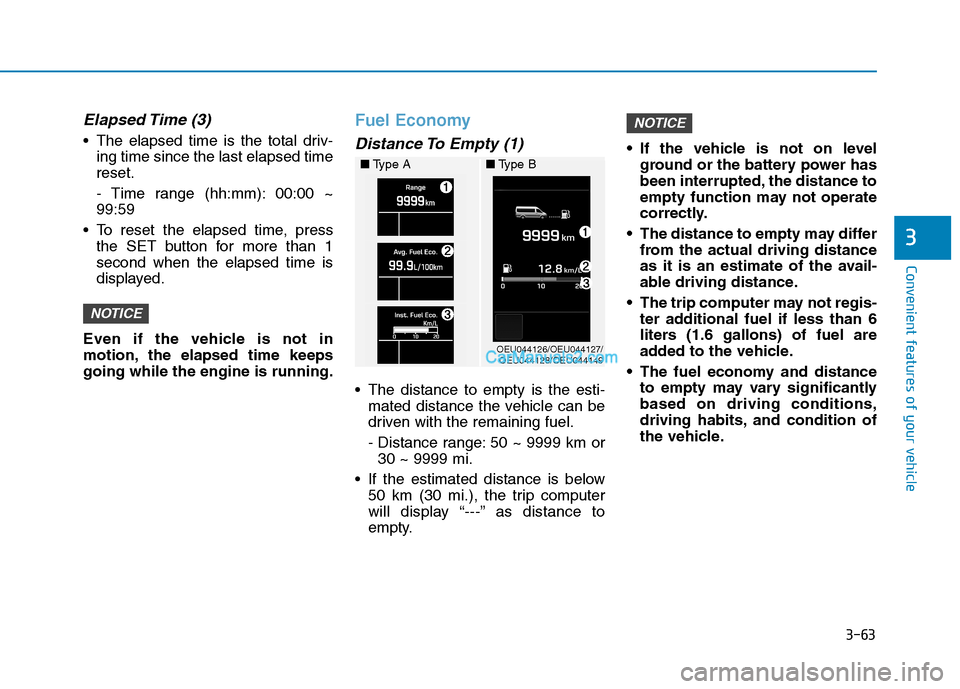
Distance To Empty (1)
The distance to empty is the esti- mated distance the vehicle can be
driven with the remaining fuel.
- Distance range: 50 ~ 9999 km or30 ~ 9999 mi.
If the estimated distance is below 50 km (30 mi.), the trip computer
will display “---” as distance to
empty. If the vehicle is not on level
ground or the battery power has
been interrupted, the distance to
empty function may not operate
correctly.
The distance to empty may differ from the actual driving distance
as it is an estimate of the avail-
able driving distance.
The trip computer may not regis- ter additional fuel if less than 6
liters (1.6 gallons) of fuel are
added to the vehicle.
The fuel economy and distance to empty may vary significantlybased on driving conditions,
driving habits, and condition of
the vehicle.
NOTICE
NOTICE
OEU044126/OEU044127/OEU044128/OEU044149
■
Type A ■Type B
Page 126 of 473
3-64
Convenient features of your vehicle
Average Fuel Economy (2)
The average fuel economy is cal-culated by the total driving dis- tance and fuel consumption since
the last average fuel economyreset.
- Fuel economy range: 0.0 ~ 99.9km/L (L/100km)
The average fuel economy can be reset both manually and automati-
cally.
Manual reset
To clear the average fuel economy
manually, press the SET button for
more than 1 second when the aver-
age fuel economy is displayed.
Automatic reset
The average fuel economy will be
cleared to zero (---) when the vehicle
speed exceeds 1 km/h after refuelingmore than 6 liters (1.6 gallons).
The average fuel economy is not
displayed for more accurate cal-
culation if the vehicle does not
drive more than 300 meters since
the ignition switch is turned toON. Information
When the average fuel efficiency
is set to be automatically reset in
the user-setting mode, the aver-
age fuel efficiency and the fuel
gauge may automatically reset to
the default, while driving on a
slope or going down/up on a flat
road from a slope. Such situations
make the fuels in a tank abruptlyfluctuate and cause the system to
misrecognize it as the refueling.
Thus, it is automatically reset to
the default. This is not a system
failure. When the automatic reset function
is cancelled in the user-setting
mode, the average fuel efficiency
will not be automatically reset, any
longer.i
NOTICE
Page 127 of 473
3-65
Convenient features of your vehicle
3
Instant fuel economy (3)
This mode displays the instant fueleconomy during the last few sec-
onds when the vehicle speed ismore than 10 km/h (6.2 MPH).
- Fuel economy range:
0 ~ 20 km/L (L/100 km)
Urea Solution Gauge (if equipped)
The urea solution gauge indicates
the approximate amount of ureasolution remaining in the urea tank.
■ Type A
OEU044111/OEU044135
■Type BIf the vehicle is driven with
urea solution volume less
than 4%, engine output will belimited.
Liquid that are not recom-
mended such as diesel, gaso-
line, and alcohol shall neverbe used other than the recom-mended urea solution thatsatisfy ISO22241 or DIN70070.
CAUTION
If defective urea solution or liq- uid that is not recommended is
supplied, there may be damage
on the parts of the vehicle such
as processing device. If defec-
tive fuel is used, foreign objects
will be accumulated to SCR cat-
alyst and cause catalyst pushed
away or breaking.
CAUTION
Page 128 of 473
3-66
Convenient features of your vehicle
Total AUTO STOP Hour
When the AUTO STOP operates, the
total AUTO STOP hour displays on
the LCD display.
Stop Hour Range: 00:00~99:59:59
Pressing the “Select” button for 1
second or over resets the total AUTO
STOP hour.
For further information, refer to the ISG (Idle stop and go) system in thechapter 5.
Driving Information
The driving information may display
on the cluster for a few seconds after
turning OFF the engine.
When the fuel is insufficient, "Low
Fuel" message will display. In this
case, immediately refuel the tank.
Seat Belt Warning Light
This warning light informs the driver
that the seat belt is not fastened.
For more details, refer to the “Seat
Belts” in chapter 2.
OEU044151
■Type B■ Type A
OEU044129/OEU044150
■Type B
WW AARRNN IINN GG AA NN DD IINN DDIICC AA TTOO RR
L
L IIGG HH TTSS
Page 137 of 473

3-75
Convenient features of your vehicle
3
Lane departure warn-ing system (LDWS)
(if equipped)
The warning light illuminates, if
LDWS cannot identify any lane
departure due to a system malfunc-
tion, snow, or dirt.
In case of a communications fail-
ure, the warning light flashes in
the amber color.
Tachograh
(if equipped)
The warning light illuminates, if an
error in a tachograph is detected.
Have your vehicle inspected by an
HYUNDAI authorized dealer.
Master Warning Light
The Master Warning Light illumi-
nates, when one of the following sys-
tem malfunctions occurs. Moredetails about a malfunction will be
displayed on the LCD display.
The Master Warning Light illumi-
nates, when there is a malfunction
with one of the followings: - Lamp disconnection
- DPF check-up
- Service alarm
Situations, where the Master
Warning Light illuminates, may be
various. When a warning situation is
settled, the Master Warning Light
turns OFF.
In addition, for a malfunction with the
major units, such as CM and SJB,
the Master Warning Light also illumi-
nates. ❈ DPF : Diesel Particular Filter
❈ CM : Central Module
❈ SJB : Smart Junction Box
❈
There will be a warning sound
if you change the lane withoutturning ON the turn signal
switch.
Change the lane after turning
ON the turn signal switch,when required.
WARNING
T
Page 142 of 473
3-80
Convenient features of your vehicle
Warning sound
Overspeed warning (if equipped)
Overspeed warning light
If you drive with the speed of
120km/h or more, the overspeed
warning light will blink. This is to pre-
vent from driving your vehicle with
overspeed.
Overspeed warning chime
If you drive with the speed of
120km/h or more, the overspeed
warning chime will sound for about 5
seconds. This is to prevent you from
driving your vehicle with overspeed.
■■ Ty p e A
(1) Display
(2) Driver 1 keypad(3) Card slot 1
(4) Download interface
(5) Driver 2 keypad(6) Card slot 2
(7) Unlock button printer drawer(8) Cutting edge
(9) Menu buttons (a) Symbol " " for ADR variant*
(ADR=European Agreement con-
cerning the international carriage of
dangerous goods by road) The DTCO 1381 can be remotely
controlled by the corresponding
accessories.
DD
IIGG IITT AA LL TT AA CCHH OO GGRRAA PPHH (( IIFF EE QQ UUIIPP PP EEDD ))
OEU044072
120
km/h
Page 143 of 473
3-81
Convenient features of your vehicle
3
Description
Display (1)
Depending on the vehicle's opera-
tional condition, different displays will
appear or data can be displayed.
Driver 1 keypad (2)
( ) activity button for driver 1
( ) ejection button for card slot 1
Card slot 1 (3)
Driver 1, who will drive the vehicle at
this moment in time, inserts his driv-er card into slot 1.
Download interface (4)
The download interface is located
under the cover. The access rights of
this interface are regulated according
to the inserted tachograp card.
Driver 2 keypad (5)
( ) activity button for driver 2
( ) ejection button for card slot 2
Card slot 2 (6)
Driver 2, who is not driving the vehi-
cle at this moment in time, inserts his
driver card into slot 2 (crew opera-tion).
Unlock button (7)
Use this button to unlock the printer
drawer, for example when inserting a
roll of paper.
Cutting edge (8)
You can use the cutting edge to tear
off a printout generated by integrated
printer.
Menu buttons (9)
Use the following buttons to enter,
display, or print out data. (/) Use the paging function to
select the desired function or
selection.(This is possible by
pressing and holding down
the auto-repeat function key.)
( ) Confirm or acknowledge desired function/selection.
( ) Press and hold, repeatedly until the last entry field.
( ) Back to the last entry field, abort the entry of a country, or leave
the menu one step at a time.
OK
OK
22
2
1
Page 144 of 473
3-82
Convenient features of your vehicle
ADR variant*(a)
- Some functions, such as insertionor removal of the tachograph
cards, printing or display of data
are possible only while the ignition
is switched on.
- The download interface dap on the DTCO 1381 must be closed duringloading and unloading of haz-
ardous materials. ❈ For more detail information,
refer to operating instructions
(book or CD) from the manufac-
turing company.
■■
Type B
Name and function (If equipped)
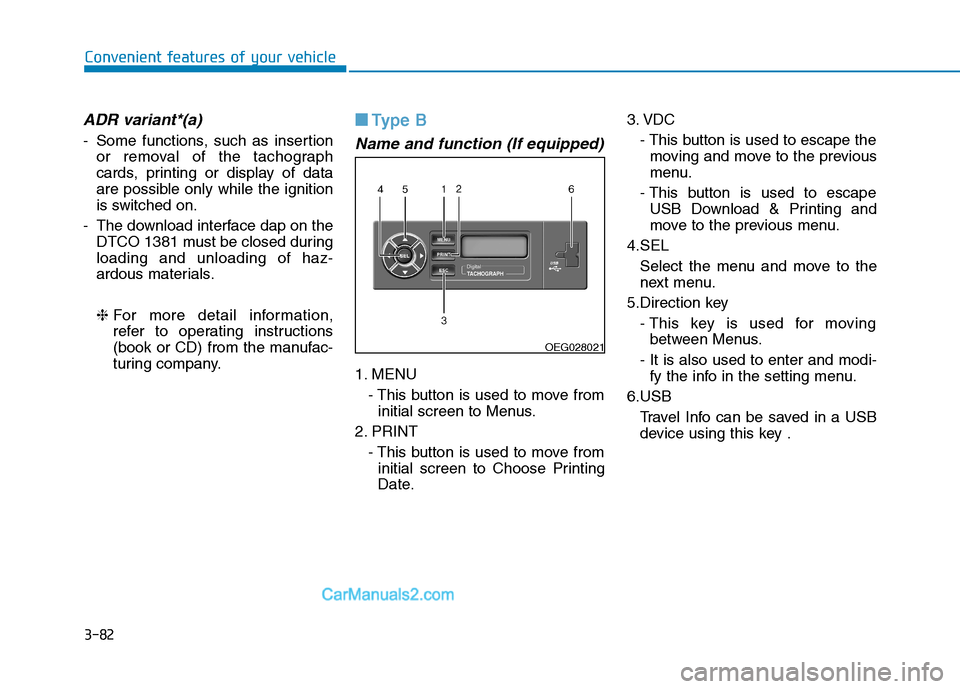
1. MENU
- This button is used to move frominitial screen to Menus.
2. PRINT - This button is used to move frominitial screen to Choose Printing
Date. 3. VDC
- This button is used to escape themoving and move to the previous
menu.
- This button is used to escape USB Download & Printing and
move to the previous menu.
4.SEL Select the menu and move to the
next menu.
5.Direction key - This key is used for movingbetween Menus.
- It is also used to enter and modi- fy the info in the setting menu.
6.USB Travel Info can be saved in a USBdevice using this key .
OEG028021