Page 127 of 473
3-65
Convenient features of your vehicle
3
Instant fuel economy (3)
This mode displays the instant fueleconomy during the last few sec-
onds when the vehicle speed ismore than 10 km/h (6.2 MPH).
- Fuel economy range:
0 ~ 20 km/L (L/100 km)
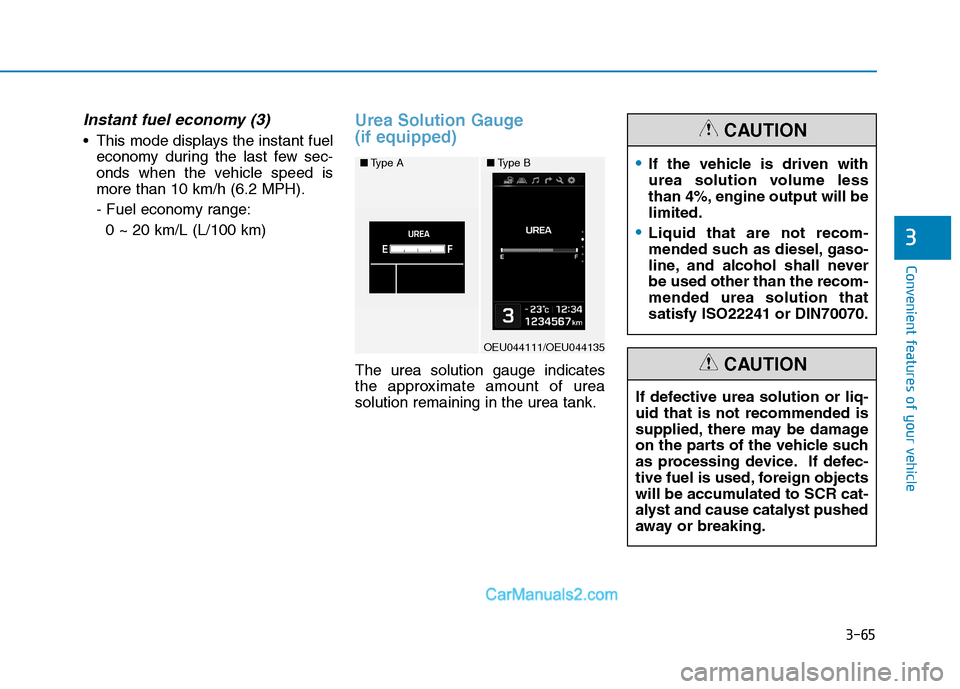
Urea Solution Gauge (if equipped)
The urea solution gauge indicates
the approximate amount of ureasolution remaining in the urea tank.
■ Type A
OEU044111/OEU044135
■Type BIf the vehicle is driven with
urea solution volume less
than 4%, engine output will belimited.
Liquid that are not recom-
mended such as diesel, gaso-
line, and alcohol shall neverbe used other than the recom-mended urea solution thatsatisfy ISO22241 or DIN70070.
CAUTION
If defective urea solution or liq- uid that is not recommended is
supplied, there may be damage
on the parts of the vehicle such
as processing device. If defec-
tive fuel is used, foreign objects
will be accumulated to SCR cat-
alyst and cause catalyst pushed
away or breaking.
CAUTION
Page 134 of 473
3-72
Convenient features of your vehicle
Vehicle DynamicControl (VDC) OFF
Indicator Light
This indicator light illuminates:
Once you set the ignition switch to the ON position.
- It illuminates for approximately 3 seconds and then goes off.
For more details, refer to “Vehicle
Dynamic Control (VDC)” in chapter5.
ECO Mode Indicator Light (if equipped)
This indicator light illuminates:
When you select “ECO” mode as drive mode.
Cruise Indicator Light
(if equipped)
This indicator light illuminates:
When the cruise control system is enabled.
For more details, refer to “Cruise
Control System” in chapter 5.
Cruise SET Indicator Light (if equipped)
This indicator light illuminates:
When the cruise control speed is set.
For more details, refer to “Cruise
Control System” in chapter 5.
ECO
SET
Do not watch the ECO indicator
light while driving. This will dis-
tract you and may cause an
accident that results in severe
personal injury.
WARNING
Page 135 of 473

3-73
Convenient features of your vehicle
3
Auto stop indicator(if equipped)
This indicator will illuminate when the engine enters the Idle Stop mode ofthe ISG (Idle Stop and Go) system.
When the automatic starting occurs, the auto stop indicator on the cluster
will blink for few seconds.
For more details, refer to the ISG (Idle Stop and Go) system in thechapter 5.
Information
When the engine automatically starts
by the ISG system, some warning
lights (ABS/EBD/VDC/VDC OFF)
may turn on for a few seconds.
This happens because of the low bat-
tery voltage. It does not mean the sys-
tem is malfunctioning.
Engine Oil Pressure Warning Light
This warning light illuminates:
Once you set the ignition switch to the ON position.
- It remains on until the engine isstarted.
When the engine oil pressure is low.
If the engine oil pressure is low:
1. Drive carefully to the nearest safe location and stop your vehicle.
2. Turn the engine off and check the engine oil level (For more details,
refer to “Engine Oil” in chapter 7) .
If the level is low, add oil as required.
If the warning light remains on
after adding oil or if oil is not avail-
able, we recommend that you
have the vehicle inspected by an
authorized HYUNDAI dealer as
soon as possible.
Malfunction indicator
lamp (MIL)
(check engine light)
This indicator light is part of theEngine Control System which moni-
tors various emission control system
components. If this light illuminates
while driving, it indicates that a
potential problem has been detected
somewhere in the emission controlsystem. This light will also illuminate when
the ignition switch is turned to the
ON position, and will go out in a few
seconds after the engine is started. If
it illuminates while driving, or does
not illuminate when the ignition key is
turned to the ON position, we recom-
mend that the system be checked by
an authorized HYUNDAI dealer.
Generally, your vehicle will continue
to be drivable, but we recommend
that the system be checked by an
authorized HYUNDAI dealer.
i
Page 146 of 473
3-84
Convenient features of your vehicle
3.Select travel data you want toinquire:
Nothing displays when there is no
travel info recorded.
4.Select travel time you want to inquire:
Displays the time elapsed from Key
On to Key Off.
5.Displays travel time info you inquired:
The travel info calculated above (4)
will be displayed.USB Download
1.Initial screen
It displays Date, Time, Driving con-
dition, Travel hour, Travel distance.
2.Select print travel info mode 3.Select USB download mode
4.Set and select travel period:
Select (Total, Day 1 ~ 99) by using
the direction (UP, down) key.
5.Check USB and download pro- gression is displayed.
- Click VDC in the downloading toescape and it goes to (3).
- If USB is not inserted, it goes to page (7).
- Don’t remove USB while down- load is in process.
6.Display the completion of data storage to USB device.
- If download is completed, removethe USB device.
7.Error massage is displayed when no USB is inserted.
OCY28403M
Page 149 of 473
3-87
Convenient features of your vehicle
3
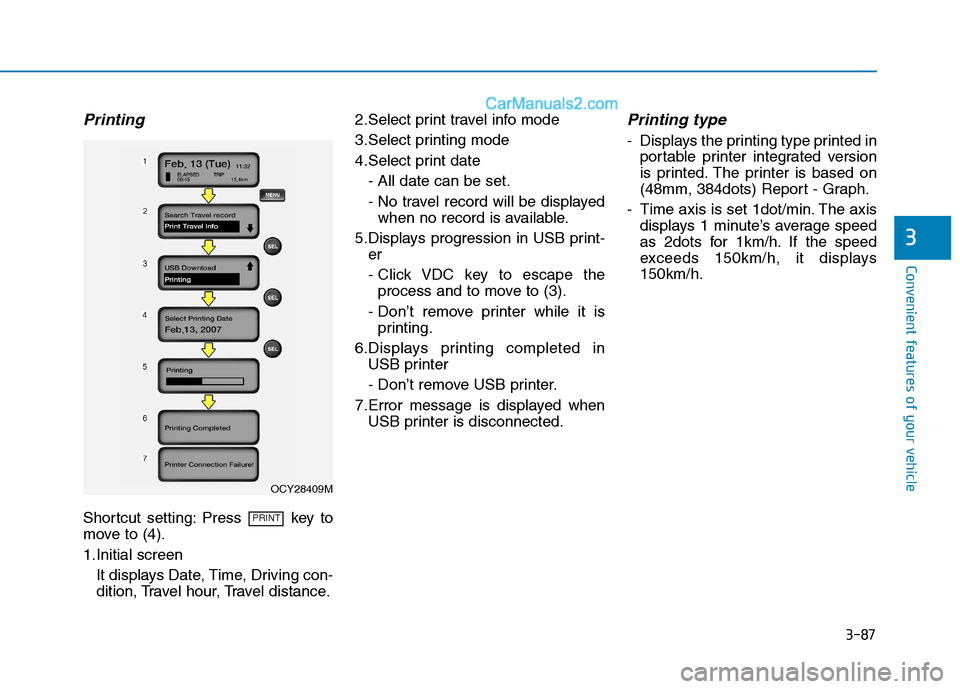
Printing
Shortcut setting: Press key to
move to (4).
1.Initial screenIt displays Date, Time, Driving con-
dition, Travel hour, Travel distance. 2.Select print travel info mode
3.Select printing mode
4.Select print date
- All date can be set.
- No travel record will be displayedwhen no record is available.
5.Displays progression in USB print- er
- Click VDC key to escape theprocess and to move to (3).
- Don’t remove printer while it is printing.
6.Displays printing completed in USB printer
- Don’t remove USB printer.
7.Error message is displayed when USB printer is disconnected.
Printing type
- Displays the printing type printed inportable printer integrated version
is printed. The printer is based on
(48mm, 384dots) Report - Graph.
- Time axis is set 1dot/min. The axis displays 1 minute’s average speed
as 2dots for 1km/h. If the speed
exceeds 150km/h, it displays150km/h.
PRINT
OCY28409M
Page 164 of 473

3-102
Convenient features of your vehicle
Windshield wiper/washer
A : Wiper speed control (front)(MIST) – Single wipe
O (OFF) – Off
--- (INT) – Intermittent wipe
AUTO - Automatic control wipe (if equipped)
1 (LO)– Low wiper speed2 (HI) – High wiper speed
B : Intermittent control wipe time adjustment
C : Wash with brief wipes (front)
Windshield wipers
Operates as follows when the igni-
tion switch is turned ON. (MIST) : For a single wiping cycle, move the lever to this(MIST) position and
release it. The wipers will
operate continuously if
the lever is held in thisposition.
O (OFF) : Wiper is not in operation --- (INT) : Wiper operates intermit-
tently at the same wiping
intervals. Use this mode in
light rain or mist. To vary
the speed setting, turn the
speed control knob.
AUTO : The rain sensor located on the upper end of the wind-shield glass senses the
amount of rainfall and con-
trols the wiping cycle for the
proper interval. The more it
rains, the faster the wiper
operates. When the rain
stops, the wiper stops. To
vary the speed setting, turnthe speed control knob (B).
If it does not work properly even
though your vehicle is inclined
backward according to passen-
ger's posture, or the headlightbeam is irradiated to the high or
low position, we recommend
that you have your vehicle
inspected by an authorized
HYUNDAI dealer. Do not attempt to inspect or
replace the wiring yourself.WARNING
WW
IIPP EERR SS AA NN DD WW AASSHH EERR SS
OEU045240
Page 180 of 473
3-118
Convenient features of your vehicle
When using the air conditioningsystem, monitor the temperature
gauge closely while driving up
hills or in heavy traffic when out-
side temperatures are high. Airconditioning system operation
may cause engine overheating.
Continue to use the blower fan
but turn the air conditioning sys-
tem off if the temperature gauge
indicates engine overheating.
When opening the windows in humid weather air conditioning
may create water droplets inside
the vehicle. Since excessive
water droplets may cause dam-
age to electrical equipment, air
conditioning should only be run
with the windows closed.
Air conditioning system operation
tips
If the vehicle has been parked indirect sunlight during hot weather,
open the windows for a short time
to let the hot air inside the vehicle
escape.
To help reduce moisture inside of the windows on rainy or humid
days, decrease the humidity inside
the vehicle by operating the airconditioning system.
During air conditioning system operation, you may occasionallynotice a slight change in enginespeed as the air conditioning com-
pressor cycles. This is a normal
system operation characteristic.
Use the air conditioning system every month only for a few minutes
to ensure maximum system per-
formance. When using the air conditioning
system, you may notice clear water
dripping (or even puddling) on the
ground under the passenger rear
side of the vehicle. This is a normal
system operation characteristic.
Operating the air conditioning sys- tem in the recirculated air position
provides maximum cooling, how-
ever, continual operation in this
mode may cause the air inside the
vehicle to become stale.
During cooling operation, you may occasionally notice a misty air flow
because of rapid cooling and
humid air intake. This is a normal
system operation characteristics.
NOTICE
Page 195 of 473
4-3
Multimedia System
4
Before entering a place with alow height clearance or a vehicle
wash, remove the antenna by
rotating it counterclockwise. If
not, the antenna may be dam-
aged.
When reinstalling your antenna, it is important that it is fullytightened and adjusted to the
upright position to ensure prop-
er reception. But it could be fold-
ed or removed when parking the
vehicle or when loading cargo
on the roof rack.
When cargo is loaded on the roof rack, do not place the cargonear the antenna pole to ensure
proper reception.
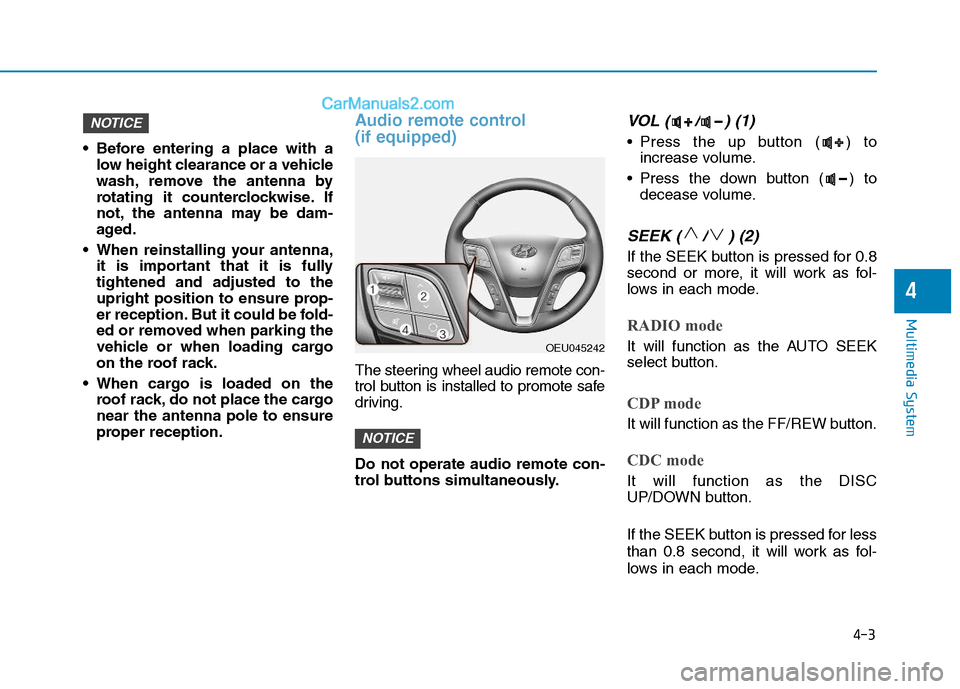
Audio remote control (if equipped)
The steering wheel audio remote con-
trol button is installed to promote safe
driving. Do not operate audio remote con-
trol buttons simultaneously.
VOL ( / ) (1)
• Press the up button ( ) toincrease volume.
Press the down button ( ) to decease volume.
SEEK ( / ) (2)
If the SEEK button is pressed for 0.8
second or more, it will work as fol-
lows in each mode.
RADIO mode
It will function as the AUTO SEEK
select button.
CDP mode
It will function as the FF/REW button.
CDC mode
It will function as the DISC
UP/DOWN button.
If the SEEK button is pressed for less
than 0.8 second, it will work as fol-
lows in each mode.
NOTICE
NOTICE
OEU045242