Page 188 of 503
3-94
Convenient features of your vehicle
Digital Speedometer
This message shows the speed of
the vehicle (km/h, MPH).
One time driving informationmode
This display shows trip distance (1),
average fuel economy (2) and the
vehicle can be driven with the
remaining fuel (3).
This information is displayed for a
few seconds when you turn off the
engine and then goes off automati-
cally. The information provided is cal-
culated according to each trip.
If the estimated distance is below
1mi. (1km), the distance to empty (3)
will display as "---" and a refuel mes-
sage will appear (4).
✽ ✽ NOTICE
If “Window Open or Sunroof Open”
warning message are displayed in
the cluster, this display may not be
displayed in the cluster.
ODH043308L
ODH043310N
Page 200 of 503
3-106
Convenient features of your vehicle
SPORT/SNOW ModeIndicator Light
This indicator light illuminates:
When you select "SPORT/SNOW"
mode as drive mode.
For more details, refer to "Drive
Mode Integrated Control System"
in chapter 5.
ECO mode indicator Light
This indicator light illuminates :
When you select “ECO” mode as
drive mode.
For more details, refer to "LCD
Display" in this chapter.
LKAS (Lane Keeping Assistant System)indicator (if equipped)
The LKAS indicator will illuminate
when you turn the lane keeping
assistant system on by pressing the
LKAS button.
If there is a problem with the system,
the yellow LKAS indicator will illumi-
nate.
For more details, refer to "Lane
Keeping Assistant System (LKAS)"
in chapter 5.
SPORT
SNOW
ECO
Do not watch the ECO indicator
light while driving. This will dis-
tract you and may cause an
accident that results in severe
personal injury.
WARNING
Page 209 of 503

3-115
Convenient features of your vehicle
3
Front fog lamp (if equipped)
Use the switch next to the headlamp
switch to turn the Fog Lights ON and
OFF. The fog lamps will turn on when
the fog lamp switch (1) is turned to
the ON position after the headlamps
are turned on.
To turn off the fog lamps, turn the
switch to the OFF position.
You can use the fog lamps only when
the headlamps are on low beam.
When the light switch is in the AUTO
position, you can also use the fog
lamps when the headlamps turn on
automatically. The fog lamps will go
OFF when the headlamps turn OFF.
✽ ✽NOTICE
When in operation, the fog lamps
consume large amounts of vehicle
electrical power. Only use the fog
lamps when visibility is poor.
Battery saver function
The purpose of this feature is to pre-
vent the battery from being dis-
charged. The system automatically
turns off the parking lamp when the
driver turns the engine off and opens
the driver-side door.
With this feature, the parking lamps
will turn off automatically if the driver
parks on the side of road at night.
If necessary, to keep the lamps on
when the engine is turned off, perform
the following:
1) Open the driver-side door.
2) Turn the parking lamps OFF and
ON again using the light switch on
the steering column.
Headlamp delay function (if equipped)
If you place the Engine Start/Stop
button in to the ACC or OFF position
with the headlamps ON, the head-
lamps (and/or parking lamps) remain
on for about 5 minutes. However,
with the engine off if the driver’s door
is opened and closed, the head-
lamps (and/or parking lamps) are
turned off after 15 seconds.
The headlamps (and/or parking
lamps) can be turned off by pressing
the lock button on the smart key
twice or turning the light switch to the
OFF or AUTO position. However, if
you turn the light switch to the AUTO
position when it is dark outside, the
headlamps will not be turned off.
You can activate or deactivate the
Headlamp Delay function from the
User Settings Mode (Light) on the
LCD display.
For more details, refer to "LCD
Display" in this chapter.
ODH043177N
Page 212 of 503

3-118
Convenient features of your vehicle
Headlamp and Parking lamp
When the headlamp (lamp switch in
the headlamp or AUTO position) is on
and all doors (and trunk) are locked
and closed, the parking lamp and
headlamp will come on for 15 seconds
if/or any of the below is performed.
When the door unlock button ispressed on the smart key.
At this time, if you press the door lock
or unlock button on the smart key the
parking lamp and headlamp will turn
off immediately.
You can activate or deactivate the
Welcome Light from the User
Settings Mode (Light) on the LCD
display.
For more details, refer to "LCD
Display" in this chapter.
Interior lamp
When the interior lamp switch is in
the DOOR position and all doors (and
trunk) are closed and locked, the
room lamp will come on for 30 sec-
onds if any of the below is performed.
When the door unlock button is pressed on the smart key.
When the button of the outside door handle is pressed.
At this time, if you press the door lock
or unlock button on the smart key the
room lamp will turn off immediately.
Interior lights
Do not use the interior lights
when driving in the dark. The inte-
rior lights may obscure your view
and cause an accident.
WARNING
Do not use the interior lights for
extended periods when the
engine is turned off or the bat-
tery will discharge.
CAUTION
Page 237 of 503
3-143
Convenient features of your vehicle
3
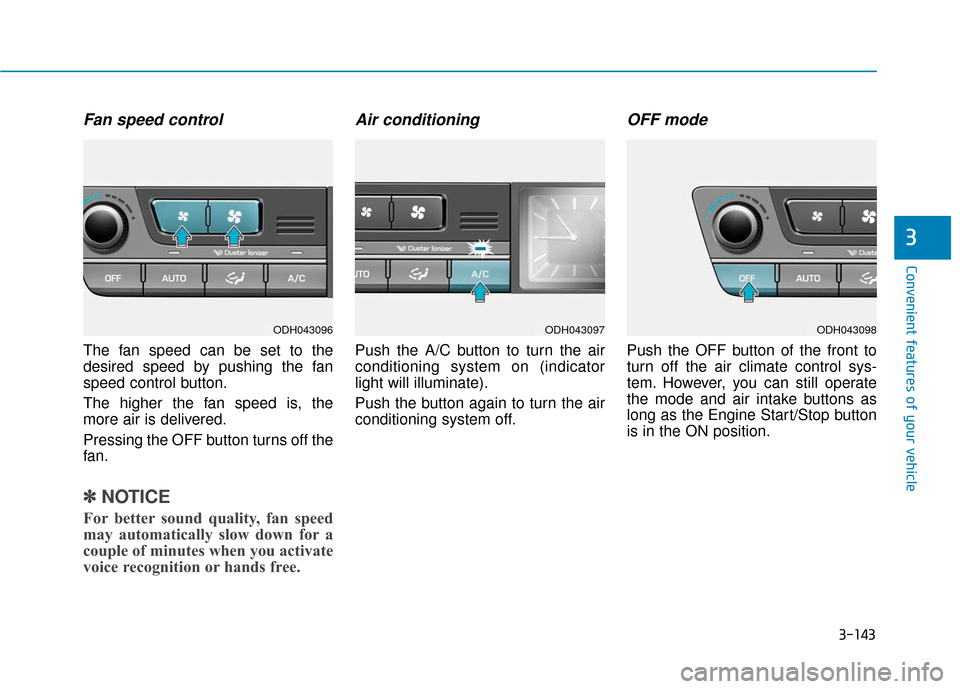
Fan speed control
The fan speed can be set to the
desired speed by pushing the fan
speed control button.
The higher the fan speed is, the
more air is delivered.
Pressing the OFF button turns off the
fan.
✽ ✽NOTICE
For better sound quality, fan speed
may automatically slow down for a
couple of minutes when you activate
voice recognition or hands free.
Air conditioning
Push the A/C button to turn the air
conditioning system on (indicator
light will illuminate).
Push the button again to turn the air
conditioning system off.
OFF mode
Push the OFF button of the front to
turn off the air climate control sys-
tem. However, you can still operate
the mode and air intake buttons as
long as the Engine Start/Stop button
is in the ON position.
ODH043096ODH043097ODH043098
Page 240 of 503

3-146
Convenient features of your vehicle
When using the air conditioning system, you may notice clear water
dripping (or even puddling) on the
ground under the passenger side
of the vehicle. This is a normal sys-
tem operation characteristic.
Operating the air conditioning sys- tem in the recirculated air position
provides maximum cooling, how-
ever, continual operation in this
mode may cause the air inside the
vehicle to become stale.
During cooling operation, you may occasionally notice a misty air flow
because of rapid cooling and
humid air intake. This is a normal
system operation characteristic.
Climate control air filter
The climate control air filter installed
behind the glove box filters the dust
or other pollutants that come into the
vehicle from the outside through the
heating and air conditioning system.
If dust or other pollutants accumulate
in the filter over a period of time, the
air flow from the air vents may
decrease, resulting in moisture accu-
mulation on the inside of the wind-
shield even when the outside (fresh)
air position is selected. If this hap-
pens, have the climate control air fil-
ter replaced by an authorized
HYUNDAI dealer.
✽ ✽ NOTICE
• Replace the filter according to the
maintenance schedule.
If the car is being driven in severe
conditions such as dusty or rough
roads, more frequent air condi-
tioner filter inspections and
changes are required.
• When the air flow rate suddenly decreases, the system should be
checked at an authorized
HYUNDAI dealer.
1LDA5047
Outside air
Recirculatedair
Climate control air filter Blower
Evaporatorcore Heater core
Page 242 of 503

3-148
Convenient features of your vehicle
W
WI
IN
N D
DS
SH
H I
IE
E L
LD
D
D
D E
EF
FR
R O
O S
ST
T I
IN
N G
G
A
A N
N D
D
D
D E
EF
FO
O G
GG
GI
IN
N G
G
For maximum defrosting, set the
temperature control to the extreme
right/hot position and the fan speed
control to the highest speed.
If warm air to the floor is desired while defrosting or defogging, set the
mode to the floor-defrost position.
Before driving, clear all snow and ice from the windshield, rear win-
dow, outside rear view mirrors, and
all side windows.
Clear all snow and ice from the hood and air inlet in the cowl grill to
improve heater and defroster effi-
ciency and to reduce the probability
of fogging up the inside of the wind-
shield.
✽ ✽ NOTICE
If the engine temperature is still cold
after starting, then a brief engine
warm up period may be required for
the vented air flow to become warm
or hot.
To defog inside windshield
1. Select desired fan speed.
2. Select desired temperature.
3. Press the defrost button ( ).
4. The outside (fresh) air position will
be selected automatically.
If the outside (fresh) air position is
not selected automatically, adjust the
corresponding button manually.
If the position is selected, lower
fan speed is adjusted to a higher fan
speed.
Windshield heating
Do not use the or posi-
tion during cooling operation in
extremely humid weather. The
difference between the temper-
ature of the outside air and that
of the windshield could cause
the outer surface of the wind-
shield to fog up, causing loss of
visibility could cause an acci-
dent resulting in serious injury
or death. In this case, set the
mode selection knob or button
to the position and fan
speed control knob or button to
a lower speed.
WARNING
ODH043100
■ Type A
■ Type B
Page 246 of 503
3-152
Convenient features of your vehicle
Rear climate system ON/OFF
If you would like to cancel the rear
climate system, turn off the rear cli-
mate in the AVN climate monitor.
CO2 control auto air conditioner
(if equipped)
When driving, the auto air condition-
er controls CO2 concentration and
maintains pleasant air in a vehicle.
When the system controls CO2, the
symbol ( ) displays in the AVN
monitor.You can turn on or off the CO2 con-
trol function as below.
1. Start the engine.
2. While pressing the driver mode
selection button, press the air intake
control button (Recirculated air) at
least 4 times within 2 seconds.
ODH043168L
ODH044169N
■
Type A
■ Type B
ODH044143N
■
Type B