Page 159 of 475

Features of your vehicle
76
4
PARKING ASSIST SYSTEM (IF EQUIPPED)
The parking assist system assists the
driver during movement of the vehicle
by chiming if any object is sensed
within the distance of 24 in. (60 cm) in
front and 47 in. (120 cm) behind the
vehicle. This system is a supplemental
system and it is not intended to nor
does it replace the need for extreme
care and attention of the driver. The sensing range and objects
detectable by the sensors are limit-
ed. Whenever moving pay as much
attention to what is in front and
behind of you as you would in a vehi-
cle without a parking assist system.
The front parking assist system has
2 sensors on the front bumper. These
2 sensors can detect right and left
side area. It means the front parking
assist system can not detect the cen-
ter area of the front bumper.
Operation of the parking
assist system
Operating condition
This system activates when the
parking assist button is pressed
with the ignition switch ON.
OBK042226
OBK042131
■ Type A
■Type B
S
S
S
S
e
e
e
e
n
n
n
n
s
s
s
s
o
o
o
o
r
r
r
r
S
S
S
S
e
e
e
e
n
n
n
n
s
s
s
s
o
o
o
o
r
r
r
r
WARNING
The parking assist system
should only be considered as a
supplementary function. The
driver must check the front and
rear view. The operational func-
tion of the parking assist system
can be affected by many factors
and conditions of the surround-
ings, so the responsibility rests
always with the driver.
OBK042227
procarmanuals.com
Page 162 of 475

479
Features of your vehicle
Detecting range may decreasewhen:
1. Outside air temperature is extremely hot or cold.
2. Undetectable objects smaller than 80 in. (1 m) and narrower than 6 in.
(14 cm) in diameter.
The following objects may not be
recognized by the sensor:
1. Sharp or slim objects such as ropes, chains or small poles.
2. Objects, which tend to absorb sen- sor frequency such as clothes,
spongy material or snow.
✽ ✽NOTICE
1. The warning may not sound
sequentially depending on the
speed and shapes of the objects
detected.
2. The parking assist system may malfunction if the vehicle bumper
height or sensor installation has
been modified. Any non-factory
installed equipment or accessories
may also interfere with the sensor
performance.
3. Sensor may not recognize objects less than 12 in. (30 cm) from the
sensor, or it may sense an incor-
rect distance. Use with caution.
4. When the sensor is frozen or stained with snow or water, the
sensor may be inoperative until
the stains are removed using a
soft cloth.
5. Do not push, scratch or strike the sensor with any hard objects that
could damage the surface of the
sensor. Sensor damage could
occur.
✽ ✽NOTICE
This system can only sense objects
within the range and location of the
sensors, it can not detect objects in
other areas where sensors are not
installed. Also, small or slim objects,
or objects located between sensors
may not be detected.
Always visually check in front and
behind the vehicle when driving.
Be sure to inform any drivers in the
vehicle that may be unfamiliar with
the system regarding the systems
capabilities and limitations.
WARNING
Pay close attention when the
vehicle is driven close to objects
on the road, particularly pedestri-
ans, and especially children. Be
aware that some objects may not
be detected by the sensors, due
to the objects distance, size or
material, all of which can limit the
effectiveness of the sensor.
Always perform a visual inspec-
tion to make sure the vehicle is
clear of all obstructions before
moving the vehicle in any direc-
tion.
procarmanuals.com
Page 164 of 475
481
Features of your vehicle
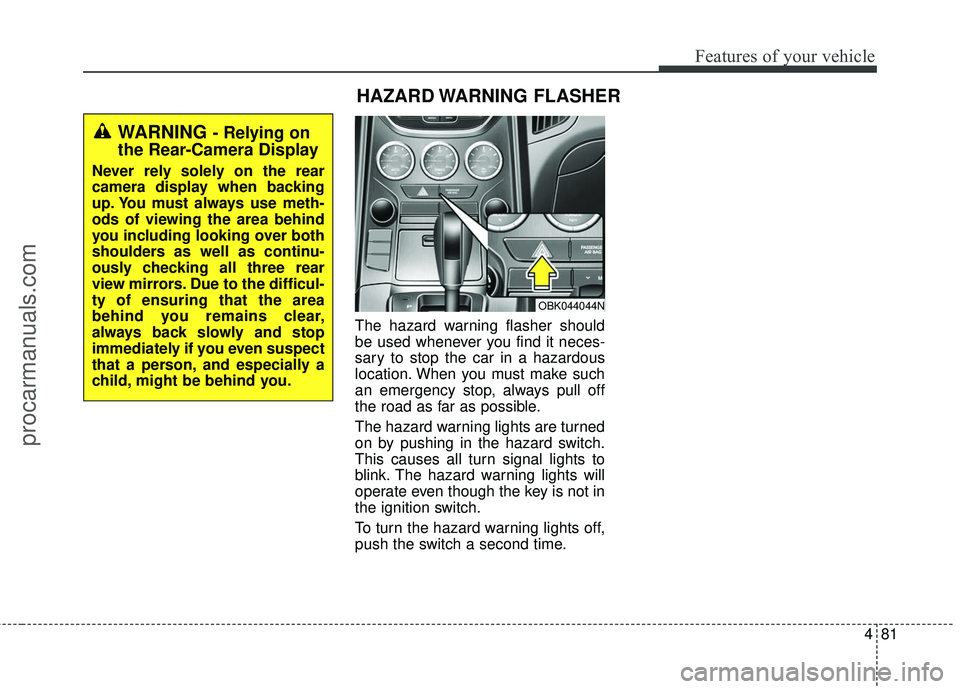
The hazard warning flasher should
be used whenever you find it neces-
sary to stop the car in a hazardous
location. When you must make such
an emergency stop, always pull off
the road as far as possible.
The hazard warning lights are turned
on by pushing in the hazard switch.
This causes all turn signal lights to
blink. The hazard warning lights will
operate even though the key is not in
the ignition switch.
To turn the hazard warning lights off,
push the switch a second time.
HAZARD WARNING FLASHER
OBK044044N
WARNING - Relying on
the Rear-Camera Display
Never rely solely on the rear
camera display when backing
up. You must always use meth-
ods of viewing the area behind
you including looking over both
shoulders as well as continu-
ously checking all three rear
view mirrors. Due to the difficul-
ty of ensuring that the area
behind you remains clear,
always back slowly and stop
immediately if you even suspect
that a person, and especially a
child, might be behind you.
procarmanuals.com
Page 166 of 475

483
Features of your vehicle
Daytime running light
(if equipped)
Daytime Running Lights (DRL) can
make it easier for others to see the
front of your vehicle during the day.
DRL can be helpful in many different
driving conditions, and it is especially
helpful after dawn and before sunset.
The DRL system turns OFF when:
1. The multifunction switch is in theOFF position. (if equipped)
2. The headlights are ON.
3. The turn signal is ON. (the blinking side of the DRL will turn off)
4. The hazard warning light is ON.
5. The parking brake is applied.
6. Engine stops.
Lighting control
The light switch has a Headlight and
a Parking light position.
To operate the lights, turn the knob at
the end of the control lever to one of
the following positions:
(1) OFF position
(2) Parking light position
(3) Headlight position
(4) Auto light position (if equipped)
Parking light position ( )
When the light switch is in the park-
ing light position (1st position), the
tail, license and instrument panel
lights are ON.
OBK049046OBK049045
procarmanuals.com
Page 198 of 475
4115
Features of your vehicle
3. Press the defrost button ( ).
4. The outside (fresh) air will beselected automatically. If the
position is selected, air condition-
ing will also be selected automati-
cally.
If the air conditioning and/or outside
(fresh) air position are not selected
automatically, press the correspon-
ding button manually.
To defrost outside windshield
1. Set the fan speed to the highest (extreme right) position.
2. Set the temperature to the extreme hot position. 3. Press the defrost button ( ).
4. The outside (fresh) air and air con-
ditioning will be selected automat-
ically.
If the position is selected, lower
fan speed is adjusted to a higher fan
speed.
OBK042108
OBK042270L
■
Type A, B
■ Type C, D
procarmanuals.com
Page 199 of 475
Features of your vehicle
116
4
Automatic climate control sys-
tem
To defog inside windshield
1. Set the fan speed to the desired
position. 2. Select desired temperature.
3. Press the defrost button ( ).
4. The air conditioning will be turned
on according to the detected
ambient temperature and outside
(fresh) air position will be selected
automatically.
If the air conditioning and outside
(fresh) air position are not selected
automatically, adjust the correspon-
ding button manually. If the posi-
tion is selected, lower fan speed is
adjusted to a higher fan speed.
To defrost outside windshield
1. Set the fan speed to the highest position.
2. Set the temperature to the extreme hot position.
OBK042072
OBK042275L
■
Type A, B
■ Type C, D
OBK042073
OBK042276L
■
Type A, B
■ Type C, D
procarmanuals.com
Page 227 of 475
✽
✽NOTICE - USING THE Voice
Recognition
• When using the voice recognition feature, only commands listed
within the user's manual are sup-
ported.
• Be aware that during the opera- tion of the voice recognition sys-
tem, pressing any key other than
the key or touching the screen
will terminate voice recognition
mode.
• For superior voice recognition performance, position the micro-
phone used for voice recognition
above the head of the driver’s seat
and maintain a proper position
when saying commands.
• Within the following situations, voice recognition may not function
properly due to external sound.
- When the windows and sunroof are open
- When the wind of the cooling / heating device is strong
- When entering and passing through tunnels (Continued)(Continued)
- When driving on rugged and uneven roads
- During severe rain (heavy rains, windstorms)
• Phone related voice commands can be used only when a
Bluetooth
®Wireless Technology
device is connected.
• When making calls by stating a name, the corresponding contact
must be downloaded and stored
within the audio system.
• After downloading the Bluetooth
®
Wireless Technology phone book,
it takes some times to convert the
phone book data into voice infor-
mation. During this time, voice
recognition may not properly
operate.
• Pronounce the voice commands naturally and clearly as if in a nor-
mal conversation.
4144
Features of your vehicle
procarmanuals.com
Page 264 of 475

4181
Features of your vehicle
✽
✽NOTICE
•Bluetooth®Wireless Technology
features supported within the
vehicle are as follows. Some fea-
tures may not be supported
depending on your Bluetooth
®
Wireless Technology device.
- Outgoing/Incoming Handsfree
calls
- Operations during a call (Switch to Private, Switch to
call waiting, MIC on/off)
- Downloading Call History
- Downloading Mobile Contacts
- Bluetooth
®Wireless Technology
device auto connection
- Bluetooth Audio Streaming
• Up to five Bluetooth
®Wireless
Technology devices can be paired
to the Car Handsfree system.
• Only one Bluetooth
®Wireless
Technology device can be connect-
ed at a time.
• Other devices cannot be paired while a Bluetooth
®Wireless
Technology device is connected. (Continued)(Continued)
• Only
Bluetooth
®Wireless
Technology Handsfree and
Bluetooth audio related features
are supported.
• Bluetooth related operations are possible only within devices that
support Handsfree or audio fea-
tures, such as a Bluetooth
®
Wireless Technology mobile phone
or a Bluetooth audio device.
• If a connected Bluetooth
®Wireless
Technology device becomes dis-
connected due to being out of com-
munication range, turning the
device OFF, or a Bluetooth
®
Wireless Technology communica-
tion error, corresponding
Bluetooth
®Wireless Technology
devices are automatically searched
and reconnected.
• If the system becomes unstable due to communication errors
between the car Handsfree and the
Bluetooth
®Wireless Technology
device, reset the device by turning
off and back on again. Upon reset-
ting Bluetooth
®Wireless
Technology device, the system will
be restored. (Continued)(Continued)
• After pairing is complete, a con-
tacts download request is sent
once to the mobile phone. Some
mobile phones may require confir-
mation upon receiving a download
request, ensure your mobile phone
accepts the connection. Refer to
your phones user’s manual for
additional information regarding
phone pairing and connections.
procarmanuals.com

