2016 HYUNDAI COUPE ESP
[x] Cancel search: ESPPage 95 of 475

Features of your vehicle
12
4
Transmitter precautions
✽
✽
NOTICE
The transmitter will not work if any
of the following occur:
• The ignition key is in ignition
switch.
• You exceed the operating distance limit (about 90 feet [30 m]).
• The battery in the transmitter is weak.
• Other vehicles or objects may be blocking the signal.
• The weather is extremely cold.
• The transmitter is close to a radio transmitter such as a radio station
or an airport which can interfere
with normal operation of the
transmitter.
When the transmitter does not work
correctly, open and close the door
with the ignition key. If you have a
problem with the transmitter, contact
an authorized HYUNDAI dealer.
(Continued)(Continued)
• If the transmitter is in close prox-
imity to your cell phone or smart
phone, the signal from the trans-
mitter could be blocked by normal
operation of your cell phone or
smart phone. This is especially
important when the phone is active
such as making call, receiving
calls, text messaging, and/or send-
ing/receiving emails. Avoid placing
the transmitter and your cell
phone or smart phone in the same
pants or jacket pocket and main-
tain adequate distance between the
two devices.
This device complies with Part 15
of the FCC rules.
Operation is subject to the following
two conditions:
1. This device may not cause harm-
ful interference, and
2. This device must accept any inter- ference received, including inter-
ference that may cause undesired
operation.
CAUTION
Keep the transmitter away fromwater or any liquid and fire. Ifthe inside of the transmittergets damp (due to drinks ormoisture), or is heated, internalcircuit may malfunction, exclud-ing the car from the warranty.
CAUTION
Changes or modifications notexpressly approved by the partyresponsible for compliancecould void the user’s authorityto operate the equipment. If thekeyless entry system is inopera-tive due to changes or modifica-tions not expressly approved bythe party responsible for com-pliance, it will not be covered byyour manufacturer’s vehiclewarranty.
procarmanuals.com
Page 106 of 475

423
Features of your vehicle
Power windows
The ignition switch must be in the ON
position for power windows to oper-
ate.
Each door has a power window
switch that controls the door's win-
dow. The power windows can be
operated for approximately 30 sec-
onds after the ignition key is removed
or turned to the ACC or LOCK posi-
tion. However, if the doors open, the
power windows cannot be operated
within the 30 second period after
ignition key is removed or turned to
the ACC or LOCK position.
✽ ✽NOTICE
While driving with the sunroof in an
open (or partially open) position,
your vehicle may demonstrate a
wind buffeting or pulsation noise.
This noise is a normal occurrence
and can be reduced or eliminated by
slightly reducing the size of the sun-
roof opening.
Window opening and closing
The driver’s door has a master power
window switch that controls all the
windows in the vehicle.
To open or close a window, press
down or pull up the front portion of
the corresponding switch to the first
detent position (3).
Auto up/down window
(if equipped)
Depressing or pulling up the power
window switch momentarily to the
second detent position (4) complete-
ly lowers or lifts the window even
when the switch is released. To stop
the window at the desired position
while the window is in operation,
momentarily pull the switch in the
direction opposite of the window’s
movement.
OBK049138N
procarmanuals.com
Page 112 of 475

429
Features of your vehicle
Emergency fuel filler lid
release
If the fuel filler lid does not open, use
the fuel filler lid release located in the
left trunk side wall. Pull on the
release to manually release the fuel
filler lid.
(Continued)
When refueling, always shutthe engine off. Sparks pro-
duced by electrical compo-
nents related to the engine
can ignite fuel vapors causing
a fire. Once refueling is com-
plete, check to make sure the
filler cap and filler door are
securely closed, before start-
ing the engine.
DO NOT use matches or a lighter and DO NOT SMOKE or
leave a lit cigarette in your
vehicle while at a gas station
especially during refueling.
Automotive fuel is highly
flammable and can, when
ignited, result in fire.
If a fire breaks out during refu- eling, leave the vicinity of the
vehicle, and immediately con-
tact the manager of the gas
station and then contact the
local fire department or 911.
Follow any safety instructions
they provide.CAUTION
Make sure to refuel your vehi- cle according to the “Fuelrequirements” suggested insection 1.
If the fuel filler cap requires replacement, use only a gen-uine HYUNDAI cap or theequivalent specified for yourvehicle. An incorrect fuel fillercap can result in a seriousmalfunction of the fuel systemor emission control system.
Do not spill fuel on the exteri- or surfaces of the vehicle. Anytype of fuel spilled on paintedsurfaces may damage thepaint.
After refueling, make sure the fuel cap is installed securelyto prevent fuel spillage in theevent of an accident.
CAUTION
Do not pull the handle exces-sively, otherwise the luggagearea trim or release handle maybe damaged.
OBK042014
procarmanuals.com
Page 125 of 475

Features of your vehicle
42
4
Reprogramming a single
HomeLink®button
To program a device to HomeLink®
using a HomeLink®button previously
trained, follow these steps:
1. Press and hold the desired HomeLink
®button. DO NOT release
the button.
2. The indicator light will begin to flash after 20 seconds. Without releasing
the HomeLink
®button, proceed
with "Programming" step 2.
For questions or comments, contact
HomeLink
®at www.homelink.comor
1-800-355-3515. Erasing HomeLink
®buttons
Individual buttons cannot be erased.
However, to erase all three pro-
grammed buttons:
1. Press and hold the two outer HomeLink
®buttons until the indi-
cator light begins to flash after 10
seconds.
2. Release both buttons. Do not hold for longer than 20 seconds.
The Integrated HomeLink
®Wireless
Control System is now in the training
(learn) mode and can be pro-
grammed at any time following the
appropriate steps in the Programming
sections above. FCC ID: NZLTLMHL4
IC: 4112A-TLMHL4
This device complies with Part 15
of the FCC Rules.
Operation is subject to the following
two conditions:
1. This device may not cause harm-
ful interference, and
2. This device must accept any inter- ference received, including inter-
ference that may cause undesired
operation.
CAUTION
The transceiver has been testedand complies with FCC andIndustry Canada rules. Changesor modifications not expresslyapproved by the party responsi-ble for compliance could voidthe user's authority to operatethe device.
procarmanuals.com
Page 127 of 475

Features of your vehicle
44
4
Outside rearview mirrors
The outside rearview mirrors control
switch allows you to adjust the posi-
tion of the left and right outside
rearview mirrors. To adjust the posi-
tion of either mirror, push the switch
(1) to R or L to select the right side
mirror or the left side mirror, then
press a corresponding point on the
mirror adjustment control to position
the selected mirror up, down, left or
right.
After adjustment, put the switch into
neutral (center) position to prevent
the inadvertent adjustment.
Folding the outside rearview mirror
To fold the outside rearview mirror,
grasp the housing of the mirror and
then fold it toward the rear of the
vehicle.
CAUTION
The mirrors stop moving when
they reach the maximumadjusting angles, but themotor continues to operatewhile the switch is depressed.Do not depress the switchlonger than necessary, themotor may be damaged.
Do not attempt to adjust the outside rearview mirror byhand. Doing so may damagethe parts.
OBK049024NOBK049137N
procarmanuals.com
Page 143 of 475

Features of your vehicle
60
4
engine (for auto transmission)
If you try to start the engine with the
shift lever not in the P(Park) or
N(Neutral) position, the warning illu-
minates for about 10 seconds on the
LCD display.
You can also start the engine with
the shift lever in the N(Neutral) posi-
tion, but for your safety start the
engine with the shift lever in the
P(Park) position.
When the stop lamp switch fuse is
disconnected, the warning illumi-
nates for 10 seconds on the LCD dis-
play.
Replace the fuse with a new one. If
that is not possible you can start the
engine by pressing the engine
start/stop button for 10 seconds in
ACC.Low tire pressure (if equipped)
The low tire pressure position telltale
will appear when one or more of your
tires are under-inflated. It will indicate
the corresponding under-inflated tire.
For more details, refer to “TPMS” in
section 6.
OBK042217LOBK042239LOBK042238L
procarmanuals.com
Page 156 of 475
473
Features of your vehicle
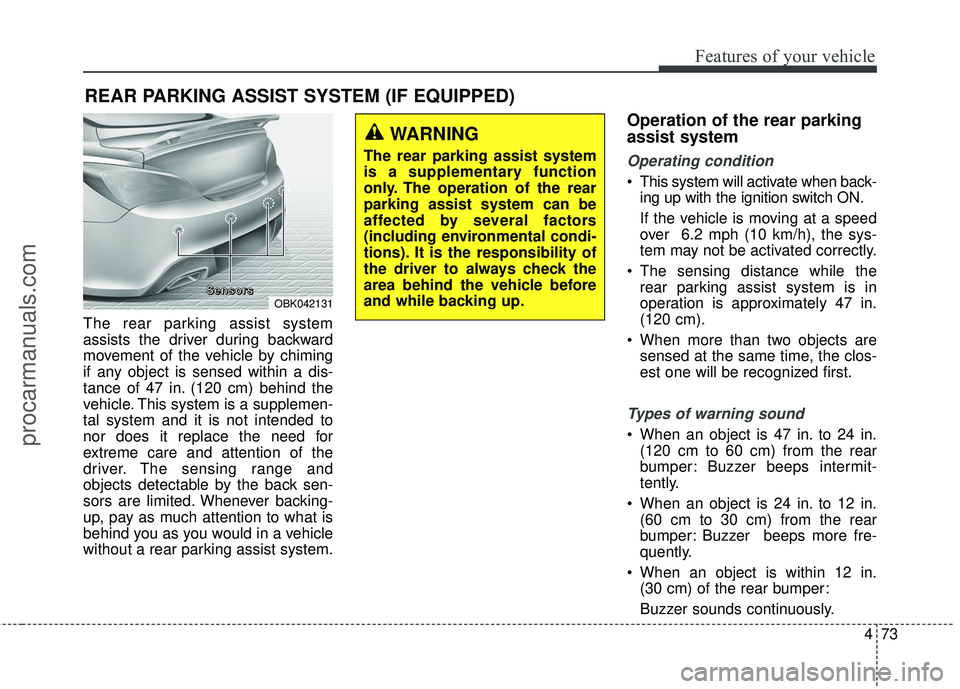
The rear parking assist system
assists the driver during backward
movement of the vehicle by chiming
if any object is sensed within a dis-
tance of 47 in. (120 cm) behind the
vehicle. This system is a supplemen-
tal system and it is not intended to
nor does it replace the need for
extreme care and attention of the
driver. The sensing range and
objects detectable by the back sen-
sors are limited. Whenever backing-
up, pay as much attention to what is
behind you as you would in a vehicle
without a rear parking assist system.
Operation of the rear parking
assist system
Operating condition
This system will activate when back-ing up with the ignition switch ON.
If the vehicle is moving at a speed
over 6.2 mph (10 km/h), the sys-
tem may not be activated correctly.
The sensing distance while the rear parking assist system is in
operation is approximately 47 in.
(120 cm).
When more than two objects are sensed at the same time, the clos-
est one will be recognized first.
Types of warning sound
When an object is 47 in. to 24 in.(120 cm to 60 cm) from the rear
bumper: Buzzer beeps intermit-
tently.
When an object is 24 in. to 12 in. (60 cm to 30 cm) from the rear
bumper: Buzzer beeps more fre-
quently.
When an object is within 12 in. (30 cm) of the rear bumper:
Buzzer sounds continuously.
REAR PARKING ASSIST SYSTEM (IF EQUIPPED)
WARNING
The rear parking assist system
is a supplementary function
only. The operation of the rear
parking assist system can be
affected by several factors
(including environmental condi-
tions). It is the responsibility of
the driver to always check the
area behind the vehicle before
and while backing up.
OBK042131
S
S
S
S
e
e
e
e
n
n
n
n
s
s
s
s
o
o
o
o
r
r
r
r
s
s
s
s
procarmanuals.com
Page 158 of 475

475
Features of your vehicle
✽
✽NOTICE
This system can only sense objects
within the range and location of the
sensors; It can not detect objects in
other areas where sensors are not
installed. Also, small or slim objects,
such as poles or objects located
between sensors may not be detected
by the sensors.
Always visually check behind the
vehicle when backing up.
Be sure to inform any drivers of the
vehicle that may be unfamiliar with
the system regarding the systems
capabilities and limitations.
Self-diagnosis
If you don’t hear an audible warning
sound or if the buzzer sounds inter-
mittently when shifting the gear to the
R (Reverse) position, this may indi-
cate a malfunction in the rear parking
assist system. If this occurs, have
your vehicle checked by an author-
ized HYUNDAI dealer as soon as
possible.WARNING
Pay close attention when the
vehicle is driven close to
objects on the road, particularly
pedestrians, and especially
children. Be aware that some
objects may not be detected by
the sensors, due to the object’s
distance, size or material, all of
which can limit the effective-
ness of the sensor. Always per-
form a visual inspection to
make sure the vehicle is clear of
all obstructions before moving
the vehicle in any direction.
WARNING
Your new vehicle warranty does
not cover any accidents or dam-
age to the vehicle or injuries to
its occupants due to a rear
parking assist system malfunc-
tion. Always drive safely and
cautiously.
procarmanuals.com