Page 366 of 661
365
uuCustomized Features u
Continued
Features
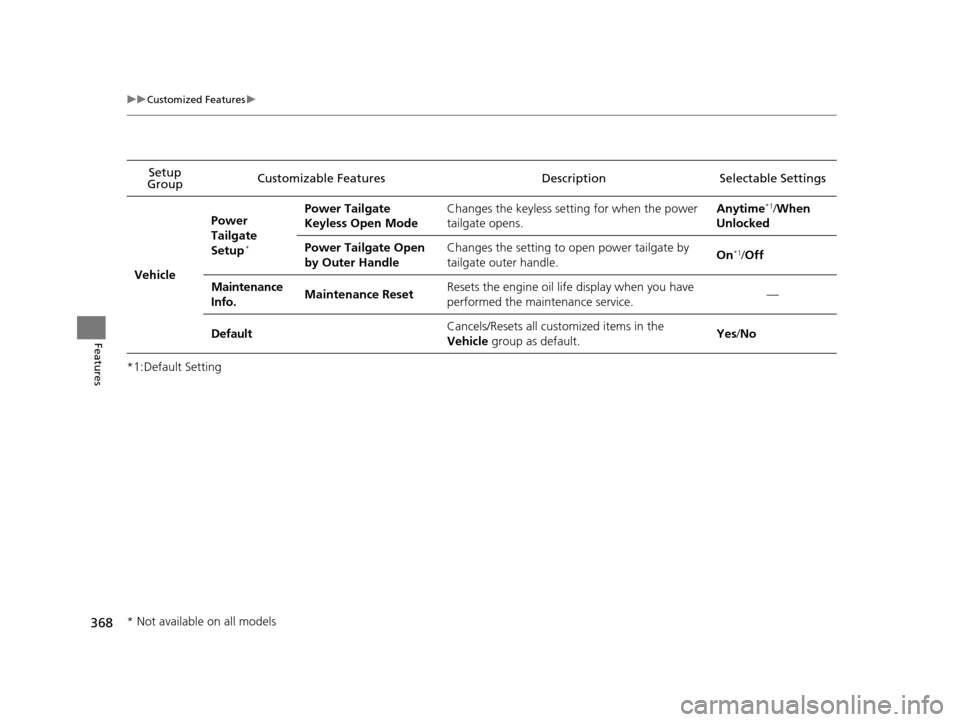
*1:Default SettingSetup
Group Customizable Features Description Selectable Settings
Vehicle
Meter
Setup
Display km/Miles
Selects the trip computer units. Auto
/km /Miles
*1
(U.S.)
Auto /km*1/Miles
(Canada)
Driving
Position
Setup Easy Entry/Exit
Moves the seat rearward when you get in/get out of
the vehicle. Changes the
setting for this feature. On
*1/
Off
Memory Position Link
*Turns the driving position memory system on and off. On*1/Off
Keyless
Access
Setup Door Unlock Mode
Changes which doors unlock when you grab the
driver’s door handle. Driver Door Only
*1/
All Doors
Keyless Access Light Flash Causes some exterior lights to flash when you unlock/
lock the doors. On
*1/
Off
Keyless Access Beep Causes the beeper to soun
d when you unlock/lock the
doors. On
*1/
Off
Remote Start System On/
Off Turns the remote engine start feature on and off.
On
*1/Off
* Not available on all models
16 PILOT-31TG76000.book 365 ページ 2015年6月15日 月曜日 午前11時30分
Page 369 of 661
368
uuCustomized Features u
Features
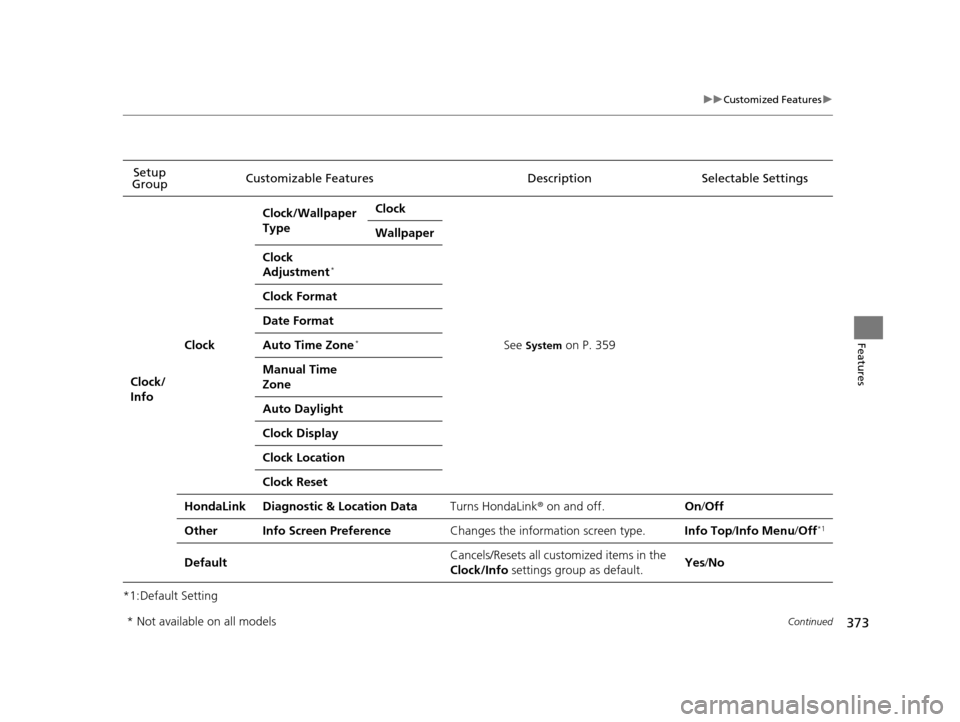
*1:Default SettingSetup
Group Customizable Features Descri
ption Selectable Settings
Vehicle
Power
Tailgate
Setup
*
Power Tailgate
Keyless Open ModeChanges the keyless setting for when the power
tailgate opens.Anytime*1/When
Unlocked
Power Tailgate Open
by Outer HandleChanges the setting to open power tailgate by
tailgate outer handle.On*1/ Off
Maintenance
Info.Maintenance ResetResets the engine oil life display when you have
performed the maintenance service.—
DefaultCancels/Resets all cust omized items in the
Vehicle group as default.Yes/No
* Not available on all models
16 PILOT-31TG76000.book 368 ページ 2015年6月15日 月曜日 午前11時30分
Page 370 of 661
369
uuCustomized Features u
Continued
Features
*1:Default SettingSetup
Group Customizable Features Descri
ption Selectable Settings
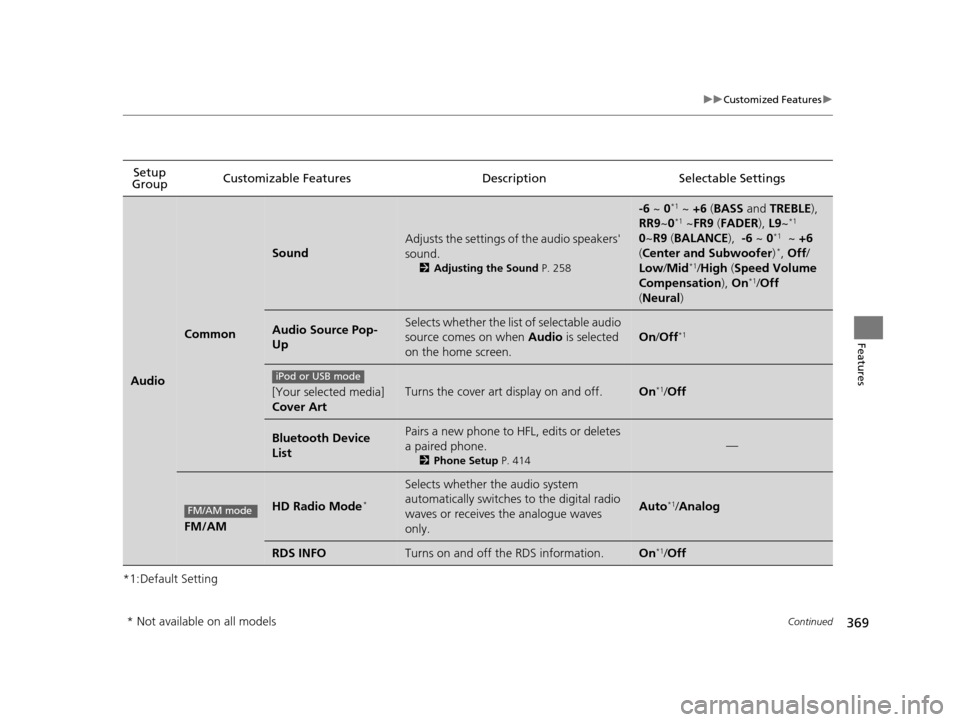
Audio
Common
Sound
Adjusts the settings of the audio speakers'
sound.
2Adjusting the Sound P. 258
-6 ~ 0*1 ~ +6 (BASS and TREBLE),
RR9 ~0*1 ~FR9 (FADER ), L9~*1
0 ~R9 (BALANCE ), -6 ~ 0*1 ~ +6
( Center and Subwoofer )*, Off /
Low /Mid*1/High (Speed Volume
Compensation ), On*1/Off
( Neural )
Audio Source Pop-
UpSelects whether the list of selectable audio
source comes on when Audio is selected
on the home screen.
On /Off*1
[Your selected media]
Cover ArtTurns the cover art display on and off.On*1/Off
Bluetooth Device
ListPairs a new phone to HFL, edits or deletes
a paired phone.
2 Phone Setup P. 414
—
FM/AM
HD Radio Mode*
Selects whether the audio system
automatically switches to the digital radio
waves or receives the analogue waves
only.
Auto*1/Analog
RDS INFOTurns on and off the RDS information.On*1/Off
iPod or USB mode
FM/AM mode
* Not available on all models
16 PILOT-31TG76000.book 369 ページ 2015年6月15日 月曜日 午前11時30分
Page 374 of 661
373
uuCustomized Features u
Continued
Features
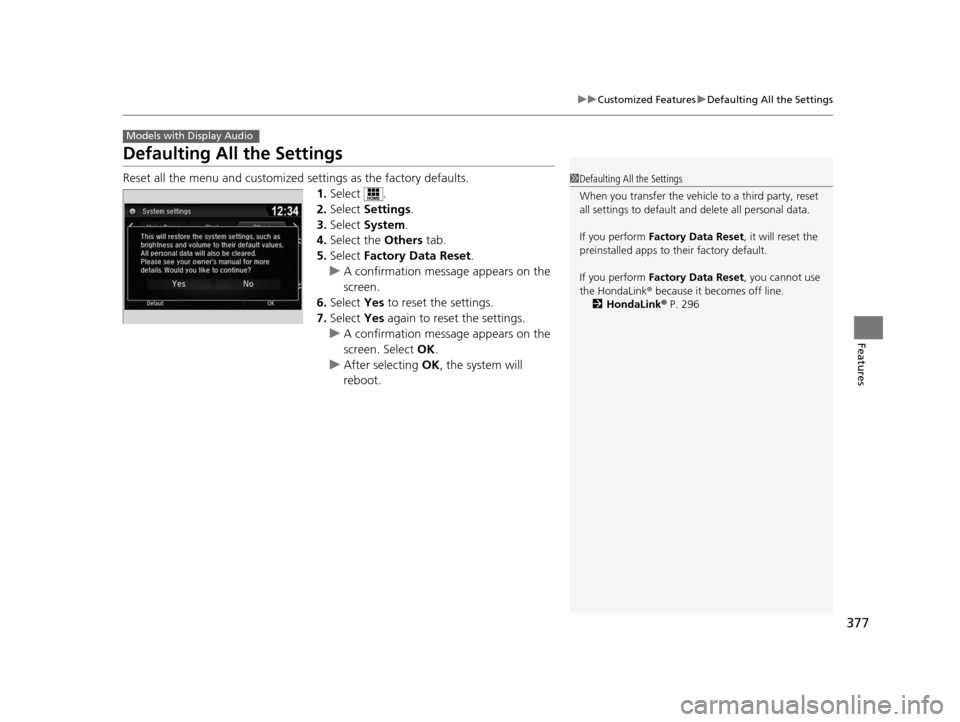
*1:Default SettingSetup
Group Customizable Features Description Selectable Settings
Clock/
Info
Clock
Clock/Wallpaper
TypeClock
See System on P. 359
Wallpaper
Clock
Adjustment*
Clock Format
Date Format
Auto Time Zone*
Manual Time
Zone
Auto Daylight
Clock Display
Clock Location
Clock Reset
HondaLinkDiagnostic & Location DataTurns HondaLink
® on and off.On /Off
OtherInfo Screen PreferenceChanges the information screen type.Info Top/ Info Menu /Off*1
DefaultCancels/Resets all cust omized items in the
Clock/Info settings group as default.Yes /No
* Not available on all models
16 PILOT-31TG76000.book 373 ページ 2015年6月15日 月曜日 午前11時30分
Page 376 of 661
375
uuCustomized Features u
Continued
Features
*1:Default SettingSetup
Group Customizable Features Descri
ption Selectable Settings
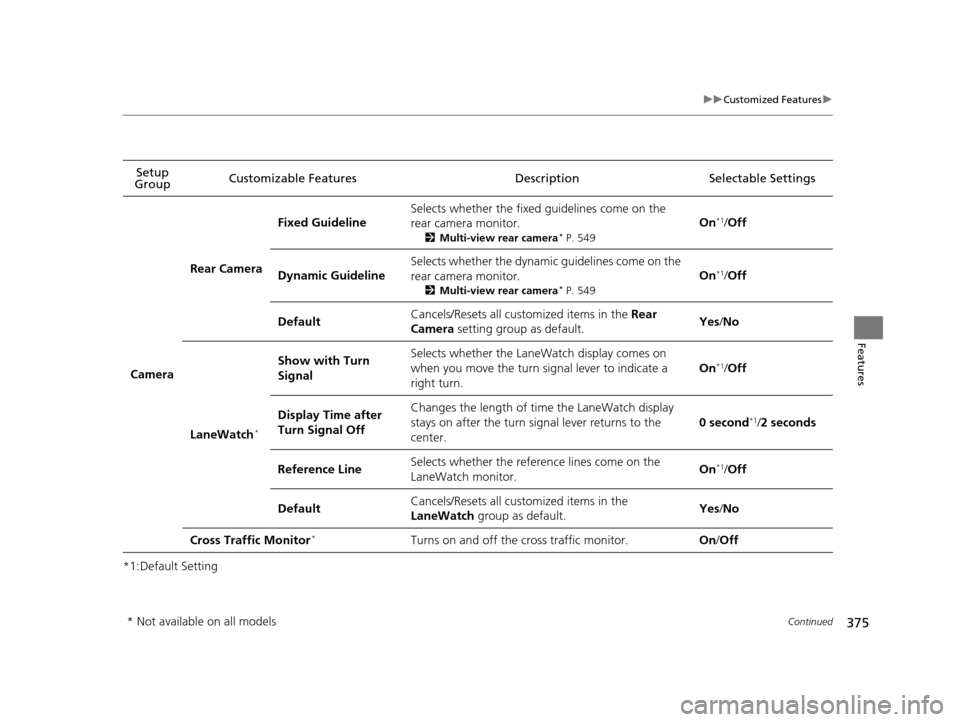
Camera
Rear Camera
Fixed Guideline
Selects whether the fixed guidelines come on the
rear camera monitor.
2Multi-view rear camera* P. 549
On*1/Off
Dynamic Guideline
Selects whether the dynamic guidelines come on the
rear camera monitor.
2 Multi-view rear camera* P. 549
On*1/Off
DefaultCancels/Resets all customized items in the Rear
Camera setting group as default.Yes /No
LaneWatch*
Show with Turn
SignalSelects whether the LaneWatch display comes on
when you move the turn signal lever to indicate a
right turn.
On*1/Off
Display Time after
Turn Signal OffChanges the length of time the LaneWatch display
stays on after the turn signal lever returns to the
center.
0 second*1/2 seconds
Reference LineSelects whether the reference lines come on the
LaneWatch monitor.On*1/ Off
DefaultCancels/Resets all customized items in the
LaneWatch group as default.Yes/No
Cross Traffic Monitor*Turns on and off the cross traffic monitor.On /Off
* Not available on all models
16 PILOT-31TG76000.book 375 ページ 2015年6月15日 月曜日 午前11時30分
Page 377 of 661
376
uuCustomized Features u
Features
*1:Default SettingSetup
Group Customizable Features
DescriptionSelectable Settings
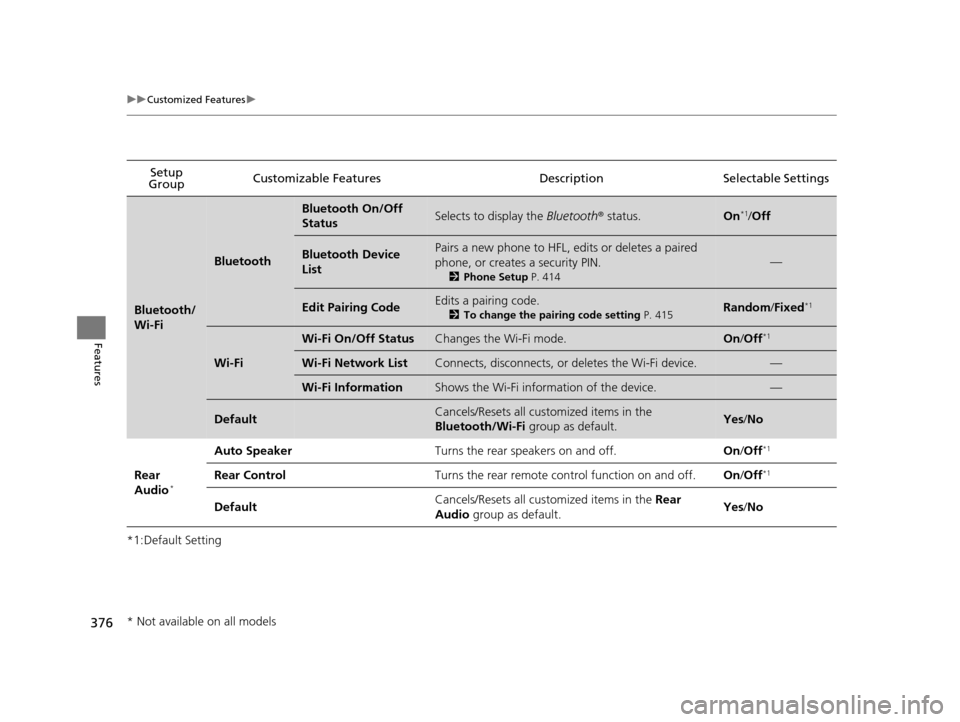
Bluetooth/
Wi-Fi
Bluetooth
Bluetooth On/Off
StatusSelects to display the Bluetooth® status.On*1/Off
Bluetooth Device
ListPairs a new phone to HFL, edits or deletes a paired
phone, or creates a security PIN.
2 Phone Setup P. 414
—
Edit Pairing CodeEdits a pairing code.
2To change the pairing code setting P. 415Random/Fixed*1
Wi-Fi
Wi-Fi On/Off StatusChanges the Wi-Fi mode.On /Off*1
Wi-Fi Network ListConnects, disconnects, or deletes the Wi-Fi device.—
Wi-Fi InformationShows the Wi-Fi information of the device.—
DefaultCancels/Resets all customized items in the
Bluetooth/Wi-Fi group as default.Yes/No
Rear
Audio*
Auto SpeakerTurns the rear speakers on and off.On /Off*1
Rear ControlTurns the rear remote con trol function on and off.On/Off*1
DefaultCancels/Resets all customized items in the Rear
Audio group as default.Yes/No
* Not available on all models
16 PILOT-31TG76000.book 376 ページ 2015年6月15日 月曜日 午前11時30分
Page 378 of 661
377
uuCustomized Features uDefaulting All the Settings
Features
Defaulting All the Settings
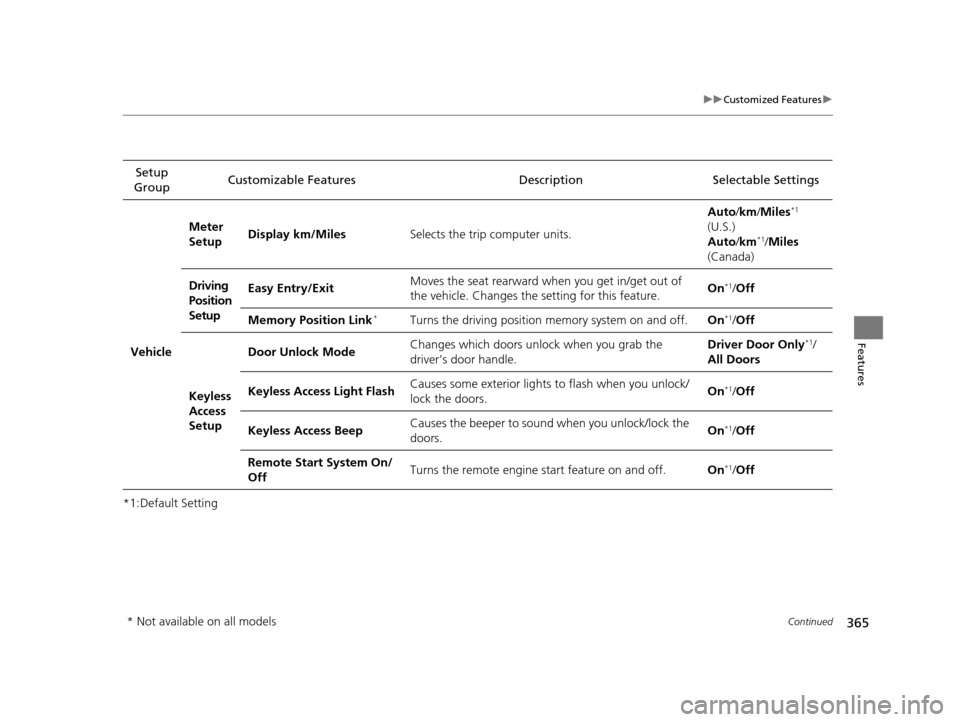
Reset all the menu and customized settings as the factory defaults.
1.Select .
2. Select Settings .
3. Select System.
4. Select the Others tab.
5. Select Factory Data Reset .
u A confirmation message appears on the
screen.
6. Select Yes to reset the settings.
7. Select Yes again to reset the settings.
u A confirmation message appears on the
screen. Select OK.
u After selecting OK, the system will
reboot.
Models with Display Audio
1 Defaulting All the Settings
When you transfer the vehicle to a third party, reset
all settings to default a nd delete all personal data.
If you perform Factory Data Reset , it will reset the
preinstalled apps to their factory default.
If you perform Factory Data Reset , you cannot use
the HondaLink ® because it becomes off line.
2 HondaLink® P. 296
16 PILOT-31TG76000.book 377 ページ 2015年6月15日 月曜日 午前11時30分
Page 383 of 661
uuBluetooth ® HandsFreeLink ®u Using HFL
382
Features
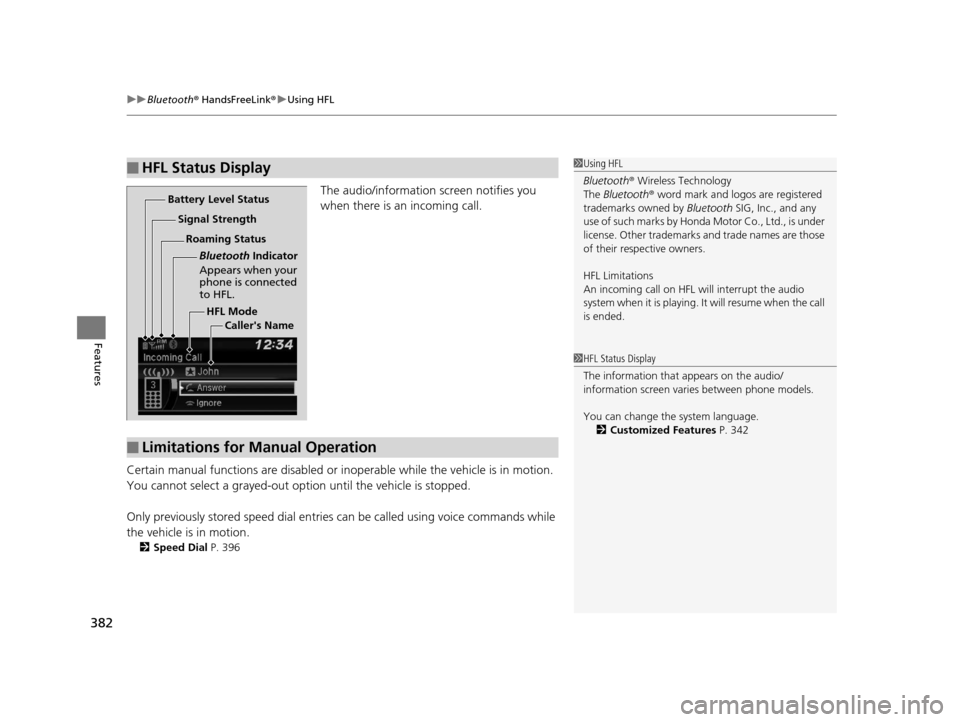
The audio/information screen notifies you
when there is an incoming call.
Certain manual functions are disabled or inoperable while the ve hicle is in motion.
You cannot select a grayed-out option until the vehicle is stopped.
Only previously stored speed dial entries can be called using voice commands while
the vehicle is in motion.
2 Speed Dial P. 396
■HFL Status Display1Using HFL
Bluetooth ® Wireless Technology
The Bluetooth ® word mark and logos are registered
trademarks owned by Bluetooth SIG, Inc., and any
use of such marks by Honda Motor Co., Ltd., is under
license. Other trademarks and trade names are those
of their respective owners.
HFL Limitations
An incoming call on HFL will interrupt the audio
s y s te m wh e n it is p la y i n g . It wi ll re s u m e w h en t h e c a l l
is ended.
HFL Mode
Battery Level Status
Signal Strength
Bluetooth Indicator
Appears when your
phone is connected
to HFL.
Roaming Status
Caller's Name
■Limitations for Manual Operation
1HFL Status Display
The information that appears on the audio/
information screen vari es between phone models.
You can change the system language. 2 Customized Features P. 342
16 PILOT-31TG76000.book 382 ページ 2015年6月15日 月曜日 午前11時30分