Page 610 of 661
609
uuIf a Tire Goes Flat uChanging a Flat Tire
Continued
Handling the Unexpected
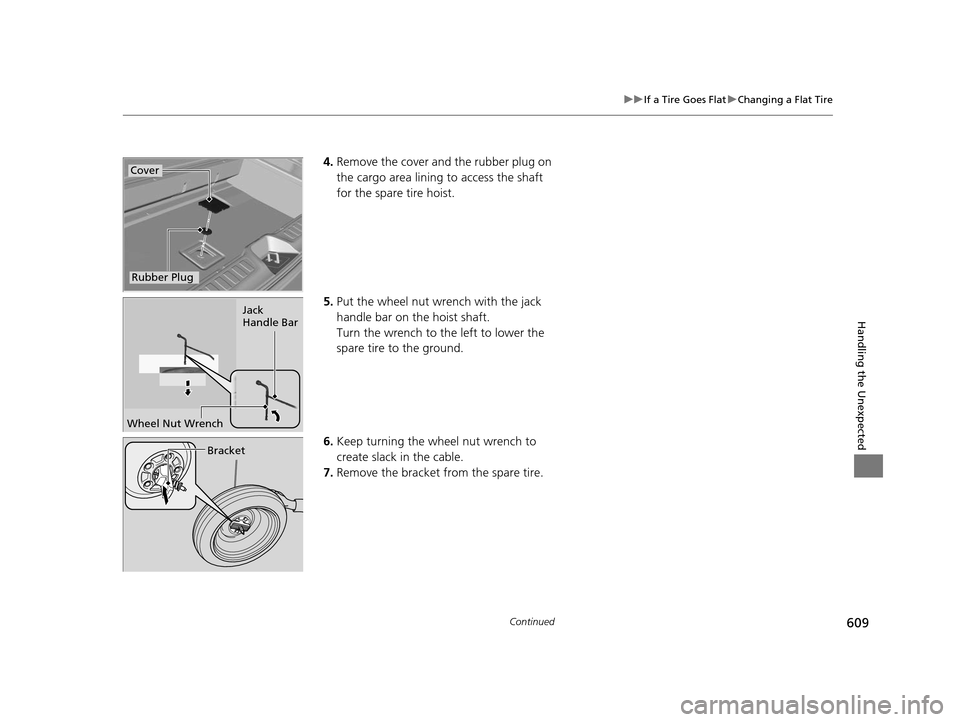
4. Remove the cover and the rubber plug on
the cargo area lining to access the shaft
for the spare tire hoist.
5. Put the wheel nut wrench with the jack
handle bar on the hoist shaft.
Turn the wrench to the left to lower the
spare tire to the ground.
6. Keep turning the wh eel nut wrench to
create slack in the cable.
7. Remove the bracket from the spare tire.Cover
Rubber Plug
Jack
Handle Bar
Wheel Nut Wrench
Bracket
16 PILOT-31TG76000.book 609 ページ 2015年6月15日 月曜日 午前11時30分
Page 611 of 661
610
uuIf a Tire Goes Flat uChanging a Flat Tire
Handling the Unexpected
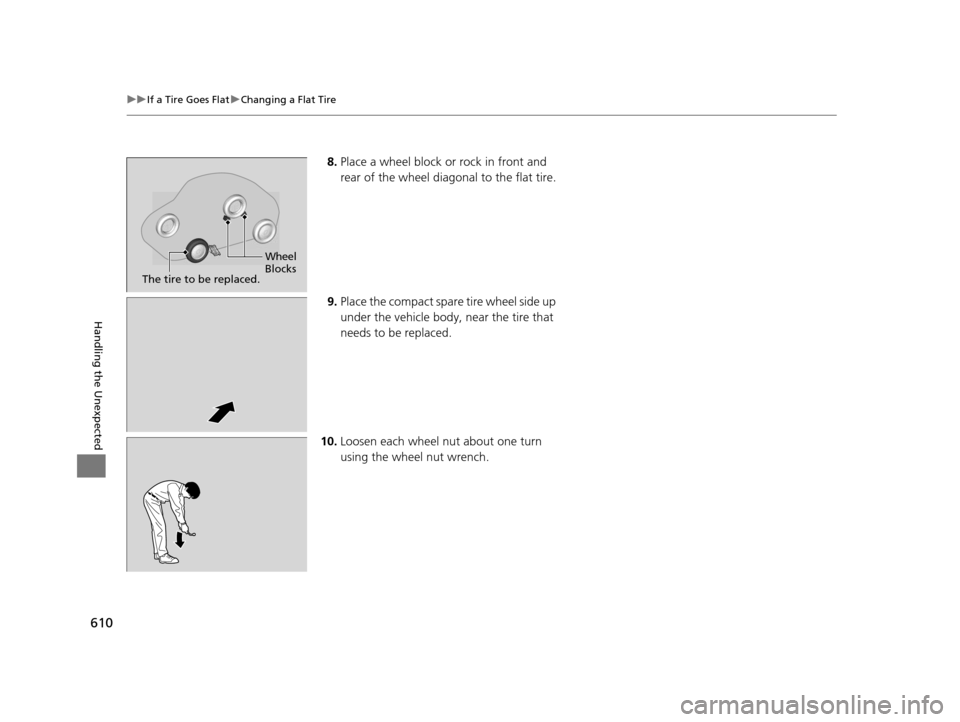
8. Place a wheel block or rock in front and
rear of the wheel diagonal to the flat tire.
9. Place the compact spare tire wheel side up
under the vehicle body, near the tire that
needs to be replaced.
10. Loosen each wheel nut about one turn
using the wheel nut wrench.
Wheel
Blocks
The tire to be replaced.
16 PILOT-31TG76000.book 610 ページ 2015年6月15日 月曜日 午前11時30分
Page 612 of 661

Continued611
uuIf a Tire Goes Flat uChanging a Flat Tire
Handling the Unexpected
1. Place the jack under the jacking point
closest to the tire to be changed.
2. Turn the end bracket cl ockwise as shown in
the image until the top of the jack contacts
the jacking point.
u Make sure that the jacking point tab is
resting in the jack notch.
3. Raise the vehicle, using the jack handle bar
and the jack handle, until the tire is off the
ground.
■How to Set Up the Jack1How to Set Up the Jack
Do not use the jack with people or luggage in the
vehicle.
Use the jack provided in your vehicle.
Other jacks may not support the weight (“load”) or
may not fit the jacking point.
The following instructions must be followed to use
the jack safely:
•Do not use while the engine is running.
•Use only where the ground is firm and level.
•Use only at the jacking points.•Do not get in the vehicl e while using the jack.
•Do not put anything on top of or underneath the
jack.
3WARNING
The vehicle can easily roll off the jack,
seriously injuring anyone underneath.
Follow the directions for changing a tire
exactly, and never get under the vehicle
when it is supported only by the jack.
Jack Handle Bar
Wheel Nut Wrench as Jack Handle
16 PILOT-31TG76000.book 611 ページ 2015年6月15日 月曜日 午前11時30分
Page 613 of 661
uuIf a Tire Goes Flat uChanging a Flat Tire
612
Handling the Unexpected
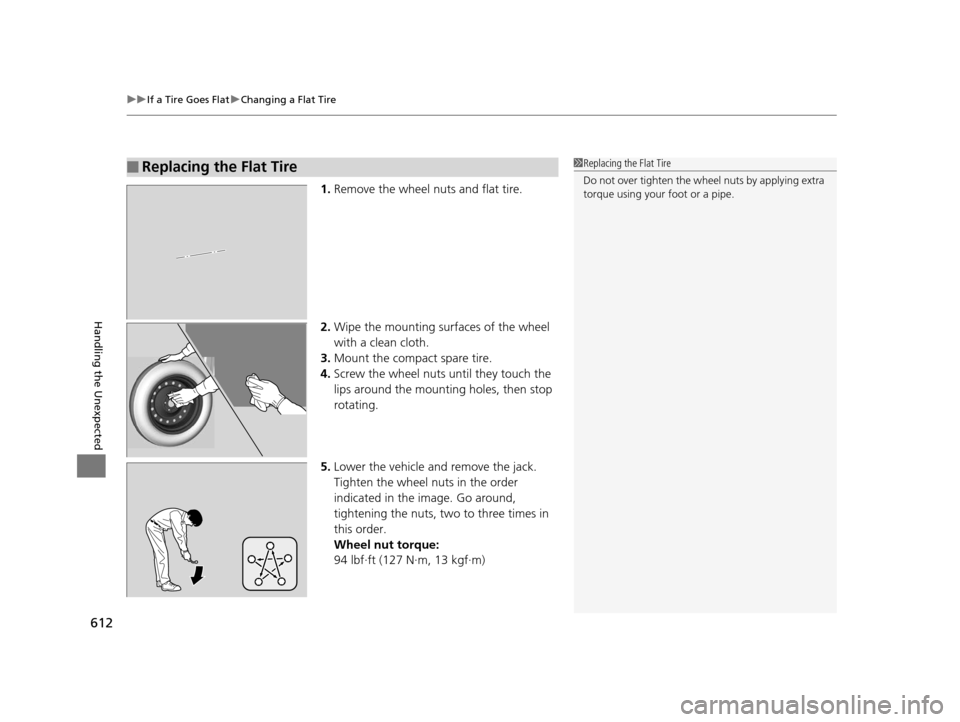
1. Remove the wheel nuts and flat tire.
2. Wipe the mounting surfaces of the wheel
with a clean cloth.
3. Mount the compact spare tire.
4. Screw the wheel nuts until they touch the
lips around the mounting holes, then stop
rotating.
5.
Lower the vehicle and remove t
he jack.
Tighten the wheel nuts in the order
indicated in th e
image. Go around,
tightening the nuts, t
wo to thr ee times in
this order
.
Wheel nut torque:
94 lbf∙ft (127 N∙m, 13 kgf∙m)
■Replacing the Flat Tire1 Replacing the Flat Tire
Do not over tighten the wheel nuts by applying extra
torque using your foot or a pipe.
16 PILOT-31TG76000.book 612 ページ 2015年6月15日 月曜日 午前11時30分
Page 614 of 661
Continued613
uuIf a Tire Goes Flat uChanging a Flat Tire
Handling the Unexpected
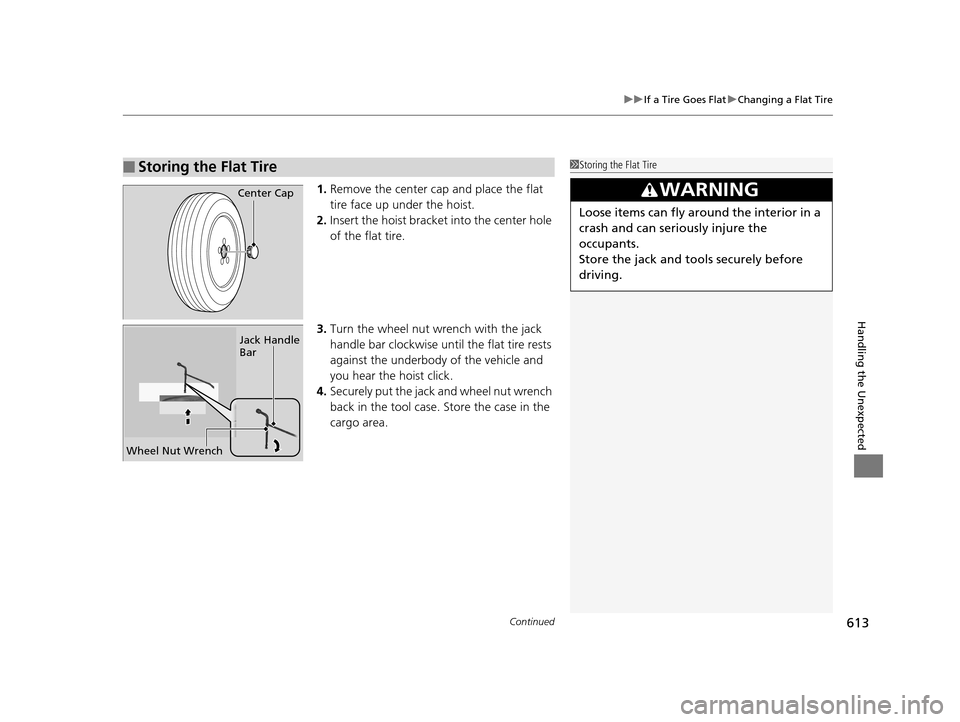
1. Remove the center cap and place the flat
tire face up under the hoist.
2. Insert the hoist bracke t into the center hole
of the flat tire.
3. Turn the wheel nut wrench with the jack
handle bar clockwise until the flat tire rests
against the underbody of the vehicle and
you hear the hoist click.
4. Securely put the jack and wheel nut wrench
back in the tool case. Store the case in the
cargo area.
■Storing the Flat Tire1Storing the Flat Tire
3WARNING
Loose items can fly around the interior in a
crash and can seriously injure the
occupants.
Store the jack and tools securely before
driving.
Center Cap
Wheel Nut Wrench Jack Handle
Bar
16 PILOT-31TG76000.book 613 ページ 2015年6月15日 月曜日 午前11時30分
Page 618 of 661

617
uuEngine Does Not Start uEmergency Engine Stop
Handling the Unexpected
Emergency Engine Stop
The ENGINE START/STOP button may be used to stop the engine due to an
emergency situation even while driving. If you must stop the engine, do either of the
following operations:
• Press and hold the ENGINE START/STOP button for about two seconds.
• Firmly press the ENGINE START/STOP button twice.
The steering wheel will not lock. However, because turning off the engine disables
the power assist the engine provides to the steering and braking systems, it will
require significantly more physical effort an d time to steer and slow the vehicle. Use
both feet on the brake pedal to slow down the vehicle and stop immediately in a
safe place.
The gear position auto matically changes to
(P after the vehicle comes to a complete
stop. Then, the power mode changes to VEHICLE OFF.
The gear position auto matically changes to
(P after the vehicle comes to a complete
stop. Then press the ENGINE START/STOP button twice without depressing the
brake pedal to change the mode VEHICLE OFF.
The power mode is in ACCESSORY when the engine is stopped.
To change the mode to VEHICLE OF F, change the gear position to
(P after the
vehicle comes to a complete stop.
Then press the ENGINE START/STOP button twice without depressing the brake
pedal.
1 Emergency Engine Stop
Do not press the button while driving unless it is
absolutely necessary for th e engine to be switched
off.
Automatic transmission models with electronic gear selector for U.S. models
Automatic transmission models with elec tronic gear selector for Canadian models
Automatic transmission models with shift lever
Automatic transmission models with shift lever for Canadian models
16 PILOT-31TG76000.book 617 ページ 2015年6月15日 月曜日 午前11時30分
Page 627 of 661

626
uuIndicator, Coming On/Blinking uIf the Brake System Indicator (Red) Comes On
Handling the Unexpected
If the Brake System Indicator (Red) Comes On
■Reasons for the indicator to come on
• The brake fluid is low.
• There is a malfunction in the brake system.
■What to do when the indicator comes on while driving
Press the brake pedal lightly to check pedal pressure.
• If normal, check the brake fluid level the next time you stop.
• If abnormal, take immediate action . If necessary, downshift the
transmission to slow the vehicle using engine braking.
If the Electric Power Steeri ng (EPS) System Indicator
Comes On
■Reasons for the indicator to come on
• Comes on if there is a problem with the EPS system.
• If you depress the accelerator pedal repeatedly to increase the engine
speed while the engine is idling, the indicator comes on, and
sometimes the steering wheel becomes harder to operate.
■What to do when the indicator comes on
Stop the vehicle in a safe place and restart the engine.
If the indicator comes on and stays on, immediately have your vehicle
inspected by a dealer.
1 If the Brake System Indicator (Red) Comes On
Have your vehicle re paired immediately.
It is dangerous to drive with low brake fluid. If there
is no resistance from the brake pedal, stop
immediately in a safe plac e. If necessary downshift
the gears.
If the brake system indicator and ABS indicator come
on simultaneously, the elec tronic brake distribution
system is not working. Th is can result in vehicle
instability under sudden braking.
Have your vehicle inspecte d by a dealer immediately.U.S.
Canada
16 PILOT-31TG76000.book 626 ページ 2015年6月15日 月曜日 午前11時30分
Page 629 of 661

628
Handling the Unexpected
Fuses
Fuse Locations
If any electrical devices are not working, set
the power mode to VEHICLE OFF (LOCK)
and check to see if any applicable fuse is
blown.
Fuse locations are shown on the fuse box
cover. Locate the fuse in question by the
fuse number and box cover number.
Located near the passenger's side damper
house. Push the tabs to open the box.
■Engine Compartment Fuse
Box Type A
Tab
■Circuit protected and fuse rating
Circuit ProtectedAmps
1
−(70 A)
RR BLOWER30 A
ABS/VSA MTR40 A
ABS/VSA FSR20 A
MAIN FAN30 A
MAIN FUSE150 A
2
SUB FAN30 A
WIP MTR30 A
WASHER20 A
SUNSHADE(20 A)
−(30 A)
FR BLOWER40 A
AC INVERTER(30 A)
AUDIO AMP(30 A)
RR DEF40 A
−(30 A)
−(20 A)
3
−−
−−
−−
−−
4 PARKING LIGHT 10 A
5−−
6 STOP LIGHT 10 A
7−−
8 L H/L LO 10 A
9−−
10 R H/L LO 10 A
11IGPS7.5 A
12 INJECTOR (20 A)
13H/L LO MAIN20 A
14 USB CHARGER (15 A)
15FR FOG(15 A)
16 HAZARD 15 A
17AS P/SEAT (REC)(20 A)
18 AS P/SEAT (SLIDE) (20 A)
19ACM20 A
20 MG CLUTCH 7.5 A
21MAIN RLY15 A
22 FI SUB 15 A
23IG COIL15 A
24 DBW 15 A
25SMALL/STOP MAIN(20 A)
26 BACK UP 10 A
27HTD STRG WHEEL(10 A)
28 HORN 10 A
29RADIO(20 A)
Circuit ProtectedAmps
16 PILOT-31TG76000.book 628 ページ 2015年6月15日 月曜日 午前11時30分