Page 513 of 661
512
uuWhen Driving uLane Keeping Assist System (LKAS)*
Driving
■The LKAS may automatically be suspended when:
• The system fails to detect lane lines.
• The steering wheel is quickly turned.
• You fail to steer the vehicle.
• The vehicle speed is over the pos ted speed limit, on a curve road.
Once these conditions no longer exis t, the LKAS automatically resumes.
■The LKAS may automatically be canceled when:
• The camera temperature gets too high.
• The camera behind the rearview mirror, or the area around the camera, including
the windshield, gets dirty.
• When driving through a sharp curve.
• When driving at a speed in excess of approximately 90 mph (145 km/h).
• When the ABS or VSA ® systems engage.
A beeper will sound if the LKAS is automatically canceled.
16 PILOT-31TG76000.book 512 ページ 2015年6月15日 月曜日 午前11時30分
Page 515 of 661
514
uuWhen Driving uLane Keeping Assist System (LKAS)*
Driving
■Roadway conditions
• Driving on a snowy or wet roadway (obscured lane marking, vehicle tracks,
reflected lights, road spray, high contrast).
• Driving on a road with temporary lane markings.
• Faint, multiple, or varied lane markings are visible on the roadway due to road
repairs or old lane markings.
• The roadway has merging, split, or crossing lines (e.g., such as at an intersection
or crosswalk).
• The lane markings are extremely narrow, wide, or changing.
• The vehicle in front of you is driving near the lane lines.
• The road is hilly or the vehicle is approaching the crest of a hill.
• Driving on rough or unpaved roads, or over bumpy surfaces.
• When objects on the road (c urb, guard rail, pylons, etc.) are recognized as white
lines (or yellow lines).
• When driving on roads with double lines.
■Vehicle conditions
• Headlight lenses are dirty or the headlights are not properly adjusted.
• The outside of the windshield is streake d or blocked by dirt, mud, leaves, wet
snow, etc.
• The inside of the windshield is fogged.
• The camera temperature gets too hot.
• An abnormal tire or wheel condition (wrong sized, varied size or construction,
improperly inflated, comp act spare tire, etc.).
• The vehicle is tilted due to a heav y load or suspension modifications.
16 PILOT-31TG76000.book 514 ページ 2015年6月15日 月曜日 午前11時30分
Page 517 of 661
uuWhen Driving uVehicle Stability Assist (VSA® ), aka Electronic Stability Control (ESC), System
516
Driving
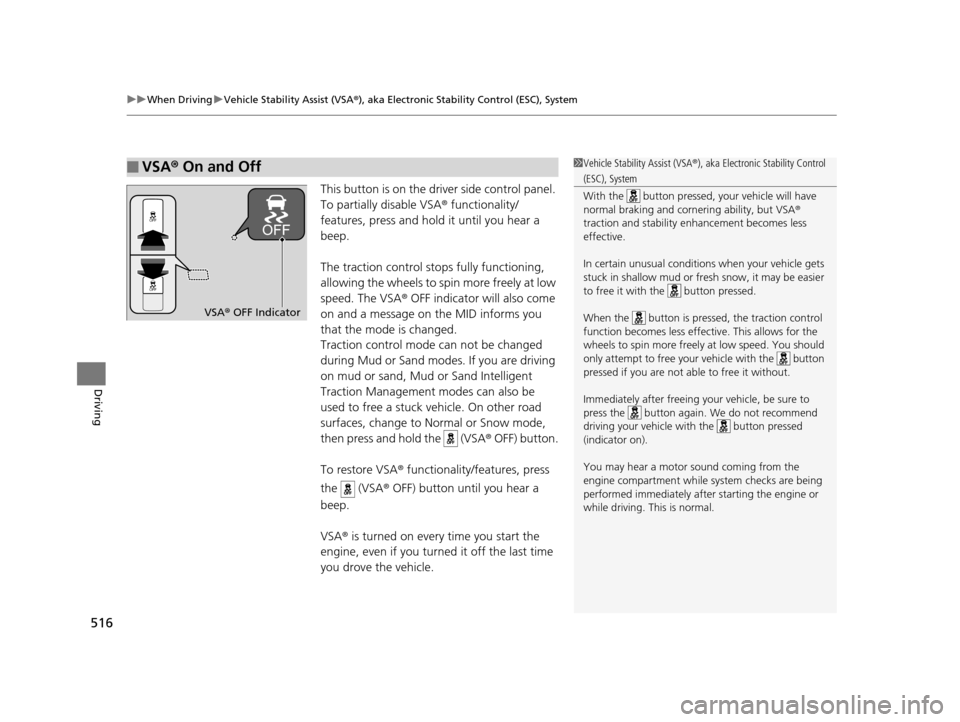
This button is on the driver side control panel.
To partially disable VSA ® functionality/
features, press and hold it until you hear a
beep.
The traction control stops fully functioning,
allowing the wheels to sp in more freely at low
speed. The VSA ® OFF indicator will also come
on and a message on the MID informs you
that the mode is changed.
Traction control mode can not be changed
during Mud or Sand modes. If you are driving
on mud or sand, Mud or Sand Intelligent
Traction Management modes can also be
used to free a stuck vehicle. On other road
surfaces, change to No rmal or Snow mode,
then press and hold the (VSA ® OFF) button.
To restore VSA ® functionality/features, press
the (VSA ® OFF) button until you hear a
beep.
VSA ® is turned on every time you start the
engine, even if you turned it off the last time
you drove the vehicle.
■VSA ® On and Off1 Vehicle Stability Assist (VSA ®), aka Electronic Stability Control
(ESC), System
With the button pressed, your vehicle will have
normal braking and corn ering ability, but VSA®
traction and stability enhancement becomes less
effective.
In certain unusual conditions when your vehicle gets
stuck in shallow mud or fr esh snow, it may be easier
to free it with the button pressed.
When the button is pressed, the traction control
function becomes less effective. This allows for the
wheels to spin more freely at low speed. You should
only attempt to free your vehicle with the button
pressed if you are not able to free it without.
Immediately after freeing your vehicle, be sure to
press the button again. We do not recommend
driving your vehicle wi th the button pressed
(indicator on).
You may hear a motor sound coming from the
engine compartment while system checks are being
performed immediately after starting the engine or
while driving. This is normal.
VSA ® OFF Indicator
16 PILOT-31TG76000.book 516 ページ 2015年6月15日 月曜日 午前11時30分
Page 518 of 661
517
uuWhen Driving uAgile Handling Assist System
Driving
Agile Handling Assist System
Lightly brakes each of the front and rear wheels, as needed, when you turn the
steering wheel, and helps support the vehi cle’s stability and performance during
cornering.1 Agile Handling Assist System
The agile handling assist system cannot enhance
stability in all driving situat ions. You still need to drive
and corner at speeds appr opriate for the conditions
and always leave a sufficient margin of safety.
When the VSA ® indicator comes on and stays on
while driving, the agile handling assist system does
not activate.
You may hear a sound coming from the engine
compartment while the system is activated. This is
normal.
16 PILOT-31TG76000.book 517 ページ 2015年6月15日 月曜日 午前11時30分
Page 521 of 661
520
uuWhen Driving uLaneWatchTM*
Driving
LaneWatchTM*
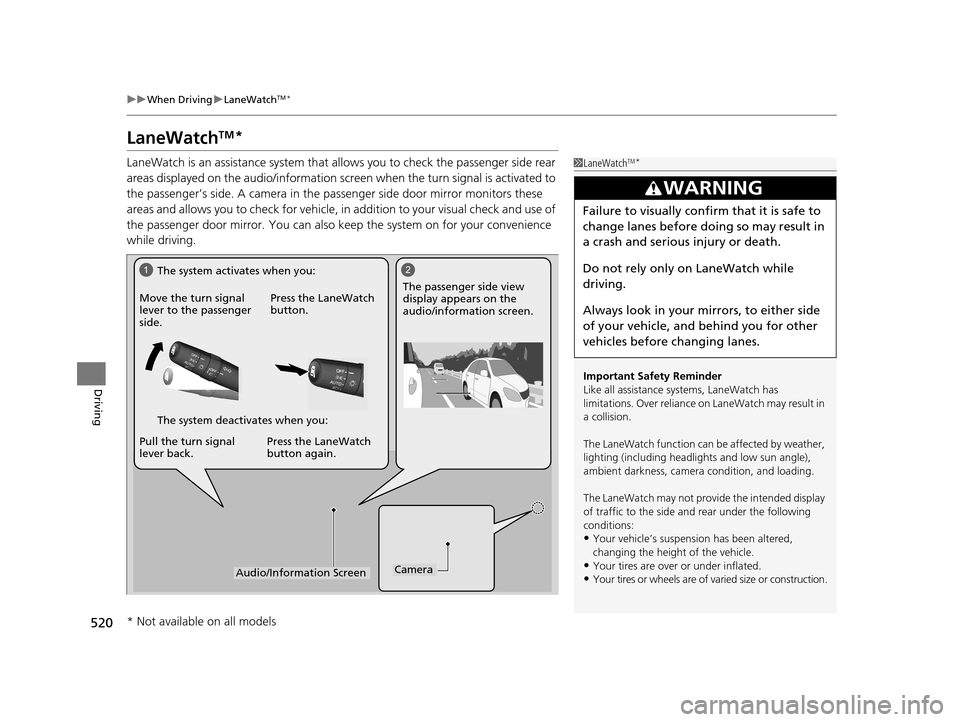
LaneWatch is an assistance system that allows you to check the passenger side rear
areas displayed on the audio/in formation screen when the turn signal is activated to
the passenger’s side. A camera in the passenger side door mirror monitors these
areas and allows you to check for vehicle, in addition to your visual check and use of
the passenger door mirror. You can also keep the system on for your convenience
while driving.1 LaneWatchTM*
Important Safety Reminder
Like all assistance systems, LaneWatch has
limitations. Over reliance on LaneWatch may result in
a collision.
The LaneWatch func tion can be affected by weather,
lighting (including headli ghts and low sun angle),
ambient darkness, camera condition, and loading.
The LaneWatch may not prov ide the intended display
of traffic to the side and rear under the following
conditions:
•Your vehicle’s suspension has been altered,
changing the height of the vehicle.
•Your tires are over or under inflated.
•Your tires or wheels are of varied size or construction.
3WARNING
Failure to visually confirm that it is safe to
change lanes before doing so may result in
a crash and serious injury or death.
Do not rely only on LaneWatch while
driving.
Always look in your mirrors, to either side
of your vehicle, and behind you for other
vehicles before changing lanes.
12
CameraAudio/Information Screen
Move the turn signal
lever to the passenger
side.
Press the LaneWatch
button.
Pull the turn signal
lever back. Press the LaneWatch
button again. The passenger side view
display appears on the
audio/information screen.
The system activates when you:
The system deactivates when you:
* Not available on all models
16 PILOT-31TG76000.book 520 ページ 2015年6月15日 月曜日 午前11時30分
Page 523 of 661

522
uuWhen Driving uIntelligent VTM4 (i-VTM4)*
Driving
Intelligent VTM4 (i-VTM4)*
The Intelligent VTM4 (i-VTM4) is a full time all wheel drive system that automatically
controls and transfers varying amount of engine torque to all wheels independently
according to the driving conditions.
You still need to exercise the same care when accelerating, steering, and braking
that you would in a two wheel drive vehicle.
Avoid continuously driving on slippery surfa ces where a wheel is likely to spin out,
and do not drive if the AWD indicator starts blinking. Driving continuously under
such conditions can damage the system's torque distribution unit.
If the AWD indicator blinks while driving , it indicates the differential temperature is
too high. If this happens, pull to the side of the road when it is safe, shift to park, an
idle the engine idle until the indicator goes out. If the indicator does not go out, take
your vehicle to a dealer to have it checked.1Intelligent VTM4 (i-VTM4)*
NOTICE
Do not continuously spin the front tires of your
vehicle. Continuously spinning the front tires can
cause transmission or re ar differential damage.
The i-VTM4 system may not function properly if tire
type and size are mixed. Make sure to use the same
size and type of tire, and the air pressures as
specified.
2 Tire and Wheel Replacement P. 591
* Not available on all models
16 PILOT-31TG76000.book 522 ページ 2015年6月15日 月曜日 午前11時30分
Page 525 of 661
uuWhen Driving uTPMS with Tire Fill Assist
524
Driving
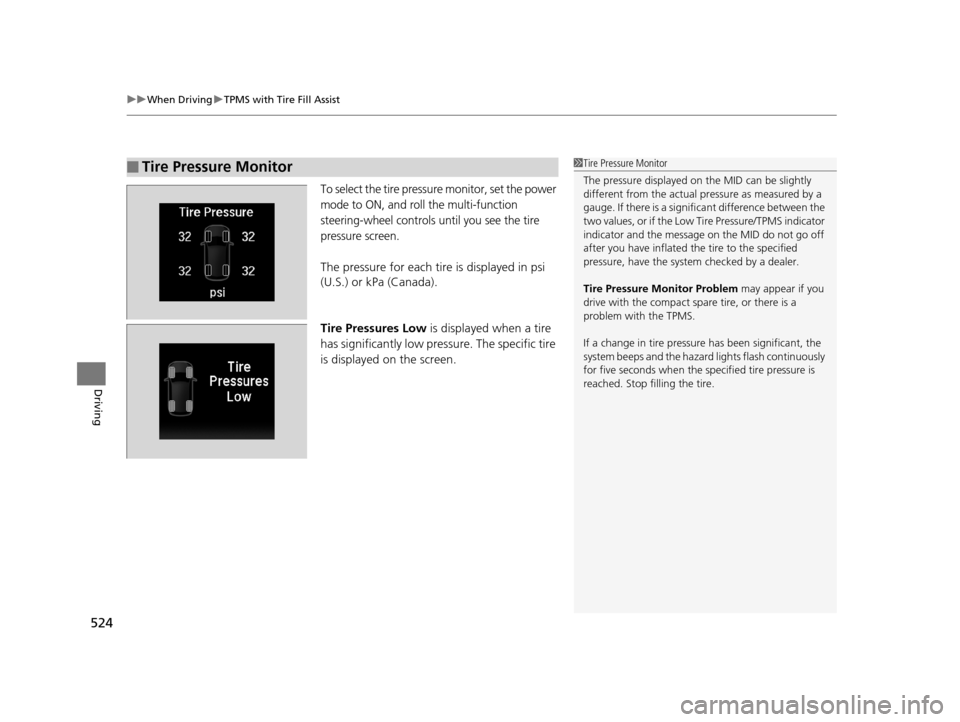
To select the tire pressure monitor, set the power
mode to ON, and roll the multi-function
steering-wheel controls until you see the tire
pressure screen.
The pressure for each tire is displayed in psi
(U.S.) or kPa (Canada).
Tire Pressures Low is displayed when a tire
has significantly low pressure. The specific tire
is displayed on the screen.
■Tire Pressure Monitor1Tire Pressure Monitor
The pressure displayed on the MID can be slightly
different from the actual pr essure as measured by a
gauge. If there is a signifi cant difference between the
two values, or if the Low Tire Pressure/TPMS indicator
indicator and the message on the MID do not go off
after you have inflated the tire to the specified
pressure, have the system checked by a dealer.
Tire Pressure Monitor Problem may appear if you
drive with the compact spare tire, or there is a
problem with the TPMS.
If a change in tire pressure has been significant, the
system beeps and the hazard lights flash continuously
for five seconds when the specified tire pressure is
reached. Stop filling the tire.
16 PILOT-31TG76000.book 524 ページ 2015年6月15日 月曜日 午前11時30分
Page 527 of 661
526
uuWhen Driving uTire Pressure Monitoring System (TPMS) - Required Federal Explanation
Driving
Please note that the TPMS is not a substitute for proper tire
maintenance, and it is the driver ’s responsibility to maintain
correct tire pressure, even if un der-inflation has not reached the
level to trigger illumina tion of the TPMS low ti re pressure telltale.
Your vehicle has also been eq uipped with a TPMS malfunction
indicator to indicate when the sy stem is not operating properly.
The TPMS malfunction indicator is combined with the low tire
pressure telltale. When the system detects a malfunction, the
telltale will flash fo r approximately one minute and then remain
continuously illuminated. This sequence will continue upon
subsequent vehicle start-ups as long as the malfunction exists.
When the malfunction indicator is illuminated, the system may
not be able to detect or signal low tire pressure as intended.
TPMS malfunctions may occur for a variety of reasons, including
the installation of replacement or alternate tires or wheels on the
vehicle that prevent the TPMS from functioning properly.
Always check the TPMS malfunction telltale after replacing one or
more tires or wheels on your vehicle to ensure that the
replacement or alternate tires and wheels allow the TPMS to
continue to function properly.
16 PILOT-31TG76000.book 526 ページ 2015年6月15日 月曜日 午前11時30分