Page 395 of 661
394
uuBluetooth ® HandsFreeLink ®u HFL Menus
Features
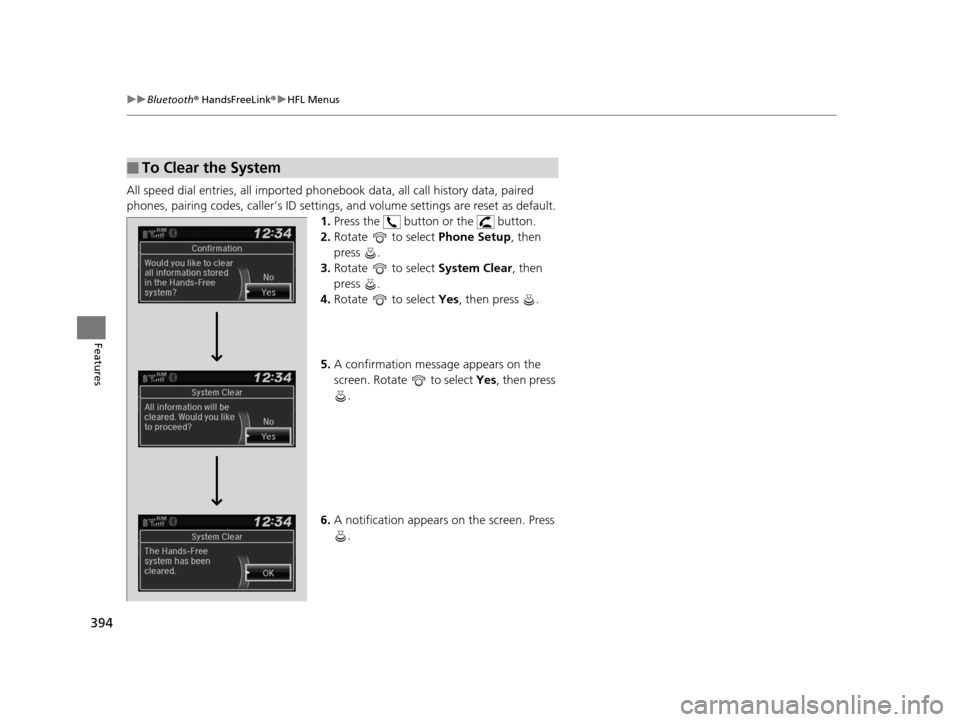
All speed dial entries, all imported phonebook data, all call history data, paired
phones, pairing codes, caller’s ID settings, and volume settings are reset as default.
1. Press the button or the button.
2. Rotate to select Phone Setup, then
press .
3. Rotate to select System Clear, then
press .
4. Rotate to select Yes, then press .
5. A confirmation message appears on the
screen. Rotate to select Yes, then press
.
6. A notification appears on the screen. Press
.
■To Clear the System
16 PILOT-31TG76000.book 394 ページ 2015年6月15日 月曜日 午前11時30分
Page 396 of 661
Continued395
uuBluetooth ® HandsFreeLink ®u HFL Menus
Features
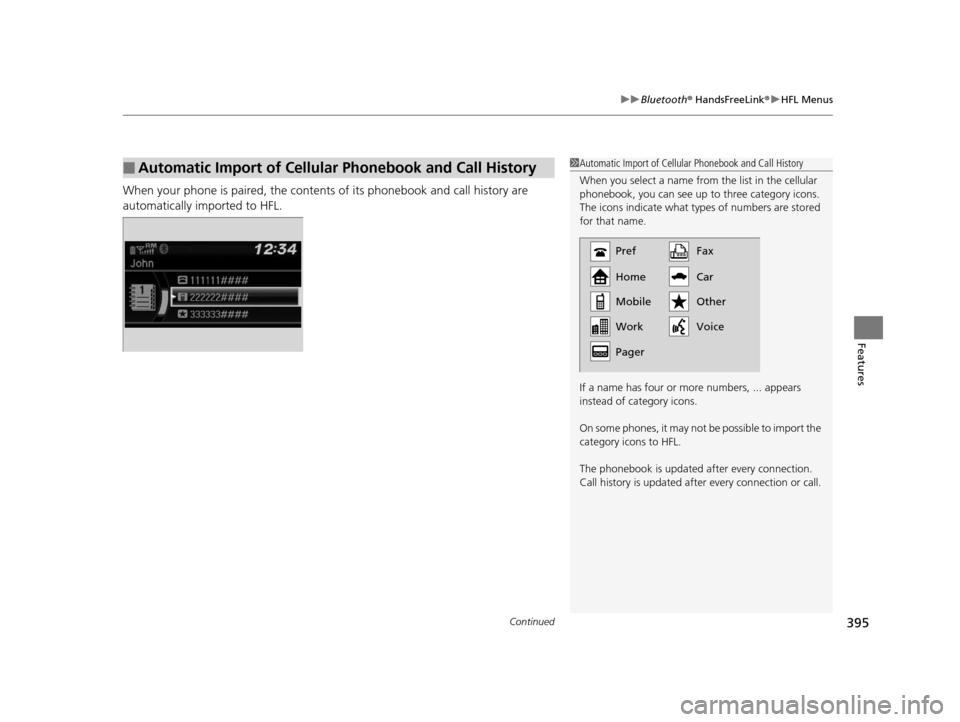
When your phone is paired, the contents of its phonebook and call history are
automatically imported to HFL.
■Automatic Import of Cellular Phonebook and Call History1Automatic Import of Cellular Phonebook and Call History
When you select a name from the list in the cellular
phonebook, you can see up to three category icons.
The icons indicate what types of numbers are stored
for that name.
If a name has four or more numbers, ... appears
instead of category icons.
On some phones, it may not be possible to import the
category icons to HFL.
The phonebook is updated af ter every connection.
Call history is updated after every connection or call.
Pref
Home
Mobile
Pager WorkFax
Car
Voice Other
16 PILOT-31TG76000.book 395 ページ 2015年6月15日 月曜日 午前11時30分
Page 402 of 661
Continued401
uuBluetooth ® HandsFreeLink ®u HFL Menus
Features
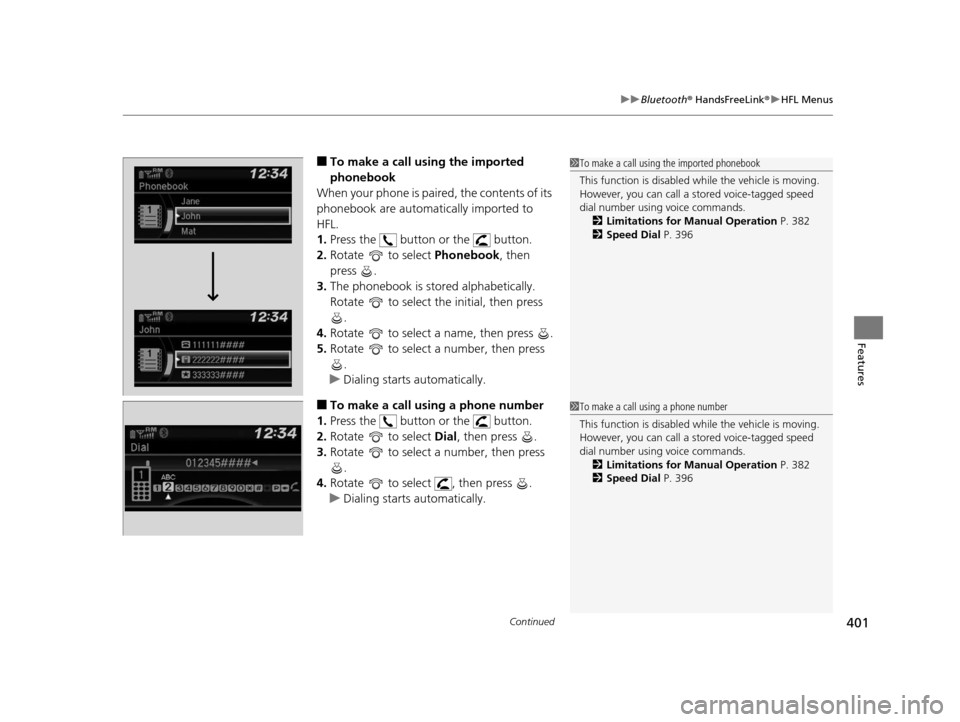
■To make a call us ing the imported
phonebook
When your phone is paired, the contents of its
phonebook are automatically imported to
HFL.
1. Press the button or the button.
2. Rotate to select Phonebook, then
press .
3. The phonebook is stored alphabetically.
Rotate to select the initial, then press
.
4. Rotate to select a name, then press .
5. Rotate to select a number, then press
.
u Dialing starts automatically.
■To make a call using a phone number
1. Press the button or the button.
2. Rotate to select Dial, then press .
3. Rotate to select a number, then press
.
4. Rotate to select , then press .
u Dialing starts automatically.
1To make a call using the imported phonebook
This function is disabled while the vehicle is moving.
However, you can call a stored voice-tagged speed
dial number using voice commands. 2 Limitations for Manual Operation P. 382
2 Speed Dial P. 396
1To make a call using a phone number
This function is disabled while the vehicle is moving.
However, you can call a stored voice-tagged speed
dial number using voice commands. 2 Limitations for Manual Operation P. 382
2 Speed Dial P. 396
16 PILOT-31TG76000.book 401 ページ 2015年6月15日 月曜日 午前11時30分
Page 407 of 661
406
Features
Bluetooth® HandsFreeLink ®
Bluetooth® HandsFreeLink ® (HFL) allows you to place and receive phone calls using
your vehicle’s audio system, without handling your cell phone.
Using HFL
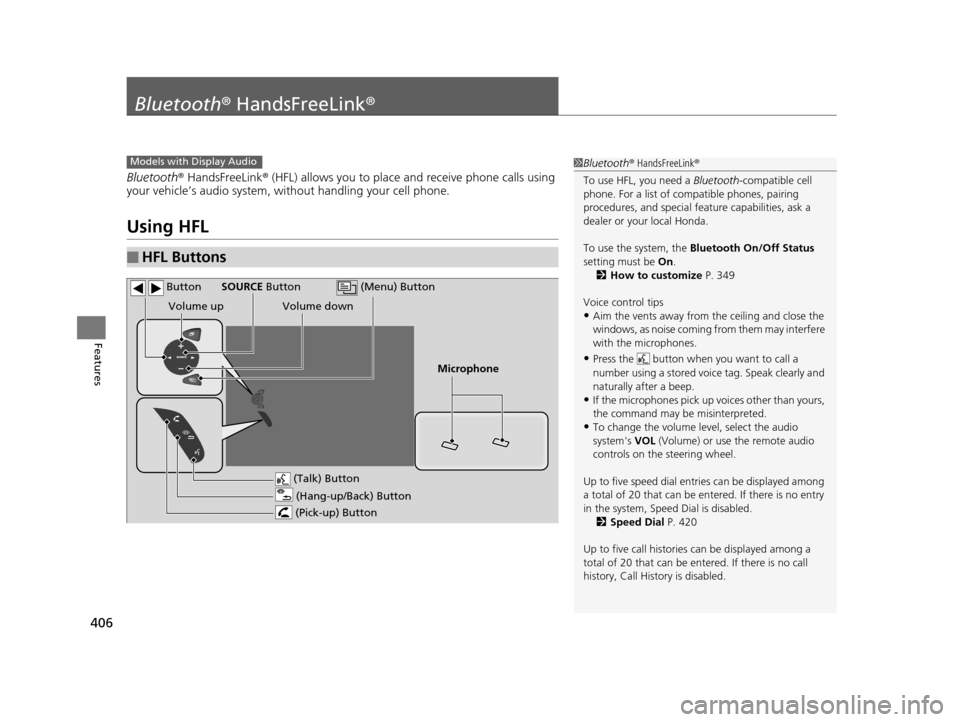
■HFL Buttons
1 Bluetooth ® HandsFreeLink ®
To use HFL, you need a Bluetooth-compatible cell
phone. For a list of compatible phones, pairing
procedures, and special fe ature capabilities, ask a
dealer or your local Honda.
To use the system, the Bluetooth On/Off Status
setting must be On.
2 How to customize P. 349
Voice control tips
•Aim the vents away from the ceiling and close the
windows, as noise coming fr om them may interfere
with the microphones.
•Press the button when you want to call a
number using a stored voic e tag. Speak clearly and
naturally after a beep.
•If the microphones pick up vo ices other than yours,
the command may be misinterpreted.
•To change the volume level, select the audio
system's VOL (Volume) or use the remote audio
controls on the steering wheel.
Up to five speed dial entries can be displayed among
a total of 20 that can be en tered. If there is no entry
in the system, Speed Dial is disabled. 2 Speed Dial P. 420
Up to five call historie s can be displayed among a
total of 20 that can be entered. If there is no call
history, Call History is disabled.
Models with Display Audio
(Talk) Button
Volume up
Microphone
(Hang-up/Back) Button
(Pick-up) Button
Volume down
SOURCE Button
(Menu) Button
Button
16 PILOT-31TG76000.book 406 ページ 2015年6月15日 月曜日 午前11時30分
Page 410 of 661
409
uuBluetooth ® HandsFreeLink ®u HFL Menus
Continued
Features
HFL Menus
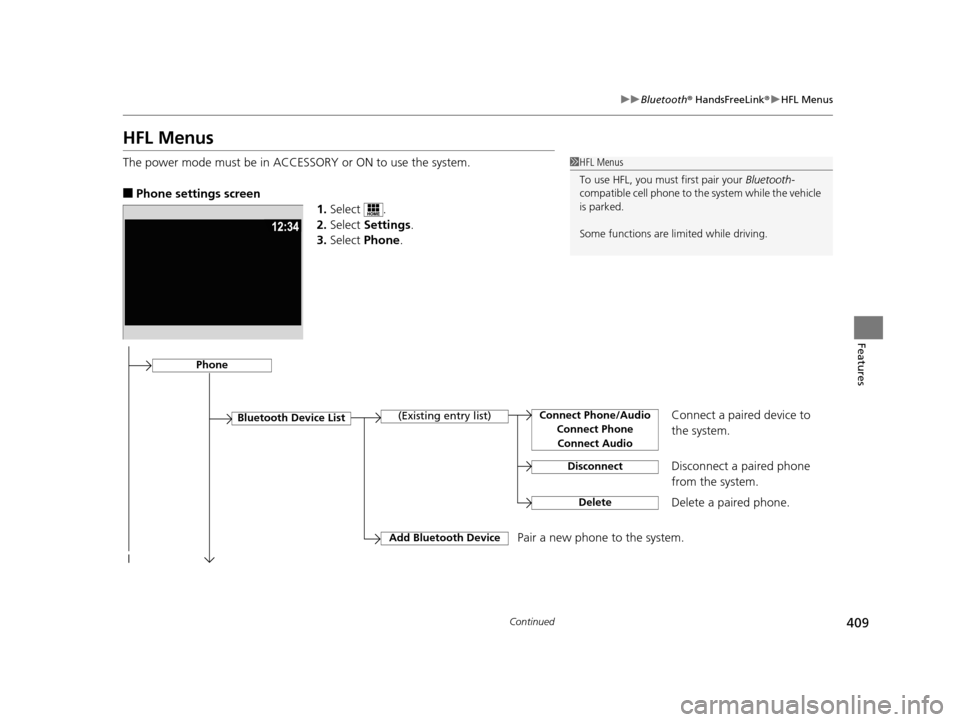
The power mode must be in ACCESSO RY or ON to use the system.
■Phone settings screen
1.Select .
2. Select Settings .
3. Select Phone.
1HFL Menus
To use HFL, you must first pair your Bluetooth-
compatible cell phone to th e system while the vehicle
is parked.
Some functions are li mited while driving.
Disconnect a paired phone
from the system.
Bluetooth Device List(Existing entry list)
Disconnect
DeleteDelete a paired phone.
Add Bluetooth DevicePair a new phone to the system.
Phone
Connect a paired device to
the system.Connect Phone/Audio
Connect PhoneConnect Audio
16 PILOT-31TG76000.book 409 ページ 2015年6月15日 月曜日 午前11時30分
Page 411 of 661
410
uuBluetooth ® HandsFreeLink ®u HFL Menus
Features
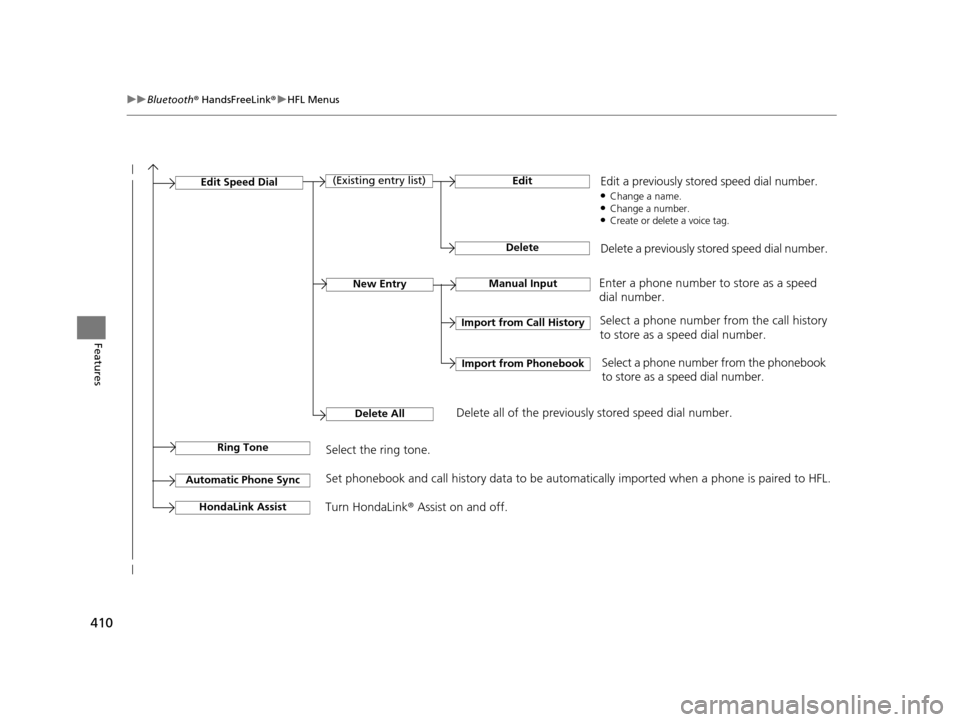
Manual InputNew Entry
Import from Call History
Import from Phonebook
Edit
Delete
(Existing entry list)Edit Speed Dial
Delete All
Enter a phone number to store as a speed
dial number.
Select a phone number from the call history
to store as a speed dial number.
Delete all of the previously stored speed dial number.Select a phone number from the phonebook
to store as a speed dial number.
Edit a previously stored speed dial number.
●Change a name.●Change a number.●Create or delete a voice tag.
Delete a previously stored speed dial number.
Ring ToneSelect the ring tone.
Automatic Phone SyncSet phonebook and call history data to be automatically imported when a phone is paired to HFL.
Turn HondaLink® Assist on and off.HondaLink Assist
16 PILOT-31TG76000.book 410 ページ 2015年6月15日 月曜日 午前11時30分
Page 413 of 661
412
uuBluetooth ® HandsFreeLink ®u HFL Menus
Features
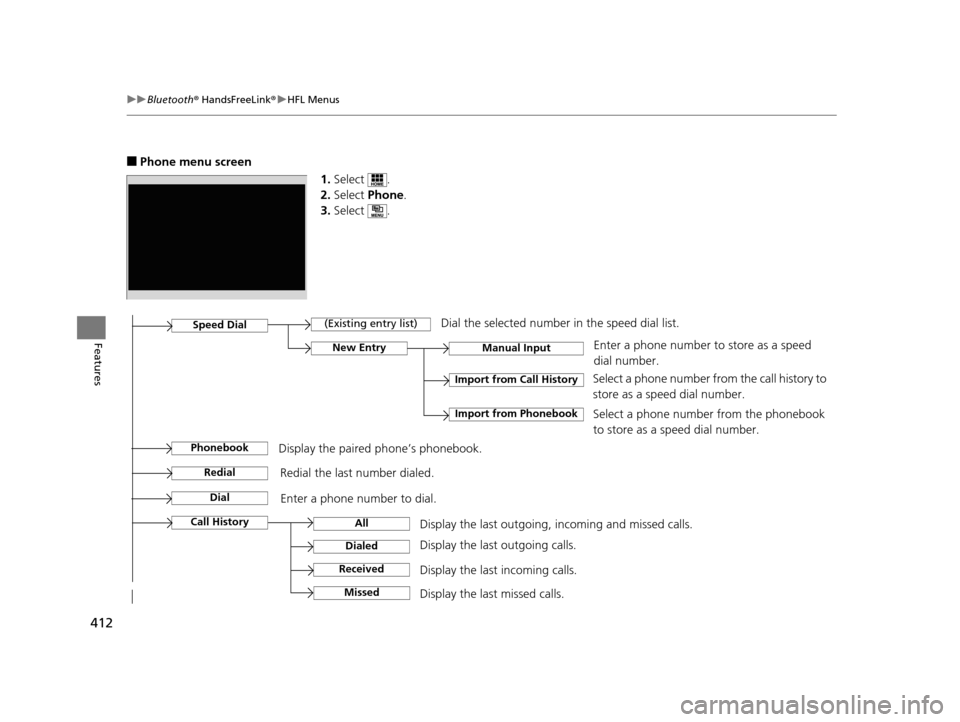
■Phone menu screen
1.Select .
2. Select Phone .
3. Select .
Display the last outgoing, incoming and missed calls. Select a phone number fro
m the call history to
store as a speed dial number.Call History
Speed Dial
All
Manual Input
Dialed
Received
Display the last outgoing calls.
Display the last incoming calls.
New Entry
Import from Call History
Import from PhonebookSelect a phone number from the phonebook
to store as a speed dial number. Enter a phone number to store as a speed
dial number.
MissedDisplay the last missed calls.
Dial
Redial
Enter a phone number to dial.
Redial the last number dialed.
(Existing entry list)Dial the selected number in the speed dial list.
PhonebookDisplay the paired phone’s phonebook.
16 PILOT-31TG76000.book 412 ページ 2015年6月15日 月曜日 午前11時30分
Page 415 of 661
uuBluetooth ® HandsFreeLink ®u HFL Menus
414
Features
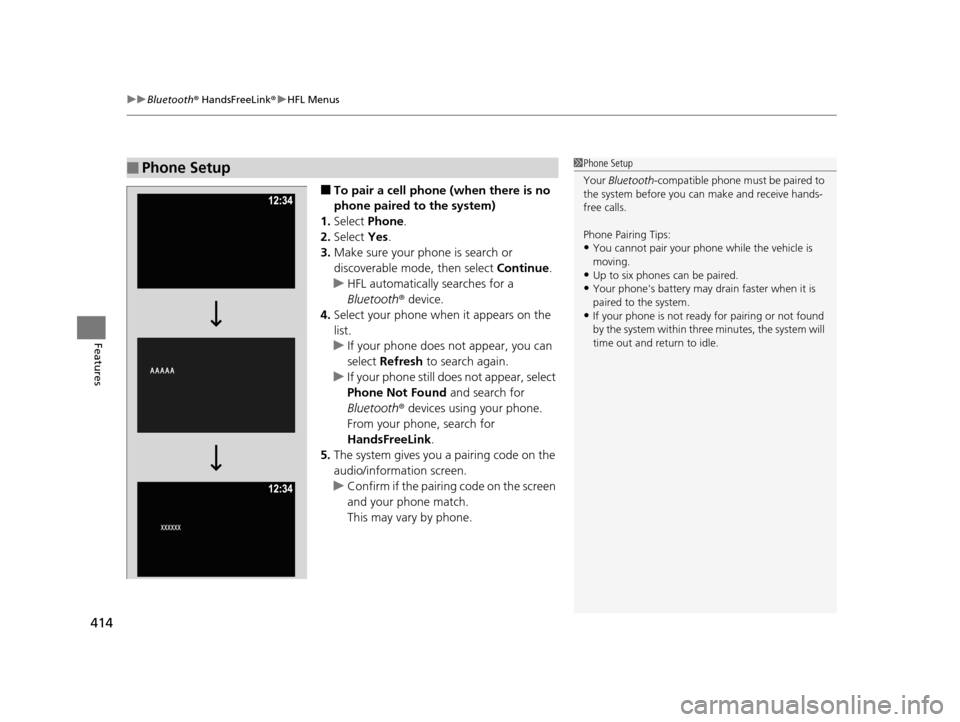
■To pair a cell phone (when there is no
phone paired to the system)
1. Select Phone .
2. Select Yes.
3. Make sure your phone is search or
discoverable mode, then select Continue.
u HFL automatically searches for a
Bluetooth ® device.
4. Select your phone when it appears on the
list.
u If your phone does not appear, you can
select Refresh to search again.
u If your phone still does not appear, select
Phone Not Found and search for
Bluetooth ® devices using your phone.
From your phone, search for
HandsFreeLink .
5. The system gives you a pairing code on the
audio/information screen.
u Confirm if the pairing code on the screen
and your phone match.
This may vary by phone.
■Phone Setup1Phone Setup
Your Bluetooth -compatible phone must be paired to
the system before you ca n make and receive hands-
free calls.
Phone Pairing Tips:
•You cannot pair your phone while the vehicle is
moving.
•Up to six phones can be paired.
•Your phone's battery may dr ain faster when it is
paired to the system.
•If your phone is not ready for pairing or not found
by the system within three minutes, the system will
time out and return to idle.
16 PILOT-31TG76000.book 414 ページ 2015年6月15日 月曜日 午前11時30分