2016 HONDA ODYSSEY audio
[x] Cancel search: audioPage 444 of 565
443
uuParking Your Vehicle uParking Sensor System*
Continued
Driving
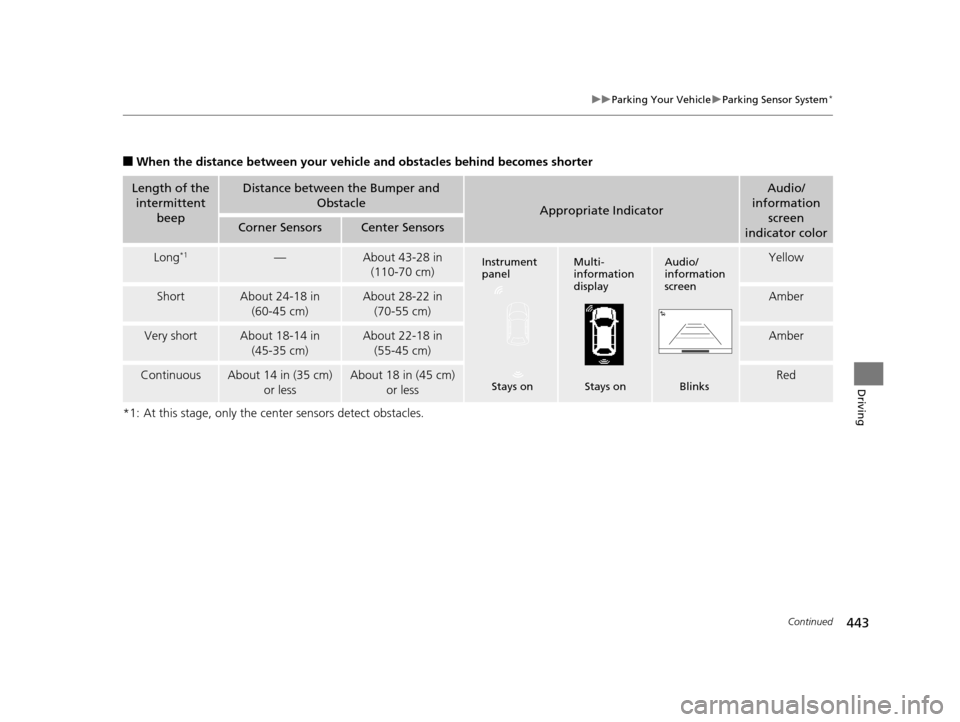
■When the distance between your vehicle and obstacles behind becomes shorter
*1: At this stage, only the center sensors detect obstacles.
Length of the intermittent
beepDistance between the Bumper and
Obstacle
Appropriate Indicator
Audio/
information
screen
indicator color
Corner SensorsCenter Sensors
Long*1—About 43-28 in (110-70 cm)Yellow
ShortAbout 24-18 in
(60-45 cm)About 28-22 in (70-55 cm)Amber
Very shortAbout 18-14 in (45-35 cm)About 22-18 in (55-45 cm)Amber
ContinuousAbout 14 in (35 cm) or lessAbout 18 in (45 cm) or lessRed
Instrument
panel
Stays onMulti-
information
display Stays onAudio/
information
screen Blinks
16 US ODYSSEY-31TK86500.book 443 ページ 2015年6月24日 水曜日 午後3時0分
Page 445 of 565
uuParking Your Vehicle uParking Sensor System*
444
Driving
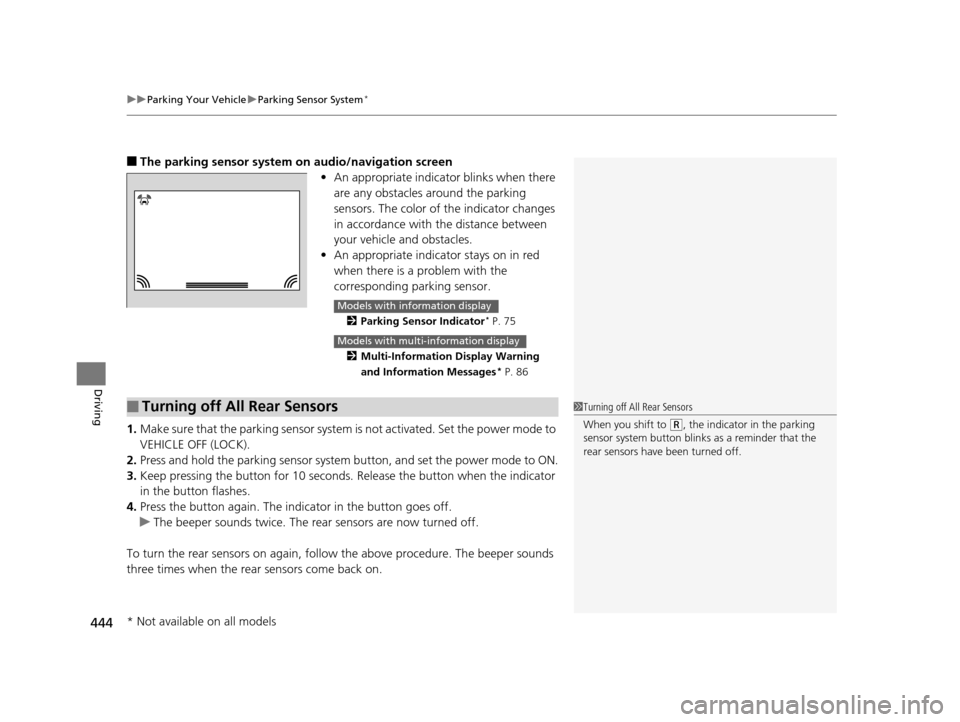
■The parking sensor system on audio/navigation screen
•An appropriate indicato r blinks when there
are any obstacles around the parking
sensors. The color of the indicator changes
in accordance with the distance between
your vehicle and obstacles.
• An appropriate indicator stays on in red
when there is a problem with the
corresponding parking sensor.
2 Parking Sensor Indicator* P. 75
2 Multi-Information Display Warning
and Information Messages
* P. 86
1.Make sure that the parking sensor system is not activated. Set the power mode to
VEHICLE OFF (LOCK).
2. Press and hold the parking sensor system button, and set the power mode to ON.
3. Keep pressing the button for 10 seconds. Release the button when the indicator
in the button flashes.
4. Press the button again. The indi cator in the button goes off.
u The beeper sounds twice. The re ar sensors are now turned off.
To turn the rear sensors on again, follow the above procedure. The beeper sounds
three times when the rear sensors come back on.
Models with info rmation display
Models with multi- information display
■Turning off All Rear Sensors1Turning off All Rear Sensors
When you shift to
(R, the indicator in the parking
sensor system button blinks as a reminder that the
rear sensors have been turned off.
* Not available on all models
16 US ODYSSEY-31TK86500.book 444 ページ 2015年6月24日 水曜日 午後3時0分
Page 446 of 565
445
Driving
Rearview Camera
About Your Rearview Camera
For models with the navigation system, see the Navigation System Manual.
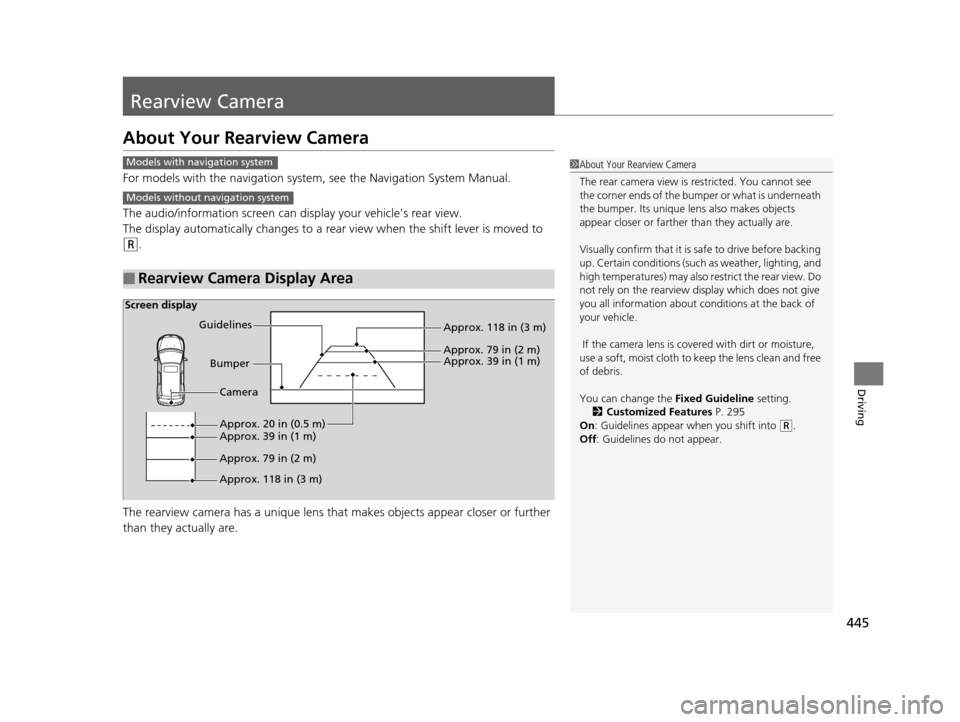
The audio/information screen can display your vehicle’s rear view.
The display automatically changes to a rear view when the shift lever is moved to
(R.
The rearview camera has a un ique lens that makes objects appear closer or further
than they actually are.
■Rearview Camera Display Area
1 About Your Rearview Camera
The rear camera view is restricted. You cannot see
the corner ends of the bum per or what is underneath
the bumper. Its unique le ns also makes objects
appear closer or farther than they actually are.
Visually confirm that it is safe to drive before backing
up. Certain conditions (such as weather, lighting, and
high temperatures) may also restrict the rear view. Do
not rely on the rearview display which does not give
you all information about conditions at the back of
your vehicle.
If the camera lens is covered with dirt or moisture,
use a soft, moist cloth to keep the lens clean and free
of debris.
You can change the Fixed Guideline setting.
2 Customized Features P. 295
On : Guidelines appear when you shift into
(R.
Off : Guidelines do not appear.
Models with navigation system
Models without navigation system
Screen display
Bumper
Guidelines
Approx. 118 in (3 m)
Approx. 79 in (2 m) Approx. 39 in (1 m)
Approx. 20 in (0.5 m)
Approx. 118 in (3 m) Approx. 79 in (2 m) Approx. 39 in (1 m) Camera
16 US ODYSSEY-31TK86500.book 445 ページ 2015年6月24日 水曜日 午後3時0分
Page 500 of 565
499
Maintenance
Battery
Checking the Battery
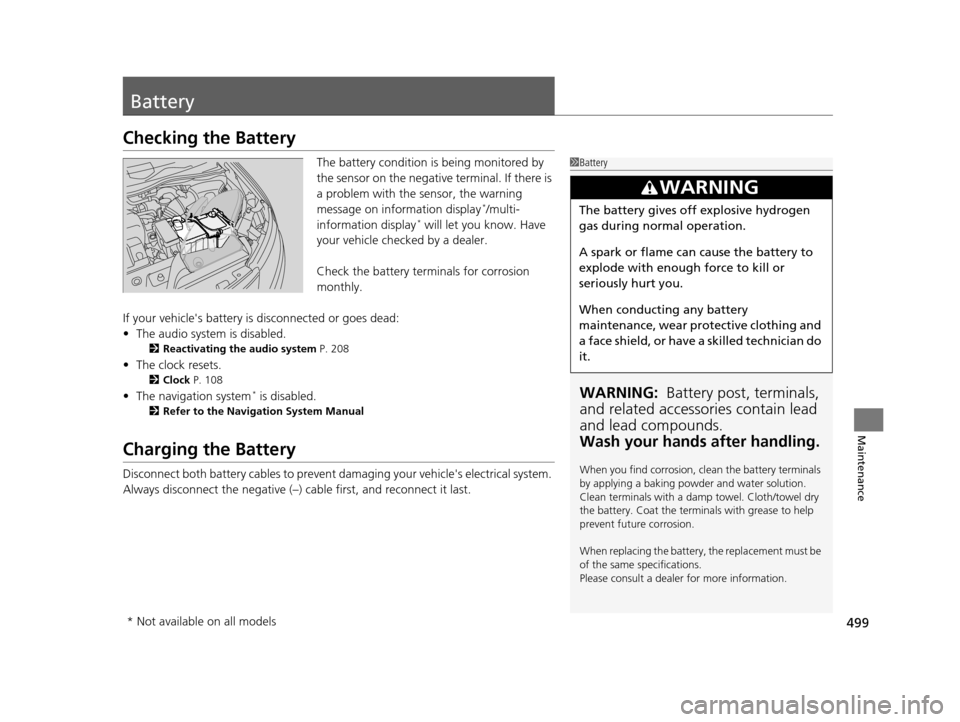
The battery condition is being monitored by
the sensor on the negative terminal. If there is
a problem with the sensor, the warning
message on information display
*/multi-
information display* will let you know. Have
your vehicle checked by a dealer.
Check the battery termi nals for corrosion
monthly.
If your vehicle's battery is disconnected or goes dead:
• The audio system is disabled.
2 Reactivating the audio system P. 208
•The clock resets.
2 Clock P. 108
•The navigation system* is disabled.
2 Refer to the Navigation System Manual
Charging the Battery
Disconnect both battery cables to prevent damaging your vehicle's electrical system.
Always disconnect the negative (–) cable first, and reconnect it last.
1Battery
WARNING: Battery post, terminals,
and related accessories contain lead
and lead compounds.
Wash your hands after handling.
When you find corrosion, cl ean the battery terminals
by applying a baking powder and water solution.
Clean terminals with a damp towel. Cloth/towel dry
the battery. Coat the terminals with grease to help
prevent future corrosion.
When replacing the battery, the replacement must be
of the same specifications.
Please consult a dealer for more information.
3WARNING
The battery gives off explosive hydrogen
gas during normal operation.
A spark or flame can cause the battery to
explode with enough force to kill or
seriously hurt you.
When conducting any battery
maintenance, wear prot ective clothing and
a face shield, or have a skilled technician do
it.
* Not available on all models
16 US ODYSSEY-31TK86500.book 499 ページ 2015年6月24日 水曜日 午後3時0分
Page 506 of 565
505Continued
Maintenance
Cleaning
Interior Care
Use a damp cloth with a mixture of mild detergent and warm water to remove dirt.
Use a clean cloth to remove detergent residue.
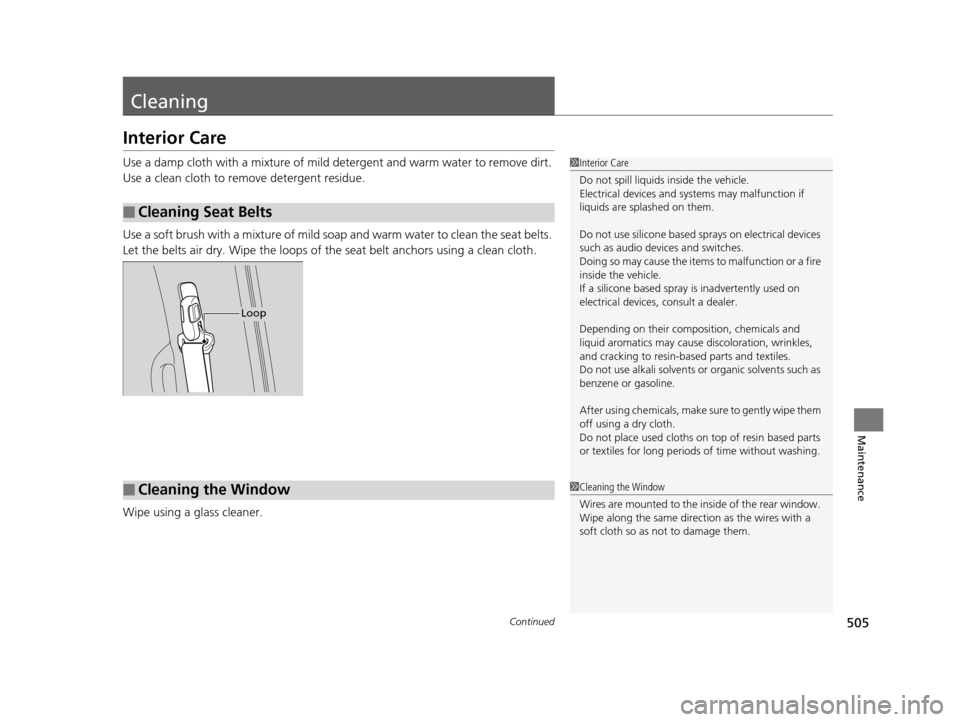
Use a soft brush with a mixture of mild soap and warm water to clean the seat belts.
Let the belts air dry. Wipe the loops of the seat belt anchors using a clean cloth.
Wipe using a glass cleaner.
■Cleaning Seat Belts
1 Interior Care
Do not spill liquids inside the vehicle.
Electrical devices and sy stems may malfunction if
liquids are splashed on them.
Do not use silicone based sprays on electrical devices
such as audio devices and switches.
Doing so may cause the items to malfunction or a fire
inside the vehicle.
If a silicone based spray is inadvertently used on
electrical devices, consult a dealer.
Depending on their compos ition, chemicals and
liquid aromatics may cause discoloration, wrinkles,
and cracking to resin-ba sed parts and textiles.
Do not use alkali solvents or organic solvents such as
benzene or gasoline.
After using chemical s, make sure to gently wipe them
off using a dry cloth.
Do not place used cloths on top of resin based parts
or textiles for long periods of time without washing.
Loop
■Cleaning the Window1Cleaning the Window
Wires are mounted to the in side of the rear window.
Wipe along the same direct ion as the wires with a
soft cloth so as not to damage them.
16 US ODYSSEY-31TK86500.book 505 ページ 2015年6月24日 水曜日 午後3時0分
Page 524 of 565
523Continued
Handling the Unexpected
Jump Starting
Turn off the power to electric devices, such as audio and lights. Turn off the engine,
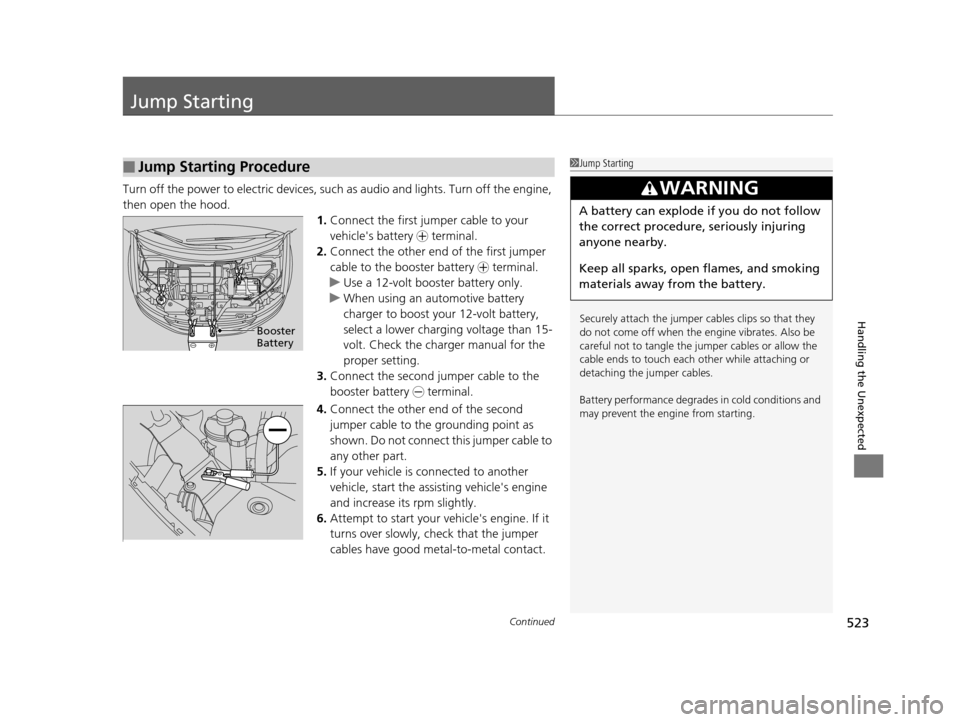
then open the hood. 1.Connect the first jumper cable to your
vehicle's battery + terminal.
2. Connect the other end of the first jumper
cable to the booster battery + terminal.
u Use a 12-volt booster battery only.
u When using an automotive battery
charger to boost your 12-volt battery,
select a lower charging voltage than 15-
volt. Check the charger manual for the
proper setting.
3. Connect the second jumper cable to the
booster battery - terminal.
4. Connect the other end of the second
jumper cable to the grounding point as
shown. Do not connect this jumper cable to
any other part.
5. If your vehicle is connected to another
vehicle, start the assisting vehicle's engine
and increase its rpm slightly.
6. Attempt to start your ve hicle's engine. If it
turns over slowly, check that the jumper
cables have good metal-to-metal contact.
■Jump Starting Procedure1 Jump Starting
Securely attach the jumper cables clips so that they
do not come off when the e ngine vibrates. Also be
careful not to tangle the ju mper cables or allow the
cable ends to touch each other while attaching or
detaching the jumper cables.
Battery performance degrades in cold conditions and
may prevent the engi ne from starting.
3WARNING
A battery can explode if you do not follow
the correct procedure, seriously injuring
anyone nearby.
Keep all sparks, open flames, and smoking
materials away from the battery.
Booster
Battery
16 US ODYSSEY-31TK86500.book 523 ページ 2015年6月24日 水曜日 午後3時0分
Page 546 of 565
545
Information
Devices that Emit Radio Waves
The following products and systems on your vehicle emit radio waves when in operation.
Each of the above complies with the appropriate requirements or the required
standards of FCC (Federal Communications Commission) and Industry Canada
Standard, described below:
As required by the FCC:
This device complies with Part 15 of the FCC rules. Operation is
subject to the following two cond itions: (1) This device may not
cause harmful interferenc e, and (2) this device must accept any
interference received, including interference that may cause
undesired operation.
Changes or modifications not ex pressly approved by the party
responsible for compliance could void the user's authority to
operate the equipment.
This device complies with Industry Canada Standard RSS-Gen/210/251/310.
Operation is subject to the following two conditions: (1) this device may not cause
interference, and (2) this device must accept any interference, including interference
that may cause undesired operation of the device.
Audio System
Bluetooth ® Audio
Bluetooth® HandsFreeLink ®
HomeLink® Universal Transceiver
Immobilizer System
Parking Sensor System (Canadian models only)
Remote Transmitter
Tire Pressure Monitoring System (TPMS)
Rear Entertainment System Remote Control
Models with Rear Entertainment System
16 US ODYSSEY-31TK86500.book 545 ページ 2015年6月24日 水曜日 午後3時0分
Page 554 of 565
Index
553
Index
Index
A
AAC................................... 221, 229, 252, 262
ABS (Anti-lock Brake System) .................. 438
AC Power Outlet ...................................... 185
Accessories and Modifications ................ 450
Accessory Power Sockets ......................... 183
Additives Coolant .................................................. 470
Engine Oil ............................................... 465
Washer ................................................... 474
Additives, Engine Oil ............................... 465
Adjusting Armrest .................................................. 175
Front Seats.............................................. 161
Head Restraints ....................................... 164
Mirrors.................................................... 158
Rear Seats ....................................... 162, 169
Steering Wheel ....................................... 157
Temperature ....................................... 95, 98
Aha
TM Menu ............................................. 261
AhaTM Radio .............................................. 271
Air Conditioning System (Climate Control
System) .................................................... 198
Changing the Mode................................ 198
Defrosting the Windshield and
Windows .............................................. 199
Dust and Pollen Filter .............................. 504
Recirculation/Fresh Air Mode................... 198
Sensors ................................................... 203 Using Automatic Climate Control ............ 198
Air Conditioning System (Heating and
Cooling System) ...................................... 194
Cooling ................................................... 196
Defrosting the Windshield and
Windows ............................................... 196
Dust and Pollen Filter ............................... 504
Heating ................................................... 195
Air Pressure ....................................... 491, 543
Airbags ........................................................ 39
Advanced Airbags ..................................... 45
Airbag Care ............................................... 51
Event Data Recorder .................................... 0
Front Airbags (SRS) .................................... 42
Indicator .............................................. 49, 74
Passenger Airbag Off Indicator .................. 50
Sensors ...................................................... 39
Side Airbags .............................................. 46
Side Curtain Airbags .................................. 48
AM/FM Radio .................................... 218, 245
Anti-lock Brake System (ABS) .................. 438
Indicator .................................................... 73
Armrest ..................................................... 175
Audio Remote Controls ............................ 210
Audio System ............................................ 206
Adjusting the Sound ................ 216, 237, 243
Auxiliary Input Jack .................................. 207
Error Messages ........................................ 267
General Information ................................ 272 Internet Radio ................................. 227, 259
iPod ................................................ 224, 255
MP3/WMA/AAC .............. 221, 229, 252, 262
Reactivating ............................................ 208
Recommended CDs ................................. 273
Recommended Devices............................ 275
Remote Controls ..................................... 210
Security Code .......................................... 208
Shortcuts................................................. 236
Theft Protection ...................................... 208
Touch Screen .......................................... 235
USB Flash Drives ...................................... 275
USB Port.................................................. 207
Audio with Touch Screen ......................... 235
Authorized Manuals ................................ 551
Auto Door Locking/Unlocking ................. 120
Customize ............................... 103, 302, 317
Automatic Lighting .................................. 148
Automatic Transmission ........................... 412
Creeping ................................................. 412
Fluid ........................................................ 472
Kickdown ................................................ 412
Operating the Shift Lever................... 18, 414
Shift Lever Does Not Move ...................... 525
Shifting ................................................... 413
Auxiliary Input Jack .................................. 207
Average Fuel Economy ........................ 94, 97
Average Speed ........................................... 98
16 US ODYSSEY-31TK86500.book 553 ページ 2015年6月24日 水曜日 午後3時0分