2016 HONDA CR-Z airbag off
[x] Cancel search: airbag offPage 3 of 64

TABLE OF CONTENTS
INDEX
VISUAL INDEX
VOICE COMMAND INDEX
SAFETY
INFORMATION
CUSTOMER
INFORMATION
INSTRUMENT PANEL
SPECIFICATIONS
VEHICLE
CONTROLS
MAINTENANCE
AUDIO AND
CONNECTIVITY
HANDLING THE UNEXPECTED
BLUETOOTH®
HANDSFREELINK®
DRIVING
HONDALINK®
NAVIGATION
Honda Automobile Customer Service
Your authorized Honda dealer should be able to answer any questions you h\
ave
about your vehicle. However, if you are dissatisfied with the information you receive,
you can call Honda Automobile Customer Service (see page 111).
Call (800) 999-1009 (U.S.) or (888) 946-6329 (Canada)
Honda Roadside Assistance
24-hour emergency road service is available to you in the United States \
and Canada
throughout your 3-year/36,000-mile warranty term. Services include jump starting,
flat tire and lockout assistance, towing, and more (limitations apply\
).
Call (866) 864-5211 (U.S.) or (800) 465-7587 (Canada)
This Owner’s Guide is intended to help you quickly get acquainted with your
2016 Honda CR-Z. It provides basic information and instructions on technology and
convenience features, as well as emergency procedures and how to get ass\
istance.
This guide is for vehicles sold in the United States and Canada. It cove\
rs all CR-Z
models, so you may find descriptions of features and equipment that ar\
e not in your
vehicle. Images throughout this guide are from U.S. vehicles and represe\
nt features
and equipment that are available on some, but not all, models.
This guide is not intended to be a substitute for the Owner’s Manual. The Owner
Information CD enclosed in your glove box kit includes the Owner’s Manual,
Navigation Manual, and vehicle and tire warranties in electronic format.\
This
information can be viewed on a computer (PC
or Mac platform) and saved or printed
for your reference. You can also visit owners.honda.com (U.S.) or myhonda.ca
(Canada) to view the complete and most current information.
If you are the first registered owner of your vehicle, you may request\
a complimentary
printed copy of the Owner’s Manual, Navigation Manual, or Vehicle Warranty within
the first six months of vehicle purchase. To request a copy, visit owners.honda.com
(U.S.) and create or log in to your account. In Canada, please request\
a copy from
your Honda dealer.
American Honda Motor Company strives to be proactive in protecting our
environment and natural resources. By using electronic delivery for a co\
nsiderable
portion of the information typically found in a vehicle owner’s manual, we are further
reducing our impact on the environment.
INTRODUCTION TABLE OF CONTENTS
*if equipped
VISUAL INDEX .......................................1
Steering Wheel and Nearby Controls ...1
Dashboard and Other Controls
...........2
SAFETY INFORMATION
........................3
Important Safety Information
..............3
Seat Belts
............................................... 5
Airbags
.................................................... 8
Child Safety
.......................................... 13
Safety Label Locations
.......................18
Reporting Safety Defects
...................19
INSTRUMENT PANEL
.........................20
Malfunction Indicators
......................20
Condition Indicators
...........................22
On/Off Indicators
................................. 23
IMA Battery Charge Level
.................23
Multi-Information Display
.................24
VEHICLE CONTROLS
...........................26
Using the Remote T
ransmitter ..........26
Smart Entry System
.............................27
Door Operation
.................................... 28
Power Window Operation
................29
One-Touch Turn Signal
.......................29
Interior and Exterior Lights
...............30
Wiper Operation
.................................. 31
Adjusting the Seats
............................32
Rear Cargo
........................................... 35
Adjusting the Mirrors
.........................37
Adjusting the Steering Wheel
..........37
Climate Control System
....................38
Seat Heaters*
...................................... 38
Setting the Clock
................................. 39
Customized Features
..........................39
AUDIO AND CONNECTIVITY
.............40
Basic Audio Operation
.......................40HondaLink™
........................................
43
FM/AM Radio ......................................44
Compact Disc (CD)
.............................45
iPod
®......................................................46
USB Flash Drive .................................. 47
Bluetooth
® Audio ................................ 48
Pandora
® .............................................. 49
BLUETOOTH
® HANDSFREELINK® .... 50
Basic HFL Operation
........................... 50
Pairing a Phone
................................... 51
Making a Call
...................................... 52
HondaLink
® Assist .............................. 53
SMS T
ext Messaging and E-Mail* ...54
Siri
® Eyes Free ..................................... 55
NA
VIGATION*
...................................... 56
Basic Navigation Operation
.............56
Entering a Destination
.......................59
Routing
.................................................. 61
DRIVING
................................................ 62
Before Driving
..................................... 62
Maximum Load Limit
..........................64
Starting to Drive
.................................. 66
Shifting
.................................................. 67
Braking
................................................. 70
3-Mode Drive System
.........................71
Plus Sport System
............................... 72
Eco Assist™ System
...........................73
V
ehicle Stability Assist (VSA
®), aka
Electronic Stability Control (ESC)
System
................................................... 75
Cruise Control
...................................... 76
LaneW
atch™*
..................................... 77
Multi-View Rear Camera
................... 78
Refueling
.............................................. 79
Page 8 of 64

8 || 9
S AFETY
S
AFETY
TABLE OF CONTENTS
INDEX
VISUAL INDEX
VOICE COMMAND
INDEX
SAFETY
INFORMATION
CUSTOMER
INFORMATION
INSTRUMENT PANEL
SPECIFICATIONS
VEHICLE
CONTROLS
MAINTENANCE
AUDIO AND
CONNECTIVITY
HANDLING THE UNEXPECTED
BLUETOOTH®
HANDSFREELINK®
DRIVING
HONDALINK®
NAVIGATION
Airbags
Your vehicle is equipped with three types of airbags: front airbags, side\
airbags, and
side curtain airbags.
Front Airbags (SRS)
The front SRS airbags inflate in a moderate-to-severe frontal collisio\
n to help
protect the head and chest of the driver and/or passenger. They are housed in the
center of the steering wheel for the driver, and in the dashboard for the passenger.
Both airbags are marked SRS AIRBAG.
SRS (Supplemental Restraint System) indicates that the airbags are des\
igned to
supplement seat belts, not replace them. Seat belts are the occupant’\
s primary
restraint system.
Advanced AirbagsYour front airbags have advanced features to help reduce the likelihood o\
f airbag-
related injuries to smaller occupants.
The driver’s advanced front airbag system includes
a seat position sensor. If the seat is too far forward,
the airbag inflates with less force, regardless of the
severity of the impact.
If there is a problem with the driver’s seat position
sensor, the SRS indicator will come on and the
airbag will inflate with full (normal) force, regardless
of the driver’s seating position.
The passenger’s advanced front airbag system
has weight sensors. Although Honda recommends
against carrying an infant or small child in the
passenger seat, if the sensors detect the weight
of a child (up to 65 lbs or 29 kg), the system will
automatically turn off the passenger’s front airbag.
For both advanced front airbags to work properly:
•
Do not spill any liquid on or under the seats.
•
Do not put any object under the passenger’
s seat.
•
Make sure any objects are positioned properly on the floor
. Improperly
positioned objects can interfere with the advanced airbag sensors.
•
All occupants should sit upright and wear their seat belts properly
.
•
Do not place any cover over any part of the passenger side dashboard.
Driver’s
seat
position
sensor
Passenger’s
seat
weight
sensors
Side AirbagsThe side airbags help protect the upper torso of the driver or a passeng\
er during
a moderate-to-severe side impact. They are housed in the outside edge of\
the
driver’s and passenger’s seat-backs. Both are marked SIDE AIRBAG.
Side Curtain AirbagsSide curtain airbags help protect the heads of the driver and passenger \
during a
moderate-to-severe side impact.
The side curtain airbags are located in the ceiling
above the side windows on both sides of the
vehicle.
The side curtain airbags are designed to deploy in a
moderate-to-severe side impact.
To get the best protection from the side curtain
airbags, occupants should wear their seat belts
properly and sit upright and well back in their seats.
Do not attach any objects to the side windows or
roof pillars, as they can interfere with the proper
operation of the side curtain airbags.
When side curtain airbags deploy in a frontal collision
One or both side curtain airbags may inflate in a moderate-to-severe a\
ngled
frontal collision.
Airbag System IndicatorsIf a problem occurs in the airbag system, the SRS indicator comes on and\
a
message appears in the multi-information display.
SRS (Supplemental Restraint System) indicator
If the indicator comes on at any other time besides
vehicle start-up, or does not come on at all, have the
system checked by a dealer as soon as possible. If
you don’t, your airbags and seat belt tensioners may
not work properly when they are needed.
Ignoring the SRS indicator can result in serious injury or death if the \
airbag
systems or tensioners do not work properly.
Have your vehicle checked by a dealer as soon as possible if the SRS
indicator alerts you to a possible problem.
WARNING
Side curtain airbag storage
Deployed side curtain airbag
READY
Page 9 of 64
10 || 11
S AFETY
S
AFETY
TABLE OF CONTENTS
INDEX
VISUAL INDEX
VOICE COMMAND
INDEX
SAFETY
INFORMATION
CUSTOMER
INFORMATION
INSTRUMENT PANEL
SPECIFICATIONS
VEHICLE
CONTROLS
MAINTENANCE
AUDIO AND
CONNECTIVITY
HANDLING THE UNEXPECTED
BLUETOOTH®
HANDSFREELINK®
DRIVING
HONDALINK®
NAVIGATION
Passenger Airbag Off indicator
The indicator comes on to alert you that the
passenger’s front airbag has been turned off. This
occurs when the front passenger’s weight sensors
detect 65 lbs (29 kg) or less, the weight of an infant
or small child, on the seat.
Your vehicle is not recommended for child passengers. Never put a rear-facing
child seat in this vehicle.
Objects placed on the seat can also cause the indicator to come on.
If the passenger‘s seat is empty, the passenger’s front airbag will not deploy and
the indicator will not come on.
If the indicator comes on with no occupant or objects in the passenger’\
s seat,
something may be interfering with the weight sensors, such as:
•
An object hanging on the seat or in the seat-back pocket.
•
An object pressing against the rear of the seat-back.
•
The seat or seat-back is forced back against cargo on the rear trays or \
floor
behind it.
•
An object placed under the passenger’
s seat.
If none of these conditions exist, have your vehicle checked by a dealer\
as soon
as possible.
The passenger airbag off indicator may go on and off repeatedly if the t\
otal weight
on the seat is near the airbag cutoff threshold.
Side Airbag Off indicator
This indicator comes on if the passenger’s side
airbag has been turned off because the passenger
is too small to be sitting in the passenger’s seat, is
slouching or not sitting upright, or has leaned into
the airbag’s deployment path.
OFFOFFP ASSENGER
AIRBAGCanad a
U.S.
READY
READY
U.S.
Canada
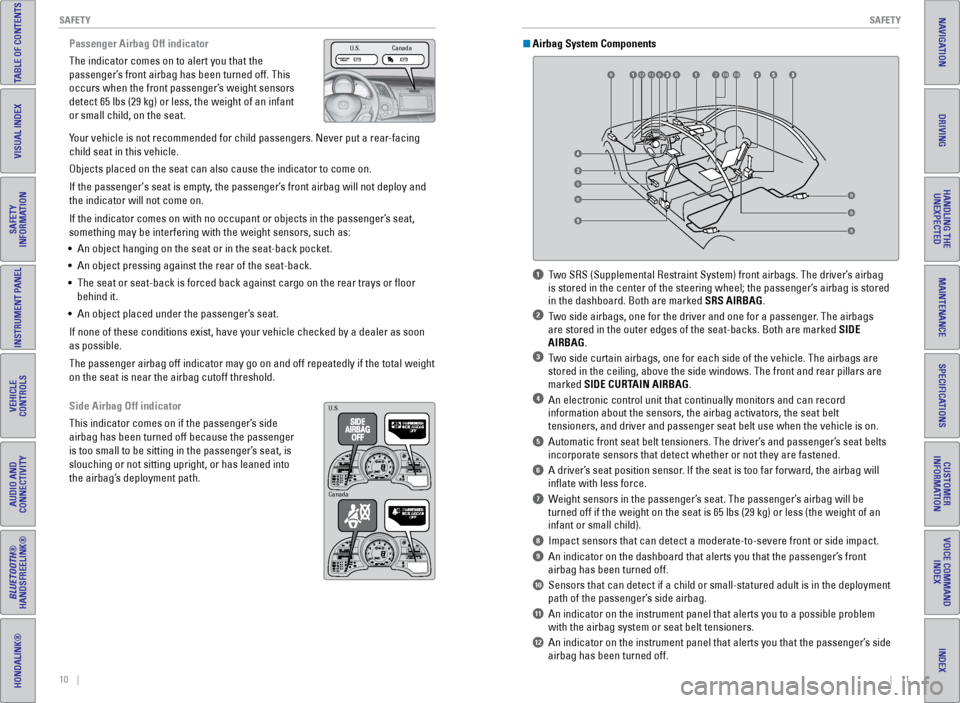
1 Two SRS (Supplemental Restraint System) front airbags. The driver’s airbag
is stored in the center of the steering wheel; the passenger’s airbag is stored
in the dashboard. Both are marked SRS AIRBAG.
2 Two side airbags, one for the driver and one for a passenger. The airbags are stored in the outer edges of the seat-backs. Both are marked SIDE
AIRBAG.
3 Two side curtain airbags, one for each side of the vehicle. The airbags a\
re stored in the ceiling, above the side windows. The front and rear pillar\
s are
marked SIDE CURTAIN AIRBAG.
4 An electronic control unit that continually monitors and can record information about the sensors, the airbag activators, the seat belt
tensioners, and driver and passenger seat belt use when the vehicle is o\
n.
5 Automatic front seat belt tensioners. The driver’s and passenger’s seat belts incorporate sensors that detect whether or not they are fastened.
6 A driver’s seat position sensor. If the seat is too far forward, the airbag will inflate with less force.
7 Weight sensors in the passenger’s seat. The passenger’s airbag will be turned off if the weight on the seat is 65 lbs (29 kg) or less (the w\
eight of an
infant or small child).
8 Impact sensors that can detect a moderate-to-severe front or side impa\
ct.
9 An indicator on the dashboard that alerts you that the passenger’s front airbag has been turned off.
10 Sensors that can detect if a child or small-statured adult is in the d\
eployment path of the passenger’s side airbag.
11 An indicator on the instrument panel that alerts you to a possible pro\
blem with the airbag system or seat belt tensioners.
12 An indicator on the instrument panel that alerts you that the passenge\
r’s side airbag has been turned off.
Airbag System Components
6
789101112810
8
8
88
Page 11 of 64

14 || 15
S AFETY
S
AFETY
TABLE OF CONTENTS
INDEX
VISUAL INDEX
VOICE COMMAND
INDEX
SAFETY
INFORMATION
CUSTOMER
INFORMATION
INSTRUMENT PANEL
SPECIFICATIONS
VEHICLE
CONTROLS
MAINTENANCE
AUDIO AND
CONNECTIVITY
HANDLING THE UNEXPECTED
BLUETOOTH®
HANDSFREELINK®
DRIVING
HONDALINK®
NAVIGATION
Protecting Infants
An infant must be properly restrained in a rear-facing, reclining child seat until the
infant reaches the seat maker’s weight or height limit for the seat, and the infant is
at least one year old. Because rear-facing child seats should not be used in this
vehicle, you should never carry an infant in this vehicle.
Children who are unrestrained or improperly restrained can be seriously \
injured or killed in a crash.
Any child too small for a seat belt should be properly restrained in a c\
hild
seat. A larger child should be properly restrained with a seat belt, usi\
ng a
booster seat if necessary.
WARNING
Placing a rear-facing child seat in the passenger’s seat can result in serious
injury or death during a crash.
Never install a rear-facing child seat in this vehicle.
WARNING
Protecting Smaller Children
If a child is at least one year old and within the weight range indicate\
d by the child
seat manufacturer, the child should be properly restrained in a firmly secured
forward-facing child seat.
Since this vehicle does not have a back seat, Honda recommends that you \
do not
carry a child, age 12 or under, as a passenger.
This is because placing a forward-facing child seat in the passenger’\
s seat can
be hazardous, even with advanced front airbags that automatically turn t\
he
passenger’s front airbag off.
If you choose to ignore our warnings and transport a small child in this\
vehicle,
be sure to move the passenger seat as far to the rear as possible, and f\
ollow the
instructions and guidelines in the following pages.
Placing a forward-facing child seat in the passenger’s seat can result in
serious injury or death if the front airbag inflates.
If you must place a forward-facing child seat in the passenger’s seat, move
the vehicle seat as far back as possible, and properly restrain the chil\
d.
WARNING
Selecting a Child Seat Important considerations when selecting a child seat
Make sure the child seat meets the following three requirements:
•
The child seat is the correct type and size for the child.
•
The child seat is the correct type for the seating position.
•
The child seat is compliant with Federal Motor V
ehicle Safety Standard 213 or
Canadian Motor Vehicle Safety Standard 213.
Installing a Child Seat with a Lap/Shoulder Seat Belt
1.
Move the passenger seat to the rearmost
position.
2.
Place the child seat on the passenger seat.
3.
Route the seat belt through the child seat
according to the seat manufacturer’
s
instructions, and insert the latch plate into the
buckle. Insert the latch plate fully until it clicks.
4.
Slowly pull the shoulder part of the belt all the
way out until it stops. This activates the lockable
retractor
.
5.
Let the seat belt completely wind up into the
retractor
, then try to pull it out to make sure the
retractor is locked. If you are able to pull the
shoulder belt out, the lockable retractor is not
activated. Pull the seat belt all the way out, and
repeat steps 4 – 5.
6.
Grab the shoulder part of the seat belt near the
buckle, and pull up to remove any slack from
the lap part of the belt. When doing this, place
your weight on the child seat and push it into the
vehicle seat.
7.
Make sure the child seat is firmly secured by
rocking it forward and back and side to side; little
movement should be felt.
T
o deactivate a lockable retractor, release the
buckle and allow the seat belt to wind up all the
way.
Page 14 of 64

20 || 21
I NSTRUMENT P
ANELI
NSTRUMENT P
ANEL
TABLE OF CONTENTS
INDEX
VISUAL INDEX
VOICE COMMAND
INDEX
SAFETY
INFORMATION
CUSTOMER
INFORMATION
INSTRUMENT PANEL
SPECIFICATIONS
VEHICLE
CONTROLS
MAINTENANCE
AUDIO AND
CONNECTIVITY
HANDLING THE UNEXPECTED
BLUETOOTH®
HANDSFREELINK®
DRIVING
HONDALINK®
NAVIGATION
Learn about the indicators, gauges, and displays related to driving the \
vehicle.
Indicators briefly appear with each engine start and then go out. Red \
and amber
indicators are most critical. Blue and green indicators are used for gen\
eral
information.
Malfunction Indicators
These are the most critical indicators. If they come on and stay lit whi\
le driving or at
any other time, there may be a problem. See your dealer if necessary.
Brake system
• Brake fluid is low.
• The brake system has a problem.
Press the brake pedal lightly to check pedal pressure. If normal, check \
the brake fluid level when you stop. If abnormal, take immediate actio\
n. If
necessary, downshift the transmission to slow the vehicle using engine
braking. Have your vehicle repaired immediately.
Low oil pressure
Engine oil pressure is low. Stop in a safe place. Open the hood. Check the oil
level, and add oil if necessary (see page 96). If the indicator does n\
ot turn
off, have your vehicle repaired immediately.
Charging system
The battery is not charging. Turn off all electrical items, but do not turn off
the vehicle to prevent further battery discharge. Have your vehicle repa\
ired
immediately.
Supplemental Restraint System (SRS)
There is a problem with one of the airbag systems or seat belt tensioner\
s.
Canada
U.S.
INSTRUMENT PANELMalfunction indicator lamp (check engine light)
The emissions control system may have a problem, or the fuel cap is loos\
e
or missing. If the indicator blinks, a
misfire in the engine’s cylinders is
detected. Stop in a safe place, and wait for the engine to cool down.
Anti-lock Brake System (ABS)
There is a problem with the anti-lock brake system. Your vehicle still has
normal braking ability, but no anti-lock function.
Tire Pressure Monitoring System (TPMS) (U.S. models only)
If the indicator blinks for one minute and then stays on, there is a pro\
blem
with the system.
Vehicle Stability Assist (VSA
®)
There is a problem with the VSA system or hill start assist system.
Brake system
There is a problem with a braking system component or the electric parking
brake.
Electric power steering
There is a problem with the system. Stop in a safe place, and restart th\
e
vehicle.
IMA (Integrated Motor Assist)
There is a problem with the system. Avoid high speed driving and have your
vehicle repaired immediately.
High temperature
The engine coolant temperature is high. Drive slowly to prevent overheat\
ing.
If the indicator remains on, immediately stop the vehicle in a safe plac\
e (see
page 83).
Low temperature
The engine coolant temperature is low. If the indicator remains on after the
engine has reached normal operating temperature, there may be a problem \
with temperature sensors.
Canada U.S.
Page 15 of 64

22 || 23
I NSTRUMENT P
ANELI
NSTRUMENT P
ANEL
TABLE OF CONTENTS
INDEX
VISUAL INDEX
VOICE COMMAND
INDEX
SAFETY
INFORMATION
CUSTOMER
INFORMATION
INSTRUMENT PANEL
SPECIFICATIONS
VEHICLE
CONTROLS
MAINTENANCE
AUDIO AND
CONNECTIVITY
HANDLING THE UNEXPECTED
BLUETOOTH®
HANDSFREELINK®
DRIVING
HONDALINK®
NAVIGATION
Condition Indicators
These indicators may require you to perform an action.
Parking brake
Release the parking brake before driving. You will hear a beep if you drive
with it not fully released.
Seat belt reminder
Make sure seat belts are fastened for you and all passengers. The indica\
tor
blinks and beeps sound continuously if you or your front passenger has not
fastened your seat belts when you begin driving. If the indicator remain\
s on
after seat belts are fastened, see your dealer.
Door/hatch open
A door or the hatch is open. A beep sounds if any door or the hatch is o\
pen
while driving.
Low fuel
Refuel as soon as possible. If the indicator blinks, there is a problem \
with the
fuel gauge. See your dealer.
Low tire pressure
Stop in a safe place, check tire pressures, and inflate tire(s) if n\
ecessary. If
the indicator remains on after tire inflation, you need to calibrate t\
he system
(see page 85).
System message
When a condition or malfunction indicator comes on, a message also
appears on the multi-information display. Check the display for more
information.
Immobilizer
Your remote transmitter cannot be recognized by the vehicle. If the indic\
ator
blinks, you may not be able to start the engine. Turn the vehicle off, and then
on again. If it continues to blink, there may be a problem with the syst\
em.
See your dealer.
Canada
U.S.
On/Off Indicators
These indicators remind you when an item is on or off.
VSA off
VSA on (blinks)
Side airbag off
CRUISE
MAIN on
CRUISE
CONTROL on
Turn signals/hazards on
Fog lights* on High beams on
Exterior lights on
ECON mode on
SPORT mode on
NORMAL mode on
Auto idle stop on (blinks)
Plus Sport system on
CanadaU.S.
*if equipped
IMA Battery Charge Level
The remaining battery charge level is displayed as a bar graph.
Electric Motor Assist
The degree to which the electric motor is assisting
the engine is displayed by the ASST indicator bar.
Battery ChargeThe degree to which the IMA battery is being
charged is displayed by the CHRG indicator bar.
IMA battery charge
level indicator
CHRG indicato rASST indicato r
Page 63 of 64

118 || 119
INDEX
VOICE COMMAND INDEX
TABLE OF CONTENTS
INDEX
VISUAL INDEX
VOICE COMMAND
INDEX
SAFETY
INFORMATION
CUSTOMER
INFORMATION
INSTRUMENT PANEL
SPECIFICATIONS
VEHICLE
CONTROLS
MAINTENANCE
AUDIO AND
CONNECTIVITY
HANDLING THE UNEXPECTED
BLUETOOTH®
HANDSFREELINK®
DRIVING
HONDALINK®
NAVIGATION
On-screen Commands
The system accepts these commands on any screen where applicable. All
available commands are highlighted in yellow when you press the Talk button.
•
Next (or previous)
•
Up (or down)
•
Right (or left)
•
Return
•
OK (excluding Startup Confirmation screen)
•
Delete
INDEX
3-Mode Drive System ...................................... 71
ABS
....................................................... 21, 70
Accessory Power Socket
...............................40
Airbags
............................................................... 8
Advanced Airbags
......................................... 8
Airbag Care
................................................... 12
Airbag System Components
.......................11
Airbag System Indicators
.............................9
Front Airbags (SRS)
.......................................8
Passenger Airbag Off Indicator
.................10
Side Airbag Off indicator
............................10
Side Airbags
.................................................... 9
Side Curtain Airbags
......................................9
Supplemental Restraint System (SRS) Indicator...............................................9
Ambient Meter..................................................73
Anti-Lock Brake System (ABS)
................21, 70
Audio Commands
........................................... 116
Audio Operation
............................................... 40
Accessory Power Socket
...........................40
Bluetooth
® Audio ......................................... 48
Compact Disc (CD) ....................................... 45
FM/AM Radio
................................................ 44
HDMI Port
...................................................... 40
HondaLink
® ................................................... 43
iPod® ............................................................. 46
Pandora® ....................................................... 49
Sound
............................................................. 41
Steering Wheel Controls
............................. 41
Touchscreen Operation
.............................. 42
USB Flash Drive
............................................ 47
USB Port
........................................................ 40
Auto idle stop
.............................................. 23, 75
Battery
............................................................. 99
Battery Charge
................................................. 23
Bluetooth
® Audio ............................................. 48
Bluetooth® Audio Commands ...................... 117
Bluetooth® HandsFreeLink® (HFL) ................. 50
E-Mail
............................................................. 54
HFL Controls
.................................................. 50
HondaLink
® Assist ....................................... 53
Making a Call ................................................ 52
Pairing a Phone
............................................ 51
Phonebook
.................................................... 52
Siri
® Eyes Free .............................................. 55
SMS T ext Messaging .................................. 54
Speed Dial
..................................................... 53
Talk Button Tips
............................................ 51
Brake Assist System........................................70
Brake/Clutch Fluid............................................98
Brake system
.............................................. 20, 21
Braking
............................................................. 70
Brightness Control
........................................... 30Carbon Monoxide Gas.......................................4
Cargo Area
........................................................
35
Cargo Cover ......................................................
36
Changing Wiper Blades
................................
100
Charging system...............................................20
Child Safety
.......................................................
13
Child Seat ..........................................................
15
Climate Control Commands ..........................
115
Climate Control System
...................................
38
Clock
.............................................................
39
Compact Disc (CD) ...........................................
45
Compact Disc (CD) Commands ....................
116
Condition Indicators ........................................
22
Contact Us .......................................................
111
Continuously Variable Transmission (CVT) ...
67
Cruise control .............................................
23, 76
Customer Information....................................110
Customize Settings ....................................
25, 39
Dashboard and Other Controls ........................
2
Destination ........................................................
59
Detour
.............................................................
61
Dialing a Number .............................................
52
Door/hatch open
..............................................
22
Door Mirrors
.....................................................
37
Door Operation ...........................................
27, 28
DOT Tire Quality Grading
..............................
106
Driving
.............................................................
62
3-Mode Drive System
..................................
71
Braking
...........................................................
70
Cruise Control ...............................................
76
Eco Assist™ System ....................................
73
ENGINE START/STOP button .....................
66
LaneWatch™ ................................................
77
Maximum Load Limit ....................................
64
Multi-View Rear Camera ............................
78
Paddle Shifters .............................................
68
Plus Sport System
........................................
72
Power Mode
.................................................
66
Refueling ........................................................
79
Shifting ...........................................................
67
Starting the Engine
......................................
66
V
ehicle Stability Assist (VSA
®) ..................
75
Eco Assist™ System
........................................ 73
Ecological Drive Display
................................. 74
ECON mode
................................................. 23, 71
Electric Motor Assist
....................................... 23
Electric Parking Brake
.................................... 70
Electric power steering...................................21
Electronic Stability Control (ESC)
.................. 75
E-Mail
............................................................. 54
Emergency Engine Stop
.................................. 84
Emergency Towing
.......................................... 84
Engine and Fuel
.............................................. 109
Page 64 of 64

120 || 121
INDEX
INDEX
TABLE OF CONTENTS
INDEX
VISUAL INDEX
VOICE COMMAND
INDEX
SAFETY
INFORMATION
CUSTOMER
INFORMATION
INSTRUMENT PANEL
SPECIFICATIONS
VEHICLE
CONTROLS
MAINTENANCE
AUDIO AND
CONNECTIVITY
HANDLING THE UNEXPECTED
BLUETOOTH®
HANDSFREELINK®
DRIVING
HONDALINK®
NAVIGATION
Engine Coolant..................................................97
Engine Oil...........................................................95
ENGINE START/STOP button
.........................66
Exterior lights
.............................................. 23, 30
Fastening a Seat Belt
........................................ 7
Find Nearest Place
.......................................... 60
Find Place Commands
...................................114
Floor Mats
......................................................... 33
Fluids
........................................................... 109
FM/AM Radio
.................................................... 44
FM/AM Radio Commands
.............................116
Fog lights
..................................................... 23, 30
Foot Brake
......................................................... 70
Frequently Asked Questions
........................110
Front Airbags (SRS)
........................................... 8
Front Door Inner Handle
.................................28
Front Wipers
..................................................... 31
Fuel Information
............................................... 79
Fuse Locations..................................................88
Hatch
....................................................... 27, 28
Hazards
............................................................. 23
HDMI Port..........................................................40
Head Restraints
................................................ 34
High beams
....................................................... 23
High temperature
............................................. 21
Home Address
.................................................. 59
HondaLink
® ....................................................... 43
HondaLink® Assist ........................................... 53
Honda Roadside Assistance ........................112
Hood
............................................................. 94
IMA Battery Charge Level
.............................. 23
IMA (Integrated Motor Assist).......................21
Immobilizer
........................................................ 22
Info Commands...............................................117
Information Display..........................................24
Instrument Panel
.............................................. 20
Interior Lights....................................................30
iPod
® ............................................................. 46
iPod® Commands ........................................... 116
Jump Starting ................................................... 81
LaneWatch™
.................................................... 77
Lap/Shoulder Seat Belts
................................... 5
Light Bulbs.......................................................109
Lights
............................................................. 30
Lock Tab
............................................................. 28
Low fuel
............................................................. 22
Low oil pressure
............................................... 20
Low temperature
.............................................. 21
Low tire pressure
............................................. 22
Maintenance.....................................................91 Battery
........................................................... 99
Brake/Clutch Fluid
........................................ 98
Engine Coolant
.............................................. 97
Engine Oil
....................................................... 95
Maintenance Minder™
...............................92Safety Precautions
......................................
91
Service Codes
...............................................
93
Under the Hood
............................................
94
Window W
asher Fluid
.................................
98
Wiper Blades
..............................................
100
Making a Call ....................................................
52
Malfunction indicator lamp ............................
21
Malfunction Indicators....................................20
Manual Transmission
......................................
69
Map Display Commands
...............................
113
Map Legend
......................................................
61
Master Door Lock Switch
...............................
28
Maximum Load Limit........................................64
Mirrors
.............................................................
37
Multi-Information Display
...............................
24
Multi-View Rear Camera
................................
78
Navigation
.........................................................
56
Detour ............................................................
61
Display and Controls
....................................
57
Entering a Destination
.................................
59
Find Nearest Place
......................................
60
Home Address
..............................................
59
Map Legend ..................................................
61
Place Name ...................................................
60
Routing ...........................................................
61
Steering Wheel Controls .............................
56
Street Address ..............................................
59
Talk Button Tips ............................................
58
Traffic
.............................................................
61
Voice Prompt.................................................58
Navigation Commands
..................................
113
NORMAL mode
...........................................
23, 71
One-Touch Turn Signal
....................................
29
On/Off Indicators
..............................................
23
On-screen Commands...................................118
Opening the Hood ............................................
94
Overheating.......................................................83
Paddle Shifters .................................................
68
Pairing a Phone ................................................51
Pandora® ........................................................... 49
Pandora® Commands .................................... 117
Parking brake..............................................22, 70
Passenger Airbag Off Indicator
.....................10
Phone
............................................................. 51
Phonebook
........................................................ 52
Phone Commands
.......................................... 117
Place Name.......................................................60
Plus Sport system
...................................... 23, 72
Power Door Mirrors.........................................37
Power Flow Monitor
........................................ 73
Power Mode
..................................................... 66
Power Windows
............................................... 29
Radio
............................................................. 44
Readiness Codes............................................108 Rear Camera
..................................................... 78Rear Cargo
........................................................
35
Rearview Mirror ...............................................
37
Rear Wiper ........................................................
31
Refueling............................................................79
Remote Battery Strength ................................
80
Remote Transmitter
.........................................
26
Reporting Safety Defects................................19
Roadside Assistance
.....................................
112
Route Commands
...........................................
115
Routing
.............................................................
61
Safety Information .............................................
3
Carbon Monoxide Gas
...................................
4
Child Safety
...................................................
13
Reporting Safety Defects ............................
19
Safety Label Locations
................................
18
Safety Messages
...........................................
3
Seat Belts ............................................................
5
Fastening a Seat Belt
....................................
7
Lap/Shoulder Seat Belts
...............................
5
Seat Belt Inspection
......................................
6
Seat belt reminder ....................................... 22
Seat Heaters ..................................................... 38
Seats
............................................................. 32
Service Codes...................................................93
Settings
....................................................... 25, 39
Setting the Clock
.............................................. 39
Shifting
............................................................. 67
Shift Lever Does Not Move
............................80
Side airbag off
............................................ 10, 23
Side Airbags........................................................9
Side Curtain Airbags..........................................9
Siri
® Eyes Free .................................................. 55
Smart Entry System ......................................... 27
SMS Text Messaging
...................................... 54
Song By V
oice™ Commands ........................117
Sound
............................................................. 41
Specifications
................................................. 109
Speed Dial
......................................................... 53
SPORT mode
............................................... 23, 71
Starting the Engine
.......................................... 66
Steering Wheel.................................................37
Steering Wheel and Nearby Controls
............1
Steering Wheel Controls...........................41, 56
Street Address..................................................59
Supplemental Restraint System (SRS)
.....9, 20
System message
.............................................. 22
Talk button
................................................... 50, 56
Talk Button Tips
.......................................... 51, 58
Text Messaging
................................................ 54
Tire Information
.............................................. 102
DOT Tire Quality Grading
..........................106
Inflation Guidelines
.................................... 102
T
ire and Loading Information Label ........103
Tire and Wheel Replacement
...................103
Tire Chains
................................................... 104Tire Identification Number (TIN)
..............
105
Tire Labeling ................................................
105
Tire Service Life ..........................................
104
Tire Terminology .........................................
105
Wear Indicators .........................................
102
Winter Tires .................................................
104
Tire Pressure Monitoring System (TPMS)
.........................................
21, 85
T
ire Repair Kit ...................................................
87
Tires
...........................................................
109
Touchscreen Operation ..................................
42
Towing
.............................................................
84
Traffic
.............................................................
61
Troubleshooting ..............................................
110
Turn Signal ..................................................
23, 29
Under the Hood ................................................
94
USB Commands..............................................116
USB Flash Drive................................................47
USB Port ............................................................
40
Vehicle
...........................................................
109
Vehicle Controls ...............................................
26
Vehicle Stability Assist (VSA
®) .......... 21, 23, 75
Visual Index.........................................................1
V
oice Command Index
.................................. 113
V
oice Prompt
.................................................... 58
Warranty Coverages
..................................... 112
W
ear Indicators
............................................. 102
Window Washer Fluid
..................................... 98
Windows............................................................29
Winter T
ires
..................................................... 104
Wiper Blades
.................................................. 100
Wiper Operation
............................................... 31