Page 200 of 590
199
uuAudio System uUSB Port(s)
Features
USB Port(s)
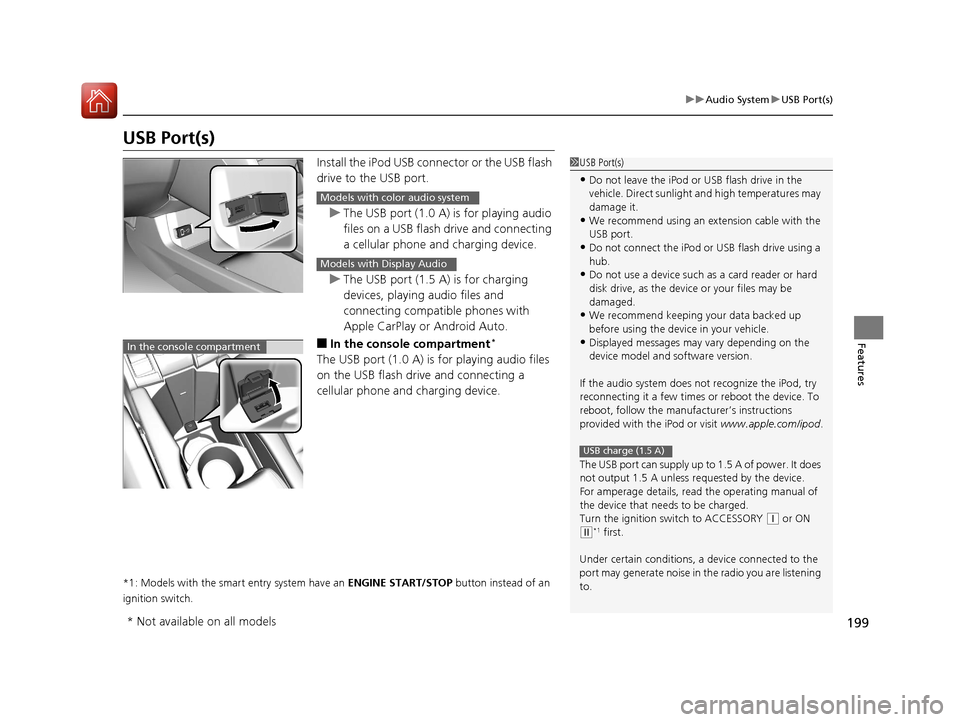
Install the iPod USB connector or the USB flash
drive to the USB port.
u The USB port (1.0 A) is for playing audio
files on a USB flash drive and connecting
a cellular phone and charging device.
u The USB port (1.5 A) is for charging
devices, playing audio files and
connecting compatib le phones with
Apple CarPlay or Android Auto.
■In the consol e compartment*
The USB port (1.0 A) is for playing audio files
on the USB flash drive and connecting a
cellular phone and charging device.
*1: Models with the smart entry system have an ENGINE START/STOP button instead of an
ignition switch.
1 USB Port(s)
•Do not leave the iPod or USB flash drive in the
vehicle. Direct sunlight and high temperatures may
damage it.
•We recommend using an ex tension cable with the
USB port.
•Do not connect the iPod or USB flash drive using a
hub.
•Do not use a device such as a card reader or hard
disk drive, as the device or your files may be
damaged.
•We recommend k eeping your data backed up
before using the device in your vehicle.
•Displayed messages may vary depending on the
device model and software version.
If the audio system does not recognize the iPod, try
reconnecting it a few times or reboot the device. To
reboot, follow the manufac turer’s instructions
provided with the iPod or visit www.apple.com/ipod.
The USB port can supply up to 1.5 A of power. It does
not output 1.5 A unless re quested by the device.
For amperage details, read the operating manual of
the device that ne eds to be charged.
Turn the ignition switch to ACCESSORY
( q or ON
(w*1 first.
Under certain condi tions, a device connected to the
port may generate noi se in the radio you are listening
to.
USB charge (1.5 A)
Models with color audio system
Models with Display Audio
In the console compartment
* Not available on all models
16 CIVIC 4D-31TBA6000.book 199 ページ 2015年8月31日 月曜日 午後5時56分
Page 221 of 590

220
uuAudio System Basic Operation uPlaying Bluetooth ® Audio
Features
Playing Bluetooth® Audio
Your audio system allows you to listen to music from your Bluetooth-compatible
phone.
This function is available when the phone is paired and connected to the vehicle’s
Bluetooth ® HandsFreeLink ® (HFL) system.
2 Phone Setup P. 339
1Playing Bluetooth ® Audio
Not all Bluetooth -enabled phones with streaming
audio capabilities are comp atible with the system.
For a list of compatible phones:
•U.S.: Visit www.handsfreelink.honda.com , or call
1-888-528-7876.
•Canada: Visit www.handsfreelink.ca , or call 1-888-
528-7876.
In some states, it may be illegal to perform some data
device functions while driving.
Only one phone can be used with HFL at a time.
When there are more than two paired phones in the
vehicle, the first paired phone the system finds is
automatically connected.
If more than one phone is paired to the HFL system,
there will be a delay before the system begins to play.
In some cases, the name of the artist, album, or track
may not appear correctly.
Some functions may not be available on some
devices.
MEDIA Button
Press to select
Bluetooth ® Audio.
VOL/
(Volume/
Power) Knob
Press to turn
the audio
system on and
off.
Turn to adjust
the volume.
MENU/CLOCK
Button
Press to
display the
menu items.
Audio/Information Screen
Bluetooth Indicator
Appears when your phone is connected to HFL.
/ (Seek/Skip) Buttons
Press or to change files.
Play Button (Preset 1)
Press to resume a file. Pause Button (Preset 2)
Press to pause a file.
16 CIVIC 4D-31TBA6000.book 220 ページ 2015年8月31日 月曜日 午後5時56分
Page 222 of 590
Continued221
uuAudio System Basic Operation uPlaying Bluetooth ® Audio
Features
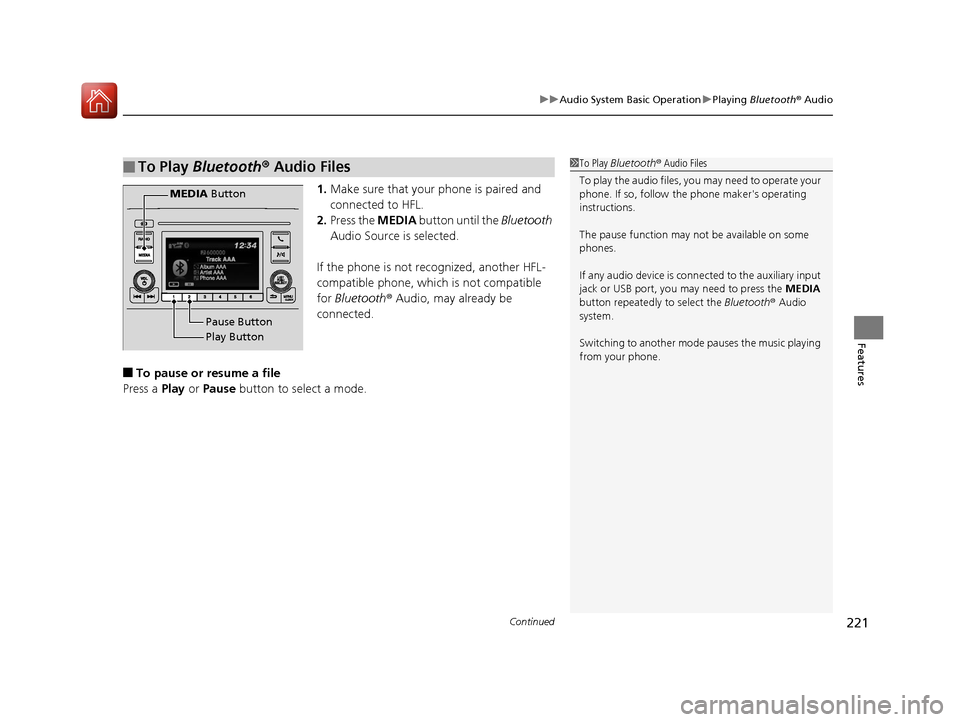
1. Make sure that your phone is paired and
connected to HFL.
2. Press the MEDIA button until the Bluetooth
Audio Source is selected.
If the phone is not recognized, another HFL-
compatible phone, which is not compatible
for Bluetooth ® Audio, may already be
connected.
■To pause or resume a file
Press a Play or Pause button to select a mode.
■To Play Bluetooth ® Audio Files1 To Play Bluetooth ® Audio Files
To play the audio files, y ou may need to operate your
phone. If so, follow the phone maker's operating
instructions.
The pause function may no t be available on some
phones.
If any audio device is conne cted to the auxiliary input
jack or USB port, you may need to press the MEDIA
button repeatedly to select the Bluetooth ® Audio
system.
Switching to another mode pauses the music playing
from your phone.
Play Button Pause Button
MEDIA
Button
16 CIVIC 4D-31TBA6000.book 221 ページ 2015年8月31日 月曜日 午後5時56分
Page 226 of 590
225
uuAudio System Basic Operation uAudio/Information Screen
Continued
Features
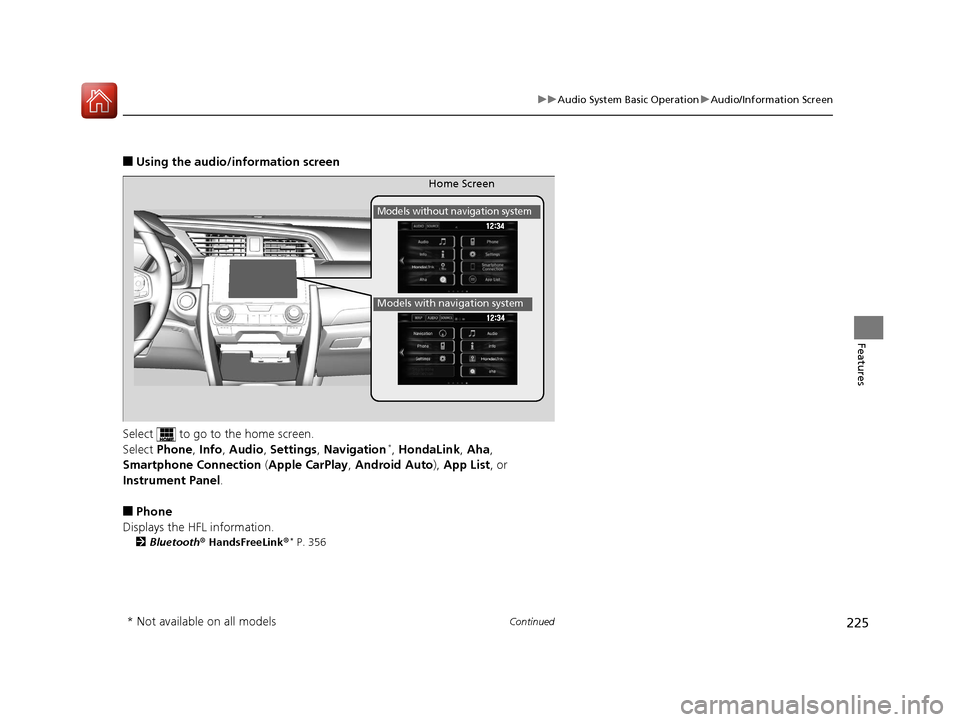
■Using the audio/in formation screen
Select to go to the home screen.
Select Phone , Info , Audio , Settings , Navigation
*, HondaLink , Aha ,
Smartphone Connection (Apple CarPlay , Android Auto ), App List, or
Instrument Panel .
■Phone
Displays the HFL information.
2 Bluetooth ® HandsFreeLink ®* P. 356
Home Screen
Models without navigation system
Models with navigation system
* Not available on all models
16 CIVIC 4D-31TBA6000.book 225 ページ 2015年8月31日 月曜日 午後5時56分
Page 228 of 590
227
uuAudio System Basic Operation uAudio/Information Screen
Continued
Features
■HondaLink
Connects with your smartphone*1 to play personalized music, information, and
social media streams.
2 HondaLink ® P. 278
■Aha
Displays the AhaTM screen.
2 Playing AhaTM P. 272
■Smartphone Connection
Connects with your smartphone*1 and allows some apps on your smartphone to be
used on the audio system.
2 Apple CarPlay P. 286
2 Android Auto P. 289
■App List
Adds or removes apps or widgets on the Home screen.
2 Home Screen P. 235
■Instrument Panel
Selects from three customizable settings for the driver information interface.
*1: Available on specific phones only. Check handsfreelink.honda.com for U.S. and
www.handsfreelink.ca for Canada for compatible phones and hondalink.com for U.S. and
honda.ca/hondalink for Canada for feature details.
16 CIVIC 4D-31TBA6000.book 227 ページ 2015年8月31日 月曜日 午後5時56分
Page 237 of 590
uuAudio System Basic Operation uAudio/Information Screen
236
Features
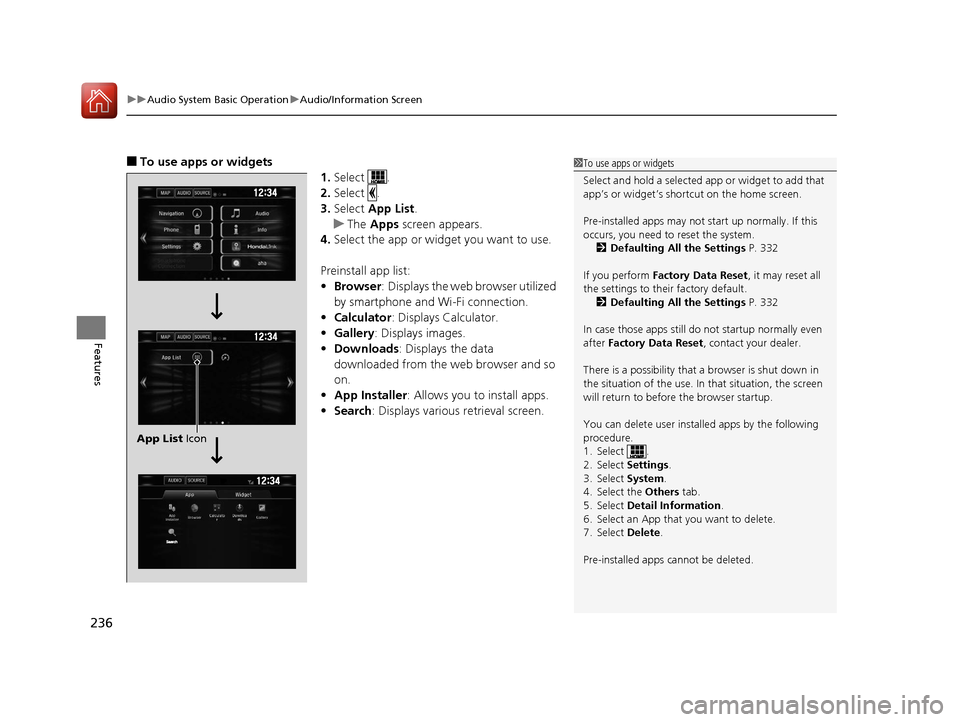
■To use apps or widgets
1.Select .
2. Select .
3. Select App List .
u The Apps screen appears.
4. Select the app or widget you want to use.
Preinstall app list:
• Browser : Displays the web browser utilized
by smartphone and Wi-Fi connection.
• Calculator : Displays Calculator.
• Gallery: Displays images.
• Downloads : Displays the data
downloaded from the web browser and so
on.
• App Installer : Allows you to install apps.
• Search : Displays various retrieval screen.1To use apps or widgets
Select and hold a selected app or widget to add that
app’s or widget’s shortcut on the home screen.
Pre-installed apps may not start up normally. If this
occurs, you need to reset the system.
2 Defaulting All the Settings P. 332
If you perform Factory Data Reset , it may reset all
the settings to their factory default. 2 Defaulting All the Settings P. 332
In case those apps still do not startup normally even
after Factory Data Reset , contact your dealer.
There is a possibility that a browser is shut down in
the situation of the use. In that situation, the screen
will return to before the browser startup.
You can delete user installed apps by the following
procedure.
1. Select .
2. Select Settings .
3. Select System .
4. Select the Others tab.
5. Select Detail Information .
6. Select an App that you want to delete.
7. Select Delete .
Pre-installed apps cannot be deleted.
12�‰34
12 �‰34
12 �‰34
Search
App List Icon
16 CIVIC 4D-31TBA6000.book 236 ページ 2015年8月31日 月曜日 午後5時56分
Page 240 of 590
Continued239
uuAudio System Basic Operation uAudio/Information Screen
Features
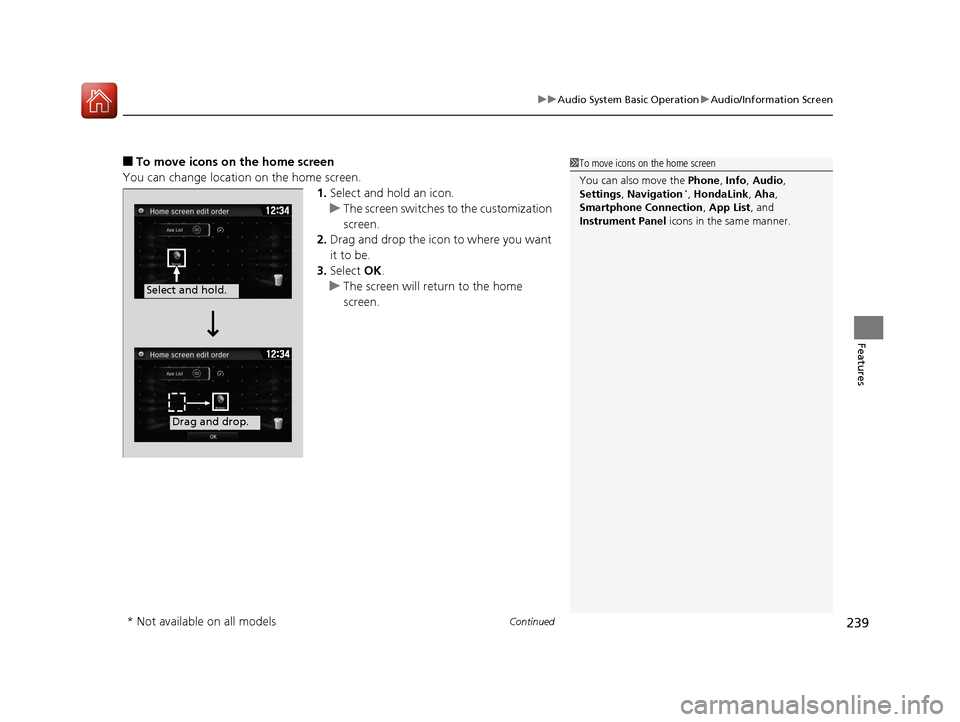
■To move icons on the home screen
You can change location on the home screen. 1.Select and hold an icon.
u The screen switches to the customization
screen.
2. Drag and drop the icon to where you want
it to be.
3. Select OK.
u The screen will return to the home
screen.1To move icons on the home screen
You can also move the Phone, Info, Audio ,
Settings , Navigation
*, HondaLink , Aha,
Smartphone Connection , App List, and
Instrument Panel icons in the same manner.
Select and hold.
Drag and drop.
* Not available on all models
16 CIVIC 4D-31TBA6000.book 239 ページ 2015年8月31日 月曜日 午後5時56分
Page 241 of 590
uuAudio System Basic Operation uAudio/Information Screen
240
Features
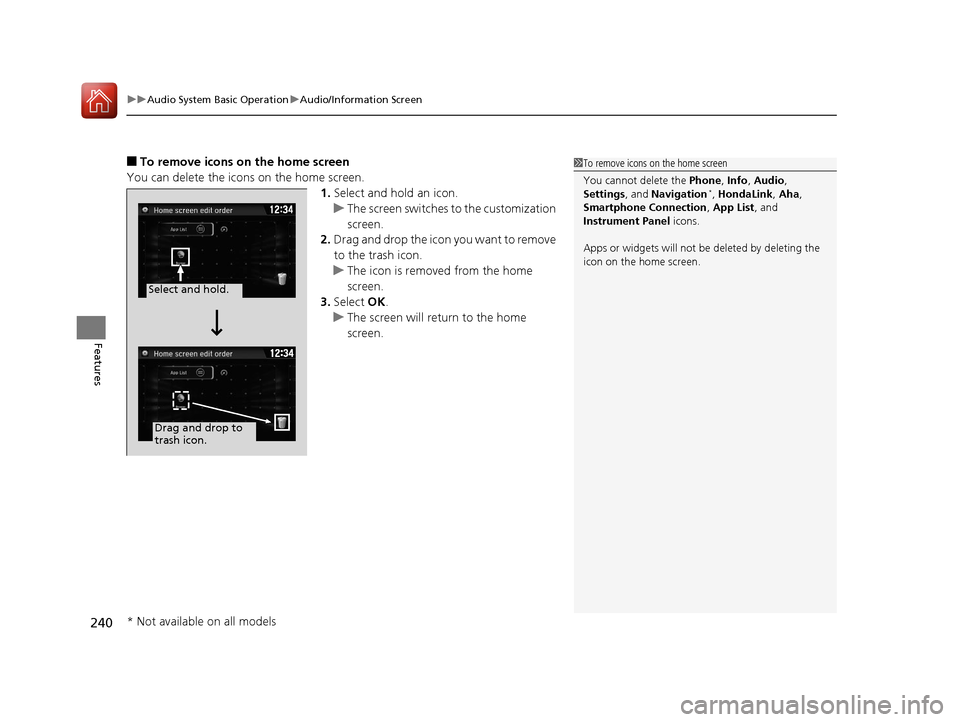
■To remove icons on the home screen
You can delete the icons on the home screen. 1.Select and hold an icon.
u The screen switches to the customization
screen.
2. Drag and drop the icon you want to remove
to the trash icon.
u The icon is removed from the home
screen.
3. Select OK.
u The screen will return to the home
screen.1To remove icons on the home screen
You cannot delete the Phone, Info, Audio ,
Settings , and Navigation
*, HondaLink , Aha,
Smartphone Connection , App List, and
Instrument Panel icons.
Apps or widgets will not be deleted by deleting the
icon on the home screen.
Select and hold.
Drag and drop to
trash icon.
* Not available on all models
16 CIVIC 4D-31TBA6000.book 240 ページ 2015年8月31日 月曜日 午後5時56分