Page 303 of 590
302
Features
Customized Features
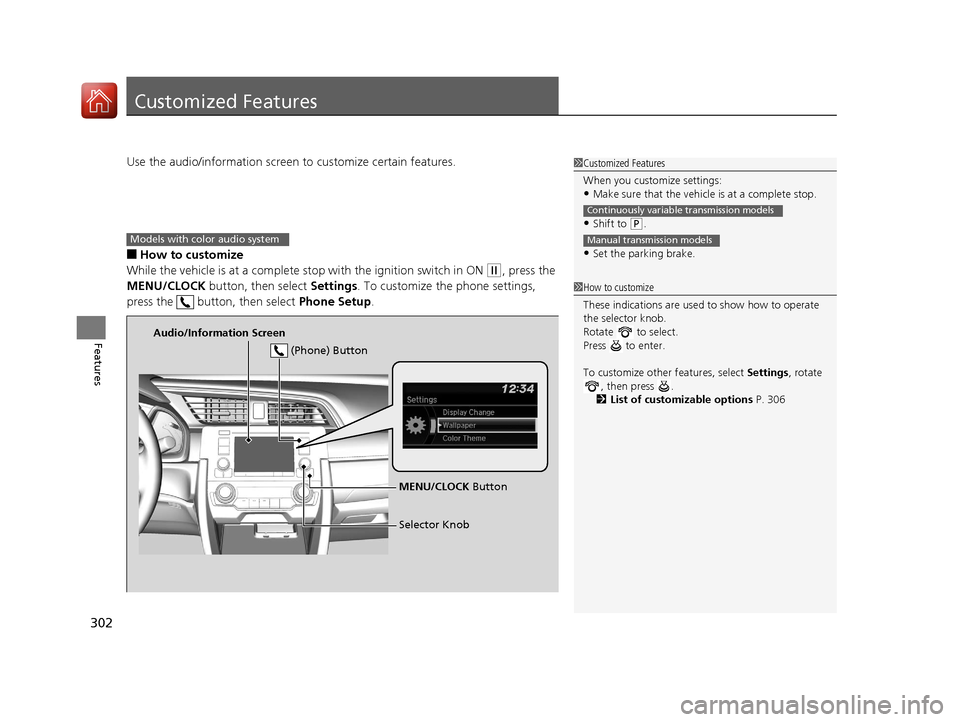
Use the audio/information screen to customize certain features.
■How to customize
While the vehicle is at a complete stop with the ignition switch in ON
(w, press the
MENU/CLOCK button, then select Settings. To customize the phone settings,
press the button, then select Phone Setup.
1Customized Features
When you customize settings:
•Make sure that the vehicle is at a complete stop.
•Shift to (P.
•Set the parking brake.
Continuously variable transmission models
Manual transmission models
1 How to customize
These indications are used to show how to operate
the selector knob.
Rotate to select.
Press to enter.
To customize other features, select Settings, rotate
, then press .
2 List of customizable options P. 306
Models with color audio system
Audio/Information Screen
MENU/CLOCK Button
Selector Knob
(Phone) Button
16 CIVIC 4D-31TBA6000.book 302 ページ 2015年8月31日 月曜日 午後5時56分
Page 306 of 590
305
uuCustomized Features u
Continued
Features
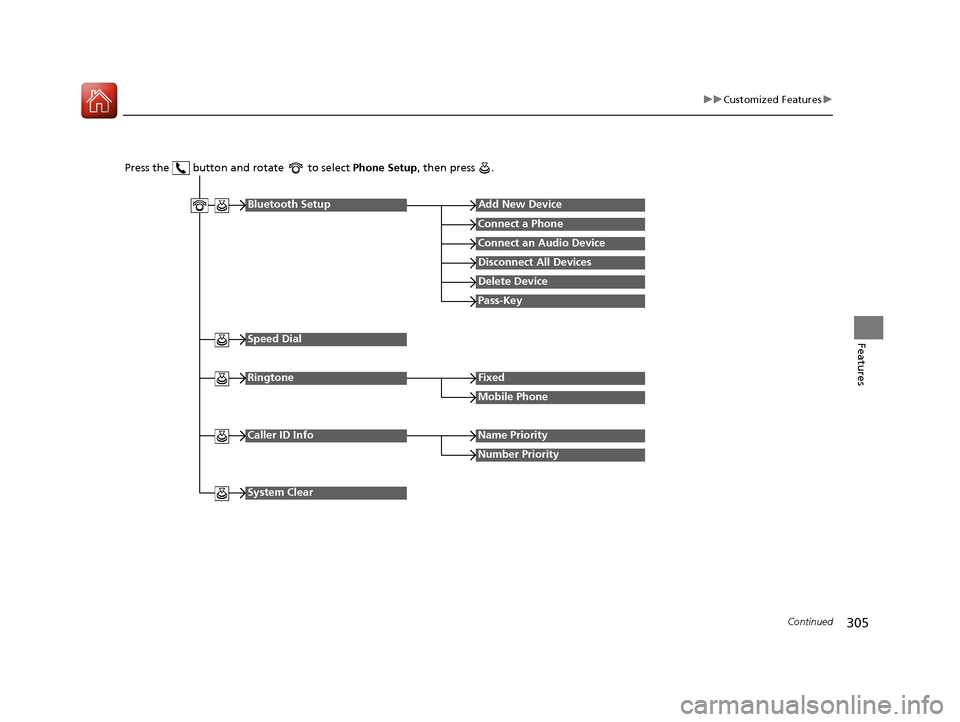
Press the button and rotate to select Phone Setup, then press .
RingtoneFixed
Mobile Phone
Bluetooth SetupAdd New Device
Connect a Phone
Connect an Audio Device
Disconnect All Devices
Delete Device
Pass-Key
Speed Dial
Caller ID InfoName Priority
Number Priority
System Clear
16 CIVIC 4D-31TBA6000.book 305 ページ 2015年8月31日 月曜日 午後5時56分
Page 307 of 590
306
uuCustomized Features u
Features
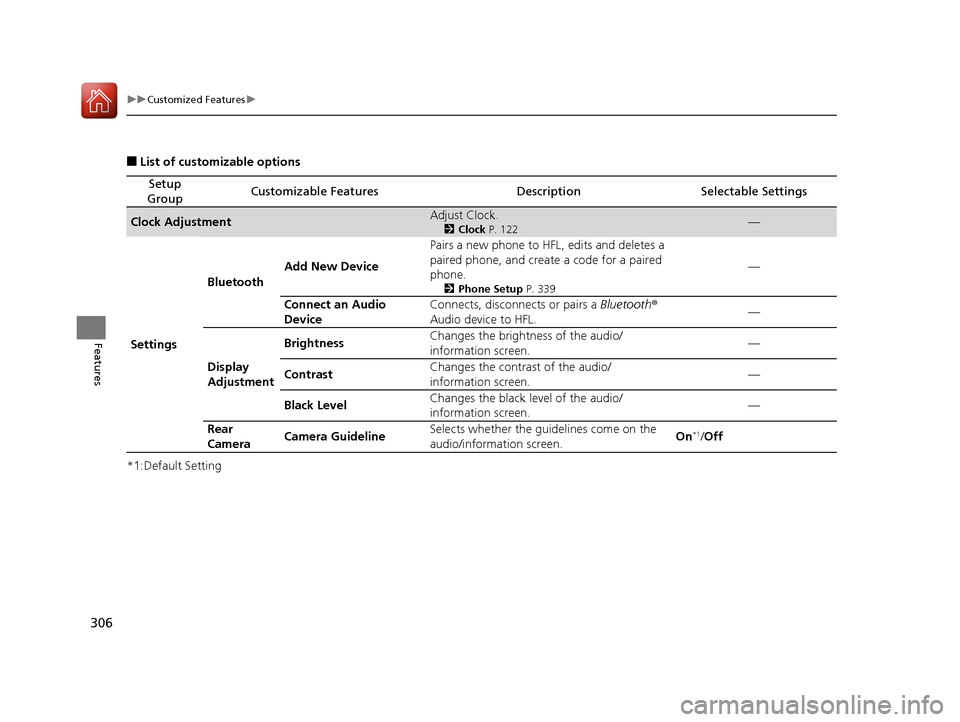
■List of customizable options
*1:Default Setting
Setup
GroupCustomizable FeaturesDescriptionSelectable Settings
Clock AdjustmentAdjust Clock.
2 Clock P. 122—
Settings Bluetooth
Add New Device Pairs a new phone to HFL, edits and deletes a
paired phone, and create a code for a paired
phone.
2
Phone Setup P. 339
—
Connect an Audio
Device Connects, disconnects or pairs a Bluetooth
®
Audio device to HFL. —
Display
Adjustment Brightness
Changes the brightness of the audio/
information screen.
—
Contrast Changes the contrast of the audio/
information screen. —
Black Level Changes the black level of the audio/
information screen. —
Rear
Camera Camera Guideline Selects whether the guidelines come on the
audio/information screen.
On
*1/
Off
16 CIVIC 4D-31TBA6000.book 306 ページ 2015年8月31日 月曜日 午後5時56分
Page 309 of 590
308
uuCustomized Features u
Features
*1:Default Setting
Setup
GroupCustomizable FeaturesDescriptionSelectable Settings
Phone
Setup
Bluetooth
Setup
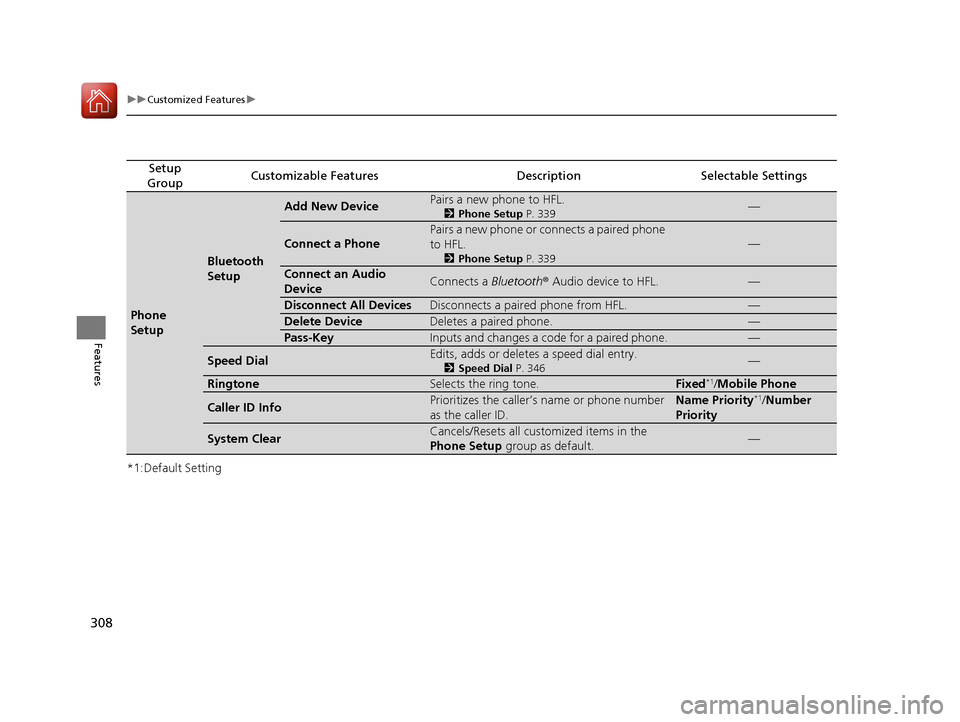
Add New DevicePairs a new phone to HFL.
2 Phone Setup P. 339—
Connect a Phone
Pairs a new phone or connects a paired phone
to HFL.
2Phone Setup P. 339
—
Connect an Audio
DeviceConnects a Bluetooth® Audio device to HFL.—
Disconnect All DevicesDisconnects a paired phone from HFL.—
Delete DeviceDeletes a paired phone.—
Pass-KeyInputs and changes a code for a paired phone.—
Speed DialEdits, adds or deletes a speed dial entry.
2Speed Dial P. 346—
RingtoneSelects the ring tone.Fixed*1/Mobile Phone
Caller ID InfoPrioritizes the caller’s name or phone number
as the caller ID.Name Priority*1/ Number
Priority
System ClearCancels/Resets all customized items in the
Phone Setup group as default.—
16 CIVIC 4D-31TBA6000.book 308 ページ 2015年8月31日 月曜日 午後5時56分
Page 312 of 590
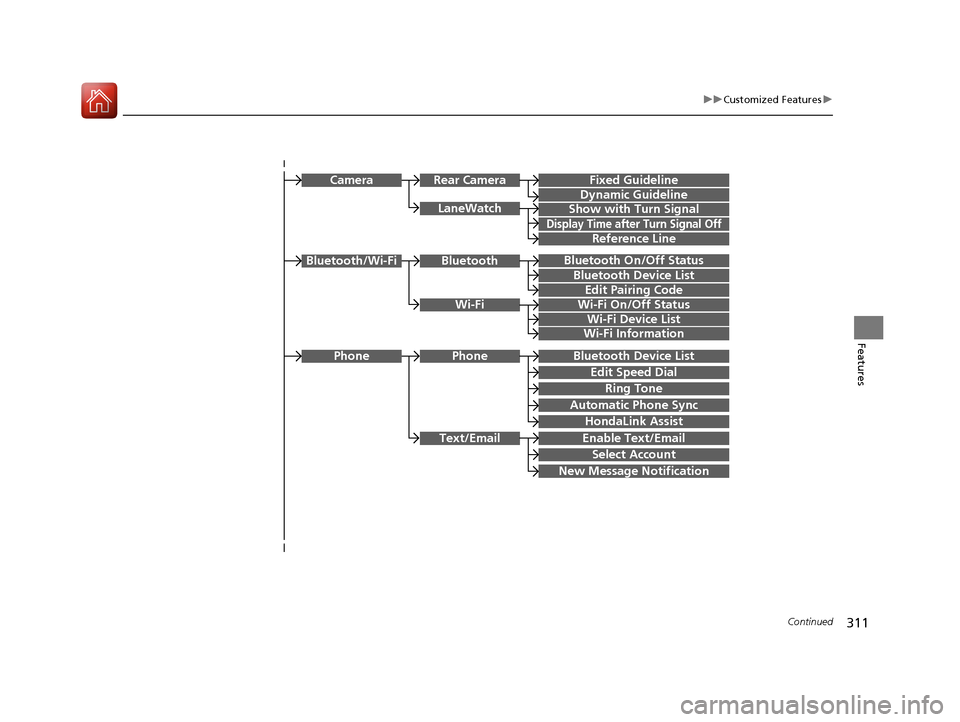
311
uuCustomized Features u
Continued
Features
Bluetooth On/Off Status
Bluetooth Device List
Edit Pairing Code
Wi-Fi On/Off Status
Wi-Fi Device List
Wi-Fi
BluetoothBluetooth/Wi-Fi
Wi-Fi Information
Text/Email
Bluetooth Device List
Edit Speed Dial
Ring Tone
Phone
Automatic Phone Sync
HondaLink Assist
Enable Text/Email
Select Account
New Message Notification
Phone
LaneWatch
Fixed Guideline
Dynamic Guideline
Show with Turn Signal
Rear CameraCamera
Display Time after Turn Signal Off
Reference Line
16 CIVIC 4D-31TBA6000.book 311 ページ 2015年8月31日 月曜日 午後5時56分
Page 313 of 590
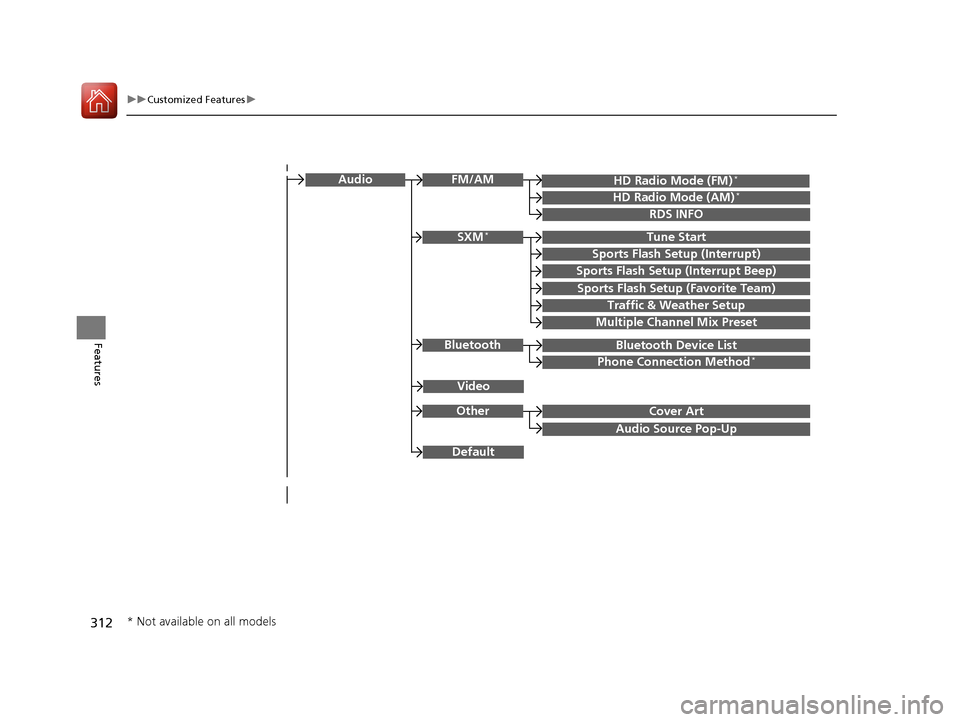
312
uuCustomized Features u
Features
Audio Source Pop-Up
Cover Art
HD Radio Mode (FM)*
RDS INFO
Tune Start
Sports Flash Setup (Interrupt)
Sports Flash Setup (Interrupt Beep)
Sports Flash Setup (Favorite Team)
Traffic & Weather Setup
Audio
Other
FM/AM
SXM*
Default
Bluetooth Device List
Phone Connection Method*Bluetooth
Video
Multiple Channel Mix Preset
HD Radio Mode (AM)*
* Not available on all models
16 CIVIC 4D-31TBA6000.book 312 ページ 2015年8月31日 月曜日 午後5時56分
Page 315 of 590
314
uuCustomized Features u
Features
Voice Recog.
Voice Prompt
Voice Recog. Volume
Song by Voice
Song by Voice Phonetic Modification
Phonebook Phonetic Modification
Automatic Phone Sync
ClockClock/Wallpaper Type*1/
Clock Type*2
Clock Adjustment
Clock Format
Auto Time Zone*
Manual Time Zone*
Auto Daylight Saving Time
Clock Display
Overlay Clock Location
Clock Reset
Clock
Wallpaper
One Press Voice Operation
*1 : Does not appear when you chang e the screen interface design.
*2 : Appears only when you change the screen interface design.
* Not available on all models
16 CIVIC 4D-31TBA6000.book 314 ページ 2015年8月31日 月曜日 午後5時56分
Page 317 of 590
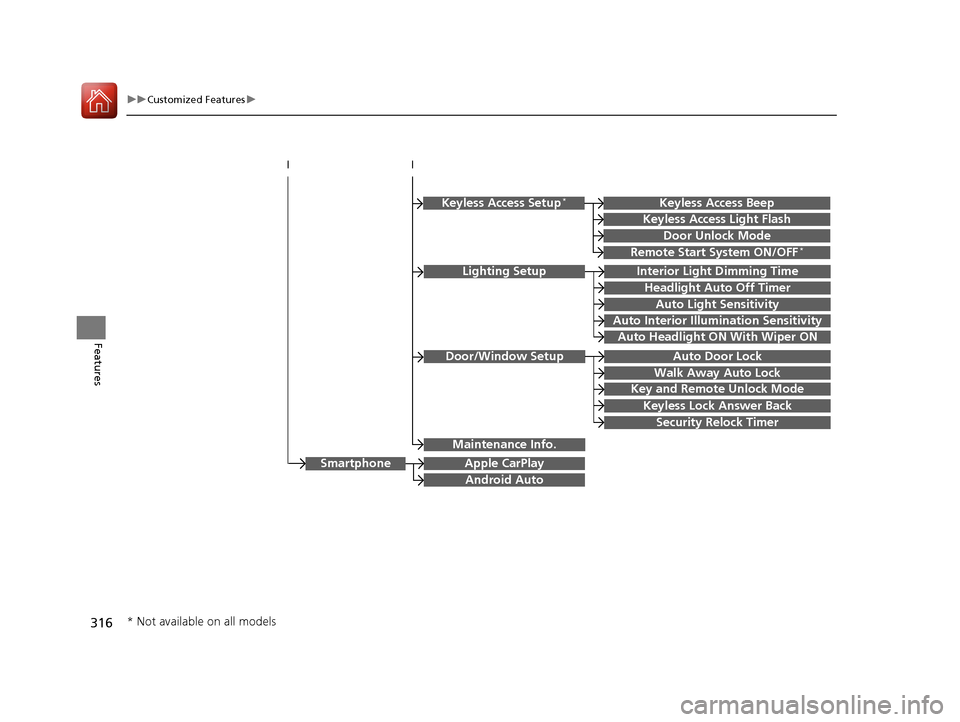
316
uuCustomized Features u
Features
Lighting SetupInterior Light Dimming Time
Headlight Auto Off Timer
Auto Light Sensitivity
Auto Interior Illumination Sensitivity
Auto Door Lock
Key and Remote Unlock Mode
Door/Window Setup
Apple CarPlay
Maintenance Info.
Android Auto
Auto Headlight ON With Wiper ON
Keyless Lock Answer Back
Security Relock Timer
Walk Away Auto Lock
Keyless Access Setup*
Door Unlock Mode
Keyless Access Light Flash
Keyless Access Beep
Remote Start System ON/OFF*
Smartphone
* Not available on all models
16 CIVIC 4D-31TBA6000.book 316 ページ 2015年8月31日 月曜日 午後5時56分