2016 HONDA CIVIC COUPE deactivate
[x] Cancel search: deactivatePage 47 of 585
uuAirbagsuAirbag System Components
46
Safe DrivingAirbags can pose serious hazards. To do their job, airbags must inflate with
tremendous force. So, while airbags help save lives, they can cause burns, bruises,
and other minor injuries, sometimes even fatal ones if occupants are not wearing
their seat belts properly and sitting correctly.
What you should do: Always wear your seat belt properly, and sit upright and as
far back from the steering wheel as possi ble while allowing full control of the
vehicle. A front passenger should move thei r seat as far back from the dashboard as
possible.
Remember, however, that no safety system can prevent all injuries or deaths that
can occur in a severe crash, even when seat belts are properly worn and the airbags
deploy.
Do not place hard or sharp objects between yourself and a front airbag.
Carrying hard or sharp objects on your lap, or driving with a pipe or other sharp
object in your mouth, can result in in juries if your front airbag inflates.
Do not attach or place object s on the front airbag covers. Objects on the
covers marked SRS AIRBAG could interfere with the pr oper operation of the airbags
or be propelled inside the vehicle and hurt someone if the airbags inflate.
■Important Facts About Your Airbags1Important Facts About Your Airbags
Do not attempt to deactivate your airbags. Together,
airbags and seat belts pr ovide the best protection.
When driving, keep hand s and arms out of the
deployment path of the front airbag by holding each
side of the steering wheel. Do not cross an arm over
the airbag cover.
16 CIVIC 2D HC2 (0A 01 0C)-31TBG6000.book 46 ページ >0>.>/6年>0月>/>0日 金 曜日 午後4時>/6分
Page 60 of 585
59
uuChild SafetyuProtecting Child Passengers
Safe Driving
•Any child who is too small to wear a seat belt correctly must be restrained in an
approved child seat that is properly secured to the vehicle using either the lap belt
portion of the lap/shoulder belt or the lower anchors of the LATCH system.
• Never hold a child on your lap because it is impossible to protect them in the
event of a collision.
• Never put a seat belt over yourself and a child. During a crash, the belt would
likely press deep into the child and cause serious or fatal injuries.
• Never let two children use the same seat belt. Both children could be very
seriously injured in a crash.
• Do not allow children to operate the doors, windows or seat adjustments.
• Do not leave children in the vehicle unattended, especially in hot weather when
the inside of the vehicle can get hot enough to kill them. They could also activate
vehicle controls causing it to move unexpectedly.1Protecting Child Passengers
To deactivate a lockable retractor, release the buckle
and allow the seat belt to wind up all the way.
To remind you of the pa ssenger's front airbag
hazards and child safety, your vehicle has warning
labels on the dashboard (U.S. models) and on the
front visors. Please read and follow the instructions
on these labels.
2 Safety Labels P. 71
3WARNING
Allowing a child to play with a seat belt or
wrap one around their neck can result in
serious injury or death.
Instruct children not to play with any seat
belt and make sure any unused seat belt a
child can reach is buckled, fully retracted,
and locked.
16 CIVIC 2D HC2 (0A 01 0C)-31TBG6000.book 59 ページ >0>.>/6年>0月>/>0日 金 曜日 午後4時>/6分
Page 67 of 585
uuChild SafetyuSafety of Infants and Small Children
66
Safe Driving
6. Make sure the child seat is firmly secured by
rocking it forward and back and side to
side; little movement should be felt.
7. Make sure any unused seat belt that a child
can reach is buckled, the lockable retractor
is activated, and the be lt is fully retracted
and locked.
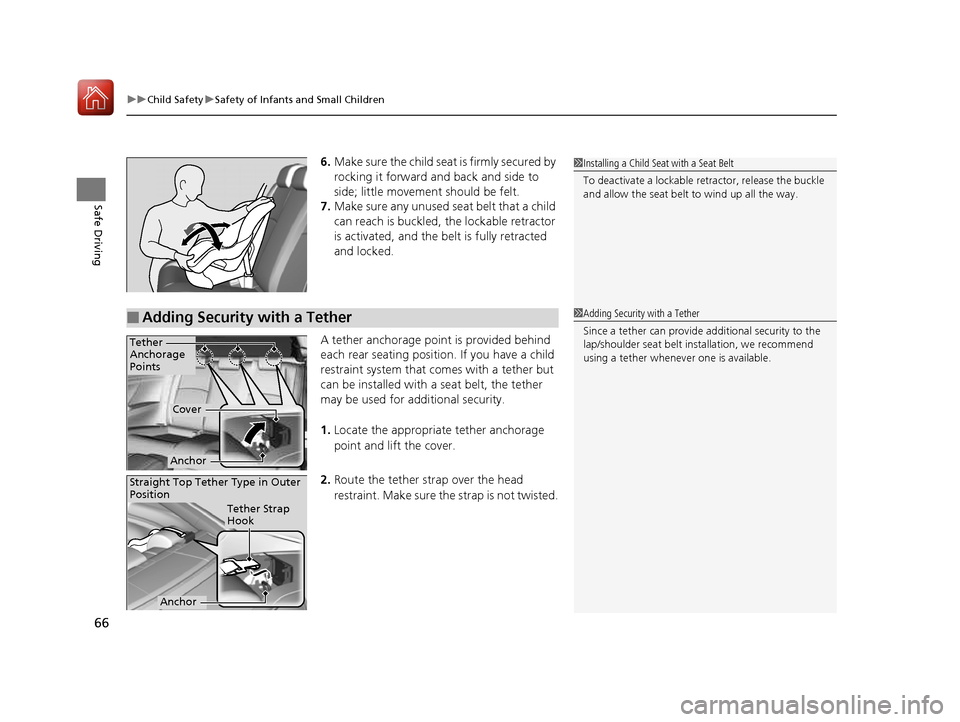
A tether anchorage point is provided behind
each rear seating position. If you have a child
restraint system that comes with a tether but
can be installed with a seat belt, the tether may be used for additional security. 1. Locate the appropriate tether anchorage point and lift the cover.
2. Route the tether strap over the head
restraint. Make sure the strap is not twisted.1Installing a Child Seat with a Seat Belt
To deactivate a lockable retractor, release the buckle
and allow the seat belt to wind up all the way.
■Adding Security with a Tether1Adding Security with a Tether Since a tether can provide additional security to the
lap/shoulder seat belt in stallation, we recommend
using a tether whenever one is available.
Tether
Anchorage
Points
Cover
Anchor
Straight Top Tether Type in Outer
Position
Tether Strap
Hook
Anchor
16 CIVIC 2D HC2 (0A 01 0C)-31TBG6000.book 66 ページ >0>.>/6年>0月>/>0日 金 曜日 午後4時>/6分
Page 81 of 585
80
uuIndicatorsu
Instrument Panel
*1:Models with the smart entry system have an ENGINE START/STOP button instead of an ignition switch.
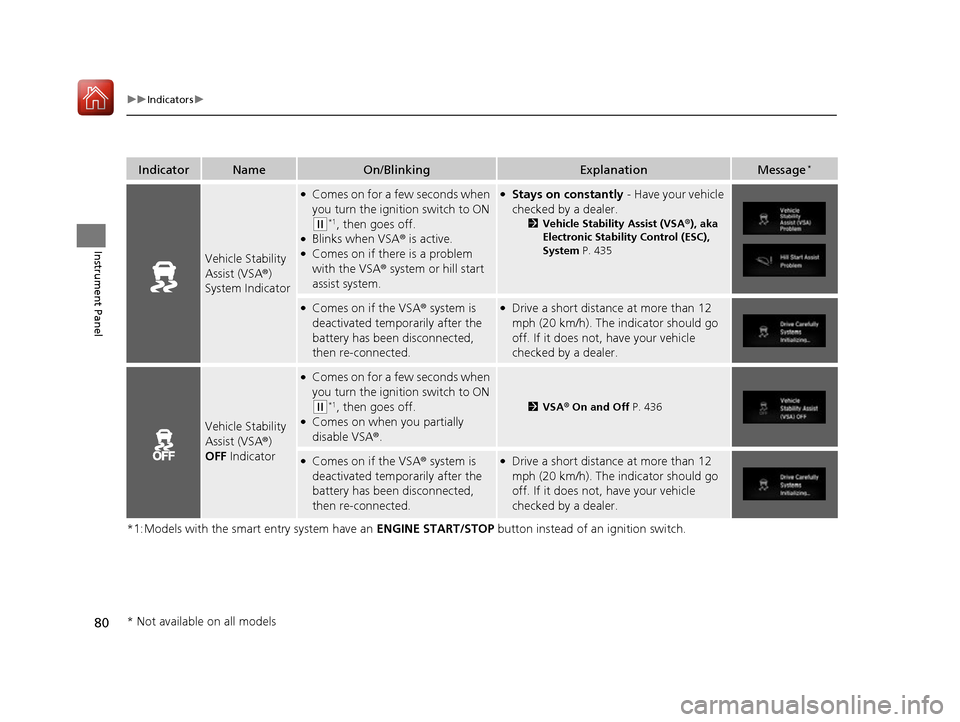
IndicatorNameOn/BlinkingExplanationMessage*
Vehicle Stability
Assist (VSA
®)
System Indicator
● Comes on for a few seconds when
you turn the ignition switch to ON
(w *1
, then goes off.
● Blinks when VSA ® is active.
● Comes on if there is a problem with the VSA ® system or hill start
assist system.
● Stays on constantly - Have your vehicle
checked by a dealer. 2Vehicle Stability Assist (VSA ®), aka
Electronic Stability Control (ESC), System P. 435
●
Comes on if the VSA ® system is
deactivated temporarily after the
battery has been disconnected,
then re-connected.● Drive a short distance at more than 12
mph (20 km/h). The indicator should go
off. If it does not, have your vehicle
checked by a dealer.
Vehicle Stability
Assist (VSA ®)
OFF Indicator
●
Comes on for a few seconds when
you turn the ignition switch to ON
(w *1
, then goes off.
● Comes on when you partially disable VSA ®.2 VSA ® On and Off P. 436
●
Comes on if the VSA ® system is
deactivated temporarily after the
battery has been disconnected,
then re-connected.● Drive a short distance at more than 12
mph (20 km/h). The indicator should go
off. If it does not, have your vehicle
checked by a dealer.
* Not available on all models
16 CIVIC 2D HC2 (0A 01 0C)-31TBG6000.book 80 ページ >0>.>/6年>0月>/>0日 金 曜日 午後4時>/6分
Page 83 of 585
82
uuIndicatorsu
Instrument Panel
*1:Models with the smart entry system have an ENGINE START/STOP button instead of an ignition switch.
IndicatorNameOn/BlinkingExplanationMessage*
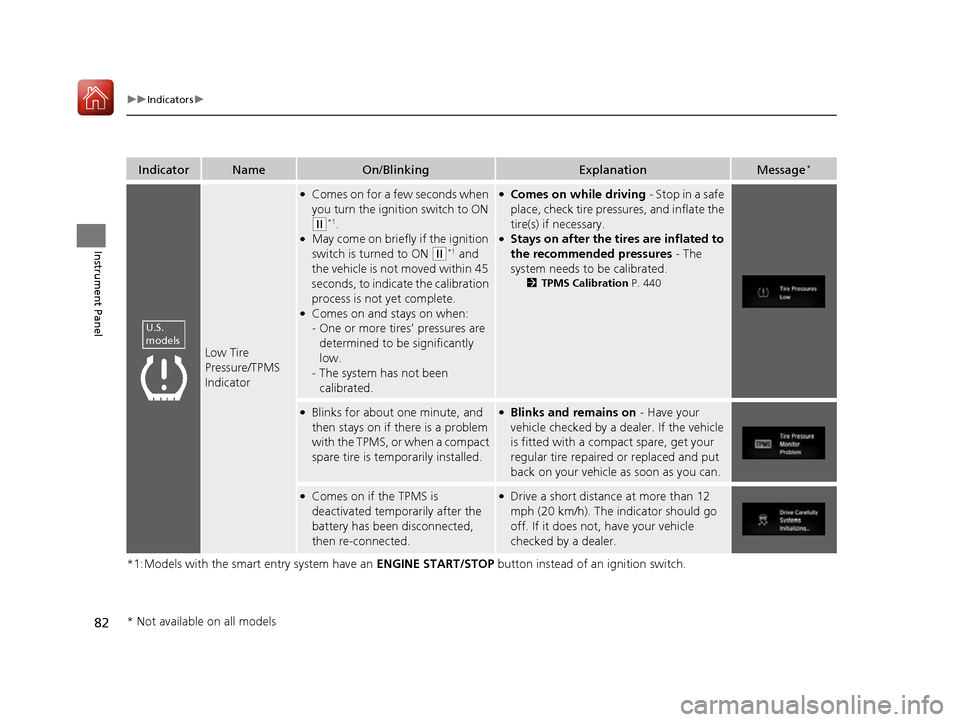
Low Tire
Pressure/TPMS
Indicator
●
Comes on for a few seconds when
you turn the igniti on switch to ON
(w*1
.
● May come on briefly if the ignition switch is turned to ON
(w *1
and
the vehicle is not moved within 45
seconds, to indicate the calibration
process is not yet complete.
● Comes on and stays on when:-One or more tires’ pressures are
determined to be significantly low.
- The system has not been calibrated.
●
Comes on while driving - Stop in a safe
place, check tire pressures, and inflate the tire(s) if necessary.
● Stays on after the tires are inflated to
the recommended pressures - The
system needs to be calibrated. 2TPMS Calibration P. 440
●
Blinks for about one minute, and
then stays on if there is a problem
with the TPMS, or when a compact
spare tire is temporarily installed.● Blinks and remains on - Have your
vehicle checked by a dealer. If the vehicle
is fitted with a compact spare, get your
regular tire repaired or replaced and put
back on your vehicle as soon as you can.
● Comes on if the TPMS is
deactivated temporarily after the
battery has been disconnected,
then re-connected.● Drive a short distance at more than 12
mph (20 km/h). The indicator should go
off. If it does not, have your vehicle
checked by a dealer.
U.S.
models
* Not available on all models
16 CIVIC 2D HC2 (0A 01 0C)-31TBG6000.book 82 ページ >0>.>/6年>0月>/>0日 金 曜日 午後4時>/6分
Page 91 of 585
90
uuIndicatorsu
Instrument Panel
*1:Models with the smart entry system have an ENGINE START/STOP button instead of an ignition switch.
IndicatorNameOn/BlinkingExplanationMessage*
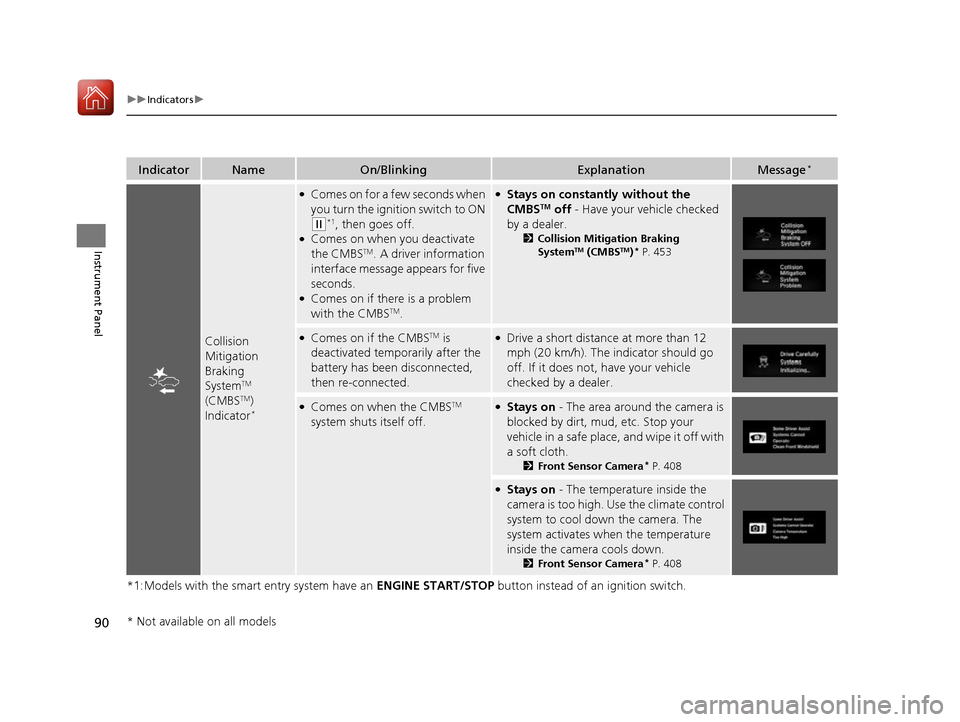
Collision
Mitigation Braking
SystemTM
(CMBS TM
)
Indicator *
●
Comes on for a few seconds when
you turn the ignition switch to ON
(w *1
, then goes off.
● Comes on when you deactivate the CMBS TM
. A driver information
interface message appears for five
seconds.
● Comes on if there is a problem
with the CMBS TM
.
● Stays on constantly without the
CMBS TM
off - Have your vehicle checked
by a dealer. 2Collision Mitigation Braking System TM
(CMBS TM
)*
P. 453
● Comes on if the CMBS TM
is
deactivated temporarily after the
battery has been disconnected,
then re-connected.● Drive a short distance at more than 12
mph (20 km/h). The indicator should go
off. If it does not, have your vehicle checked by a dealer.
●Comes on when the CMBS TM
system shuts itself off.● Stays on - The area around the camera is
blocked by dirt, mud, etc. Stop your
vehicle in a safe place, and wipe it off with
a soft cloth. 2Front Sensor Camera *
P. 408
● Stays on - The temperature inside the
camera is too high. Use the climate control
system to cool down the camera. The
system activates when the temperature
inside the camera cools down. 2Front Sensor Camera *
P. 408
* Not available on all models
16 CIVIC 2D HC2 (0A 01 0C)-31TBG6000.book 90 ページ >0>.>/6年>0月>/>0日 金 曜日 午後4時>/6分
Page 122 of 585
Continued121
uuLocking and Unlocking the DoorsuLocking/Unlocking the Doors from the Outside
Controls
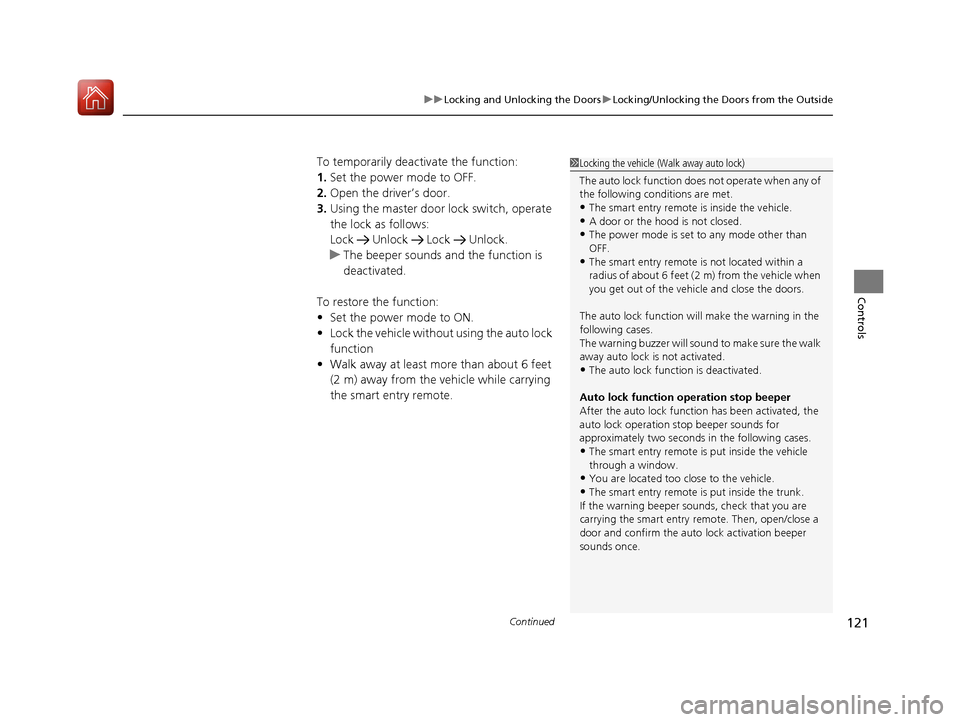
To temporarily deactivate the function: 1.Set the power mode to OFF.
2. Open the driv er’s door.
3. Using the master door lock switch, operate
the lock as follows:
Lock Unlock Lock Unlock.
uThe beeper sounds an d the function is
deactivated.
To restore the function: • Set the power mode to ON.
• Lock the vehicle without using the auto lock
function
• Walk away at least more than about 6 feet
(2 m) away from the vehicle while carrying
the smart entry remote.
1Locking the vehicle (Walk away auto lock)
The auto lock function does not operate when any of
the following conditions are met.
• The smart entry remote is inside the vehicle.
• A door or the hood is not closed.
• The power mode is set to any mode other than
OFF.
• The smart entry remote is not located within a
radius of about 6 feet (2 m) from the vehicle when
you get out of the vehicle and close the doors.
The auto lock function will make the warning in the
following cases.
The warning buzzer will sound to make sure the walk
away auto lock is not activated.
• The auto lock func tion is deactivated.
Auto lock function operation stop beeper
After the auto lock function has been activated, the
auto lock operation stop beeper sounds for
approximately two seconds in the following cases.
• The smart entry remote is put inside the vehicle through a window.
• You are located too close to the vehicle.
• The smart entry remote is put inside the trunk.
If the warning beeper sounds, check that you are
carrying the smart entry remote. Then, open/close a
door and confirm the auto lock activation beeper
sounds once.
16 CIVIC 2D HC2 (0A 01 0C)-31TBG6000.book 121 ページ >0>.>/6年>0月>/>0日 金曜日 午後4時>/6分
Page 131 of 585
130
uuLocking and Unlocking the DoorsuCustomizing the Auto Door Locking/Unlocking Setting
Controls
Customizing the Auto Door Locking/Unlocking Setting
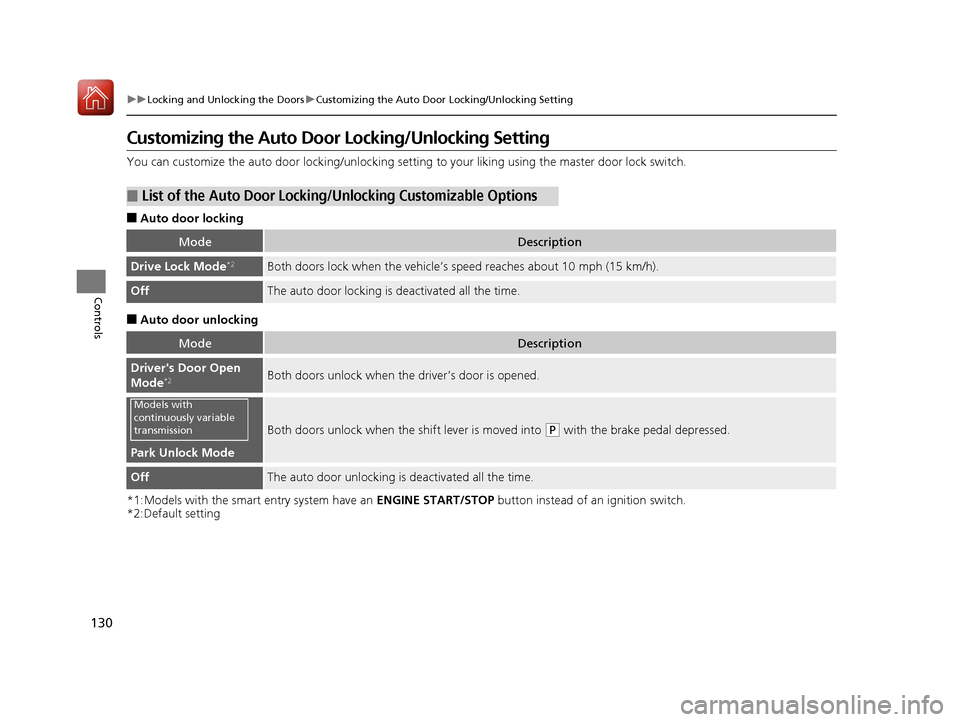
You can customize the auto door locking/unlocking setting to your liking using the master door lock switch.
■ Auto door locking
■ Auto door unlocking
*1:Models with the smart entry system have an ENGINE START/STOP button instead of an ignition switch.
*2:Default setting
■List of the Auto Door Locking/ Unlocking Customizable Options
ModeDescription
Drive Lock Mode*2Both doors lock when the vehicle’s
speed reaches about 10 mph (15 km/h).
OffThe auto door locking is deactivated all the time.
ModeDescription
Driver's Door Open
Mode*2Both doors unlock when the driver’s door is opened.
Park Unlock Mode
Both doors unlock when the
shift lever is moved into (P with the brake pedal depressed.
OffThe auto door unlocking is deactivated all the time.
Models with
continuously variable
transmission
16 CIVIC 2D HC2 (0A 01 0C)-31TBG6000.book 130 ページ >0>.>/6年>0月>/>0日 金曜日 午後4時>/6分