Page 296 of 585
295
uuCustomized Featuresu
Continued
Features
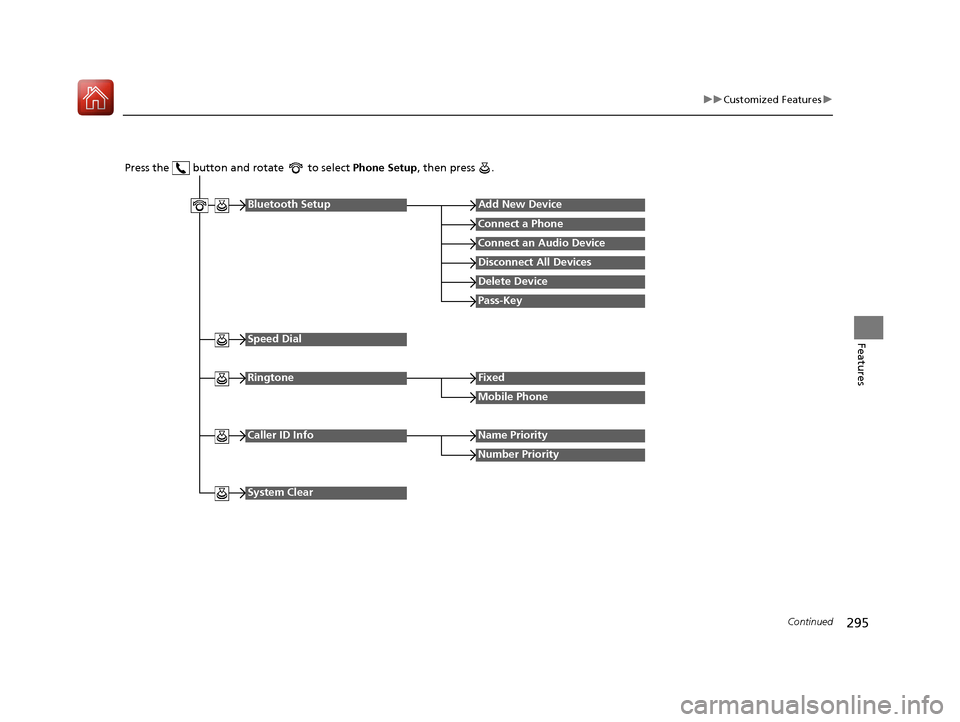
Press the button and rotate to select Phone Setup, then press .
RingtoneFixed
Mobile Phone
Bluetooth SetupAdd New Device
Connect a Phone
Connect an Audio Device
Disconnect All Devices
Delete Device
Pass-Key
Speed Dial
Caller ID InfoName Priority
Number Priority
System Clear
16 CIVIC 2D HC2 (0A 01 0C)-31TBG6000.book 295 ページ >0>.>/6年>0月>/>0日 金曜日 午後4時>/6分
Page 297 of 585
296
uuCustomized Featuresu
Features
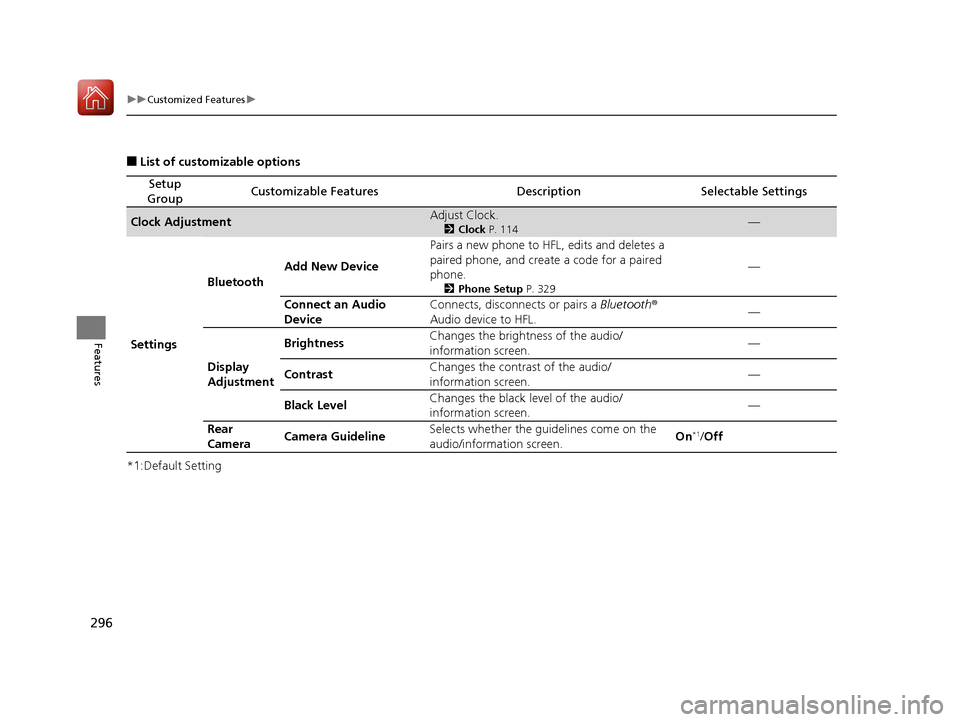
■List of customizable options
*1:Default Setting
Setup
GroupCustomizable FeaturesDescriptionSelectable Settings
Clock AdjustmentAdjust Clock. 2Clock P. 114—
Settings Bluetooth
Add New Device Pairs a new phone to HFL, edits and deletes a
paired phone, and create a code for a paired
phone.
2Phone Setup P. 329 —
Connect an Audio
Device Connects, disconnects or pairs a
Bluetooth®
Audio device to HFL. —
Display
Adjustment Brightness
Changes the brightness of the audio/
information screen.
—
Contrast Changes the contrast of the audio/
information screen. —
Black Level Changes the black level of the audio/
information screen. —
Rear
Camera Camera Guideline Selects whether the guidelines come on the
audio/information screen.
On
*1
/Off
16 CIVIC 2D HC2 (0A 01 0C)-31TBG6000.book 296 ページ >0>.>/6年>0月>/>0日 金曜日 午後4時>/6分
Page 299 of 585
298
uuCustomized Featuresu
Features
*1:Default Setting
Setup
GroupCustomizable FeaturesDescriptionSelectable Settings
Phone
Setup
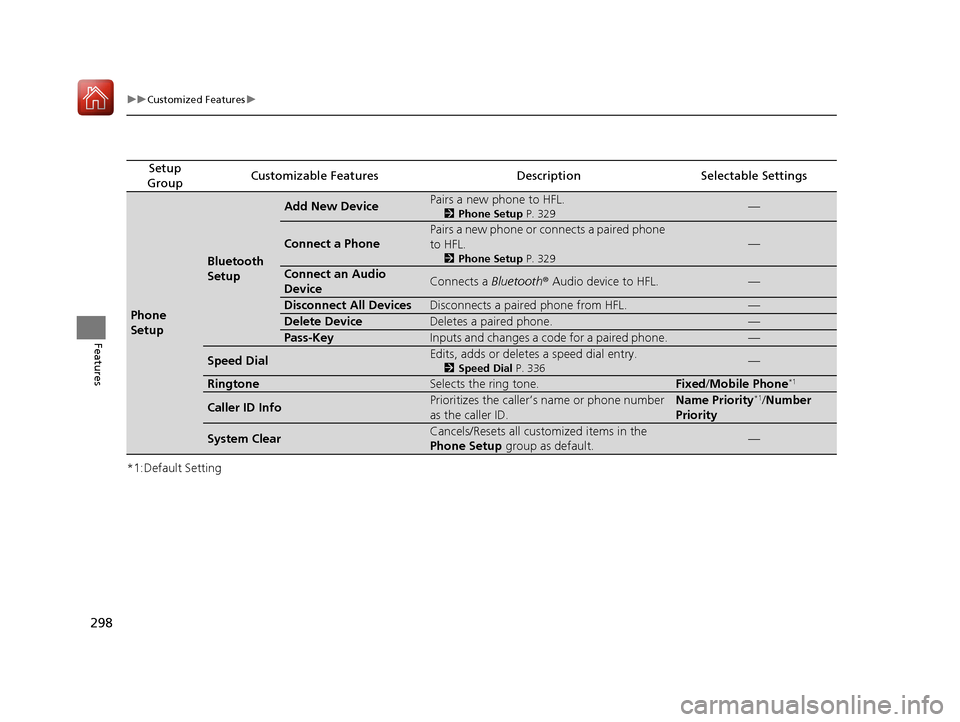
Bluetooth Setup
Add New DevicePairs a new phone to HFL. 2Phone Setup P. 329—
Connect a Phone
Pairs a new phone or connects a paired phone to HFL.
2Phone Setup P. 329
—
Connect an Audio
DeviceConnects a Bluetooth® Audio device to HFL.—
Disconnect All DevicesDisconnects a paired phone from HFL.—
Delete DeviceDeletes a paired phone.—
Pass-KeyInputs and changes a code for a paired phone.—
Speed DialEdits, adds or deletes a speed dial entry.
2Speed Dial P. 336—
RingtoneSelects the ring tone.Fixed/Mobile Phone *1
Caller ID InfoPrioritizes the caller’s name or phone number
as the caller ID.Name Priority*1
/Number
Priority
System ClearCancels/Resets all customized items in the
Phone Setup group as default.—
16 CIVIC 2D HC2 (0A 01 0C)-31TBG6000.book 298 ページ >0>.>/6年>0月>/>0日 金曜日 午後4時>/6分
Page 302 of 585
301
uuCustomized Featuresu
Continued
Features
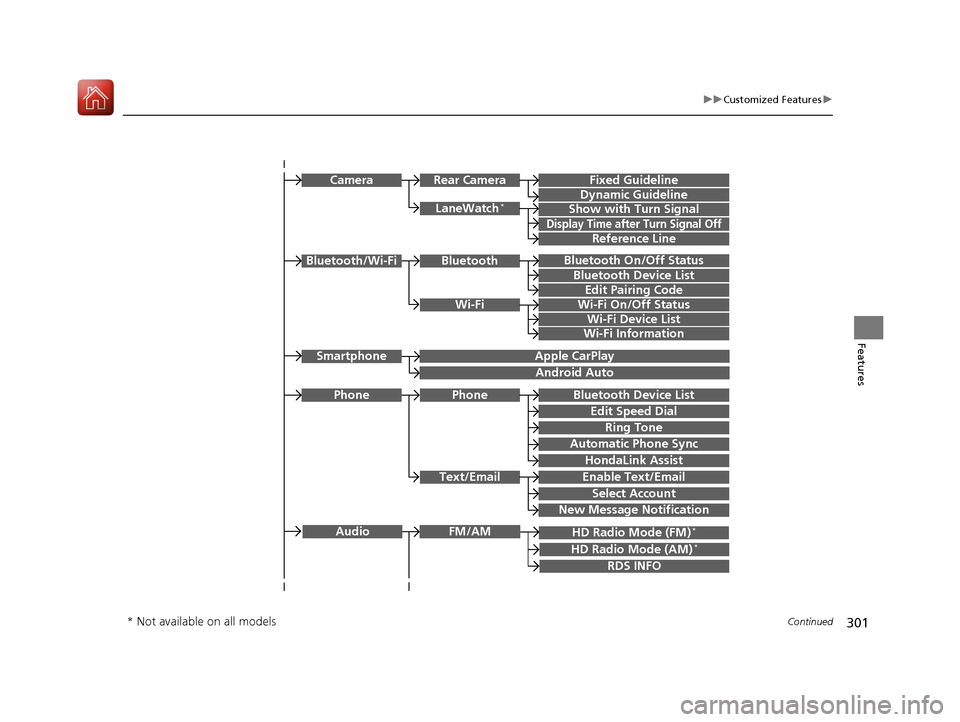
Bluetooth On/Off Status
Bluetooth Device List
Edit Pairing Code
Wi-Fi On/Off Status
Wi-Fi Device List
Wi-Fi
BluetoothBluetooth/Wi-Fi
Wi-Fi Information
Text/Email
Bluetooth Device List
Edit Speed Dial
Ring Tone
Phone
Automatic Phone Sync
HondaLink Assist
Enable Text/Email
Select Account
New Message Notification
Phone
LaneWatch*
Fixed Guideline
Dynamic Guideline
Show with Turn Signal
Rear CameraCamera
Display Time after Turn Signal Off
Reference Line
HD Radio Mode (FM) *
RDS INFO
AudioFM/AM
HD Radio Mode (AM) *
Apple CarPlay
Android Auto
Smartphone
* Not available on all models
16 CIVIC 2D HC2 (0A 01 0C)-31TBG6000.book 301 ページ >0>.>/6年>0月>/>0日
金曜日 午後4時>/6分
Page 304 of 585
303
uuCustomized Featuresu
Continued
Features
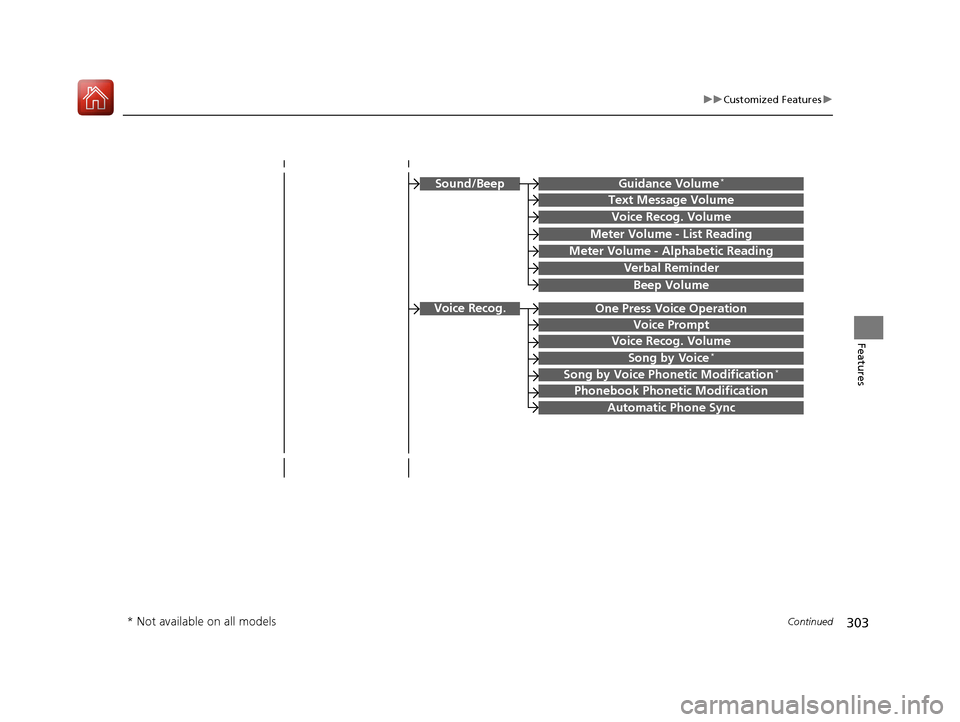
Guidance Volume*
Text Message Volume
Sound/Beep
Voice Recog. Volume
Verbal Reminder
Beep Volume
Meter Volume - List Reading
Meter Volume - Alphabetic Reading
Voice Prompt
Voice Recog. Volume
Song by Voice*
Song by Voice Phonetic Modification *
Phonebook Phonet
ic Modification
Automatic Phone Sync
One Press Voice OperationVoice Recog.
* Not available on all models
16 CIVIC 2D HC2 (0A 01 0C)-31TBG6000.book 303 ページ >0>.>/6年>0月>/>0日 金曜日 午後4時>/6分
Page 311 of 585
310
uuCustomized Featuresu
Features
*1:Default SettingSetup
Group Customizable Featur
es Description Sel ectable Settings
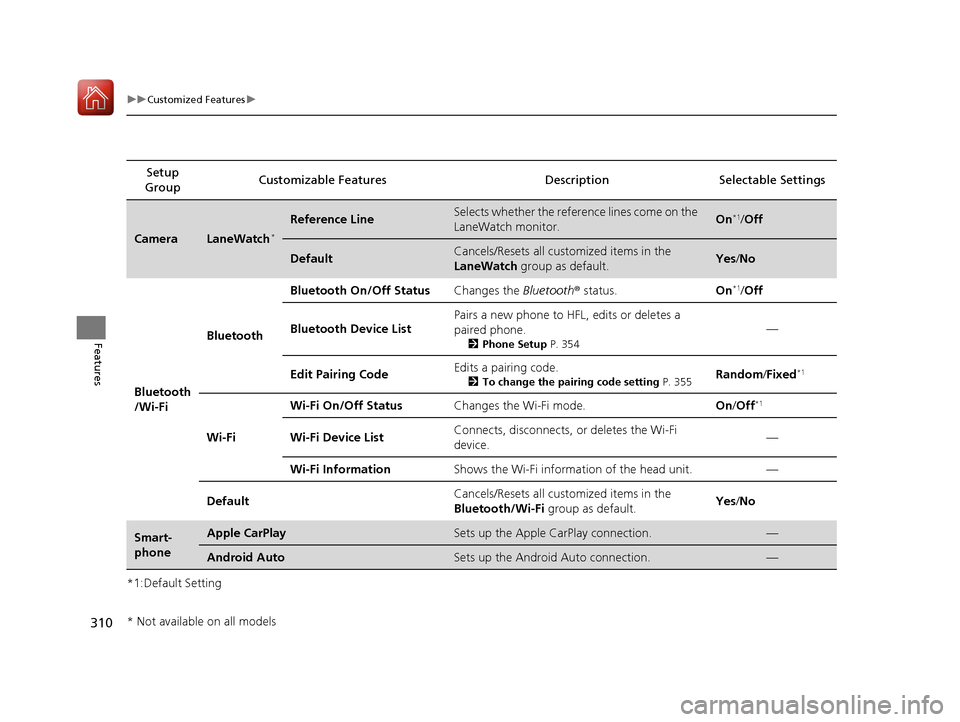
CameraLaneWatch*
Reference LineSelects whether the reference lines come on the LaneWatch monitor.On*1
/Off
DefaultCancels/Resets all customized items in the LaneWatch group as default.Yes/No
Bluetooth
/Wi-Fi Bluetooth
Bluetooth On/Off Status
Changes the Bluetooth® status. On*1
/Off
Bluetooth Device List Pairs a new phone to HFL, edits or deletes a
paired phone.
2Phone Setup P. 354 —
Edit Pairing Code Edits a pairing code.
2To change the pairing code setting P. 355Random
/Fixed *1
Wi-Fi Wi-Fi On/Off Status
Changes the Wi-Fi mode. On/Off *1
Wi-Fi Device List Connects, disconnects, or deletes the Wi-Fi
device.
—
Wi-Fi Information Shows the Wi-Fi information of the head unit. —
Default Cancels/Resets all customized items in the
Bluetooth/Wi-Fi
group as default. Yes
/No
Smart-
phoneApple CarPlaySets up the Apple CarPlay connection.—
Android AutoSets up the Android Auto connection.—
* Not available on all models
16 CIVIC 2D HC2 (0A 01 0C)-31TBG6000.book 310 ページ >0>.>/6年>0月>/>0日 金曜日 午後4時>/6分
Page 312 of 585
311
uuCustomized Featuresu
Continued
Features
*1:Default SettingSetup
Group Customizable Features Description Selectable Settings
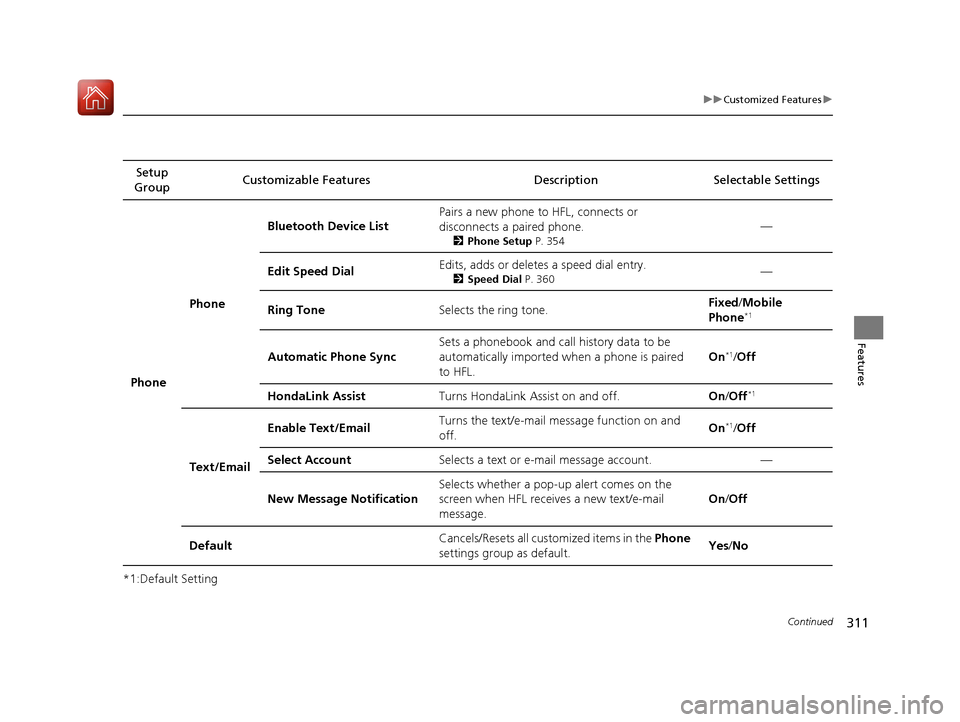
Phone Phone
Bluetooth Device List
Pairs a new phone to HFL, connects or
disconnects a paired phone.
2Phone Setup P. 354 —
Edit Speed Dial Edits, adds or deletes a speed dial entry.
2Speed Dial P. 360 —
Ring Tone Selects the ring tone. Fixed
/Mobile
Phone *1
Automatic Phone Sync Sets a phonebook and call history data to be
automatically imported when a phone is paired to HFL. On
*1
/Off
HondaLink Assist Turns HondaLink Assist on and off. On/Off *1
Text/Email Enable Text/Email
Turns the text/e-mail
message function on and
off. On
*1
/Off
Select Account Selects a text or e-mail message account. —
New Message Notification Selects whether a pop-up
alert comes on the
screen when HFL receives a new text/e-mail
message. On
/Off
Default Cancels/Resets all customized items in the
Phone
settings group as default. Yes
/No
16 CIVIC 2D HC2 (0A 01 0C)-31TBG6000.book 311 ページ >0>.>/6年>0月>/>0日 金曜日 午後4時>/6分
Page 314 of 585
313
uuCustomized Featuresu
Continued
Features
*1:Default Setting
*2:Appears only when you change the screen interface design.Setup
Group Customizable Features Descri
ption Selectable Settings
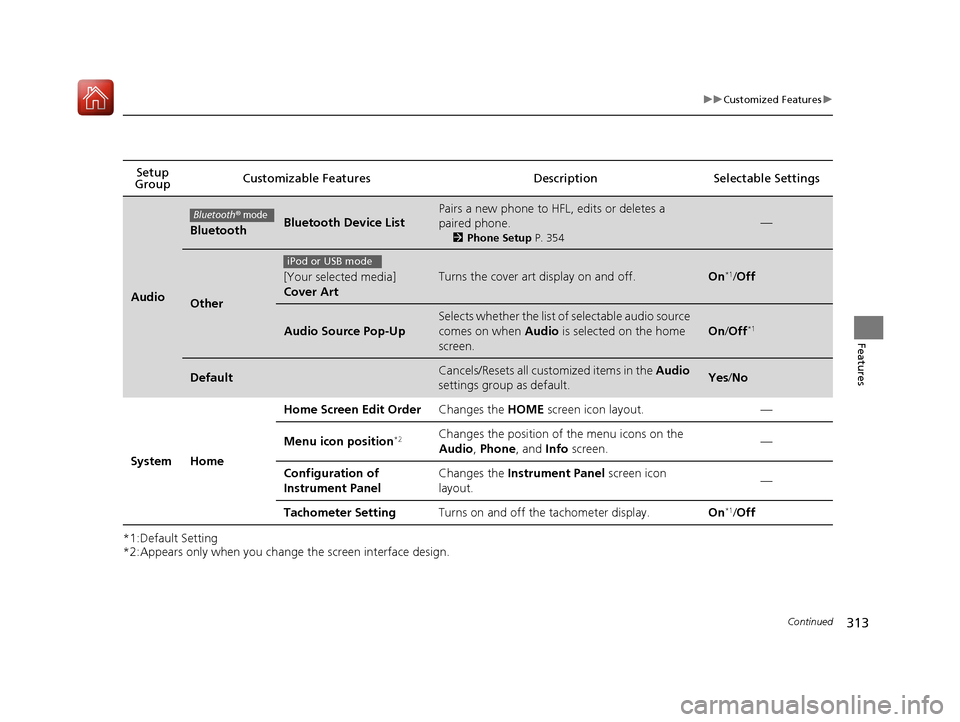
Audio
BluetoothBluetooth Device List
Pairs a new phone to HFL, edits or deletes a paired phone.
2Phone Setup P. 354
—
Other
[Your selected media] Cover ArtTurns the cover art display on and off.On*1
/Off
Audio Source Pop-Up
Selects whether the list of selectable audio source
comes on when Audio is selected on the home
screen.
On /Off *1
DefaultCancels/Resets all customized items in the
Audio
settings group as default.Yes /No
System Home Home Screen Edit Order
Changes the HOME screen icon layout. —
Menu icon position *2Changes the position of the menu icons on the
Audio
, Phone , and Info screen. —
Configuration of
Instrument Panel Changes the
Instrument Panel screen icon
layout. —
Tachometer Setting Turns on and off the tachometer display. On*1
/Off
Bluetooth® mode
iPod or USB mode
16 CIVIC 2D HC2 (0A 01 0C)-31TBG6000.book 313 ページ >0>.>/6年>0月>/>0日 金曜日 午後4時>/6分